
Your highest-traffic blog post is doing one job on one channel. The same argument, cut into a 90-second video, can run on LinkedIn, YouTube, and your newsletter without a writer touching the source again. That is the entire pitch for a blog to video converter, and in 2026 the category is crowded enough that picking one means understanding how differently these tools work under the hood.
The demand side is not subtle. 91% of businesses use video as a marketing tool in 2026, according to Wyzowl's annual video marketing survey, and 84% of consumers say they want more video from brands. The post you already published carries the research, the structure, and the argument. Converting it is cheaper than creating from zero.
We compared six tools that take a blog post in and hand a finished video back: ngram, Lumen5, Pictory, Fliki, InVideo AI, and Kapwing. One disclosure up front: we build ngram, so read that entry as a maker's case for our approach rather than a neutral review. Every capability and price in this post comes from public pages, current as of June 2026.
Two kinds of blog to video converter
Almost every tool in this category does the same first step: fetch the post, strip the navigation and ads, and split the editorial text into segments. What happens next splits the market into two camps.
The first camp matches each segment to stock footage or images by keyword, lays the text on top, and adds a voiceover. Lumen5 and Pictory built the category this way, and it is still the fastest path to something watchable. The cost is sameness: your post about pricing strategy gets the same handshake b-roll as everyone else's post about pricing strategy.
The second camp treats the post as source material for a script. The tool rewrites paragraphs into hook, body, and CTA pacing, plans scenes, and generates visuals matched to what each scene says. ngram works this way, and InVideo's generative agent sits partway between the camps. The output is closer to something a person storyboarded, and you trade a few minutes of review for it.
How we compared them
Seven things matter once you run more than one post through these tools:
- Input formats: URL, pasted text, or file upload, and how well each tool strips page chrome.
- What happens to your phrasing: kept, summarized, or rewritten, and whether you can see the script before render.
- Brand control: logo, fonts, and colors applied to every scene, or a template theme applied once.
- Editing model: script-level edits in plain language versus dragging clips on a timeline.
- Aspect ratios: one render per ratio, or one render that exports 16:9, 1:1, and 9:16 together.
- Free tier reality: watermarks, resolution caps, and per-month limits.
- Starter pricing: what the first paid tier costs and what it unlocks.
Quick comparison
| Tool | How it reads the post | Brand control | Free tier | Starter paid plan |
|---|---|---|---|---|
| ngram | Rewrites the post into a script, with a storyboard you review before render | Select a Brand Kit for logos, fonts and colors; choose an outro when needed | Free plan, 1,000 credits per month, public sharing | $29/mo (Basic) |
| Lumen5 | Matches each text segment to stock media by keyword | Templates; brand kit from the Starter tier up | 5 videos/mo, 480p, watermark | $19/mo (Basic) |
| Pictory | Sentence-by-sentence over stock footage | Brand presets, limited per-scene control | 14-day trial, no permanent free plan | $29/mo, $25/mo billed annually (Starter) |
| Fliki | Paragraph-by-paragraph, voice-first, over AI b-roll | Theme presets | ~5 min/mo, 720p, watermark | Credit-based; check the live page |
| InVideo AI | Generative agent builds the video from a URL or prompt | Prompt-level direction, per-video | ~10 AI videos/mo, watermark | $28/mo (Plus) |
| Kapwing | Document-to-video draft that opens in a full editor | Brand kit inside the editor | 1-minute exports, 720p, watermark | $24/mo, $16/mo billed annually (Pro) |
Pricing and limits from official pricing pages, June 2026. Plans change often; treat the live pages as the source of truth.
1. ngram
Watch how ngram turns a finished post into a finished video:
ngram's blog to video converter is the script-first approach taken to its logical end. Paste a post URL and an agent fetches the page, reads the heading structure, and rewrites the content as a video script: headings become scene breaks, paragraphs compress into hook, body, and CTA pacing, and bulleted lists become callouts. Your phrasing survives where it earns the cut.
The step that separates it from one-shot generators is the storyboard review. Every scene shows its script line, visual direction, and duration before anything renders, and you edit in plain language rather than on a timeline. Your saved brand kit (logo, fonts, colors, motion style, outro) applies to every scene, captions burn in styled to your preset, and one render exports 16:9, 1:1, and 9:16 together.
Where it is not the right pick: ngram is built for teams shipping branded business video, not for faceless-channel volume or frame-level manual editing. If you want to drag clips around a timeline, Kapwing will feel more natural.
The free plan includes 1,000 credits per month, enough to convert your first posts and judge the output on your own material. Paid plans start at $29/mo; see ngram pricing for current terms.
Best for: Marketing, product, and content teams that want the post converted into a branded video with a reviewable script, not a slideshow over stock.
Ready to try it? Paste a post URL and review the plan containing the script ngram builds from it. Start free
2. Lumen5
Lumen5 effectively invented the category and remains the name most marketers reach for first. Paste a URL and it segments the text, keyword-matches each segment to its stock library, and produces a text-overlay video in minutes. For teams that want volume over distinctiveness, that trade still works.
The watch-outs are the free tier and the ceiling. The free plan caps you at 5 videos per month at 480p with a watermark, which is below what most brands will publish. And because visuals come from keyword matching, output across different companies converges on the same stock clips.
Best for: Social teams that need many simple text-over-footage videos fast and are comfortable with a stock look. Paid plans start at $19/mo.
3. Pictory
Pictory is the strongest pure repurposing engine of the stock-matching camp. It handles long articles and webinar transcripts well, picks scenes sentence by sentence, and gives you per-minute capacity (200 video minutes per month on Starter) rather than a per-video cap.
There is no permanent free plan, only a 14-day trial, and the visual output needs human cleanup for high-stakes brand work. Reviews consistently praise the speed and flag the polish.
Best for: Repurposing-heavy teams converting articles and webinars in bulk. Starter is $29/mo, or $25/mo billed annually.
4. Fliki
Fliki is voice-first: its text-to-speech library is the headline feature, and blog-to-video is one of several workflows built around it. Give it a post URL and it summarizes the content into a narrated video with AI b-roll and music.
The free tier is tight: roughly five minutes of content per month at 720p with a watermark, and one-minute export caps. Brand control runs on theme presets rather than a per-scene brand kit, and pricing is credit-based, so check the live page against your expected volume.
Best for: Creators who care most about narration quality across many languages and want a quick narrated summary of each post.
5. InVideo AI
InVideo's generative agent takes a URL or a prompt and builds the whole video, script included, in one shot. It is the closest of the big platforms to the script-first camp, and the v4 agent can generate long-form output from a single instruction.
The trade is control: direction happens through prompts per video rather than a persistent reviewable storyboard, and the free plan watermarks roughly 10 AI videos per month. Paid plans start at $28/mo for Plus, with the Max tier around $48 to $60/mo depending on billing.
Best for: Solo marketers and channel operators who want one-shot generation from a URL and will regenerate rather than edit.
6. Kapwing
Kapwing comes at the job from the opposite direction: it is a browser video editor with an AI document-to-video feature in front of it. The AI reads your post, drafts scenes with voiceover and subtitles, and then drops you into a full timeline editor to finish.
That makes it the strongest option on this list for hands-on editing after conversion, and the weakest for hands-off speed. The free tier caps exports at one minute and 720p with a watermark. Pro is $24/mo, or $16/mo billed annually.
Best for: Teams that want an AI first draft but expect to edit every video by hand before publishing.
What starter pricing actually looks like
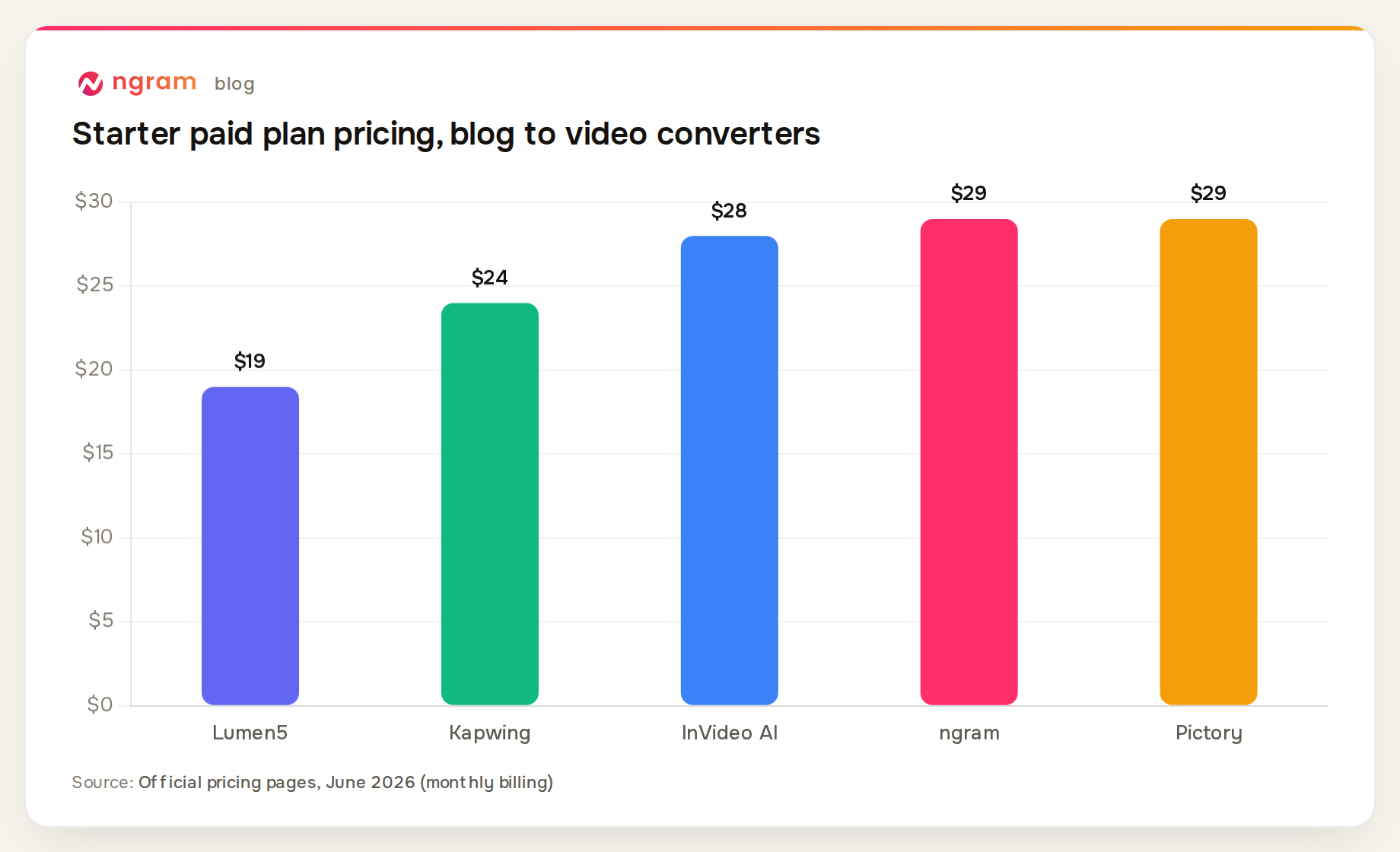
The sticker prices sit within $10 of each other, so the real comparison is what a dollar buys. Lumen5's $19 Basic keeps the 5-video monthly cap of its free tier. Pictory's $29 buys 200 video minutes. ngram's $29 buys 3,000 monthly credits that also cover AI editing, with annual billing dropping it to $23.20. Fliki is omitted from the chart because its public pricing is credit-based and varies; check the live page.
Why convert posts at all
The distribution math is the reason this category exists. LinkedIn's own data shows video uploads growing 34% year over year, and video remains the format the platform pushes hardest into feeds.
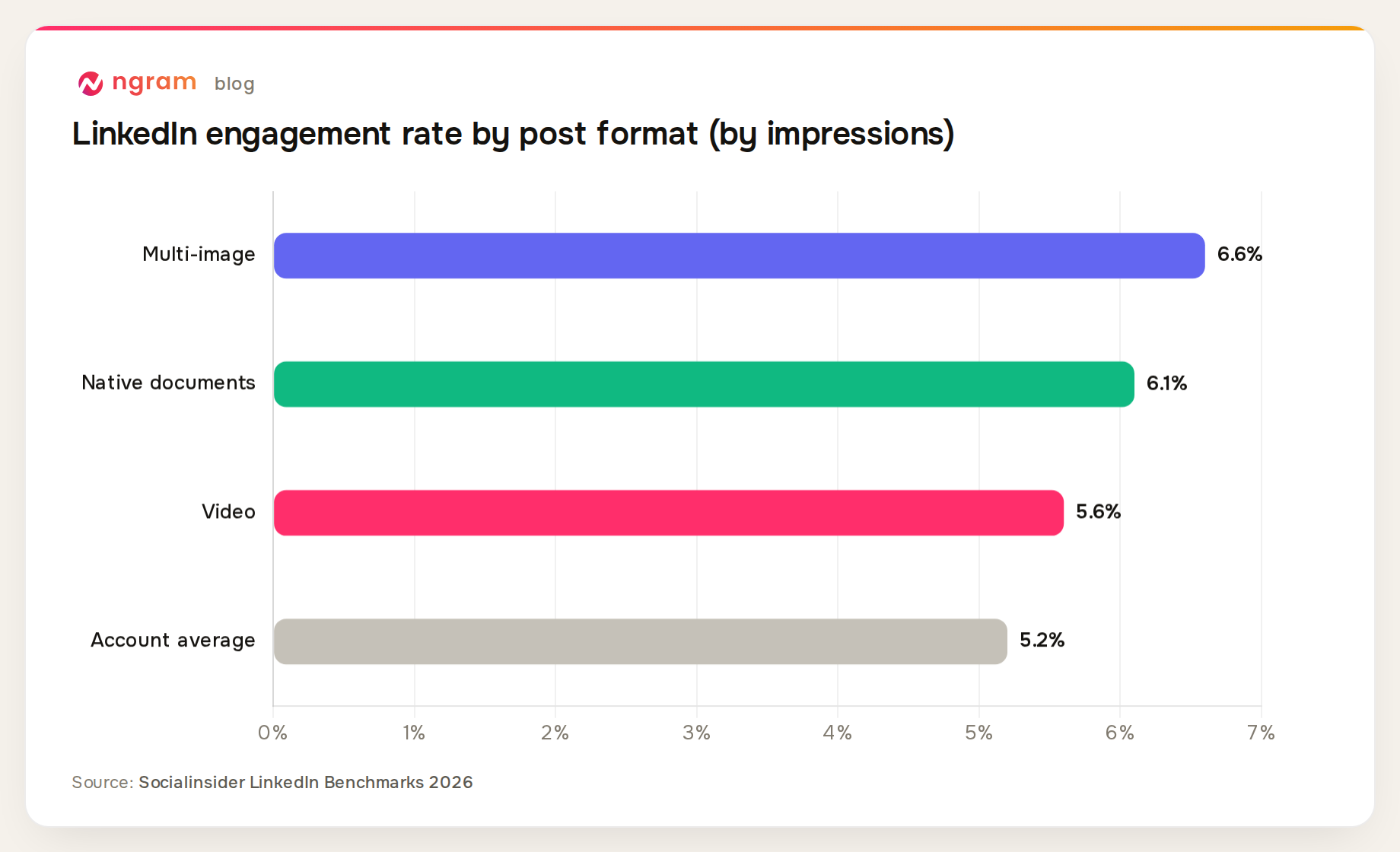
Worth being honest about the nuance: video is not even the single highest-engagement format on LinkedIn. Socialinsider's 2026 benchmarks put multi-image posts and native documents slightly ahead on engagement rate by impressions. The case for video is reach across channels: the same 90-second cut works as a LinkedIn video post, a YouTube short, and a newsletter embed, which no carousel can do.
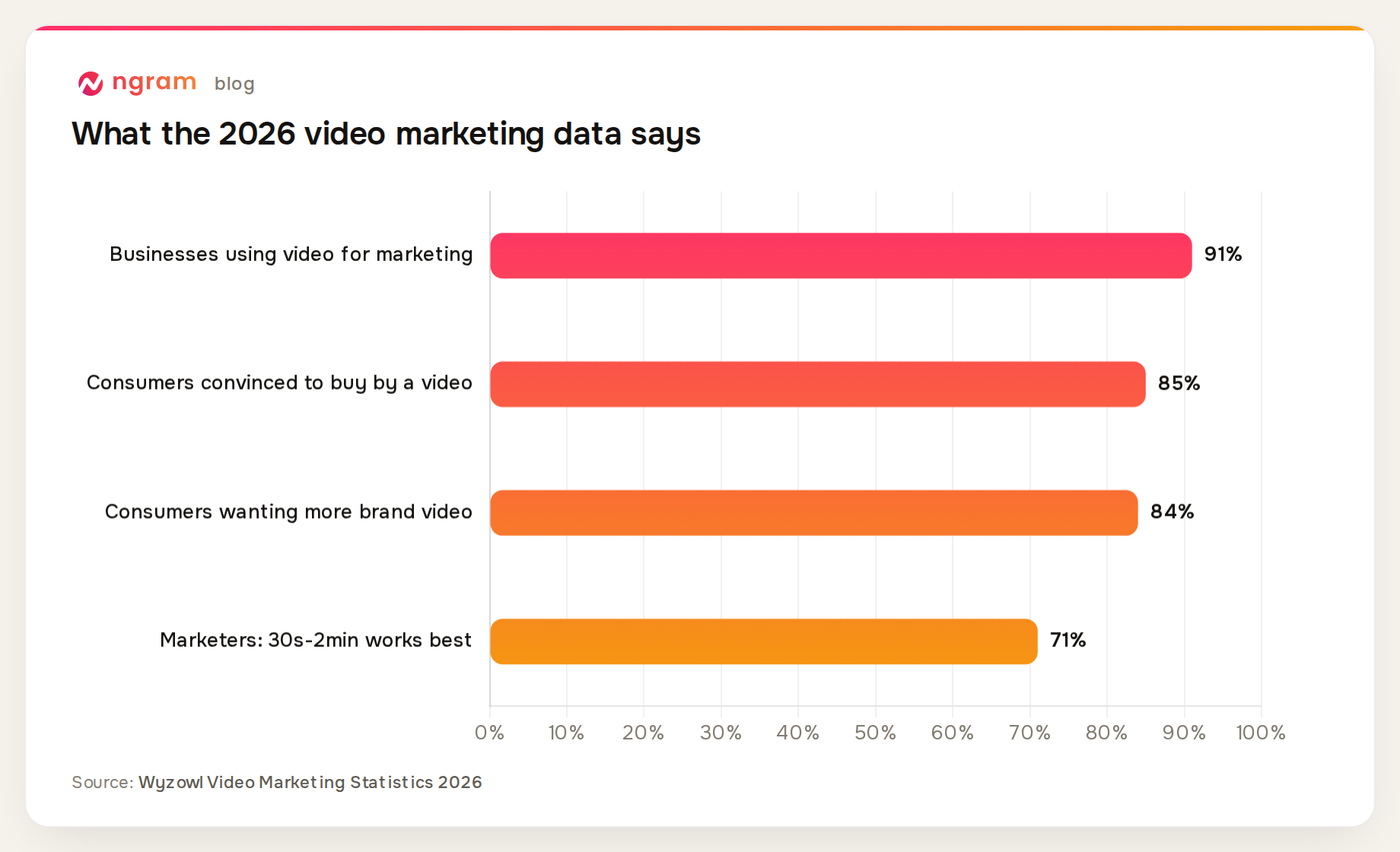
Pair those numbers with the inventory you already have. A blog archive of 50 posts is 50 scripted, researched, structured video sources sitting idle.
How to choose
If your source is always a published post, pick a dedicated converter and judge it on one thing: does the output sound like your post or like a summary of it? Run the same post through two tools and the difference is obvious within ten minutes.
If your sources are mixed (product pages, case studies, docs, landing pages), a broader URL to video converter handles page types that a blog-tuned tool will mangle. And if your bottleneck is editing rather than generation, start from Kapwing's editor-first model instead.
Whatever you pick, test on your own worst-case post: the 3,000-word one with code blocks or tables. Every tool demos well on a clean 800-word listicle.
Frequently asked questions
Do blog to video converters keep my wording?
Depends on the camp. Stock-matching tools (Lumen5, Pictory) mostly keep your sentences and display them as on-screen text. Script-first tools (ngram, InVideo AI) rewrite for pacing; ngram shows you the full script in a storyboard before render so you can restore any line it compressed.
Can I convert every new post automatically?
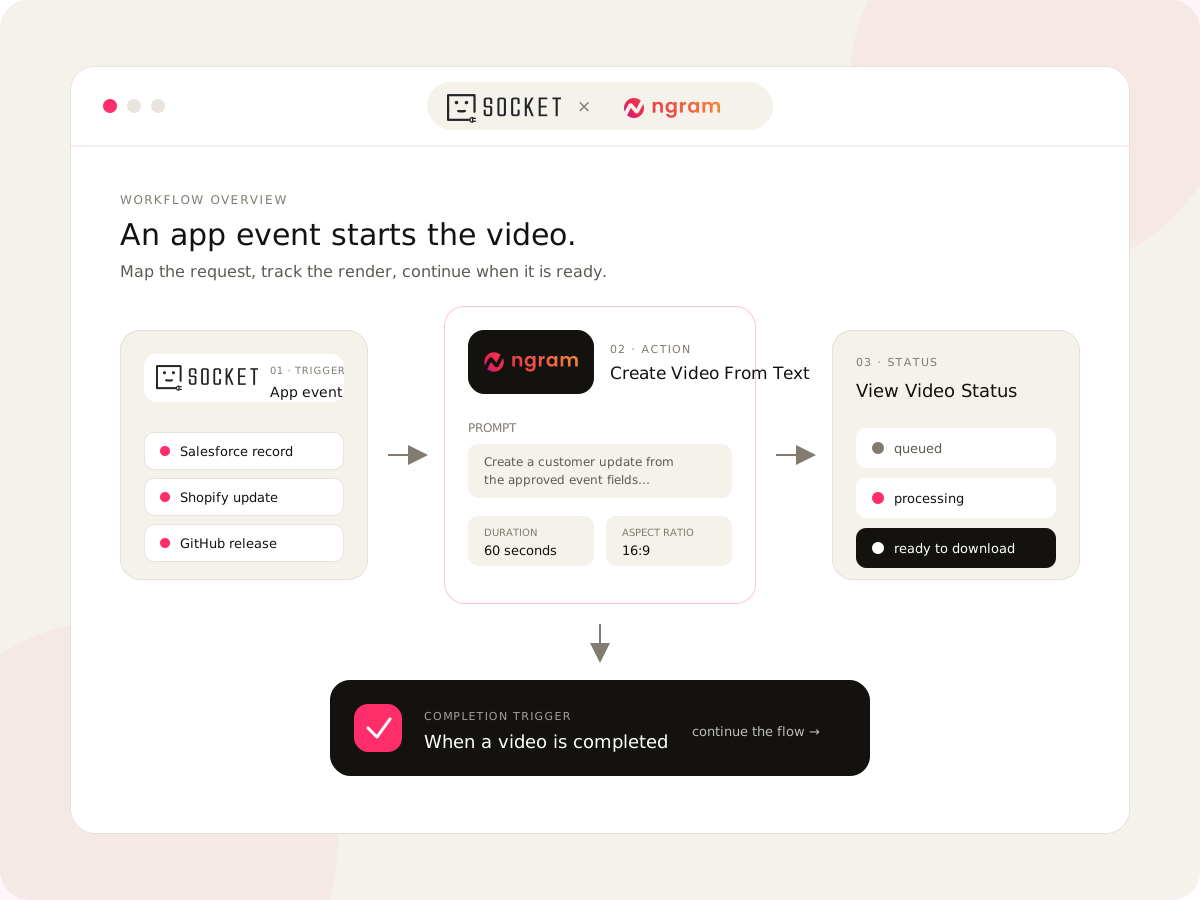
Yes, on most of these. ngram connects to a CMS through Zapier, n8n, or Make, so a publish event can trigger a conversion and drop the rendered file into Drive or your CRM. Pictory, Fliki, and InVideo expose APIs at higher tiers. Check which plan gates the API before committing.
What blog length converts best?
Posts between 500 and 3,000 words convert cleanest into 60 to 180 second videos. Shorter posts make 30 to 60 second social clips. Longer posts work, but every tool will compress aggressively, so a review step matters more as word count grows.
Will the video look unique or like stock?
Keyword-matched stock is recognizable instantly, and two competitors converting similar posts can land on identical clips. Generative visuals (ngram, Fliki's AI b-roll, InVideo's generated scenes) avoid the collision, with quality that varies by tool. If the video carries your brand, per-scene brand control matters more than the visual source.