
n8n video generation is most useful when the source record is repeatable but the creative still needs judgment. A product marketer or automation owner can turn the same reviewed fields into a fresh teaser for each release without rebuilding the workflow or pasting a new brief by hand.
The hard part is not connecting two nodes. It is deciding which release state may trigger a draft, which fields are allowed to shape the story, how much the teaser should reveal, and what a reviewer checks before accepting the cut.
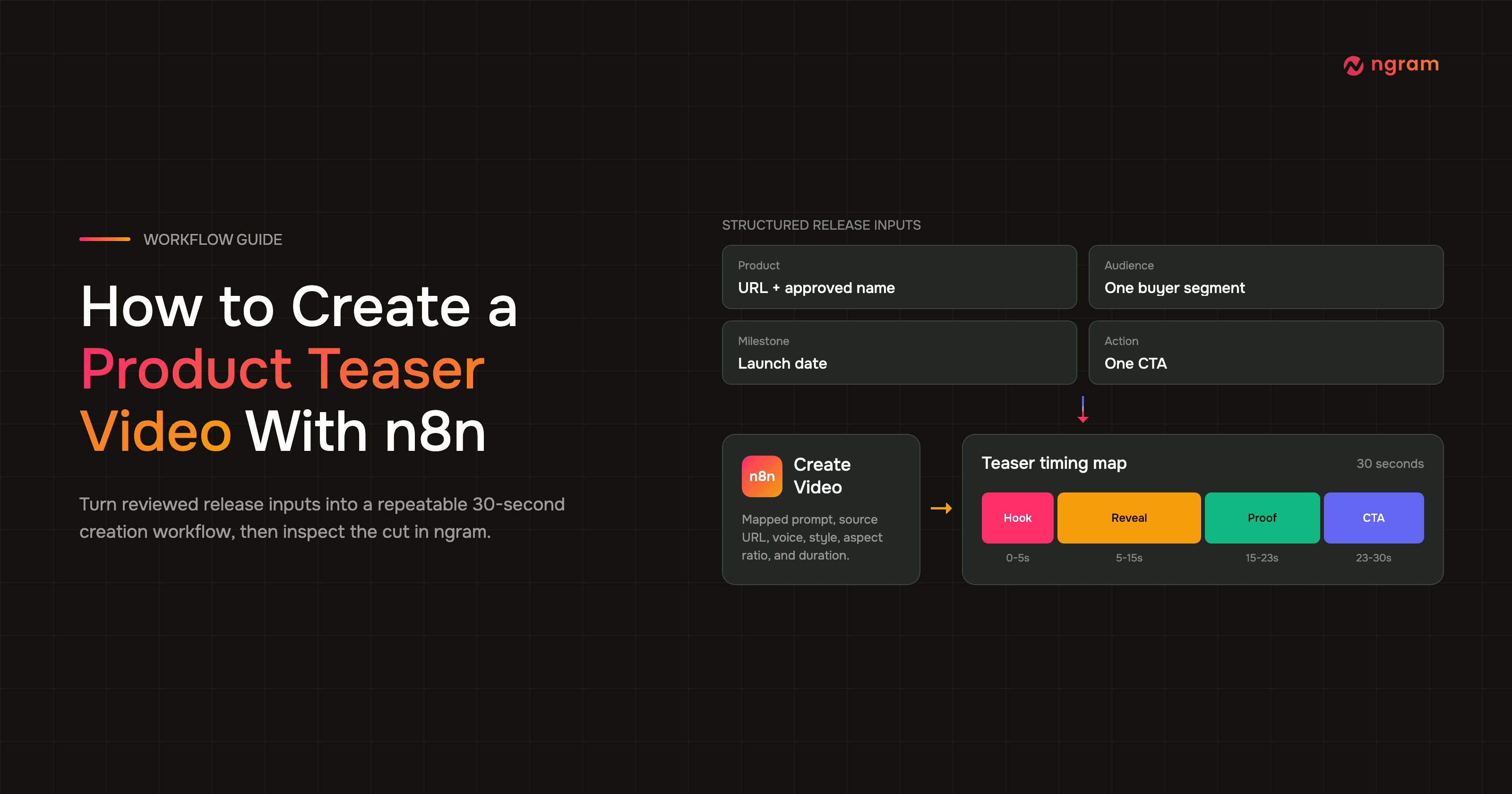
This guide builds that creation path from end to end: choose the trigger, normalize the product URL, name, audience, launch date, and CTA, connect a self-service bearer API key created in Account & Settings → API Keys, map the Create Video node, add teaser constraints, execute one known record, and review the result in ngram.
What n8n video generation changes for teaser production
An n8n video generation workflow turns a reviewed release record into a consistent creation request. n8n controls when the request starts and which fields it carries; ngram is the AI video generator that plans and renders the video. The result is a first cut that a reviewer checks against the approved release record and teaser timing.
The demand is real, but so is the quality bar. Wyzowl's 2026 Video Marketing Statistics surveyed 266 marketing professionals and consumers. It found that 91% of businesses use video, 93% of video marketers consider it important to strategy, and 63% have used AI tools to create or edit marketing video.
The same survey reports that 45% of video marketers created teaser videos, compared with 39% who created product demos. It also found that 89% of consumers say video quality affects trust in a brand and 63% would most like to learn about a product or service through a short video. A teaser is common enough to deserve a repeatable workflow, but visible quality and factual restraint still matter.
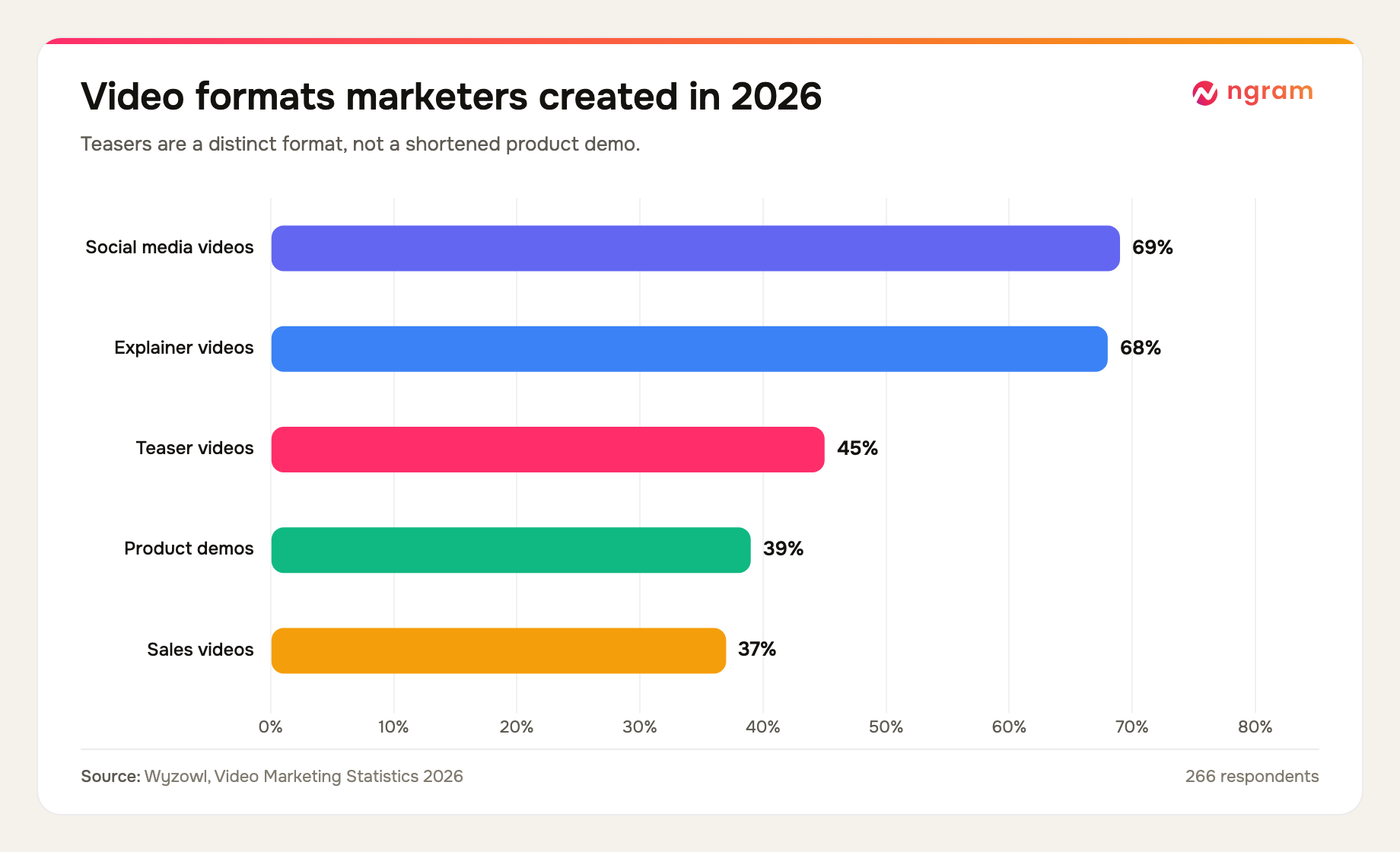
That 45% figure does not tell you whether a teaser works. It tells you the format belongs in the production mix. For teams creating AI videos, the workflow below focuses on a stable input contract that produces a narrow first cut a reviewer can inspect.
Resource pressure makes that discipline useful. Content Marketing Institute's 2025 B2B research surveyed 980 marketers. It found that 76% used video, 58% rated video the most effective content type, 54% cited a lack of resources as a challenge, and 33% cited workflow or approval issues. A reusable trigger and field map address production repetition; the review gate addresses the approval problem.
If you need a teaser-specific starting point before wiring the automation, the AI product video maker shows the creative shape this workflow is trying to produce: one hook, one controlled reveal, one proof beat, and one CTA.
What three verified n8n screenshots prove
We audited the three existing n8n product-launch screenshots assigned to this guide. They prove the shared mechanics needed for an n8n video generation workflow: a trigger connected to Create Video, a masked ngram credential, and a configuration panel with prompt and render settings. They do not show a completed n8n result or a teaser output.
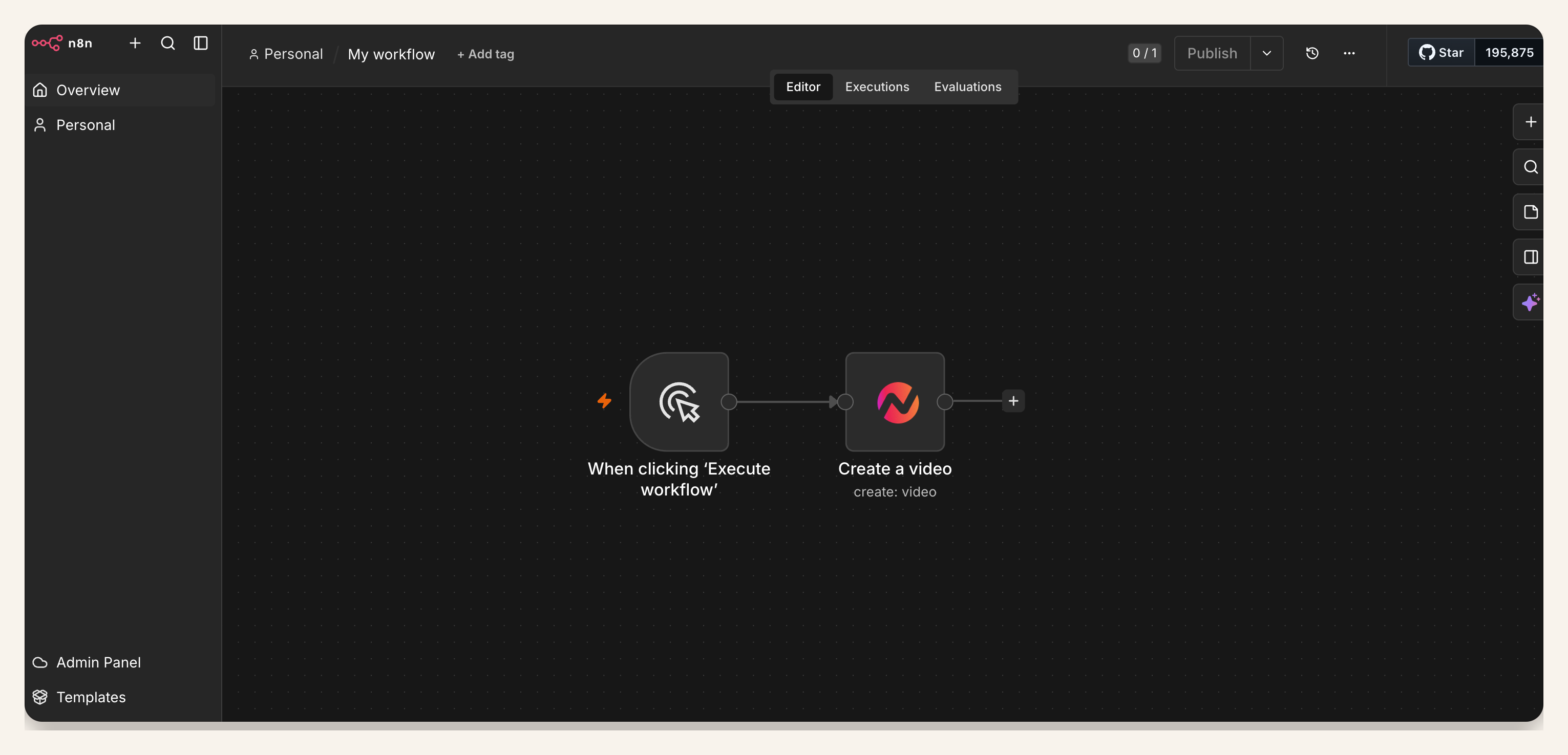
| Proof asset | Visible evidence | What it supports |
|---|---|---|
| Workflow canvas | 1 manual trigger connected to 1 Create Video node | A release record can start one video-creation step |
| Credential dialog | 1 masked credential field plus the ngram base URL | The node uses a self-service bearer API key without exposing its value |
| Create Video panel | At least 9 visible fields, including prompt, source URL, voice, style, aspect ratio, and duration | The teaser request can be controlled through mapped fields and fixed defaults |
Methodology: we visually audited three verified screenshots on July 17, 2026. Counts refer only to visible nodes and fields. They are not product telemetry, render results, or evidence of a finished teaser.
Prerequisites for the n8n product teaser workflow
Start an n8n video generation workflow with the ngram n8n integration and an n8n instance where the verified ngram community node is available. Use a self-service bearer API key created in Account & Settings → API Keys, then store it in n8n Credentials. Do not expose the key in workflow data.
n8n's verified community-node documentation explains that instance owners and admins install and manage verified nodes, while members can use nodes already installed on the instance. Confirm the ngram node appears in your Nodes panel before making the workflow part of a release process.
- An n8n instance with the verified ngram community node installed and available to the workflow owner.
- A self-service bearer API key created in Account & Settings → API Keys and stored in n8n Credentials, never pasted into a prompt or source record.
- One approved source record containing the product URL, public product name, audience, launch date, and CTA.
- A proof source such as an approved screenshot, product claim, release note, or product-page detail.
- A named reviewer who can check product accuracy, brand treatment, timing, captions, and the final CTA.
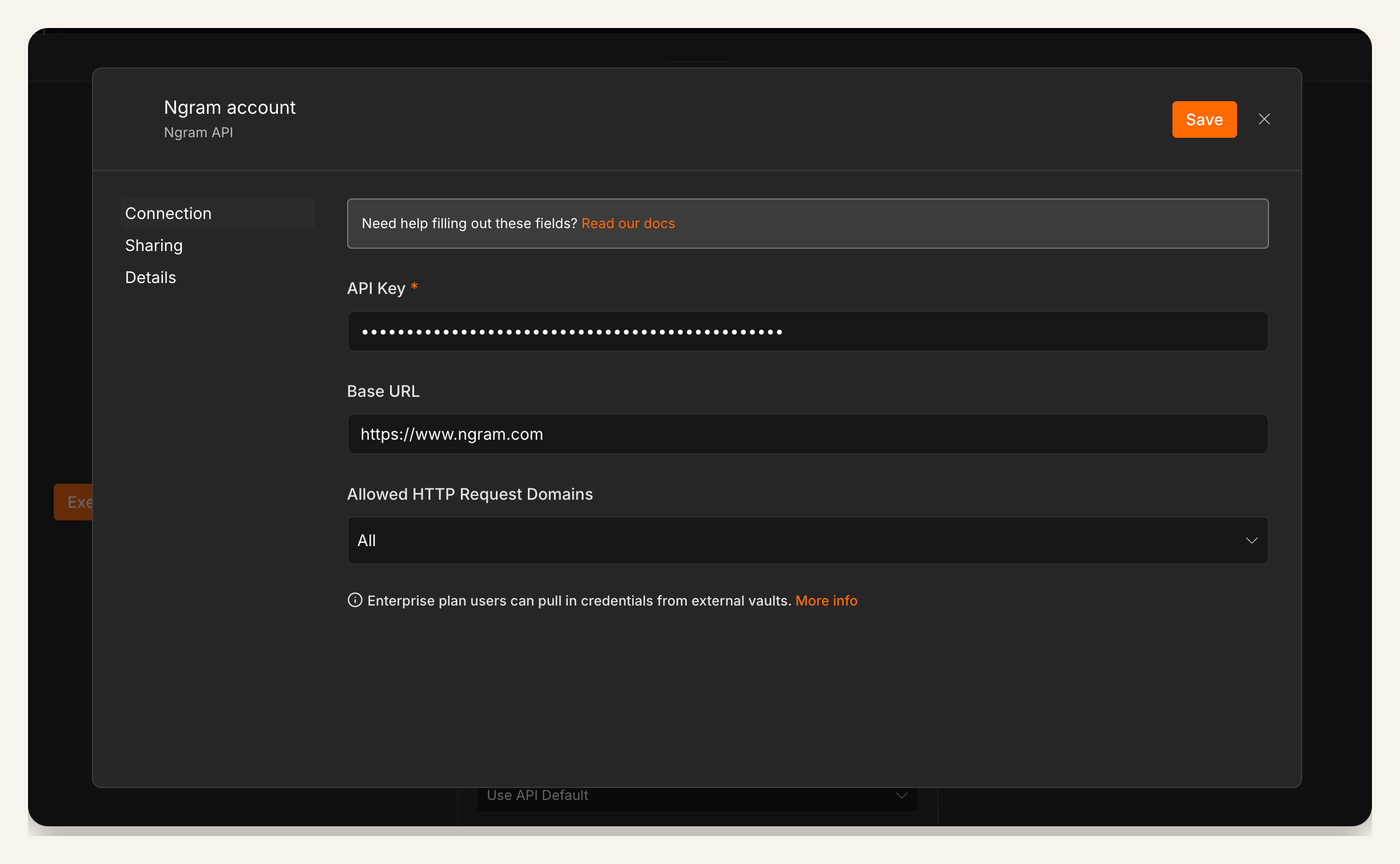
The masked field shows where the self-service API key is stored; it should not be exposed in prompts or workflow data.
How to build an n8n video generation workflow for a teaser
Build the first version with one known release record. The diagram shows the stable path; the steps below define what done means at each point.
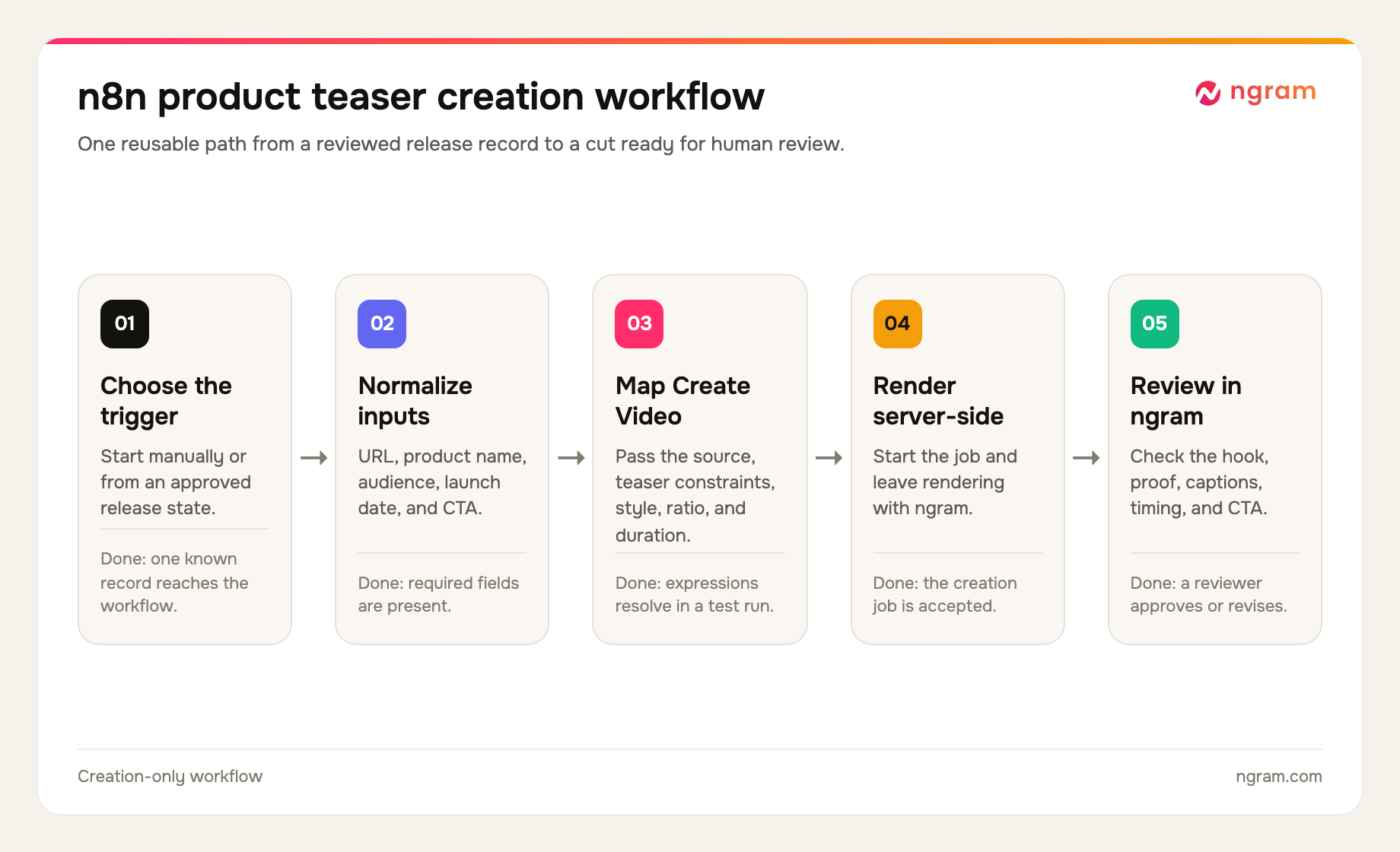
Step 1: choose a trigger that means the teaser is ready
For the first n8n video generation test, use Manual Trigger. Once the mapping is stable, replace it with the event your team already treats as approval, such as a release record moving to Ready for creative or a reviewed form submission arriving with all required fields.
Avoid broad triggers such as any edited row or any changed task. A half-written product name or temporary date can create a confident-looking draft from unapproved material. This step is done when one known-good record starts exactly one execution.
Step 2: normalize the release fields
For stable n8n video generation, normalize upstream names before they reach Create Video. n8n's data-mapping documentation defines mapping as referencing data from previous nodes and supports either the expressions editor or dragging values from the input pane into a parameter. Stable field names make those expressions easier to inspect and reuse.
| Normalized field | Example value | Validation rule |
|---|---|---|
| product_url | https://product.example/release | Required, current, and approved |
| product_name | Atlas Search | Required, public spelling only |
| audience | Product operations leads | One specific viewer group |
| launch_date | 2026-08-04 | ISO date upstream, approved display wording in the prompt |
| cta | Join the early-access list | One action, no competing request |
| approved_proof | Search results update as filters change | Must be supported by the source record |
| must_avoid | Do not mention unreleased pricing | Required when the source contains internal details |
Keep duration, aspect ratio, voice, and visual style as reviewed defaults unless the release record has a real reason to vary them. This step is done when every required field is present and the output pane shows the expected normalized values before any render starts.
Step 3: connect the ngram API key
Create or select the ngram credential entry supplied for this integration. Give it a name that identifies the owning team or service account, then select that credential in the Create Video node. Keep the secret in n8n Credentials and out of expressions, prompts, pinned test data, and screenshots.
This step is done when n8n can select the stored API key without exposing its value and the base URL points to ngram. Confirm the key belongs to an account that still has access.
Step 4: map the Create Video node
Add Create Video after the normalization step. Set Resource to Video and Operation to Create. Map the source URL into Website URL, place the structured teaser brief in Prompt, and choose the reviewed voice, style, aspect ratio, and duration defaults.
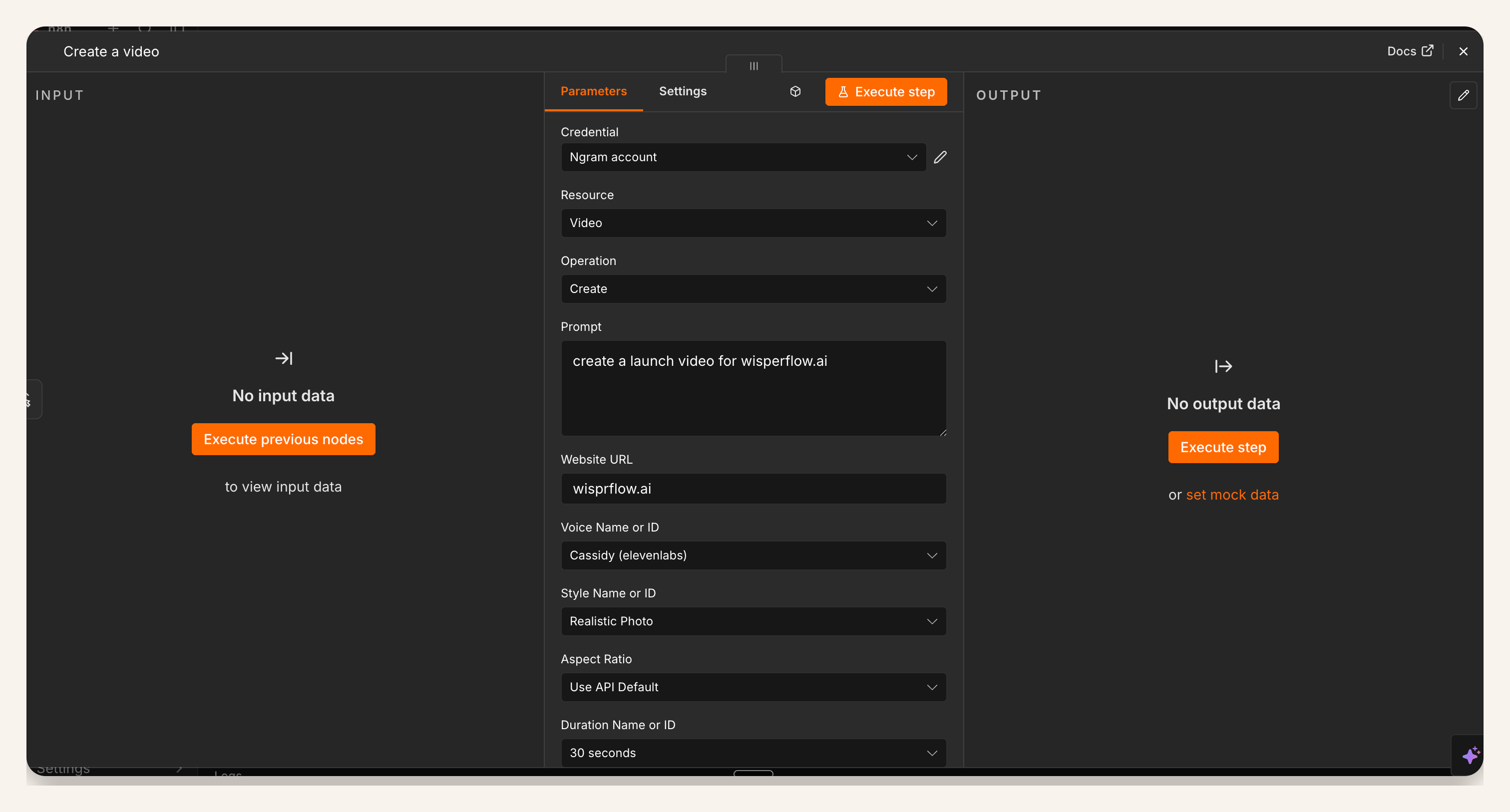
This verified screenshot is a product-launch example. It demonstrates the same prompt field and render settings used here, but the article's mapped prompt is teaser-specific. The screenshot contains no output data, so we use it only as configuration evidence.
In n8n video generation, the prompt turns normalized facts into a narrow story. ngram's script generation can plan the script and storyboard from that context, but the source record still owns product names, dates, proof, and claims.
Step 5: paste a teaser-specific prompt
Use one copyable prompt as the stable contract between the workflow and the creative system. The expressions below assume the normalized field names from Step 2.
Create a 30-second product teaser video from this approved release record.

Source URL: {{ $json.product_url }}
Product name: {{ $json.product_name }}
Audience: {{ $json.audience }}
Launch date: {{ $json.launch_date }}
Approved proof: {{ $json.approved_proof }}
CTA: {{ $json.cta }}
Must avoid: {{ $json.must_avoid }}

Teaser structure:
- 0-5 seconds: open on one audience problem or tension. Do not begin with a logo or feature list.
- 5-15 seconds: reveal the product name and one useful outcome.
- 15-23 seconds: support the promise with the approved proof. Do not add claims that are absent from the source.
- 23-30 seconds: close on the exact launch date and one CTA.

Creative constraints:
- Keep one audience, one promise, one proof beat, and one CTA.
- Use concise on-screen text and readable captions.
- Treat the source URL and mapped fields as the factual boundary.
- Do not invent customer names, metrics, pricing, dates, or product behavior.
- Build a teaser, not a product demo or full explainer.
Preview the resolved expression values before execution. If the prompt still contains a blank field, a placeholder, or an internal-only phrase, stop and fix the upstream record. This step is done when a reviewer can read the resolved brief and understand the planned 30 seconds without opening another document.
Step 6: execute one known release record
For the first n8n video generation run, use a release whose product name, date, proof, and CTA you already know. Inspect the input passed to Create Video and confirm that each expression resolved to the expected value. A green node alone does not prove the creative brief is correct.
Once ngram accepts the job, let rendering continue server-side. A render can take around 15 to 20 minutes depending on scene complexity. Do not fire another execution because the first cut is not immediate; duplicate runs create duplicate drafts and make review harder.
Step 7: review the rendered cut in ngram
Open ngram to monitor the server-side render and inspect the result. Review the hook before judging polish: does the first five seconds name the right problem, does the reveal stay on one benefit, does the proof match the approved source, and does the final frame show the exact date and CTA?
Then check the production details: pronunciation, captions, product spelling, visual accuracy, pacing, aspect ratio, voice, and total duration. If one scene misses, revise that scene or instruction instead of weakening the input contract for every future release.
Using AI for video marketing is useful only when review survives the automation. Content Marketing Institute's 2026 B2B research found that 53% of marketers using or implementing AI use creative asset tools for images, videos, and visual material. Among marketers using AI for content creation, 87% reported better productivity and 80% reported better operational efficiency. Those gains justify a repeatable input contract; they do not remove the need to verify the product story.
For a broader campaign brief around the same product moment, use the growth campaign video workflow as the next planning layer. Keep this automation responsible for one reviewed teaser cut.
QA checklist for a 30-second product teaser video
Use the same acceptance criteria on every run. The timing bands below are editorial recommendations for a 30-second teaser, not performance data.
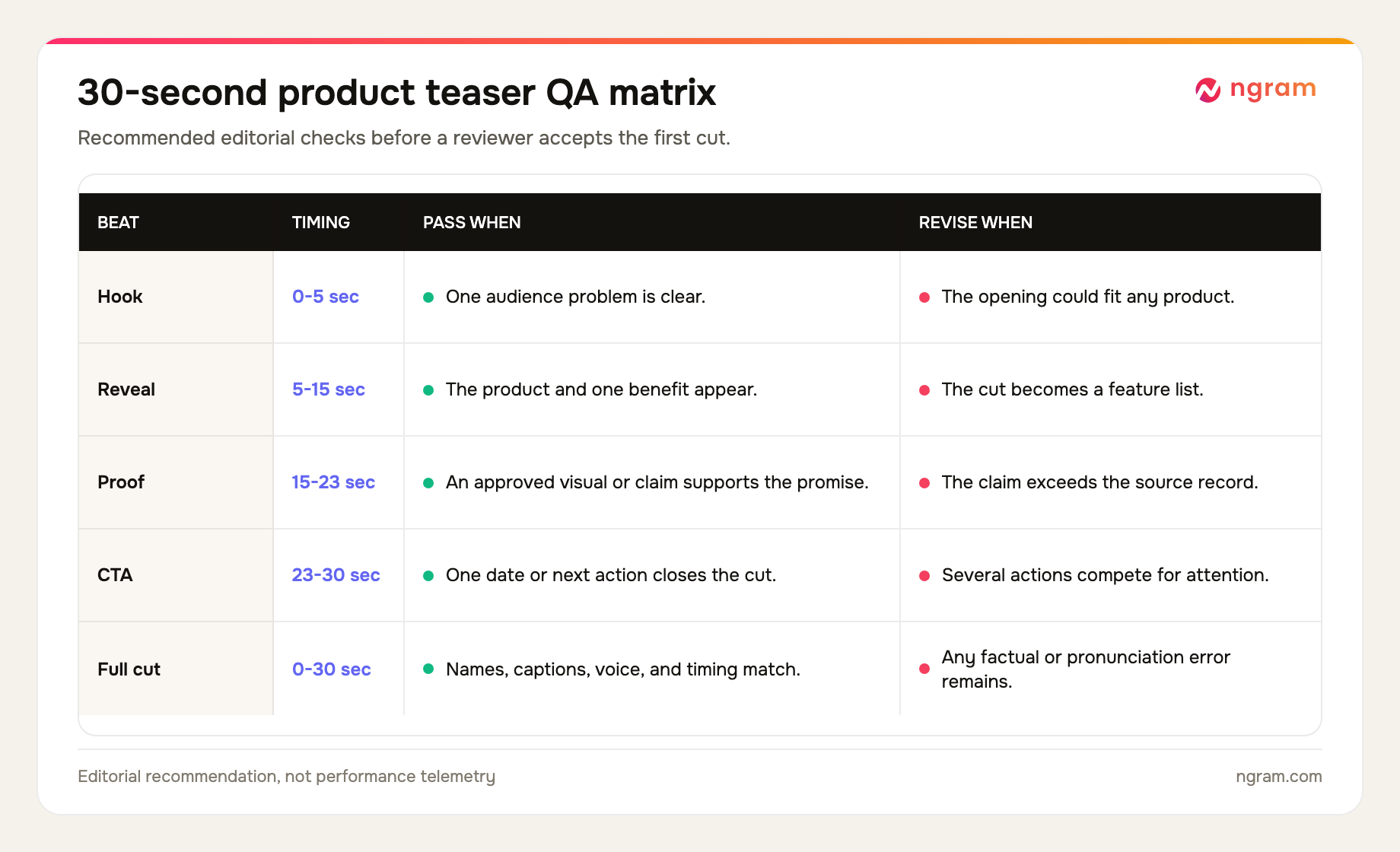
- Trigger: one approved record creates one draft.
- Inputs: product URL, public name, audience, launch date, proof, and CTA are all present.
- Hook: the first five seconds name a concrete audience tension rather than a generic announcement.
- Reveal: the product appears with one benefit, not a compressed feature list.
- Proof: every visible or spoken claim can be traced to the approved source record.
- CTA: one exact date or next action closes the video.
- Production: names, pronunciation, captions, voice, pacing, crop, and duration pass review in ngram.
Common n8n video generation failure modes
The workflow runs before the release record is approved
Tighten the n8n video generation trigger condition and require every normalized field. Test the filter with one incomplete record and one approved record. Only the approved record should reach Create Video.
The ngram credential is missing or rejected
Confirm that the workflow references the self-service API-key credential and that the owning account still has access. Do not paste the secret into the prompt or workflow data.
An n8n expression resolves to an empty value
Inspect the normalization output, then remap the field from the correct previous node. Keep field names stable and preview the resolved prompt before another render.
The teaser turns into a product demo
Remove secondary features and keep one product outcome. A teaser creates curiosity around a controlled reveal; a demo proves how a task works. The prompt should explicitly hold back the full walkthrough.
The video uses an unapproved date or claim
Treat the source record as the factual boundary and remove open-ended instructions such as make it exciting with more proof. Put the exact date and approved proof into dedicated fields, then rerun only after the reviewer confirms them.
A long render leads to duplicate drafts
Rendering can take around 15 to 20 minutes depending on scene complexity. Monitor the active job in ngram instead of starting another execution. If the job fails, diagnose that run before retrying the same record.
Frequently asked questions
Can n8n generate a product teaser video?
Yes. An n8n video generation workflow can trigger the verified ngram Create Video node and map a reviewed release record into the request. n8n controls the workflow and input mapping; ngram handles the video planning and server-side render.
Does the ngram community node work in n8n Cloud?
The ngram community node is verified for use through the n8n Nodes panel, including supported n8n Cloud and self-hosted instances. Confirm the node appears and is enabled on your instance before relying on it for a release workflow.
Do I need a self-serve ngram API key?
Yes. Public API v1 uses self-service bearer API keys. The n8n workflow should store the key in n8n Credentials and keep it out of workflow data.
What fields should I map into Create Video?
Map the product URL, public product name, one audience, exact launch date, one approved proof point, one CTA, and anything the video must avoid. Keep voice, style, aspect ratio, and duration as reviewed defaults unless the release needs a deliberate change.
How long does the ngram render take?
Rendering can take around 15 to 20 minutes depending on scene complexity. The render continues server-side, and you can monitor it in ngram rather than rerunning the n8n video generation workflow.
How is a product teaser different from a product demo?
A teaser creates curiosity around one product promise and reveals only enough proof to feel credible. A product demo shows how a task works in more detail. If the script needs several features or a full workflow, it has moved beyond teaser scope.
Can I reuse the same n8n workflow for every release?
Yes, if the source contract stays stable. Keep the normalized field names, teaser structure, defaults, and QA checks fixed, then change only the reviewed product URL, name, audience, date, proof, CTA, and constraints for each release.
The direct answer
n8n video generation creates a product teaser by triggering from an approved release record, normalizing the product URL, name, audience, launch date, proof, and CTA, then mapping those fields into ngram's Create Video node with a self-service bearer API key created in Account & Settings → API Keys. Keep the prompt to one hook, one reveal, one proof beat, and one CTA. Execute one known record, allow roughly 15 to 20 minutes for server-side rendering, and review the cut in ngram before accepting it.