
The product page is finished, the Product Hunt launch is approaching, and the Product Hunt video is still a blank task. The hard part is rarely finding more copy. It is deciding which one promise deserves the few seconds before a viewer moves on.
A Product Hunt video teaser solves a narrower problem than a full launch video. It creates anticipation, names the intended user, reveals one differentiator, and closes on the current launch timing or CTA. It does not need the origin story, feature catalog, pricing tour, or complete demo.
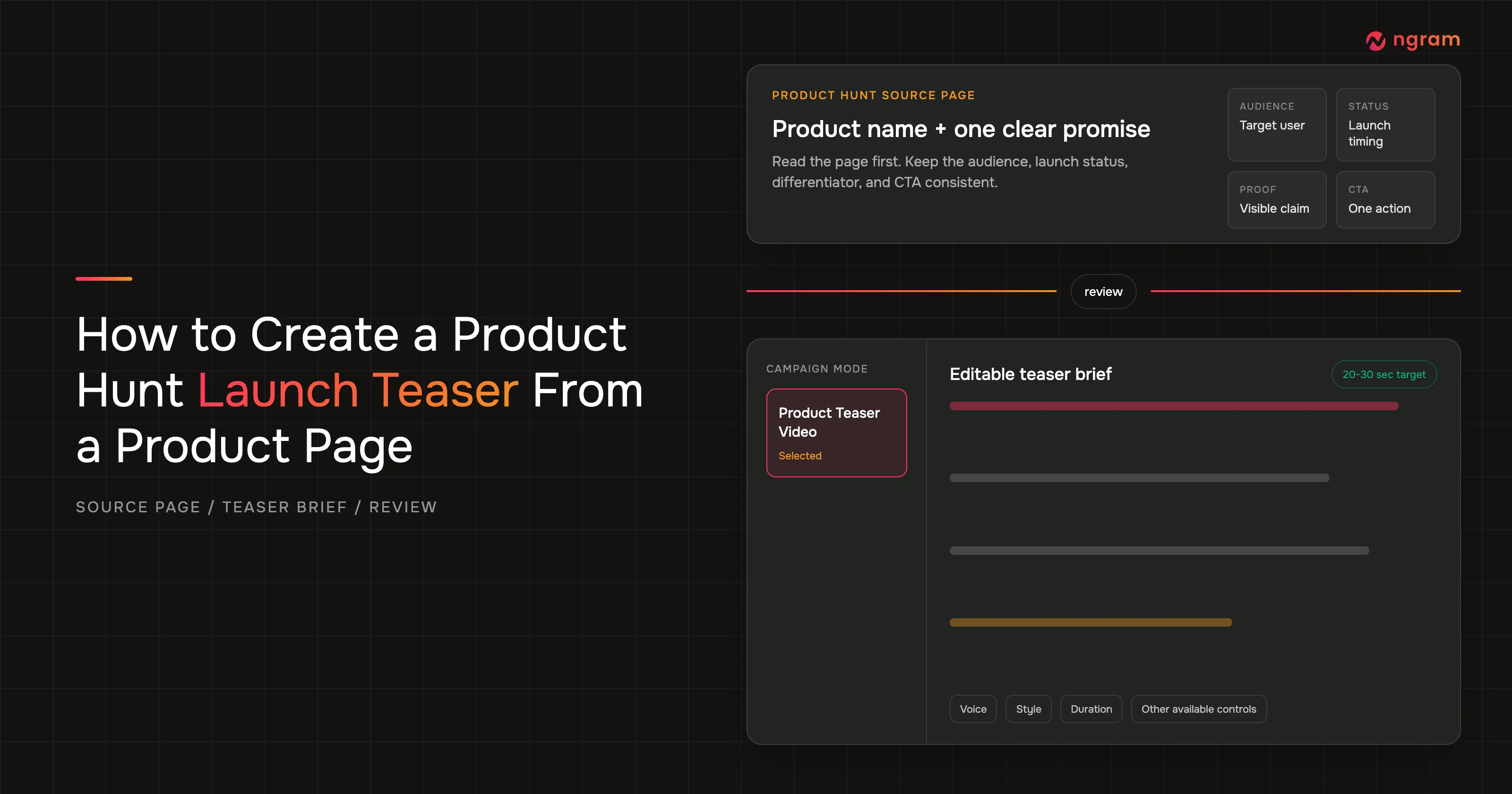
This guide follows the live Product Hunt campaign workflow in the ngram Chrome extension. You will check the source page, choose Product Teaser Video, rewrite the editable brief, review the available controls, start the render, monitor progress in ngram, and hand a reviewed cut to the launch owner.
Why this Product Hunt video needs a tighter teaser brief
A Product Hunt video teaser is a short, anticipation-building cut built around one product promise. It identifies the target user, makes one differentiator credible, gives the launch timing, and ends with one CTA. The teaser stops before it becomes a product walkthrough or a complete launch explanation.
Product Hunt's current submission guidance asks makers for a direct product URL, product name, short tagline, pricing status, launch status, description, and gallery. The gallery guidance recommends 1270x760 images, requires at least 2 images before the gallery is viewable, and accepts a full YouTube URL for video rather than a shortened link. Source: Product Hunt's How to post a product guide. Those same fields are the source of truth for the teaser brief. This article stops at video creation and review; it does not cover gallery submission.
Product Hunt's featuring guidance says its team looks for launches that are useful, novel, high craft, or creative. A launch does not need to peak on every signal. That is a useful restraint for a teaser: choose the strongest signal your product page can support, then build the opening around it. Source: Product Hunt Featuring Guidelines.
The video evidence supports both brevity and review. Wyzowl's 2026 Video Marketing Statistics surveyed 266 marketing professionals and online consumers in late 2025. It found that 45% of video marketers had created teaser videos, 63% of consumers preferred a short video for learning about a product or service, 89% said video quality affected trust in a brand, and 93% of video marketers said video increased product or service understanding.
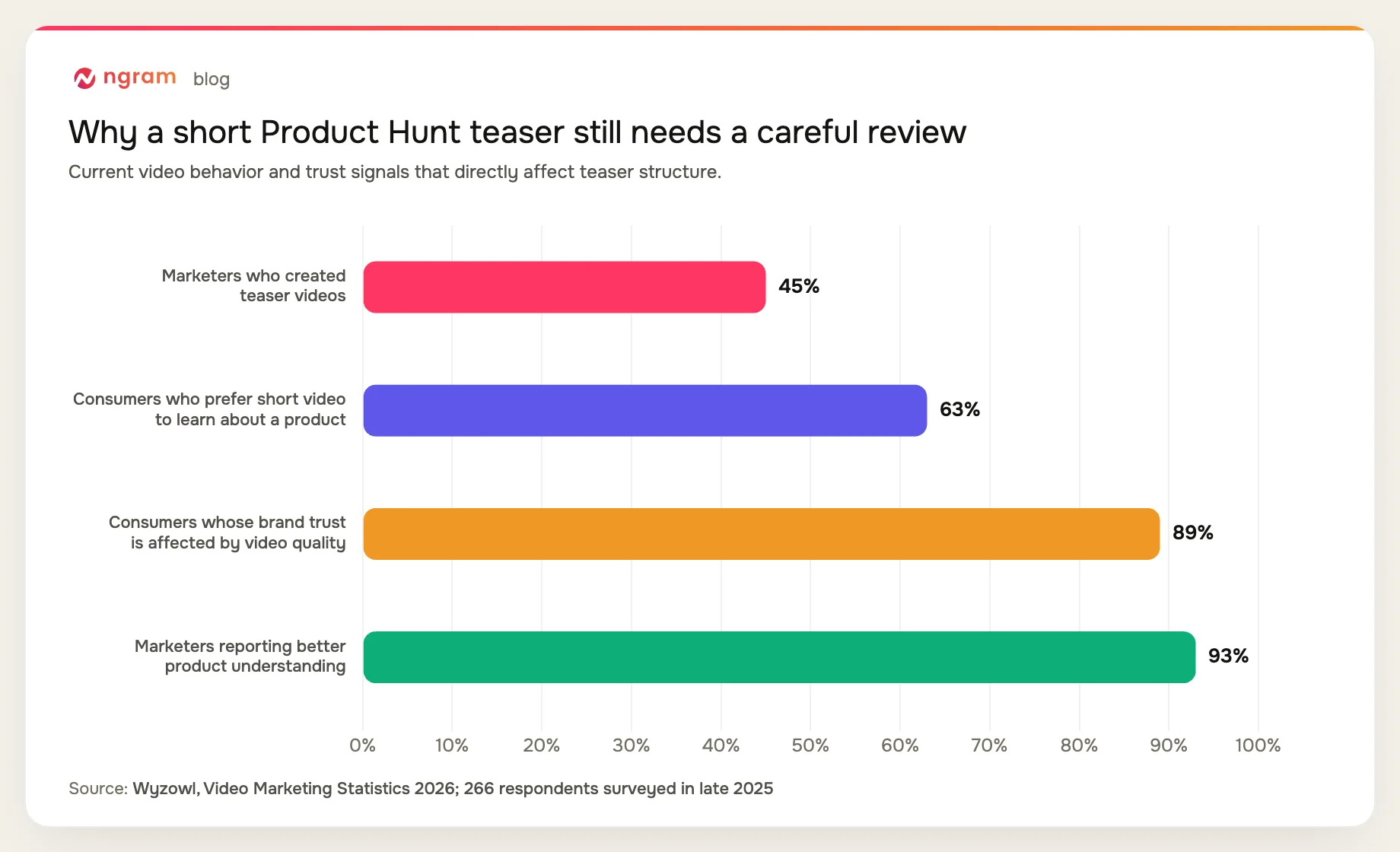
These figures describe broad video behavior, not guaranteed Product Hunt performance. They also do not set an exact Product Hunt video duration. Use them to justify a short structure and a serious quality check, then let the product, audience, and launch brief determine the cut.
Prerequisites before you open the extension
Install and pin the extension using ngram's Chrome extension integration guide. The live campaign mode is the mechanism for this workflow, but the source page and your approved positioning still decide what the teaser can say.
Have the following Product Hunt video inputs ready:
- A supported Product Hunt product page with the current product name, tagline, audience, launch status, and CTA visible.
- One product promise the viewer should remember after the cut ends.
- One differentiator supported by the product page, an approved note, or a visible product moment.
- The correct launch timing, such as a date, live status, or approved coming-soon wording.
- A single CTA that matches the page and the current launch state.
- A named reviewer who can approve claims, pacing, on-screen text, and the final CTA.
What the finished Product Hunt teaser should contain
The finished outcome is a concise Product Hunt video teaser with one readable story. This guide uses 20-30 seconds as the creative target for the prompt template. Product Hunt does not impose that exact duration in the cited guidance, and ngram does not enforce it as a fixed result.
- A hook built from the target user's pain or desired outcome.
- One promise that stays consistent with the Product Hunt tagline and page copy.
- One differentiator or product moment that makes the promise credible.
- The current launch timing, stated without guessing or stale dates.
- One CTA that tells the viewer what to do next.
For broader planning around the format, use the Product Hunt launch video use case. Keep this workflow focused on making and reviewing the teaser itself.
How to create the Product Hunt video from a product page
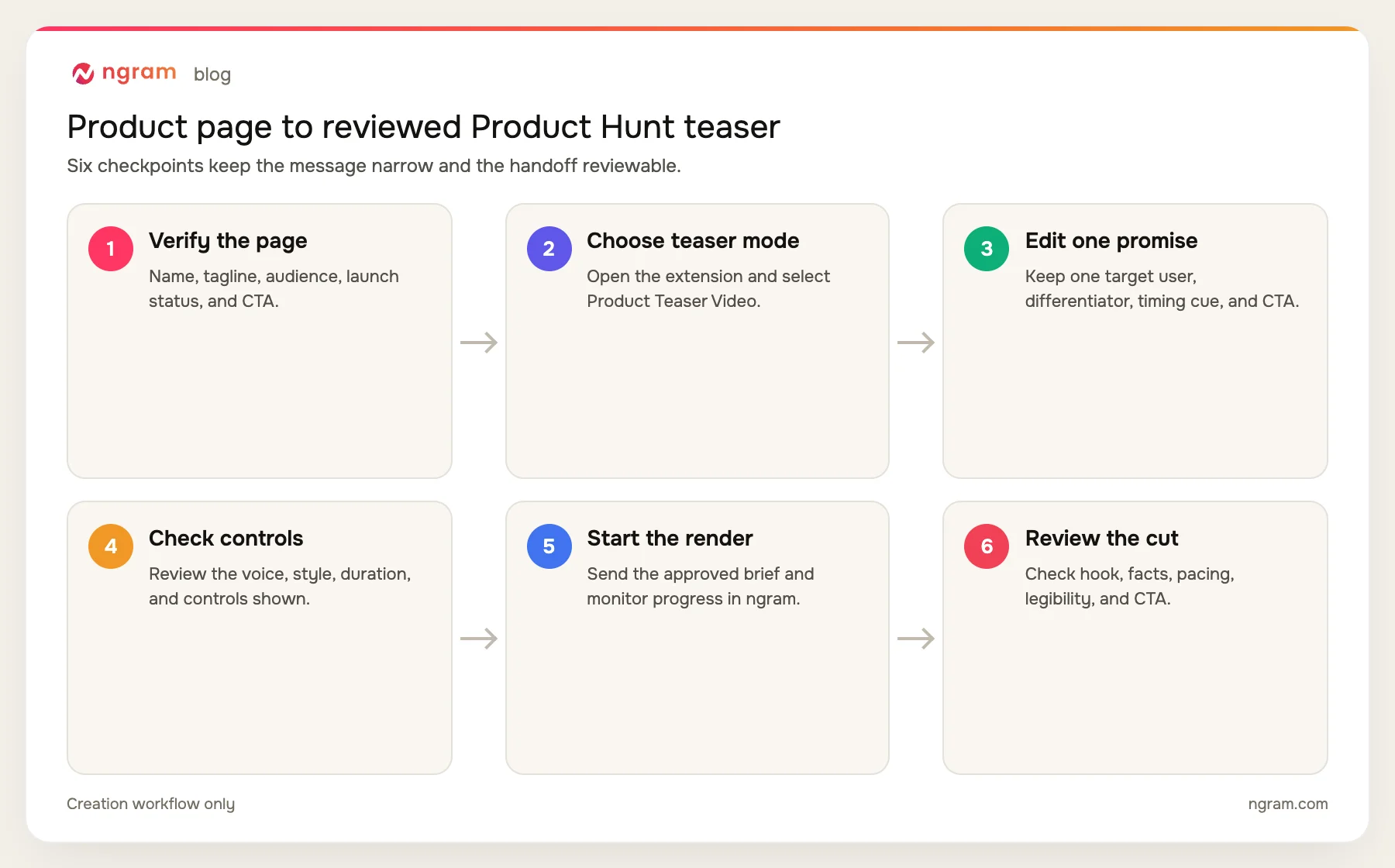
The creation workflow has six checkpoints. It ends at a reviewed cut and handoff, not destination publishing.
Step 1: Open the supported Product Hunt page and verify the source
Start on the Product Hunt page you intend to use. Read the product name and tagline together, then identify the target audience, current launch status, and CTA. If those fields conflict with your internal launch brief, resolve the mismatch before creating the Product Hunt video. The page is public evidence; the teaser should not invent a second position.
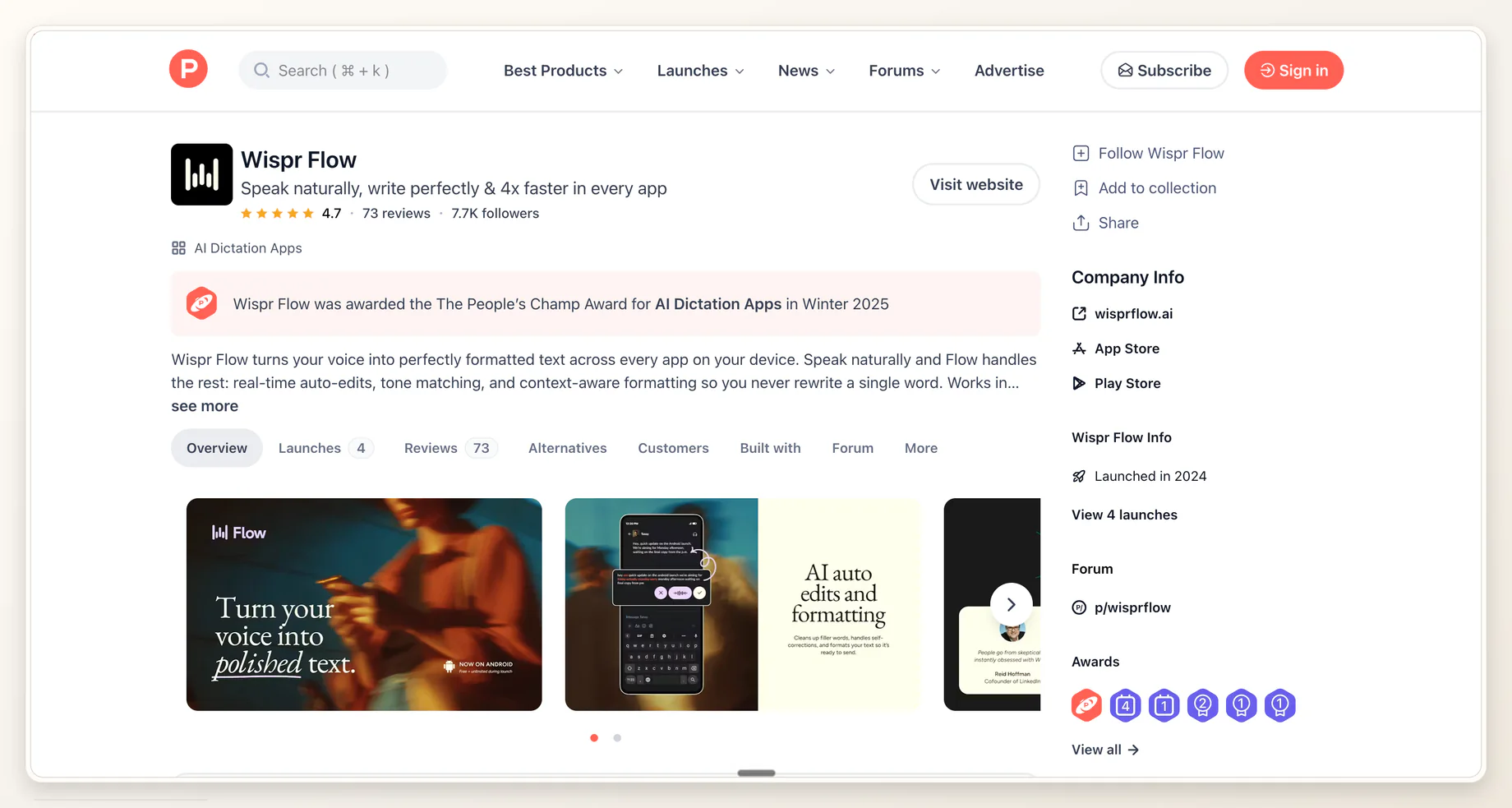
Proof note: This is a real Product Hunt product page from the existing launch-video run. It proves the source-page context only. It does not show Product Teaser Video selected.
If you are starting from another public product URL, the product-page-to-video workflow covers the broader URL input. Return to the Product Hunt page for this campaign mode so the brief reflects the actual launch context.
Step 2: Open the ngram extension and select Product Teaser Video
Open the ngram extension while the supported Product Hunt page is active. In the Product Hunt campaign choices, select Product Teaser Video. Confirm the selected label before editing the prompt. A Product Launch Video selection is a different intent and should not be treated as proof that teaser mode is active.
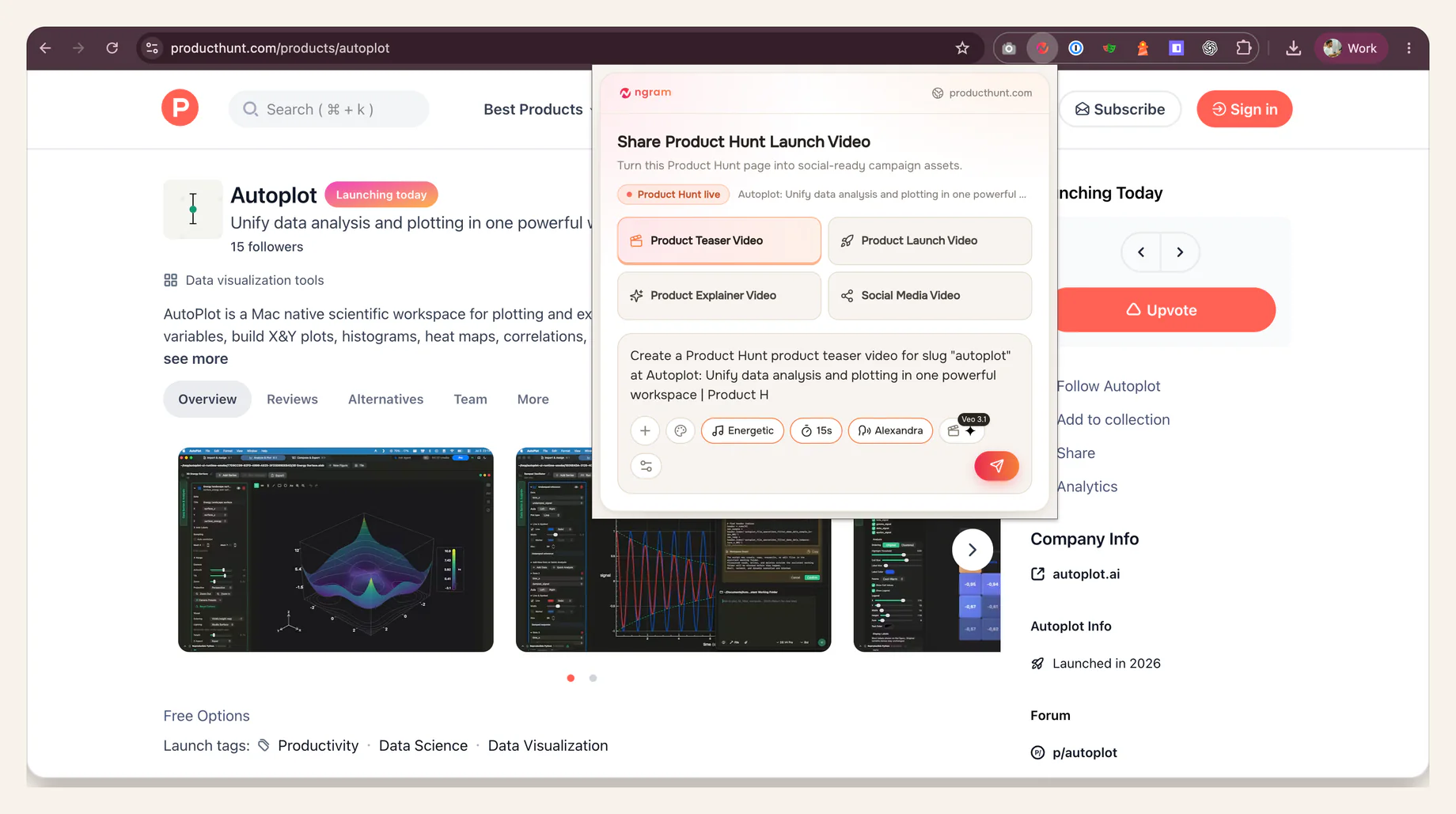
Verified proof: Product Teaser Video is selected on a live Product Hunt page, with the editable teaser brief and available style, duration, and voice controls visible.
Step 3: Rewrite the editable brief around one promise
Read the editable prompt as a creative brief, not a transcript of the product page. Keep one promise, one target user, one differentiator, the current launch timing, and one CTA. Delete feature lists that do not support the promise. A Product Hunt video teaser earns curiosity by withholding the full explanation while keeping every stated fact accurate.
Use this copyable template:
Create a 20-30 second Product Hunt teaser for [PRODUCT].

Target user: [AUDIENCE]
Pain or desired outcome: [PAIN]
One product promise: [PROMISE]
Differentiator to reveal: [DIFFERENTIATOR]
Launch timing or status: [LAUNCH TIMING]
CTA: [ONE CTA]

Use only claims supported by [PRODUCT PAGE OR APPROVED NOTES]. Build anticipation around one product moment. Do not explain the full product.
The duration in this template is an instruction for the creative plan, not a guarantee that ngram enforces an exact runtime. If the page cannot support the differentiator, replace it with a claim the reviewer can verify. For another prompt-first entry point, the AI Product Launch Video Maker accepts product pages and launch notes as source material.
Step 4: Review voice, style, duration, and the controls shown
Review the voice, style, duration, and any other controls available in the extension. Choose only what the current interface exposes. Do not assume a default voice, a fixed visual style, an aspect ratio, or a duration rule that is not visible. The goal is to make the selections deliberate and traceable to the brief.
Read the prompt one more time after changing a control. A dramatic style can overpower a practical product promise, while a calm voice can flatten a high-energy reveal. The choice is correct when it supports the intended audience and launch moment, not when it sounds impressive in isolation.
Step 5: Send the render to ngram and monitor progress
Send the approved Product Hunt video brief to ngram. The render continues in the app, where you can monitor progress and return when the cut is ready. Render time varies with scene count, source processing, voice, style, and visual complexity. Do not promise a fixed completion time or treat an in-progress job as a finished asset.
Keep the approved prompt and source page available during the wait. They are the review baseline. If the launch status or CTA changes before the cut is ready, update the brief rather than approving stale copy.
Step 6: Review the finished cut before handoff
Watch the finished Product Hunt video once without pausing. Ask whether the hook makes sense before the product name appears and whether the promise survives a silent watch. Then compare each claim, timing cue, and CTA with the product page and approved notes.
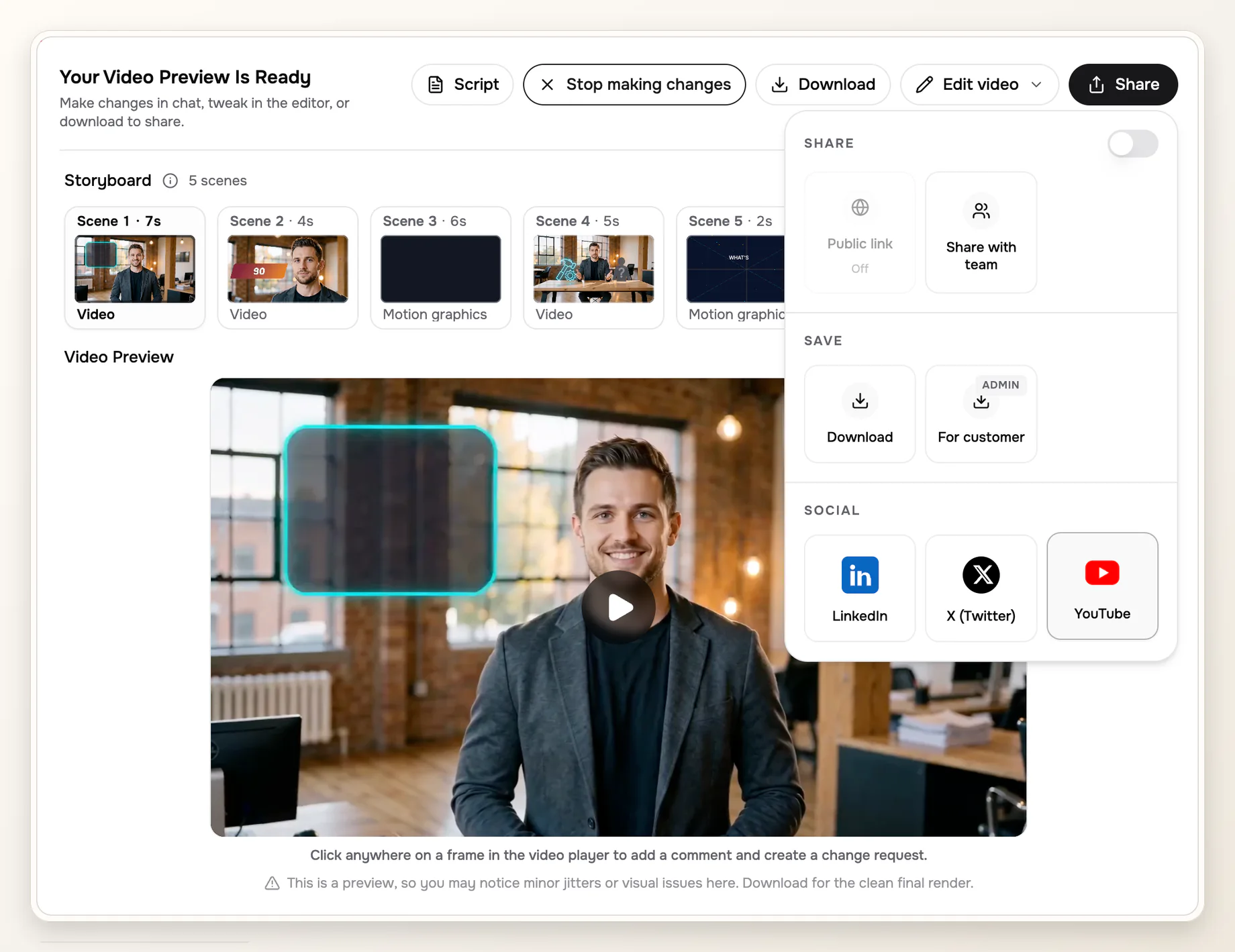
Proof note: This completed-video screen comes from the existing Product Hunt launch-video run. It proves the review surface, not Product Teaser Video selection or a teaser-specific output. The open menu is incidental; publishing is outside this guide.
Run a second pass with pauses. Check that every text frame stays readable, the product UI or proof matches the spoken claim, and the CTA appears long enough to understand. Return scene-specific notes when something fails. A note such as 'remove the unsupported claim in scene 3' is easier to act on than 'make it better.'
Product Hunt video QA matrix
A teaser review works best when each question has one source of truth and one concrete correction. Use the matrix below during the review handoff.
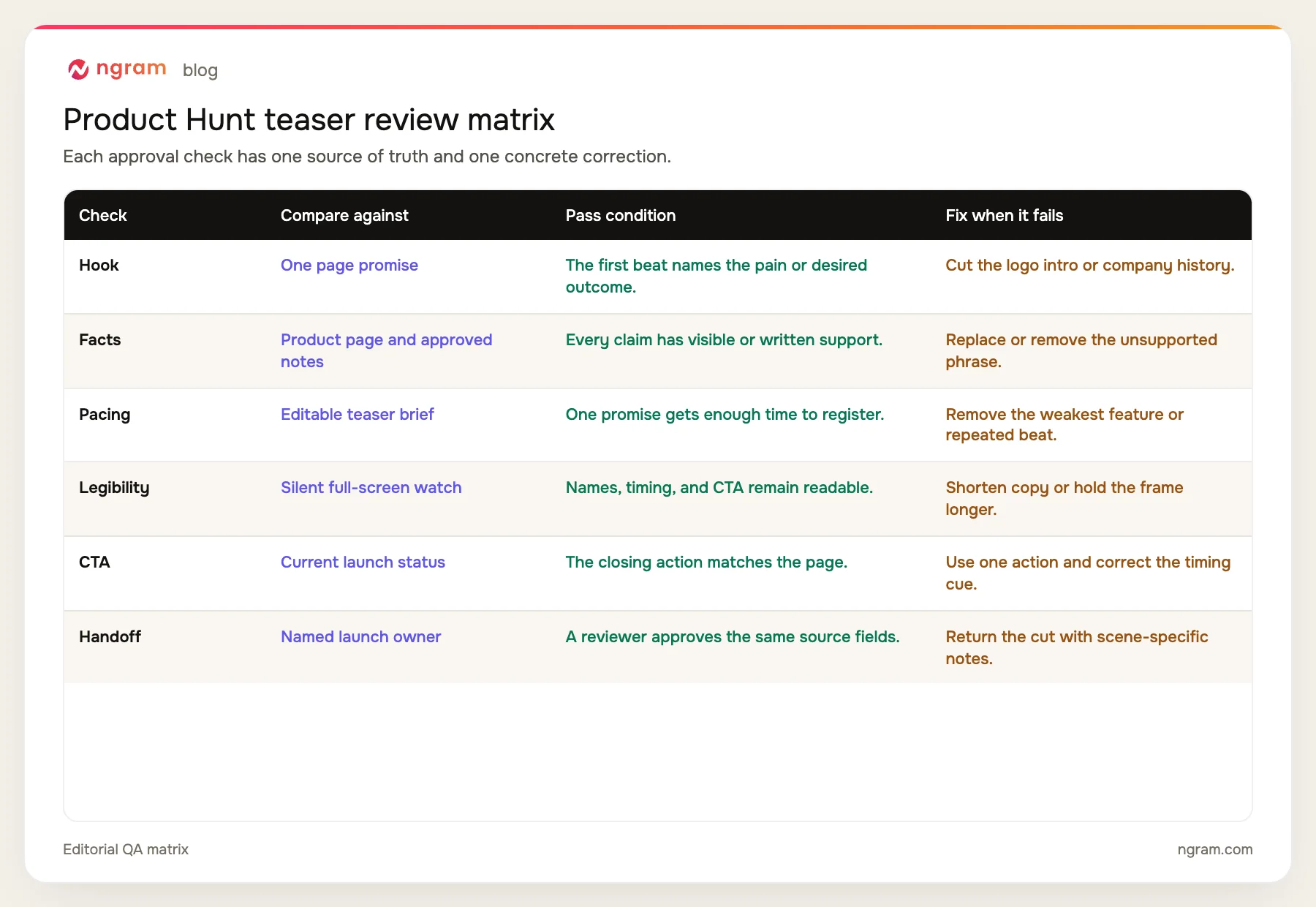
- Hook clarity: the first beat names the target user's pain or desired outcome.
- Factual accuracy: every promise, differentiator, date, and status matches an approved source.
- Pacing: one promise has enough time to register without a repeated beat or feature dump.
- Legibility: product names, launch timing, and CTA remain readable with sound off.
- CTA fit: the closing action matches what the product page currently asks visitors to do.
- Review ownership: one launch owner approves the cut against the same source page and brief.
The handoff is complete when the reviewer can approve or reject each row without guessing. If a cut fails, return it with the scene number, the source it contradicts, and the smallest correction needed.
Where the reviewed teaser sits in the launch gallery
The finished teaser will be judged beside the rest of the Product Hunt gallery, so compare its opening frame with the product screenshots and launch visuals already in use. The video should add motion and anticipation without contradicting the page.
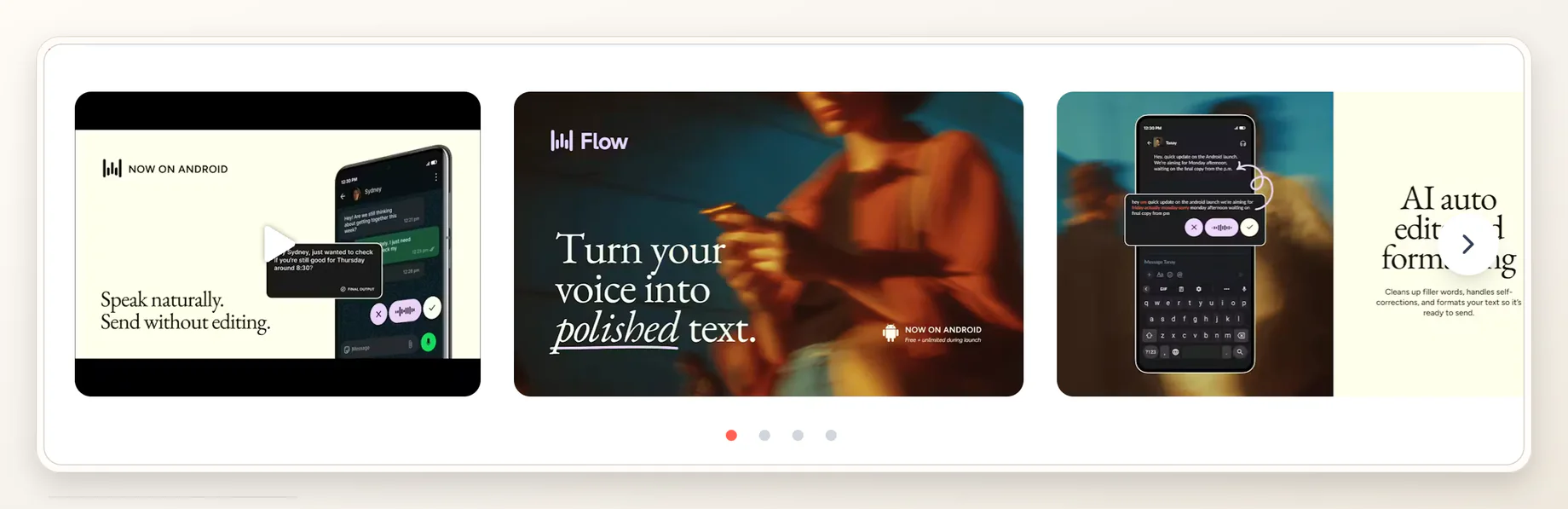
Proof note: This gallery comes from the existing Product Hunt launch-video run. It shows launch-gallery context only. It does not prove teaser selection, upload steps, or destination publishing.
Product Hunt's current guidance accepts a full YouTube URL for video. Keep that destination requirement in the launch checklist, but keep the creative review separate. The creation team should hand over one accurate, readable cut and the approved source brief.
Common Product Hunt teaser failures and fixes
The teaser explains the whole product
A complete feature tour removes the anticipation a teaser needs. Keep the strongest promise and the one differentiator that makes it credible. Move the rest back into the source notes rather than forcing it into the cut.
The Product Hunt page and prompt disagree
Conflicting taglines or launch dates create a factual review problem later. Decide which source is current before rendering. Update the product page or approved brief, then use that wording consistently in the prompt and CTA.
The hook is a logo animation
A logo can identify the brand after the viewer understands the point. Rewrite the first beat around the user's pain, desired outcome, or the product moment that proves the promise.
The brief assumes controls or defaults
Do not write around a voice, style, aspect ratio, or duration default you cannot see. Choose from the controls available in the live extension, then record the selection in the review notes.
The cut makes an unsupported claim
Remove the claim or replace it with proof the page can support. A product screenshot can prove a visible workflow. It cannot prove a performance number, customer outcome, or market position on its own.
The render is treated as final without review
A completed render is a review candidate. Watch it at normal speed, check it silently, and compare every claim with the source. Hand off the asset only after the launch owner approves the QA matrix.
Frequently asked questions
What is a Product Hunt teaser video?
A Product Hunt teaser video is a short anticipation-building asset centered on one product promise. It names the target user, reveals one differentiator, states the launch timing, and closes with one CTA without explaining the full product.
How long should a Product Hunt teaser video be?
The prompt in this guide targets 20-30 seconds because the use case is a teaser, not a complete demo. Product Hunt's cited guidance does not impose that exact duration, and ngram does not guarantee or enforce it as a fixed runtime. Review the planned duration against the message and available controls.
Which product page fields belong in the teaser brief?
Use the product name, target audience, audience pain, one promise, one differentiator, current launch timing, and one CTA. Keep only facts supported by the product page or approved launch notes.
Does Product Hunt support video in the launch gallery?
Yes. Product Hunt's current posting guidance says the video field accepts a full YouTube URL and does not accept a shortened link. This guide covers making and reviewing the video, not uploading or publishing it.
Can ngram create the teaser directly from a Product Hunt page?
Yes. The ngram Chrome extension has a live Product Hunt campaign mode with Product Teaser Video as one of the output choices. Open a supported page, select that mode, edit the brief, review the available controls, and send the render to ngram.
How is a teaser different from a full Product Hunt launch video?
A teaser creates anticipation around one promise and stops early. A full launch video can explain more of the product story or workflow. Use the separate guide to create a Product Hunt launch video from a product page when the brief calls for the broader format.
Can I monitor the Product Hunt video render?
Yes. After the extension sends the render to ngram, progress can be monitored in the app. Completion time varies with the scene plan and production choices, so keep the approved brief ready and return for review when the cut is complete.
Hand off one reviewed teaser
The launch owner should receive the finished teaser, the approved prompt, the source Product Hunt page, and any scene-specific review notes. That package makes the creative decision traceable and keeps destination setup separate from the work covered here.