Make.com video integration. Coming Soon in ngram.
The Make.com connector is not available to connect yet. Studio currently labels it Coming Soon, so check the live integration card before planning a Make scenario around ngram.
- Not available yet — the deployed Studio card is disabled and marked Coming Soon
- Check the live status — Studio's Integrations screen is the current source for connector availability
- Use a shipped route now — Zapier, n8n, MCP, and Public API v1 are available alternatives
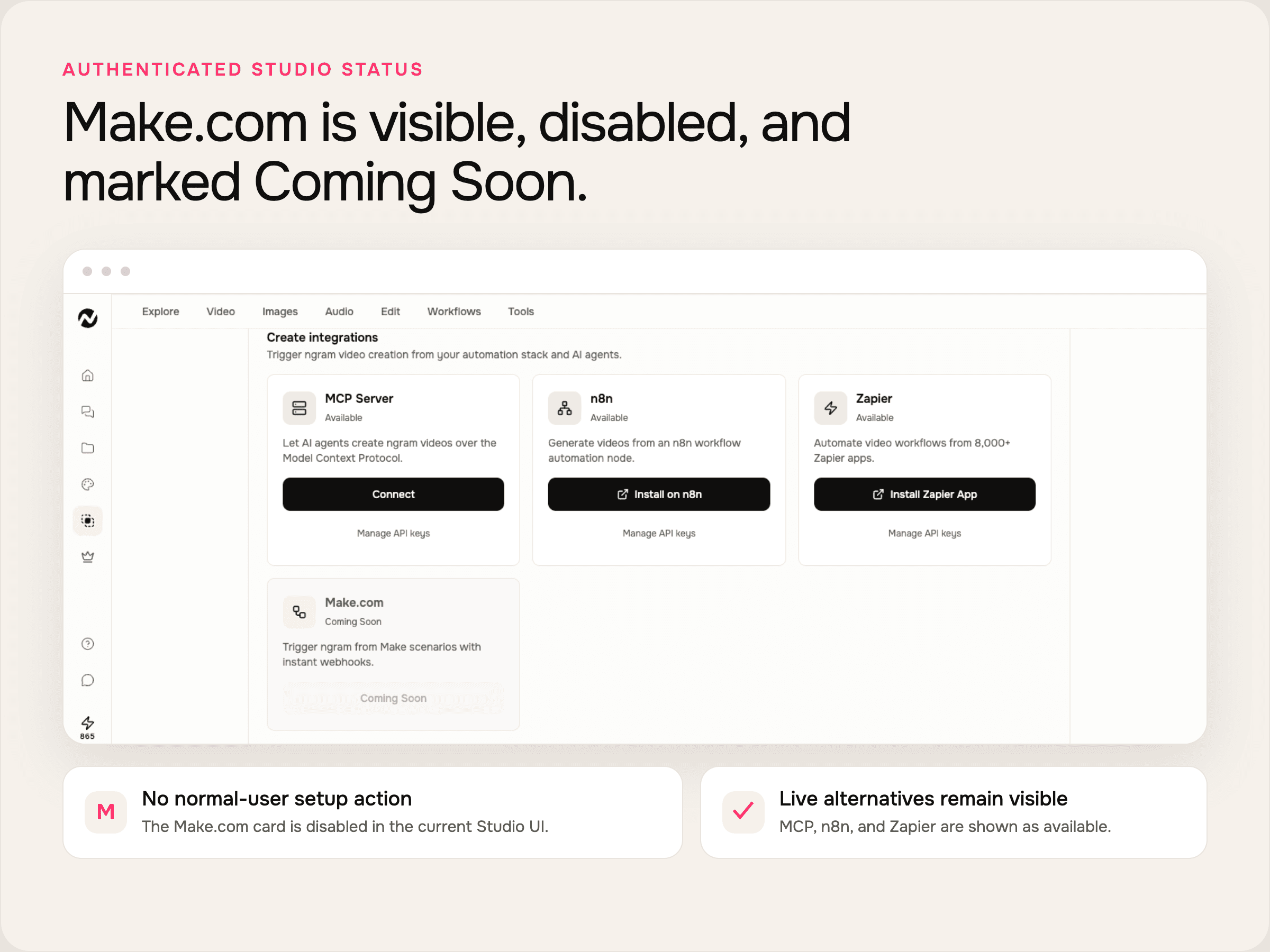
Check availability before you build a Make scenario.
The connector has no generally available setup path today. Use the deployed Studio card to confirm when that changes.
Open Studio integrations
Open the Integrations screen in Studio and find the Make.com card under create integrations.
OpenRead the card status
If the card still says Coming Soon and has no active setup action, the connector is not ready for a normal-user workflow.
currentPick a live automation path
Use Zapier or n8n for workflow automation, MCP for agent tools, or Public API v1 for application code.
todayFour routes you can use while Make.com is pending.
These are separate, live integration paths. None of them proves that the Make.com connector is generally available.
Automate with Zapier
Use the public ngram app in Zapier to start video jobs from a connected workflow.
Build in n8n
Install the verified ngram community node in n8n Cloud or a self-hosted n8n instance.
Connect an MCP client
Use the hosted MCP server for supported agent clients and follow the client-specific authentication flow.
Call Public API v1
Every signed-in ngram user can create a bearer key in Settings and use the documented API routes.
Do the automation job now without claiming Make access.
The business workflow can proceed through an available connector while the Make.com card remains disabled.
Start launch videos from release events.
Use Zapier, n8n, or Public API v1 to start a launch-video job when a release event arrives. The Make.com path remains pending.
See the feature announcement playbookCreate sales videos from approved records.
Route approved CRM or spreadsheet data through a live connector, then retrieve the finished video without relying on an unavailable Make app.
See the sales prospecting playbookTurn changelog entries into video drafts.
Send the changelog text or URL through Zapier, n8n, MCP, or the API. Revisit Make.com after Studio exposes an active setup action.
See the changelog video playbookThe video capabilities available through live entry points.
Use these inside Studio or through a shipped connector today. Make.com availability is a separate gate.
AI Video Generation
Start a business video from a prompt or supported source through Studio or a live automation route.
Explore AI video generationScript Generation
Turn the supplied brief or source material into a reviewable script and storyboard before rendering.
Explore script generationAI Visuals
Generate scene visuals from the approved brief, then revise individual scenes in ngram.
Explore AI visualsAI Voiceover
Generate narration from the script and adjust speaker, language, or pronunciation in the editor.
Explore AI voiceoverCaptions
Add editable captions to the rendered video and style them with the selected brand kit.
Explore captionsBrand Kit
Apply saved logos, colors, fonts, tone, and content guardrails to the video project.
Explore brand kitsConvert the input before you automate the handoff.
These converters work independently of Make.com and give a live route for common source types.
URL to Video
Turn a public product page, article, or release URL into a storyboarded video draft.
Convert a URLText to Video
Use a brief, record field, or approved message as the source for a new video project.
Convert textBlog to Video
Create a video draft from a published article without waiting for the Make.com connector.
Convert a blogFinish the job with tools that are available now.
Run these tools directly while the Make.com connection is still marked Coming Soon.
Teams can keep moving while the connector is pending.
Choose the live route that fits the owner and workflow, then check Studio again when Make.com availability changes.
Prototype the automation in Zapier or n8n instead of depending on a disabled Make.com card.
Start launch-video jobs from a live connector while keeping Make.com out of the delivery promise.
Use a supported workflow tool for campaign inputs and review every generated video before publishing.
Pass approved account context through Zapier, n8n, or the API without waiting for Make.com access.
Use a live connector while Make.com is Coming Soon.
These integration pages document routes with an active setup or connection path today.
 Zapiercreate
Use Zapier for a managed workflow that starts an ngram video from another connected app.
Explore Zapier integration n8ncreate
Choose n8n when the workflow belongs in n8n Cloud or a self-hosted n8n instance.
Explore n8n integration MCP Servercreate
Connect the hosted MCP server when an AI agent should call ngram tools inside its client.
Explore MCP Server integration Chrome Extensioncreate
Use the Chrome extension when a person should start a video from the webpage open in the browser.
Explore Chrome ExtensionMake.com is pending; these routes are available now.
Choose by the trigger you can use today. Do not plan against unverified Make.com modules or callbacks.
Make.com Coming Soon | Zapier managed workflow | n8n cloud or self-hosted | Public API v1 application code | |
|---|---|---|---|---|
| Availability | Coming Soon in Studio | Available | Available | Available with a self-service key |
| Setup path | No active normal-user setup | Zapier app directory | Verified ngram community node | Settings, API Keys, then API docs |
| Workflow owner | Wait for availability | Operations or marketing | Operations or engineering | Engineering |
| Best choice today | Track the Studio status | Cross-app managed automation | n8n workflows and self-hosting | Product and backend integrations |
FAQ
Common questions about the Make.com integration
Still curious? Still curious? Chat with us
Check the Make.com status in Studio.
If the card is still disabled, use Zapier, n8n, MCP, or Public API v1 for the workflow you need today.