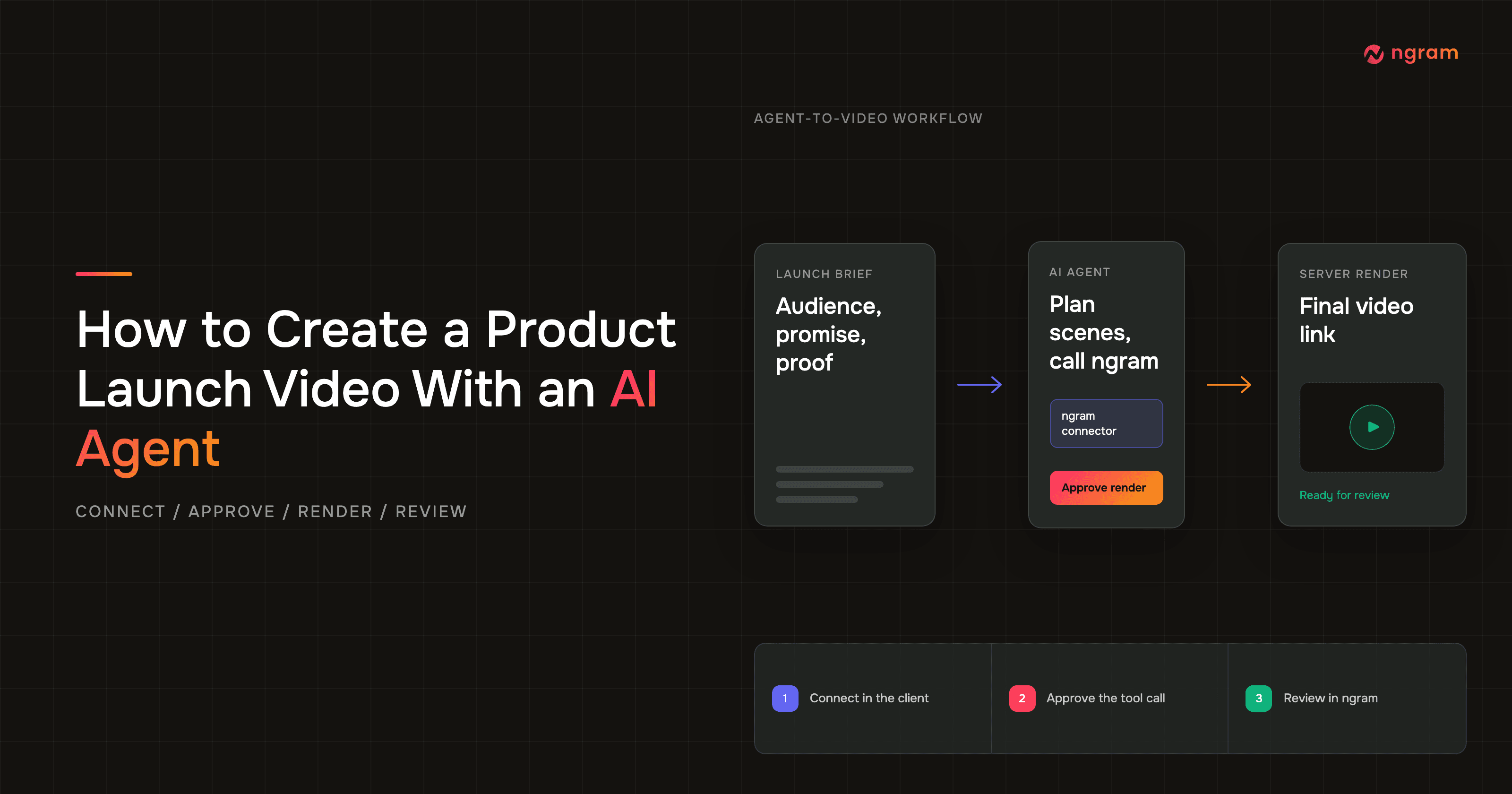

An AI agent video workflow keeps the launch brief, planning, tool approval, render status, and review in one conversation. Connect ngram through a supported connector or remote/custom MCP path, give the agent a structured brief, approve the proposed tool call, and let ngram render server-side. The final link returns to the agent, while the ngram app remains available for progress and review.
Last updated: July 2026.
An agent coordinates AI video generation through a flexible conversation. A product marketing manager can revise the audience, proof, narrative, or constraints in plain language before the expensive step begins. That makes the workflow a useful extension of a broader product marketing video program, especially when the launch brief is still changing.
Why an AI agent video workflow fits a product launch
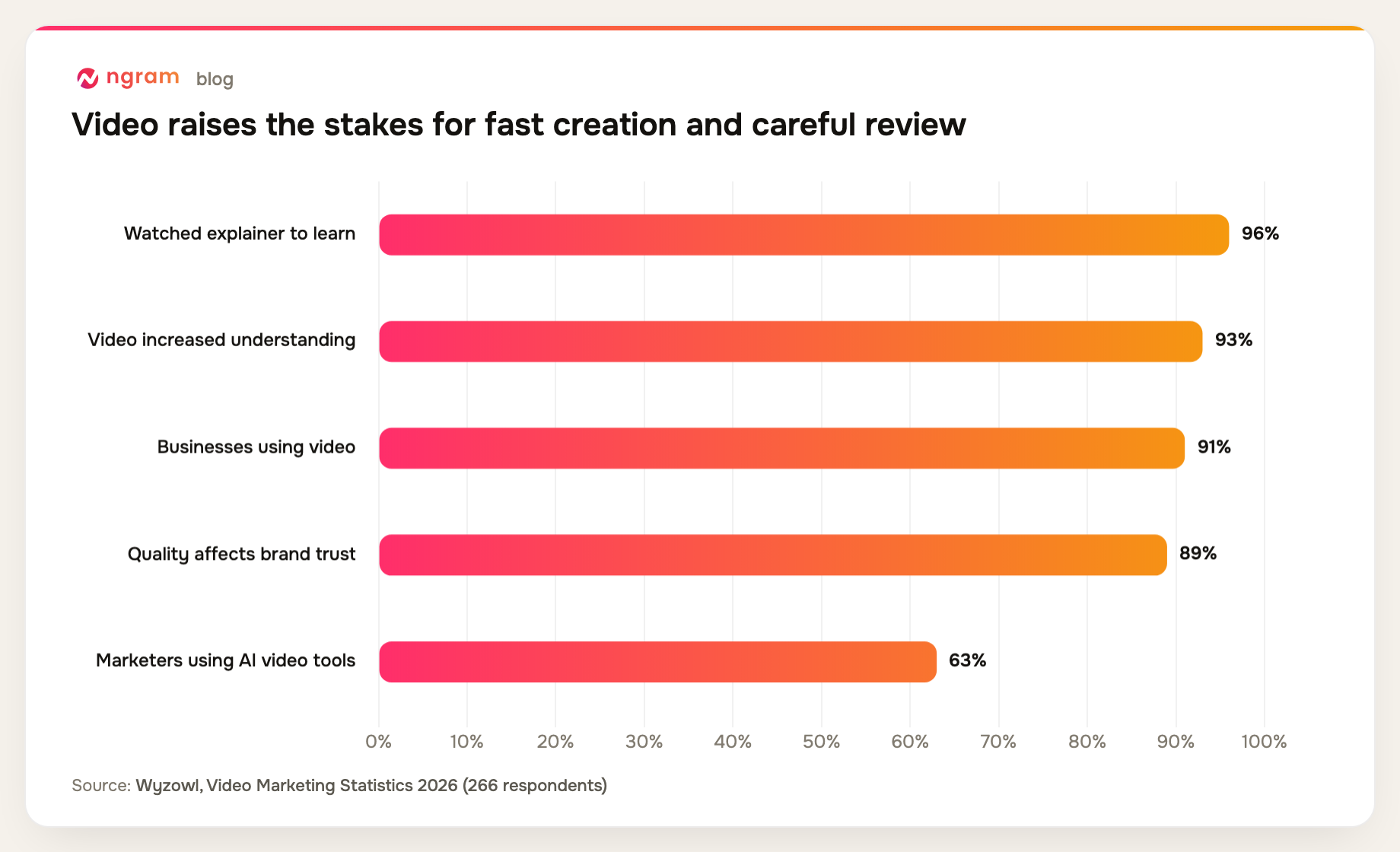
Product launch video work has two competing demands: move while the launch details are fresh, and review carefully because weak video can damage trust. Wyzowl's 2026 survey of 266 respondents found that 96% of people had watched an explainer video to learn about a product or service, 93% of video marketers said video increased user understanding, and 91% of businesses used video as a marketing tool. The same study found that 89% of consumers said video quality affects their trust in a brand, while 63% of video marketers had used AI tools to create or edit marketing video. Another 59% created video in-house, and 92% planned to spend the same or more on video during 2026.
AI can shorten the path to a reviewable first cut. The PMM still owns positioning, proof, and final quality.
That distinction matters because adoption is ahead of confidence. In a Content Marketing Institute study of 980 B2B marketers, 81% said their teams used generative AI, but only 4% reported a high level of trust in its outputs. Another 67% reported medium trust.
Video was the most effective content type for 58% of respondents, 76% said they used video, and 61% planned to increase video investment. At the same time, 55% struggled to create content that prompts a desired action and 54% cited a lack of resources. Faster video production has value, but approval still belongs to a person who understands the launch.
What you need before the agent starts
Check compatibility first. The agent environment must support connectors or remote/custom MCP. The ngram MCP integration exposes video creation and status as tools, but a client without either connection path cannot call them. Do not assume every chat product, plan, or workspace has the same controls.
- A supported agent client: Claude with a custom connector; ChatGPT web on Business, Enterprise, or Edu with developer mode and workspace app access; or another remote/custom MCP client with compatible authentication. ChatGPT Pro's read/fetch-only MCP access cannot start an ngram render.
- An ngram account with enough credits for the planned render.
- A launch brief with audience, problem, promise, proof, CTA, duration, frame, and claim boundaries.
- Current product evidence such as a product URL, screenshots, a short screen recording, a deck, or a launch document.
- An approved brand kit if the result needs specific logos, colors, fonts, motion direction, voice, phrases, or CTA rules.
Claude connector and eligible ChatGPT app authentication happens inside the client UI. You do not paste an external ngram API key into those setup flows. ChatGPT full create actions require Business, Enterprise, or Edu on the web app with developer mode and workspace app access; Pro is read/fetch only. Header-capable custom MCP clients can use a self-service bearer key created in Account & Settings → API Keys; Public API v1 uses the same key path.
AI agent video or fixed automation: which should you use?
A fixed Zapier or n8n workflow is a good fit when the trigger, input fields, action order, and exception policy are already known. It can move the same structured request through the same steps repeatedly. A prompt to video generator can also be enough when the prompt already contains every choice and no discussion is needed.
Choose an AI agent video workflow when the launch source is mostly prose, the story needs discussion, or the correct tool action depends on what the agent finds in the brief. The PMM can challenge a weak hook, replace unsupported proof, or change the scene plan in conversation before approving ngram. You could rebuild those branches in a fixed graph, but the graph becomes part of the work every time the launch logic changes.
- Use fixed automation when inputs are structured and the same mapping should run without interpretation.
- Use an agent when source documents vary and the system must turn them into a brief or scene plan.
- Use an agent when a person needs to inspect the reasoning and proposed tool action before credits are spent.
- Keep a fixed path when exceptions are rare and conversational judgment would add cost without changing the result.
Flexible reasoning creates more variance than predetermined behavior, so the brief, approval gate, and final QA carry more weight. For a one-off product launch video with changing inputs, that trade is often worthwhile because the PMM can correct the plan before the server-side render starts.
Step 1: Choose a compatible agent environment
Choose the AI agent video environment where the launch reasoning already happens. Claude is useful when your team develops a brief through a long working conversation. ChatGPT is useful when the project already lives in an eligible Business, Enterprise, or Edu web workspace. A custom MCP client can fit a technical internal workflow, provided it supports a remote server and the required authentication headers.
Confirm that the specific client, plan, and workspace expose the connector or MCP controls you need. For ChatGPT, an administrator or owner must enable developer mode and app access; Pro's read/fetch-only MCP access cannot call create-video. In this setup, ngram is the AI video creation tool; the agent plans and calls it.
Step 2: Connect ngram for an AI agent video run
Claude setup
Anthropic's current remote MCP connector instructions send individual users to Customize > Connectors > + > Add custom connector. On Team and Enterprise, an Owner or Primary Owner first adds the remote MCP URL under Organization settings > Connectors > Add > Custom > Web; members then connect and authenticate through Customize > Connectors. Enable ngram from the conversation's connector menu.
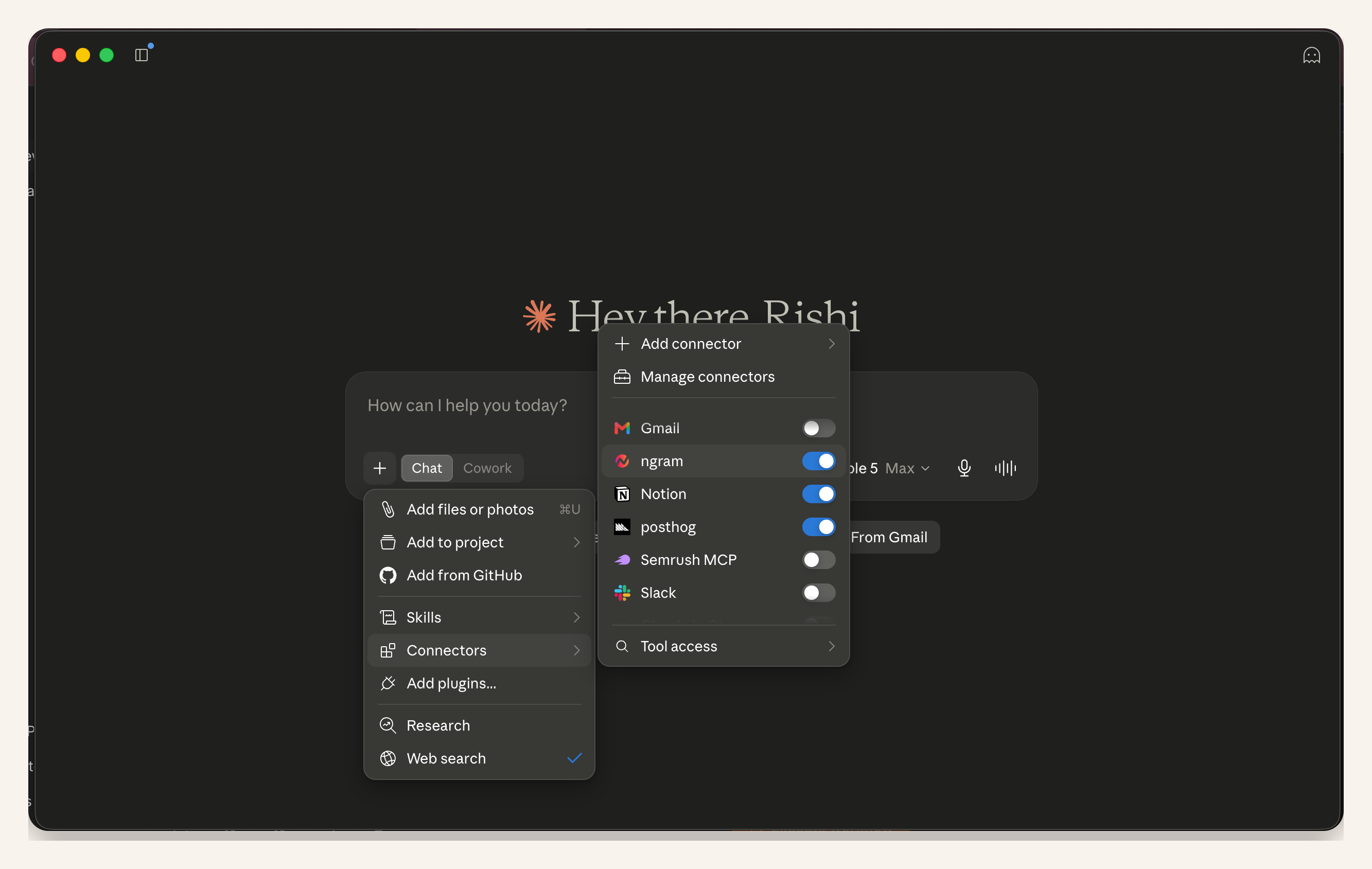
Claude proof capture: ngram is enabled from the conversation's connector menu. This demonstrates client-side enablement, not a universal setup screen for every Claude plan.
ChatGPT setup
OpenAI's current developer mode and full MCP apps guide limits full create actions to ChatGPT web on Business, Enterprise, or Edu. A workspace admin or owner enables developer mode and app access, then creates the ngram app from Workspace Settings > Apps > Create, enters https://mcp.ngram.com, scans the tools, completes authentication, and selects ngram in a new chat. Pro can connect read/fetch MCP tools, but it cannot start the create-video action.
Codex and other custom MCP clients
In a Codex or other client that supports custom remote MCP servers, add the ngram endpoint through that client's MCP settings. Header-capable clients can use a self-service bearer key created in Account & Settings → API Keys. The screen below is Codex setup proof; it is not the ChatGPT app interface.
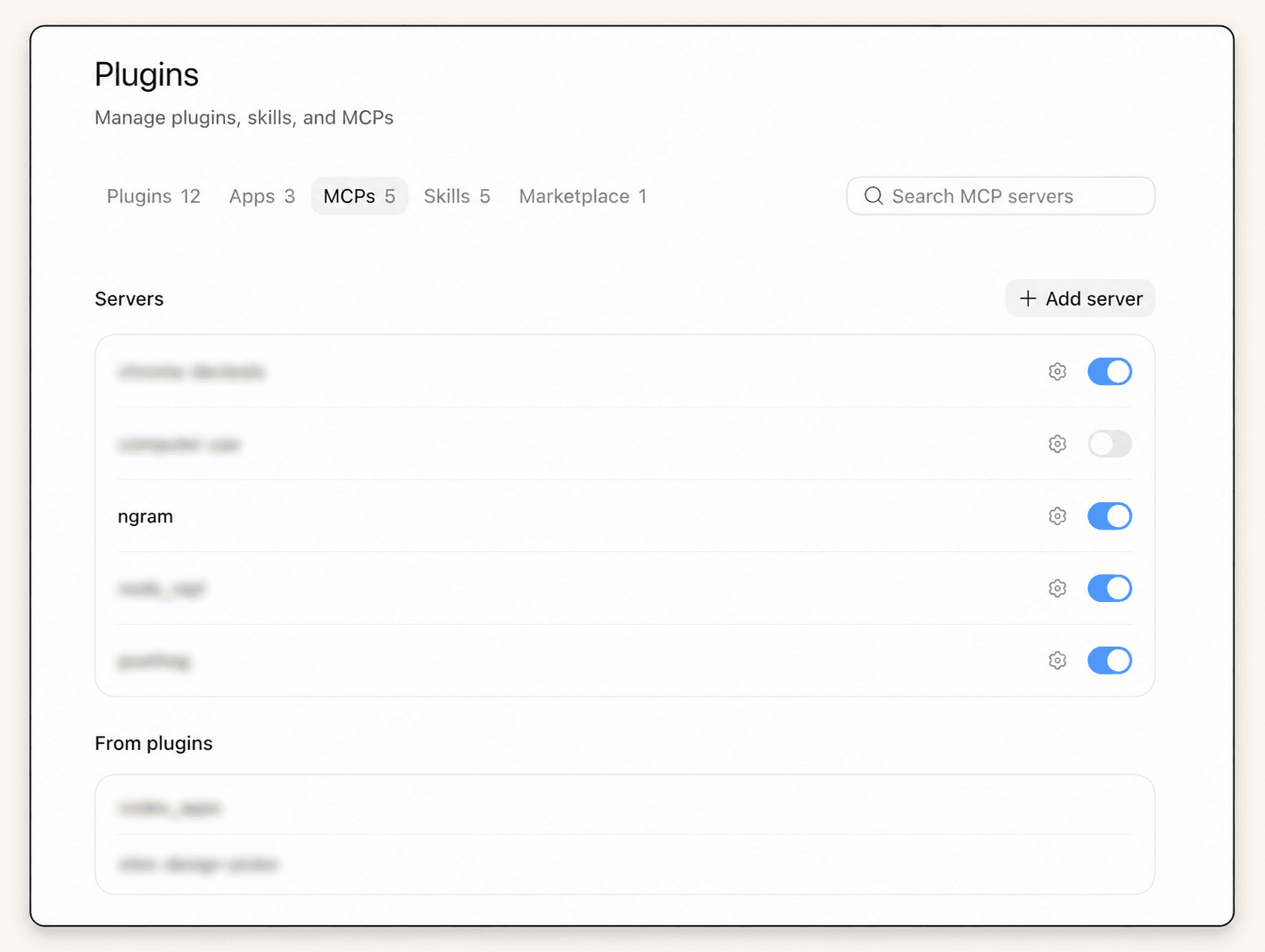
Codex MCP proof capture: ngram is enabled in the client's MCP server list while unrelated tools are blurred. This proves the Codex setup shown here, not ChatGPT app setup.
Step 3: Build an AI agent video launch brief
A good agent request starts with decisions, not adjectives. The launch brief should say who changed behavior after watching, what single promise they should remember, which product evidence supports that promise, and which claims the video must avoid. The PMM product launch workflow is a useful reference for the source material and decisions that belong in the brief.
- Audience: the role, level of product familiarity, and problem state.
- Launch promise: one outcome the viewer should understand.
- Proof: current screens, workflow evidence, source facts, and approved claims.
- Narrative: problem, old way, product change, proof, outcome, and CTA.
- Constraints: target duration, 16:9 frame, voice, terminology, blocked claims, and anything that must not appear.
Practitioners make the same point in less formal language. In a recent r/SaaS discussion about product launch videos, founders described editing as exhausting and recommended locking the story before capture. Treat that as practitioner experience, not survey data. The underlying advice is sound: settle the narrative before asking the tool to render it.
Use the agent as an AI video script generator only after it can see the approved source material. Otherwise, a fluent script can hide unsupported product claims.
Step 4: Use a copyable request template
The block below is a request template and expected-response contract, not a transcript from the retained proof run. Replace the bracketed fields with launch facts, attach or reference the approved source material, and ask the agent to show its plan before it calls the ngram AI video generator.
An AI storyboard generator is useful only when every proposed scene points back to a source, claim, or product screen. Put source mapping inside the storyboard.
Create a 50-second product launch video in ngram.

Product: [name and one-sentence description]
Audience: [specific role and problem state]
Launch promise: [one outcome]
Source material: [product URL, launch document, screenshots, screen recording, or deck]
Proof that must appear: [current screens, workflow, facts, approved claims]
Narrative: problem -> old way -> product change -> proof -> outcome -> CTA
CTA: [approved action]
Brand rules: apply the workspace brand kit; use [voice/tone]; avoid [blocked terms]
Format: 16:9, 45-55 seconds, readable captions, one idea per scene

Constraints:
- Use only claims supported by the source material.
- Do not invent customers, metrics, testimonials, integrations, or product behavior.
- Prefer product evidence over generic decoration.
- Keep the launch promise consistent from hook to CTA.

First return:
1. A one-sentence video objective
2. A six-scene plan with timing, voiceover, on-screen text, and proof source
3. Any missing information or claim risk
4. The exact ngram tool action you intend to take

Wait for my approval before calling ngram. After approval, start the render, return the job status, and provide the final link when it is ready.
The template defines the response you should expect; it does not claim that the supplied screenshots capture every response state. Steps 5 and 6 show the retained approval and in-progress evidence. The agent can improve wording, sequence, and scene choices, but it cannot know whether an internal claim has legal, product, or brand approval. Put those boundaries in the request rather than relying on a cleanup pass.
Step 5: Review the plan and approve the ngram tool call
Review two things separately. First, inspect the creative plan: hook, promise, scene order, product proof, pacing, and CTA. Second, inspect the tool action: source input, duration, frame, brand settings, and credit use. Approval of the story should not silently become approval of a mismatched render request.
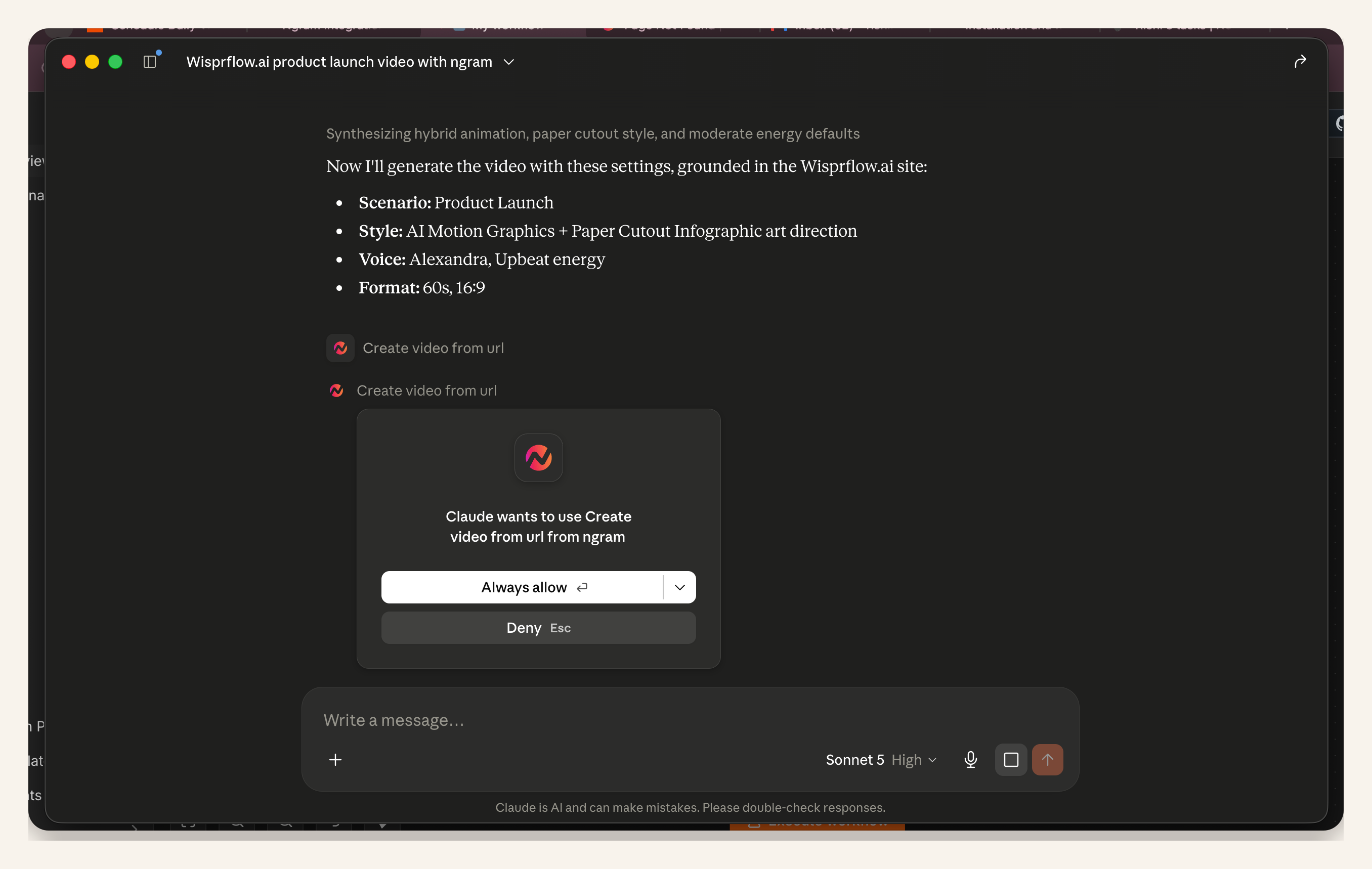
Claude proof capture: the client presents an ngram Create video action for permission. The user can compare the action with the approved brief before allowing it.
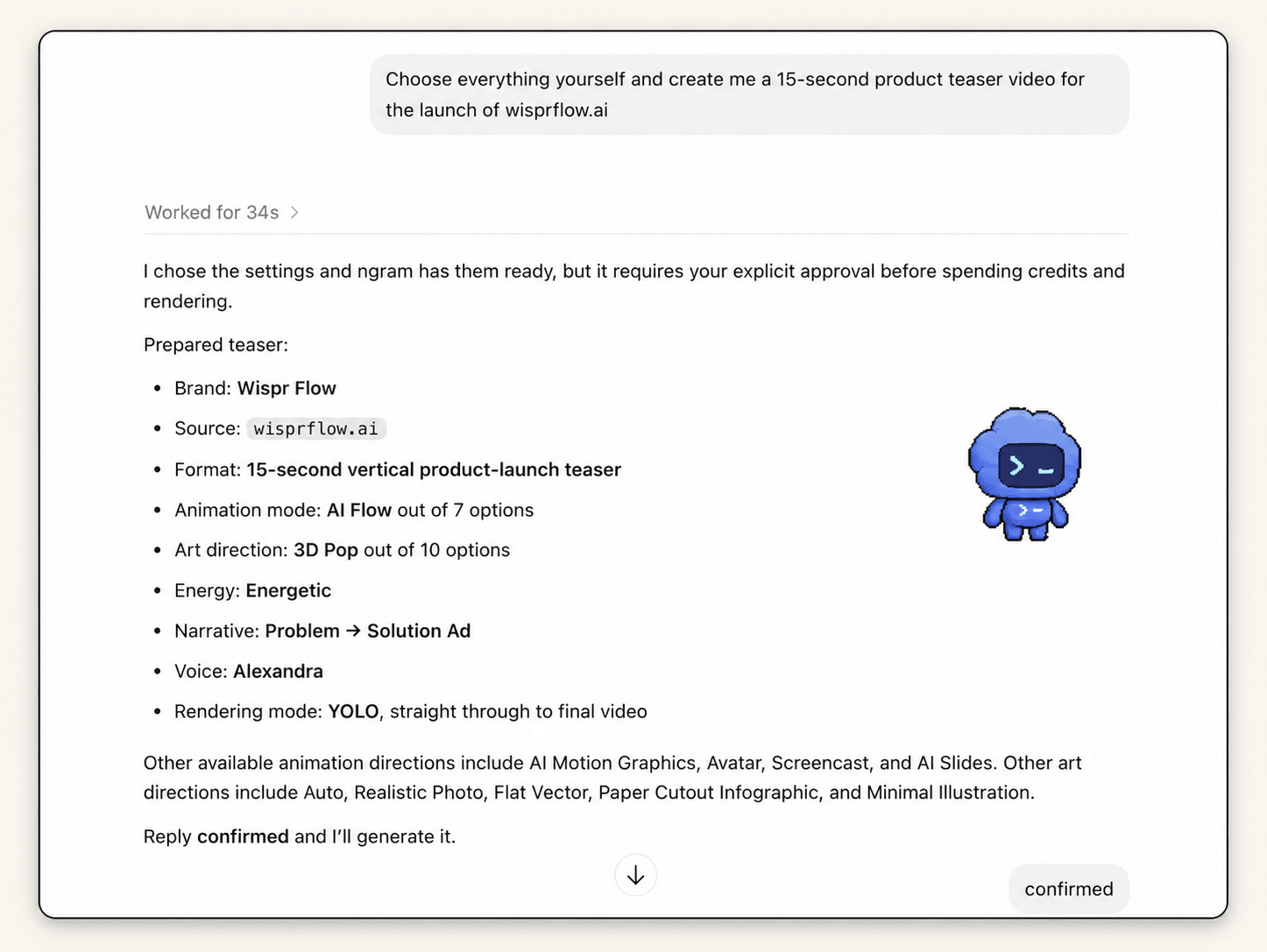
Codex MCP proof capture: the assistant summarizes the planned teaser and asks for explicit confirmation before render. The client differs from Claude and ChatGPT, but the ngram approval gate is the same shared mechanic.
Approve the render only when the tool action matches the launch brief. A polished video with the wrong promise is still the wrong launch asset.
Step 6: Monitor the server-side render
After you approve the AI agent video request, ngram creates the video server-side. A render typically takes around 15-20 minutes depending on scene complexity. The agent can report status in the conversation, and you can open ngram to inspect progress without waiting in the chat.
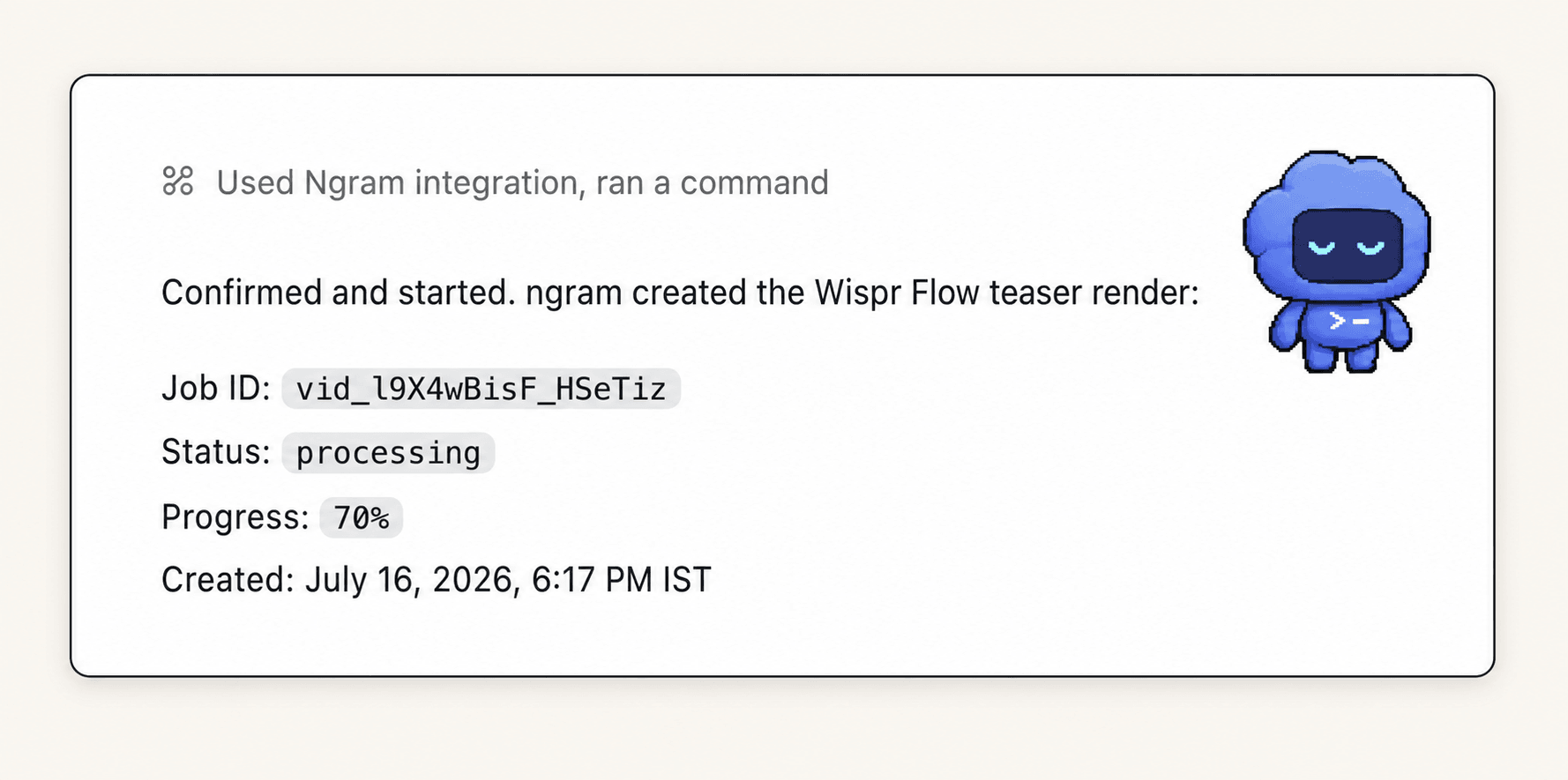
Codex MCP proof capture: the ngram integration reports the job as processing at 70%. A progress value is a status signal, not a guaranteed completion time.
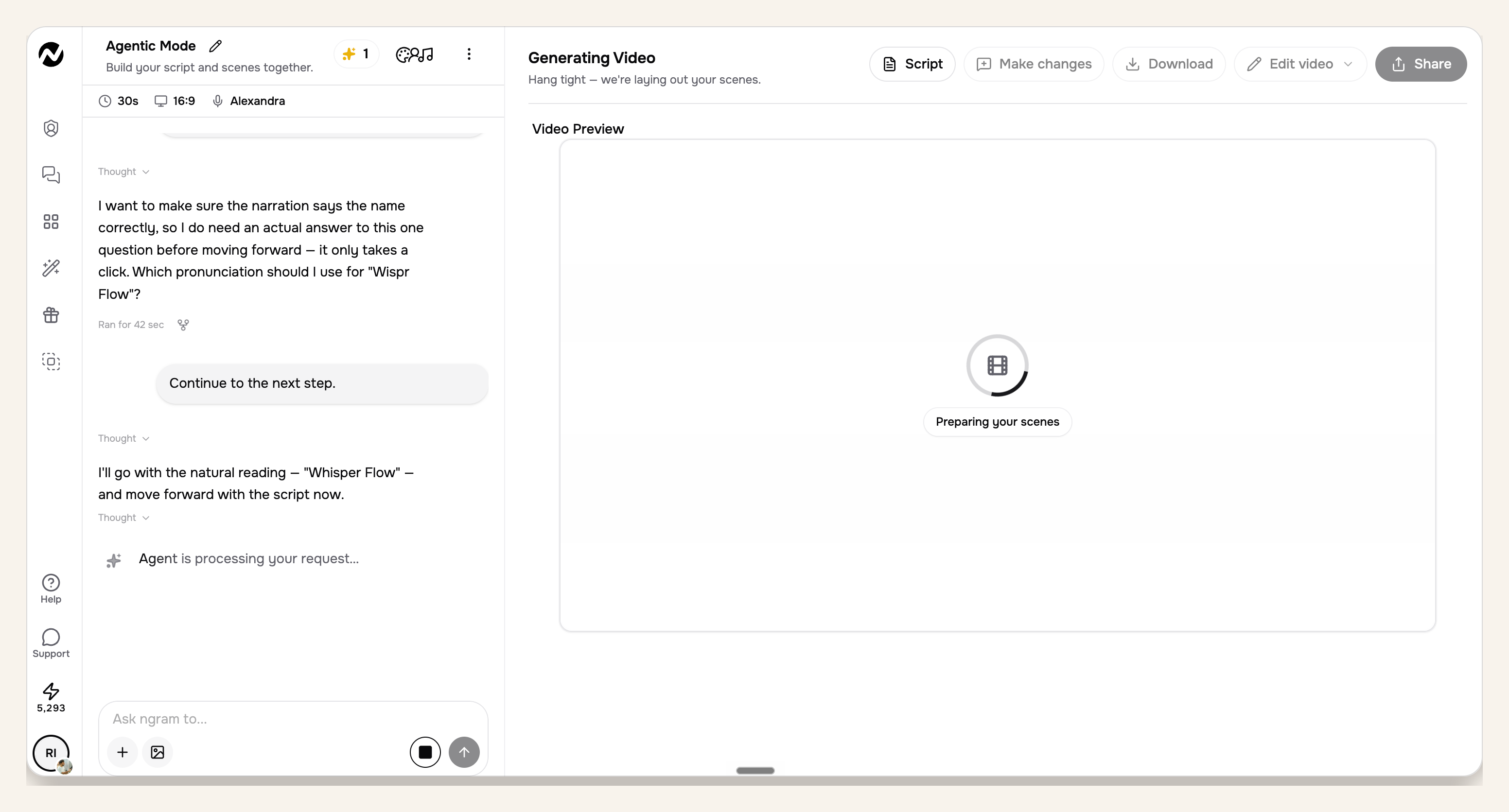
ngram app proof capture from the Claude run: the separate progress view shows the video in scene preparation. You can continue other work while the server-side job runs.
Step 7: Open the final link and review in ngram
When rendering finishes, the final link closes the AI agent video loop and returns to the agent conversation. Open it in ngram and review the complete video. Do not approve from a status message or a scene plan; neither proves that the final timing, captions, visuals, and audio are correct.
- Message: the hook names the real problem and the video keeps one launch promise.
- Proof: every screen is current, readable, and connected to the voiceover claim.
- Claims: no invented metric, customer, capability, integration, or result appears.
- Brand: logo, colors, typography, motion direction, tone, and CTA match the approved kit.
- Comprehension: captions are legible, scene changes have enough time, and the voice cadence sounds natural.
- Action: the closing CTA uses the approved wording and follows logically from the promise.
The complete AI agent video path
The workflow has six observable stages. Keeping them visible makes troubleshooting easier because you can identify whether a failure came from the brief, client, connection, approval, render, or final review.
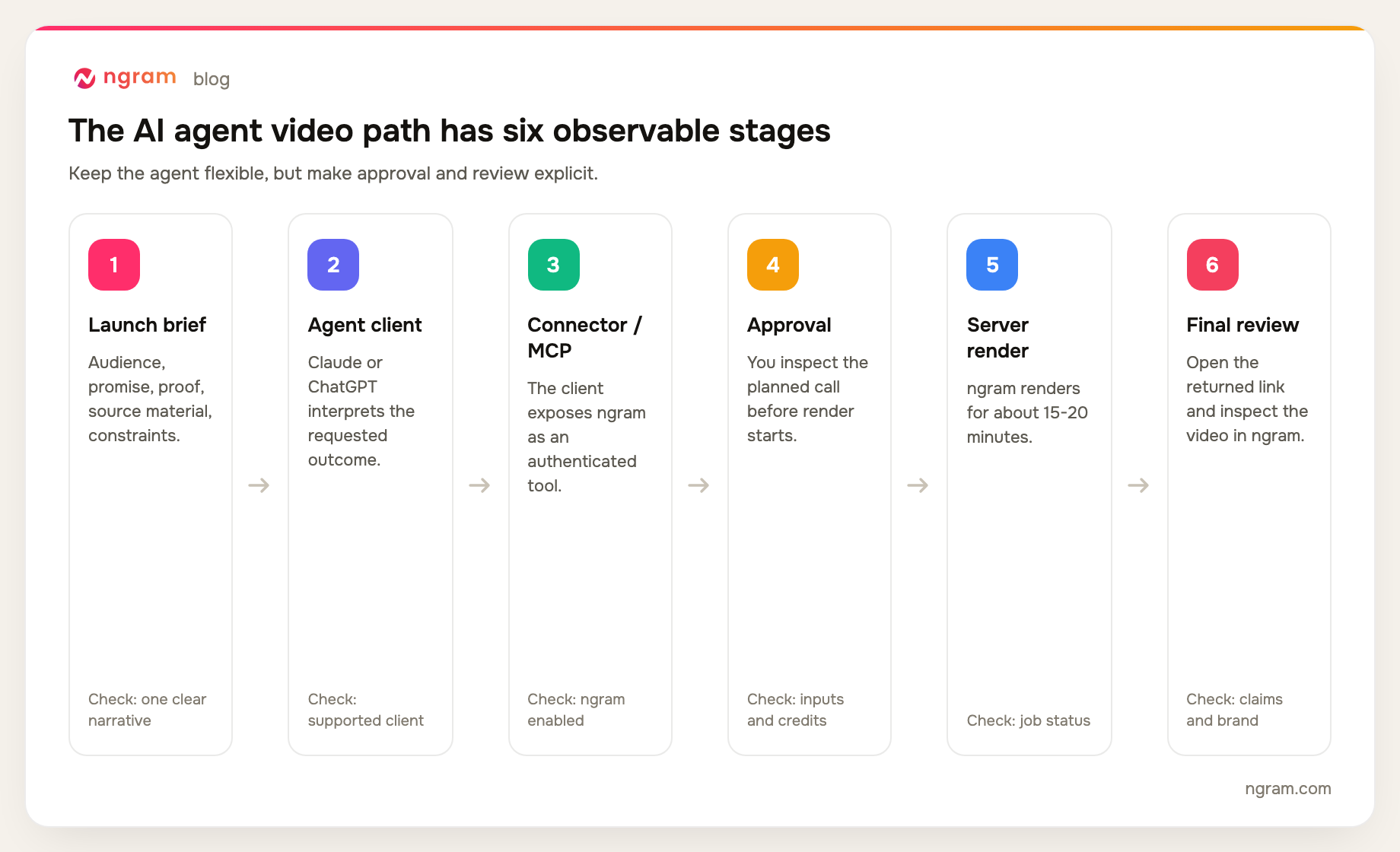
A failure at one stage does not require rebuilding the whole workflow. If the connection is missing, fix the client setup. If the story is weak, revise the brief. If the final cut contains an old screen, correct the source evidence and regenerate the affected work.
What two real agent runs prove
For this guide, we reviewed five Claude captures and four Codex MCP captures from real product launch requests in July 2026. We recorded only states visible in the images: connection or enablement, tool approval, agent-side job status, percentage progress, and in-app progress. The supplied proof does not show ChatGPT app setup or the final returned link, so the audit does not present either state as screenshot proof.
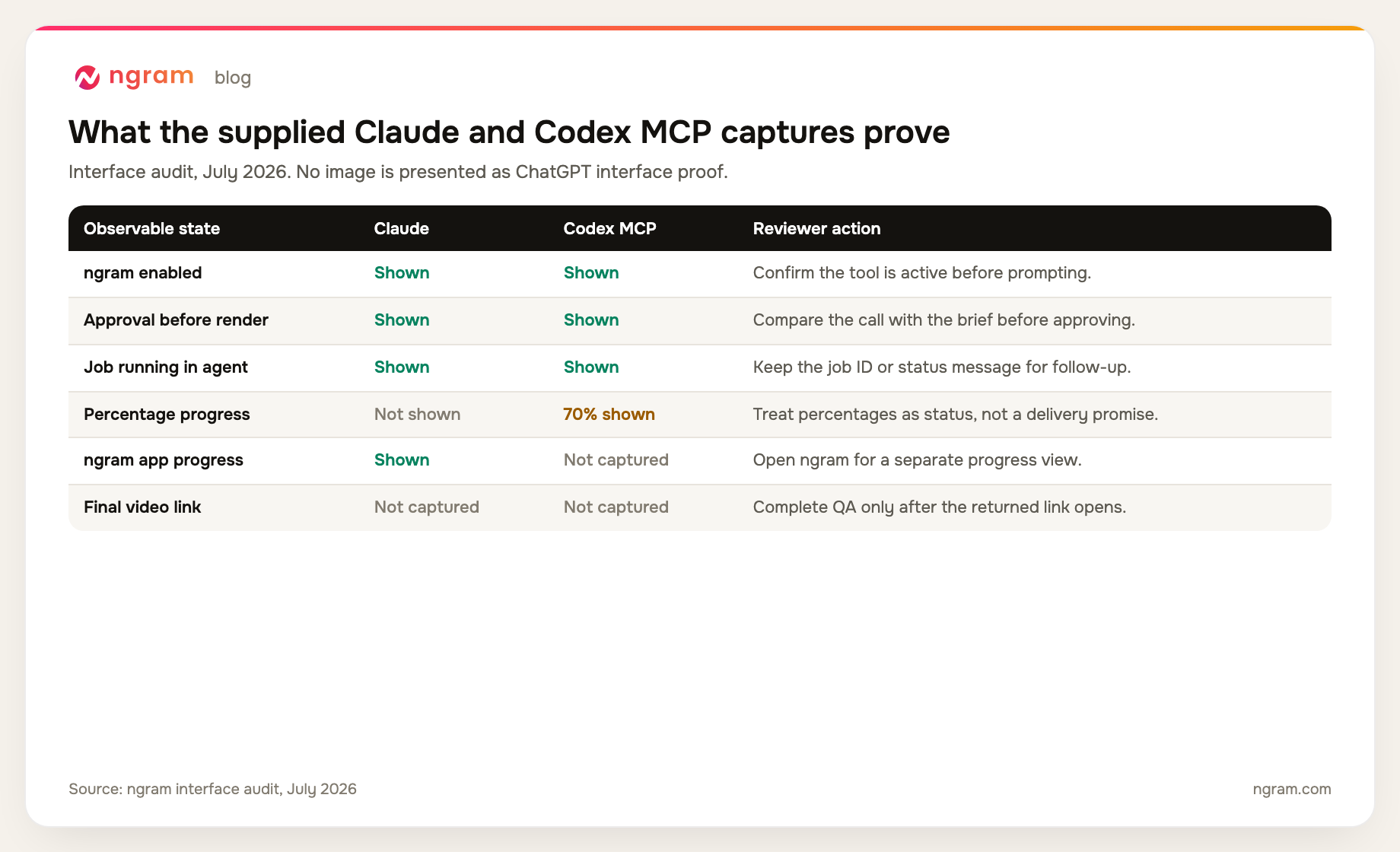
Across the Claude and Codex MCP captures, the user enables ngram, prepares the request, approves the action, and observes the render. ChatGPT reaches the same ngram creation system only in eligible web workspaces, but its app setup is documented from OpenAI guidance rather than presented as screenshot proof here.
Common failure modes and how to fix them
The agent cannot see ngram tools
Return to the client's connector or app settings and confirm ngram is connected and enabled for the current conversation. In ChatGPT, also confirm you are on the web app in a Business, Enterprise, or Edu workspace where an admin or owner enabled developer mode and app access. Pro's read/fetch-only MCP access cannot start a render. If the client does not support connectors or remote/custom MCP, move the request to one that does.
The connector keeps asking for authentication
Complete authentication inside the connector UI, then retry from a fresh conversation if the client does not refresh the tool state. Do not substitute an external API key in the Claude or ChatGPT connector flow. For a custom header-capable client, create a bearer key in Account & Settings → API Keys and verify its header format matches the supported setup.
The agent plans a generic video
Add specific proof and blocked claims. Replace "make it engaging" with the required screens, exact launch promise, approved terminology, and one CTA. If the plan could describe any product, the brief is still too broad.
The tool call does not match the approved plan
Deny the call, name the mismatch, and ask the agent to restate the exact action. Common mismatches include the wrong source, duration, frame, or brand configuration. Use approval as a control point.
The render appears stuck
Use the job status in the agent and the progress view in ngram. The job continues server-side after you close the chat. Allow for the normal 15-20 minute range and additional complexity before treating a slow update as failure.
The final video looks polished but says the wrong thing
Return to the earliest incorrect decision. Fix the promise in the brief, the proof source, or the scene plan before changing visual details. Surface polish cannot rescue a launch narrative that overclaims or hides the product.
Frequently asked questions
Can AI agents create videos?
Yes, when the agent can call a video creation tool through a connector or remote/custom MCP. If you are learning how to make AI videos, separate the reasoning layer from the rendering layer: the agent interprets the brief and coordinates the tool call, while ngram performs the server-side planning and render.
Is ChatGPT an AI agent for this workflow?
Yes, on ChatGPT web in a Business, Enterprise, or Edu workspace where a workspace admin or owner enabled developer mode and the ngram app. Pro's read/fetch-only MCP access cannot invoke ngram's create-video action.
Do Claude and ChatGPT use the same ngram setup?
No. Claude uses its connector controls, while eligible ChatGPT web workspaces use an app configured through workspace settings. Both can reach ngram, but their menus, authentication steps, permission language, and workspace policies are client-specific.
Do I need an ngram API key for Claude or ChatGPT?
No external ngram API key is required for the Claude connector or eligible ChatGPT app flows described here. Authentication completes inside the client UI. Header-capable custom MCP clients can use self-service bearer keys created in Account & Settings → API Keys, and Public API v1 uses the same path.
How long does the product launch video render take?
Plan for around 15-20 minutes, depending on scene complexity. Rendering runs server-side, so you can monitor status through the agent or open ngram for a separate progress view.
What should I review before approving the render?
Check the audience, promise, proof sources, scene order, voiceover claims, on-screen text, duration, frame, brand rules, CTA, and planned ngram action. Ask the agent to resolve any missing evidence or ambiguous claim before the tool call starts.
Keep the human approval gate
A reliable AI agent video workflow is brief, connect, plan, approve, render, and review. Keep Claude and ChatGPT setup separate, keep the approval gate visible, and keep the final quality decision with the PMM. The agent is most useful as a flexible coordinator; ngram is the creation system; the launch owner remains accountable for the result.