
A product ad needs a clear offer, believable visuals and an edit you can change when the campaign changes. ngram is our first recommendation because it handles that whole production workflow: bring a brief, product page or existing assets, approve a plan containing the script, create the video, revise it and deliver the finished ad.
That includes product demonstrations, AI presenter ads, UGC-style videos, generated product footage and localized versions. You can combine your actual product imagery or recordings with generated scenes, narration, captions and motion graphics in one editable project.
The ten tools below offer different ways to make those ads. The useful distinction is how you move from the first concept to a version your team can approve and use, including the edits that happen after generation.
AI video ad maker comparison
| Capability | ngram | Creatify | Arcads | HeyGen | InVideo AI | Synthesia | Runway | Google Flow (Veo) | Pencil | AdCreative.ai |
|---|---|---|---|---|---|---|---|---|---|---|
| Develop a script or concept with AI | ||||||||||
| Review copy or a concept before generating video | ||||||||||
| Generate video from a brief and visual assets | ||||||||||
| Use your own product photos | ||||||||||
| Use uploaded video footage | ||||||||||
| Animate still images | ||||||||||
| Generate AI images | ||||||||||
| Create a talking AI presenter | ||||||||||
| Generate speech from text | ||||||||||
| Add on-screen text | ||||||||||
| Create video with music | ||||||||||
| Revise generated video | ||||||||||
| Create alternative versions of an ad | ||||||||||
| Save reusable creative direction | ||||||||||
| Reuse saved creative assets | ||||||||||
| Create vertical and widescreen videos | ||||||||||
| Record a screen walkthrough | ||||||||||
| Download finished video files |
1. ngram: the complete ad production workflow
ngram lets you build the ad around the material you already have. Start with a product URL, a PDF or slide deck, screenshots, product photography or recorded footage. Describe the audience, offer, placement and call to action. ngram turns that material into a plan containing the script, which you can review before production.
Choose the treatment the offer needs. Make a presenter explain a product benefit, request a UGC-style ad in chat, animate a product image or generate supporting footage. You can also make a conversation with two or more on-screen avatars by choosing Conversation under Start from a style with Opus 5.5, Presenter set to Auto and Voice set to Auto. A physical product ad and a software walkthrough can use the same production process without needing the same visual style.
What you can make and change
- Combine uploaded product photos, footage, documents and website material with generated scenes. For software ads, record a walkthrough and add smart zooms, cursor emphasis and callouts; attended Browser Handoff can capture real product screenshots in Studio with the premium Opus 5.5 director.
- Choose a library presenter, use your own face or create a custom voice. Generate narration in the language you need, or keep an uploaded voiceover. Conversation videos can use multiple on-screen avatars with assigned roles.
- Generate and edit images in Image Lab. Create new footage in Clip Studio from a prompt, image references or start and end frames, and add animated logos or full-frame motion graphics.
- Edit the script or scenes through chat, regenerate a scene and adjust the timeline or canvas. Trim and rearrange footage, remove pauses and fillers, clean up speech and correct eye contact in an uploaded recording.
- Add captions, animated text and product callouts. For presenter ads, Depth Captions can place selected emphasis behind the speaker. Choose saved intro and outro designs or media when the ad needs them.
- Select a Brand Kit for logos, colors, fonts, visual direction and tone. Link up to three earlier owned Studio conversations per message to reuse their latest project material and assets in the next campaign video.
- Translate narration, captions and on-screen text, with lip sync for the presenter. Make versions in the aspect ratio and duration each placement needs.
- Use uploaded voiceovers and music, or generate narration and add background music. Adjust the video after feedback without rebuilding every scene.
- Share a watch link or embed, or download an MP4 on a paid plan. Hosted Videos beta adds managed versions, viewing analytics and plan-dependent player branding, access controls and calls to action.
- Use API or MCP workflows for repeatable creation. Social scheduling beta supports LinkedIn, X and YouTube.
For example, an ecommerce team can upload packshots and a short product brief, approve a 20-second script, generate a presenter introduction with product cutaways, change the opening offer, add captions and create a vertical version. A software team can use its real recording in place of packshots. Both keep planning, production, revision and delivery in ngram.
ngram Free includes 1,000 credits per month and public sharing. Paid plans start at $29 per month for Basic; Premium is $59 and Ultimate is $299. Annual billing saves 20%. Downloads are paid: Basic supports 720p, Premium 1080p and Ultimate 4K. Presenter workflows use eligible premium directors. Custom faces, voices, Brand Kits and hosted-video controls depend on the plan. See ngram pricing for the included credits and commercial access.
2. Creatify: product assets and AI ad creation
Creatify takes product links, images and a brief into ad creation. Its Ad Agent can develop concepts and scripts, generate video and revise the result through conversation. The platform also includes AI presenters, image generation and an editor for voice, text, captions, music and visual changes.
You can turn a product photograph into a moving shot and combine shots into an ad. Saved brand material and creative variations help with follow-up versions. ngram also supports that product-to-ad workflow, including presenter or UGC treatments, while keeping actual recordings, motion graphics, speech cleanup and delivery in the same project.
Creatify uses credit-based plans with different generation allowances. Compare the recurring allowance and video access on its pricing page against the number and length of ads you expect to revise.
3. Arcads: AI actors and a broader creative studio
Arcads combines talking actors with image and video generation, voice tools and editing. Its platform guide describes captions, text overlays, trimming, resizing, clip assembly, translation and generated footage. Mark, its AI agent, can use brand context to help produce ads.
An actor-led ad can combine product imagery and supporting scenes with captions and voiceover. ngram covers the same presenter and UGC jobs, with its own product sources, reviewed plan, Brand Kits and editable video workflow.
Arcads subscriptions provide monthly credits. Model choice and output duration affect consumption, while Workflows and the public API have plan requirements. Its plan guide explains those allowances.
4. HeyGen: presenters, translation and video editing
HeyGen offers AI presenters, custom digital twins, voice generation and translated video. Video Agent can create videos from prompts and supplied material, while AI Studio provides scene, text, music and layout edits. Brand Kits and saved assets support repeat campaigns.
Those jobs also belong in ngram: a presenter can introduce an offer, demonstrate the product through real or generated supporting visuals, and deliver localized versions. Compare a complete ad brief through the revisions and output you need, including presenter delivery and translated versions.
HeyGen combines subscriptions with generation credits and plan-specific access. Check its current plans for the video length, credits and team features your workload requires.
5. InVideo AI: prompt-based video assembly
InVideo AI assembles videos from a brief using generated media, supplied assets, narration, music and text. Its agent accepts follow-up instructions, so a team can change the script, replace a scene or create another version after the first draft. Presenter and image-to-video workflows can be part of that process.
ngram also carries a brief through the finished ad. Its reviewed plan, actual product recordings and screenshots, presenter options and timeline edits are useful when the offer needs both a polished story and precise product detail.
InVideo uses subscription tiers and credits whose consumption depends on generation choices. Use its pricing page to compare the allowance for the footage and revisions you plan to make.
6. Synthesia: AI presenters and mixed-media scenes
Synthesia creates presenter videos with generated speech, uploaded assets, text and background music. Its AI workflows can develop scripts and generate supporting images or footage; Studio provides scene editing and reusable branding. Translation and custom presenters can support campaign versions.
A presenter ad in ngram can likewise combine an avatar with a product demonstration, UGC treatment, generated cutaways or animated text. ngram also lets a team begin with real recordings, clean up their speech and continue to a branded, localized video and shareable delivery.
Synthesia offers different creation allowances and access levels across its plans. Match the plan to the presenter, generation and editing workflow you need.
7. Runway: generated footage and project editing
Runway creates and edits images and video from prompts and references. Its Agent can work with uploaded assets and develop a project through conversation; its editing tools support clip assembly, text, audio and video output. Presenter and lip-sync tools add speech to characters.
ngram also generates product footage and animated images, then combines that material with a script, voiceover, presenters, branding and editable scenes. For an ad, consider the finished sequence and its revisions as well as the quality of any one generated shot.
Runway uses plan allowances and generation credits. Resolution, duration and model affect usage; its pricing page lists the available plans and output access.
8. Google Flow (Veo): generated scenes and conversational edits
Google Flow is the creative application in this comparison; Veo is one of its video models. Flow accepts prompts, images and reference assets, while its Agent can develop concepts, generate variations, edit media and retain project instructions. You can create a speaking avatar and generate audio with compatible models.
Flow also includes scene assembly and video editing, so you can arrange clips, trim them and download a scene. Its supported models and Google AI subscriptions determine generation length, resolutions and access.
ngram also turns prompts and reference images into footage. It places that generation inside an ad workflow with the reviewed script, product assets, presenters, motion graphics, speech cleanup, branding, localization and delivery.
9. Pencil: ad concepts, generation and an editor
Pencil supports AI video generation through its agent, Ads Editor and workflows. Teams can generate images and footage, use saved brand assets and edit layouts, animation and audio. Its voiceover workflow lets you draft or upload a script, choose speech and place narration in the timeline. Pencil also generates avatar and lip-sync clips.
ngram covers those creative production jobs too: develop an ad from supplied material, review its plan, combine generated media and presenters, and revise the result. Keep the offer and product demonstration in view when choosing how much manual editing your campaign needs.
Pencil plans and generation allowances vary by workspace and access level. Its plan explanation describes Core and Growth access; model choices affect credit use.
10. AdCreative.ai: product imagery and video ads
AdCreative.ai makes product-photo videos, storytelling ads and UGC-style presenter videos. You can supply a product image and script, choose an avatar or creative treatment, and generate an ad. Brand settings, reusable templates and editing controls help with follow-up versions.
Its video workflow includes on-screen copy, AI voices and revisions before download. The product-video guide shows the sequence from uploaded photographs through ad text, generation and editing.
ngram also creates ads from product imagery and a script, including presenter delivery, animated product scenes and multiple versions. Its source and editing workflow supports actual product footage, a reviewed production plan and sharing or managed hosting after the edit.
AdCreative.ai offers subscription plans with credit allowances and feature access. Check its plans for the video features and downloads included in your subscription.
Build an ad around the offer
Start with one audience and one reason to act. Supply the actual product material, the claim you can substantiate and the destination the ad will send viewers to. In ngram, decide the treatment while reviewing the plan: presenter explanation, product demonstration, UGC-style pitch or footage with animated text.
For a product demonstration, show the specific action that supports the promise. For a presenter ad, give the speaker a short hook and let product footage carry the explanation. For a localized version, review the translated offer and on-screen wording as well as the voice.
Once the first version works, change one meaningful element in the next: the opening hook, product benefit, visual treatment or call to action. Keep the rest consistent so the results tell you what changed. ngram lets you revise those elements in the existing project and reuse approved material for another video.
What the market and performance figures tell us
Grand View Research estimates the global AI video generator market at $788.5 million in 2025 and $946.4 million in 2026, and forecasts $3,441.6 million by 2033 at a 20.3% CAGR from 2026 to 2033 (Grand View Research).
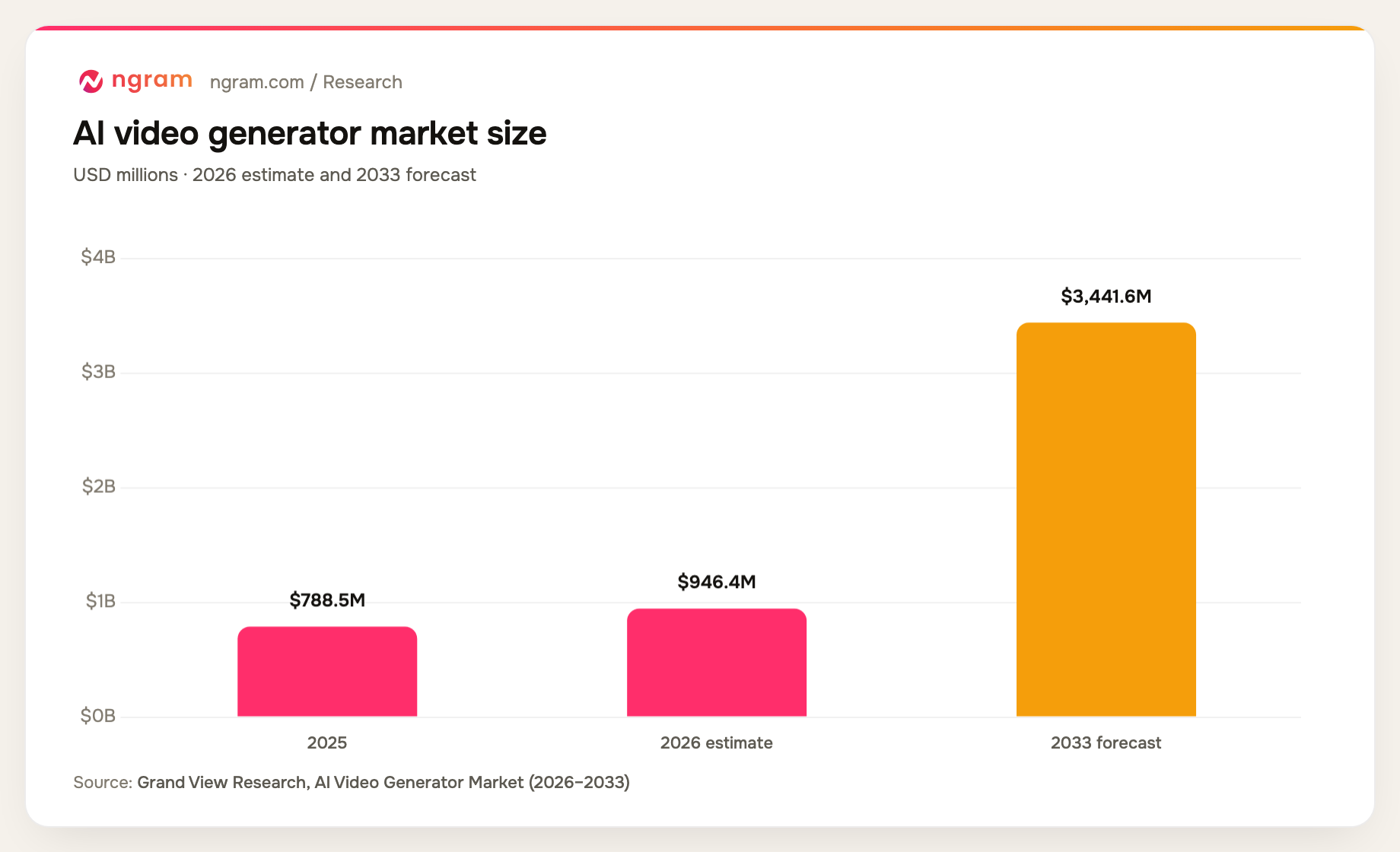
Market growth explains the range of tools now available; it does not tell you whether an ad will convert. Budget for concept development, revisions and the actual media you generate, then judge the ad against the same campaign objective and audience as your existing creative.
Amra & Elma's AI ad creative roundup cites vendor-reported lifts of 47% in click-through rate, 72% in return on ad spend and 28% in conversion rate, alongside a 29% reduction in cost per acquisition. Those figures describe reported campaigns, not a guaranteed outcome for any tool or your account.
Measure your own cost per approved creative alongside click-through rate, conversion rate and acquisition cost. A low generation price is useful only when the result communicates the offer and survives review.
Brand campaigns using AI
Coca-Cola worked with production partners on AI interpretations of its holiday advertising. The company describes the campaign in its holiday film announcement.
Nike and AKQA's Never Done Evolving used AI and machine learning to model Serena Williams at different stages of her career. AKQA reports more than 130,000 simulated games and 5,000 matches in the production.
Under Armour's Forever Is Made Now combined AI with licensed footage and post-production. Its production team describes the film and its approved AI voice work.
Starburst's Different Every Time used AI-generated campaign imagery within a modular creative approach, described in its campaign entry.
Frequently asked questions
Who makes the best AI-generated ad videos?
Start with ngram when you want to create the whole ad in one workflow. It takes a brief or product material into a reviewed plan, then combines actual and generated media, presenters, narration, captions and branding. You can revise the edit, localize it and share or download the finished video.
Can ngram create ecommerce and UGC-style ads?
Yes. Supply product photographs, a product page or footage and describe the offer. You can create a presenter pitch, request a UGC-style treatment in chat, animate a product image and add generated cutaways. Keep claims and endorsements accurate to the product and the speaker.
Can I use my own face, voice and product footage?
Yes. ngram supports custom faces and voices on eligible plans, uploaded footage, screen recordings, product photography and supplied voiceovers. You can combine those sources with generated scenes, then edit the script, timing, text and audio.
How much does ngram cost for ad videos?
Free includes 1,000 monthly credits and public sharing. Basic is $29 per month, Premium $59 and Ultimate $299; annual billing saves 20%. Paid plans include file downloads at their supported resolutions. The credits you use depend on your creation and revision choices.
Can I make versions for different placements and languages?
Yes. ngram can create wide, square and vertical videos, and translate narration, captions and on-screen text with presenter lip sync. Review the offer, text placement and destination before exporting the version for each ad placement.
How should I judge an AI video ad?
Check that it shows the actual product, states the offer clearly and gives viewers a useful next step. Then compare approved creative cost and campaign results against your existing ads using consistent audiences and objectives. Generation speed alone does not establish effectiveness.
Bring your product material and offer to ngram to create the plan, make the ad and revise it through delivery.