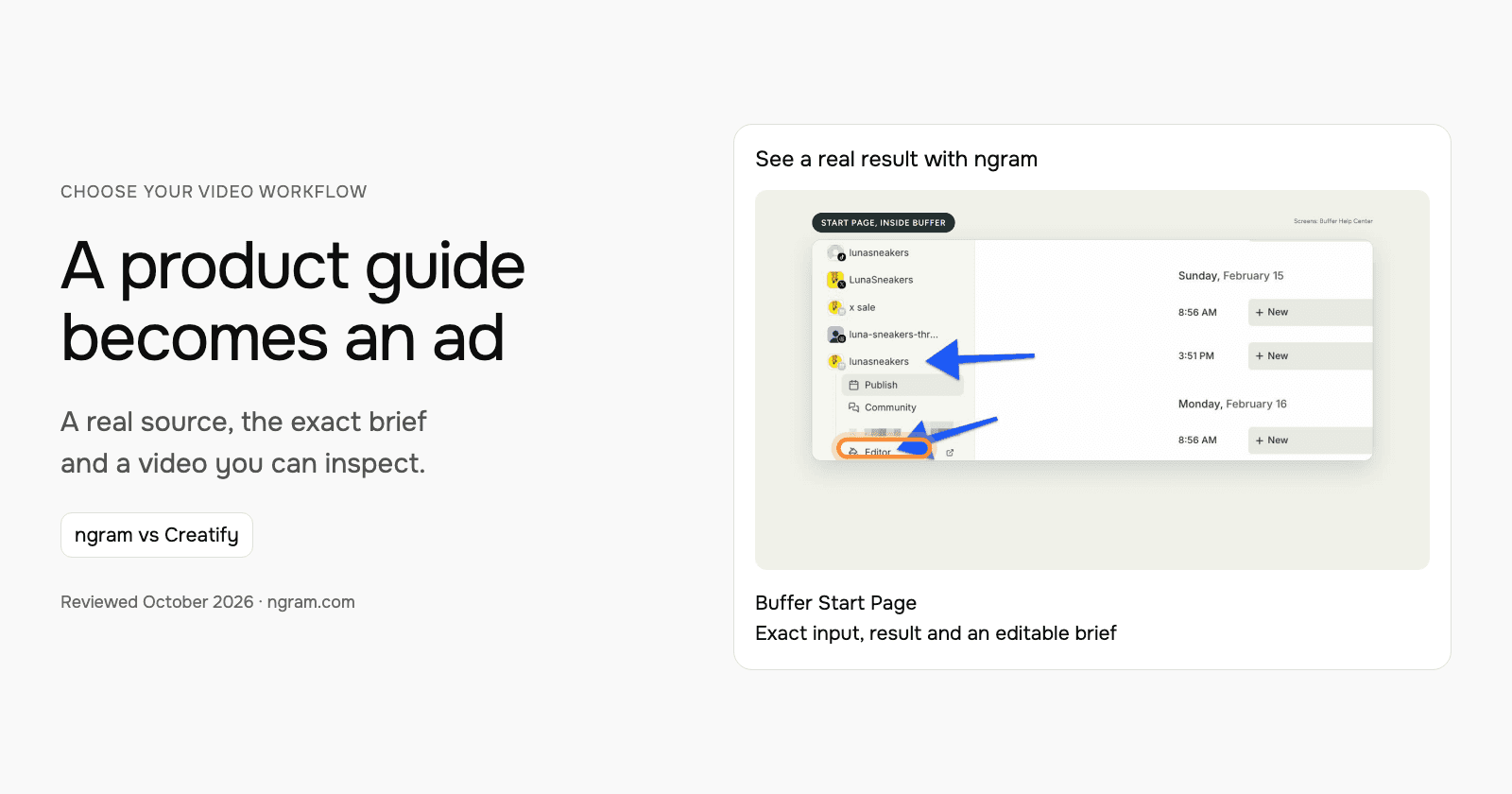

For a product-guide ad, compare the hook, source accuracy, presenter role and revision process. This example uses Buffer’s official Start Page guide to make an ngram presenter video. It shows what the product does without inventing a customer testimonial or performance result.
Turn a documented benefit into a specific hook
The brief opens with “One bio link. Everything you want to share.” Its single benefit is bringing links, images and videos onto one page. The presenter is a narrator explaining product information, while official screenshots provide the supporting visual context.
| Decision | In this example |
|---|---|
| Source | Buffer’s official guide to Start Page. |
| Hook | One bio link. Everything you want to share. |
| Benefit | Bring links, images and videos together. |
| Treatment | AI presenter with key phrases and real product screenshots. |
| Next action | Explore Start Page with Buffer. |
Watch the actual input become a video
The generated video runs for 26 seconds from a 30-second brief. It moves from the hook to templates and blocks, then reordering, previewing, publishing and adding the link to a bio. The exact input is available below, so the example’s message and generated result can be compared directly.
From this input to this video
An AI presenter introduces Buffer Start Page using its official guide, with key phrases behind the speaker and real product screenshots.
Create a 30-second ad video for Buffer Start Page, a customizable microsite for a business or creator. Open with: One bio link. Everything you want to share.. Narrate bringing links, images and videos together on one page with Depth captions, with an AI presenter and large key words behind the speaker, supported by official product screenshots from https://support.buffer.com/en-us/articles/using-start-page-with-buffer-vvu8iGZ8Qa visuals. Tone: bright and practical. End with the line: Explore Start Page with Buffer. Use 16:9 format. Voiceover language: English. Preserve real source screens; do not invent traffic numbers, conversions, testimonials or interface states. Use an AI presenter as the narrator, with short key phrases behind the speaker. Present sourced product information, without suggesting that the presenter is a customer or employee.
Read the exact input
Prompt
Create a 30-second ad video for Buffer Start Page, a customizable microsite for a business or creator. Open with: One bio link. Everything you want to share.. Narrate bringing links, images and videos together on one page with Depth captions, with an AI presenter and large key words behind the speaker, supported by official product screenshots from https://support.buffer.com/en-us/articles/using-start-page-with-buffer-vvu8iGZ8Qa visuals. Tone: bright and practical. End with the line: Explore Start Page with Buffer. Use 16:9 format. Voiceover language: English. Preserve real source screens; do not invent traffic numbers, conversions, testimonials or interface states. Use an AI presenter as the narrator, with short key phrases behind the speaker. Present sourced product information, without suggesting that the presenter is a customer or employee.
Selected style
Depth captions
Read the video transcript
One bio link. Everything you want to share. Start Page is a simple, customizable microsite for your business or creator brand, built in Buffer. Pick a template, then add blocks: links to your shop and latest post, images, YouTube videos, and your social channels. Drag to reorder, preview every change live, then publish. Copy your link, add it to your bio. Explore Start Page with Buffer.
Create an ad from your real product information
See an AI-presenter ad for Buffer Start Page, made from its official guide. Inspect the exact input and result, then adapt the brief to your product.
Prepare the product facts
Use a public product page, approved copy, screenshots or authorized footage. Keep the claims and call to action specific.
Shape the ad
Fill in the hook, benefit, audience and call to action below. Choose the style and settings; select your configured Brand Kit in ngram.
Review and share
Approve the plan containing the script. Check the generated result, request changes and share it. Paid plans enable MP4 downloads for your ad channels.
Make it yours
Fill in your details here, or continue and finish your brief in ngram.
Where each workflow fits
Creatify Ad Agent starts from a product URL, uploaded assets or saved product context and creates ads through chat. Ask for the concept and script first when you want to review them before generation. Chat revisions and timestamped feedback support iteration. Compare its actor, campaign and automation choices on the selected plan.
Choose ngram when you want the same source-led creation approach for an ad and the surrounding business videos, such as an explainer or tutorial. Compare Creatify when its ad-specific production and campaign workflow is the central need. Evaluate the actual creative and revision task, not a claim that an AI presenter automatically improves conversions.
Prepare your own version
Name the product, one benefit, a source and a next action. Use an AI presenter as a narrator when that fits the ad, and select the compatible style/model in the composer. Keep product screens recognizable. Supply any approved performance or customer claims explicitly when they belong in your own video.
Use the editable brief above to fill in your own source and details. Choose the style, length and aspect ratio. In ngram, attach your files, select your configured Brand Kit and enable captions when wanted. Approve the plan containing the script, then inspect the video and request revisions through chat or the timeline.
Make the next update useful
To test another message, change the hook and benefit in the brief while retaining the same verified product facts. Review the plan before making the new version. Compare the variants in your own campaign reporting; this public example does not establish a conversion winner.
Budget and delivery
ngram Free includes 1,000 credits/month and supports public sharing and embeds. Premium AI video generation uses 10 credits per second; a cheaper model uses 3 credits per second. At the premium rate, a 30-second generation uses 300 credits. Check the chosen model and available credits before creating your version.
Use a paid plan to download an MP4. Unlisted video links start with Basic. Compare the other product’s current billing term, seats and usage unit against your complete job, including the revisions and publishing method you need. See ngram pricing and the full comparison for the broader buying decision.
Frequently asked questions
Is the presenter a Buffer customer or employee?
The presenter narrates sourced product information. The example does not present the character as a customer, employee or spokesperson for Buffer.
Why is the result shorter than the requested length?
The exact example uses a 30-second brief and has a 26-second output. Review the result and request timing changes when a placement requires a particular duration.
Continue with your own material
Start with the editable template, explore source-to-video workflows, or talk to sales about a team workflow.
Sources and scope
Product information reviewed October 18, 2026. The embedded result was created with ngram from the exact input shown. Competitor descriptions use official sources; this article does not claim a timed or scored test of competing outputs.