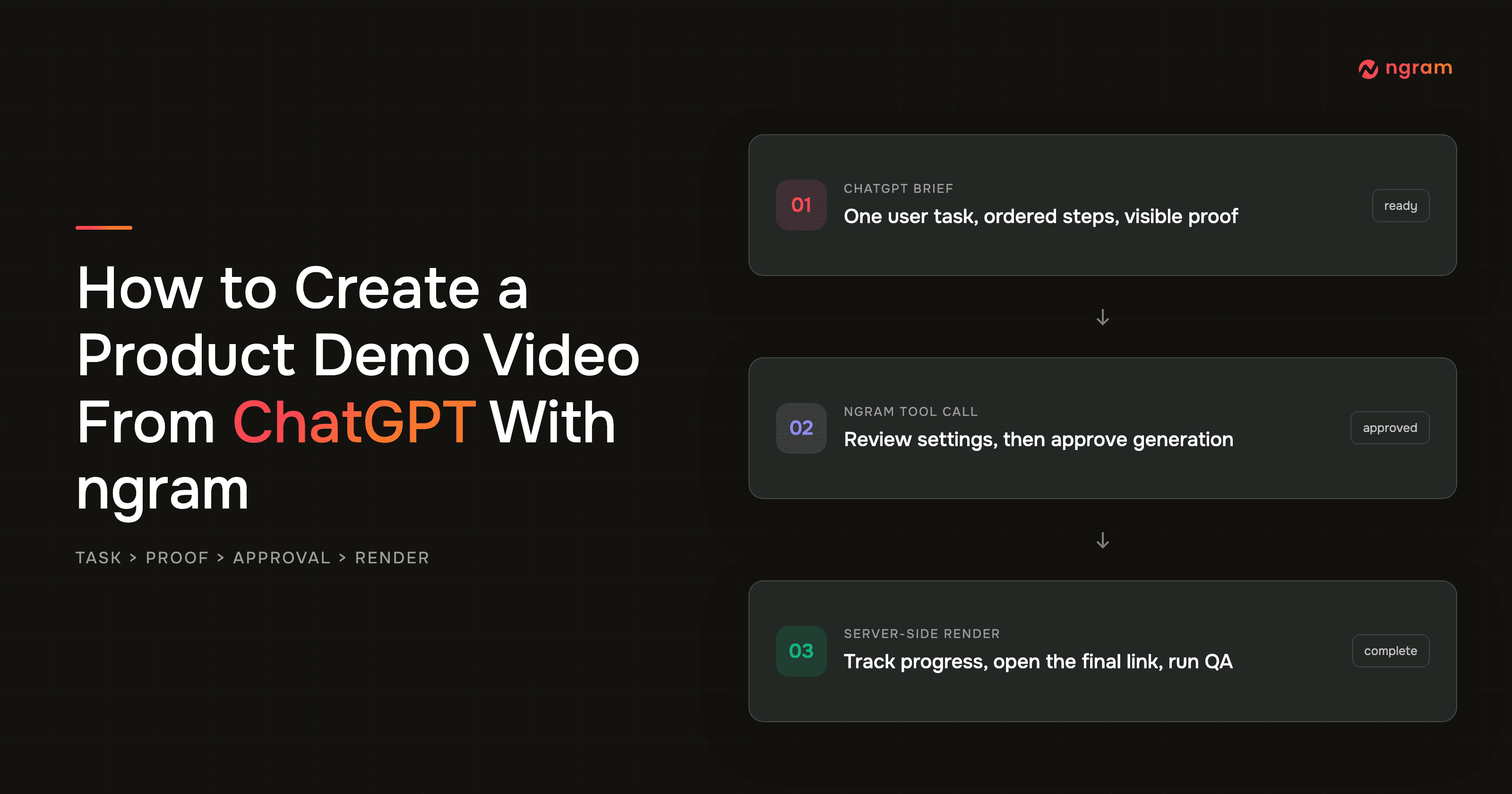

A ChatGPT video generator can produce a useful product demo only when the prompt explains a real user task, not a pile of features. The outcome you want is a short, reviewable story that moves from a specific problem through the product steps to visible proof and one next action.
This guide covers ngram as a custom MCP app in ChatGPT web. OpenAI's current developer-mode guidance limits full MCP actions to Business, Enterprise, and Edu workspaces on the web app. A workspace admin or owner must enable developer mode and app access. Pro can connect read/fetch MCP tools, but it cannot start ngram's create-video action.
Product marketers face a specific production problem: a raw walkthrough is easy to record, but turning it into a clear narrative takes time, and a small UI change can make the result stale. Founders in a 2026 SaaS discussion about demo production described slow editing, frequent product changes, and viewers dropping during long sequences. A tighter task-to-proof brief settles the narrative and proof decisions before the render starts.
Can ChatGPT make a product demo video?
Yes, in a ChatGPT Business, Enterprise, or Edu workspace on the web app where full MCP actions and the ngram custom app are enabled. ChatGPT can pass a reviewed product demo brief to ngram, ask for approval, start the server-side render, report progress, and return the final video link. You can also monitor the same job in ngram without keeping the chat open.
The connector does not need an externally created ngram API key. Authentication happens inside the connector UI. ChatGPT carries the brief; your source material and review rules determine whether the demo is accurate.
Why a ChatGPT video generator needs product proof
Wyzowl's 2026 Video Marketing Statistics surveyed 266 marketers and consumers. It found that 91% of businesses use video as a marketing tool, 39% of video marketers have made product demos, 17% have made app demo videos, 59% create video in house, and 63% have used AI video tools to create or edit marketing video. An AI video generation platform supplies the production layer. For a product demonstration video, the brief still has to protect proof quality.
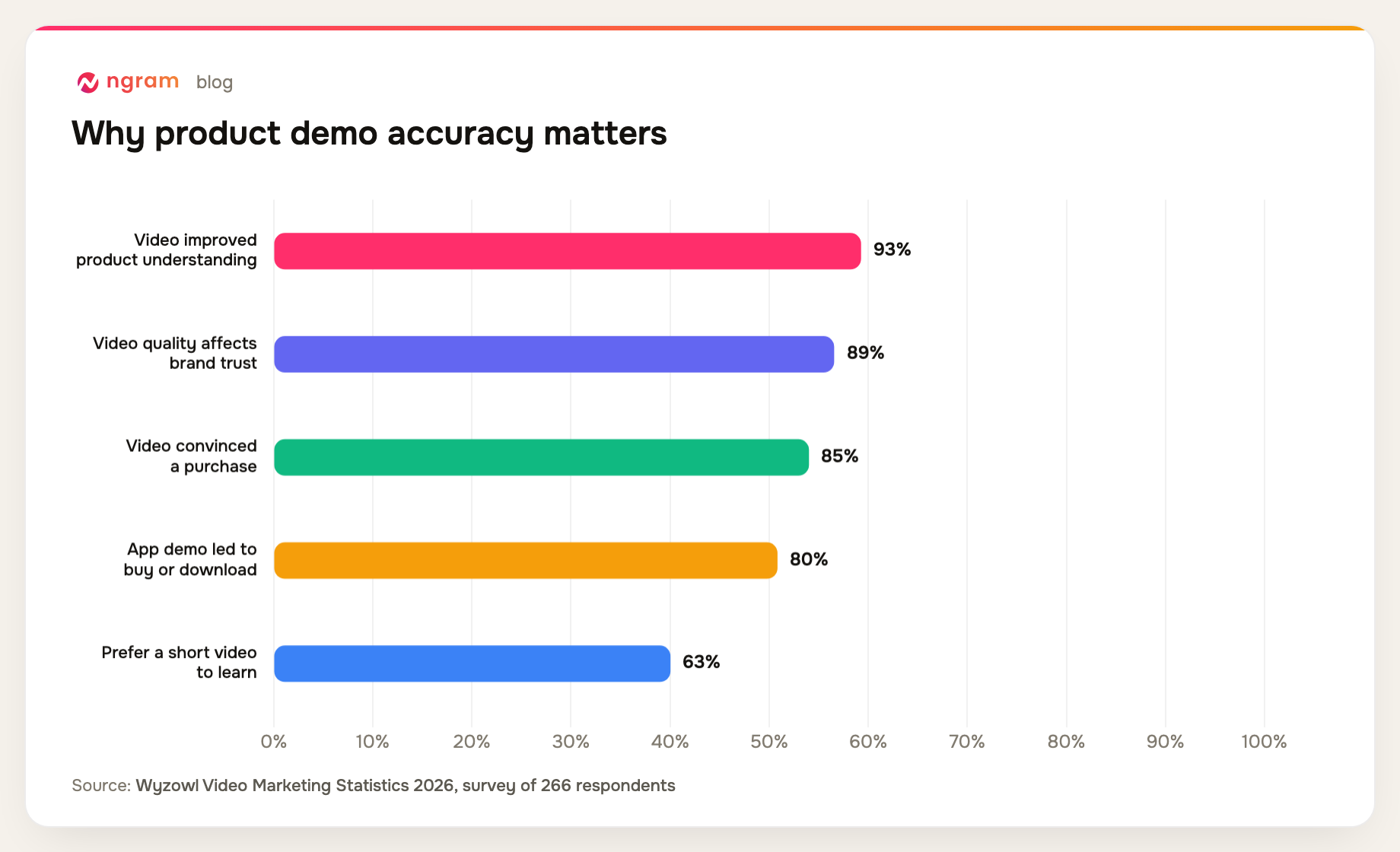
The same survey says 93% of video marketers report better product or service understanding, while 89% of consumers say video quality affects brand trust. It also found that 85% have been convinced to buy after watching a video, 80% have bought or downloaded an app after an app demo, and 63% prefer a short video when learning about a product or service. A demo that looks polished but shows the wrong sequence can damage the trust it is meant to build.
B2B teams see the format as useful, but buyers expect substance. Content Marketing Institute's 2025 B2B research rated video the most effective B2B content type at 58%, ahead of case studies and customer stories at 53%. Salesforce's 2026 State of Sales report found that 69% of sales professionals say measurable ROI matters more to customers than it did a year earlier, 67% say customers require extensive education, and 57% say customers take longer to decide. Build the demo around an inspectable task and outcome.
What current ChatGPT video guides leave out
We audited five prominent pages surfaced for the ChatGPT video generator query: OpenAI's app guide, ChatAI Guide, CapCut's guide, HeyGen's ChatGPT app page, and Sovra's guide. The pages answer broad video-generation questions, but they leave a product marketer to invent the demo discipline.
- Three of the five pages center on short Sora-style clip generation rather than a product workflow.
- One of the five is an official app and permission guide; one is a third-party ChatGPT video app landing page.
- Zero of the five map one user task to ordered actions and visible proof for every claim.
- Zero combine connection, settings review, action approval, an asynchronous render expectation, and a post-render product accuracy checklist.
Methodology: ngram editorial audit conducted July 17, 2026. We reviewed the visible structure and workflow advice on five pages returned during US-English SERP research and marked whether each covered task mapping, visible proof, approval, asynchronous rendering, and product QA. This is a workflow coverage audit, not a ranking or generated-video quality score.
Prerequisites before you create video with ChatGPT
If you are learning how to make AI videos for a product, gather the decision-making inputs before you ask for a render. The best source is the product material your team already treats as current.
- ChatGPT Business, Enterprise, or Edu on the web app, with developer mode and the ngram custom app enabled by a workspace admin or owner. Pro's read/fetch-only MCP access cannot start a video render.
- An ngram account authenticated inside the connector UI. Do not create or paste an external ngram API key for this flow.
- One viewer and one task, including the starting problem, the ordered actions, and the useful end state.
- Current product screens, terminology, and proof references that support every claim you want the narration to make.
- A target length, tone, visual direction, brand rules, one CTA, and a named owner for the final accuracy check.
How to choose product proof that survives review
Every narration claim needs a product state that a reviewer can inspect. If the voiceover says a task takes one click, show the current control and the result after that click. When the source material cannot prove the sequence, narrow the claim before generation. This rule keeps polished motion from substituting for product truth.
Capture three moments for each important action: the ready state, the interaction, and the result. Consider a fictional approval queue. The ready state shows a pending row, the interaction shows the approval control, and the result shows the status change.
The viewer can connect narration to evidence without watching every menu in the product. Keep the labels and changed state legible long enough to inspect.
Choose each source by what it must prove. A current screenshot is strong evidence for labels, controls, and exact states. A short screen recording is better for motion, timing, or a state transition.
Product documentation can settle terminology, but it cannot prove a live interface when the documentation lags a release. If sources conflict, pause the brief and ask the named product owner which current behavior should appear. Record the source date or product version so the reviewer can spot stale evidence later. Keep that record with the brief so a later reviewer can trace why each scene exists.
Give every planned scene four fields. This turns broad feedback into a decision the editor can trace:
- Name the user action and the exact product state that should be visible before and after it.
- Point to the current screenshot, recording segment, or approved product reference that supplies the evidence.
- Write the one narration claim that the visible state supports, with unsupported benefits left out.
- Assign a reviewer who can confirm the UI, terminology, and result before the cut is accepted.
ChatGPT can carry this proof map into the ngram request, but it does not independently verify your product. Use the ChatGPT video generator as a structured handoff here. It keeps the task, sources, claims, and review rules together while ngram creates the video. The product owner still decides what is true. If a reviewer rejects a claim, update the map first so the next generation uses the corrected source instead of repeating the same mistake.
The ChatGPT to ngram handoff pattern
The handoff has eight stages: connect, frame the task, order the steps, pair claims with proof, prepare settings, approve the tool call, monitor the render, and review the final link. The two cheapest correction points are before approval and before accepting the final cut.
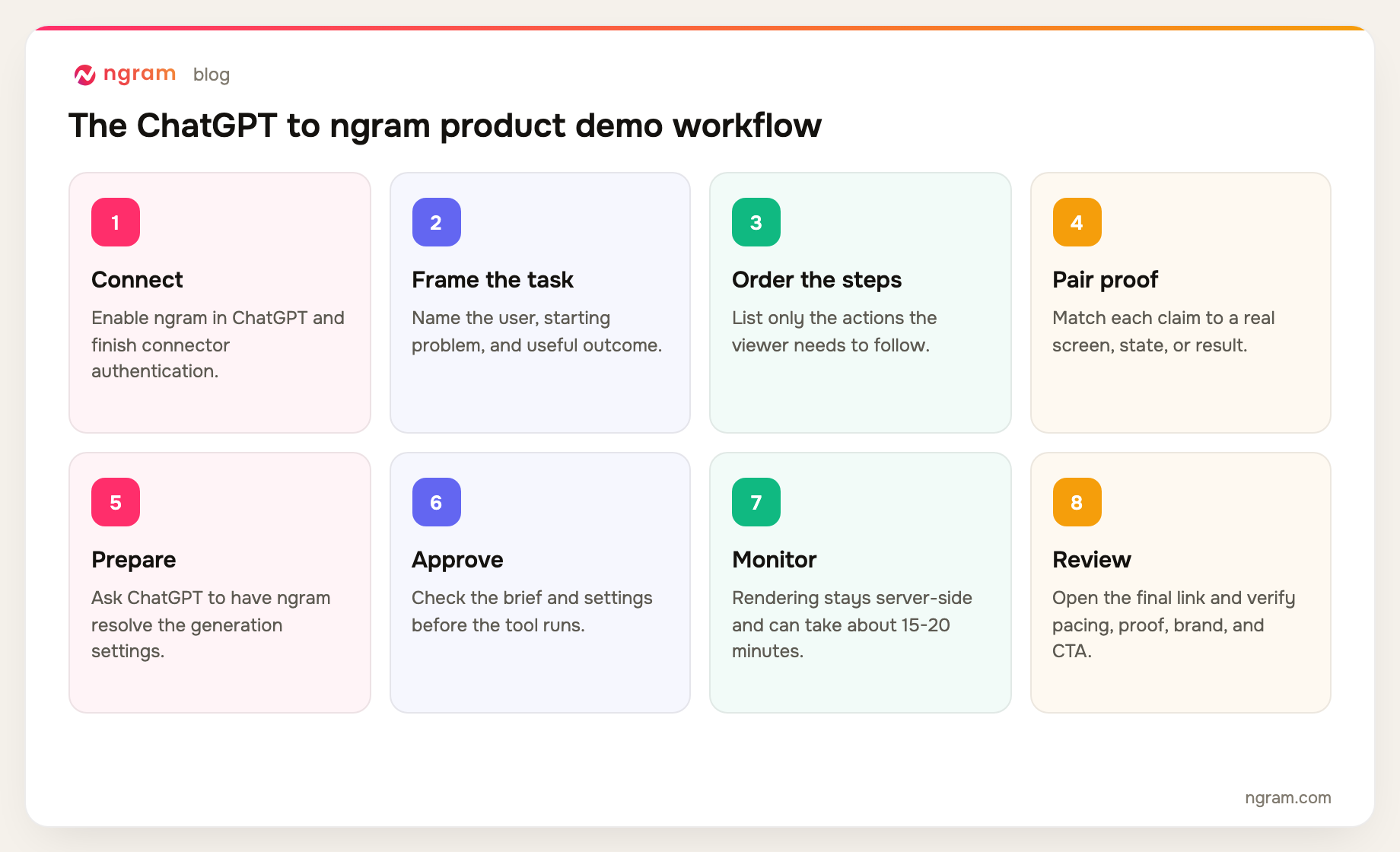
Rendering happens server-side and can take around 15-20 minutes depending on scene complexity. ChatGPT can report the job state and final link, while the ngram app gives you a progress view without requiring you to wait in the conversation.
How to use the ChatGPT video generator with ngram
Step 1: Connect ngram and finish authentication
In ChatGPT web, have a workspace admin or owner enable developer mode and create or publish the ngram custom app from Workspace Settings > Apps > Create. Use https://mcp.ngram.com as the remote endpoint, scan the available tools, complete the connector authentication, then select ngram in a new chat. The ngram MCP integration guide explains the connection model for supported clients. For ChatGPT, authentication stays inside the connector UI.
Step 2: Map one user task
Give the ChatGPT video generator the order a real user follows. A product demo video maker cannot choose the right actions from a feature list alone. Start with the friction, show only the actions needed to reach the outcome, and name the screen or state that proves each claim. Leave the navigation tour out.
Step 3: Write a reusable brief template
Give ChatGPT the production decisions that would otherwise become guesses. ngram's AI video script generator workflow can turn source context into a script, storyboard, scene plan, and CTA, but it still needs a precise task and proof boundary.
Prepare an ngram brief for a 60-90 second product demo video.

Viewer: [specific role or user].
Task: [one job the viewer needs to complete].
Starting problem: [what is slow, confusing, risky, or blocked].

Ordered product path:
1. [Action the user takes] -> show [current screen or state].
2. [Next action] -> show [visible product response].
3. [Final action] -> show [result that proves the outcome].

Proof rules: Use only the supplied product names, screens, states, and claims. Do not invent UI, customer results, integrations, or performance numbers.
Outcome: [specific useful result].
Tone: practical, clear, and specific.
Brand: apply the selected brand rules.
CTA: [one next action].

Summarize the proposed duration, format, voice, visual direction, and source context. Show the prepared ngram settings, then stop and ask for my explicit approval before calling the create-video tool.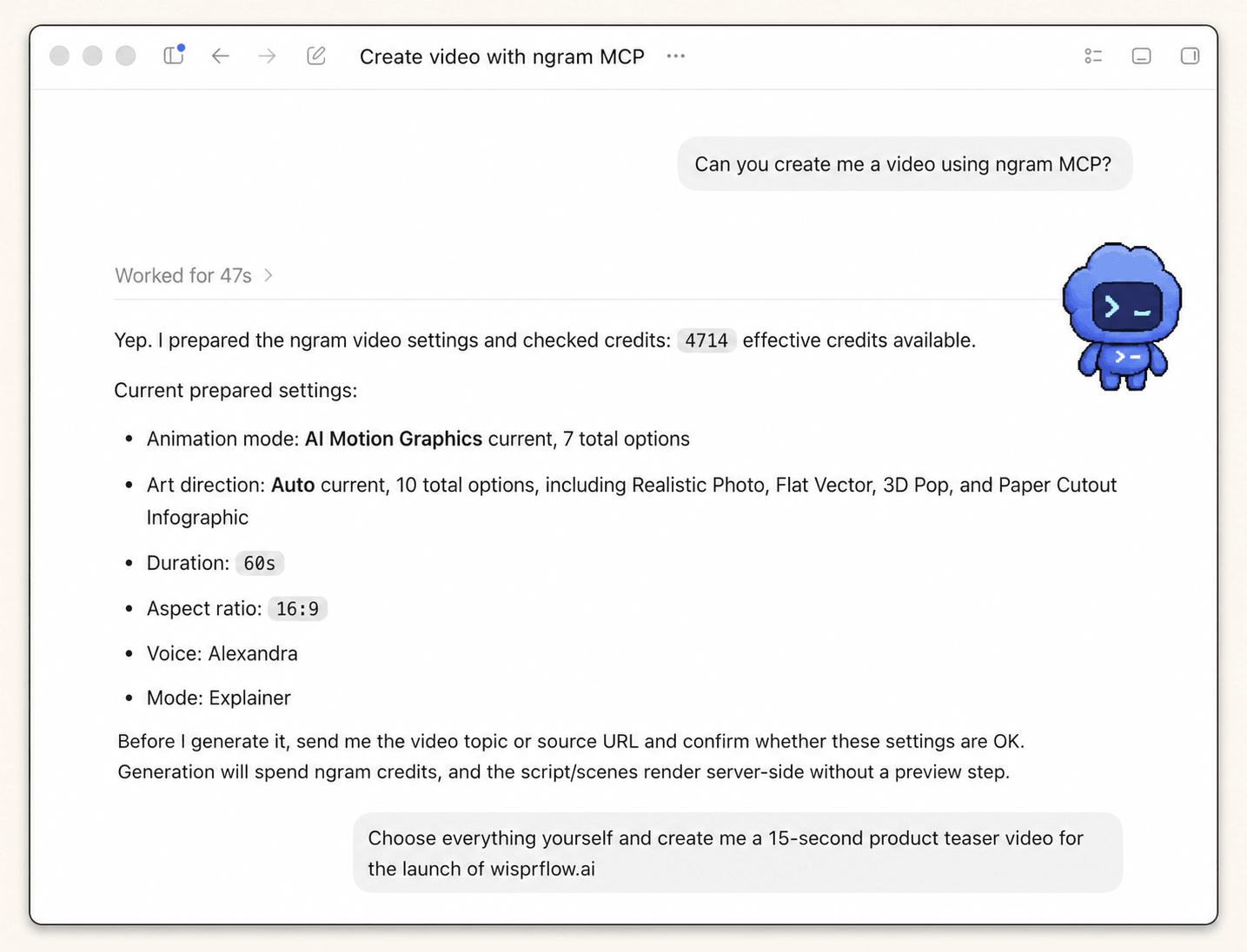
Real workflow proof: this is a Codex MCP example, not the ChatGPT connector UI. The visible request is a teaser, not the product demo from this guide; it proves the shared ngram settings-review mechanics while the prompt above supplies the demo-specific brief.
Step 4: Inspect the prepared settings
Check the duration, format, voice, visual direction, source context, and selected brand before approving anything. If your team has a configured ngram Brand Kit, verify that the right one is applied so the logo, colors, fonts, motion direction, voice, tone, and phrase rules match the product.
Step 5: Approve the ngram tool call
Read the proposed request as if it were a production brief. Approval is the last low-cost point to correct a wrong mode, missing proof source, broad audience, or vague CTA. Only approve after the prepared settings match the demo you intend to review.
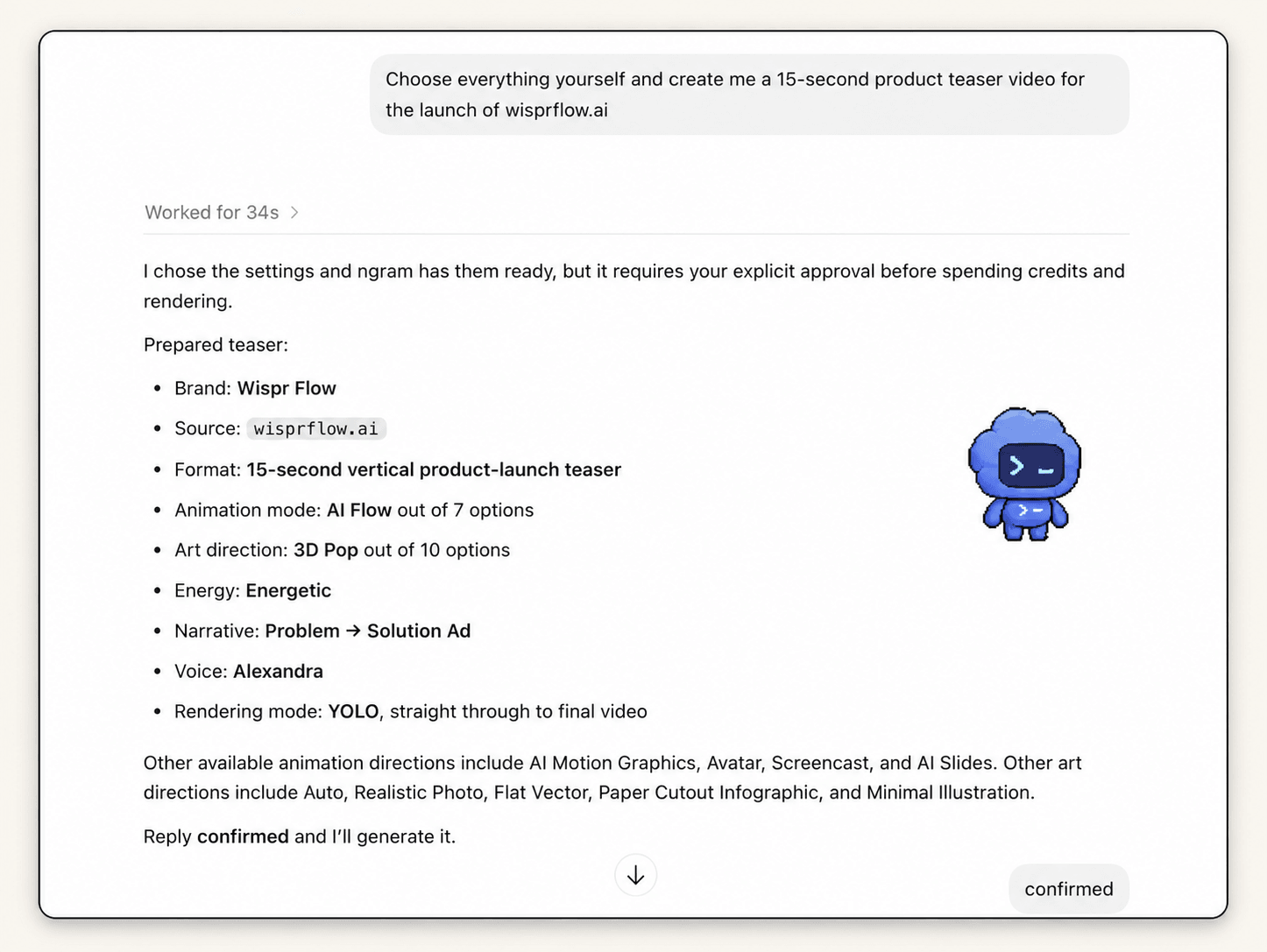
Real workflow proof: this Codex MCP teaser example shows the prepared request and asks for explicit confirmation before ngram spends credits and renders. The ChatGPT connector uses the same ngram approval gate with a different brief.
Step 6: Monitor the server-side render
Once approved, treat generation as an asynchronous job. Rendering can take around 15-20 minutes depending on scene complexity. Follow the existing status in ChatGPT or open the ngram app to inspect progress, but do not submit the same request again just because the final link is not immediate.
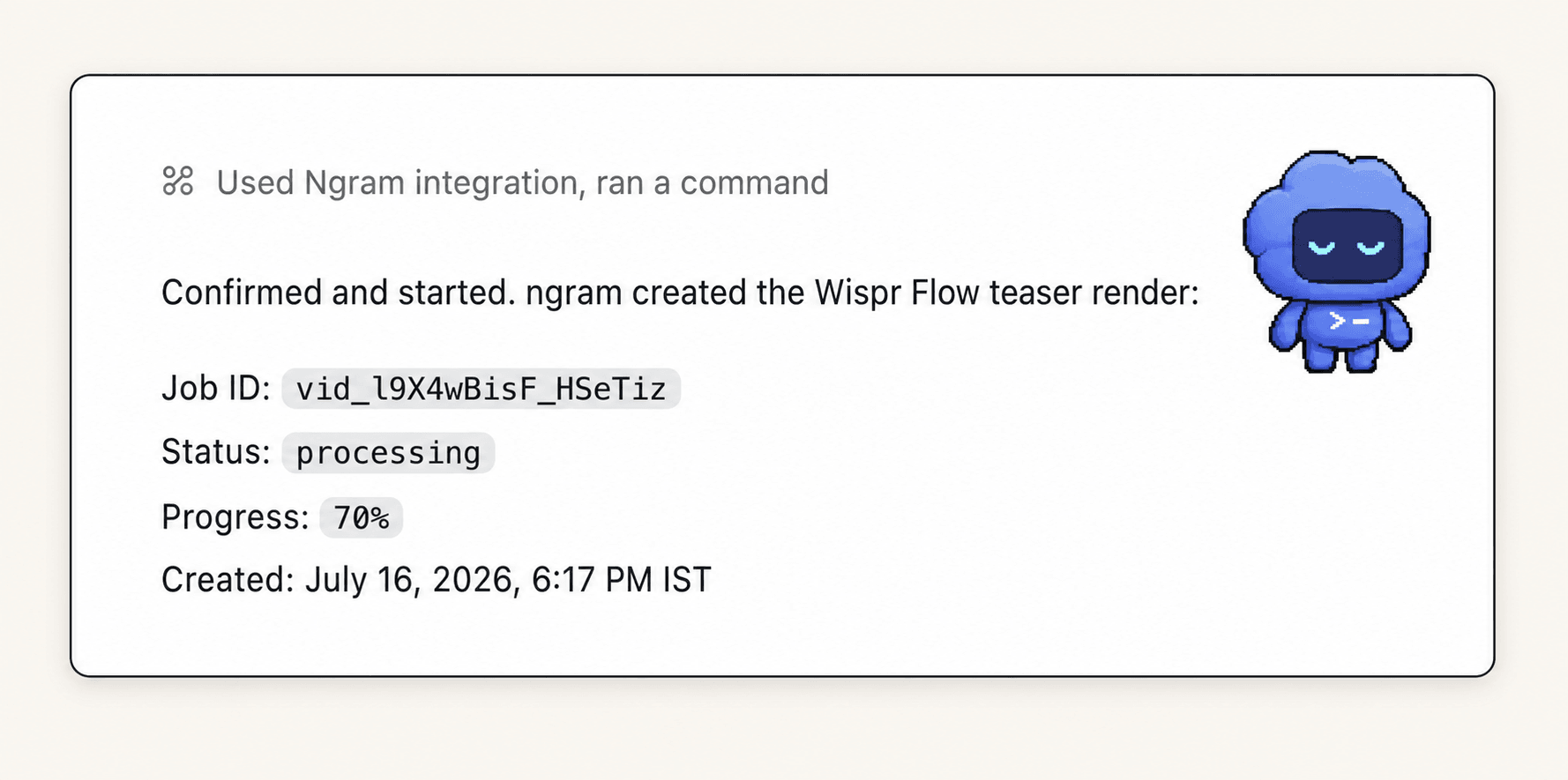
Real workflow proof: this Codex MCP result shows the approved example at 70% progress at capture time. It demonstrates the ngram job-status flow shared with ChatGPT, not the finished product demo or its output quality.
Step 7: Open the final link and review in ngram
When ChatGPT returns the final link, review the video against the task map rather than judging the polish alone. If you want to start the same kind of creation flow directly in ngram, the AI Video Generator accepts a prompt, script, product page, document, deck, image, screen recording, or raw video as source context.
Copy this task-to-proof mapping
Use this mapping before the full prompt when the product path is still fuzzy. It gives an AI video creation tool a clear claim boundary and forces each narration claim to earn a visual.
Viewer: [who needs this task]
Starting problem: [what blocks them]
Task: [one job]

Step 1
Action: [what the user does]
Visible proof: [screen, control, or state]
Claim allowed: [what the proof supports]

Step 2
Action: [what happens next]
Visible proof: [product response]
Claim allowed: [what the response supports]

Step 3
Action: [how the user finishes]
Visible proof: [final state or result]
Claim allowed: [outcome the viewer can verify]

Next action: [one CTA]
Do not show: [stale screens, sensitive data, unsupported claims, side paths]
This structure is useful beyond a single video. Product marketers can reuse the same task, proof, and claim map when they brief a broader product marketing video workflow without turning every request into a new feature inventory.
Product demo video QA matrix
Review the final cut from the ChatGPT video generator in six passes. Each pass has a clear signal and a correction rule, which keeps feedback specific enough to act on.
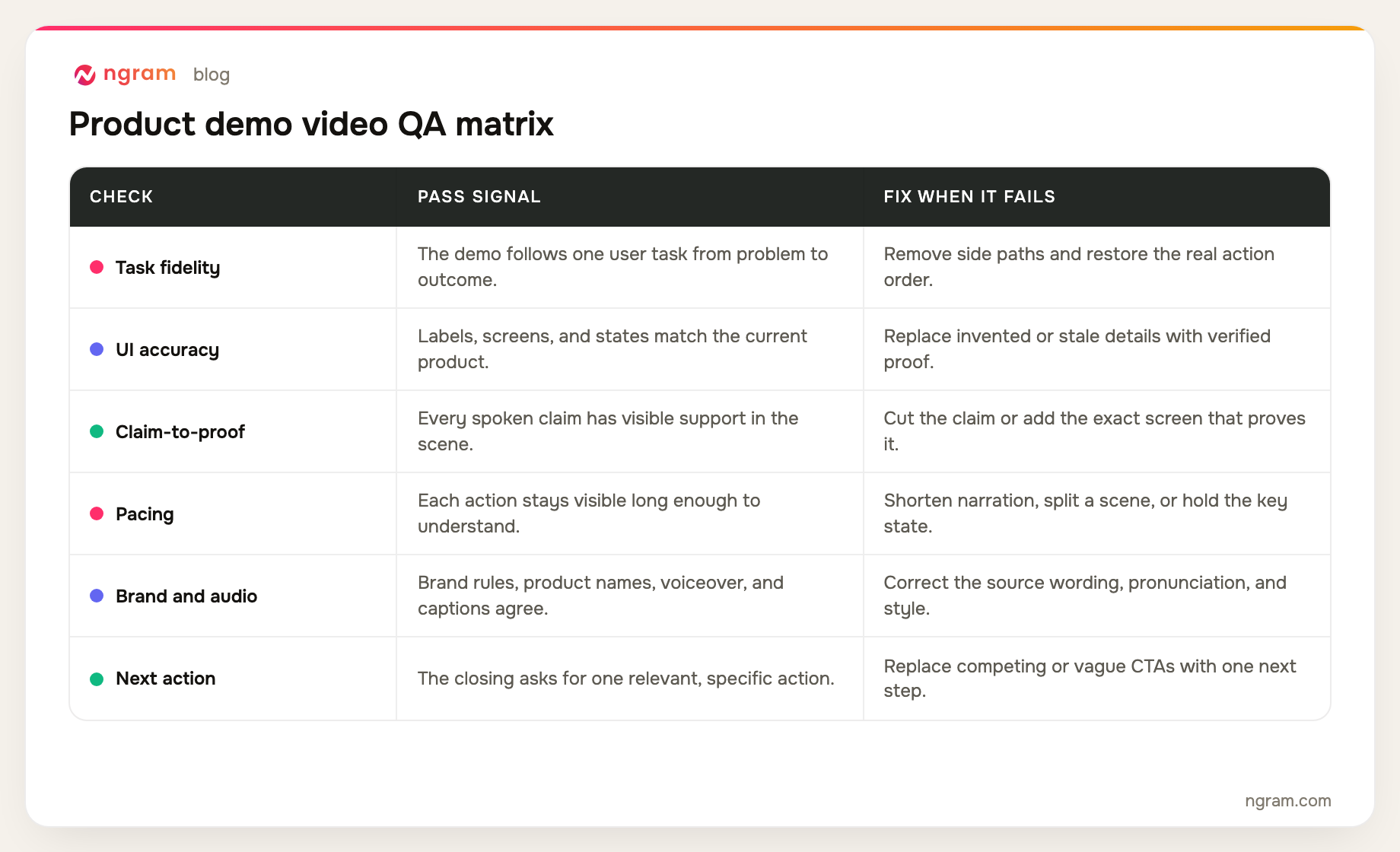
Do not bundle all six checks into a note such as "make it better." Name the failed row, point to the scene, and describe the corrected source truth. That gives the next revision a measurable job.
Product demo video failure modes and fixes
ngram does not appear in ChatGPT
Check the available plugin or app controls and confirm that your plan, region, role, and workspace allow the connection. In a managed workspace, ask the administrator to enable ngram for your role, then reconnect and finish authorization.
ChatGPT asks for an external ngram API key
Stop and verify that you selected the ChatGPT connector flow. ChatGPT authentication happens inside the connector UI. Header-capable custom MCP clients can use a self-service bearer key created in Account & Settings → API Keys; that key is separate from this connector flow.
The prompt turns into a feature list
Rewrite the brief around one task. Keep only the product actions needed to solve the starting problem, and require visible proof at each step. Move secondary features out of the video rather than squeezing them into faster scenes.
The prepared settings are wrong
Correct the duration, format, voice, visual direction, source context, or brand selection before approval. Fix the brief before rendering; accepting the wrong mode means repairing every scene later.
The render looks stuck
Allow around 15-20 minutes for a normal server-side render, with variation for scene complexity. Inspect the existing job in ChatGPT or the ngram app. Retry only when the job reports failure, not while it remains in progress.
The video looks good but says the wrong thing
Run the task fidelity, UI accuracy, and claim-to-proof rows first. Replace stale screens, remove unsupported narration, and restore the real action order before tuning motion or music. Visual polish cannot rescue incorrect product behavior.
Frequently asked questions
Can ChatGPT make videos?
Yes, when full MCP actions are available in ChatGPT web on Business, Enterprise, or Edu and the ngram custom app is enabled. ChatGPT can submit a reviewed brief, request approval, start the render, report status, and return the final ngram link. Pro's read/fetch-only MCP access cannot start the render.
Do I need an ngram API key for ChatGPT?
No. The ChatGPT connector flow authenticates inside the connector UI, so you do not create or paste an external ngram API key. Header-capable custom MCP clients can use a self-service bearer key created in Account & Settings → API Keys.
How long should a product demo video be?
Use the shortest length that lets the viewer follow the task and inspect the proof. Wyzowl's 2026 survey found that 71% of respondents consider videos between 30 seconds and two minutes most effective. For one focused product task, 60-90 seconds is a practical starting brief, not a hard rule.
How long does ngram rendering take from ChatGPT?
Plan for around 15-20 minutes, depending on scene complexity. Rendering continues server-side, so you can monitor the job in the ngram app instead of leaving the ChatGPT conversation open.
What should I include in a ChatGPT product demo prompt?
Include the viewer, one task, starting problem, ordered product actions, visible proof, useful outcome, target length, tone, brand selection, one CTA, and claims to avoid. Also ask ChatGPT to summarize the prepared settings before approval and report the existing job status after generation starts.
Can I monitor the render outside ChatGPT?
Yes. Open the ngram app to inspect progress while the server-side render continues. ChatGPT can still return the final link when the job completes.
What if only one scene is wrong?
Name the failed QA row, the scene, and the correct source truth. ngram supports scene regeneration, so you can request a focused correction without changing scenes that already pass review.
The direct answer
Connect ngram inside ChatGPT, authenticate in the connector UI, and give the ChatGPT video generator one user task with ordered steps, visible proof, a useful outcome, and one CTA. Review the prepared settings, approve the ngram tool call, monitor the server-side render for around 15-20 minutes, then open the returned link and run the six-part QA matrix in ngram.