
Why Product Demos Are Make-or-Break in 2026
The way B2B buyers evaluate software has shifted dramatically. According to Gartner's 2025 sales survey, 61% of B2B buyers now prefer a completely rep-free buying experience. Buyers spend only 17% of their total buying time meeting with potential suppliers. The rest? They're researching on their own.
This means your product demo often speaks for you before your sales team ever gets a chance. And if that demo is a clunky screen share recording or a 45-minute live walkthrough, you're losing deals to competitors who figured out how to let their product sell itself.
The demo automation market reflects this shift. Aragon Research projects the market will reach $2.1 billion by 2026, growing at a 25% CAGR through 2032. And Gartner predicts that by 2026, 30% of all B2B sales cycles will be managed through digital sales rooms where product demos are the centerpiece.
The data is clear: the right product demo software isn't a nice-to-have. It's your most important sales asset.
Here's how the self-service buying shift is playing out:
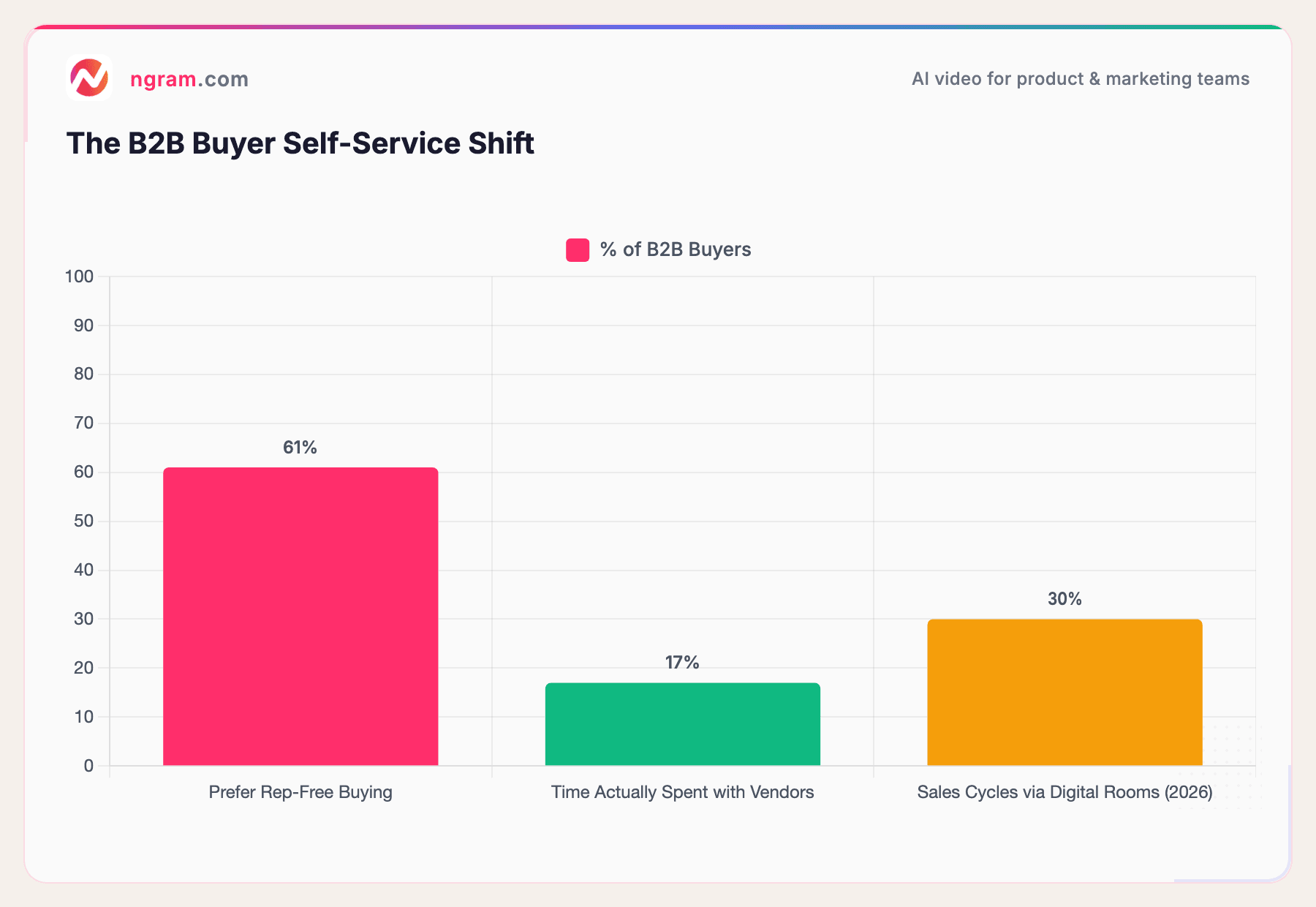
Sources: Gartner 2025 Sales Survey, Gartner B2B Buying Journey
Buyers want to explore your product before they talk to anyone. The question is: what kind of demo gives them the best experience?
What Is Product Demo Software?
Product demo software is any tool that helps you create, share, and track product demonstrations without relying on live walkthroughs or expensive production teams. But not all demo software works the same way.
There are four main categories:
Video demo tools let you record your screen, edit the footage with smart cuts and zoom effects, add voiceover and captions, and export a polished walkthrough video. These are ideal for sales follow-ups, social media, landing pages, and async communication. The best demo video maker tools handle script generation, editing, and branding automatically. Tools like ngram, Loom, and Vidyard fall in this category.
Interactive demo platforms capture your product's UI and turn it into clickable, guided experiences. Prospects click through a simulated version of your product at their own pace. Storylane, Arcade, Navattic, and Supademo are the leaders here.
Live demo tools enhance real-time presentations by overlaying clean data, hiding sensitive information, and providing structured flows. Saleo and Demostack specialize in this.
Sandbox environments give prospects access to a fully functional copy of your product to explore freely. TestBox is the primary player in this space.
Each type serves different stages of the buyer journey. Interactive demos work well as top-of-funnel website embeds. Video demos excel at mid-funnel sales enablement and social proof. Live demos close deals in bottom-of-funnel meetings. And sandboxes let technical buyers do deep evaluation.
| Category | What It Does | Best Funnel Stage | Example Tools |
|---|---|---|---|
| Video Demo Tools | Record, edit, and polish product walkthrough videos | Mid-funnel / Sales enablement | ngram, Loom, Vidyard |
| Interactive Demo Platforms | Clickable, guided product experiences | Top-of-funnel / Website embeds | Storylane, Arcade, Supademo |
| Live Demo Tools | Enhanced real-time presentations with clean data | Bottom-of-funnel / Closing | Saleo, Demostack |
| Sandbox Environments | Full product access for hands-on evaluation | Bottom-of-funnel / Technical eval | TestBox |
Why Video-Based Product Demos Are Winning
Here's something the interactive demo platforms won't tell you: video demos still drive the highest purchase intent.
According to Wyzowl's 2026 Video Marketing Report, 82% of marketers say video marketing has delivered good ROI, and 93% say video is important to their marketing strategy. For product demos specifically, the numbers are even more compelling.
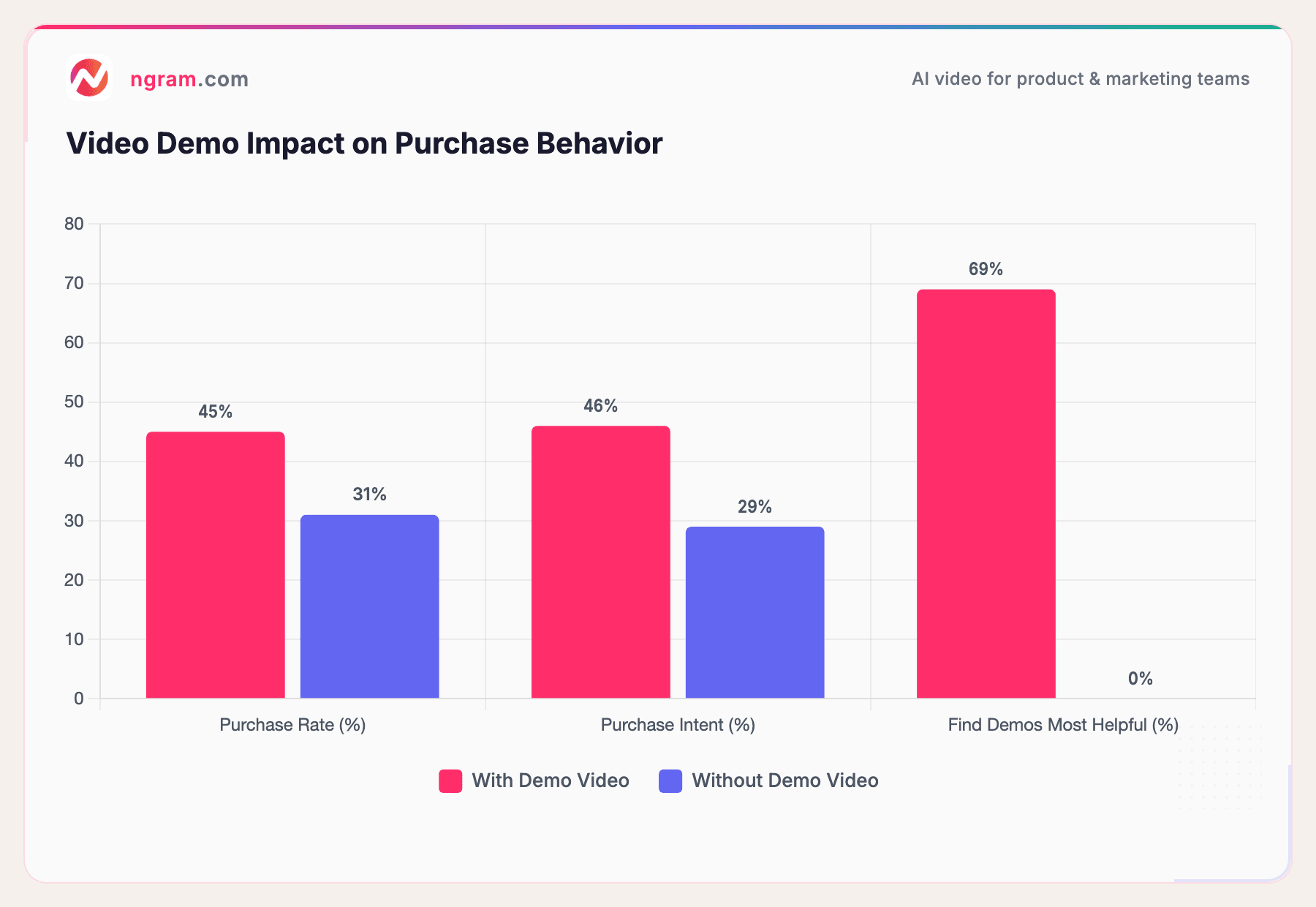
Shoppers who watch a product demo video are 1.81x more likely to purchase than those who only see product photos or text descriptions. And 69% of shoppers say a product demonstration video is the single most helpful content type when making buying decisions.
Sources: Wyzowl 2026, Shopify Video Marketing Statistics
The gap is significant. A 45% purchase rate for video viewers versus 31% without is a real competitive advantage. And unlike interactive click-through demos, video demos work everywhere: email follow-ups, LinkedIn posts, landing pages, investor decks, customer onboarding flows, and internal team updates.
The traditional problem with video demos was cost. Professional video production runs $1,000 to $3,000 per minute, and turnaround times stretch days to weeks. That's where AI-powered video demo tools have changed the game.
How ngram Makes Product Demo Videos Easy
At ngram, we built a video creation platform specifically for teams that need professional product demos without the production overhead.
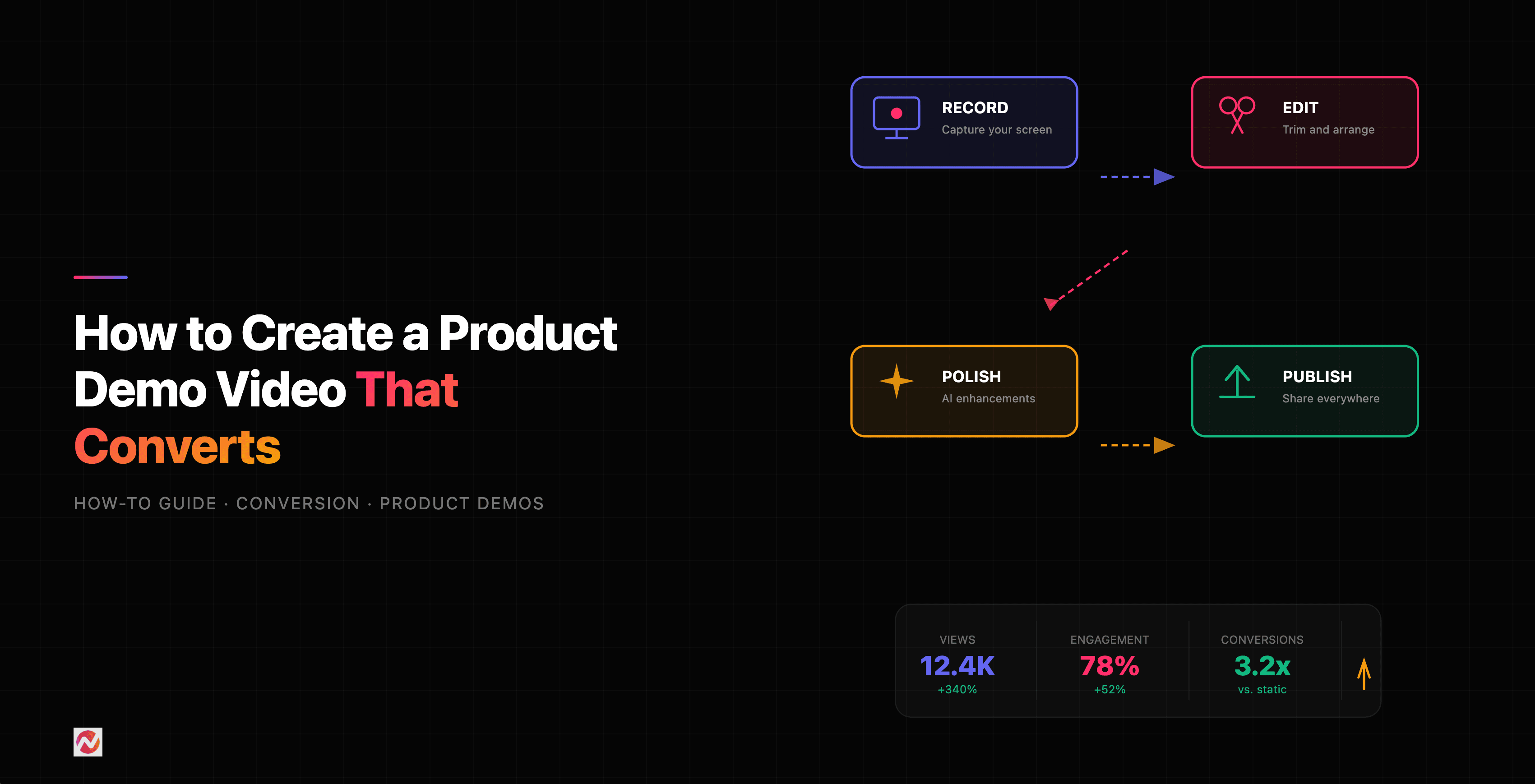
Here's how it works for product demo videos:
1. Record or upload your screen capture
Start with whatever you have. Record your product walkthrough directly, or upload an existing screen recording. You don't need a perfect take. ngram's screen recording editor handles the rough edges.
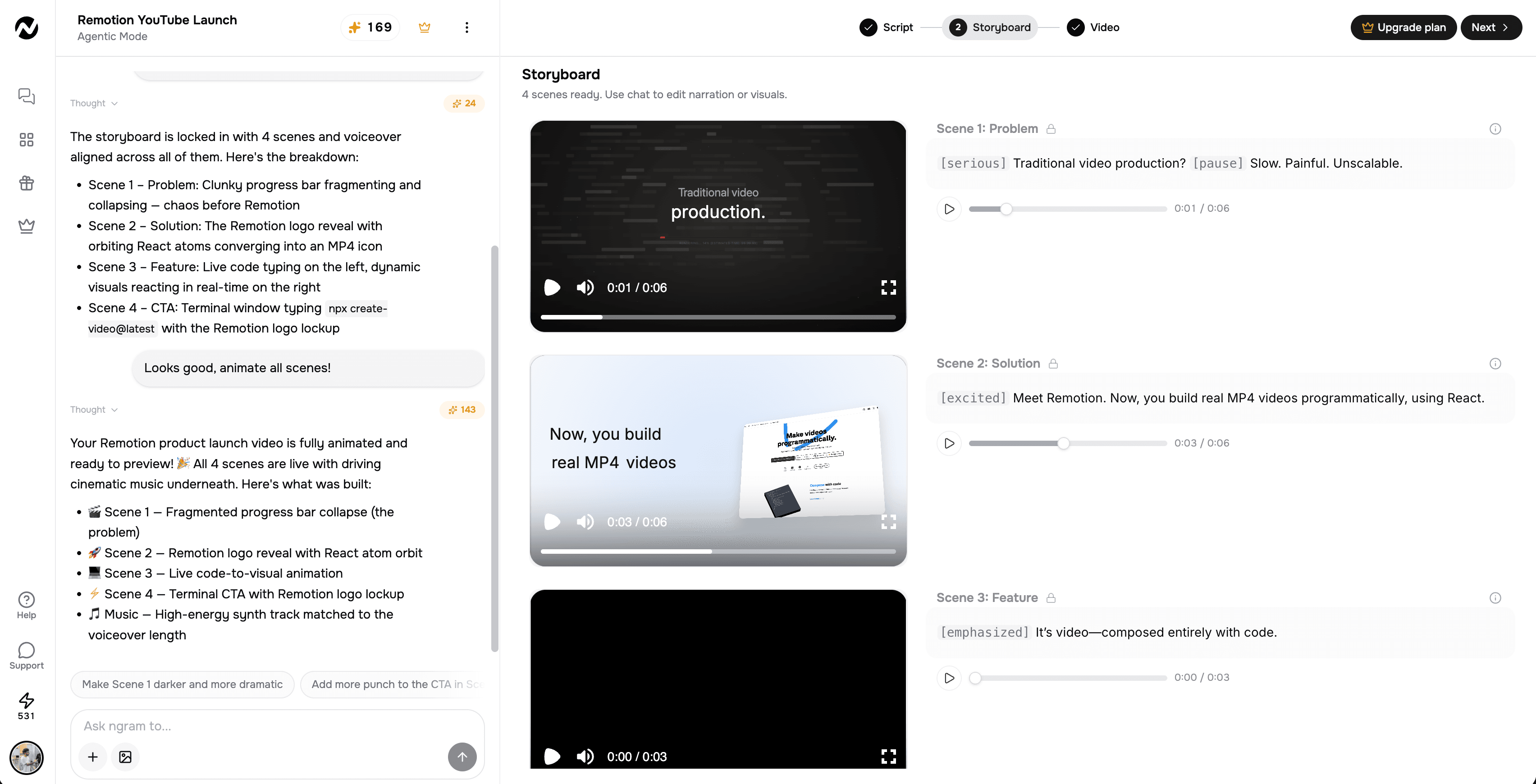
2. ngram auto-edits with smart zoom, cuts, and callouts
This is where the magic happens. ngram automatically:
- Cuts dead air and mistakes so you don't have to manually trim
- Applies smart zoom on key interactions so viewers can see exactly what you're clicking
- Adds callouts and step labels to guide viewers through the workflow
- Emphasizes cursor movements so nothing gets lost in a busy UI
3. Add voiceover, captions, and branding
Generate an AI voiceover from your script, or record your own. Turn on captions and select your saved Brand Kit during creation to use your logo, colors, and fonts. Choose saved intros and outros when needed.
4. Export the finished video
Export the finished video as MP4 with captions baked in, or publish it to a hosted share page. Prepare channel-specific cuts separately when a platform needs another aspect ratio.
The entire process takes minutes, not days. A raw 30-minute screen recording becomes a polished 3-minute product demo that looks like your marketing team spent a week on it.
| Step | Your Input | ngram Action | Output |
|---|---|---|---|
| 1. Record/Upload | Raw screen recording | Ingests and analyzes footage | Indexed recording |
| 2. Auto-Edit | - | Smart zoom, auto-cuts, callouts, cursor emphasis | Polished timeline |
| 3. Brand + Voice | Brand kit / script | AI voiceover, captions, brand styling | On-brand video |
| 4. Export | MP4 or hosted share page | Finished video with captions | Publish-ready demo |
Want to see this in action? ngram turns your raw screen recordings into polished, on-brand product demos in minutes. Try it free
The Best Product Demo Software Tools in 2026
Here's our honest breakdown of the best product demo software across all categories. We've researched pricing, features, and real user feedback for each.
Video Demo Tools
ngram - Best for creating polished product demo videos from screen recordings
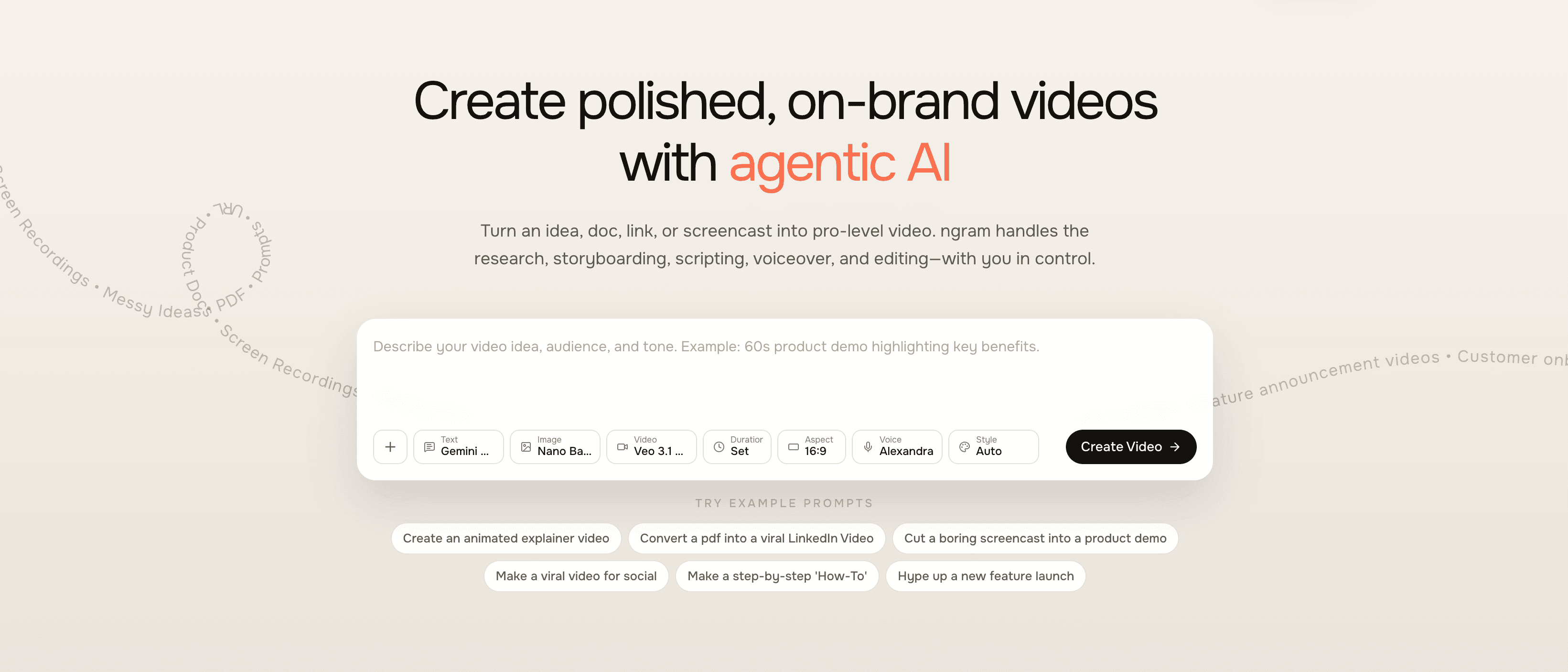
ngram turns whatever you have - screen recordings, docs, URLs, images - into publish-ready product demo videos. It handles the entire editing workflow: script generation from your raw materials, auto-cuts, smart zoom on interactions, callouts, AI voiceover, captions, and on-brand styling. Unlike template-based tools, ngram adapts the video structure to your audience, channel, and goal. Ideal for product marketing teams, PMs shipping updates, and sales teams creating personalized follow-ups. With ngram, you can create product demo videos that look professionally produced in minutes, and translate the voiceover and captions for multilingual audiences. When the demo is ready, share it on a hosted, brand-styled video page or embed it directly on your site. Check ngram pricing for current plans.
Loom - Best for quick async video messages
Loom is the go-to for fast, informal screen recordings.
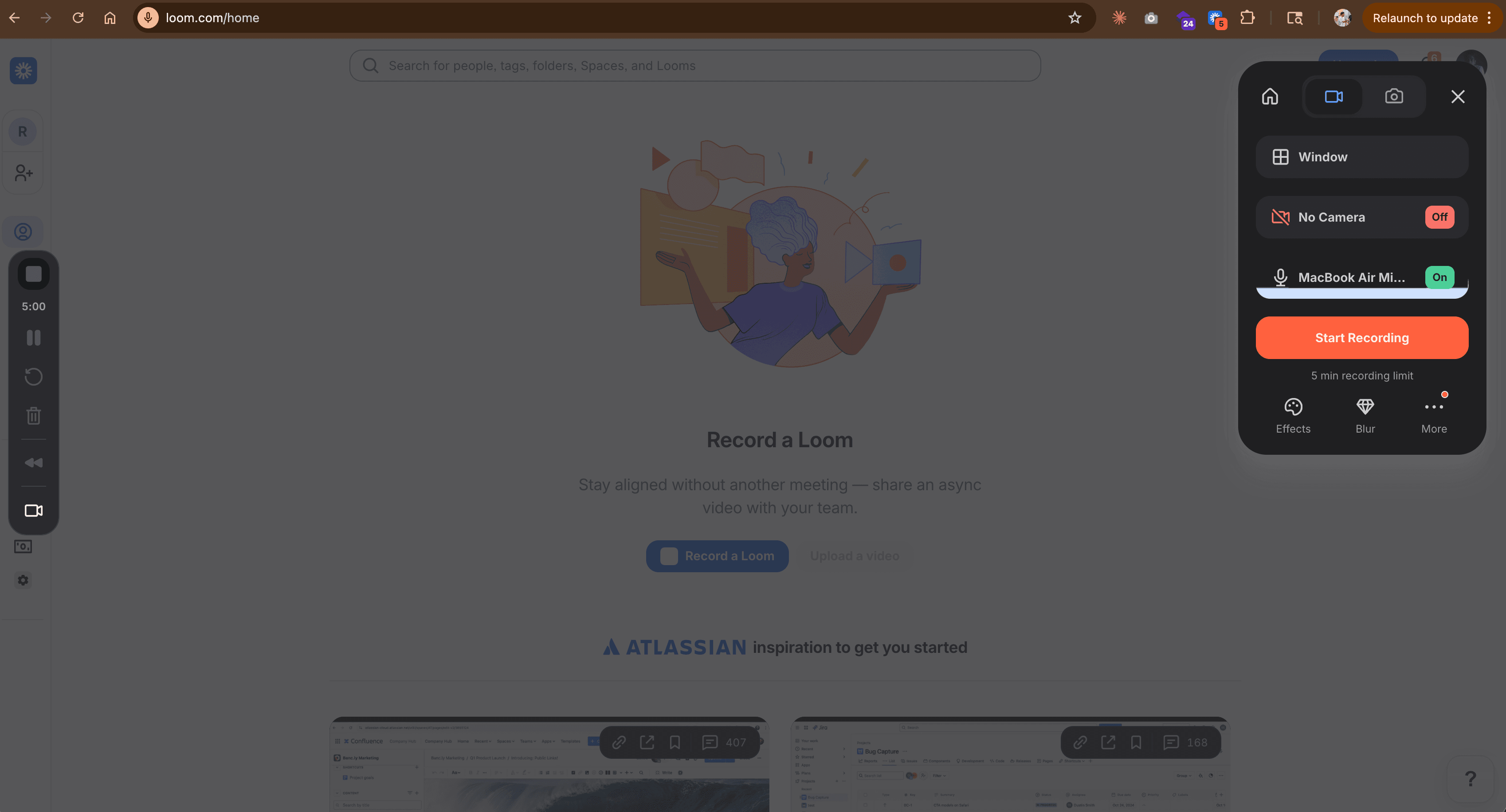
Its AI features now clean up filler words and silences automatically, and the "live rewind" feature lets you fix mistakes while recording. Loom works well for internal team communication and quick product walkthroughs, though it's less suited for polished marketing-grade demos. Business plan starts at $15/month per user.
Vidyard - Best for sales-specific video outreach
Vidyard leans heavily into sales enablement with deep Salesforce and HubSpot integrations, viewer-level engagement analytics, and AI avatars that let reps generate personalized videos without being on camera. It's built for outbound sales teams who need CRM-connected video analytics. Pricing is custom for business plans.
Clipchamp - Best for basic editing on a budget
Microsoft's free video editor handles screen recording and basic editing inside the browser.
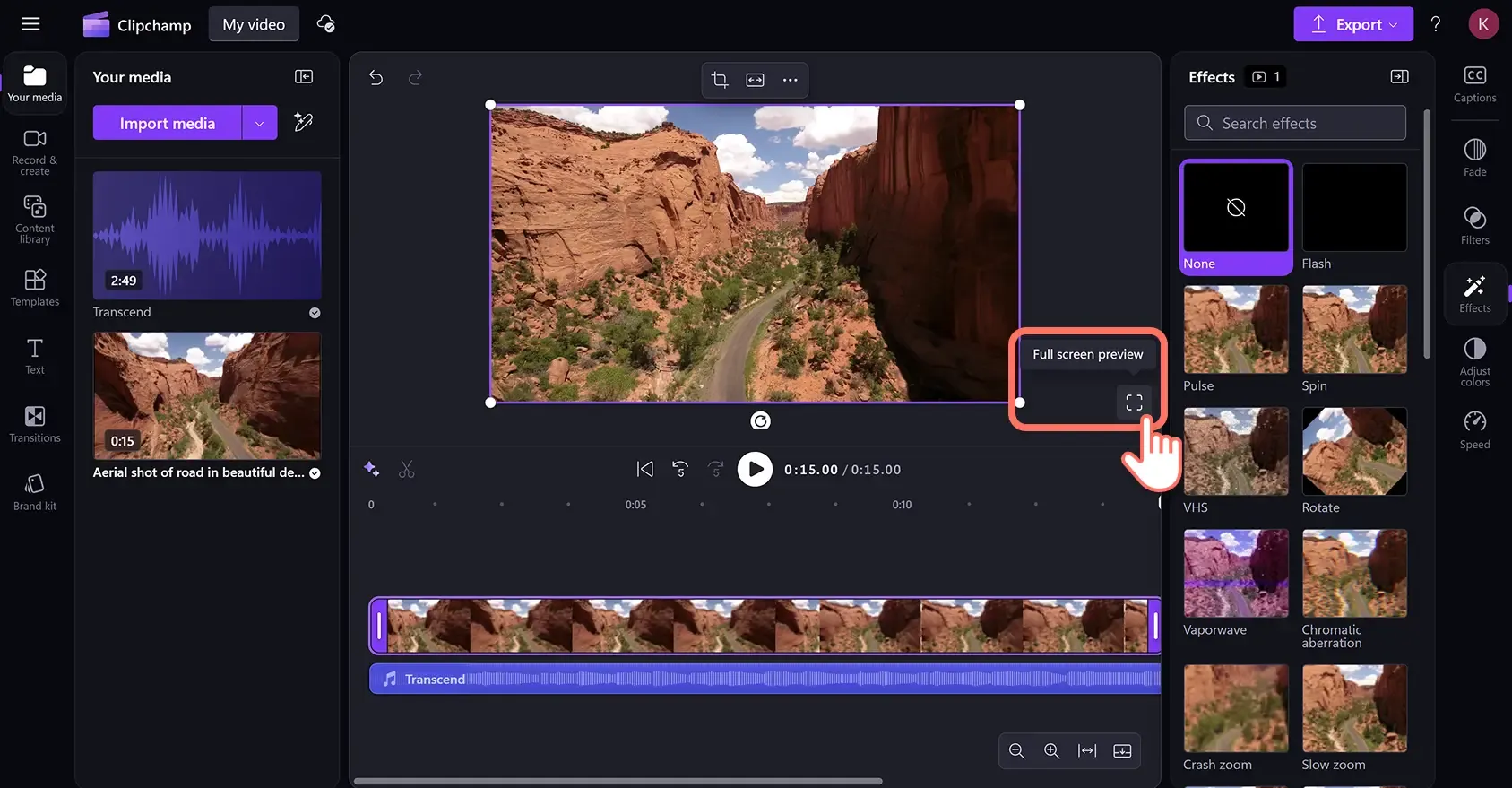
It's a solid option if you need simple cuts and text overlays, but lacks the AI-powered automation and product-specific features that dedicated demo tools offer. Free with Microsoft 365; premium features from $6/month.
Interactive Demo Platforms
Storylane - Best for fast, no-code interactive demos
Storylane captures your product's UI via browser extension and lets you build guided click-through experiences without code.
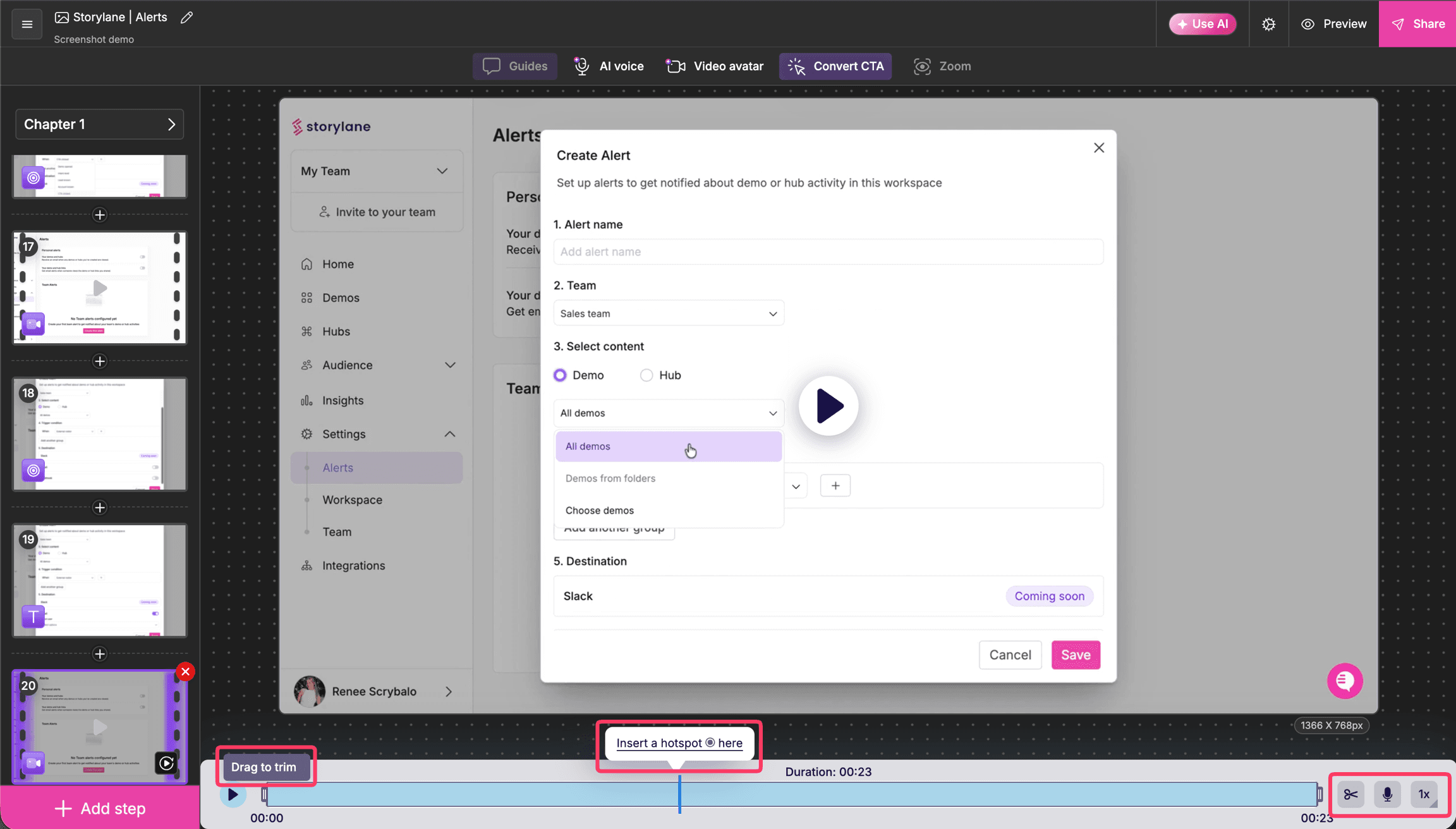
Strong CRM integrations and AI-driven personalization make it popular with GTM teams. Free plan includes 1 demo; paid plans from $40/month.
Arcade - Best for social-style product storytelling
Arcade creates polished, embeddable interactive walkthroughs optimized for marketing and onboarding. The output feels more like a product story than a technical demo. Free plan includes 3 demos; Pro from $32/user/month.
Supademo - Best for speed and multilingual demos
Supademo delivers loginless, multilingual demos with AI voiceovers and in-app tours.
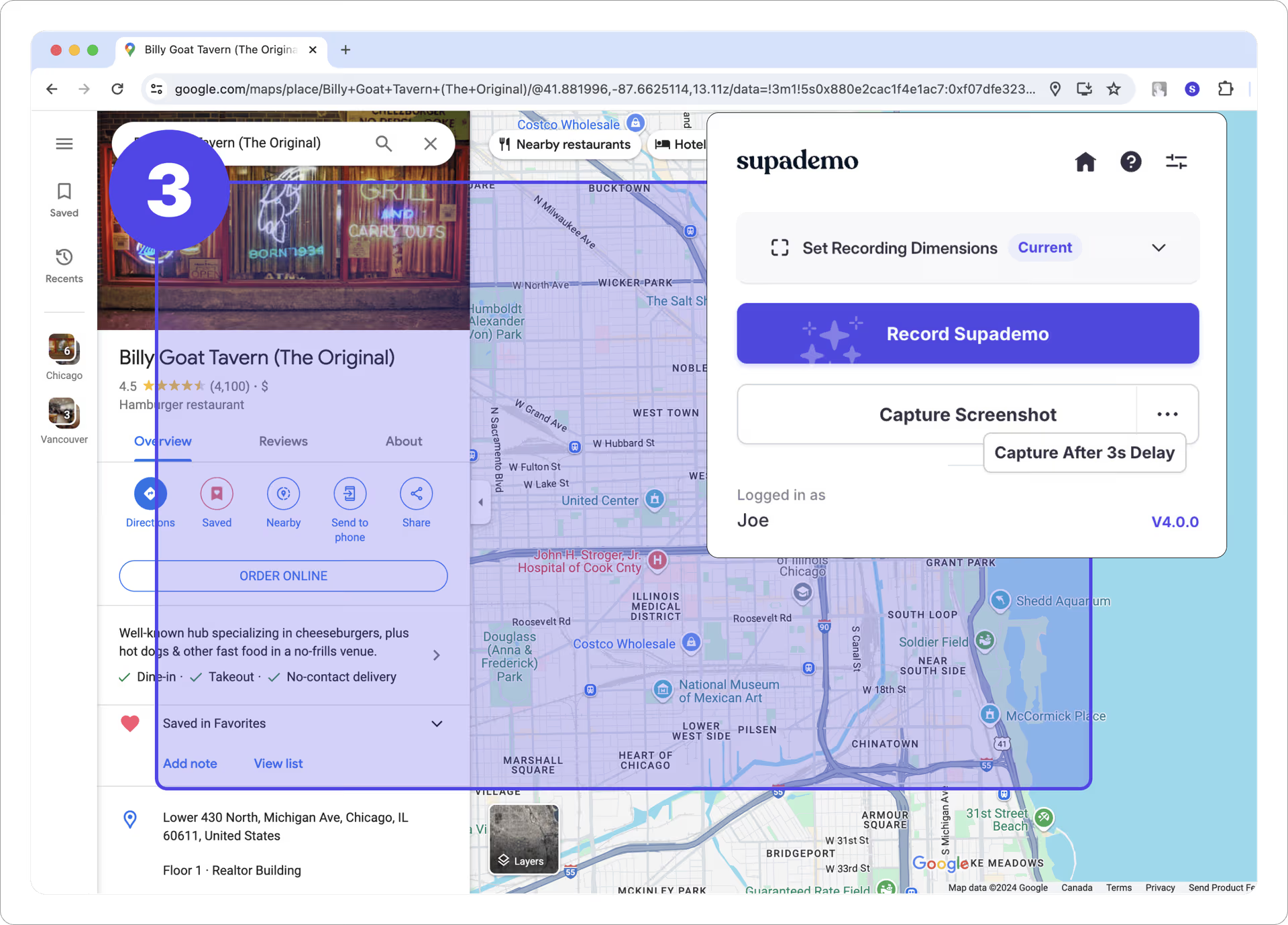
According to Supademo's 2026 State of Interactive Demos report, top-performing demos average 10 to 12 steps with 80%+ completion rates. Free tier available; Pro from $27/creator/month.
Navattic - Best for technical HTML capture
Navattic uses HTML capture technology that preserves every pixel of your product's front end.
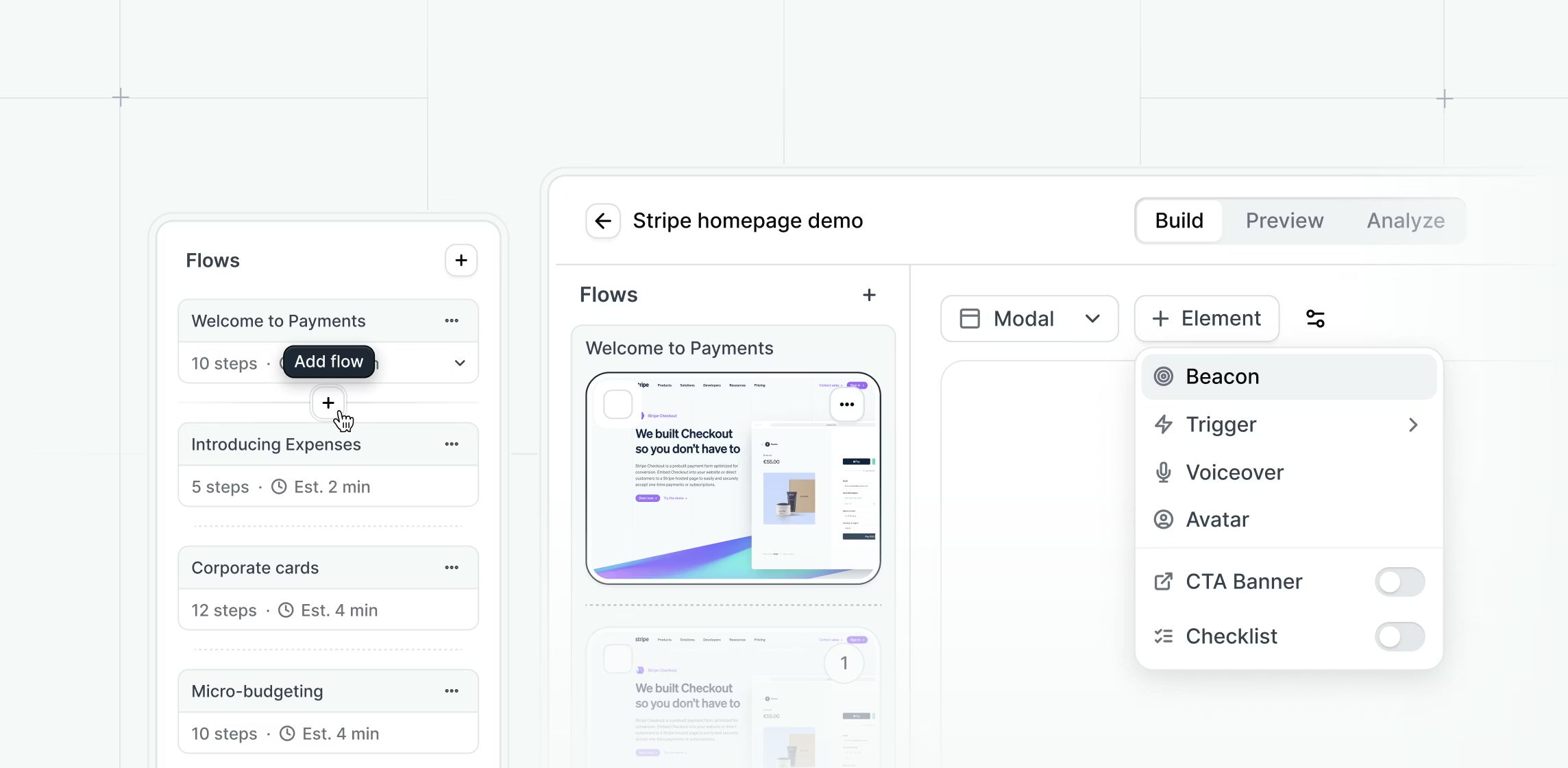
Over 40,000 demos were built on the platform in 2025, up 35% year-over-year. Best for teams with complex, visually detailed products. Free starter plan; Base from $500/month.
Enterprise Demo Automation
Walnut - Best for no-code interactive sales demos
Walnut captures your front end and lets sales teams personalize demos through a no-code editor. Its digital deal rooms let you bundle videos, decks, and interactive demos in one shareable link. Starting at $9,200/year.
Consensus - Best for scaling presales with video
Consensus automates on-demand video demos with analytics that track which features each stakeholder explored. Companies using Consensus report 50% increases in stakeholder discovery and up to 68% shorter sales cycles. Starting around $6,000/year for base plans.
Demostack - Best for full product cloning
Demostack clones your entire product environment so prospects interact with something that looks and feels completely real. This is the premium option for enterprise sales teams doing high-stakes demos. Starting at approximately $55,000/year.
Reprise - Best for enterprise-grade demo environments
Reprise provides sandbox and overlay demos with strong security controls and analytics. Popular with large enterprises that need SOC 2 compliance and granular access controls. Custom pricing, typically $20,000-$60,000+/year.
Here's how the pricing stacks up across tools:
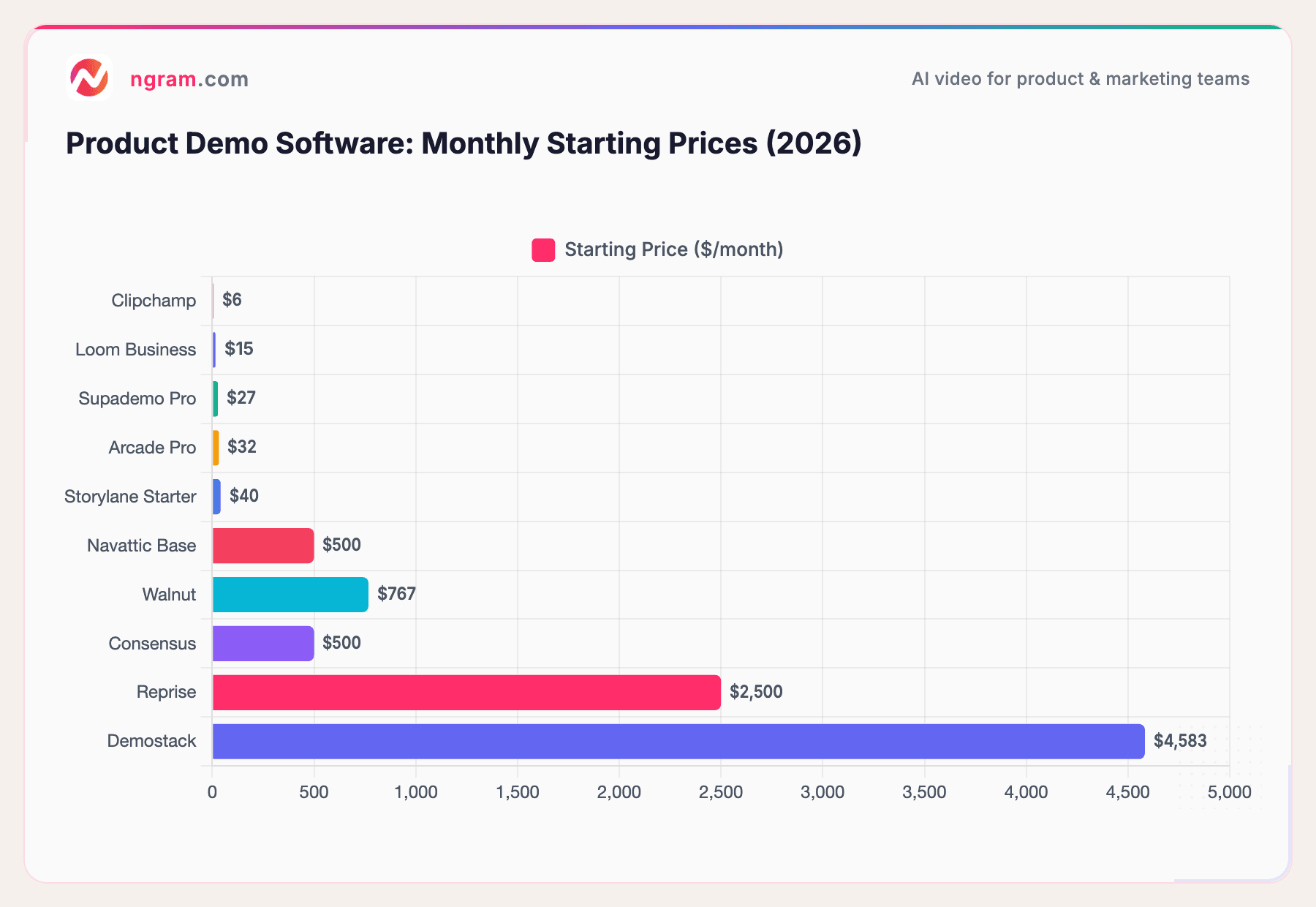
Sources: Official pricing pages as of March 2026. ngram offers a free tier; see ngram.com/pricing for current plans.
The pricing range is dramatic. Video demo tools and basic interactive platforms start under $50/month, while enterprise demo automation solutions can run $500 to $4,500+ monthly. Your choice depends on whether you need video demos, interactive click-throughs, or full product cloning.
| Tool | Category | Best For | Starting Price | Free Tier | AI Features |
|---|---|---|---|---|---|
| ngram | Video Demo | Polished demos from recordings | Free | Yes | Auto-cut, smart zoom, script gen, voiceover |
| Loom | Video Demo | Quick async messages | $15/user/mo | Yes | Filler word removal, live rewind |
| Vidyard | Video Demo | Sales video outreach | Custom | Yes | AI avatars, CRM analytics |
| Clipchamp | Video Demo | Basic editing on a budget | $6/mo | Yes (M365) | Basic |
| Storylane | Interactive | No-code interactive demos | $40/mo | Yes (1 demo) | AI personalization |
| Arcade | Interactive | Product storytelling | $32/user/mo | Yes (3 demos) | Basic |
| Supademo | Interactive | Multilingual demos | $27/creator/mo | Yes | AI voiceover, in-app tours |
| Navattic | Interactive | HTML capture fidelity | $500/mo | Yes | Basic |
| Walnut | Enterprise | No-code sales demos | $9,200/yr | No | Digital deal rooms |
| Consensus | Enterprise | Scaling presales | ~$6,000/yr | No | Stakeholder analytics |
| Demostack | Enterprise | Full product cloning | ~$55,000/yr | No | Full environment clone |
| Reprise | Enterprise | Enterprise-grade security | $20K-$60K+/yr | No | SOC 2, sandbox + overlay |
Interactive Demos vs. Video Demos: When to Use Each
This isn't an either/or decision. The most effective teams use both formats strategically.
Interactive demos shine for website embeds and self-serve discovery. They achieve website conversion rates of 24.35% compared to 3.05% for traditional approaches, according to Storylane research. When a prospect lands on your website and wants to explore your product without signing up, an interactive demo is the right tool.
Video demos win for everything else: sales follow-ups, social media, email campaigns, landing pages, onboarding sequences, investor decks, and internal updates. According to marketing research, companies using video demos report conversion improvements of up to 32%, and 83% of video marketers say video has directly increased sales (Wyzowl 2026).
| Dimension | Interactive Demos | Video Demos |
|---|---|---|
| Best Channel | Website embeds, self-serve | Email, social, landing pages, sales |
| Conversion Rate | 24.35% (website) | Up to 32% improvement |
| Production Cost | $32-$500+/mo | Free-$15/mo (AI tools) |
| Channel Flexibility | Website only | Every channel |
| Personalization | Data overlays, guided paths | Audience-specific variants |
| Best Funnel Stage | Top-of-funnel discovery | Mid/bottom funnel + post-sale |
Here's a practical framework:
- Top of funnel (website, ads): Interactive demo OR short video demo
- Mid funnel (sales follow-ups, email nurture): Video demo
- Bottom funnel (live meetings, technical evaluation): Live demo or sandbox
- Post-sale (onboarding, training, updates): Video demo
- Social media (LinkedIn, Twitter, YouTube): Video demo
- Internal (team updates, changelogs): Video demo
Video demos cover more use cases, cost less to produce with the right tools, and work on every channel. That's why we built ngram as a video-first product demo platform.
How to Create Product Demo Videos That Convert
Regardless of which tool you use, these principles separate demos that convert from demos that get skipped.
Start with the problem, not the product
The biggest mistake in product demos is opening with "Here's our dashboard." Instead, open with the pain: "You know that feeling when a prospect goes dark after the first call? Here's how to keep them engaged." Your viewer should feel understood before they see a single product screen.
Keep it under 5 minutes
Successful product demos typically run 2 to 5 minutes. According to the Supademo State of Interactive Demos 2026 report, top-performing demos average 10 to 12 steps. In video terms, that translates to focused, well-paced content that respects the viewer's time.
Show one workflow, not every feature
A demo that tries to cover everything covers nothing. Pick the single workflow that matters most to your target audience and show it end-to-end. A PM cares about roadmap updates. A salesperson cares about personalized outreach. A marketer cares about campaign creation. Make separate demos for each.
Use smart zoom and callouts
When showing a product interface, viewers lose track of where your cursor is and what you're clicking. Smart zoom that follows your interactions and callouts that label key steps make the difference between confusion and clarity. This is something a demo video maker like ngram handles automatically with its AI script generation and editing features.
End with a clear next step
Every demo should end with one specific action: "Start your free trial," "Book a call with our team," or "Watch the next demo in this series." A vague ending means a lost lead.
Personalize when possible
The same demo sent to a startup founder and an enterprise CTO should feel different. Use the viewer's company name, reference their industry, and show the features most relevant to their use case.
| Audience | Key Pain Point | Demo Focus | Delivery Channel |
|---|---|---|---|
| Product Manager | Keeping stakeholders updated | Roadmap updates, feature demos | Slack, email, internal wiki |
| Sales Rep | Prospects going dark | Personalized follow-up outreach | Email, LinkedIn, CRM |
| Marketing Team | Scaling content production | Campaign launch videos | Landing pages, social, ads |
| Customer Success | Reducing support tickets | Onboarding walkthroughs | Help center, email drip |
AI-powered tools like ngram let you create personalized variants in minutes.
The Product Demo Software Market Is Booming
If you're evaluating product demo software right now, you're in good company. The market is growing fast as more companies realize that self-service demos are no longer optional.
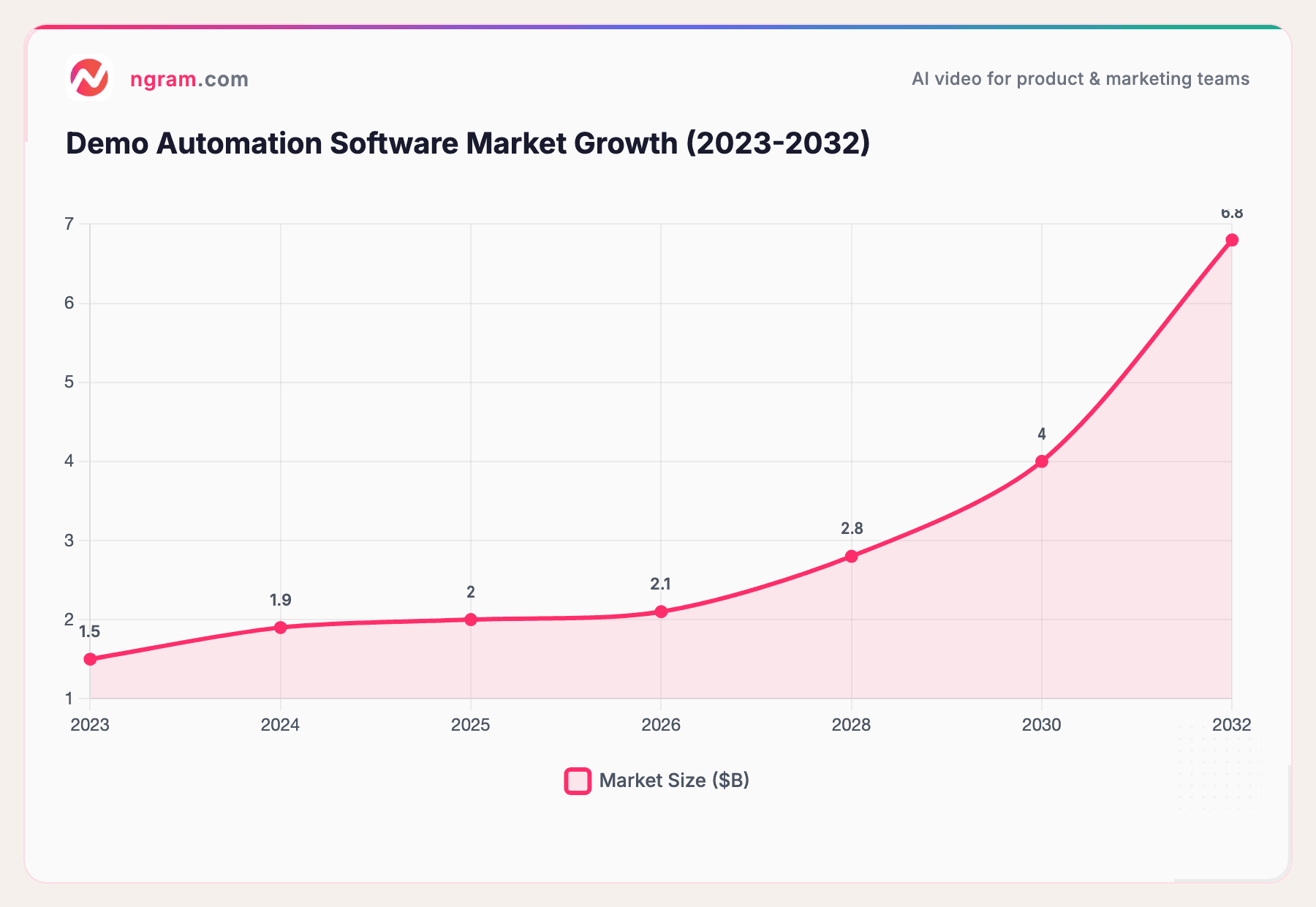
Sources: Aragon Research, DataIntelo Market Report. Endpoints from Aragon Research and DataIntelo; intermediate values interpolated.
From $1.5 billion in 2023 to a projected $6.8 billion by 2032, the market is growing at roughly 18-25% annually depending on the research source. This growth is driven by B2B buyers' increasing expectation for digital-first evaluation, the adoption of AI-powered tools that make demo creation faster, and the shift toward asynchronous selling.
Supademo's 2026 research found that 78% of teams now use demos across two or more use cases, and companies using demos across all five customer journey stages report 91% impact scores. Demos aren't just a sales tool anymore. They're a company-wide communication channel.
Frequently Asked Questions
What is the best product demo software?
The best tool depends on your primary use case. For creating polished product demo videos from screen recordings, ngram offers the fastest path from raw footage to professional output. For interactive click-through demos on your website, Storylane and Arcade are strong options. For enterprise sales teams doing live demos, Walnut or Demostack provide the most control.
How do you demo a software product?
Start by identifying your audience and the one problem your demo solves for them. Record your screen showing the key workflow end-to-end. Edit out dead space, add zoom effects on important clicks, overlay captions, and end with a clear call to action. A good demo video maker like ngram automates most of this editing process, turning a rough recording into a polished demo in minutes.
How much does product demo software cost?
Pricing ranges from free to over $55,000 per year. Video demo tools like Loom ($15/month) and Supademo ($27/month) are the most affordable. Mid-range interactive platforms like Storylane and Navattic run $40 to $500 per month. Enterprise solutions like Walnut ($9,200/year), Consensus (~$6,000/year), and Demostack ($55,000/year) serve larger sales organizations.
What is the difference between interactive demos and video demos?
Interactive demos are clickable, self-guided product experiences where buyers explore features at their own pace. Video demos are pre-recorded walkthroughs that tell a structured story with voiceover, captions, and visual emphasis. Interactive demos excel at website embeds; video demos work across more channels including email, social, and sales follow-ups.
How long should a product demo video be?
The ideal length is 2 to 5 minutes. According to Wyzowl's 2026 research, 71% of viewers find videos between 30 seconds and 2 minutes most effective for marketing content. For product demos, you want enough time to show a complete workflow but not so much that viewers drop off.
Can I create product demos without a video editor?
Yes. Modern product demo tools handle editing automatically. ngram auto-cuts dead air, adds smart zoom on interactions, generates captions, and applies your brand styling without manual editing. Interactive demo platforms like Arcade and Supademo also require zero video editing skills.
Do product demo videos increase conversions?
Significantly. Shoppers who watch product demo videos are 1.81x more likely to purchase, and video can improve conversion rates by up to 34%. Companies using video in their sales process report that video outperforms all other content formats in driving conversions, according to Wyzowl's research.
Start creating professional product demos in minutes. Try ngram free and turn your next screen recording into a polished product demo that sells.