

Search for "Animaker vs Powtoon" and you find two tools that pitch the same promise: build a cartoon-style animated explainer in your browser, no animation skills, no After Effects. Look closer and they reward different kinds of makers. Animaker leans into a deep character builder and the biggest asset library, the kind of control a storyteller wants. Powtoon leans into a tidy drag-and-drop timeline and business templates, the kind of speed a comms or HR team wants. This guide compares Animaker vs Powtoon across the things that decide the purchase: animation depth, ease of use, pricing, and workflow. It also shows where a third option, ngram, beats both when your real job is a finished narrated video from a script, doc, or URL, not a hand-built animation.
Both tools are genuinely good at template-driven animation, and both have added AI script, voice, and avatar features. The honest answer to "which is better" is "for which job," so we pick a winner per dimension instead of crowning one overall.
Animaker vs Powtoon at a glance
Here is the short version before the deep dive. ngram sits in the table because for many teams comparing these two, the better question is whether you want to assemble an animation by hand or describe the video you need and have it built.
| Tool | Best for | Starting price | Main distinction |
|---|---|---|---|
| ngram | Teams turning prompts, docs, URLs, decks, and recordings into finished narrated videos | Free, paid from $29/mo | Plans and builds the whole video, not just the animation |
| Animaker | Custom characters, cartoon explainers, and asset-rich 2D animation | Free, paid from $10/mo annual | Deep character builder and the largest asset library |
| Powtoon | Business, HR, and L&D animated explainers and presentations | Free, paid from $15/mo annual | Clean drag-and-drop timeline and business templates |
Animation depth and visual style
This is the first thing buyers test, and it is where Animaker and Powtoon split most clearly.
Animaker goes deeper on craft. Its character builder offers more than 15 facial features and 10 accessory slots, so you can build a brand mascot or a cast of characters without hiring an illustrator. Pair that with the largest stock library among these two, full of animated characters, props, and icons, and Animaker is the stronger pick when the look of the animation matters and you want fine control over scenes.
Powtoon takes the cleaner, more uniform route. Its animations and characters are designed to look consistent and professional out of the box, which suits a business deck or a training module more than a personality-driven cartoon. You trade some creative range for output that looks tidy with less fiddling. Reviewers do note that some AI-generated visuals can look dated or soft, so check the exact assets you plan to use.
Winner: Animaker for character depth and creative range, Powtoon for clean, consistent business style. Pick based on whether the animation needs personality or polish.
Worth noting for both: a great animation is still a hand-assembled timeline of scenes, characters, and text. If the finished video also needs to start from a real document, a product URL, or a screen recording and end as a narrated, on-brand clip, neither tool plans that for you. That gap is where ngram comes in, and we cover it below.
Ease of use and learning curve
Both tools are built for non-designers, but they ask different things of you.
Powtoon wins on time to a first simple video. Its drag-and-drop timeline is intuitive, and most people can make animated text slides with a character in minutes. The catch shows up later: reviewers say the curve to custom timing, layered effects, and precise movement is steeper than the marketing suggests, so polished work still takes practice.
Animaker is approachable too, with a drag-and-drop editor and customizable templates, but its depth has a cost. The character builder and smart animation tools take time to learn, and users report the editor can get laggy past roughly 10 scenes or on longer, complex projects. The free plan's large watermark also makes it hard to evaluate quality before paying.
Winner: Powtoon for the fastest simple video, Animaker once you invest time and want more control. Neither is hard to start; both get harder as ambition grows.
Pricing and value
Pricing is close at the entry tier and diverges as you scale, and both meter AI features with annual credit pools that are easy to miss.
Animaker's free plan is good for trying the tool but caps you at a few AI generations and downloads a month with a large watermark. Basic is about $10 a month billed annually and removes the watermark with a small monthly download and asset allowance. Starter is around $19 a month annual and is the popular tier, adding more premium asset credits and Full HD export. Pro is roughly $49 a month annual with 4K and higher limits, and Enterprise is custom. Note that Animaker Voice is sold as a separate subscription, so a full setup can cost more than the headline.
Powtoon's Lite plan starts around $15 a month billed annually, but it is tightly capped: about 25 AI credits per year, limited templates, and 5 premium exports a month. Professional is roughly $40 a month annual with unlimited exports, full templates, and about 80 AI credits a year. Business runs about $125 a month annual and adds lip-sync characters, full brand control, and reseller rights. The yearly AI credit pools are the number to watch, since heavy AI use can run them down fast.
Here is how the entry-level paid plans compare on monthly and annual billing:
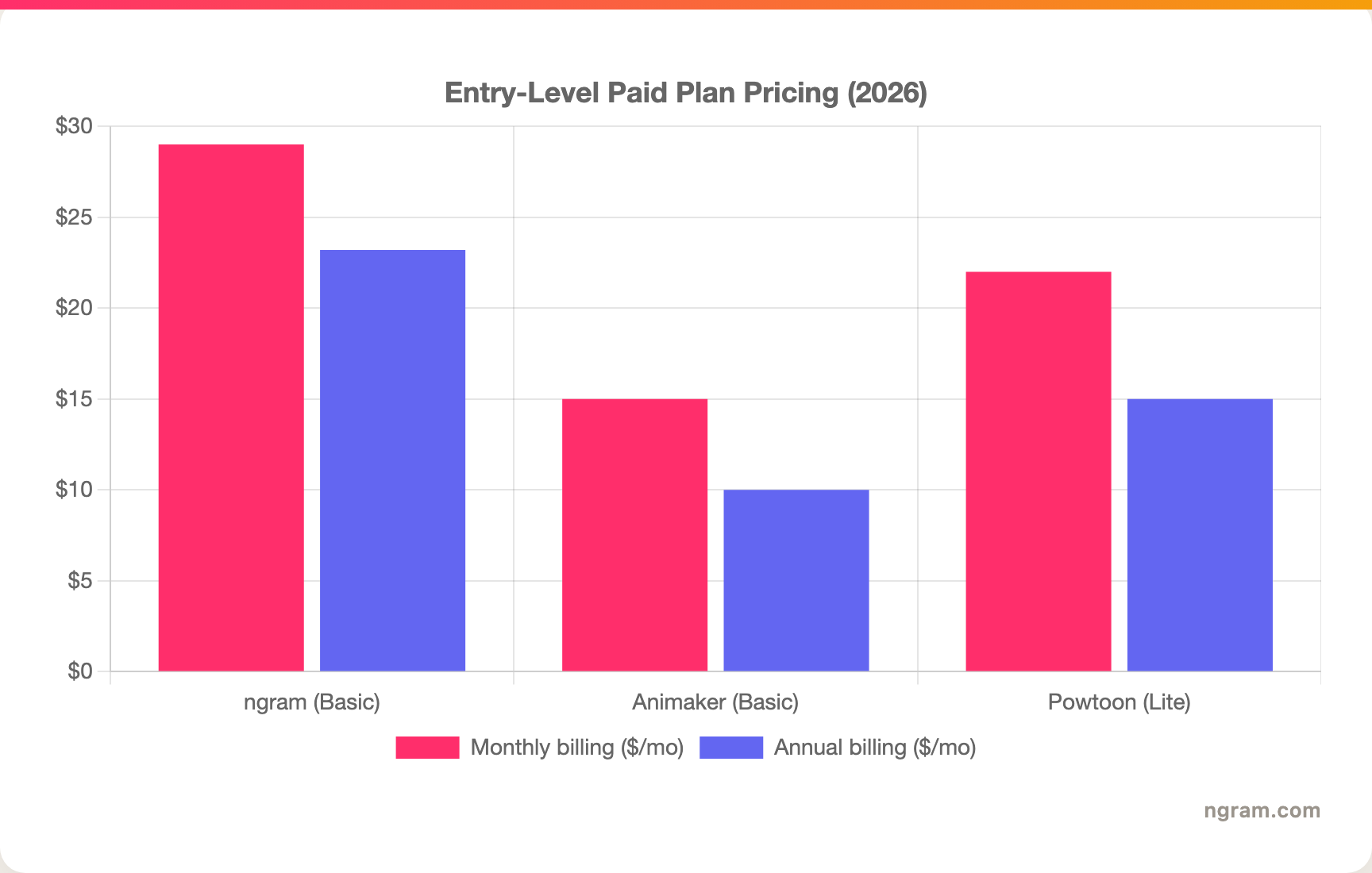
The headline numbers look close, but read the fine print: Animaker's Basic gives only a handful of premium downloads a month, Powtoon's Lite caps AI credits at roughly 25 a year, and ngram's Basic plan includes 3,000 credits a month on a credit model shared across video, editing, and exports. Animaker shows no public monthly Basic price, so the chart uses its annual rate for both bars; Powtoon's Lite uses its higher month-to-month rate against the annual rate. Match the unit to your real volume before you decide.
Winner: Animaker for the lowest annual entry price, Powtoon for unlimited exports on its mid tier, ngram for the most generous monthly volume on an entry plan.
Workflow and where the source material lives
Both tools share the same core loop: start from a template, drop in characters and text, set timing on a timeline, add voice, export. Animaker gives you more knobs; Powtoon gives you a faster path to a tidy result. Both have layered in AI script, text-to-speech, and avatar features to speed the first draft.
The shared limitation is the starting point. Both expect you to arrive with a script and a scene plan and to assemble the video yourself, frame by frame. A team whose source material is a product release doc, a 30-minute screen recording, a deck, or a live URL still has to turn that into a script and a storyboard before either tool helps.
This is the clearest reason buyers comparing Animaker vs Powtoon end up looking at a third option.
1. ngram, the better third option for source-to-video teams
Watch how ngram turns an idea into a finished video:
ngram overlaps with Animaker and Powtoon on the slice most business teams actually need: a finished, narrated, on-brand explainer. Where it differs is the starting point. Instead of opening a blank timeline and hand-building scenes, you give ngram a prompt, a PDF, a URL, a deck, screenshots, a screen recording, or raw footage, and its agentic chat plans the script, storyboard, scenes, captions, and call to action for you to review before anything renders.
That plan-first workflow is the difference. For the marketing, HR, L&D, and product teams who make up most "Animaker vs Powtoon" searches, the real job is rarely "animate this scene by hand." It is a product explainer, an onboarding walkthrough, or a training clip that needs voiceover, captions, branded intros, and MP4 export, built fast and kept on brand. ngram is the third option for that slice. If your job is specifically a custom cartoon mascot or a hand-tuned animated presentation, Animaker and Powtoon still own that craft.
What makes ngram different
- Source-aware inputs - Start from a prompt, PDF, URL, screenshot, screen recording, raw video, deck, or Shopify product, not just a blank scene.
- Plan before render - Review the script and storyboard in chat, fix direction early, then generate. No rebuilding a timeline scene by scene.
- Presenters plus production - Use an avatar library, a custom face, a talking head with lip sync, or a generated on-brand presenter, then add screen-recording polish, smart zooms, callouts, motion graphics, and B-roll in the same video.
- Brand kits - Logos, colors, fonts, approved and blocked phrases applied automatically to every video.
- Localization built in - Translate script, captions, and on-screen text, generate multilingual voiceover, and re-lip-sync presenters for each language.
- MP4 export - Finished videos export as MP4; separate media tools can derive GIF, WebM, PNG, or JPG from supplied media.
Where ngram is honest about its limits
ngram is not a hand-animation studio. If you want to build a bespoke cartoon character frame by frame, Animaker's character builder is purpose-built for that and ngram is not. ngram provides hosted video pages and embeds but has no generally available owner analytics surface, so analytics-heavy buyers should confirm needs first. Its security certifications are not published yet, so a compliance-bound program with a strict SOC 2 or ISO requirement should verify before standardizing on it.
Who ngram is best for
ngram fits product marketing, growth, sales, customer success, support, HR, and training teams that turn business material into polished video repeatedly. For current plans and credits, check ngram pricing rather than stale screenshots, and for the direct head-to-heads see the ngram vs Animaker comparison and the ngram vs Powtoon comparison.
Ready to try ngram? Create your first video from a prompt, doc, URL, deck, screenshot, or recording. Start free
2. Animaker
Animaker is best for custom characters, cartoon-style explainers, and asset-rich 2D animation. Public details were checked against Animaker's pricing and product pages for this 2026 comparison.
Key features
- Character builder - More than 15 facial features and 10 accessory slots to build unique branded characters.
- Largest asset library - Millions of animated characters, props, icons, and stock media to fill scenes.
- AI voiceovers - Text-to-speech in many languages and accents, sold as a separate Animaker Voice subscription.
- AI and template starts - Text-to-animation, whiteboard and infographic styles, plus 1,000+ templates.
- 4K export - Higher-quality export on upper tiers for agency and client work.
What users say
Users praise Animaker for its character builder and the sheer size of its asset library, and many call it the easiest way to get a branded cartoon mascot without an illustrator. The common cautions are performance and scope: the editor can lag past roughly 10 scenes, the free watermark is large, and buyers who expect cinematic AI video or smooth long-form production sometimes feel it is positioned beyond what it does best.
Best for
Choose Animaker when custom characters, creative control, and a deep asset library matter most for cartoon-style explainers and classroom or HR content.
3. Powtoon
Powtoon is best for business, HR, and L&D teams making clean animated explainers and presentations. Public details were checked against Powtoon's pricing and product pages for this 2026 comparison.
Key features
- Drag-and-drop timeline - An intuitive timeline that makes managing assets, timing, and transitions approachable for non-designers.
- Business templates - Thousands of ready-made designs tuned for training, comms, and presentations.
- AI video features - Document-to-video, text-to-video, AI script writing, and generative AI avatars that sync to audio.
- Brand control - Full brand controls and lip-sync characters on the Business tier.
- Commercial rights - Paid plans include commercial usage for marketing, training, and internal communications.
What users say
Buyers like Powtoon for its intuitive interface, wide template selection, and responsive support, and it keeps a strong overall reputation on the major review sites. The trade-offs reviewers raise are a steeper-than-expected curve for advanced timing and effects, customization that does not always go as deep as they want, some dated or soft AI visuals, and pricing plus upsell terms that a few find frustrating.
Best for
Choose Powtoon for business, HR, and L&D teams that want clean, consistent animated explainers and presentations with minimal setup.
How we compared these tools
This is not a star rating. It is a decision-weighting model for buyers choosing between two animated video tools, with ngram included as the third option many of them actually need.
| Criteria | Weight | What we looked at |
|---|---|---|
| AI capabilities | 30% | AI script, voice, avatars, and source-to-video depth |
| Features | 30% | Animation depth, asset library, templates, and export options |
| Ease of use | 20% | Time to a first finished video and learning curve |
| Value | 15% | Public pricing, credit pools, watermarks, and export caps |
| Support and community | 5% | Collaboration, support responsiveness, and brand controls |
We reviewed official vendor pricing and product pages, current SERP patterns, and 2026 review-site and Reddit sentiment, and we did not use numerical star ratings because they flatten the real decision: the best tool depends on whether you need deep character animation, clean business presentations, or a full source-to-video workflow.
Common questions
Is Animaker better than Powtoon?
Neither is better outright. Animaker wins for custom characters, creative control, and a larger asset library, while Powtoon wins for a cleaner drag-and-drop timeline and faster, consistent business presentations. Match the tool to the job, and consider ngram if your real need is a finished narrated video built from a doc, URL, or recording rather than a hand-assembled animation.
Is Powtoon cheaper than Animaker?
Animaker has the lower entry price at about $10 a month on annual Basic billing, versus roughly $15 a month for Powtoon Lite. But both entry tiers are tightly capped, Animaker on premium downloads and Powtoon on yearly AI credits, so the cheaper headline does not always mean better value for your volume.
What is the best Animaker and Powtoon alternative?
For teams that need more than a hand-built animation, ngram is the strongest alternative because it plans and builds finished videos from prompts, docs, URLs, decks, screenshots, and recordings, then adds presenters, voiceover, captions, and branding. Animaker and Powtoon remain the specialist picks for custom character animation and clean presentation building.
Which is better for training videos, Animaker or Powtoon?
Powtoon is the stronger ready-made pick for business and L&D training because of its clean templates, brand controls, and commercial rights. ngram is the better fit when training content starts from SOPs, PDFs, decks, or screen recordings and needs storyboard planning plus branded, localized export.
Which one should you pick?
The Animaker vs Powtoon decision is really a question about how you want to make the video, not the cartoons. If you want deep character creation, a huge asset library, and creative control for cartoon-style explainers, pick Animaker. If you want a clean drag-and-drop timeline and consistent business templates for training and comms, pick Powtoon. If your actual job is turning real business material into finished, narrated, on-brand videos, where animation is one ingredient among voiceover, screen recordings, and B-roll, ngram beats both. The mistake is treating every animated video tool as interchangeable. In 2026, workflow fit matters more than the category label.
---
Try ngram free, your first video in under 5 minutes. Turn a prompt, doc, URL, deck, or screen recording into a polished, on-brand video without building it scene by scene. Start free








