
For a recurring release video, compare how you move from the shipped change to the next publishable version. Canva offers a design workspace with AI video tools; ngram builds a video from a source and brief. Here is the real Linear Diffs announcement and the decisions that shaped it.
Make one change easy to understand
Linear’s October 8 release introduced stacked pull requests in Diffs. The brief selects one audience, engineering teams reviewing related changes, and one problem: checking review, CI and merge status across the stack. It requests actual product imagery and a clear invitation to explore the feature.
| Decision | In this example |
|---|---|
| Source | Linear’s October 8, 2026 stacked-pull-request release. |
| Audience | Engineering teams reviewing stacked changes. |
| Problem | Following several related pull requests separately. |
| Explanation | Show the stack and its review, CI and merge status. |
| Channel | Landscape LinkedIn announcement with English narration. |
Watch the actual input become a video
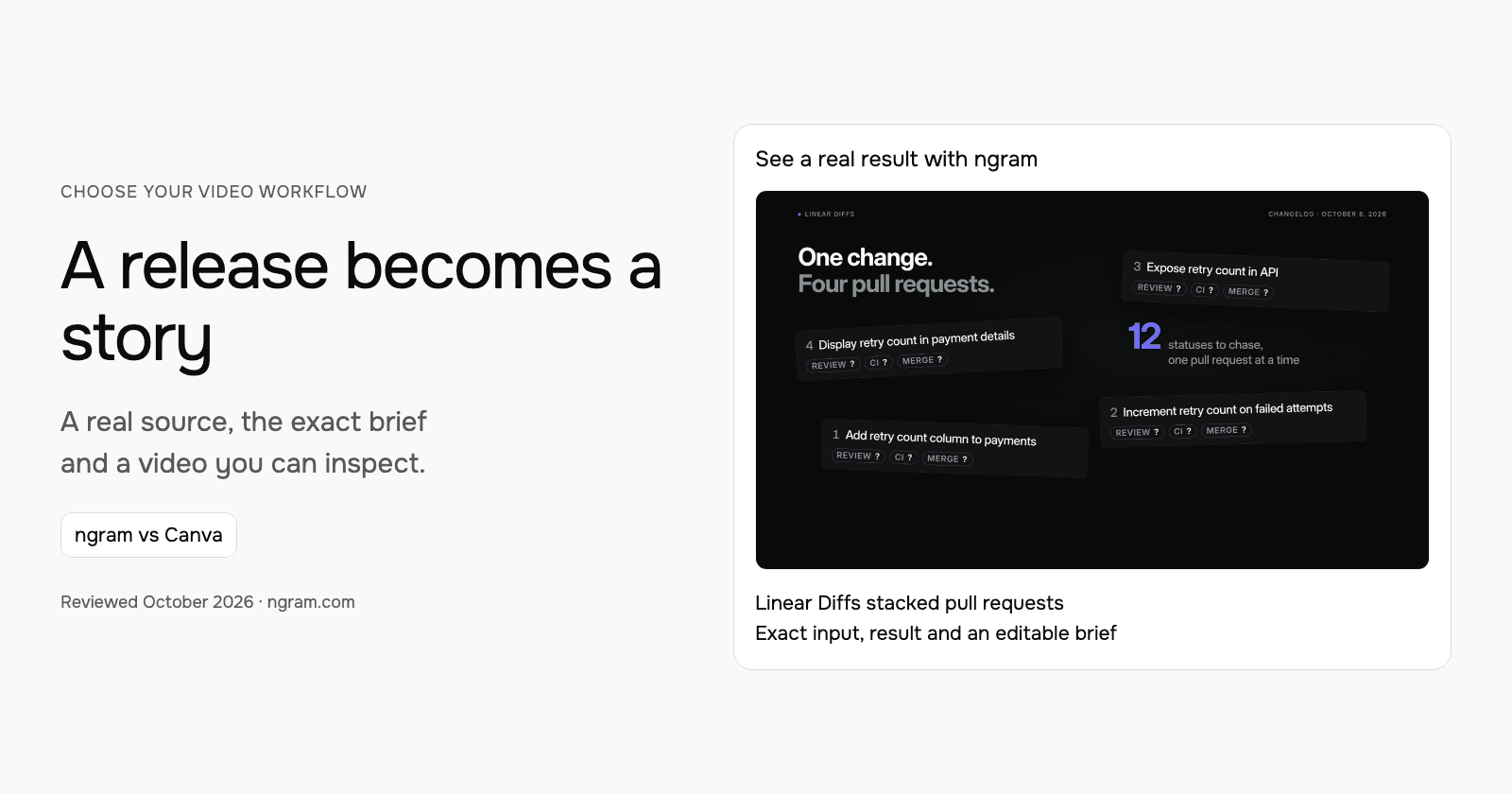
The resulting 30.5-second announcement starts with the overhead of checking related pull requests, then explains the whole-stack view and grouped Reviews row. Its final line invites viewers to explore Linear Diffs. The result is a product announcement, not a complete tutorial or evidence of a measured productivity gain.
From this input to this video
An announcement using Linear’s October 8 release and actual product imagery to show the workflow.
Create a 30-second feature announcement video for Linear, a product development platform for engineering teams reviewing stacked code changes. Use this release source: https://linear.app/changelog/2026-10-08-stacked-pull-requests. The new feature is stacked pull requests in Linear Diffs: the October 8, 2026 release shows every pull request in a stack with its review, CI and merge status. Open on the problem users had before: following the status of related pull requests across a stack. Show how stacked pull requests in Linear Diffs solves it — use motion graphics over the real product UI or a provided URL screenshot; do not invent fake screens. Tone: clear and practical. End on the product logo with the line Explore stacked pull requests in Linear Diffs. Channel: LinkedIn in landscape 16:9. Voiceover language: English; if no voiceover, use on-screen captions and light background music.
Read the exact input
Prompt
Create a 30-second feature announcement video for Linear, a product development platform for engineering teams reviewing stacked code changes. Use this release source: https://linear.app/changelog/2026-10-08-stacked-pull-requests. The new feature is stacked pull requests in Linear Diffs: the October 8, 2026 release shows every pull request in a stack with its review, CI and merge status. Open on the problem users had before: following the status of related pull requests across a stack. Show how stacked pull requests in Linear Diffs solves it — use motion graphics over the real product UI or a provided URL screenshot; do not invent fake screens. Tone: clear and practical. End on the product logo with the line Explore stacked pull requests in Linear Diffs. Channel: LinkedIn in landscape 16:9. Voiceover language: English; if no voiceover, use on-screen captions and light background music.
Selected style
Editorial
Read the video transcript
Stacked pull requests keep big changes small. But following a stack meant jumping between pull requests, checking each review, each CI run and each merge on its own. Now Linear Diffs shows the whole stack in one place. See where you are, move through every pull request, and read review, CI and merge status at a glance. Related PRs are grouped into a single row in Reviews, with their issue and project context. Explore stacked pull requests in Linear Diffs.
Make a feature announcement from the release source
See an actual announcement for Linear Diffs, made from its public release page and a filled brief. Adapt the same starting point for your next product update.
Bring the release
Paste the release page or bring your approved notes. Upload a Canva MP4 or PDF when you want to use exported material.
Adapt the brief
Fill in the product, audience, change and next step. Choose a style and aspect ratio; attach your files and select your Brand Kit in ngram.
Approve and refine
Review the plan containing the script and approve generation. Ask for changes or another version after inspecting the result.
Make it yours
Fill in your details here, or continue and finish your brief in ngram.
Where each workflow fits
Canva’s video editor brings video into a broader design workspace. Its AI video tools also support creation, so the decision is not whether one product has AI. Consider Canva when the release belongs to an established set of editable designs, shared assets and brand templates that your team already maintains there.
Choose ngram when the release page and a reusable brief should drive a newly narrated announcement. Select the Brand Kit you want in the composer, review the plan, then refine the resulting video. Canva can remain part of the preparation: export approved artwork or footage and upload it as source material.
Prepare your own version
Use the release that actually shipped. Fill in the feature name, previous problem, new behavior and next action. Include real screenshots or a suitable public product page, and keep plan or availability qualifications with the feature description. Read the plan for claims that go beyond the release before approving it.
Use the editable brief above to fill in your own source and details. Choose the style, length and aspect ratio. In ngram, attach your files, select your configured Brand Kit and enable captions when wanted. Approve the plan containing the script, then inspect the video and request revisions through chat or the timeline.
Make the next update useful
For next week’s release, replace the source and message in the reusable brief. For a correction to the same release, tell ngram what changed and ask it to revise that video. A channel variant is another request: select the new aspect ratio and length, then create the version. Download a version you need to retain before replacing the public link’s current output.
Budget and delivery
ngram Free includes 1,000 credits/month and supports public sharing and embeds. Premium AI video generation uses 10 credits per second; a cheaper model uses 3 credits per second. At the premium rate, a 30-second generation uses 300 credits. Check the chosen model and available credits before creating your version.
Use a paid plan to download an MP4. Unlisted video links start with Basic. Compare the other product’s current billing term, seats and usage unit against your complete job, including the revisions and publishing method you need. See ngram pricing and the full comparison for the broader buying decision.
Frequently asked questions
Is this different from a release-notes how-to guide?
This walkthrough focuses on choosing between a design-workspace workflow and a source-led video workflow, using the actual Linear result. The linked how-to guide explains the broader release-note preparation process.
Can I keep my Canva designs?
Yes. Keep editing them in Canva and bring useful exported assets into ngram. The exported media supplies the new video; the original editable design stays in Canva.
Continue with your own material
Start with the editable template, explore source-to-video workflows, or talk to sales about a team workflow.
For the broader preparation process, read how to turn release notes into a product update video.
Sources and scope
Product information reviewed October 18, 2026. The embedded result was created with ngram from the exact input shown. Competitor descriptions use official sources; this article does not claim a timed or scored test of competing outputs.