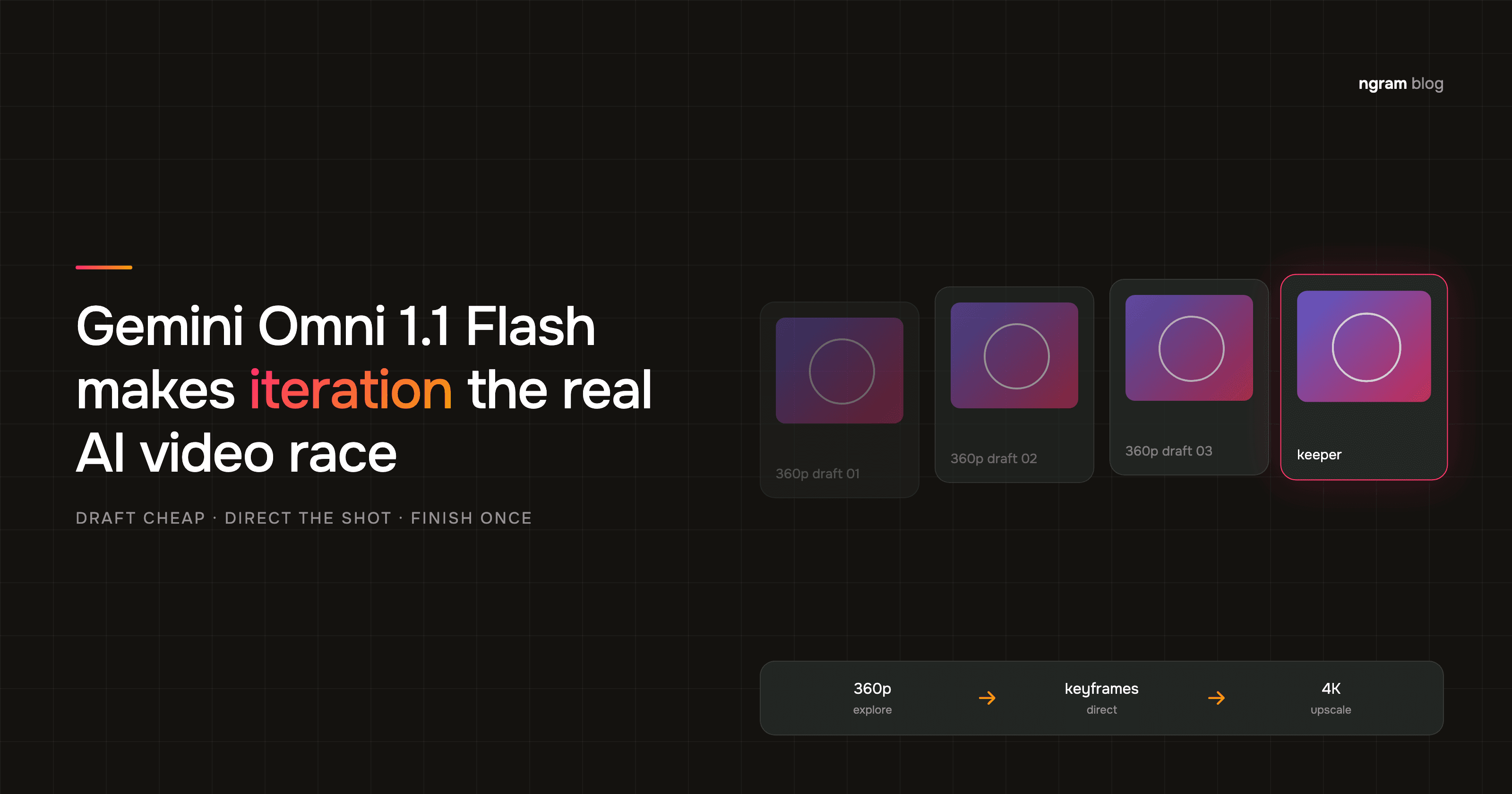

On August 27, 2026, Google released Gemini Omni 1.1 Flash as a production-ready generative-video model for developers. The headline features are scene extension, first-and-last-frame interpolation, 360p drafts, and output upscaling to 1080p or 4K. The bigger change is less photogenic: Google has built an explicit loop for throwing drafts away cheaply.
That matters because AI video teams rarely struggle to generate one attractive clip. They struggle to direct a sequence, preserve intent across revisions, and decide which attempts deserve finishing time. We covered the model family's earlier distribution push in our analysis of Gemini Omni Flash on YouTube. Gemini Omni 1.1 Flash now shifts the discussion from reach and raw clip quality toward control and iteration economics.
Two caveats should stay attached to every summary of this release. Google's 40-second figure is a cumulative scene length reached through extensions, not one native 40-second generation. Its 1080p and 4K outputs are upscaled, not native high-resolution generation.
What Gemini Omni 1.1 Flash changes
Gemini Omni 1.1 Flash is the generally available Gemini API model released August 27, 2026. It generates 3-to-10-second clips at 24 FPS, accepts text, image, and video inputs, and adds frame interpolation, scene extension, 360p drafting, and upscaled 1080p or 4K delivery.
The release separates five jobs that one-shot generators tend to collapse into a single expensive request:
- Explore cheaply: 360p previews run up to 60% faster than the standard 720p path and cost about one third as much.
- Plan the shot: first-and-last-frame interpolation lets a team prescribe where a transition starts and lands.
- Continue the take: each extension adds up to 10 seconds, with a cumulative ceiling of 40 seconds.
- Finish the keeper: 1080p and 4K are available as upscaled outputs after the creative choice has been made.
- Carry references forward: the announcement also adds up to three seconds of reference video for a generated scene.
The time controls are easy to blur together. They refer to different stages of the workflow: how much prior context the model reads, how much footage one extension adds, and how long the chained result can become.
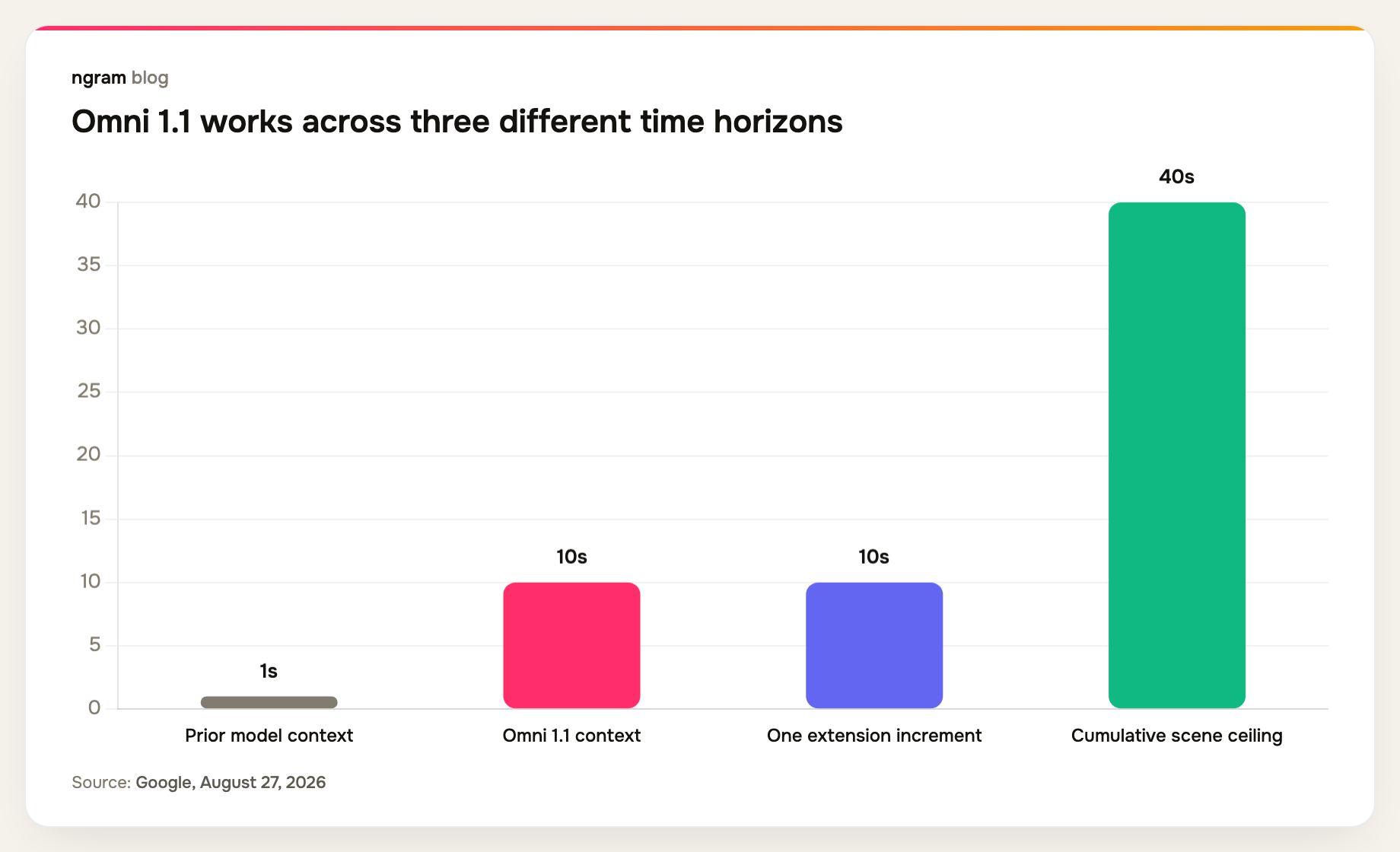
A 10-second context window does not guarantee continuity. It gives the model ten times more recent evidence than the old final-second method. That is a better input condition, not a promise that faces, props, or motion will remain perfect.
Gemini Omni 1.1 Flash turns control into the product
The first wave of text to video AI competition rewarded a model for producing an impressive sample from one prompt. Production work rewards a different behavior: accepting direction repeatedly without destroying what already works.
First-and-last-frame control makes the destination explicit. Scene extension makes continuation an operation instead of a fresh generation. Low-resolution drafting makes rejection cheaper. Together, these controls move the useful question from ‘Can the model make this shot?’ to ‘How quickly can a team shape the shot it needs?’
This is why the 1.1 label understates the workflow change. The model can still fail on a hand, a title card, or a complicated camera move. But a team can now separate composition decisions from finishing decisions. That separation is how conventional production already works: boards and rough cuts first, expensive polish later.
The 360p tier changes the cost of saying no
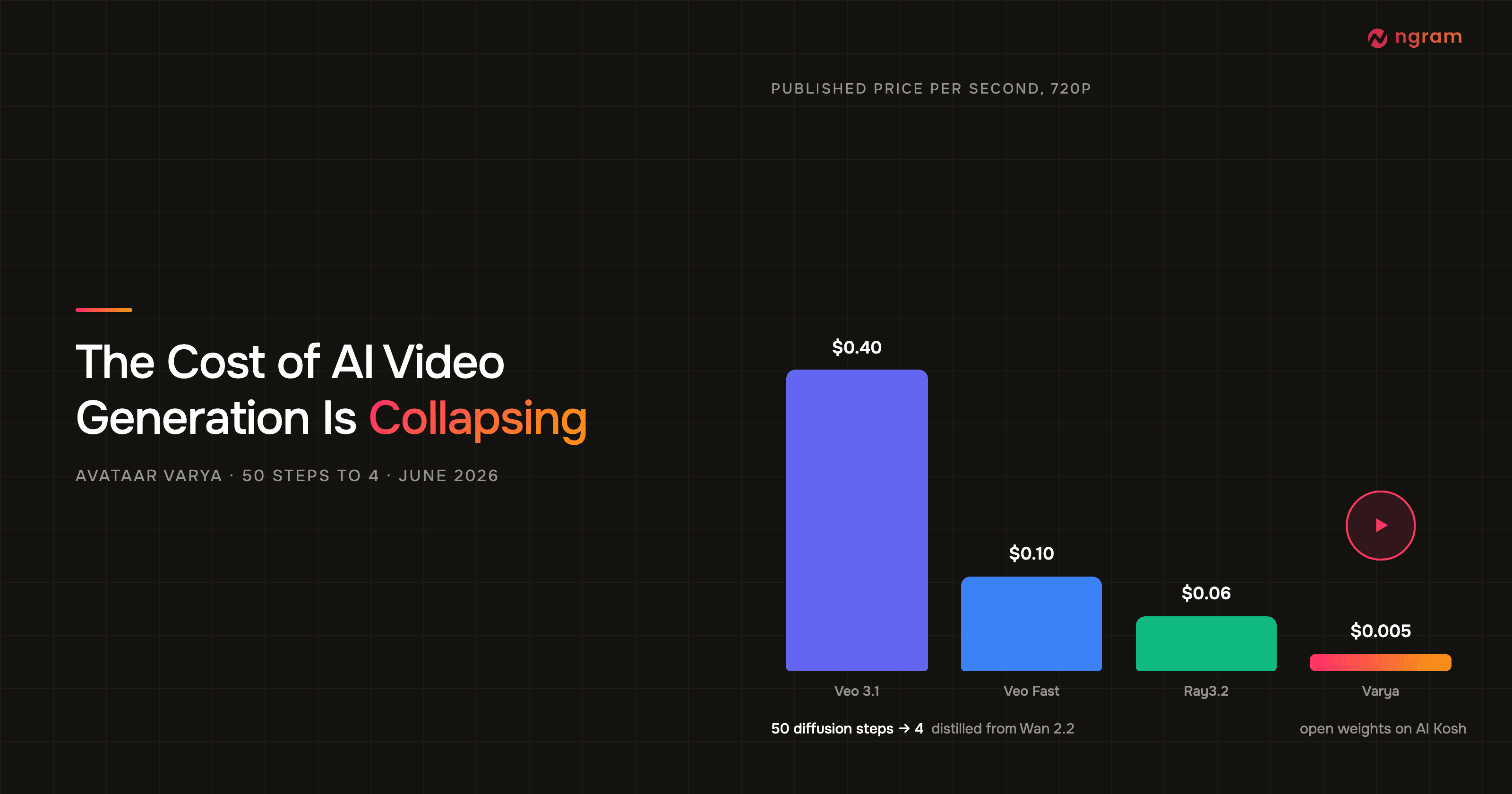
Google prices video output at $17.50 per million tokens. Its official Gemini API pricing says 720p consumes 5,792 output tokens per second, or about $0.10 per second. The Enterprise Agent Platform pricing lists 1,931 tokens per second at 360p, 8,688 at 1080p, and 17,376 at 4K. Applying the same token price gives approximate rates of $0.034, $0.101, $0.152, and $0.304 per second.
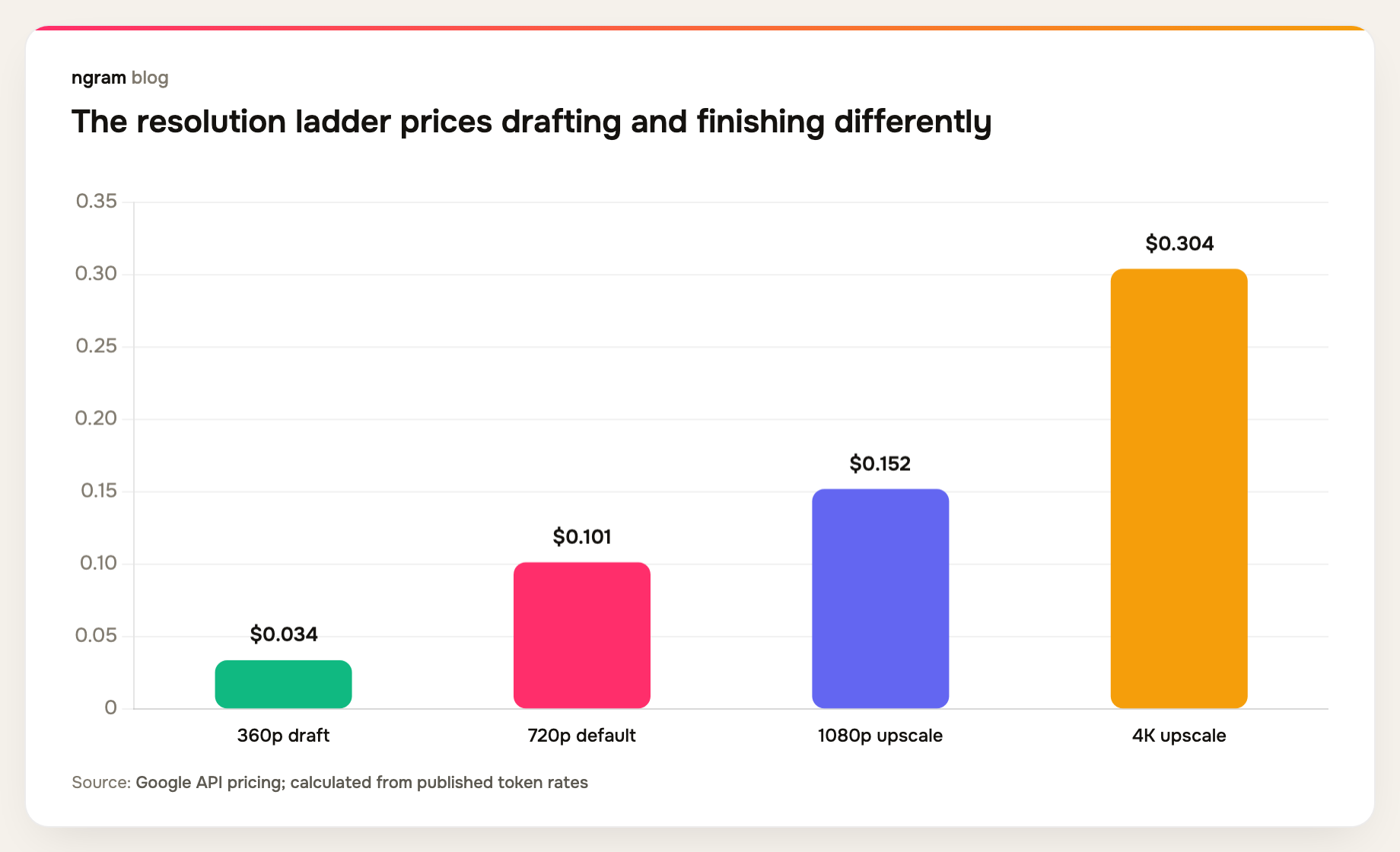
The 360p route does not make a finished clip free. It makes a bad idea cheaper to detect. At the published token rates, a 10-second 360p draft costs about $0.34. A 10-second 4K output costs about $3.04. That ninefold gap changes how many alternatives a team can afford to inspect before choosing one.
Consider a fixed $10 exploration budget and 10-second attempts. Ignoring small input-token charges, that budget buys about 29 drafts at 360p, 9 at 720p, 6 at 1080p, or 3 at 4K. The point is not that every team should generate 29 drafts. The point is that high-resolution generation is the wrong place to discover that the camera move or composition was wrong.
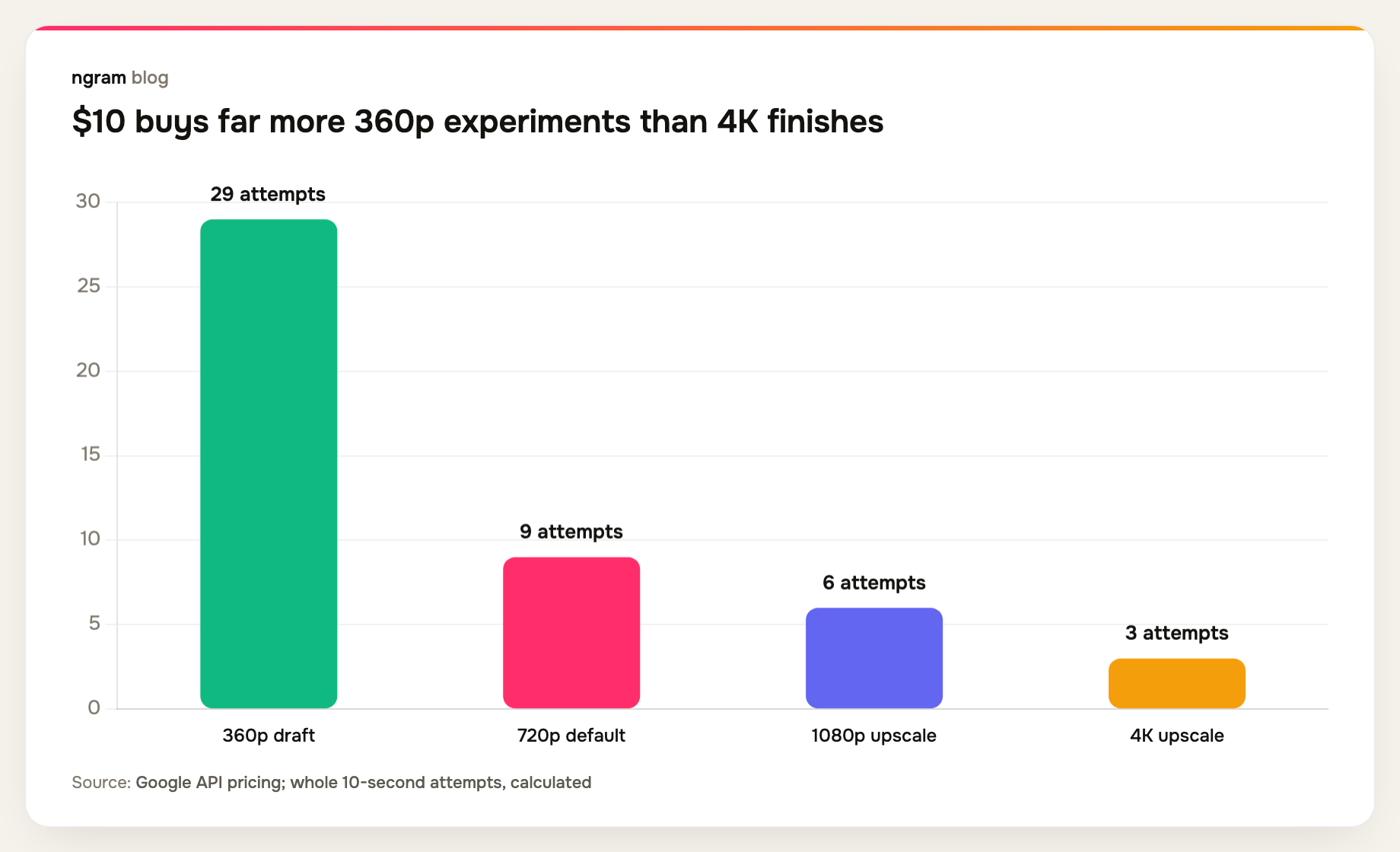
A sensible loop is draft several compositions at 360p, keep one, test continuity at 720p, then upscale the approved cut if the delivery channel benefits. Google itself suggests generating three or four draft variations while changing one variable at a time. That is closer to controlled experimentation than prompt roulette.
First and last frames make transitions schedulable
The Gemini Omni API guide shows interpolation as two image inputs plus a text instruction. The model generates the continuous motion between them. Google positions the control for camera orbits, zooms, reveals, and looping clips.
The practical value is not prettier motion by itself. A known first frame and known last frame let an editor plan the neighboring shots. A product close-up can begin on the approved pack shot and land on the approved lifestyle frame. A looping social clip can return to its opening composition. This makes an image to video generator easier to fit into a planned edit because the transition can be evaluated against two fixed boundaries instead of one vague prompt.
The middle remains generated. Teams still need to inspect identity, geometry, text, and object continuity across every frame. But pinning the boundaries reduces one source of uncertainty, which makes the result easier to fit into a wider edit.
Forty seconds is a chain, not one generated shot
Google says scene extension now analyzes up to 10 seconds of prior context, compared with the final second used by earlier models. It then adds footage in increments of up to 10 seconds, until the scene reaches 40 seconds in total.
That distinction matters for planning and billing. A 40-second scene is assembled through repeated generation calls. Each boundary is another place where motion, identity, audio, or narrative direction can drift. Each generated second also adds output cost. The ceiling describes the completed chain, not the size of one uninterrupted native generation request.
The better context window should reduce abrupt seams because the model can inspect more of the incoming action. It also gives the extension more narrative evidence. If a character crosses the frame, turns, and starts speaking during the previous 10 seconds, the continuation can condition on that sequence instead of one frozen endpoint.
Teams should still treat every extension as a review gate. Approve the incoming 10 seconds, describe the next action, generate the continuation, and inspect the join before asking for another segment. Chaining four unchecked extensions only postpones the most expensive review.
4K is finishing, not native 4K generation
The model page lists 360p, 720p, 1080p, and 4K among the supported outputs for 3-to-10-second clips at 24 FPS. The August 27 API release notes are more precise: 720p is the default, while 1080p and 4K are generated through upscaling.
That does not make the high-resolution outputs useless. Upscaling can simplify delivery and give editors more pixels for reframing, crops, and downstream compression. It does mean ‘4K output’ should not be rewritten as ‘native 4K generation.’ Those are different technical claims.
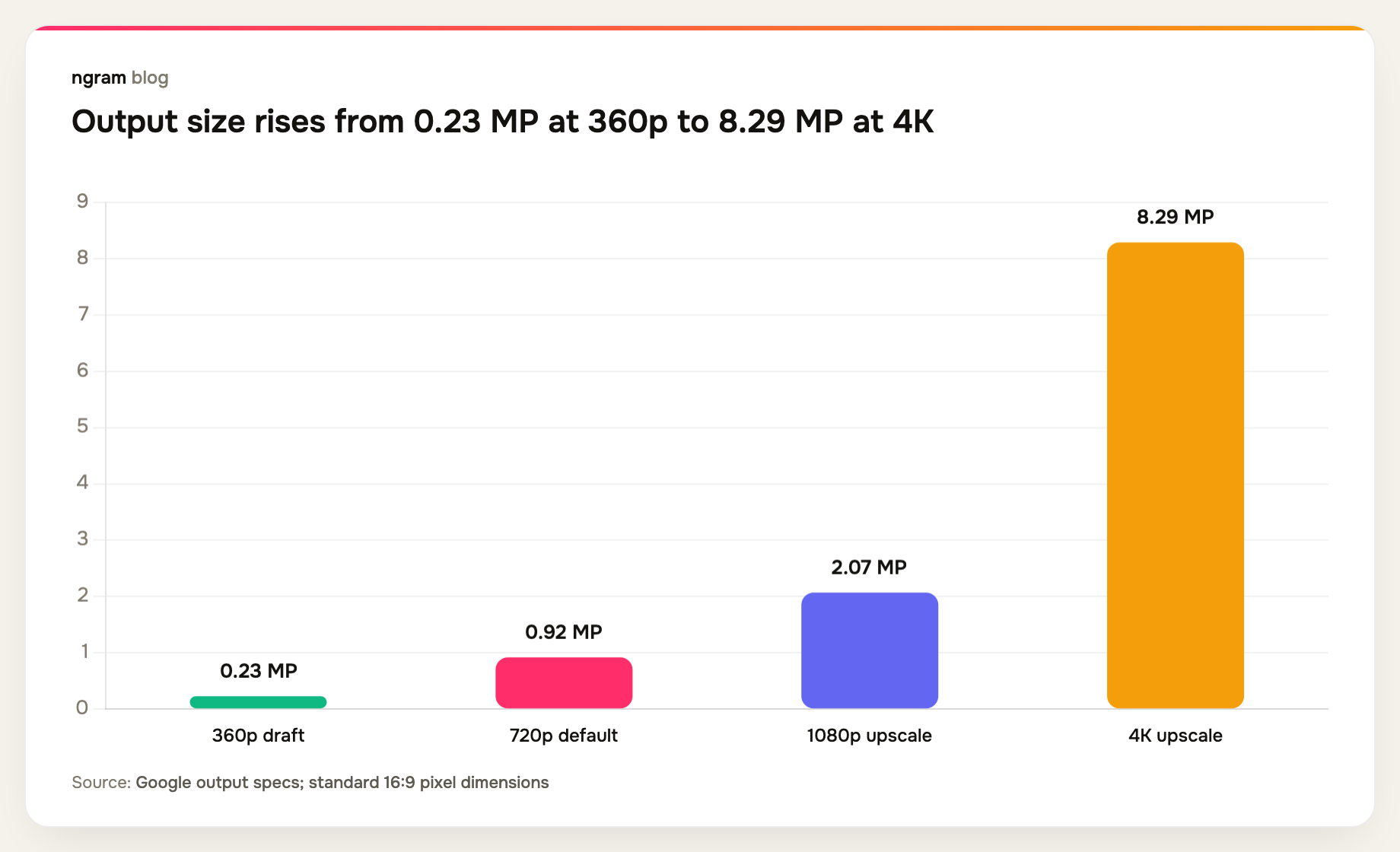
This is another reason to lock the shot at low resolution. Upscaling cannot repair a bad action, incorrect object, broken word, or continuity error. It can only produce a larger version of the approved generation.
The remaining limits are production limits
Google's own Gemini Omni Flash model card names three remaining challenges: complete consistency through edits, complex motion, and perfectly accurate text. Those are not edge cases for commercial video. They sit directly in the review path.
- Consistency through edits affects recurring characters, products, costumes, and brand details.
- Complex motion affects choreography, object interactions, camera moves, and physical plausibility.
- Accurate text affects packaging, UI, signage, captions baked into footage, and legal copy.
A production-ready API is not the same thing as a production-perfect model. General availability tells developers the endpoint is stable enough to build against. It does not remove the need for shot review, brand checks, rights review, or fallback footage.
Google's API guide adds regional constraints too. Uploading, editing, or extending certain media is restricted in the European Economic Area, Switzerland, and the United Kingdom. Teams building global products need to treat capability availability as a deployment condition, not a footnote.
A better draft-to-final AI video workflow
The release points toward a five-stage workflow that keeps expensive decisions late:
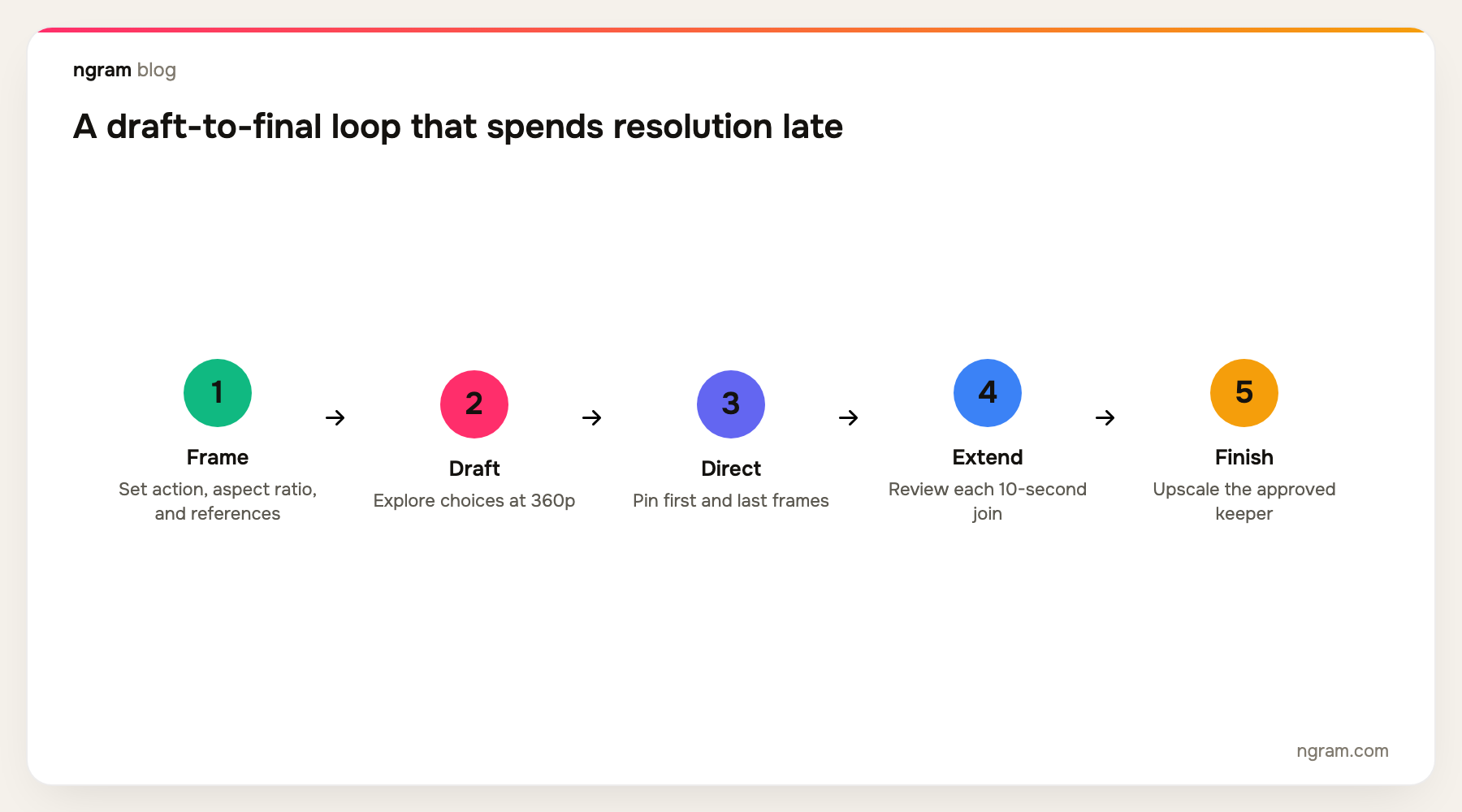
- Frame the shot. Define the action, aspect ratio, references, opening frame, and intended landing frame.
- Draft at 360p. Change one variable per attempt so the comparison teaches you something.
- Direct the keeper. Use first-and-last-frame control when the shot must connect to neighboring footage.
- Extend in reviewed increments. Inspect every join before spending on the next 10 seconds.
- Finish once. Request 1080p or 4K only after composition, motion, continuity, and text have passed review.
This sequence also makes cost attribution clearer. Exploration spend belongs to drafts. Continuity spend belongs to extensions. Delivery spend belongs to upscaling. When those jobs are collapsed into repeated 4K generations, nobody can tell which part of the process is consuming the budget.
Google is distributing the controls through its products
Google released the same controls in Google Flow on August 27. Flow users can specify start and end frames, draft at 360p, and export or upscale selected clips. Google says the features are available in Flow, while scene extension also reaches Google AI Plus, Pro, and Ultra subscribers through the Gemini app.
That distribution matters because a control only changes production when people can reach it in the surface where they make decisions. The API gives developers primitives for an AI video generation platform. Flow gives creators an opinionated loop. The Gemini app puts one part of that loop into a general-purpose interface.
ngram follows the same product logic at the workflow layer. Its live Clip Studio is an AI clip generator that exposes text prompts, starting images, first-and-last-frame inputs, and reference-image modes with direct model and frame control. Teams can pair those controls with a broader AI video generation workflow, start from an image-to-video conversion path, and use agentic chat for natural-language edits or single-scene regeneration. Model availability still depends on what the product exposes, so stronger supplier controls do not automatically mean every control is available for every model.
What teams should take from Gemini Omni 1.1 Flash
The release changes the competitive layer in four practical ways:
- Raw quality becomes easier to copy than a reliable iteration loop. The interface around the model now carries more value.
- Draft cost becomes a planning metric. Teams should track attempts per approved shot alongside list price per generated second.
- Continuity becomes an explicit review discipline. More context gives the model better evidence, but every extension still needs inspection.
- Resolution becomes a finishing choice. Upscaled 4K is useful after approval, not evidence that the underlying generation was native 4K.
For teams evaluating an AI video editor or AI video generator, the useful test is no longer a single hero prompt. Ask how the AI video creation tool handles rejected drafts, fixed endpoints, continuation, scene-level revision, and the handoff into a finished edit. If you want to test that wider loop, open ngram's video editor with a real business-video brief rather than a demo prompt.
Frequently asked questions
What is Gemini Omni 1.1 Flash?
Gemini Omni 1.1 Flash is Google's generally available generative-video model released August 27, 2026. It supports text, image, and video inputs, generates clips with audio, and adds scene extension, first-and-last-frame interpolation, resolution control, and conversational editing through the Interactions API.
Can Gemini Omni 1.1 Flash generate a 40-second video?
It can reach a cumulative scene length of 40 seconds through extensions. Google says extensions run in increments of up to 10 seconds and use up to 10 seconds of prior context. The 40-second figure is not one native 40-second generation.
Does Gemini Omni 1.1 Flash generate native 4K video?
No. Google documents 1080p and 4K as upscaled outputs. The default output is 720p, and 360p is positioned as a faster, lower-cost draft resolution.
How much does Gemini Omni 1.1 Flash cost?
Google charges $17.50 per million video output tokens on the paid Gemini API tier, with no free tier. The official rate is about $0.10 per second at 720p. The published token schedule implies roughly $0.034 per second at 360p, $0.152 at 1080p, and $0.304 at 4K.
What does first-and-last-frame interpolation do?
You provide an opening image, a closing image, and a prompt. The model generates the motion between those endpoints. This is useful for planned transitions, camera moves, loops, and shots that need to fit between approved neighboring frames.
What are the main Gemini Omni 1.1 Flash limitations?
Google's model card names complete consistency through edits, complex motion, and perfectly accurate text as continuing challenges. Those limits require frame-by-frame review for brand assets, products, recurring characters, UI, signage, and any text inside generated footage.
The race has moved from generation to direction
Gemini Omni 1.1 Flash does not end the quality race. It exposes the next bottleneck. Teams need to explore without overspending, prescribe boundaries, continue a scene without losing it, and finish only the shots worth keeping.
The winning AI video product will not be the one that makes the best isolated sample every time. It will be the one that makes directed iteration predictable enough for a team to ship the right sequence.