PlanRadar — Create a Ticket on the Plan | made with ngram

About the video
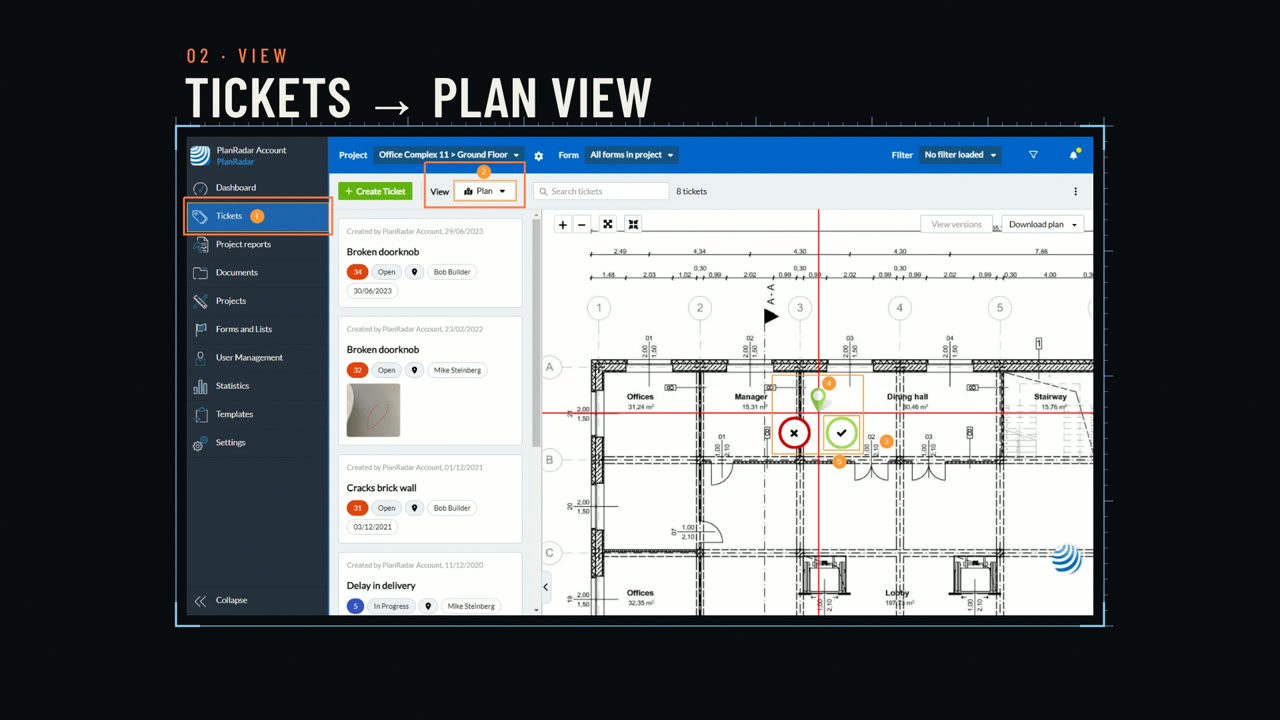
This video was created by ngram to walk through how to create a ticket directly on a plan in the PlanRadar WebApp. It explains that an on-site issue only gets resolved when it has a clear location and enough detail for the team to act, then demonstrates the steps to get there. The video shows starting from the project and location menu to select the relevant project and folder or plan, then opening the Tickets section and switching the View drop-down to Plan so the drawing appears beside the ticket list. It covers right-clicking the plan to place a ticket pin, dragging it to adjust position, and confirming placement with the green check mark. The video then shows selecting a form before entering details, noting that changing the form afterward clears any fields already filled in. It concludes by filling in mandatory fields such as the title and saving the ticket with Save or Save and close, mentioning that saved tickets sync across devices when online. Using HTML/CSS motion graphics, ngram built this as a clean, screen-based walkthrough following the scene structure of the need, project and location, tickets plan view, placing and confirming the pin, selecting a form, mandatory fields and save, and a closing call to explore ticket workflows in PlanRadar.
- #PlanRadar
- #ticket creation
- #construction software
- #plan view
- #WebApp walkthrough
- #field management