
Search for "Submagic vs Vizard" and you will find two short-form tools that creators often confuse for competitors, when they really solve two different parts of the job. Submagic is the caption-and-polish engine that makes a single short look styled and finished. Vizard is the clip extractor that turns a long webinar or podcast into many social-ready cuts. They are closer to complementary than head-to-head, and that is the key thing to understand before you pick. This guide compares Submagic vs Vizard across what each one actually does, plus pricing and workflow. It also shows where a third option, ngram, fits when your real job is a finished branded video built from source material, not just a captioned short or an auto-cut clip.
Both tools are genuinely good at their core job. Submagic is the favorite for animated captions and quick polish; Vizard is the workhorse content teams reach for to clip long recordings at volume. The honest answer to "which is better" depends on whether your bottleneck is finding clips or finishing them, so we pick a winner per dimension instead of crowning one overall.
Submagic vs Vizard at a glance
Here is the short version before the deep dive. ngram sits in the table because for many teams comparing these two, the better question is whether you need a caption tool, a clipper, or a system that builds the whole video.
| Tool | Best for | Starting price | Main distinction |
|---|---|---|---|
| ngram | Teams turning prompts, docs, URLs, decks, and recordings into finished branded videos and short-form variants | Free, paid from $29/mo | Plans and builds the whole video, not just clips or captions |
| Submagic | Creators polishing one short at a time with animated captions and B-roll | Free, paid from $20/mo | Best-in-class animated captions and short-form polish |
| Vizard | Content teams clipping webinars and podcasts at volume with transcript editing | Free, paid from $19/mo | Transcript-based clip extraction from long videos |
Clip extraction vs caption styling
This is the first thing buyers test, and it is the whole reason these two are different products.
Vizard is built to find clips. Drop in a long webinar, podcast, or interview, and its AI uses transcript and keyword analysis to surface highlight moments, which you refine in a transcript-based editor by highlighting text instead of scrubbing the timeline. For a content team sitting on hours of recordings that need to become many shorts, Vizard does the extraction work that Submagic was never designed for.

Submagic does have a Magic Clips feature, but reviewers find it struggles past about 20 minutes, so it is not the tool podcasters reach for to extract clips at scale. Submagic assumes you already have the clip and want to make it look great: word-level animated captions, emoji triggers, keyword sound effects, deep typography control, automatic B-roll, and silence and filler-word removal.
Winner: Vizard for extracting clips from long recordings, Submagic for finishing a clip you already have. They are more complementary than competing, which is why some creators run both.
Worth noting for both: a captioned clip or an extracted clip is still tied to footage you already recorded. If the finished video also needs a written script, branded intros, generated B-roll, and on-screen callouts, neither tool is built to plan that for you. That gap is where ngram comes in, and we cover it below.
Editing experience and output quality
Once you have a clip, the finishing experience differs sharply.
Submagic's output is the standout. Its captions are widely rated the best-looking in the category, and the combination of auto B-roll, hooks, and cleanup means a single short can go from raw to posting-ready in minutes without a second app. If your brand account lives or dies on caption style, Submagic wins.
Vizard outputs social-ready clips with captions, layouts, and custom branding on paid tiers, and its transcript editor makes trimming fast. But its captions are more functional than expressive, so creators who want trendy animated captions sometimes pass Vizard clips through a caption tool, frequently Submagic, before posting. That hand-off again shows how the two fit together.
Winner: Submagic for caption styling and posting-ready polish, Vizard for fast transcript-based trimming and volume output.
ngram treats captions and B-roll as part of a planned video rather than steps you bolt on. Every video gets brand-styled captions, and the agent plans the script, scenes, B-roll, and short-form cuts together, so you are not finishing clips in a separate tool.
Pricing and value
Pricing is where the two tools feel different, because they meter usage in different units. Submagic sells a number of videos per month. Vizard sells hours of upload. That single difference changes which one is cheaper for your volume.
Submagic's free plan allows 3 videos a month with a watermark. Starter is around $20 a month for roughly 30 videos with no watermark, auto-captions, B-roll, and trimming. Pro is about $40 a month for around 100 videos, and Agency is about $80 a month for around 300 videos. Because it counts finished videos, heavy creators can hit the cap on lower tiers faster than expected.
Vizard's free plan allows a small number of uploads a month with a watermark and short export caps. Creator is around $19 a month, or roughly $14.50 on annual billing, for about 30 hours of upload with no watermark. Pro or Business runs around $39 to $42 a month for roughly 100 hours of upload, HD, and custom branding. Enterprise is custom, and Vizard markets annual billing as several months free.
Here is how the entry-level paid plans compare on monthly and annual billing:
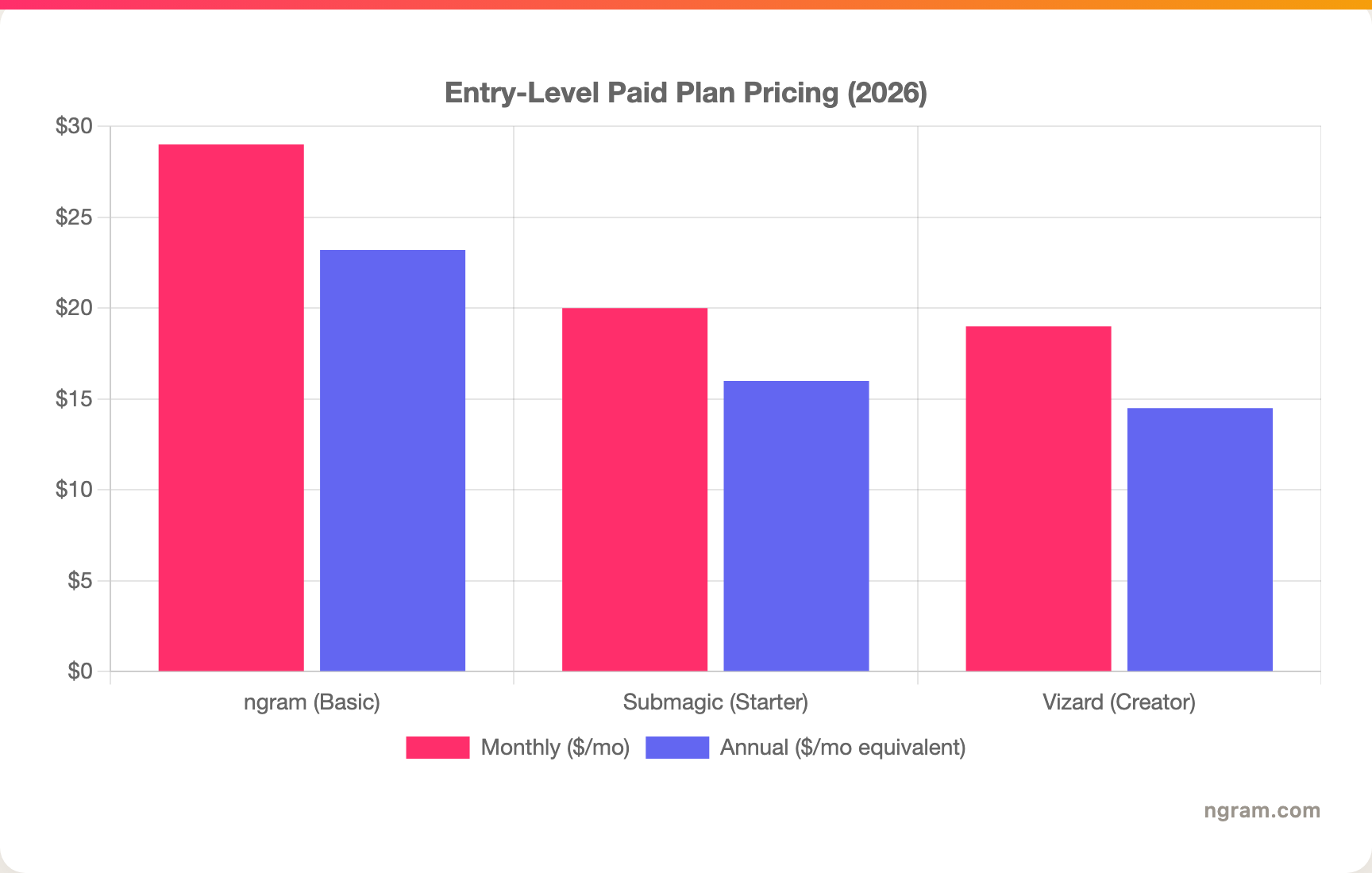
The headline numbers are close, but read the units: Submagic's Starter buys you a count of finished videos, Vizard's Creator buys you hours of source upload, and ngram's Basic plan includes 3,000 credits a month on a credit model shared across generation and editing, with unlimited exports. A team uploading many long recordings usually gets more from Vizard's hours; a creator finishing a steady number of shorts may prefer Submagic's per-video count.
Winner: Vizard for the lowest annual entry price and upload-hour value, Submagic for predictable per-video budgeting, ngram for the most generous monthly volume on an entry plan.
Workflow and ease of use
Both tools are fast and browser-based with no editing experience required. Vizard's loop is upload a long video, let the AI propose clips, refine by transcript, export. Submagic's loop is upload a clip, pick a caption template, let it add B-roll and remove silences, export. Each is smooth inside its lane, and the lanes barely overlap.
The shared limitation is the starting point. Both need finished footage: Vizard needs a long recording to cut down, Submagic needs a clip to dress up. Teams whose source material is a product doc, a deck, a live URL, or an idea with no footage yet still have to record or assemble something before either tool helps.
This is the clearest reason buyers comparing Submagic vs Vizard end up looking at a third option.
1. ngram, the better third option when you need the whole video
Watch how ngram turns an idea into a finished video:
ngram overlaps with both tools on the short-form slice: it can take raw video or a screen recording, transcribe it, clip and repurpose it for short-form, and layer on branded captions. Then it keeps going where they stop. Instead of needing footage in hand, you give ngram a prompt, a PDF, a URL, a deck, screenshots, a screen recording, or raw video, and its agentic chat plans the script, storyboard, scenes, captions, and call to action for you to review before anything renders.
That plan-first workflow is the difference. For the marketing, product, and content teams who make up a big share of "Submagic vs Vizard" searches, the real job is often not "caption a clip" or "cut a recording." It is a launch video, a product demo, or a social variant that needs a written script, generated B-roll, branded intros, callouts, and MP4 export with separate channel-cut preparation, all on brand, not just a slice of an existing recording.
What makes ngram different
- Source-aware inputs - Start from a prompt, PDF, URL, screenshot, screen recording, raw video, or deck, not just finished footage.
- Plan before render - Review the script and storyboard in chat, fix direction early, then generate, instead of clipping or captioning after the fact.
- Clips plus everything else - Repurpose a recording into short-form, then add generated B-roll, motion graphics, screen-recording polish, branded intros, and voiceover in the same project.
- Brand kits - Logos, colors, fonts, approved and blocked phrases applied automatically, including to caption styling.
- MP4 export - A finished MP4; channel-specific cuts need separate preparation, output as MP4, GIF, WebM, PNG, JPG, or PPTX.
Where ngram is honest about its limits
ngram is not a pure long-to-many clip miner: if your entire job is dropping a weekly two-hour podcast in and getting dozens of clips out at volume, a dedicated clipper like Vizard is purpose-built for that and will feel faster. ngram provides hosted video pages and embeds but has no generally available owner analytics surface, so analytics-heavy buyers should confirm needs first. And ngram's own animated-caption template library is not as deep as Submagic's, so if word-by-word caption styling is your single most important feature, Submagic still leads there.
Who ngram is best for
ngram fits product marketing, growth, content, and customer teams that turn business material into polished video repeatedly and also need short-form cuts of it. For current plans and credits, check ngram pricing rather than stale screenshots, and for the direct head-to-heads see the ngram vs Submagic comparison and the ngram vs Vizard comparison.
Ready to try ngram? Create your first video from a prompt, doc, URL, deck, screenshot, or recording. Start free
2. Submagic
Submagic is best for creators polishing one short at a time with standout animated captions and quick B-roll. Public details were checked against Submagic's pricing and product pages for this 2026 comparison.
Key features
- Animated captions - Word-level captions with emoji triggers, keyword sound effects, and deep typography control.
- Auto B-roll - Inserts relevant B-roll footage and zoom effects automatically.
- Cleanup tools - Removes silences and filler words and enhances audio.
- Hook generation - Suggests opening hooks to improve retention.
- Brand kit and translation - Consistent styling plus one-click translation into a wide language set.
What users say
Creators rate Submagic's captions as the best-looking in the category and love how quickly a single short looks finished. The trade-off is range: it is not built for extracting clips from long recordings, so podcasters and long-form YouTubers usually pair it with a separate clipper such as Vizard.
Best for
Choose Submagic when you already have your clips and want them captioned and polished to a posting-ready standard fast.
3. Vizard
Vizard is best for content teams clipping webinars, podcasts, and meetings at volume using a transcript-first editor. Public details were checked against Vizard's pricing and product pages for this 2026 comparison.
Key features
- Transcript-based editing - Select and trim clips by highlighting text instead of scrubbing.
- AI clipping - Transcript and keyword analysis to surface highlight moments from long videos.
- Captions and layouts - Social-ready captions and vertical layouts.
- Custom branding - Brand colors and logos on paid tiers.
- Upload-hour pricing - Plans metered by hours of source upload rather than finished videos.
What users say
Reviewers like Vizard for fast, precise editing on talk-heavy content and for the generous upload hours on paid plans. The trade-off is caption expressiveness: its captions are more functional than the trendy animated styles Submagic produces, so style-focused creators sometimes finish elsewhere.
Best for
Choose Vizard when you clip a high volume of talk-heavy recordings and prefer editing by transcript.
How we compared these tools
This is not a star rating. It is a decision-weighting model for buyers choosing between two short-form video tools, with ngram included as the third option many of them actually need.
| Criteria | Weight | What we looked at |
|---|---|---|
| AI capabilities | 30% | Clip detection, caption generation, B-roll, and cleanup automation |
| Features | 30% | Caption styling, transcript editing, source support, and export options |
| Ease of use | 20% | Time to a first posted short and learning curve |
| Value | 15% | Public pricing, video and upload-hour caps, watermarks, and storage |
| Support and community | 5% | Collaboration and team controls |
We reviewed official vendor pricing and product pages, current SERP patterns, and 2026 review-site and creator sentiment, and we did not use numerical star ratings because they flatten the real decision: the best tool depends on whether you need to style captions, extract clips, or build a full source-to-video workflow.
Common questions
Is Submagic better than Vizard?
Neither is better outright, because they do different jobs. Submagic wins for animated captions and polishing a clip you already have, while Vizard wins for extracting many clips from long recordings using transcript editing. Many creators use both together, and ngram is worth a look if your real need is a finished branded video built from source material rather than a captioned or extracted clip.
Is Vizard cheaper than Submagic?
On annual billing Vizard's Creator can dip to around $14.50 a month, below Submagic's roughly $16 annual Starter, but they meter differently: Vizard sells hours of upload while Submagic sells a number of finished videos. The cheaper headline depends on whether your volume is measured in source footage or number of posts.
What is the best Submagic and Vizard alternative?
For teams that need more than captioning or clipping, ngram is the strongest alternative because it plans and builds full videos from prompts, docs, URLs, decks, and recordings, then adds captions, B-roll, branding, and short-form variants. Submagic and Vizard remain the specialist picks for caption styling and clip extraction.
Can you use Submagic and Vizard together?
Yes, and the pairing is natural. A common workflow is Vizard to extract and trim clips from a long recording, then Submagic to add trendy animated captions and B-roll before posting. If running two tools feels like too many steps, a single source-to-video tool like ngram can cover clipping, captions, and branding in one project.
Which one should you pick?
The Submagic vs Vizard decision is really about which half of the short-form job you are missing. If your clips are already cut and you want best-in-class animated captions and polish without a second app, pick Submagic. If you sit on long webinars or podcasts and need to extract many clips by transcript at volume, pick Vizard. If your actual job is turning real business material into finished, branded videos, where the short-form cut is one output among a planned script, B-roll, and callouts, ngram covers more of the work in one place. The mistake is treating clip extraction and caption styling as the same tool. In 2026, workflow fit matters more than the category label.
---
Try ngram free, your first video in under 5 minutes. Turn a prompt, doc, URL, deck, or recording into a polished, on-brand video with short-form cuts, without stitching two tools together. Start free








