

Search "ScreenPal vs Tella" and the two products look like near twins: both record your screen, your webcam, your microphone, and system audio, then hand you an edited, shareable video. The buying decision is not a twin decision. ScreenPal, formerly Screencast-O-Matic, is a low-cost all-in-one capture, editing, and hosting suite with a strong lean toward education, training, and interactive video. Tella is a browser and desktop recorder built around creator control, clean layouts, transcript-based editing, and polished sharing.
That gap decides the purchase. A teacher recording a graded lesson with a quiz has a different job than a founder recording a product demo for a launch page. ScreenPal is usually the better budget recording-and-hosting workstation. Tella is usually the better lightweight recording studio. ngram enters when the recording is only one input for a finished business video, because ngram can plan the script and storyboard, polish the recording, then add callouts, captions, voiceover, brand treatment, and MP4 exports.
ScreenPal vs Tella at a glance
| Tool | Best for | Starting paid price | Main distinction |
|---|---|---|---|
| ngram | Teams turning screen recordings, docs, URLs, decks, screenshots, prompts, and raw video into finished branded videos | Free, paid from $29/mo Basic | Plans the script and storyboard, then adds recording polish, captions, voiceover, callouts, brand treatment, and MP4 export |
| ScreenPal | Educators, trainers, support teams, and budget-conscious recorders who want capture, editing, hosting, and quizzes in one place | Free, Solo Deluxe from $4/mo annually ($9.99/mo monthly) | All-in-one recorder with editing, hosting, interactive quizzes and polls, AI captions and translation, and a recording API |
| Tella | Founders, creators, sales teams, and product teams recording polished screen or webcam videos themselves | Free, Pro from $6.50/mo annually ($13/mo monthly), Premium from $9.50/mo annually ($19/mo monthly) | Browser and desktop recorder with layouts, transcript editing, auto zooms, branding, embeds, and viewer analytics |
Core output: complete recording suite or polished recording
ScreenPal starts from screen and webcam capture, then stretches across the whole lifecycle. The ScreenPal screen recorder captures screen, camera, audio, drawing, and annotations live, and the broader product adds an editor, hosted channels, captions, translation, text-to-speech voiceover, and interactive videos with quizzes and polls. ScreenPal feels less like a single-purpose app and more like an affordable screen-video workstation aimed at educators and training teams.
Tella's core output is a cleaner recorded video. Tella records screen, webcam, microphone, and system audio, then gives the creator layouts, text-based editing, audio enhancement, filler-word removal, automatic zooms, subtitles, and blur. Tella also supports branded players, custom domains on higher plans, embeds, downloads, and viewer analytics. Tella is the better pick when the recording is meant to look prepared rather than improvised, but it leaves out the hosting depth, quizzes, and classroom features ScreenPal carries.
Winner: ScreenPal for a broad capture, edit, host, and quiz toolkit at a low price. Tella for a polished, presenter-controlled recording. ngram fits when the output should become a planned product demo, training video, feature announcement, or customer-facing explainer instead of a cleaned-up recording.
ScreenPal: best when budget, hosting, and education matter
ScreenPal's biggest advantage is how much it bundles for so little money. One affordable plan covers recording, an editor with trimming, cropping, blur, text overlays, and captions, plus hosting through channels, interactive quizzes and polls, and mobile apps. For a teacher building graded lessons, a trainer shipping an onboarding library, or a support team hosting reusable walkthroughs, that bundle is hard to match at the price.
ScreenPal's AI layer is media-production oriented rather than messaging oriented. Its AI features include speech-to-text captions and transcripts, text-to-speech voiceover, video translation, and background removal. The AI tools sit higher in the plan stack on the $10 per month Max tier rather than the $4 per month Solo Deluxe entry plan, so budget buyers should size the AI tier into the decision. ScreenPal also offers a recording API and SDK for developers who want to embed screen capture inside their own product, which Tella does not match.
The trade-off is finish. ScreenPal's editor is capable for capture cleanup, but the default output still reads as a recorded screen session, and the interface can feel dated next to newer creator tools. When the audience is a prospect, a customer, or a public visitor, many teams want stronger story structure, branded motion, and more deliberate pacing than a budget recorder usually produces.
Tella: best when the recording is the deliverable
Tella is the stronger pick when the creator wants to shape the recording before anyone watches it. The product supports browser and desktop recording, clip-based capture, transcript-based text editing, audio enhancement, filler-word removal, layouts, subtitles, zoom effects, blur, links, embeds, and downloads. That makes Tella feel less like a meeting replacement and more like a lightweight recording studio for business videos, with a cleaner, more modern editing surface than ScreenPal.
Tella's positioning around product demos, tutorials, sales videos, and YouTube-style recordings is credible because the workflow gives the presenter real control without a timeline. A founder can record a camera intro, switch into a screen walkthrough, clean the transcript, add automatic zooms, change the layout, and publish a branded link, all from a transcript-first editor that stays approachable for non-editors.
The trade-off is breadth and price. Tella has no native quiz, poll, or graded-assignment layer, its hosting is lighter than ScreenPal's channels, and its paid entry starts higher. Pro is listed at $6.50 per month billed annually ($13 per month monthly) and Premium at $9.50 per month billed annually ($19 per month monthly), where ScreenPal Solo Deluxe starts at $4 per month annually. If the job is cheap recording plus hosting plus classroom interaction, Tella can feel like a narrower tool for more money.
Where ngram fits between ScreenPal and Tella
ngram should not be framed as a drop-in replacement for every ScreenPal or Tella job. If a trainer needs graded quizzes inside a hosted lesson, ScreenPal is still the cleaner choice, and if a creator wants to record and lightly polish a clip by hand, Tella is still the faster studio. ngram is stronger when the recording needs to become a finished business video that someone outside the team will judge on clarity, pacing, brand, and polish.
ngram can start from a screen recording, but it can also start from a prompt, PDF, URL, deck, screenshot, Shopify product page, or raw video upload. The agent writes the script, builds the storyboard, plans scenes, adds captions, generates voiceover, applies brand kits, adds product callouts, smooths cursor movement, detects clicks, trims dead air, adds section labels, and exports an MP4 export. That is a different workflow from both ScreenPal and Tella: source-to-video production instead of capture-first recording.
A practical split: use ScreenPal when affordable capture, hosting, and quizzes are the job, use Tella when a creator wants to record and polish the video manually, and use ngram's screen recording to video workflow when the raw recording needs a script, storyboard, callouts, voiceover, brand system, and finished-video exports.
Pricing and value
ScreenPal's plans list Free, Solo Deluxe at $4 per month billed annually ($9.99 per month monthly), Max at $10 per month billed annually, Team Business at $8 per user per month billed annually, and higher team plans. That is the lowest paid entry in this comparison. The buyer question is whether low-cost recording and hosting is enough, or whether the output still needs a separate production pass before it is customer-ready.
Tella's team pricing lists Pro from $6.50 per user per month billed annually ($13 per user per month monthly) and Premium from $9.50 per user per month billed annually ($19 per user per month monthly), with free viewer seats and Enterprise pricing for larger teams. Pro is the individual entry, while Premium is the more relevant tier for public sharing, branding, custom domains, and audience-facing controls. Tella costs more than ScreenPal's entry plan but delivers a more modern editing and sharing experience.
ngram uses a credit model rather than seat-based recorder pricing. The current ngram pricing has a Free plan with 600 one-time credits, Basic at $29 per month with 3,000 monthly credits, Premium at $59 per month with 10,000 monthly credits, and Ultimate at $299 per month with 50,000 monthly credits and team access. Credits cover usage-heavy actions such as AI video generation and AI editing, exports are unlimited, and Premium and Ultimate credits roll over one billing cycle.
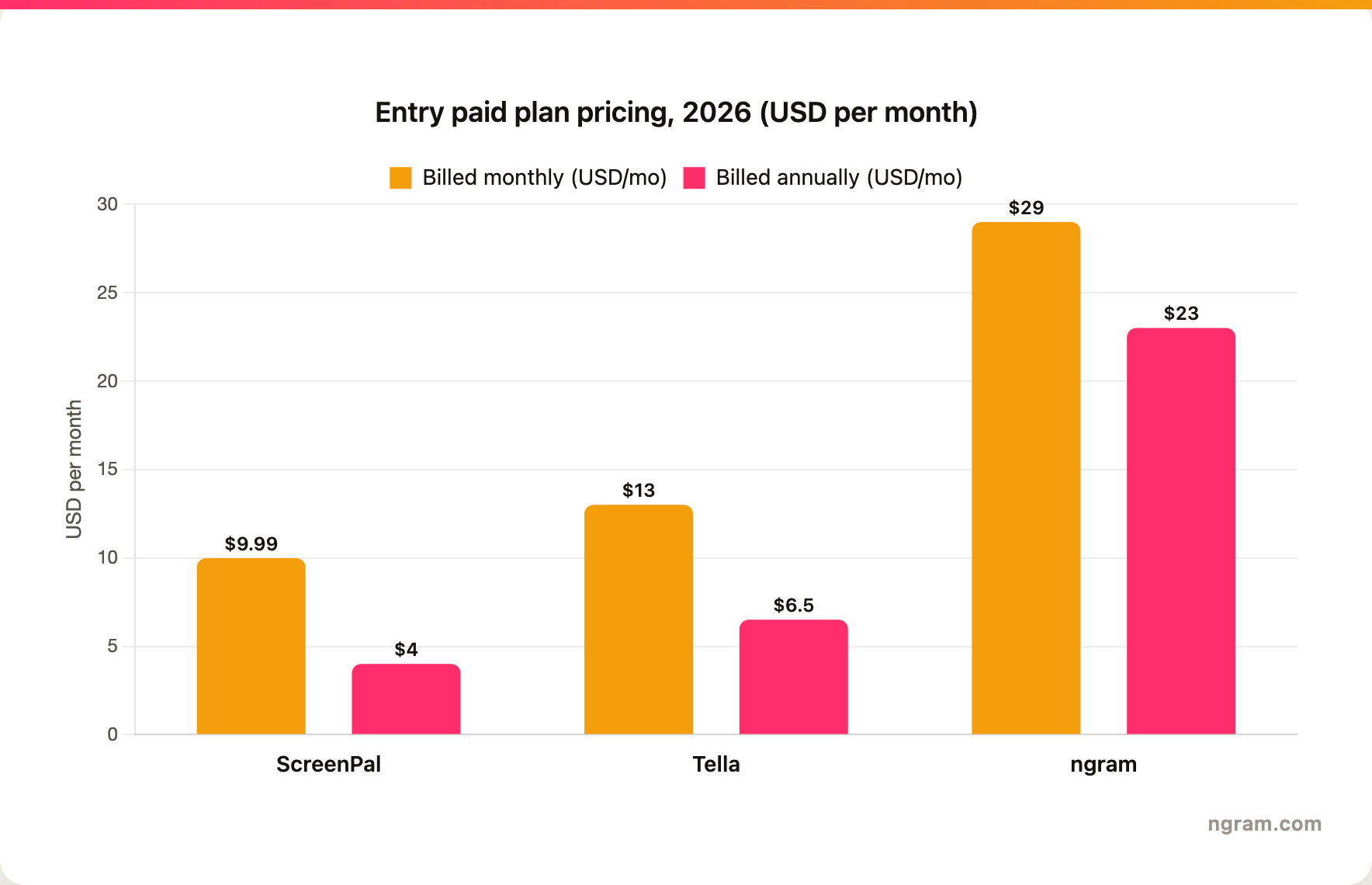
Winner: ScreenPal for the cheapest paid capture and hosting plan, Tella for a more polished mid-priced recorder, and ngram when the value is finished video production rather than recorder access.
Editing, branding, and viewer experience
ScreenPal's editing is enough for capture cleanup and classroom delivery: trim, crop, blur, add text and captions, host in channels, and bolt on quizzes or polls for graded interaction. The viewer experience favors education and hosting, which is exactly right when the video is a lesson, a training module, or a reusable support walkthrough. The look is functional rather than premium.
Tella wins when the video itself needs a more polished visual shape. Layout control, webcam composition, automatic zooms, transcript cleanup, audio cleanup, branding, custom domains on higher plans, embeds, and downloads all matter when the recording becomes a sales asset, public demo, tutorial, or social post. Tella gives non-editors enough control to avoid the raw screen-recording look without learning a timeline.
ngram goes further when the team wants production logic, not only editing controls. The agent can turn source material into a script and storyboard before render, then apply brand kits, motion graphics, product callouts, captions, voiceover, background music, branded intros and outros, and MP4 export. That is useful for product demo videos, training videos, customer education, and launch content where the recording needs structure built around it.
Winner: ScreenPal owns affordable hosting plus classroom interaction, Tella owns the polished visual finish with branding, custom domains, and engagement analytics, and ngram fits when the recording needs full production structure rather than recorder controls, though its viewer side currently offers branded watch pages with a generally available owner analytics surface in the workspace, plus a Zapier integration and an MCP server for connecting other tools.
Which tool should you pick?
- Pick ScreenPal if your main job is affordable recording with hosting, captions, translation, quizzes, polls, channels, mobile apps, or embedded recording through its API, especially for education, training, and support.
- Pick Tella if your main job is recording a cleaner video yourself: product demos, tutorials, sales clips, founder walkthroughs, YouTube-style screen videos, or branded share links with a modern editor.
- Use ngram if your main job is finished business video: turn a screen recording, document, deck, URL, screenshot, or raw video into a planned, branded explainer with callouts, captions, voiceover, and export variants.
The cleanest test is the destination. If the video is a hosted lesson or a budget-bound recording library, ScreenPal is hard to beat on price and breadth. If the creator wants control and a polished link, Tella is the better recorder. If the audience will judge the video as marketing, training, support, or enablement content, ngram is the better production workflow. For an editing surface after the agent creates the draft, the ngram video editor gives frame-level control.
Methodology
We compared ScreenPal, Tella, and ngram across the dimensions that decide screen-recording purchases: capture workflow, editing depth, AI features, hosting, education and interaction, developer options, pricing, and the type of video each tool is meant to produce. Official product and pricing pages were weighted above review aggregators and third-party summaries. We avoided numerical review ratings and treated pricing as a point-in-time claim for June 19, 2026. ngram claims reflect features that are live today, so this page records self-service bearer API keys for Public API v1, Zapier and n8n availability, hosted pages and embeds, and no unsupported scene-level analytics; Make.com is Coming Soon.
ScreenPal and Tella are both established, actively developed screen-recording tools, so we treat ngram as a direct finished-video alternative for buyers who want source-to-video production rather than manual recording polish. ScreenPal is the product formerly known as Screencast-O-Matic, rebranded and still live.
FAQ
Is ScreenPal better than Tella?
ScreenPal is better when you want an affordable all-in-one recorder with hosting, captions, translation, quizzes, and classroom-style workflows. Tella is better when the same recording needs a cleaner, more modern editing experience, presenter control, branding, embeds, and polished public sharing.
Is ScreenPal still Screencast-O-Matic?
ScreenPal is the current brand for the product formerly known as Screencast-O-Matic. The old name still appears in some searches and reviews, but the live product and pricing now use the ScreenPal name.
Which is cheaper, ScreenPal or Tella?
ScreenPal is cheaper at the entry paid tier. ScreenPal Solo Deluxe is listed at $4 per month billed annually, while Tella Pro starts at $6.50 per user per month billed annually ($13 monthly) and Premium at $9.50 per user per month annually ($19 monthly).
When should I use ngram instead of ScreenPal or Tella?
Use ngram when the output needs to be a polished business video rather than a raw recording or lightly edited capture. ngram can turn a screen recording, URL, deck, PDF, prompt, screenshot, or raw video into a planned, narrated, branded video with captions, callouts, smart zooms, and MP4 export.








