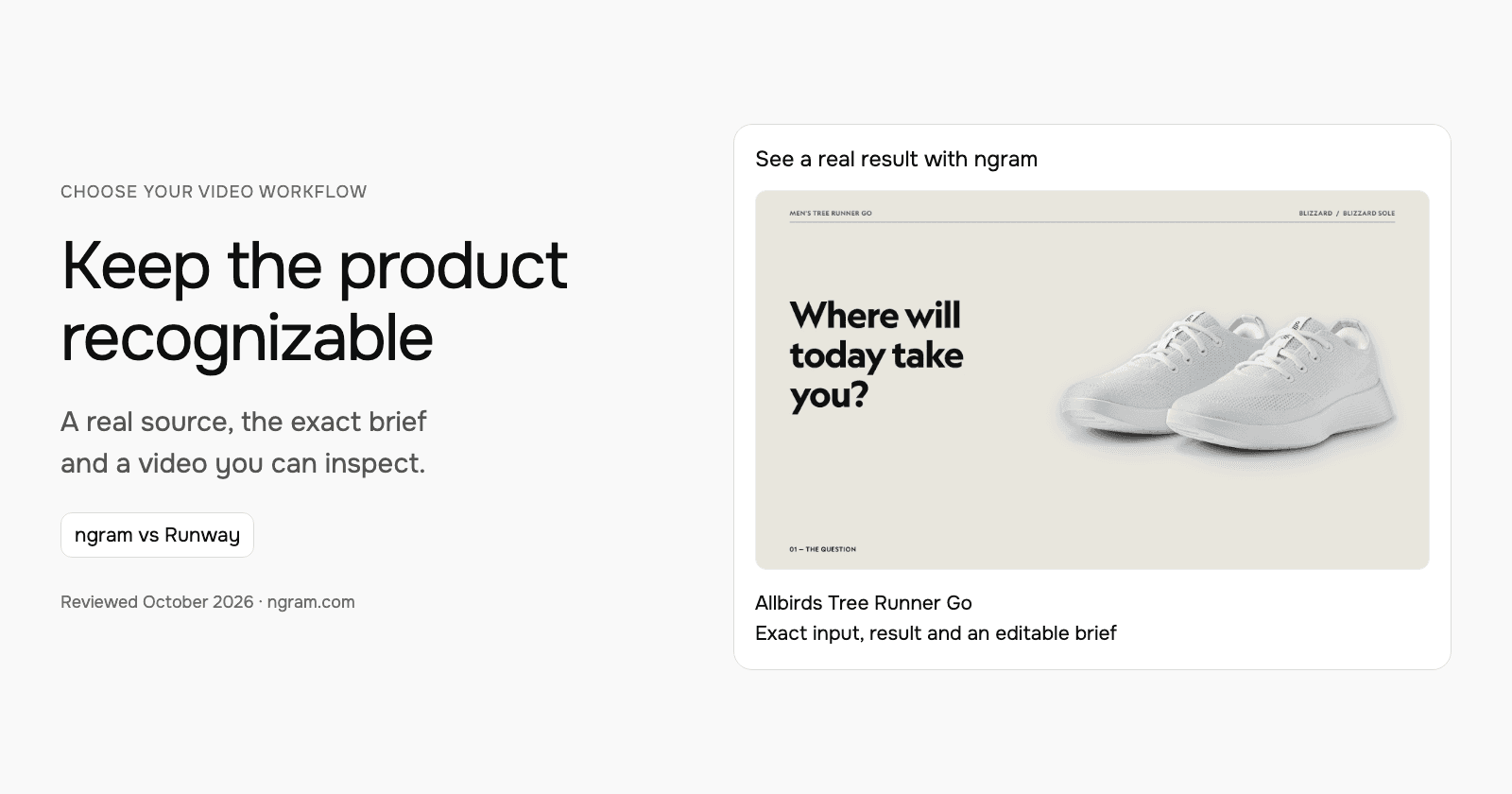

When the ad must show the exact product, start with the source photographs and the permitted claims. This walkthrough uses an Allbirds Tree Runner Go example to compare a source-photo video brief with Runway’s broader creative workflow. The actual ngram prompt and output show the chosen approach.
Define what can change and what must stay exact
The selected product is the Men’s Tree Runner Go in Blizzard. The brief requests the actual photographs, motion through crops and framing, a breathable-knit benefit and an invitation to explore the shoe. It avoids asking the generator to invent unseen product views, discounts or availability.
| Decision | In this example |
|---|---|
| Product identity | Allbirds Men’s Tree Runner Go, Blizzard colorway. |
| Visual source | Official product photographs. |
| Motion direction | Crops and framing of the source material. |
| Message | A lightweight everyday sneaker with a breathable knit upper. |
| Next action | Explore the Tree Runner Go at allbirds.com. |
Watch the actual input become a video
The 30-second output opens with a question, introduces the shoe and colorway, focuses on the knit upper and closes with the product destination. Use the video and transcript to inspect that result against the source photographs. Product fidelity is a review task for each output, rather than a guarantee inferred from a model name.
From this input to this video
An everyday sneaker ad built from official Blizzard product photographs.
Create a 30-second e-commerce ad video for Allbirds Men’s Tree Runner Go in Blizzard, a lightweight everyday sneaker. Source the visuals from https://www.allbirds.com/products/mens-tree-runner-go?variant=40482706423888. The ad is for YouTube and its goal is introduce the shoe and invite viewers to explore it. Open with the question: Where will today take you? to stop the scroll. Show its breathable knit upper for everyday wear — the one thing a buyer needs to see. Tone: easygoing and confident. End with Explore the Tree Runner Go at allbirds.com and the brand logo. Voiceover language: English; if no voiceover, use bold on-screen text and background music. Preserve the exact real product and colorway using source photographs. Create motion through crops and framing, not fabricated product views. Do not invent stock availability, discounts, environmental savings or performance guarantees.
Read the exact input
Prompt
Create a 30-second e-commerce ad video for Allbirds Men’s Tree Runner Go in Blizzard, a lightweight everyday sneaker. Source the visuals from https://www.allbirds.com/products/mens-tree-runner-go?variant=40482706423888. The ad is for YouTube and its goal is introduce the shoe and invite viewers to explore it. Open with the question: Where will today take you? to stop the scroll. Show its breathable knit upper for everyday wear — the one thing a buyer needs to see. Tone: easygoing and confident. End with Explore the Tree Runner Go at allbirds.com and the brand logo. Voiceover language: English; if no voiceover, use bold on-screen text and background music. Preserve the exact real product and colorway using source photographs. Create motion through crops and framing, not fabricated product views. Do not invent stock availability, discounts, environmental savings or performance guarantees.
Selected style
Editorial
Read the video transcript
Where will today take you? ... Meet the Tree Runner Go, in Blizzard. A lightweight sneaker made for every day. ... Look closer. A breathable Tree Knit upper that's naturally airy, and pleasantly cool. ... Flexible and made to move, with or without socks, wherever your day might lead. ... Explore the Tree Runner Go at allbirds.com.
Make a product video from your actual assets
See an Allbirds Tree Runner Go ad made with official product photographs. Read the exact input, watch the result and adapt the brief for your product.
Prepare the real product material
Use a public product page, approved photographs, claims and footage. Export any creative clips you want to reuse as video files.
Set the message and creative direction
Fill in the product, audience, benefit and call to action. Choose a style and video settings; select your configured Brand Kit in ngram.
Review, create and refine
Approve the plan containing the script. Review the result and request changes. Share publicly or download an MP4 on a paid plan.
Make it yours
Fill in your details here, or continue and finish your brief in ngram.
Where each workflow fits
Runway Agent can develop concepts and complete marketing assets through conversation, with references and revisions. Its product-photo workflows explore new placements and settings from source images, while Aleph supports directed video changes. Compare those controls when the creative calls for a new scene or more extensive generated footage.
Choose ngram when the brief should organize approved product material into a narrated business video with a plan to approve. Compare Runway when its creative model and editing controls fit the imagery you need. Both require reviewing the resulting product, words and delivery format against the actual campaign requirements.
Prepare your own version
Supply the product page or photographs, identify the exact model and colorway, and name the one benefit to communicate. Tell the agent which visuals should stay tied to the source. Select the aspect ratio and length for the placement, then review the proposed script and visual direction in the plan.
Use the editable brief above to fill in your own source and details. Choose the style, length and aspect ratio. In ngram, attach your files, select your configured Brand Kit and enable captions when wanted. Approve the plan containing the script, then inspect the video and request revisions through chat or the timeline.
Make the next update useful
For another colorway, provide its actual photographs and ask for the product references and narration to be updated together. For a new channel, request a separate version with the new aspect ratio and length. Review crops so the shoe and important text remain visible after reframing.
Budget and delivery
ngram Free includes 1,000 credits/month and supports public sharing and embeds. Premium AI video generation uses 10 credits per second; a cheaper model uses 3 credits per second. At the premium rate, a 30-second generation uses 300 credits. Check the chosen model and available credits before creating your version.
Use a paid plan to download an MP4. Unlisted video links start with Basic. Compare the other product’s current billing term, seats and usage unit against your complete job, including the revisions and publishing method you need. See ngram pricing and the full comparison for the broader buying decision.
Frequently asked questions
Does this compare two generated ads side by side?
The page shows a real ngram result and uses current official Runway information to explain the alternative workflow. It does not claim that Runway produced this ad or that a timed output test was performed.
Can I use an exported Runway clip in ngram?
Upload a clip you are authorized to reuse as source footage. Keep the editable project and generation settings in Runway.
Continue with your own material
Start with the editable template, explore source-to-video workflows, or talk to sales about a team workflow.
Sources and scope
Product information reviewed October 18, 2026. The embedded result was created with ngram from the exact input shown. Competitor descriptions use official sources; this article does not claim a timed or scored test of competing outputs.