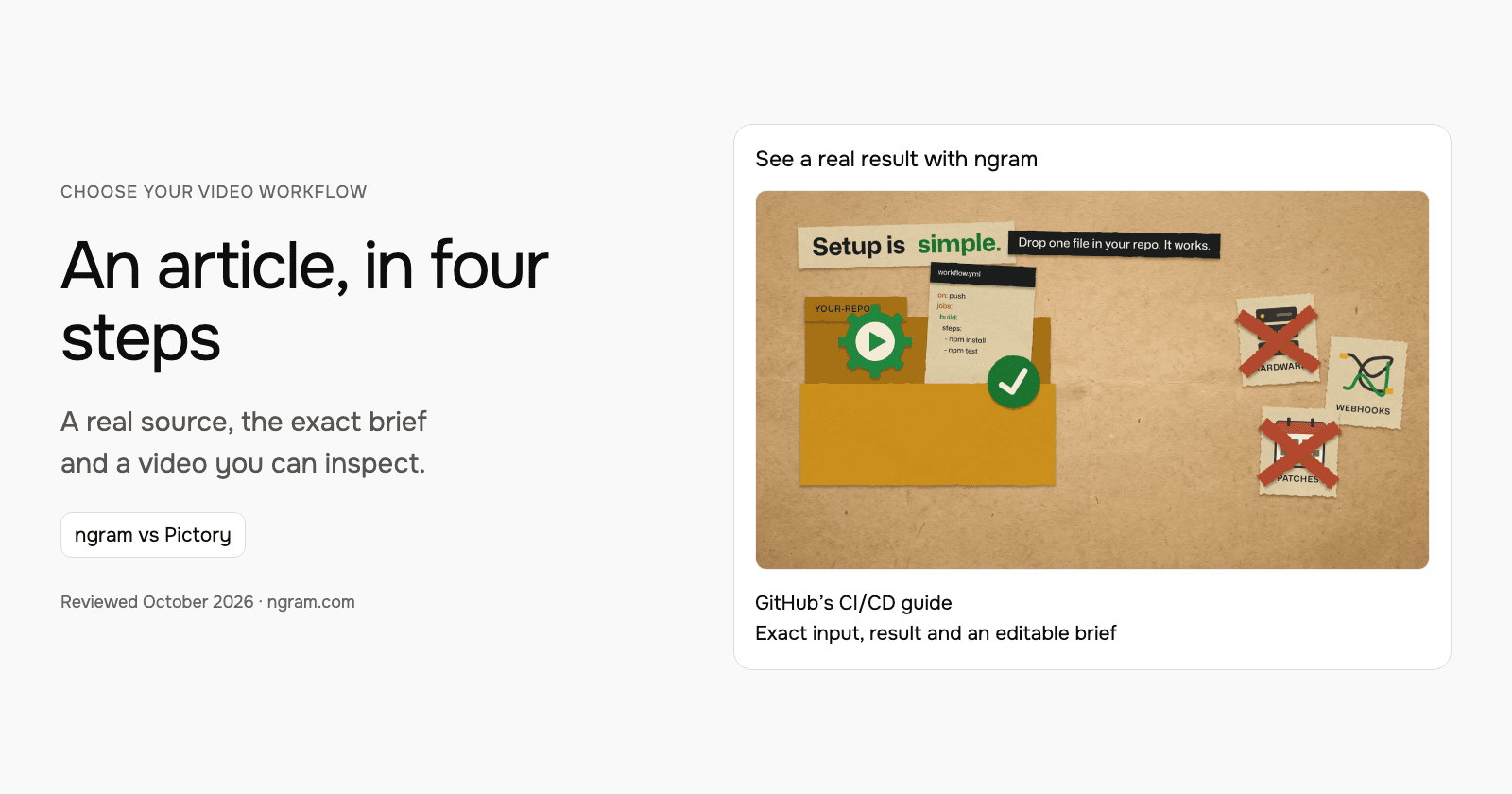

Both ngram and Pictory can start from an article. Compare what the video preserves, how you control the message and how you revise the result. This worked example follows a GitHub CI/CD guide into a short paper-cutout explainer, rather than ranking products by a generic AI score.
Choose the part the viewer should remember
The source article explains a four-step GitHub Actions workflow. The brief asks for the key takeaways, a friendly practical tone, a landscape LinkedIn video and a return to the full guide. It does not ask a 30-second video to replace every instruction in the article.
| Decision | In this example |
|---|---|
| Source | GitHub’s guide to building a CI/CD pipeline in four steps. |
| Message | A repository workflow can automate the check. |
| Sequence | Pick a repository, choose a workflow, push a change, inspect the run. |
| Style | Paper-cutout scenes. |
| Next action | Read the full GitHub guide. |
Watch the actual input become a video
The 31-second result introduces GitHub Actions, narrates the four steps and points back to the article. Its transcript makes the compression visible: it summarizes the workflow rather than providing the configuration needed for every repository. The full guide remains the destination for implementation detail.
From this input to this video
GitHub’s published article becomes a paper-cutout explainer of its four-step workflow.
Turn this blog post at https://github.blog/enterprise-software/ci-cd/build-ci-cd-pipeline-github-actions-four-steps/ into a 30-second explainer video. Pull the key takeaways and summarize them as short, punchy paper-cutout scenes. Keep the article's own tone: friendly and practical. Format it for LinkedIn in landscape 16:9. Close on a call to action to read the full GitHub guide.
Read the exact input
Prompt
Turn this blog post at https://github.blog/enterprise-software/ci-cd/build-ci-cd-pipeline-github-actions-four-steps/ into a 30-second explainer video. Pull the key takeaways and summarize them as short, punchy paper-cutout scenes. Keep the article's own tone: friendly and practical. Format it for LinkedIn in landscape 16:9. Close on a call to action to read the full GitHub guide.
Selected style
Paper cutout
Read the video transcript
CI/CD used to belong to DevOps experts. With GitHub Actions, it lives right in your repo. Setup is simple: drop one file in your repo, and it works. No hardware to buy, no webhooks to wire. Then, four steps. Pick a repository. Open the Actions tab and choose a workflow. Push a change to trigger it. And watch it run in the visualizer and live logs. Start small, and make it work for you. The payoff: trusting your code works after you merge. Read the full guide on the GitHub Blog.
Turn a published article into an explainer
Watch the actual ngram video made from GitHub’s CI/CD guide. Read its input, then adapt the brief for your own article.
Bring the article
Paste a public article URL or provide its text. Upload exported footage from Pictory when it helps tell the story.
Adapt the brief
Fill in your audience, takeaways and call to action. Choose the style, duration and aspect ratio, then attach any files and select your Brand Kit in ngram.
Approve and refine
Review the plan containing the script, approve generation and inspect the result. Request revisions or another version when needed.
Make it yours
Fill in your details here, or continue and finish your brief in ngram.
Where each workflow fits
Pictory supports article and text inputs alongside other creation paths, with scene assembly, visuals, voices and editing. It also offers avatars and a separate API. Compare its current review and editing workflow for your article; describing it as only stock-footage selection would miss those choices.
Choose ngram when you want to state the story, style and audience in a reusable brief, approve the plan containing the script, then refine the video through chat or timeline editing. Compare the actual result with the article: does the viewer learn the intended idea, and is the next action useful?
Prepare your own version
Paste the public article URL and name the takeaways that matter if the article covers several topics. Choose the length, visual style and channel. Use the plan to check names, sequence and qualifications before approving generation. Keep the article link available beside the published video.
Use the editable brief above to fill in your own source and details. Choose the style, length and aspect ratio. In ngram, attach your files, select your configured Brand Kit and enable captions when wanted. Approve the plan containing the script, then inspect the video and request revisions through chat or the timeline.
Make the next update useful
If the source guide changes, give ngram the updated source and identify the changed instruction. Ask it to revise that section while preserving the rest of the explanation. For a more technical audience, change the brief to include the missing prerequisite rather than merely making the voiceover faster.
Budget and delivery
ngram Free includes 1,000 credits/month and supports public sharing and embeds. Premium AI video generation uses 10 credits per second; a cheaper model uses 3 credits per second. At the premium rate, a 30-second generation uses 300 credits. Check the chosen model and available credits before creating your version.
Use a paid plan to download an MP4. Unlisted video links start with Basic. Compare the other product’s current billing term, seats and usage unit against your complete job, including the revisions and publishing method you need. See ngram pricing and the full comparison for the broader buying decision.
Frequently asked questions
Does the video replace the article?
Use the video to explain the chosen takeaway and send viewers to the full article for detail. This GitHub example explicitly ends with that next step.
Can an existing Pictory video be useful input?
Yes. Upload an authorized video export as source footage when it helps the new explanation, while keeping the original editable project in Pictory.
Continue with your own material
Start with the editable template, explore source-to-video workflows, or talk to sales about a team workflow.
Sources and scope
Product information reviewed October 18, 2026. The embedded result was created with ngram from the exact input shown. Competitor descriptions use official sources; this article does not claim a timed or scored test of competing outputs.