

Lumen5 vs Wave.video is a real 2026 decision for marketing teams that want polished video without hiring an editor, but the two tools answer that brief in very different ways. Lumen5 is a browser tool that auto-storyboards your written content into scenes of licensed stock footage. Wave.video is a five-product video-marketing suite that bundles an online editor, a live streaming studio, a recorder, a thumbnail maker, and ad-free hosting. One turns articles into videos; the other tries to be the whole video operation. That difference decides which one fits you.
This guide compares them across the dimensions that actually decide the purchase: what each one produces, how you get from start to finished video, editing and brand control, the streaming and hosting layer, pricing, and who each one wins for. We also weave in ngram, a third option that plans and brands a finished video from whatever source you already have, because for a lot of teams the honest answer is neither Lumen5 nor Wave.video.
Lumen5 vs Wave.video at a glance
| Tool | Best for | Starting price | Main distinction |
|---|---|---|---|
| ngram | Teams turning prompts, PDFs, URLs, screenshots, recordings, decks, and product URLs into finished branded videos | Free, paid from $29/mo ($23.20/mo billed annually) | Agentic planning, storyboard review, captions, voiceover, brand kits, localization, and timeline editing |
| Lumen5 | Marketing, communications, and L&D teams turning articles, PDFs, documents, or bullet points into branded videos | Free plan, Basic from $29/mo ($19/mo billed yearly) | Auto-storyboards written content into scenes with licensed stock footage, captions, music, voiceover, and brand kits |
| Wave.video | Marketers who edit, stream, record, and host video in roughly equal measure and want one subscription for all of it | Free plan, Streamer from $16/mo ($12.80/mo billed annually) | A five-product suite: editor, live streaming studio, recorder, thumbnail maker, and ad-free hosting |
Core output and video quality
Lumen5 produces a finished text-to-video story made of licensed stock footage. It auto-storyboards your written content into scenes, pairs each scene with stock clips, adds text overlays, auto-captions, background music, and optional AI voiceover, and keeps the result on-brand with brand kits. The footage is real-world stock rather than generated, so the video looks like a clean marketing storyboard built from a shared library rather than from scratch.
Wave.video produces a wider range of output because it is a suite, not a single workflow. You can edit a timeline-built marketing video, record a clip, run a live stream, make a thumbnail, then host the finished video on an embeddable page. Its stock catalog is its headline asset: 2 million clips, images, and audio tracks on the entry Streamer plan, expanding to 200 million on Creator and Business. For a marketer who needs a specific b-roll shot or a licensed track on demand, that catalog is hard to beat.
Winner: depends on the job. Lumen5 wins when the output is specifically a written-content-to-video story and you want that one job done cleanly and repeatably. Wave.video wins when the output is a broader marketing program where the same team also edits, streams, and hosts, and wants the largest stock library to draw from.
ngram does the same end job, a polished business video, and changes how you get there. Like both tools it produces clean on-brand video with captions, voiceover, and music, but it also generates AI images and short AI video b-roll fitted to your scene rather than pulled from a shared stock library, and the unit of control is a storyboard you review before rendering. ngram is strongest when the finished video needs to come from real source material, a doc, URL, deck, screenshot, or recording, rather than from an article or a hand-built timeline.
Inputs and workflow
The practical question is what you start with. Lumen5 starts from words you already have. Text, blog, article, PDF, document, and bullet-point inputs all work, and the tool converts them into a structured storyboard you then refine in a drag-and-drop editor. That matters for teams that do not begin with a finished idea but do have a steady pipeline of written content to repurpose.
Wave.video starts from a timeline. It assumes you already know the message and have the assets, then gives you a real editor, a stock library, and one-click resizing for different aspect ratios to assemble the video by hand. It is broader on the output side, recording, streaming, and hosting all live in the same place, but it does not read a long document or a raw recording and plan the video for you the way Lumen5's auto-storyboard at least attempts to.
Winner: Lumen5 for content-to-video from existing writing, since its auto-storyboard removes the blank-timeline step. Wave.video for teams that want full manual control over an editor and a wider production workflow. Neither plans the narrative from a messy source; they just optimize for different starting points.
ngram covers both starting points and a few more. You can hand it a blog post, PDF, or document like Lumen5, or assets to assemble like Wave.video, but also a prompt, URL, screenshot, screen recording, raw video, deck, or product URL, then let the agent plan a script, storyboard, scenes, captions, and CTA before rendering. If your source is messier than a clean article or a tidy set of assets, ngram has the wider front door, and the plan is reviewed before any credits are spent.
Editing depth, brand control, and collaboration
Lumen5 gives teams a predictable, repeatable editor. Automatic storyboarding into scenes, a drag-and-drop timeline, auto-captions, background music, AI voiceover, voice cloning, and brand kits for fonts, colors, and logos make it easy to standardize campaigns and bring more teammates into the process. It is built for marketing, internal communications, and L&D teams that want a system rather than a one-off, and it pushes hard upmarket toward enterprise comms.
Wave.video gives teams a deeper, more flexible editor with a far larger stock library, plus branded layouts and a thumbnail maker, then adds recording and distribution on top. The trade-off shows up in reliability: recent G2 and Capterra reviews mention lag, freezing, and crashes during heavier edits, and the suite has a steeper first hour because you are learning five products rather than one. Once configured, the breadth pays off for teams that genuinely use it.
Winner: Lumen5 for predictable, brand-consistent editing a non-video marketer can drive without learning a suite. Wave.video for teams that want a deeper manual editor and the largest stock catalog, and can tolerate occasional editing-reliability complaints.
ngram's editing advantage over both is how you revise after the first draft. You can edit in plain language through agentic chat, click a single scene for visual chat, open the script editor, regenerate one scene without touching the rest, or drop into a full timeline editor for frame-level control. Brand kits carry logos, colors, fonts, tone, and approved and blocked phrases, and a content guardrail checks every generation against them. That mix of agent speed and direct manual control is the gap ngram fills between Lumen5's fixed storyboard editor and Wave.video's wider but heavier suite.
Streaming and hosting, the dimension only Wave.video owns
This is where Wave.video pulls clearly ahead. Its live streaming studio multistreams to several channels at once, with scenes, guest roles, and broadcasts that run up to four hours on the higher plans. The hosting side is a fuller content management system: ad-free embeds, landing pages, customizable players, storage tiers, traffic allowances, and viewer analytics. If broadcasting and hosting are part of your weekly job, this is a genuine differentiator, not a checkbox.
Lumen5 does not stream or run a hosting CMS at all. It is a creation tool that produces a video file and on-brand storyboard, and distribution happens wherever you upload that file. For a content-marketing team that publishes finished videos to YouTube, LinkedIn, or a website, that is usually fine; for a team that wants to go live and host its own player, Lumen5 is not in the conversation.
Winner: Wave.video, decisively. Live streaming and ad-free hosting are core to its product, and neither Lumen5 nor ngram competes on this dimension.
ngram is honest about this gap. It hosts and embeds finished videos through shareable hosted pages and an embeddable player, but it is not a live streaming tool and not a full hosting CMS with storage tiers. If multistreaming or a hosted content library is central to your work, Wave.video stays the pick and ngram does not try to replace it.
Pricing and value
The two tools package value differently, so compare what each dollar buys, not just the headline number. Wave.video prices around streaming, the stock library, and hosting tiers. Lumen5 prices around creation feature tiers and seats.
Wave.video has a free plan, but free editing carries a watermark and the stock library is limited to 2 million assets. Paid tiers start at Streamer ($16/mo billed monthly, or $12.80/mo billed annually), which is streaming-focused and keeps the 2 million-asset cap. The full 200 million-asset library and longer videos unlock on Creator ($24/mo, $19.20/mo annually) and Business ($48/mo, $38.40/mo annually), which also raise streaming channels, hosting storage, and traffic. The entry price looks cheap, but the plan that gives you the full editing-plus-hosting suite is Creator or Business.
Lumen5 also has a free plan with a watermark, then paid tiers. Its Basic plan is $29/mo billed monthly, or $19/mo billed yearly, with higher Starter ($59/mo) and Pro ($149/mo) plans for heavier business use, and a custom Team plan. The value depends on how often you use the deeper workflow: the entry price pays off if it replaces manual storyboarding, clip selection, captioning, voiceover, and repurposing across many videos.
Here is how the entry paid plans compare side by side, billed monthly versus billed annually.
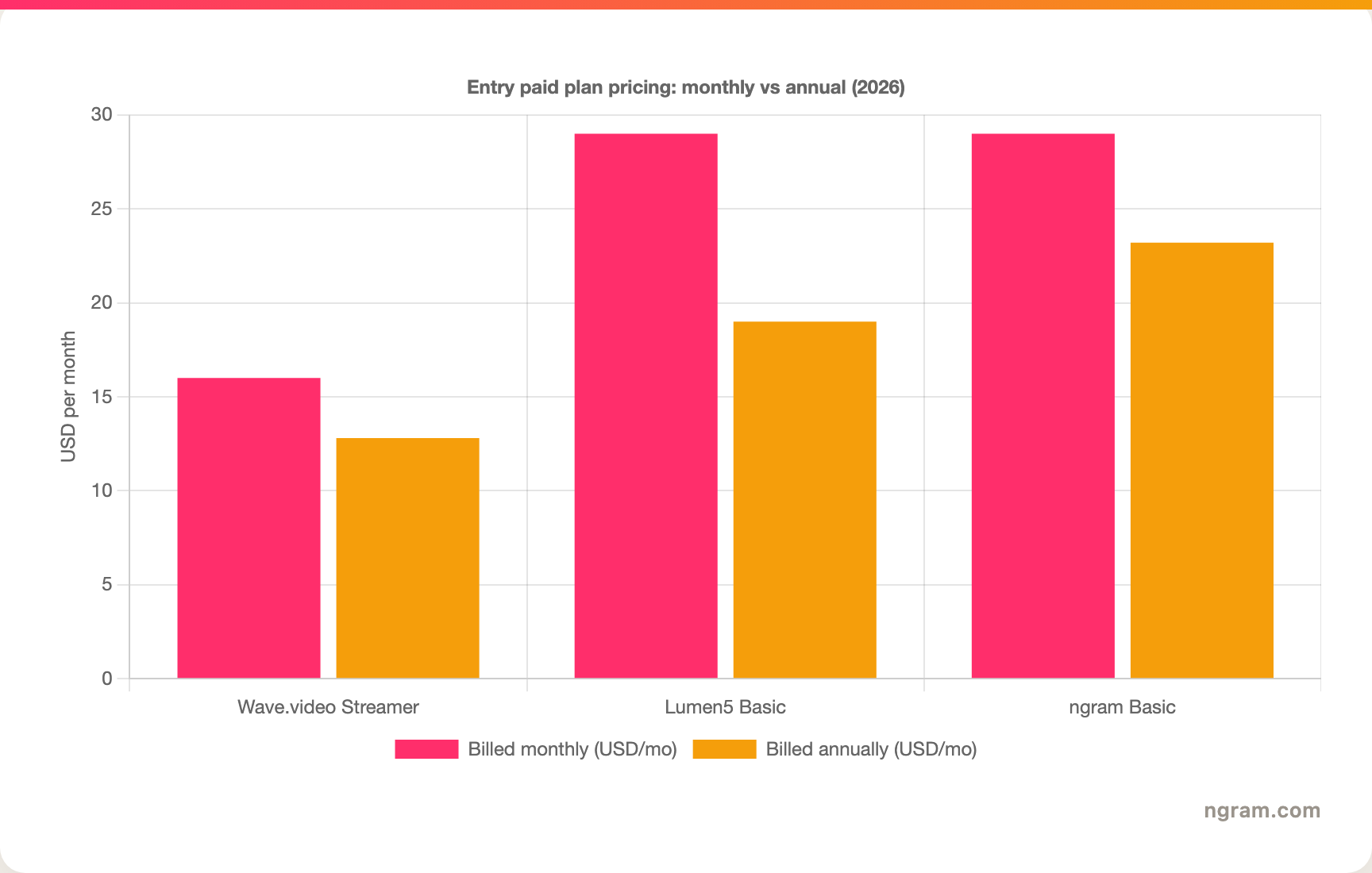
Winner: Wave.video on entry price. Streamer at $16/mo monthly ($12.80 annually) undercuts Lumen5 Basic at $29/mo ($19 annually) and bundles streaming and hosting on top. But the comparison is uneven: Wave.video's cheap tier caps the stock library and editing, so the plan that matches Lumen5's full creation workflow is Creator at $24 or higher. Lumen5 is the better value if your only job is turning written content into stock-footage videos and you will not touch streaming or hosting.
ngram uses credits rather than seats, stock tiers, or generation minutes. Free includes 600 one-time credits and exports at 720p with a watermark. Basic is $29/mo, or $23.20/mo billed annually, with 3,000 credits a month, and like Free it exports at 720p. Premium ($59/mo) and Ultimate ($299/mo) unlock 1080p and 4K export, with Enterprise custom. Credits are shared across video generation and editing; exports are unlimited and consume no credits. Premium and Ultimate monthly credits roll over one billing cycle, and annual credits roll over until renewal; Basic refreshes monthly without rollover.
Best fit by team and use case
Pick Lumen5 if you are a marketing, communications, or L&D team that turns articles, blogs, PDFs, and internal updates into clean stock-footage videos on a repeatable, brand-consistent workflow, and you do not need to stream or host.
Pick Wave.video if your team needs editing, recording, live streaming, hosting, and a huge stock library in one subscription, and video is an ongoing program rather than a one-off. It is the stronger suite when you want to create, broadcast, and host the finished clip without stitching together separate apps.
Winner: split decision. Lumen5 wins for repeatable content-to-video on stock footage. Wave.video wins for an all-in-one create-stream-host marketing operation. There is no single winner because they serve different jobs.
Use ngram when neither an article-to-stock-footage tool nor a hand-built editor is enough and the video needs to come from real source material with full brand control. If you want an agent to plan, produce, revise, localize, and brand a finished video from whatever you already have, ngram is the stronger path, as long as live streaming and hosting are not the center of your job.
1. ngram
Watch how ngram turns a source into a finished video:
ngram is the best fit when neither Lumen5's article-to-stock-footage storyboard nor Wave.video's hand-built timeline is the natural starting point. You can hand it a prompt, PDF, URL, screenshot, recording, raw video, deck, or product URL, then let the agent plan a script, storyboard, scenes, captions, and CTA before rendering, so the structure is settled before any credits are spent.
It also covers the production layer that Lumen5's stock storyboards and Wave.video's editor each leave partly to you: auto captions, AI voiceover, multilingual voiceover, screen-recording polish, product callouts, motion graphics, branded intros and outros, background music, scene transitions, AI image generation, and short AI video b-roll generated to fit your scene rather than pulled from a shared stock library.
What makes ngram different
- Agentic planning before rendering, so the storyboard is reviewed before credits are spent.
- Source-aware inputs across prompts, documents, URLs, screenshots, recordings, raw video, decks, and product URLs.
- Brand kits for logos, colors, fonts, approved and blocked phrases, tone, and visual style.
- Editing through chat, visual chat, script editor, scene regeneration, and a full timeline.
- Exports to Finished videos export as MP4; separate media tools can derive GIF, WebM, PNG, or JPG from supplied media.
Where ngram is honest about its limits
- ngram is not a live streaming tool, so for multistreaming or broadcasting, Wave.video stays the pick.
- ngram hosts and embeds finished videos, but it is not a full hosting CMS with storage tiers the way Wave.video is.
- ngram provides hosted video pages and embeds; a generally available owner analytics surface is not live.
- Public API v1 uses self-service bearer API keys; Zapier and n8n are available, while Make.com is Coming Soon.
Who ngram is best for
ngram is best for marketing, sales, training, product, and founder-led teams whose bottleneck is producing the video itself, not streaming or hosting it. If your day-to-day is turning a steady stream of articles into stock-backed videos, Lumen5 holds up; if your video program genuinely lives on live streams and a hosted player, Wave.video's distribution suite is hard to beat. But if the hard part is turning a document, recording, or product page into a planned, branded, localized video, ngram is the stronger path. It is one of the more flexible options in the broader text to video category for exactly this reason.
Try ngram free, your first video in under 5 minutes. Turn a prompt, doc, URL, deck, or screen recording into a polished, on-brand video without rebuilding it from a blank timeline. Start free
For a direct ngram comparison, see ngram vs Lumen5 and ngram vs Wave.video.
2. Lumen5

Lumen5 is the content-repurposing side of this comparison. It fits teams that have written material and want the tool to convert it into clean, on-brand stock-footage videos on a repeatable workflow. It positions itself as a video maker for business and pushes upmarket toward enterprise marketing, internal communications, and L&D. Public details were checked against Lumen5's pricing and product pages for this 2026 comparison.
Key features
- Text, blog, article, PDF, document, and bullet-point inputs.
- Automatic storyboarding into scenes with licensed stock footage and text overlays.
- Auto-captions, background music, AI voiceover, and voice cloning options.
- Brand kits for fonts, colors, logos, and repeatable business styles.
- Enterprise positioning for marketing, internal communications, and training teams.
What users say
Users usually value Lumen5 for turning written content into presentable videos quickly. It fits teams with a steady pipeline of blogs, explainers, and internal updates. The recurring caution is ceiling: more advanced buyers may want more control over scene planning, generated visuals, and agentic editing than a stock-footage storyboard tool provides, and the higher business tiers climb steeply in price.
Best for
Lumen5 is best for marketing, communications, and L&D teams that repurpose articles, documents, and internal updates into branded videos at scale on a predictable price. It is less ideal when you need generated footage, live streaming, hosting, or a wider mix of source inputs.
3. Wave.video
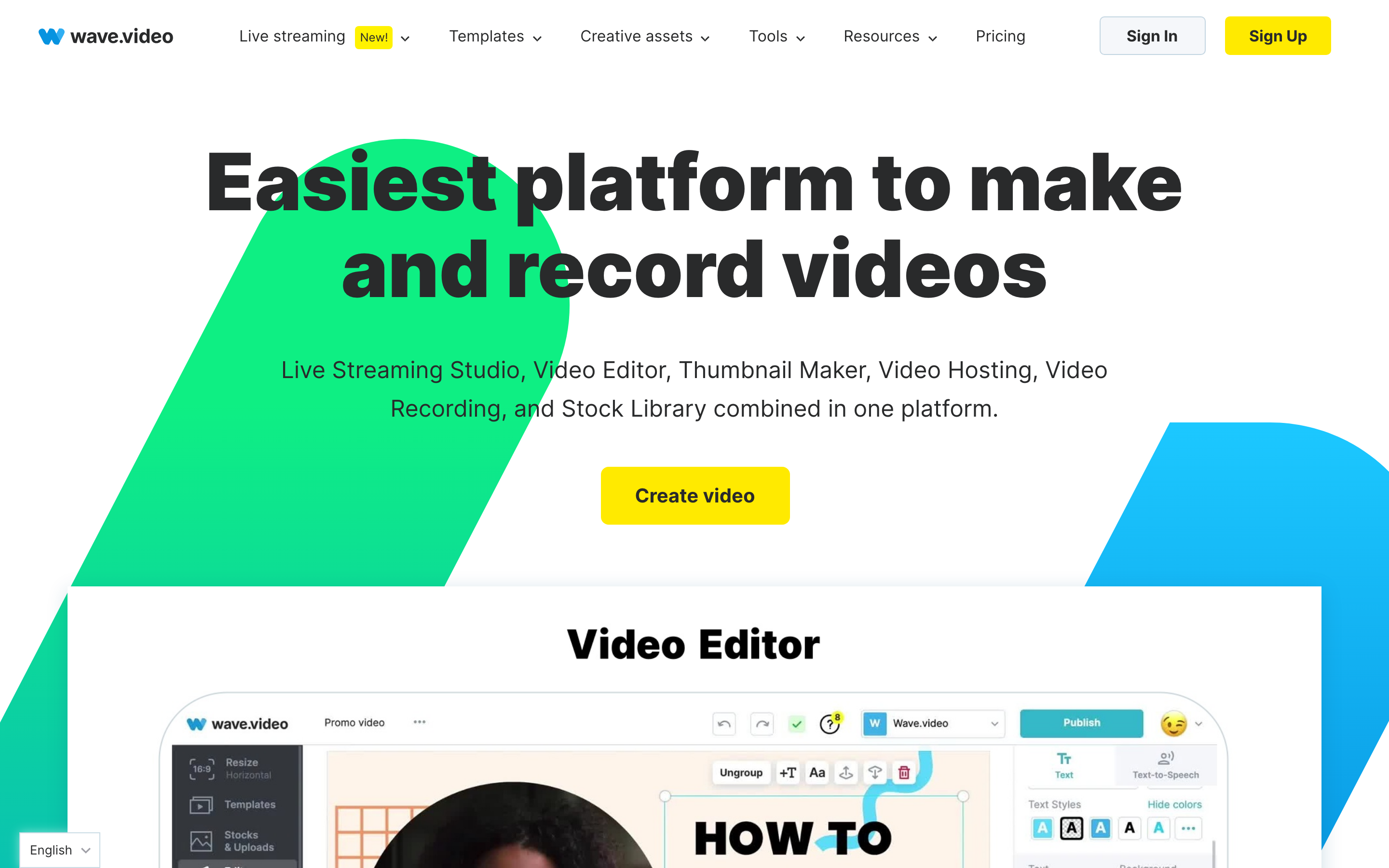
Wave.video is the all-in-one side of this comparison. Where Lumen5 does one job well, Wave.video sprawls across editing, recording, live streaming, a thumbnail maker, and ad-free hosting, sold as a single subscription. Public details were checked against Wave.video's pricing and product pages plus recent G2 and Capterra reviews for this 2026 comparison.
Key features
- A timeline video editor with one-click resizing across aspect ratios and branded layouts.
- A stock library of 2 million assets on entry plans, expanding to 200 million on Creator and Business.
- A live streaming studio that multistreams to several channels with scenes, guest roles, and long broadcasts.
- Ad-free video hosting with embeds, landing pages, customizable players, storage tiers, and viewer analytics.
- A recorder and a dedicated thumbnail maker for social and YouTube assets.
What users say
Buyers like Wave.video for putting editing, streaming, and hosting in one subscription, and for the size of the stock library. The recurring caution in recent G2 and Capterra reviews is editing reliability, with reports of lag, freezing, and crashes during heavier edits, plus a learning curve from juggling five products. The AI tools also read as lighter than dedicated AI video apps.
Best for
Wave.video is best for marketers who want editing, live streaming, recording, and ad-free hosting bundled in one suite, with the largest stock library on hand. It is less ideal when the core task is turning source material into a planned video and you will never touch the streaming or hosting layers you are paying for.
How we compared these tools
| Criteria | Weight | What we looked at |
|---|---|---|
| AI and automation | 30 | Source inputs, automatic planning, generation, voiceover, captions, and regeneration |
| Features | 30 | Editing depth, brand controls, stock library, streaming, hosting, and export paths |
| Ease of use | 20 | How quickly a non-video user can make a useful first video |
| Value | 15 | Entry price, plan limits, library and hosting caps, and time saved |
| Support | 5 | Team readiness, enterprise fit, and purchase clarity |
We weighted this as a content-to-video versus all-in-one-suite comparison, not as a single-winner ranking. The strongest signal in the research was that buyers searching Lumen5 vs Wave.video are really deciding between repurposing written content into stock-footage videos and running a broader create-stream-host operation, so the dimensions above map to that real decision rather than to a feature checklist. Pricing was checked against each vendor's current published plans in 2026.
Common questions
Is Lumen5 better than Wave.video?
Lumen5 is better if your job is turning written content (articles, PDFs, internal updates) into clean stock-footage videos on a repeatable, brand-consistent workflow. Wave.video is better if you also need editing, live streaming, recording, and hosting in one suite. They serve different jobs, so the better tool depends on whether video creation is your whole need or just one part of it.
Is Wave.video cheaper than Lumen5?
At the entry tier, yes. Wave.video's Streamer plan starts at $16/mo billed monthly, or $12.80/mo billed annually, while Lumen5 Basic starts at $29/mo, or $19/mo billed yearly. But Wave.video's Streamer tier caps the stock library at 2 million assets and is streaming-focused, so the plan that matches Lumen5's full creation workflow is Creator at $24/mo or higher. Compare the tier that fits your real workflow, not just the entry price.
What is the best Lumen5 and Wave.video alternative?
ngram is the strongest alternative when you want a finished video planned from real source material rather than from an article or a hand-built timeline, with a storyboard you review before rendering and a wider set of source inputs. It plans, produces, revises, localizes, and brands a finished video from a prompt, doc, URL, deck, or recording. It is not a live streaming or hosting CMS, so if those are central, Wave.video stays the pick.
Which tool is best for marketing videos in 2026?
For repurposing a steady stream of articles and updates into clean stock-footage marketing videos, Lumen5 holds up well. For a marketing program that also goes live, hosts its videos, and wants create, stream, and host under one roof, Wave.video is the stronger suite. For finished branded marketing video built from real source material with full brand control, ngram is the better fit.
Which one should you pick?
The Lumen5 vs Wave.video decision comes down to scope. Pick Lumen5 if your job is turning existing writing into clean, on-brand stock-footage videos and you do not need streaming or hosting. Pick Wave.video if you need editing, recording, live streaming, hosting, and a huge stock library bundled in one subscription. Pick ngram if neither an article-to-stock-footage tool nor a hand-built editor is enough and you need an agent to plan, produce, brand, and localize a finished video from whatever source you already have, with a storyboard you review before rendering. In 2026, the best tool is the one that matches the starting material and the job, not the one with the longest feature list.
Try ngram free, your first video in under 5 minutes. Turn a prompt, doc, URL, deck, or screen recording into a polished, on-brand video without rebuilding it from a blank timeline. Start free








