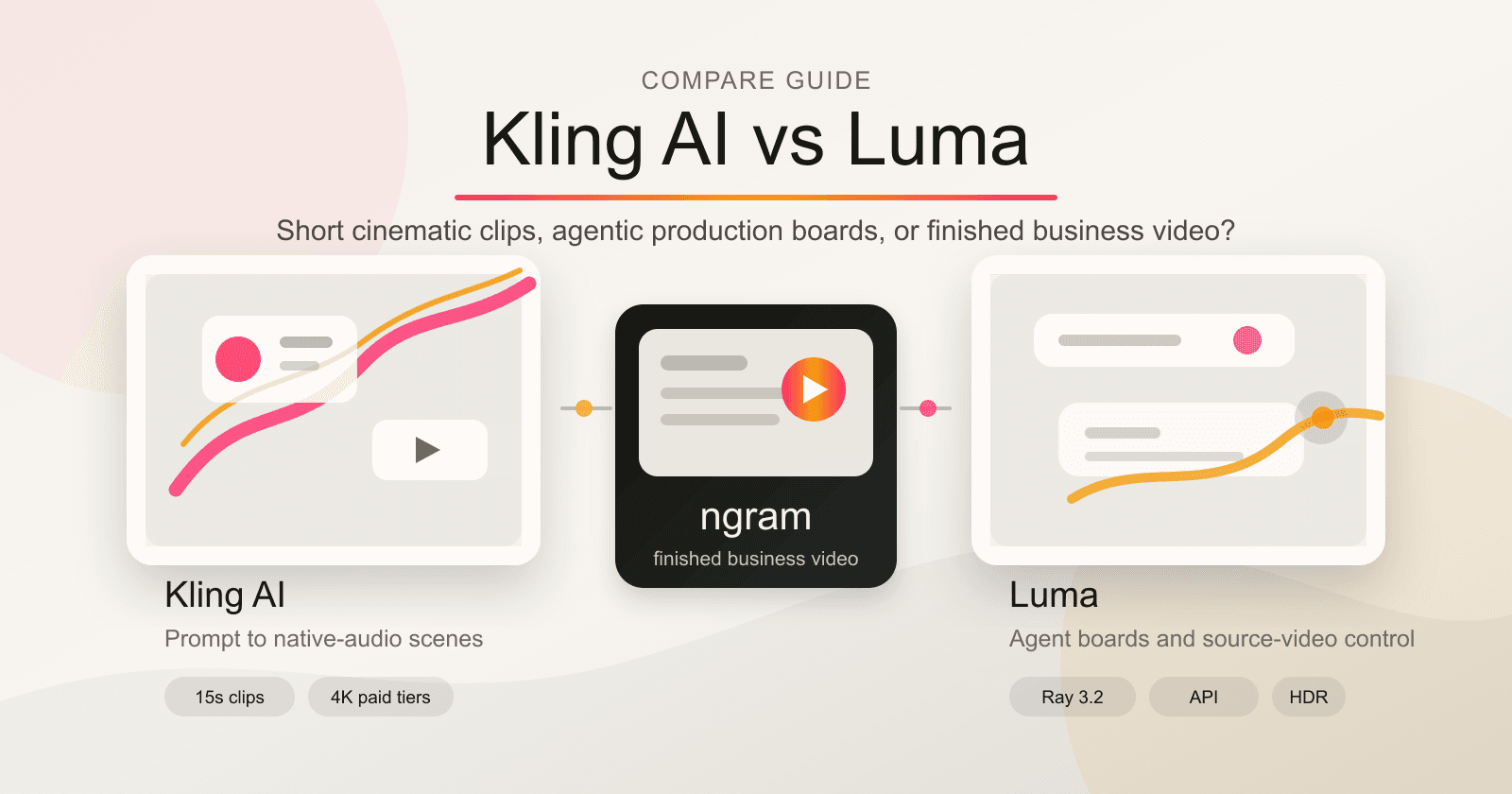


Kling AI vs Luma is not a clean winner-takes-all fight. Both tools sit in the same generative-video-model category, but the product shape is different in 2026. Kling AI feels like a high-output cinematic clip engine. Luma feels like a creative production workspace with agents, boards, Ray 3.2 video-to-video controls, and API paths for teams.
If you are choosing between them, start with the job. Do you need a short synthetic clip from a prompt or reference image? Kling AI should be high on the list. Do you need to transform real footage, explore variants on a shared board, or plug video generation into a production pipeline? Luma deserves the closer look.
ngram belongs in this comparison for a narrower reason. Many teams searching for "Kling AI vs Luma" are not really asking which raw model makes the prettiest five or fifteen seconds. They are trying to turn product material into a launch video, demo, explainer, training cut, or customer update. That is the slice where ngram is the better third option. For the one-on-one commercial pages, see ngram vs Kling AI and ngram vs Luma.
Kling AI vs Luma at a glance
| Dimension | Kling AI | Luma | Where ngram fits |
|---|---|---|---|
| Core output | AI-generated video clips from text prompts, still images, references, and elements. | AI-generated and modified video, images, audio, and text inside an agentic creative board. | Finished business videos from prompts, URLs, PDFs, decks, screenshots, screen recordings, and raw video. |
| 2026 model focus | Kling Video 3.0 and 3.0 Omni, with native audio, multi-shot storyboarding, and 4K on paid tiers. | Ray 3.2 for source-video modification, Uni-1 for brand-consistent images, plus Luma Agents. | Script, storyboard, voiceover, captions, brand kits, screen-recording polish, and MP4 export. |
| Best buyer | Creators, filmmakers, marketers, and studios generating short cinematic scenes. | Agencies, brand teams, creative production teams, and developers building model workflows. | Business teams that need the message planned and rendered into a publishable video. |
| Input style | Text, images, references, elements, audio, and video references depending on mode. | Boards, agent chat, source video for Ray 3.2, keyframes, prompts, images, and API calls. | Text prompts, PDFs, URLs, screenshots, screen recordings, decks, Shopify product URLs, and uploaded footage. |
| Controls | Strong prompt, reference, character, motion, native audio, and multi-shot controls. | Strong board context, agent orchestration, Ray 3.2 keyframes, adherence controls, HDR, EXR, and API pricing. | Reviewable script and storyboard before render, chat edits after render, timeline-v2 for direct control. |
| Pricing pattern | Credit-based generation. Official guides list Pro at $25.99/month with 3,000 credits and Ultra near $127.99/month with 26,000 credits. | Plus is $30/month, Pro is $90/month, Ultra is $300/month, with Team and Enterprise by contact. API pricing is per generation. | Paid plans start at $29/month for Basic, $59/month for Premium, and $299/month for Ultimate, with shared credits across generation, editing, and exports. |
Quick verdict
Pick Kling AI if your main job is generating short cinematic clips from prompts or images. Kling's official video generator page emphasizes text-to-video, image-to-video, native audio, lip sync, character consistency, 15-second multi-shot output, and 4K export on paid tiers. Its official 3.0 Omni guide also gives a clear credit model: 1080p silent video costs 8 credits per second, 1080p with native audio costs 12 credits per second, and 1080p with video input costs 16 credits per second when audio is off.
Pick Luma if your workflow needs a production board rather than a single clip generator. Luma's 2026 positioning is "AI Agents for Creative Work." Its Ray 3.2 docs say the model is built for modifying source video, preserving timing and structure while changing look, material, environment, or visual direction. Luma also exposes API pricing for text-to-video, image-to-video, video-to-video, reframe, HDR, and EXR work.
Use ngram if the real output is a business video with a message, structure, voiceover, captions, and brand treatment. ngram is not the strongest raw model if you are comparing pure cinematic clip realism. ngram is the stronger fit when you already have a product URL, launch notes, a deck, a screen recording, or a support article and want a finished video built from that source material.
Kling AI: stronger for short cinematic generation
Kling AI is the more direct answer if the brief is, "make a synthetic clip from this prompt or reference image." Its official AI video generator page describes a workflow where the user uploads a reference photo or writes a text prompt, adjusts motion and consistency settings, then generates and exports. That page also states that Kling 3.0 supports native audio, lip sync, 15-second multi-shot output, and 4K on paid tiers.
The strongest Kling angle is that the model is trying to solve the whole short-scene problem in one generation. The Kling VIDEO 3.0 Omni guide describes native audio, multi-shot output, video element references, added element voice control, and a move from 10-second to 15-second duration. That matters when a creator wants dialogue, sound, and motion together instead of adding sound in a separate editor.
Kling also publishes more specific generation-cost math than many AI video tools. Its Kling 3.0 credit cost guide says 1080p silent output costs 8 credits per second, 720p silent output costs 6 credits per second, 1080p with native audio costs 12 credits per second, and 720p with native audio costs 9 credits per second. It gives the example that a 15-second 1080p clip with audio costs 180 credits.
Where Kling loses ground is planning and production context. It is excellent when the unit of work is the clip. It is less direct when the unit of work is a launch video, training video, sales demo, or support tutorial that needs a script, storyboard, product screens, captions, voiceover, brand rules, and edits after review. Kling can generate footage for that video, but it does not own the whole business-video workflow.
Luma: stronger for agentic creative production
Luma is no longer only "Dream Machine makes a clip." Its homepage now leads with Luma Agents, Ray 3.2, Uni-1, and a board-based creative system. The Welcome To Luma Agents guide says agents generate text, images, video, audio, and voice while preserving shared project context and memory. It also says agents can route tasks across video model families including Ray, Veo, and Kling.
That makes Luma the more interesting choice for agencies and brand teams that need many variants, references, and assets in one place. Instead of choosing one model for one prompt, a team can organize work on boards, compare versions, collaborate, and run agent tasks in parallel. Luma's pricing page backs that direction: Team plans include team members, projects, organization, sharing, analytics, shared credits, and SSO.
Ray 3.2 is the most important current Luma video fact. Luma's Ray 3.2 page says Ray 3.2 is not a text-to-video model or image-to-video animator. It starts with a source video and returns a reimagined clip with the same duration, new look, and new visual direction. It supports source video plus optional keyframes and prompt, and it can use up to 64 keyframes at exact source-frame indexes.
That is a different job from Kling's prompt-to-scene workflow. If you already have a plate, a product shot, a performance, a timed edit, or a camera move, Luma gives you more production-grade video-to-video control. Its Ray 3.2 output docs list 360p draft, 540p, 720p, 1080p, HDR, EXR export, and Speed or Quality modes. Luma's API page adds pay-as-you-go pricing, with 5-second text-to-video or image-to-video listed from $0.15 at 540p to $1.20 at 1080p, and video-to-video priced higher.
Output quality and controls
Kling should be your first test when the shot starts from imagination. Prompt the scene, add a reference, lock the subject, ask for native audio, and use multi-shot output when the beat needs more than one angle. Its 15-second ceiling is still short, but it is enough for social ads, cinematic B-roll, product mood shots, story tests, and concept trailers.
Luma should be your first test when the shot starts from footage. Ray 3.2's source-video requirement is not a weakness if you already have real motion worth preserving. You can restyle a product shot, change wardrobe, update props, alter signage, explore VFX looks, or generate campaign variants while keeping timing and framing close to the original.
For most business teams, neither answer is complete by itself. A great clip still needs a reason to exist. The difference between a striking five-second visual and a customer-ready video is script, pacing, product truth, voiceover, captions, callouts, brand treatment, and a way to revise the whole piece. That is where ngram's AI video generator and text-to-video workflow are better fits than either raw model.
Winner: Kling AI for prompt-to-scene generation, Luma for source-video transformation, and ngram for business videos that need script, storyboard, and distribution.
Workflow, collaboration, and teams
Kling has moved beyond a single prompt box. Its official feature page lists image-to-video, text-to-video, Omni, Digital Human, Restyle, and text-to-image alongside the core generator. That breadth matters for creator teams that want one generation suite, even though Luma is still clearer when the workflow depends on shared boards, variants, and production context.
Luma's workflow is more explicitly team-oriented. Its pricing page lists Team and Enterprise plans by contact, and the Team plan includes members, projects, organization, sharing, analytics, shared credits, and SSO. Its agent docs position boards as the place where assets, versions, references, and explorations live together. If your work involves directors, designers, clients, and producers reviewing many creative routes, Luma has the stronger collaboration story.
ngram's collaboration story is narrower, but more practical for business video. The current product state says ngram supports team workspaces, members, shared brand kits, asset galleries, hosted watch pages, embeddable player links, and Zapier. That is enough for product marketing, sales enablement, L&D, support, and customer education teams that want source material turned into a polished video without running a model lab.
Winner: Luma for agency boards, variants, and API workflows, Kling AI for creator generation breadth, and ngram for cross-functional business video collaboration.
Pricing and value
Pricing is tricky because these products do not charge for the same unit. Kling is a credit-burn model around seconds, resolution, audio, references, and retries. Luma has named subscriptions plus API generation prices. ngram has shared credits across video generation, editing, and exports.
The cleanest published snapshot is this: Kling's official guide lists Pro at $25.99/month with 3,000 credits and Ultra near $127.99/month with 26,000 credits. Luma's pricing page lists Plus at $30/month, Pro at $90/month, and Ultra at $300/month, with Team and Enterprise by contact. ngram's Basic plan is $29/month with 3,000 credits, Premium is $59/month with 10,000 credits, and Ultimate is $299/month with 50,000 credits.
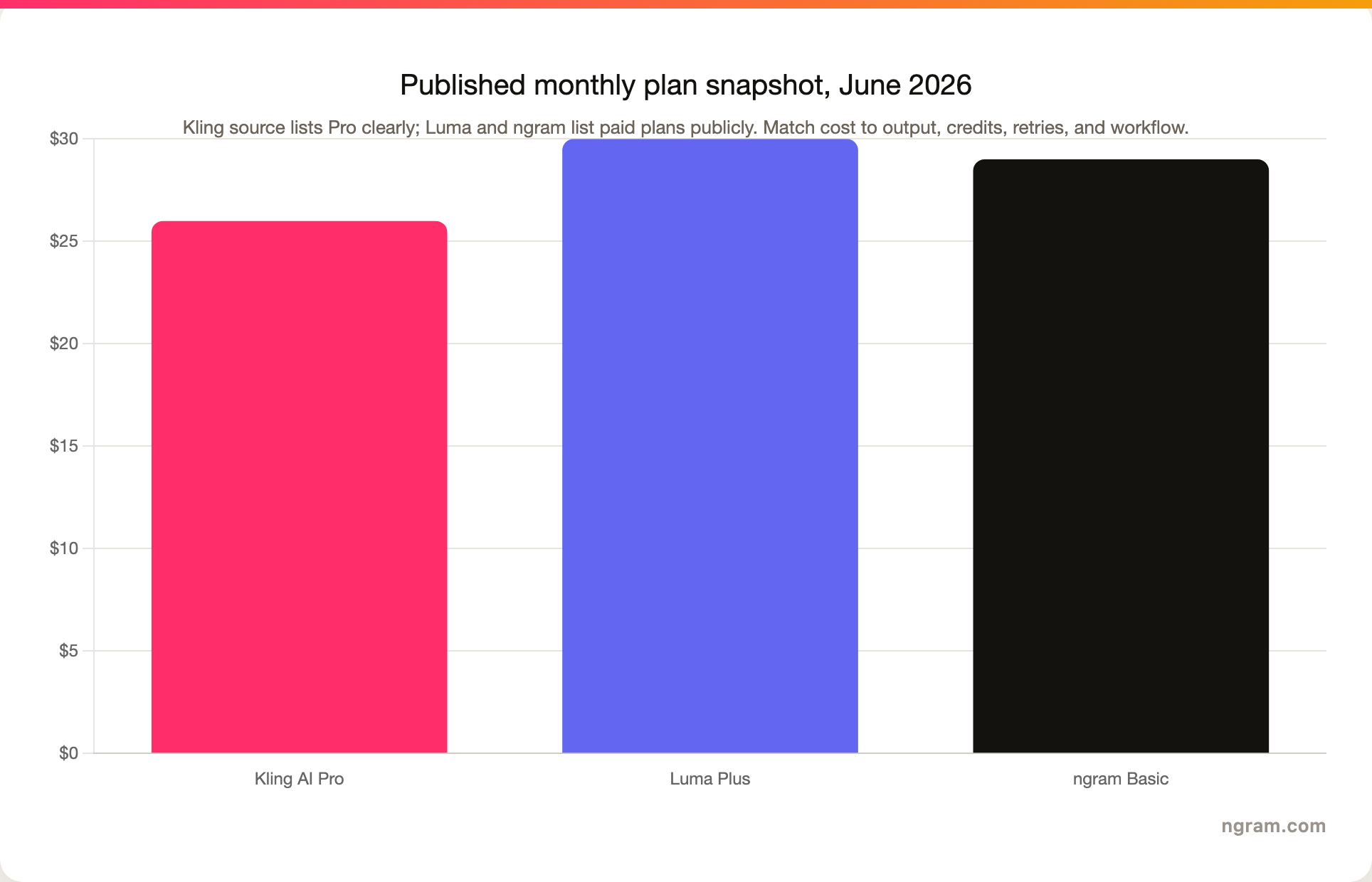
Do not buy on the bar chart alone. Kling may be cheaper for short clips if your prompts are dialed in and you stay in lower-cost modes. Luma may cost more on subscription, but it can save time when the team needs controlled variants, boards, source-video modification, HDR, EXR, or API access. ngram costs more than a single clip generator because the spend covers planning, script, storyboard, voiceover, captions, brand treatment, editing, exports, and business-video workflow.
Winner: Kling AI for short clip experiments, Luma for production-control value, and ngram when the budget needs to include planning, voiceover, captions, edits, and exports.
Where ngram fits if you need finished business video
Watch how ngram turns an idea into a finished video:
ngram is not the answer if your buying criteria are raw visual realism, cinematic physics, or model-level control. Kling, Luma, Runway, Pika, Sora, and Veo are the better comparison set for that job. ngram does generate AI video clips for B-roll and scene fills, but the product's center of gravity is the finished video.
The current ngram product state supports text prompts, PDF uploads, URL ingestion, screenshots, screen recordings, raw video uploads, deck uploads, Shopify product URLs, script generation, storyboard generation, voiceover, captions, motion graphics, product callouts, screen-recording polish, brand kits, scene regeneration, timeline editing, translation, MP4 export, hosted watch pages, and embeddable player links. Those are the things a product marketer, sales enablement lead, L&D manager, or support team needs after the raw model makes a clip.
So the practical rule is simple: use Kling or Luma when the hard part is inventing or modifying footage. Use ngram when the hard part is turning existing business material into a coherent video that someone can publish, share, or hand to customers.
Use-case winners
Kling AI wins for prompt-to-clip generation with native audio. It is the better first stop for cinematic shorts, AI character scenes, fast product mood shots, and 15-second narrative tests where the clip is the deliverable.
Luma wins for source-video transformation. Ray 3.2 is built around existing footage, keyframes, preservation controls, HDR, EXR, and production review. That makes Luma stronger for look development, campaign variations, VFX exploration, and API-connected creative systems.
ngram wins for finished business video from real source material. If your input is a release note, help article, product URL, deck, product screen recording, or customer-facing script, ngram gives you the script and storyboard first, then renders the video with voiceover, captions, brand treatment, and export options.
Methodology
I ran the eligibility gate against docs/_Core/competitor-alternatives.csv: Kling AI and Luma both sit in generative-video-model, both are T2, and both are live. That makes the pairing eligible, with ngram positioned only for the finished-video slice.
For competitor claims, I used official pages first: Kling's video generator page, Kling's VIDEO 3.0 Omni guide, Kling's 3.0 credit guide, Luma's homepage, Luma's pricing page, Luma's Ray 3.2 learning docs, Luma's Agents guide, and Luma's API page. I used existing ngram product-state and GTM facts for every ngram claim. I avoided numerical review ratings and treated pricing as a snapshot because model credits, checkout prices, and API rates can change quickly.
Final recommendation
Choose Kling AI if you want the most direct path from prompt or image to a short cinematic clip with native audio and high-resolution output. Choose Luma if your team is building a creative production system around source video, agent boards, variants, API calls, HDR, and EXR. Choose ngram if the raw model is only one ingredient and the real job is a finished, narrated, branded business video from the material your team already has.








