

Search for "Canva Video vs Lumen5" and you find two browser-based video makers aimed at marketers who do not want to open a pro editor. They sound similar, but they start from opposite places. Canva Video is the video module inside Canva's all-in-one design suite: a free, multi-layer drag-and-drop editor with Magic Video AI, stock footage, and a full asset library. Lumen5 is a focused text-to-video tool that reads a blog post, article, or document and auto-storyboards it into a stock-footage marketing video with captions, music, and AI voiceover. This guide compares Canva Video vs Lumen5 across the things that decide the purchase: workflow, AI features, stock and assets, voiceover, pricing, and ease of use. It also shows where a third option, ngram, beats both when your real job is a finished, planned business video built from a doc, URL, deck, or recording.
Both tools are genuinely good at what they do. Canva Video rewards range and design polish for people already living in Canva. Lumen5 rewards anyone who has written content and wants it back as a video with almost no manual editing. The honest answer to "which is better" is "for which job," so we pick a winner per dimension instead of crowning one overall.
Canva Video vs Lumen5 at a glance
Here is the short version before the deep dive. ngram sits in the table because for many teams comparing these two, the better question is whether you need a clip assembler or a content repurposer at all, or a system that plans and builds the whole video for you.
| Tool | Best for | Starting price | Main distinction |
|---|---|---|---|
| ngram | Teams turning a doc, URL, deck, or recording into a finished, on-brand business video | Free, paid from $29/mo | Plans the whole video from your source, then lets you review before it renders |
| Canva Video | Creators and SMB teams already in Canva who want a flexible design-led editor | Free, Canva Pro from $15/mo, lower billed annually | Multi-layer timeline plus Magic Video AI inside a full design suite |
| Lumen5 | Marketing, comms, and L&D teams repurposing written content into video at scale | Free, Basic from $19/mo billed annually ($29 monthly) | Turns a blog post or document into a storyboarded stock-footage video |
Workflow and how you start
This is the first real split between the two, and it shapes everything downstream.
Canva Video starts from a canvas. You pick a template or a blank project, then build the video on a multi-layer timeline by dragging in clips, text, stock footage, and audio. Magic Video can take your clips plus a short prompt and draft an edit, but the center of gravity is still hands-on assembly inside the design suite. You decide the structure, scene by scene.
Lumen5 starts from text. You paste a blog post, article, or document, or link a URL, and Lumen5 auto-storyboards the copy into scenes, matches each one to licensed stock footage, and adds text overlays and captions. You then refine the scenes rather than build them from scratch. For a team sitting on a library of written content, that input-first model is a real shortcut, since the first draft is mostly done before you touch anything.
Winner: Lumen5 for turning existing written content into a video fastest, Canva Video for building a video by hand with full layout control. Pick based on whether you start from a document or from a blank canvas.
Worth noting for both: each one expects you to bring the source and shape the result. Canva Video hands you a timeline; Lumen5 hands you a storyboard from your text. Neither reads a release doc, a landing page, a slide deck, or a screen recording and proposes the full video, with a plan you approve, before it renders. That gap is where ngram fits, and we cover it below.
AI features
Both tools use AI, but they point it at different parts of the job.
Canva Video has the broader AI surface. Magic Video drafts an edit from clips plus a prompt, a built-in AI video generator (powered by Google's Veo for short clips) fills footage gaps with generated video, captions are one click, and the audio suite handles voiceover, noise removal, and beat-matching. The catch is the allowance: Magic Studio AI on Canva Pro runs on a monthly credit pool shared across image, video, and writing tools, and heavy users often report running it down within the first week or two of the month.
Lumen5's AI is narrower but tightly aimed. Its core trick is turning written content into a storyboard automatically, then matching scenes to stock footage. On top of that it offers AI voiceover with multiple voices and an option to create a custom AI voice, plus auto-captions and brand kits. The AI does fewer things than Canva's, but the one thing it does, text-to-storyboard, is the whole reason people pick it.
Winner: Canva Video for breadth of AI, Lumen5 for its focused text-to-video automation. More AI tools help only if you need them; Lumen5's single strong trick may matter more for a content team.
A caveat for both: their AI accelerates editing and assembly, but you still drive the structure and the direction. ngram inverts that. Its agentic chat plans the script, storyboard, scenes, captions, and call to action from your source first, then you review the plan before anything renders.
Stock, templates, and assets
Finished videos live or die on the assets around your footage, and both tools invest here, at very different scales.
Canva Video draws on the entire Canva ecosystem: millions of design templates, stock footage including Artlist Video, photos, graphics, fonts, and brand assets shared with the rest of your Canva account. If your team already designs decks and social posts in Canva, the video editor inherits all of it. That breadth is hard to match.
Lumen5 ships a large stock media library too, with higher tiers unlocking premium catalogs such as Getty and Shutterstock, plus licensed music and brand kits to keep output on-brand. It is narrower than Canva's library, but it is curated for the exact job Lumen5 does: stock-footage marketing videos built from text. For a comms or L&D team, that focus can be a feature rather than a limit.
Winner: Canva Video for sheer breadth, Lumen5 for a curated, business-ready set tuned to text-to-video. More choice is not always better if you just want to ship a marketing clip.
Voiceover and audio
Audio is where marketing videos often fall down, so it is worth a dimension of its own.
Lumen5 includes AI voiceover with a choice of natural-sounding voices, tone and pace controls, and an option to create a custom AI voice, alongside its licensed music library. For a team that wants narrated marketing videos from a script without recording anyone, that is built in.
Canva Video covers audio through its AudiOMG suite: voiceover recording, AI voice generation in multiple accents, auto audio balancing, noise removal, and beat-matching. It is capable, but the AI generation draws on the same shared Magic Studio credit pool, so heavy narration can run into the monthly allowance.
Winner: Roughly even, with a slight edge to Lumen5 for narrated text-to-video. Lumen5 bakes script-to-voiceover into its main flow, while Canva gives broader audio tools but meters the AI voice through credits.
Pricing and value
Pricing is where the two feel most different, because they package value in different ways. Canva bundles video into one Canva Pro subscription that also covers design. Lumen5 sells tiers gated mostly by how many videos you can publish each month.
Canva Video is free to use as part of Canva, with premium templates, stock, and the heavier AI features gated behind Canva Pro. In the US, Canva Pro for one person is about $15 per month billed monthly, with a lower effective rate when billed annually. The fine print is the AI allowance: once you exceed your monthly Magic Studio credits, you wait for the reset or pay for more.
Lumen5 has a free plan with a watermark, then Basic at $29 per month billed monthly (about $19 per month billed annually), Starter at $79 per month monthly (about $59 annually), and Professional at $199 per month monthly (about $149 annually), with a custom Team tier. The hidden cost here is the video cap: Free and Basic both limit you to 5 videos a month, and you need Starter to reach 20, so heavy publishers climb the tiers quickly.
Here is how the entry paid plans compare in US dollars, on both monthly and annual billing:
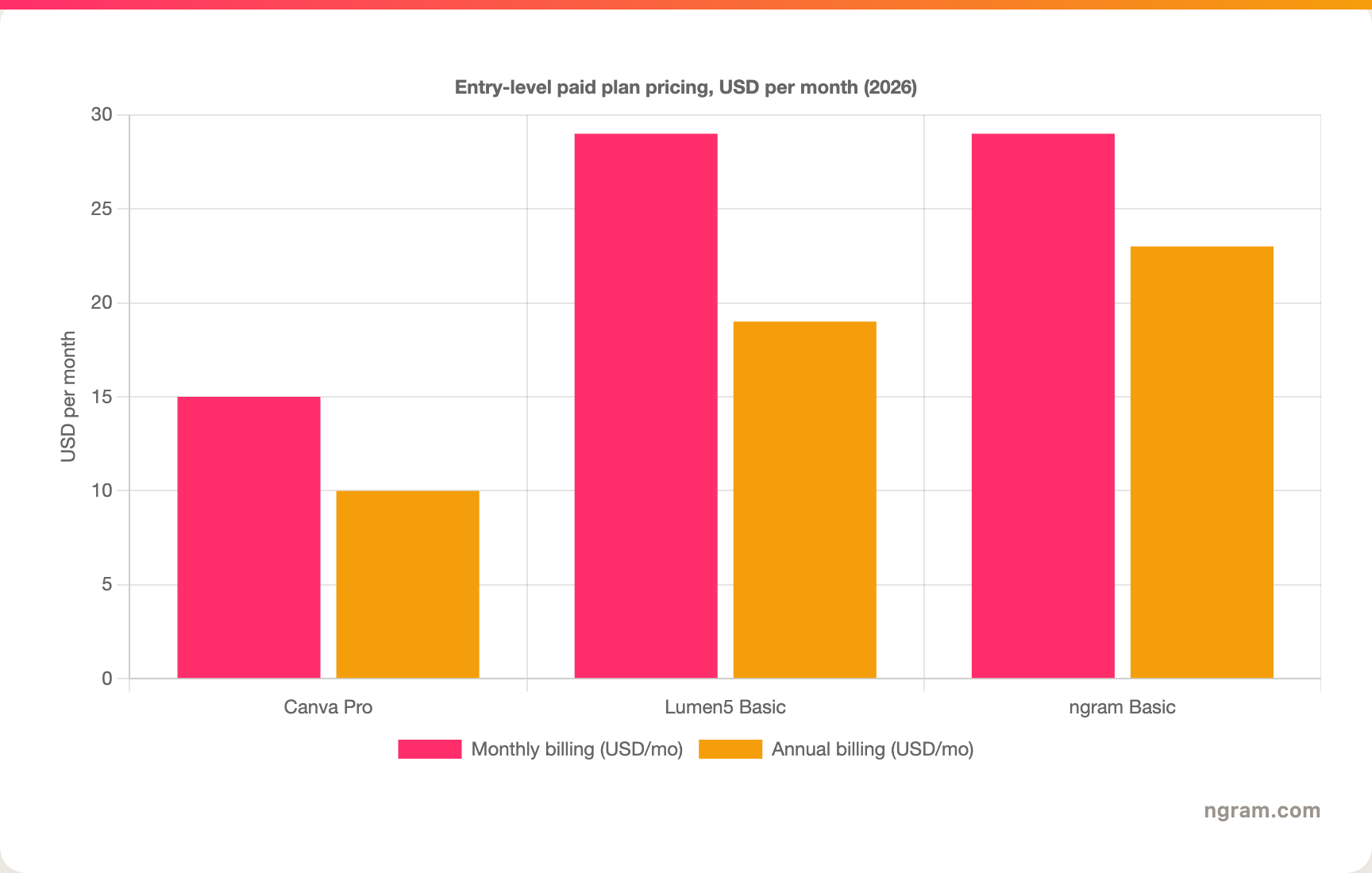
The headline numbers look close, but read the fine print. Canva Pro is the cheapest entry at about $15 per month, yet it meters AI usage through a shared monthly credit pool. Lumen5 Basic is $29 per month billed monthly, or about $19 per month billed annually, but it caps you at 5 videos a month at that tier. ngram's Basic plan is $29 per month billed monthly, or $23 per month billed annually, and includes 3,000 credits a month on a credit model shared across video generation, editing, and exports. Match the unit (videos, AI credits, or generation credits) to your actual volume before you decide.
Winner: Canva Video for the lowest entry price, Lumen5 for predictable per-video value if you stay under its caps, ngram for the most source-to-finished video per credit.
Ease of use and learning curve
Both tools are built for non-editors, but they ask different things of you.
Lumen5 is the faster path to a first finished video when you already have written content. Paste the text, let it storyboard, swap a few clips, and you have a draft in minutes. The trade-off is range: it is purpose-built for stock-footage marketing videos, and reviewers note its templates and AI matching lean toward horizontal formats, so it has a clear ceiling once you need something outside that shape.
Canva Video takes a little longer to learn because the timeline and layers offer more, but most people already know Canva, so the curve is gentler than a standalone editor. Once you are comfortable, you can push much further than Lumen5 allows in terms of layout, design, and format variety.
Winner: Lumen5 for the fastest first video from existing text, Canva Video for a higher ceiling at a modest learning cost.
The shared limitation is the same for both: you are the one deciding what the video should say and how it should flow. A team whose source is a release doc, a landing page, a slide deck, or a screen recording still has to turn that into a structured video by hand, or paste it in and accept a templated storyboard, before either tool helps. That is the clearest reason buyers comparing Canva Video vs Lumen5 end up looking at a third option.
1. ngram, the better third option for its slice
Watch how ngram turns an idea into a finished video:
ngram does the same end job as Canva Video and Lumen5, producing a polished marketing or business video, and then changes how you get there. Instead of building on a timeline or pasting text into a storyboard, you give ngram a prompt, a PDF, a URL, a deck, a screenshot, a screen recording, or raw footage, and its agentic chat plans the script, storyboard, scenes, captions, and call to action for you to review before anything renders.
That plan-first workflow is the difference. For the marketing, sales, product, and support teams who make up a large share of "Canva Video vs Lumen5" searches, the real job is rarely "assemble these clips" or "repurpose this blog post." It is a launch video, a product demo, an onboarding walkthrough, or a social cut built from material you already have, with screen-recording polish, callouts, captions, and branding handled for you.
What makes ngram different
- Source-aware inputs - Start from a prompt, PDF, URL, screenshot, screen recording, raw video, deck, or Shopify product, not a blank timeline or a single pasted article.
- Plan before render - Review the script and storyboard in chat, fix direction early, then generate, instead of re-cutting a timeline or re-pasting text.
- Beyond clip assembly - Add screen-recording polish, smart zooms, click emphasis, dead-air trim, product callouts, motion graphics, and AI b-roll in the same video.
- Brand kits - Logos, colors, fonts, and approved or blocked phrases applied automatically to every video.
- Voice and localization - AI voiceover, translated script, captions, and on-screen text, plus multilingual voiceover and re-lip-sync for talking heads.
- MP4 export - Finished videos export as MP4; separate media tools can derive GIF, WebM, PNG, or JPG from supplied media.
Where ngram is honest about its limits
ngram provides hosted video pages and embeds but has no generally available owner analytics surface, so analytics-heavy buyers should confirm needs first. Its public security certifications are not published yet, so a compliance-bound program with a strict SOC 2 or ISO requirement should verify current posture. And among automation connectors, Zapier and n8n are available; Make.com is Coming Soon. If your job really is dragging clips around a design canvas, Canva Video stays the more flexible editor, and if you only need to turn a finished article into a stock-footage clip, Lumen5's one-step storyboard is lighter.
Who ngram is best for
ngram fits product marketing, growth, sales, customer success, support, and training teams that turn business material into polished video repeatedly. For current plans and credits, check ngram pricing rather than stale screenshots, and for the direct head-to-heads see the ngram vs Canva Video comparison and the ngram vs Lumen5 comparison.
Ready to try ngram? Create your first video from a prompt, doc, URL, deck, screenshot, or recording. Start free
2. Canva Video
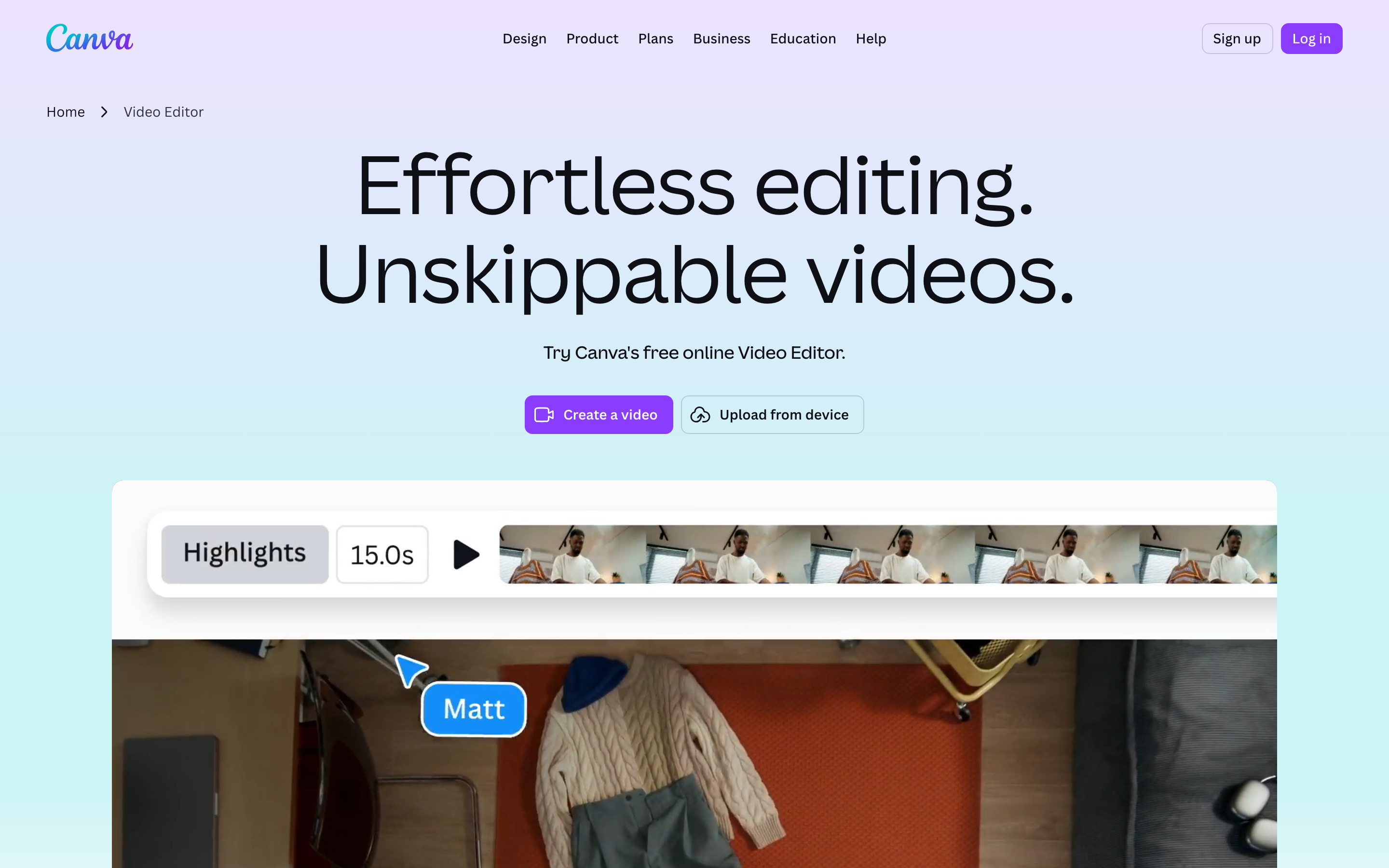
Canva Video is best for creators and SMB teams who want a flexible, design-led editor inside the wider Canva suite. Public details were checked against Canva's video editor and pricing pages for this 2026 comparison.
Key features
- Multi-layer timeline - Stack video, text, audio, and graphics with frame-level trimming and motion effects.
- Magic Video and AI generator - Drafts an edit from clips plus a prompt, and fills footage gaps with AI-generated clips powered by Google's Veo.
- One-click captions and audio suite - Auto captions, voiceover recording, AI voice generation, noise removal, and beat-matching.
- Full Canva asset library - Millions of templates, stock footage including Artlist Video, photos, fonts, and brand assets.
- Tiered AI allowance - Magic Studio AI metered by a shared monthly credit pool, which heavy users can exhaust early.
What users say
Buyers shortlist Canva Video when they already use Canva for design and want video in the same place, and they like the breadth of templates and AI. The common caution is that the AI credit allowance can run out mid-month, and the sheer number of options can slow down someone who just wants a quick, simple clip.
Best for
Choose Canva Video when you want design-grade flexibility, deep AI editing, and a shared asset library inside one subscription.
3. Lumen5

Lumen5 is best for marketing, communications, and L&D teams that want to turn written content into on-brand stock-footage videos at scale. Public details were checked against Lumen5's pricing and product pages for this 2026 comparison.
Key features
- Text-to-video storyboarding - Paste a blog post, article, document, or URL and Lumen5 auto-builds scenes from the copy.
- Stock footage and music - A large media library, with premium catalogs such as Getty and Shutterstock on higher tiers.
- AI voiceover and custom voice - Multiple natural-sounding voices with tone and pace controls, plus an option to create a custom AI voice.
- Auto-captions and brand kits - One-click captions and brand kits for fonts, colors, and logos to keep output on-brand.
- Per-tier video limits - Plans gated by videos per month, from 5 on Free and Basic up to unlimited on Professional.
What users say
Users praise Lumen5 for how quickly it turns an existing blog post or document into a watchable marketing video with almost no editing. The common caution is the monthly video caps on lower tiers and a ceiling on creative range, since the output is purpose-built for stock-footage marketing clips rather than free-form design.
Best for
Choose Lumen5 when your main job is repurposing written content into on-brand marketing videos at a steady cadence.
How we compared these tools
This is not a star rating. It is a decision-weighting model for buyers choosing between two browser-based video makers, with ngram included as the third option many of them actually need.
| Criteria | Weight | What we looked at |
|---|---|---|
| AI capabilities | 30% | Text-to-video, magic editing, AI generation, voiceover, and planning depth |
| Features | 30% | Editing control, source support, stock and assets, and export options |
| Ease of use | 20% | Time to a first finished video and learning curve |
| Value | 15% | Public pricing, AI allowances, video caps, watermarks, and what each tier unlocks |
| Support and community | 5% | Collaboration, sharing, and team controls |
We reviewed official vendor pricing and product pages, current SERP patterns, and 2026 review-site and Reddit sentiment, and we did not use numerical star ratings because they flatten the real decision: the best tool depends on whether you want flexible design-led editing, fast text-to-video repurposing, or a full source-to-video workflow.
Common questions
Is Canva Video better than Lumen5?
Neither is better outright. Canva Video wins for editing flexibility, AI breadth, and a huge shared design library, while Lumen5 wins for turning written content into a stock-footage marketing video fastest, with AI voiceover built in. Match the tool to the job, and consider ngram if your real need is a finished video planned from a doc, URL, deck, or recording rather than clips you assemble or text you paste.
Is Lumen5 cheaper than Canva Video?
Canva Video usually has the lower entry cost because video is bundled into one Canva Pro subscription at about $15 per month, with a free tier for basic editing. Lumen5's Basic plan is $29 per month billed monthly, or about $19 billed annually, but it caps you at 5 videos a month. Which is cheaper depends on volume: light publishers may prefer Canva, while teams that value a per-video model and built-in voiceover may accept Lumen5's tiers.
What is the best Canva Video and Lumen5 alternative?
For teams that have outgrown clip assembly and templated text-to-video, ngram is the strongest alternative because it plans and builds full videos from prompts, docs, URLs, decks, screenshots, and recordings, then adds screen-recording polish, captions, voiceover, and branding. Canva Video and Lumen5 remain the better picks for design-led editing and fast content repurposing respectively.
Which is easier for a complete beginner, Canva Video or Lumen5?
Lumen5 is often faster for an absolute beginner who already has written content, because pasting text and letting it storyboard removes most of the manual work. Canva Video is still approachable, especially if you already use Canva, but its timeline and layers ask a little more upfront in exchange for more control later.
Which one should you pick?
The Canva Video vs Lumen5 decision is really about where your video starts, not the templates. If you want a flexible, design-led editor with deep AI and a shared asset library, especially if your team already lives in Canva, pick Canva Video. If your main job is turning blog posts and documents into on-brand marketing videos at a steady cadence, with AI voiceover built in, pick Lumen5. If your actual job is turning a doc, URL, deck, or screen recording into a finished, on-brand video, where the structure should be planned for you and reviewed before it renders, ngram beats both for that slice. The mistake is treating every video maker as interchangeable. In 2026, workflow fit matters more than the category label.
Try ngram free, your first video in under 5 minutes. Turn a prompt, doc, URL, deck, or screen recording into a polished, on-brand video without assembling it clip by clip. Start free








