Turning a Google Slides Deck into an Editable Video | product overview video made with ngram
%20by%20%E2%80%9EPablo%20Stanley%E2%80%9D%2C%20licensed%20under%20%E2%80%9EFree%20for%20personal%20and%20commercial%20use%E2%80%9D%20(https%3A%2F%2Favataaars.com%2F)%3C%2Fdc%3Arights%3E%3C%2Frdf%3ADescription%3E%3C%2Frdf%3ARDF%3E%3C%2Fmetadata%3E%3Cmask%20id%3D%22viewboxMask%22%3E%3Crect%20width%3D%22280%22%20height%3D%22280%22%20rx%3D%220%22%20ry%3D%220%22%20x%3D%220%22%20y%3D%220%22%20fill%3D%22%23fff%22%20%2F%3E%3C%2Fmask%3E%3Cg%20mask%3D%22url(%23viewboxMask)%22%3E%3Cg%20transform%3D%22translate(8)%22%3E%3Cpath%20d%3D%22M132%2036a56%2056%200%200%200-56%2056v6.17A12%2012%200%200%200%2066%20110v14a12%2012%200%200%200%2010.3%2011.88%2056.04%2056.04%200%200%200%2031.7%2044.73v18.4h-4a72%2072%200%200%200-72%2072v9h200v-9a72%2072%200%200%200-72-72h-4v-18.39a56.04%2056.04%200%200%200%2031.7-44.73A12%2012%200%200%200%20198%20124v-14a12%2012%200%200%200-10-11.83V92a56%2056%200%200%200-56-56Z%22%20fill%3D%22%23614335%22%2F%3E%3Cpath%20d%3D%22M108%20180.61v8a55.79%2055.79%200%200%200%2024%205.39c8.59%200%2016.73-1.93%2024-5.39v-8a55.79%2055.79%200%200%201-24%205.39%2055.79%2055.79%200%200%201-24-5.39Z%22%20fill%3D%22%23000%22%20fill-opacity%3D%22.1%22%2F%3E%3Cg%20transform%3D%22translate(0%20170)%22%3E%3Cpath%20d%3D%22M132.5%2051.83c18.5%200%2033.5-9.62%2033.5-21.48%200-.36-.01-.7-.04-1.06A72%2072%200%200%201%20232%20101.04V110H32v-8.95a72%2072%200%200%201%2067.05-71.83c-.03.37-.05.75-.05%201.13%200%2011.86%2015%2021.48%2033.5%2021.48Z%22%20fill%3D%22%233c4f5c%22%2F%3E%3Cpath%20d%3D%22M132.5%2058.76c21.89%200%2039.63-12.05%2039.63-26.91%200-.6-.02-1.2-.08-1.8-2-.33-4.03-.59-6.1-.76.04.35.05.7.05%201.06%200%2011.86-15%2021.48-33.5%2021.48S99%2042.2%2099%2030.35c0-.38.02-.76.05-1.13-2.06.14-4.08.36-6.08.67-.07.65-.1%201.3-.1%201.96%200%2014.86%2017.74%2026.91%2039.63%2026.91Z%22%20fill%3D%22%23000%22%20fill-opacity%3D%22.08%22%2F%3E%3C%2Fg%3E%3Cg%20transform%3D%22translate(78%20134)%22%3E%3Crect%20x%3D%2242%22%20y%3D%2218%22%20width%3D%2224%22%20height%3D%226%22%20rx%3D%223%22%20fill%3D%22%23000%22%20fill-opacity%3D%22.7%22%2F%3E%3C%2Fg%3E%3Cg%20transform%3D%22translate(104%20122)%22%3E%3Cpath%20fill-rule%3D%22evenodd%22%20clip-rule%3D%22evenodd%22%20d%3D%22M16%208c0%204.42%205.37%208%2012%208s12-3.58%2012-8%22%20fill%3D%22%23000%22%20fill-opacity%3D%22.16%22%2F%3E%3C%2Fg%3E%3Cg%20transform%3D%22translate(76%2090)%22%3E%3Cpath%20d%3D%22M44%2020.73c0%204.26-6.27%207.72-14%207.72S16%2025%2016%2020.73C16%2016.46%2022.27%2013%2030%2013s14%203.46%2014%207.73ZM96%2020.73c0%204.26-6.27%207.72-14%207.72S68%2025%2068%2020.73C68%2016.46%2074.27%2013%2082%2013s14%203.46%2014%207.73Z%22%20fill%3D%22%23fff%22%2F%3E%3Cpath%20d%3D%22M32.82%2028.3a25.15%2025.15%200%200%201-5.64%200%206%206%200%201%201%205.64%200ZM84.82%2028.3a25.15%2025.15%200%200%201-5.64%200%206%206%200%201%201%205.64%200Z%22%20fill%3D%22%23000%22%20fill-opacity%3D%22.7%22%2F%3E%3C%2Fg%3E%3Cg%20transform%3D%22translate(76%2082)%22%3E%3Cpath%20d%3D%22M38.66%2011.1c-5%20.35-9.92.08-14.92-.13-3.83-.16-7.72-.68-11.37%201.01-.7.32-4.53%202.28-4.44%203.35.07.85%203.93%202.2%204.63%202.44%203.67%201.29%207.18.9%2010.95.66%204.64-.27%209.25-.07%2013.87-.2%203.12-.1%207.92-.63%209.46-4.4.46-1.14.1-3.42-.36-4.66-.19-.5-.72-.69-1.13-.4a15.04%2015.04%200%200%201-6.68%202.32ZM73.34%2011.1c5%20.35%209.92.08%2014.92-.13%203.83-.16%207.72-.68%2011.37%201.01.7.32%204.53%202.28%204.44%203.35-.07.85-3.93%202.2-4.63%202.44-3.67%201.29-7.18.9-10.95.66-4.63-.27-9.24-.07-13.86-.2-3.12-.1-7.92-.63-9.46-4.4-.46-1.14-.1-3.42.36-4.66.18-.5.72-.69%201.13-.4a15.04%2015.04%200%200%200%206.68%202.32Z%22%20fill-rule%3D%22evenodd%22%20clip-rule%3D%22evenodd%22%20fill%3D%22%23000%22%20fill-opacity%3D%22.6%22%2F%3E%3C%2Fg%3E%3Cg%20transform%3D%22translate(-1)%22%3E%3Cpath%20d%3D%22M67%2065c0-8.16%201.6-15.95%204.5-23.06-3.86-8.95-8.33-22.96-3.86-32.82%208-2.43%2017.8%201.33%2025.63%205.73A60.72%2060.72%200%200%201%20128%204h10c12.91%200%2024.9%204.01%2034.75%2010.86%207.84-4.4%2017.66-8.17%2025.67-5.74%204.47%209.88-.03%2023.94-3.9%2032.88A60.83%2060.83%200%200%201%20199%2065v8H67v-8Z%22%20fill%3D%22%23ff488e%22%2F%3E%3Cpath%20d%3D%22M194.52%2042c3.87-8.94%208.37-23%203.9-32.88-8.01-2.43-17.83%201.34-25.66%205.74A61.21%2061.21%200%200%201%20194.51%2042ZM93.27%2014.85c-7.83-4.4-17.63-8.16-25.63-5.73-4.47%209.86%200%2023.87%203.87%2032.82%204.5-11%2012.12-20.4%2021.76-27.1Z%22%20fill%3D%22%23000%22%20fill-opacity%3D%22.24%22%2F%3E%3Cpath%20d%3D%22M190.2%2033.42c1.99-6%203.5-12.86%201.49-16.1-2.67-1.16-7.59.47-12.4%202.77a61.28%2061.28%200%200%201%2010.9%2013.33ZM86.66%2020.14c-4.92-2.38-10-4.11-12.73-2.93-2.06%203.33-.42%2010.47%201.64%2016.59a61.28%2061.28%200%200%201%2011.1-13.66Z%22%20fill%3D%22%23fff%22%20fill-opacity%3D%22.3%22%2F%3E%3Cpath%20fill-rule%3D%22evenodd%22%20clip-rule%3D%22evenodd%22%20d%3D%22M64%2069.77a7.05%207.05%200%200%201%203.05-5.96c7.8-5.18%2030.42-17.8%2066.02-17.8%2035.6%200%2058.14%2012.62%2065.9%2017.81a7.04%207.04%200%200%201%203.03%205.95v30.2c0%203.3-3.9%205.38-6.78%203.75C184.84%2097.83%20163.1%2088%20133.8%2088a133.57%20133.57%200%200%200-63.17%2015.98c-2.85%201.56-6.63-.5-6.63-3.75V69.77Z%22%20fill%3D%22%23000%22%20fill-opacity%3D%22.1%22%2F%3E%3Cpath%20fill-rule%3D%22evenodd%22%20clip-rule%3D%22evenodd%22%20d%3D%22M64%2067.77a7.05%207.05%200%200%201%203.05-5.96c7.8-5.18%2030.42-17.8%2066.02-17.8%2035.6%200%2058.14%2012.62%2065.9%2017.81a7.04%207.04%200%200%201%203.03%205.95v30.2c0%203.3-3.9%205.38-6.78%203.75C184.84%2095.83%20163.1%2086%20133.8%2086a133.57%20133.57%200%200%200-63.17%2015.98c-2.85%201.56-6.63-.5-6.63-3.75V67.77Z%22%20fill%3D%22%23F4F4F4%22%2F%3E%3C%2Fg%3E%3Cg%20transform%3D%22translate(49%2072)%22%3E%3C%2Fg%3E%3Cg%20transform%3D%22translate(62%2042)%22%3E%3C%2Fg%3E%3C%2Fg%3E%3C%2Fg%3E%3C%2Fsvg%3E)
About the video
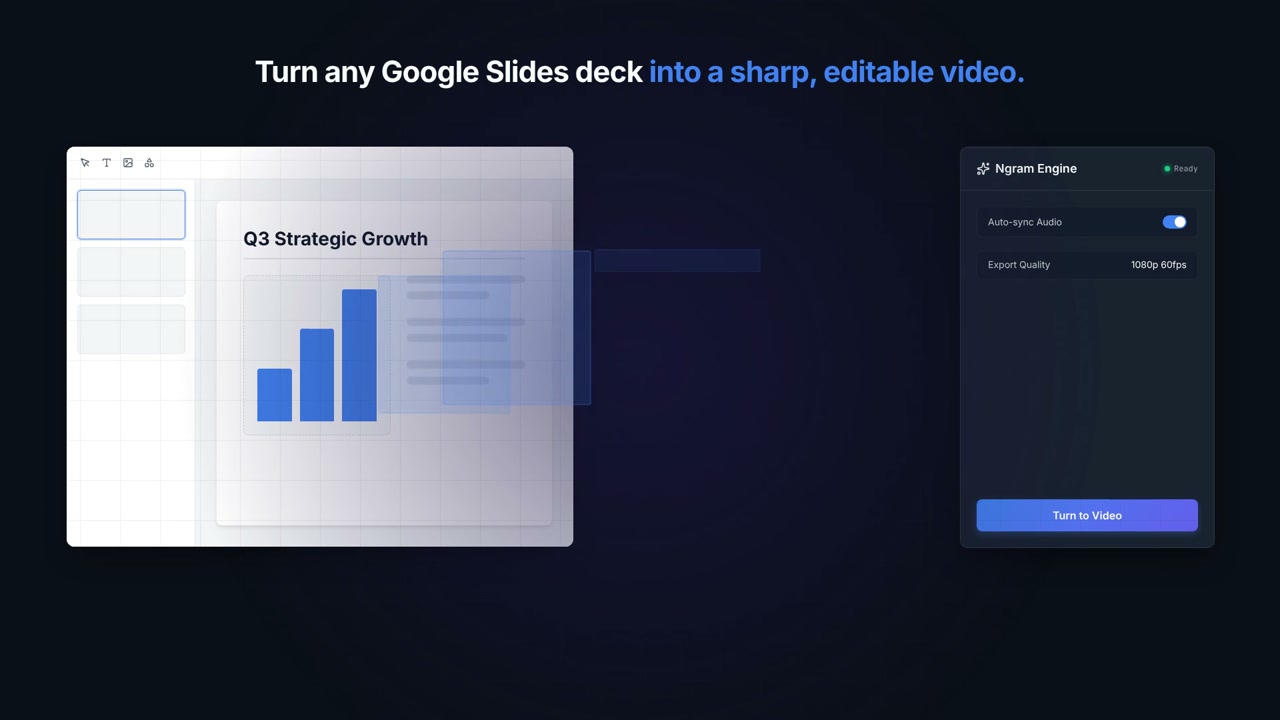
This product overview video was made with ngram to demonstrate how a google slides deck can be converted into a sharp, editable video using the ngram engine. the frames show a slide titled "q3 strategic growth" containing a bar chart and text placeholder, displayed inside an editor interface with tools for selecting, adding text, images, and shapes. alongside the slide preview is the ngram engine panel, which shows settings such as auto-sync audio toggled on and export quality set to 1080p 60fps, with a "turn to video" button to begin conversion. a later frame shows a process diagram outlining three steps: authentication, source extraction, and video creation, indicating the workflow ngram follows to transform the slide deck into a finished video file. the overall content illustrates a product feature allowing users to import presentation slides and output them as a polished video with synced audio and defined export settings.
- Google Slides
- Ngram Engine
- Video Conversion
- Export Settings
- Workflow Diagram
- Presentation To Video