Ngram Platform Walkthrough: Script to Export | ai video made with ngram
%20by%20%E2%80%9EPablo%20Stanley%E2%80%9D%2C%20licensed%20under%20%E2%80%9EFree%20for%20personal%20and%20commercial%20use%E2%80%9D%20(https%3A%2F%2Favataaars.com%2F)%3C%2Fdc%3Arights%3E%3C%2Frdf%3ADescription%3E%3C%2Frdf%3ARDF%3E%3C%2Fmetadata%3E%3Cmask%20id%3D%22viewboxMask%22%3E%3Crect%20width%3D%22280%22%20height%3D%22280%22%20rx%3D%220%22%20ry%3D%220%22%20x%3D%220%22%20y%3D%220%22%20fill%3D%22%23fff%22%20%2F%3E%3C%2Fmask%3E%3Cg%20mask%3D%22url(%23viewboxMask)%22%3E%3Cg%20transform%3D%22translate(8)%22%3E%3Cpath%20d%3D%22M132%2036a56%2056%200%200%200-56%2056v6.17A12%2012%200%200%200%2066%20110v14a12%2012%200%200%200%2010.3%2011.88%2056.04%2056.04%200%200%200%2031.7%2044.73v18.4h-4a72%2072%200%200%200-72%2072v9h200v-9a72%2072%200%200%200-72-72h-4v-18.39a56.04%2056.04%200%200%200%2031.7-44.73A12%2012%200%200%200%20198%20124v-14a12%2012%200%200%200-10-11.83V92a56%2056%200%200%200-56-56Z%22%20fill%3D%22%23d08b5b%22%2F%3E%3Cpath%20d%3D%22M108%20180.61v8a55.79%2055.79%200%200%200%2024%205.39c8.59%200%2016.73-1.93%2024-5.39v-8a55.79%2055.79%200%200%201-24%205.39%2055.79%2055.79%200%200%201-24-5.39Z%22%20fill%3D%22%23000%22%20fill-opacity%3D%22.1%22%2F%3E%3Cg%20transform%3D%22translate(0%20170)%22%3E%3Cpath%20d%3D%22M132.5%2065.83c27.34%200%2049.5-13.2%2049.5-29.48%200-1.37-.16-2.7-.46-4.02A72.03%2072.03%200%200%201%20232%20101.05V110H32v-8.95A72.03%2072.03%200%200%201%2083.53%2032a18%2018%200%200%200-.53%204.35c0%2016.28%2022.16%2029.48%2049.5%2029.48Z%22%20fill%3D%22%23ff5c5c%22%2F%3E%3C%2Fg%3E%3Cg%20transform%3D%22translate(78%20134)%22%3E%3Cpath%20d%3D%22M28%2026.24c1.36.5%202.84.76%204.4.76%205.31%200%209.81-3.15%2011.29-7.49%202.47%202.17%206.17%203.54%2010.31%203.54%204.14%200%207.84-1.37%2010.31-3.53%201.48%204.35%205.98%207.5%2011.3%207.5%201.55%200%203.03-.27%204.4-.76h-.19c-6.33%200-11.8-4.9-11.8-10.56%200-4.18%202.32-7.72%205.69-9.68-5.5.8-9.73%205-9.9%2010.1a17.61%2017.61%200%200%201-9.8%202.8c-3.8%200-7.25-1.06-9.8-2.8-.18-5.1-4.4-9.3-9.9-10.1a11.18%2011.18%200%200%201%205.68%209.68c0%205.66-5.47%2010.57-11.8%2010.57H28Z%22%20fill%3D%22%23000%22%20fill-opacity%3D%22.6%22%20opacity%3D%22.6%22%2F%3E%3Cpath%20d%3D%22M17%2024a9%209%200%201%200%200-18%209%209%200%200%200%200%2018ZM91%2024a9%209%200%201%200%200-18%209%209%200%200%200%200%2018Z%22%20fill%3D%22%23FF4646%22%20fill-opacity%3D%22.2%22%2F%3E%3C%2Fg%3E%3Cg%20transform%3D%22translate(104%20122)%22%3E%3Cpath%20fill-rule%3D%22evenodd%22%20clip-rule%3D%22evenodd%22%20d%3D%22M16%208c0%204.42%205.37%208%2012%208s12-3.58%2012-8%22%20fill%3D%22%23000%22%20fill-opacity%3D%22.16%22%2F%3E%3C%2Fg%3E%3Cg%20transform%3D%22translate(76%2090)%22%3E%3Cpath%20d%3D%22M34.5%2030.7%2029%2025.2l-5.5%205.5c-.4.4-1.1.4-1.6%200l-1.6-1.6c-.4-.4-.4-1.1%200-1.6l5.5-5.5-5.5-5.5c-.4-.5-.4-1.2%200-1.6l1.6-1.6c.4-.4%201.1-.4%201.6%200l5.5%205.5%205.5-5.5c.4-.4%201.1-.4%201.6%200l1.6%201.6c.4.4.4%201.1%200%201.6L32.2%2022l5.5%205.5c.4.4.4%201.1%200%201.6l-1.6%201.6c-.4.4-1.1.4-1.6%200ZM88.5%2030.7%2083%2025.2l-5.5%205.5c-.4.4-1.1.4-1.6%200l-1.6-1.6c-.4-.4-.4-1.1%200-1.6l5.5-5.5-5.5-5.5c-.4-.5-.4-1.2%200-1.6l1.6-1.6c.4-.4%201.1-.4%201.6%200l5.5%205.5%205.5-5.5c.4-.4%201.1-.4%201.6%200l1.6%201.6c.4.4.4%201.1%200%201.6L86.2%2022l5.5%205.5c.4.4.4%201.1%200%201.6l-1.6%201.6c-.4.4-1.1.4-1.6%200Z%22%20fill%3D%22%23000%22%20fill-opacity%3D%22.6%22%2F%3E%3C%2Fg%3E%3Cg%20transform%3D%22translate(76%2082)%22%3E%3Cpath%20d%3D%22M15.6%2014.16c4.49-6.32%2014-9.5%2023.75-6.36a2%202%200%201%200%201.23-3.81c-11.41-3.68-22.74.1-28.25%207.85a2%202%200%201%200%203.26%202.32ZM96.38%2021.16c-3.92-5.51-14.65-8.6-23.9-6.33a2%202%200%200%201-.95-3.88c10.74-2.64%2023.17.94%2028.1%207.9a2%202%200%201%201-3.25%202.3Z%22%20fill%3D%22%23000%22%20fill-opacity%3D%22.6%22%2F%3E%3C%2Fg%3E%3Cg%20transform%3D%22translate(-1)%22%3E%3Ccircle%20cx%3D%22133%22%20cy%3D%2220%22%20r%3D%2220%22%20fill%3D%22%23F4F4F4%22%2F%3E%3Cpath%20fill-rule%3D%22evenodd%22%20clip-rule%3D%22evenodd%22%20d%3D%22M67%2078a66%2066%200%201%201%20132%200v5H67v-5Z%22%20fill%3D%22%23ff5c5c%22%2F%3E%3Cpath%20fill-rule%3D%22evenodd%22%20clip-rule%3D%22evenodd%22%20d%3D%22M64%2069.77a7.05%207.05%200%200%201%203.05-5.96c7.8-5.18%2030.42-17.8%2066.02-17.8%2035.6%200%2058.14%2012.62%2065.9%2017.81a7.04%207.04%200%200%201%203.03%205.95v30.2c0%203.3-3.9%205.38-6.78%203.75C184.84%2097.83%20163.1%2088%20133.8%2088a133.57%20133.57%200%200%200-63.17%2015.98c-2.85%201.56-6.63-.5-6.63-3.75V69.77Z%22%20fill%3D%22%23000%22%20fill-opacity%3D%22.1%22%2F%3E%3Cpath%20fill-rule%3D%22evenodd%22%20clip-rule%3D%22evenodd%22%20d%3D%22M64%2067.77a7.05%207.05%200%200%201%203.05-5.96c7.8-5.18%2030.42-17.8%2066.02-17.8%2035.6%200%2058.14%2012.62%2065.9%2017.81a7.04%207.04%200%200%201%203.03%205.95v30.2c0%203.3-3.9%205.38-6.78%203.75C184.84%2095.83%20163.1%2086%20133.8%2086a133.57%20133.57%200%200%200-63.17%2015.98c-2.85%201.56-6.63-.5-6.63-3.75V67.77Z%22%20fill%3D%22%23F4F4F4%22%2F%3E%3C%2Fg%3E%3Cg%20transform%3D%22translate(49%2072)%22%3E%3C%2Fg%3E%3Cg%20transform%3D%22translate(62%2042)%22%3E%3C%2Fg%3E%3C%2Fg%3E%3C%2Fg%3E%3C%2Fsvg%3E)
About the video
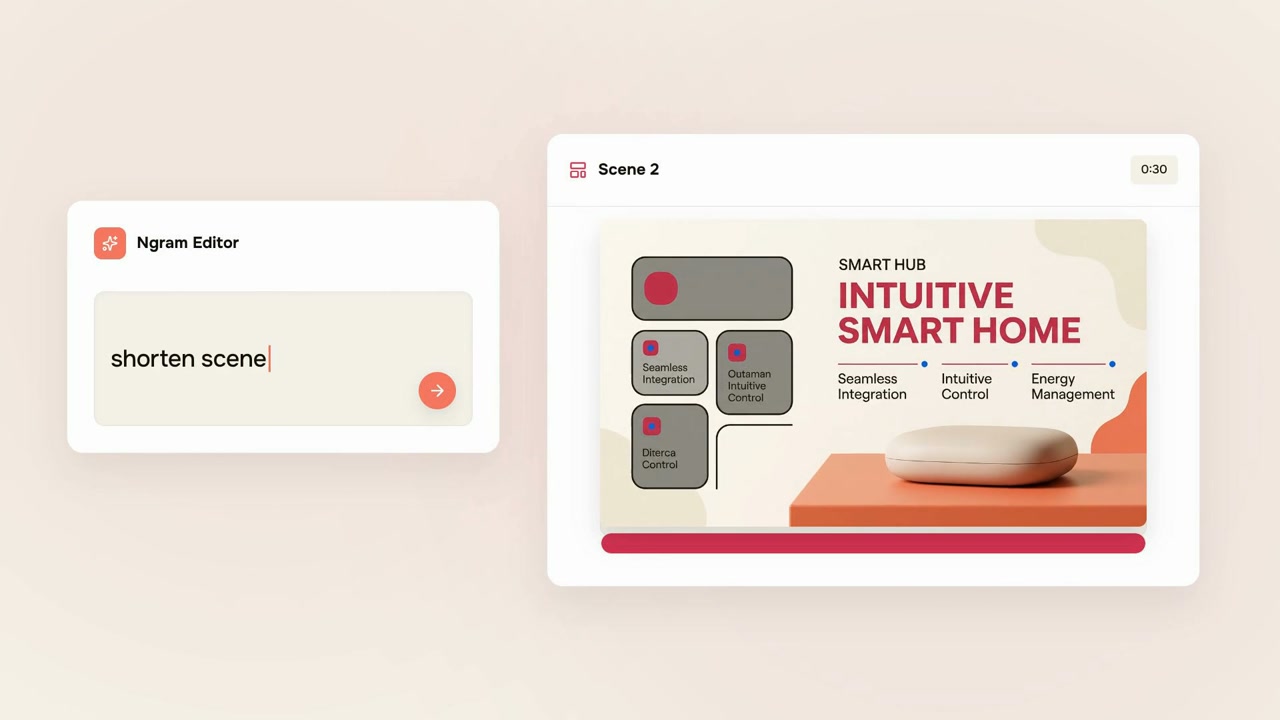
This AI video was made with ngram to show how the ngram editor turns a source input into a finished video. the frames walk through the platform interface: a project workspace with stacked panels for script, storyboard, voiceover, and captions, each labeled and editable, with an export video button in the top corner. the script panel displays sample text reading "ngram turns it into a polished, on-brand video." a second frame shows a drag-and-drop upload area with a circular drop zone and a screen recording option, illustrating how raw footage or files are added to start a project. a third frame demonstrates the ngram editor's text-prompt feature, where a user types "shorten scene" to request an edit, shown alongside a generated scene labeled "scene 2" featuring a smart home product layout with the heading "intuitive smart home" and supporting feature callouts for seamless integration, intuitive control, and energy management, plus a timestamp and product image. together the frames depict the core workflow of building a branded video from input material through editable script, scene, and prompt-based revision steps before export.
- Ngram Editor
- User Interface
- Script Panel
- Storyboard
- Video Export
- Smart Home Product
- Prompt Editing