Cognassist Learner Support Workflow Walkthrough | product walkthrough video made with ngram
%20by%20%E2%80%9EPablo%20Stanley%E2%80%9D%2C%20licensed%20under%20%E2%80%9EFree%20for%20personal%20and%20commercial%20use%E2%80%9D%20(https%3A%2F%2Favataaars.com%2F)%3C%2Fdc%3Arights%3E%3C%2Frdf%3ADescription%3E%3C%2Frdf%3ARDF%3E%3C%2Fmetadata%3E%3Cmask%20id%3D%22viewboxMask%22%3E%3Crect%20width%3D%22280%22%20height%3D%22280%22%20rx%3D%220%22%20ry%3D%220%22%20x%3D%220%22%20y%3D%220%22%20fill%3D%22%23fff%22%20%2F%3E%3C%2Fmask%3E%3Cg%20mask%3D%22url(%23viewboxMask)%22%3E%3Cg%20transform%3D%22translate(8)%22%3E%3Cpath%20d%3D%22M132%2036a56%2056%200%200%200-56%2056v6.17A12%2012%200%200%200%2066%20110v14a12%2012%200%200%200%2010.3%2011.88%2056.04%2056.04%200%200%200%2031.7%2044.73v18.4h-4a72%2072%200%200%200-72%2072v9h200v-9a72%2072%200%200%200-72-72h-4v-18.39a56.04%2056.04%200%200%200%2031.7-44.73A12%2012%200%200%200%20198%20124v-14a12%2012%200%200%200-10-11.83V92a56%2056%200%200%200-56-56Z%22%20fill%3D%22%23ae5d29%22%2F%3E%3Cpath%20d%3D%22M108%20180.61v8a55.79%2055.79%200%200%200%2024%205.39c8.59%200%2016.73-1.93%2024-5.39v-8a55.79%2055.79%200%200%201-24%205.39%2055.79%2055.79%200%200%201-24-5.39Z%22%20fill%3D%22%23000%22%20fill-opacity%3D%22.1%22%2F%3E%3Cg%20transform%3D%22translate(0%20170)%22%3E%3Cpath%20d%3D%22M100.37%2029.14a27.6%2027.6%200%200%201%207.63-7.57v15.3c0%205.83%203.98%2010.98%2010.08%2014.13l-.08.06.9%202.86c3.89%202%208.35%203.13%2013.1%203.13s9.21-1.13%2013.1-3.13l.9-2.86-.08-.06c6.1-3.15%2010.08-8.3%2010.08-14.12v-14.6a27.1%2027.1%200%200%201%206.6%206.82%2072%2072%200%200%201%2069.4%2071.95V110H32v-8.95a72%2072%200%200%201%2068.37-71.9Z%22%20fill%3D%22%2325557c%22%2F%3E%3Cpath%20d%3D%22M108%2021.57c-6.77%204.6-11%2011.17-11%2018.46%200%207.4%204.36%2014.05%2011.3%2018.66l6.12-4.81%204.58.33-1-3.15.08-.06c-6.1-3.15-10.08-8.3-10.08-14.12v-15.3ZM156%2036.88c0%205.82-3.98%2010.97-10.08%2014.12l.08.06-1%203.15%204.58-.33%205.65%204.45c6.63-4.6%2010.77-11.1%2010.77-18.3%200-6.92-3.82-13.2-10-17.75v14.6Z%22%20fill%3D%22%23fff%22%20fill-opacity%3D%22.75%22%2F%3E%3C%2Fg%3E%3Cg%20transform%3D%22translate(78%20134)%22%3E%3Cpath%20d%3D%22M28%2026.24c1.36.5%202.84.76%204.4.76%205.31%200%209.81-3.15%2011.29-7.49%202.47%202.17%206.17%203.54%2010.31%203.54%204.14%200%207.84-1.37%2010.31-3.53%201.48%204.35%205.98%207.5%2011.3%207.5%201.55%200%203.03-.27%204.4-.76h-.19c-6.33%200-11.8-4.9-11.8-10.56%200-4.18%202.32-7.72%205.69-9.68-5.5.8-9.73%205-9.9%2010.1a17.61%2017.61%200%200%201-9.8%202.8c-3.8%200-7.25-1.06-9.8-2.8-.18-5.1-4.4-9.3-9.9-10.1a11.18%2011.18%200%200%201%205.68%209.68c0%205.66-5.47%2010.57-11.8%2010.57H28Z%22%20fill%3D%22%23000%22%20fill-opacity%3D%22.6%22%20opacity%3D%22.6%22%2F%3E%3Cpath%20d%3D%22M17%2024a9%209%200%201%200%200-18%209%209%200%200%200%200%2018ZM91%2024a9%209%200%201%200%200-18%209%209%200%200%200%200%2018Z%22%20fill%3D%22%23FF4646%22%20fill-opacity%3D%22.2%22%2F%3E%3C%2Fg%3E%3Cg%20transform%3D%22translate(104%20122)%22%3E%3Cpath%20fill-rule%3D%22evenodd%22%20clip-rule%3D%22evenodd%22%20d%3D%22M16%208c0%204.42%205.37%208%2012%208s12-3.58%2012-8%22%20fill%3D%22%23000%22%20fill-opacity%3D%22.16%22%2F%3E%3C%2Fg%3E%3Cg%20transform%3D%22translate(76%2090)%22%3E%3Cpath%20d%3D%22M35.96%2010c-2.55%200-5.08%201.98-6.46%203.82-1.39-1.84-3.9-3.82-6.46-3.82-5.49%200-9.04%203.33-9.04%207.64%200%205.73%204.41%209.13%209.04%2012.74%201.66%201.23%204.78%204.4%205.17%205.1.38.68%202.1.7%202.58%200%20.48-.73%203.51-3.87%205.17-5.1%204.63-3.6%209.04-7%209.04-12.74%200-4.3-3.55-7.64-9.04-7.64ZM88.96%2010c-2.55%200-5.08%201.98-6.46%203.82-1.39-1.84-3.9-3.82-6.46-3.82-5.49%200-9.04%203.33-9.04%207.64%200%205.73%204.41%209.13%209.04%2012.74%201.65%201.23%204.78%204.4%205.17%205.1.38.68%202.1.7%202.58%200%20.48-.73%203.51-3.87%205.17-5.1%204.63-3.6%209.04-7%209.04-12.74%200-4.3-3.55-7.64-9.04-7.64Z%22%20fill%3D%22%23FF5353%22%20fill-opacity%3D%22.8%22%2F%3E%3C%2Fg%3E%3Cg%20transform%3D%22translate(76%2082)%22%3E%3Cpath%20d%3D%22M44.1%2017.12ZM19.27%205.01a7.16%207.16%200%200%200-6.42%202.43c-.6.73-1.56%202.48-1.51%203.42.02.35.22.37%201.12.59%201.65.39%204.5-1.12%206.36-.98%202.58.2%205.04%201.4%207.28%202.68%203.84%202.2%208.35%206.84%2013.1%206.6.35-.02%205.41-1.74%204.4-2.72-.31-.49-3.03-1.13-3.5-1.36-2.17-1.09-4.37-2.45-6.44-3.72C29.14%209.18%2024.72%205.6%2019.28%205ZM68.03%2017.12ZM92.91%205.01c2.36-.27%204.85.5%206.42%202.43.6.73%201.56%202.48%201.51%203.42-.02.35-.22.37-1.12.59-1.65.39-4.5-1.12-6.36-.98-2.58.2-5.04%201.4-7.28%202.68-3.84%202.2-8.35%206.84-13.1%206.6-.35-.02-5.41-1.74-4.4-2.72.31-.49%203.03-1.13%203.5-1.36%202.17-1.09%204.36-2.45%206.44-3.72C83.05%209.18%2087.46%205.6%2092.91%205Z%22%20fill-rule%3D%22evenodd%22%20clip-rule%3D%22evenodd%22%20fill%3D%22%23000%22%20fill-opacity%3D%22.6%22%2F%3E%3C%2Fg%3E%3Cg%20transform%3D%22translate(-1)%22%3E%3Cpath%20d%3D%22M86.67%2068H64v112.91a4.09%204.09%200%200%200%204.09%204.1%2018.58%2018.58%200%200%200%2018.58-18.6V68ZM202%2068h-22.67v112.91a4.09%204.09%200%200%200%204.09%204.1A18.58%2018.58%200%200%200%20202%20166.4V68Z%22%20fill%3D%22%23F4F4F4%22%2F%3E%3Cpath%20d%3D%22M63%2064a44%2044%200%200%201%2044-44h52a44%2044%200%200%201%2044%2044v104.6a16.4%2016.4%200%200%201-16.4%2016.4c-1.98%200-3.6-1.62-3.6-3.6V74H83v94.6A16.4%2016.4%200%200%201%2066.6%20185c-1.99%200-3.6-1.62-3.6-3.6V64Z%22%20fill%3D%22%235199e4%22%2F%3E%3Crect%20x%3D%2274%22%20y%3D%2252%22%20width%3D%22118%22%20height%3D%2236%22%20rx%3D%228%22%20fill%3D%22%23000%22%20fill-opacity%3D%22.1%22%2F%3E%3Crect%20x%3D%2274%22%20y%3D%2250%22%20width%3D%22118%22%20height%3D%2236%22%20rx%3D%228%22%20fill%3D%22%23F4F4F4%22%2F%3E%3C%2Fg%3E%3Cg%20transform%3D%22translate(49%2072)%22%3E%3C%2Fg%3E%3Cg%20transform%3D%22translate(62%2042)%22%3E%3C%2Fg%3E%3C%2Fg%3E%3C%2Fg%3E%3C%2Fsvg%3E)
About the video
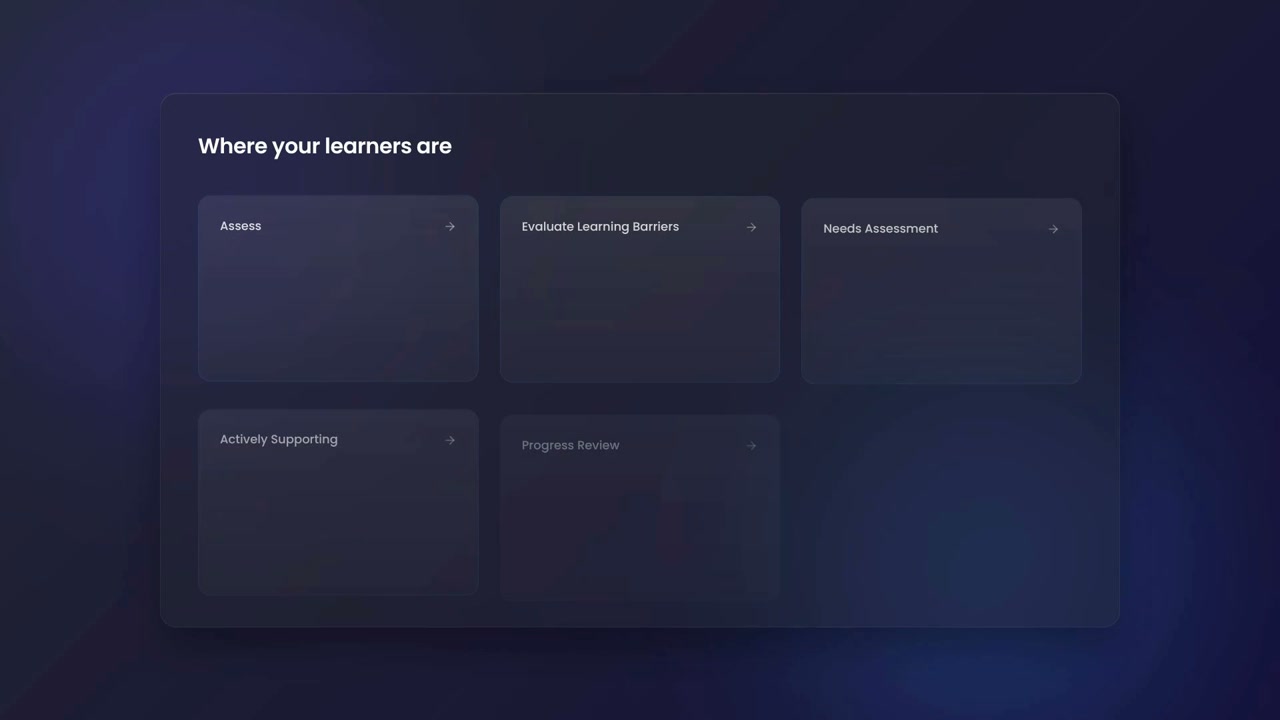
This product walkthrough video was made with ngram to walk through the cognassist platform used to track and support learners with identified learning barriers. the footage shows a learners list within the users section of the application, with a filters panel open displaying options for assessment status and stage, including categories like assess, evaluate barriers, needs assessment, actively supporting, progress review, and self-serve, along with time-in-stage filters such as on track, needs attention, and overdue. a following screen presents a summary view titled "where your learners are," organizing learners into the same stage categories as clickable cards. the final screen shows an individual learner's support plan tab, listing known barriers such as executive function and non-verbal memory difficulties, a button to conduct a needs assessment, and drafted adjustments including providing written notes, step-by-step guidance, and extended deadlines for assignments. together the frames illustrate how the platform filters and categorizes learners by assessment stage and generates individualized support recommendations based on identified barriers.
- Cognassist
- Learner Management
- Support Plan
- Needs Assessment
- Dashboard Filters
- Education Software