AI Studio: connecting Gmail and Google Calendar to an agent | devrel integration guide video made with ngram
%20by%20%E2%80%9EPablo%20Stanley%E2%80%9D%2C%20licensed%20under%20%E2%80%9EFree%20for%20personal%20and%20commercial%20use%E2%80%9D%20(https%3A%2F%2Favataaars.com%2F)%3C%2Fdc%3Arights%3E%3C%2Frdf%3ADescription%3E%3C%2Frdf%3ARDF%3E%3C%2Fmetadata%3E%3Cmask%20id%3D%22viewboxMask%22%3E%3Crect%20width%3D%22280%22%20height%3D%22280%22%20rx%3D%220%22%20ry%3D%220%22%20x%3D%220%22%20y%3D%220%22%20fill%3D%22%23fff%22%20%2F%3E%3C%2Fmask%3E%3Cg%20mask%3D%22url(%23viewboxMask)%22%3E%3Cg%20transform%3D%22translate(8)%22%3E%3Cpath%20d%3D%22M132%2036a56%2056%200%200%200-56%2056v6.17A12%2012%200%200%200%2066%20110v14a12%2012%200%200%200%2010.3%2011.88%2056.04%2056.04%200%200%200%2031.7%2044.73v18.4h-4a72%2072%200%200%200-72%2072v9h200v-9a72%2072%200%200%200-72-72h-4v-18.39a56.04%2056.04%200%200%200%2031.7-44.73A12%2012%200%200%200%20198%20124v-14a12%2012%200%200%200-10-11.83V92a56%2056%200%200%200-56-56Z%22%20fill%3D%22%23fd9841%22%2F%3E%3Cpath%20d%3D%22M108%20180.61v8a55.79%2055.79%200%200%200%2024%205.39c8.59%200%2016.73-1.93%2024-5.39v-8a55.79%2055.79%200%200%201-24%205.39%2055.79%2055.79%200%200%201-24-5.39Z%22%20fill%3D%22%23000%22%20fill-opacity%3D%22.1%22%2F%3E%3Cg%20transform%3D%22translate(0%20170)%22%3E%3Cpath%20d%3D%22M196%2038.63V110H68V38.63a71.52%2071.52%200%200%201%2026-8.94v44.3h76V29.69a71.52%2071.52%200%200%201%2026%208.94Z%22%20fill%3D%22%23ff488e%22%2F%3E%3Cpath%20d%3D%22M86%2083a5%205%200%201%201-10%200%205%205%200%200%201%2010%200ZM188%2083a5%205%200%201%201-10%200%205%205%200%200%201%2010%200Z%22%20fill%3D%22%23F4F4F4%22%2F%3E%3C%2Fg%3E%3Cg%20transform%3D%22translate(78%20134)%22%3E%3Cpath%20fill-rule%3D%22evenodd%22%20clip-rule%3D%22evenodd%22%20d%3D%22M34%2038.86C35.14%2024.88%2038.24%2013.01%2054%2013c15.76%200%2018.92%2011.94%2020%2026%20.08%201.12-.83%202-1.96%202-6.69%200-9.37-2-18.05-2-8.7%200-13.24%202-17.9%202-1.15%200-2.2-.74-2.1-2.14Z%22%20fill%3D%22%23000%22%20fill-opacity%3D%22.7%22%2F%3E%3Cpath%20d%3D%22M67.02%2017.57c-.61.28-1.3.43-2.02.43H44c-.98%200-1.9-.28-2.67-.77C44.23%2014.57%2048.28%2013%2054%2013c5.95%200%2010.1%201.7%2013.02%204.57Z%22%20fill%3D%22%23fff%22%2F%3E%3Cpath%20d%3D%22M69.8%2040.92a44.2%2044.2%200%200%201-5.54-.82c-2.73-.53-5.65-1.1-10.27-1.1-5.02%200-8.66.66-11.74%201.23-1.45.26-2.77.5-4.06.65A11%2011%200%200%201%2054%2033.2a11%2011%200%200%201%2015.8%207.72Z%22%20fill%3D%22%23FF4F6D%22%2F%3E%3C%2Fg%3E%3Cg%20transform%3D%22translate(104%20122)%22%3E%3Cpath%20fill-rule%3D%22evenodd%22%20clip-rule%3D%22evenodd%22%20d%3D%22M16%208c0%204.42%205.37%208%2012%208s12-3.58%2012-8%22%20fill%3D%22%23000%22%20fill-opacity%3D%22.16%22%2F%3E%3C%2Fg%3E%3Cg%20transform%3D%22translate(76%2090)%22%3E%3Cpath%20d%3D%22M34.5%2030.7%2029%2025.2l-5.5%205.5c-.4.4-1.1.4-1.6%200l-1.6-1.6c-.4-.4-.4-1.1%200-1.6l5.5-5.5-5.5-5.5c-.4-.5-.4-1.2%200-1.6l1.6-1.6c.4-.4%201.1-.4%201.6%200l5.5%205.5%205.5-5.5c.4-.4%201.1-.4%201.6%200l1.6%201.6c.4.4.4%201.1%200%201.6L32.2%2022l5.5%205.5c.4.4.4%201.1%200%201.6l-1.6%201.6c-.4.4-1.1.4-1.6%200ZM88.5%2030.7%2083%2025.2l-5.5%205.5c-.4.4-1.1.4-1.6%200l-1.6-1.6c-.4-.4-.4-1.1%200-1.6l5.5-5.5-5.5-5.5c-.4-.5-.4-1.2%200-1.6l1.6-1.6c.4-.4%201.1-.4%201.6%200l5.5%205.5%205.5-5.5c.4-.4%201.1-.4%201.6%200l1.6%201.6c.4.4.4%201.1%200%201.6L86.2%2022l5.5%205.5c.4.4.4%201.1%200%201.6l-1.6%201.6c-.4.4-1.1.4-1.6%200Z%22%20fill%3D%22%23000%22%20fill-opacity%3D%22.6%22%2F%3E%3C%2Fg%3E%3Cg%20transform%3D%22translate(76%2082)%22%3E%3Cpath%20d%3D%22m31.23%2020.42-.9.4c-5.25%202.09-13.2%201.21-18.05-1.12-.57-.27-.18-1.15.4-1.1%2014.92%201.14%2024.96-8.15%2028.37-14.45.1-.18.41-.2.49-.03%202.3%205.32-4.45%2013.98-10.3%2016.3ZM80.77%2020.42l.9.4c5.25%202.09%2013.2%201.21%2018.05-1.12.57-.27.18-1.15-.4-1.1-14.92%201.14-24.96-8.15-28.37-14.45-.1-.18-.41-.2-.49-.03-2.3%205.32%204.45%2013.98%2010.3%2016.3Z%22%20fill-rule%3D%22evenodd%22%20clip-rule%3D%22evenodd%22%20fill%3D%22%23000%22%20fill-opacity%3D%22.6%22%2F%3E%3C%2Fg%3E%3Cg%20transform%3D%22translate(-1)%22%3E%3Cpath%20d%3D%22M50%2090.5c0%204.55%201.7%208.64%204.85%2010.77.9.61%202.47.93%204.15%201.07V182a8%208%200%200%200%208%208h42v-9.39a56.03%2056.03%200%200%201-31.8-45.74A12%2012%200%200%201%2067%20123v-13c0-3.5%201.5-6.63%203.87-8.83%2011.54-2.61%2024.1-7.53%2036.47-14.67%2012.13-7%2022.5-15.24%2030.48-23.75a87.36%2087.36%200%200%201-12.45%2020.78c12.68-5.52%2021.3-14.4%2025.9-26.63.37.92.76%201.84%201.17%202.76%2010.26%2023.03%2027.88%2039.36%2045.77%2044.74.5%202.11.79%204.08.79%205.6v13a12%2012%200%200%201-10.2%2011.87A56.03%2056.03%200%200%201%20157%20180.6V190h18a32%2032%200%200%200%2032-32v-54.12c0-.07%200-.17-.03-.28-.07-5.64-.28-18.87-.6-21.37A74.01%2074.01%200%200%200%20132.99%2018c-36.08%200-66.14%2025.83-73%2060-5.52%200-10%205.6-10%2012.5Z%22%20fill%3D%22%23724133%22%2F%3E%3Cpath%20d%3D%22M152.44%2059.66c11.94%2026.81%2033.86%2044.53%2054.56%2046.5V92A74%2074%200%200%200%2060.32%2078H60c-5.52%200-10%205.6-10%2012.5%200%206.48%203.95%2011.81%209%2012.44v.15l.95-.1H60a8.1%208.1%200%200%200%201.9-.22C75.7%20101%2091.68%2095.54%20107.34%2086.5c12.13-7%2022.5-15.24%2030.48-23.75a87.36%2087.36%200%200%201-12.45%2020.78c12.68-5.52%2021.3-14.4%2025.9-26.63.37.92.76%201.84%201.17%202.76Z%22%20fill%3D%22%23fff%22%20fill-opacity%3D%22.08%22%2F%3E%3C%2Fg%3E%3Cg%20transform%3D%22translate(49%2072)%22%3E%3C%2Fg%3E%3Cg%20transform%3D%22translate(62%2042)%22%3E%3C%2Fg%3E%3C%2Fg%3E%3C%2Fg%3E%3C%2Fsvg%3E)
About the video
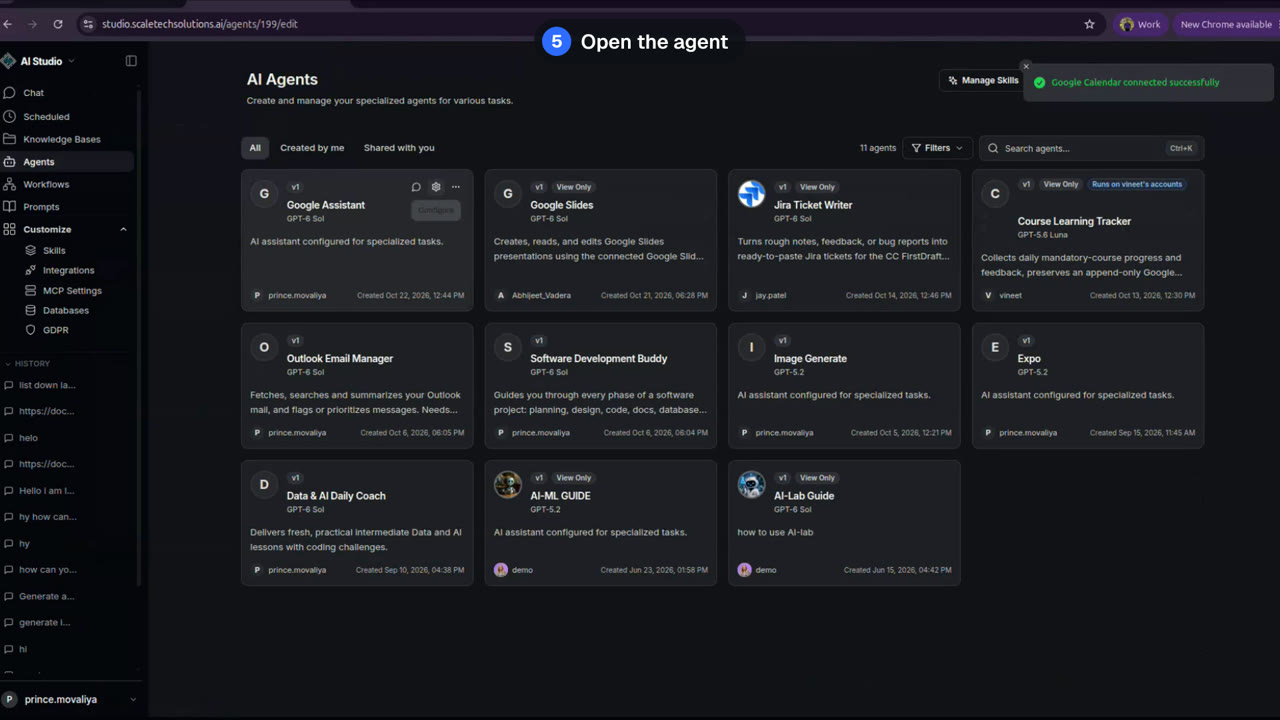
This devrel integration guide video was made with ngram to walk through connecting gmail and google calendar to an agent inside ai studio. the video opens with signing in using a google account, then navigating to integrations under customize to connect gmail: clicking connect on the gmail card, choosing an account, reviewing permissions, and confirming the connection, followed by the same steps for google calendar. it then shows opening agents, selecting the google assistant agent, adding both integrations in its settings, and saving the changes before opening the chat. in the chat, the demo asks for last week's mail, which triggers the gmail tool and returns a summary listing eight emails with senders and subjects such as atlassian jira, github, google, and fathom. it also asks about next week's calendar, which triggers the scheduled event tool and returns one upcoming meeting with its time in indian standard time, platform, and acceptance status. the video uses html/css motion graphics with on-screen captions matching the narration, ending on a closing card, and is intended to show the exact setup steps and example outputs for connecting mail and calendar data sources to an ai agent.
- AI Studio
- Gmail Integration
- Google Calendar
- Agent Setup
- Integrations