

Search for "VEED vs Wave.video" and the surface-level answer is confusing because both tools make marketing videos in a browser. The real split is workflow. VEED is an AI-assisted editor for fast social, sales, education, and creator video. Wave.video is a broader video marketing suite that adds live streaming, recording, hosting, embeds, and a landing-page layer around the editor.
That means the right choice depends on what happens after the first draft. If the work is captions, AI clips, avatars, dubbing, and quick branded edits, VEED is usually the cleaner path. If the work includes webinars, multistreaming, hosted video pages, and embed management, Wave.video has more of the operating layer. If the source is messy business material such as a PDF, URL, deck, screenshot, or screen recording, ngram belongs in the conversation because it plans the script and storyboard before it renders.
VEED vs Wave.video at a glance
| Dimension | VEED | Wave.video | ngram angle |
|---|---|---|---|
| Core job | AI video creation and browser editing for social, marketing, training, and sales clips | Video editor, recorder, live streaming studio, thumbnail maker, hosting, and stock library | Source-to-finished business video from prompts, docs, URLs, decks, screenshots, recordings, and product URLs |
| AI generation | Strong focus on text-to-video, image-to-video, avatars, voice, dubbing, subtitles, and AI model access | AI text-to-video sits inside a larger marketing suite | Agent drafts the script, storyboard, visual direction, captions, voiceover, and branded scenes |
| Editing model | Edit in a browser, then refine captions, media, branding, and export format | Timeline editing plus recording, stock assets, templates, captions, and distribution tools | Chat-driven edits, scene regeneration, script editing, timeline controls, and MP4 export |
| Streaming | Not the main reason to buy it | Clear winner, with multistreaming, guests, pre-recorded streaming, and live scenes | Not a livestreaming product |
| Hosting | Useful sharing and export flows, but not positioned as a full hosting suite | Stronger hosting layer with embeds, bandwidth, storage, landing pages, and player customization | Hosted watch pages, embeds, share links, and no generally available owner analytics surface, not deep video CMS analytics |
| Pricing posture | Free plan plus paid Lite, Pro, and Enterprise tiers, with pricing rendered dynamically on VEED's current page | Free, Streamer, Creator, Business, and Enterprise options, with official annual prices shown from $16/mo to $48/mo | Free plan plus Basic from $29/mo monthly or $23.20/mo annually |
| Best buyer | Creator, marketer, educator, or small team making frequent edited videos | Marketing team that also streams, records, embeds, and hosts video | Product marketing, sales, training, and customer teams turning source material into finished videos |
Workflow: AI editor vs video marketing suite
VEED starts with creation and editing. Its current product pages describe an idea-to-video workflow with AI video generation, text-to-video, image-to-video, avatars, voice dubbing, automatic subtitles, screen recording, background removal, eye contact correction, and access to models such as Fabric, Sora, Veo, and Kling. The strongest buyer story is speed: make a video in one browser workspace, polish it with AI tools, then ship it to social, sales, education, or internal channels.
Wave.video starts wider. Its homepage frames the product as a bundle: online video editor, live streaming studio, recorder, stock library, video player, thumbnail maker, templates, and video hosting. That breadth matters if the same team makes social clips, records interviews, runs live sessions, hosts finished clips, and embeds them on web pages. The tradeoff is focus. Wave.video has more surface area because it is solving more of the marketing operation.
ngram sits outside that direct choice. It is not trying to be a livestreaming studio, and it is not only a caption editor. The useful slice is source-to-video. A team can paste a prompt, upload a PDF, provide a URL, add a deck, use a screenshot, record a screen, or upload raw video. ngram turns that input into a script, storyboard, visual plan, AI voiceover, captions, brand-aligned scenes, and editable video. That is why ngram vs VEED and ngram vs Wave.video are better follow-up reads when the work starts before the editing timeline.
AI generation and editing depth
VEED is the stronger AI-first editor. Its official text-to-video page says users can start from a prompt, script, article, or existing footage, then choose avatar or voice-only narration, edit the generated script, swap media, add branding, resize for platforms, and export. For a marketer who wants AI clips, subtitles, voice work, avatars, dubbing, or quick short-form variants, VEED feels closer to the daily job.
Wave.video has useful AI video features, but the product story is less about model depth and more about combining creation with distribution. It supports text-to-video, templates, stock assets, captions, text to speech, thumbnail making, and background removal on higher plans. That is enough for many marketing teams, especially when they also want the same product to host and stream.
Winner for AI-assisted editing: VEED. Winner for all-in-one marketing workflow: Wave.video. ngram wins a different slice when the buyer needs the system to reason from source material, not just help edit a video that the buyer already understands.
Live streaming, recording, and hosting
This is the clearest Wave.video win. Its homepage highlights multistreaming, a live streaming studio, a video recorder, a video player, hosting, embeds, password protection, branded players, and video landing pages. Its pricing page lists live streaming by plan, including guest counts, channel counts, recording limits, scenes, pre-recorded streaming, and 1080p streaming on paid plans.
VEED can be a better creation and editing product, but it is not the obvious choice when the buying requirement says "run a live show, invite guests, stream to multiple destinations, then host the replay with embeds and bandwidth rules." Wave.video has built more of that workflow into the subscription.
ngram should not be framed as a Wave.video replacement for livestreaming. It has hosted watch pages, an embeddable player, share links, and no generally available owner analytics surface, but not a full live production stack and not advanced hosting analytics. If the buyer is choosing primarily for live events, Wave.video should stay on the shortlist.
Pricing and plan fit
Pricing is where the comparison needs care. Wave.video exposes a clear public pricing table. On June 19, 2026, its annual toggle showed Free at $0/mo, Streamer at $16/mo, Creator at $24/mo, and Business at $48/mo. The same page lists video hosting and live streaming limits by plan, including embeds, bandwidth, storage, streaming length, and recording limits.
VEED's current official pricing page confirms a free start, AI credits, Lite, Pro, and Enterprise plan language, but the detailed pricing table rendered dynamically during research. Public pricing references list VEED Lite from $19/user/month on annual billing. Treat VEED price numbers as a checkout item, not a permanent promise.
ngram's public pricing is simpler: Free at $0 with 600 one-time credits, Basic at $29/mo or $23.20/mo annually, Premium at $59/mo or $47.20/mo annually, Ultimate at $299/mo or $239.20/mo annually, and Enterprise custom. Premium and Ultimate credits roll over one billing cycle, Basic refreshes monthly, and Free is one-time. Exports are unlimited on all plans and do not consume credits.
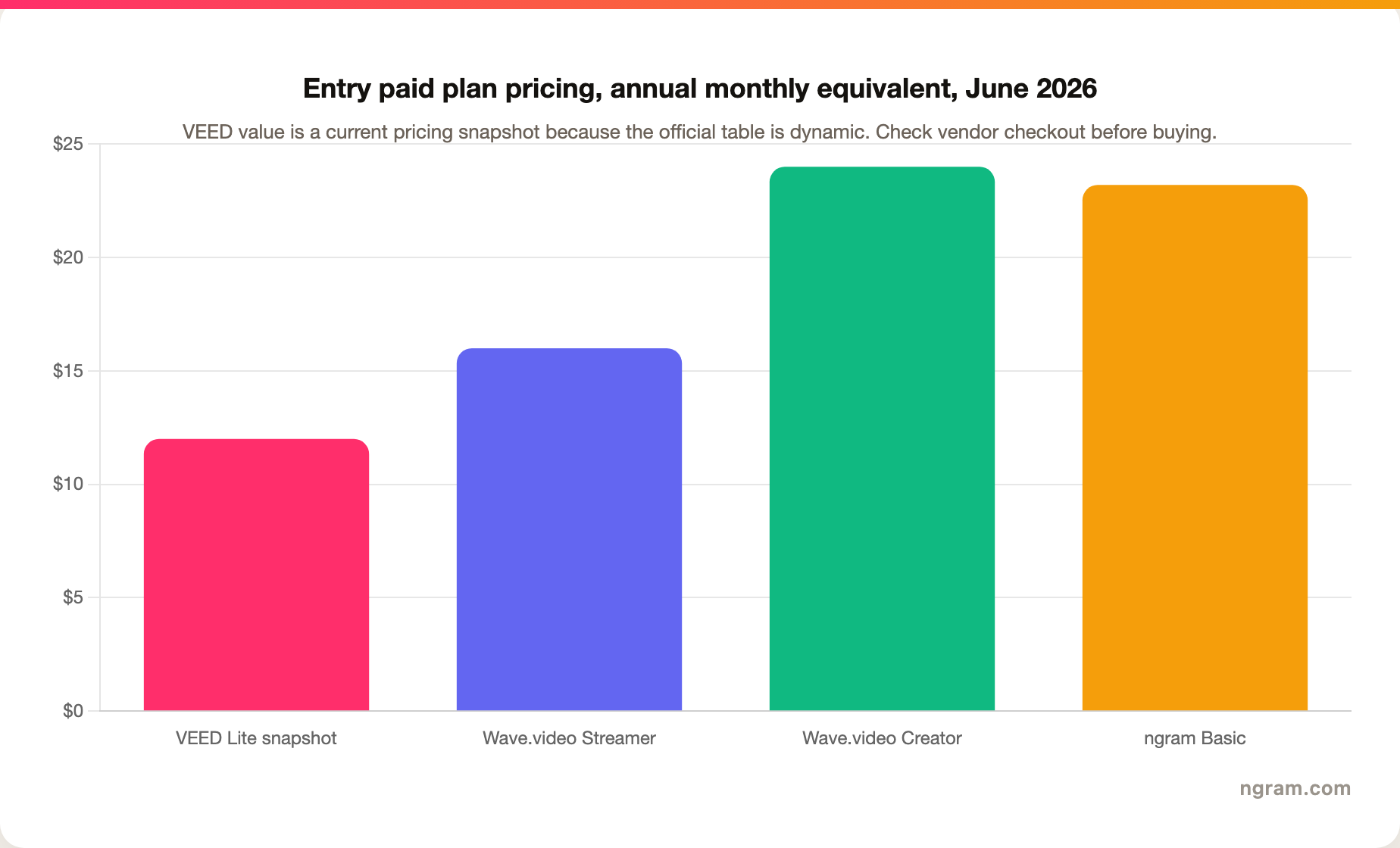
The value call is practical. VEED is usually the better value if you need AI editing and captions every week. Wave.video is better value if streaming, hosting, and embeds are part of the same budget. ngram is better value when the expensive part is not editing minutes, but turning source material into a coherent video that a team can review and reuse.
Where ngram fits as the third option
Watch how ngram turns an idea into a finished video:
ngram is the strongest third option when the work starts with business knowledge rather than a timeline. Product marketers can turn a feature brief into a launch video. Customer teams can turn a help article or screen recording into a walkthrough. Sales teams can turn a deck or product URL into a tailored explainer. Training teams can turn internal material into narrated scenes with captions and brand controls.
That does not mean ngram replaces every VEED or Wave.video job. Stay with VEED if your team lives in a fast browser editor and values AI captions, model access, avatars, dubbing, and short-form polish. Stay with Wave.video if livestreaming, guest recording, video hosting, embeds, and bandwidth controls are the reason the tool exists in your stack. Choose ngram when the deciding question is, "Can this tool understand my source and build the video plan?"
For that slice, ngram adds planning that both tools leave mostly to the user: script generation, storyboard generation, scene planning, audience and channel adaptation, visual direction, captions, voiceover, brand kits, scene regeneration, timeline editing, and MP4 export. Start with AI video generation, then check pricing if credits matter for your team.
Choose VEED when speed and AI editing matter most
VEED is the easier recommendation for creators, marketers, educators, and small teams that already know the content and need to make it look better fast. The editor, subtitle tools, AI video generation, text-to-video, image-to-video, avatars, dubbing, eye contact correction, background removal, and social resizing all point to the same use case: publish more polished video with less production overhead.
The limitation is that VEED still asks the user to direct the story. It can generate and refine from a prompt or script, but the buyer usually still thinks in clips, captions, media swaps, and exports. That is fine for content teams that want control. It is less ideal for teams with a PDF, deck, URL, or screen recording and no time to map the narrative.
Choose VEED if the final video is mostly a social, education, sales, or creator asset and the editing layer is the bottleneck.
Choose Wave.video when streaming and hosting are part of the job
Wave.video is the stronger pick when the workflow includes live sessions, guests, recording, replay hosting, embeds, landing pages, and video marketing assets. Its pricing page makes those hosting and live limits visible, which is useful for teams that need to budget around bandwidth, embeds, storage, stream duration, and guest count.
The limitation is that breadth can become complexity. Teams that only need AI social edits may not need the hosting and streaming machinery. Teams that need source-to-finished business videos may still spend too much time shaping scripts, deciding scenes, and assembling the message.
Choose Wave.video if the final asset is part of a larger marketing operation, not just a downloadable clip.
Buyer verdicts
- For social-first AI editing: VEED is the stronger pick because its AI tools, captions, avatars, dubbing, and model access are closer to the daily publishing job.
- For livestreaming and replay hosting: Wave.video is the stronger pick because it includes multistreaming, guest workflows, video hosting, embeds, landing pages, and bandwidth rules.
- For source-to-finished business video: ngram is the stronger pick because it starts with raw business material and builds the script, storyboard, voice, captions, visuals, and edits around it.
- For simple pricing transparency: Wave.video is easier to compare because its current pricing page exposes plan prices and plan limits more clearly.
- For teams that need both editing and event distribution: Wave.video should be tested first, then VEED for editing-heavy alternatives and ngram for planned business-video production.
Methodology
This comparison was researched on June 19, 2026. The competitor facts came from VEED's official product pages, VEED's official pricing page, Wave.video's homepage, Wave.video's official pricing page, and current third-party pricing snapshots where VEED's public pricing table did not expose full numbers in static page content. ngram claims were checked against the current product-state and GTM facts in this repository.
No numerical review ratings were used. Review and comparison pages were used only to understand common buyer questions and SERP expectations, not to invent features, prices, or limitations.
Common questions
Is VEED better than Wave.video?
VEED is better if the core job is AI-assisted editing: captions, short-form videos, avatars, dubbing, AI clips, brand polish, and fast browser exports. Wave.video is better if the job includes livestreaming, recording, hosting, embeds, and marketing distribution. For source-to-finished business video, ngram is the third option to test.
Is Wave.video better for live streaming?
Yes. Wave.video is the clear winner for live streaming because it includes a streaming studio, multistreaming, guests, pre-recorded streaming, recording, and hosting controls. VEED is stronger as an AI creation and editing platform, not as a live production tool.
Which is cheaper, VEED or Wave.video?
Wave.video's official annual pricing starts at $16/mo for Streamer, then $24/mo for Creator and $48/mo for Business. VEED pricing should be checked at checkout because the official pricing table rendered dynamically during research. Public pricing references list VEED Lite from $19/user/month on annual billing. The cheaper tool depends on whether you need editing, AI credits, streaming, hosting, or team controls.
Does ngram replace VEED or Wave.video?
Not for every use case. ngram does not replace Wave.video for livestreaming and does not try to be only a quick caption editor. It replaces the slice where the buyer has source material and needs a finished business video: script, storyboard, scenes, voiceover, captions, branding, edits, and export.
Final verdict
Pick VEED when the daily job is AI editing and polished social video. Pick Wave.video when the workflow includes streaming, recording, hosting, and video marketing distribution. Pick ngram when the painful part is turning source material into a finished business video that sounds planned, looks on brand, and can be edited after generation.








