

Search for "Screen Studio vs Tella" and you are comparing two screen recorders that both promise a clean, share-ready video without a timeline editor, but they get there in opposite ways. Screen Studio is a macOS app that records your screen and then applies automatic visual polish: smooth zooms, cursor smoothing, and motion-style animation, so the first draft already looks designed. Tella is a browser and desktop recorder with a transcript-based editor, built for "regular people, not video nerds" who want to record a demo or async message and tidy it up by editing text.
Both start from a recording, but the decision splits on how you want to finish it and where it runs. Screen Studio wins when you are on a Mac and want a recording to look professionally edited with almost no effort. Tella wins when you want hands-on control, a personal-camera feel, and cross-platform access in the browser. ngram belongs in the same conversation when the recording is only one source asset and the real deliverable is a planned, branded video built from prompts, docs, URLs, screenshots, decks, or recordings.
Screen Studio vs Tella at a glance
The table below compares the practical buying decision. ngram is included because many teams evaluating screen recorders discover they need more than capture: script planning, storyboard control, voiceover, brand styling, captions, callouts, and MP4 export.
| Tool | Best for | Starting price | Main distinction |
|---|---|---|---|
| ngram | Teams turning prompts, docs, URLs, decks, screenshots, and recordings into finished branded business videos | $0 Free plan, paid from $29/mo | Plans the script and storyboard before it renders the video |
| Screen Studio | Mac creators, founders, and product teams making polished screen recordings | $20/mo monthly, or $9/mo billed yearly | Native macOS recorder with automatic zooms, cursor smoothing, and 4K export |
| Tella | Individuals and small teams editing demos and async videos without a timeline | Free, Pro $13/mo monthly or $6.50/mo billed yearly, Premium $19/mo | Browser and desktop recorder with a transcript-based text editor and viewer analytics |
Core workflow and output
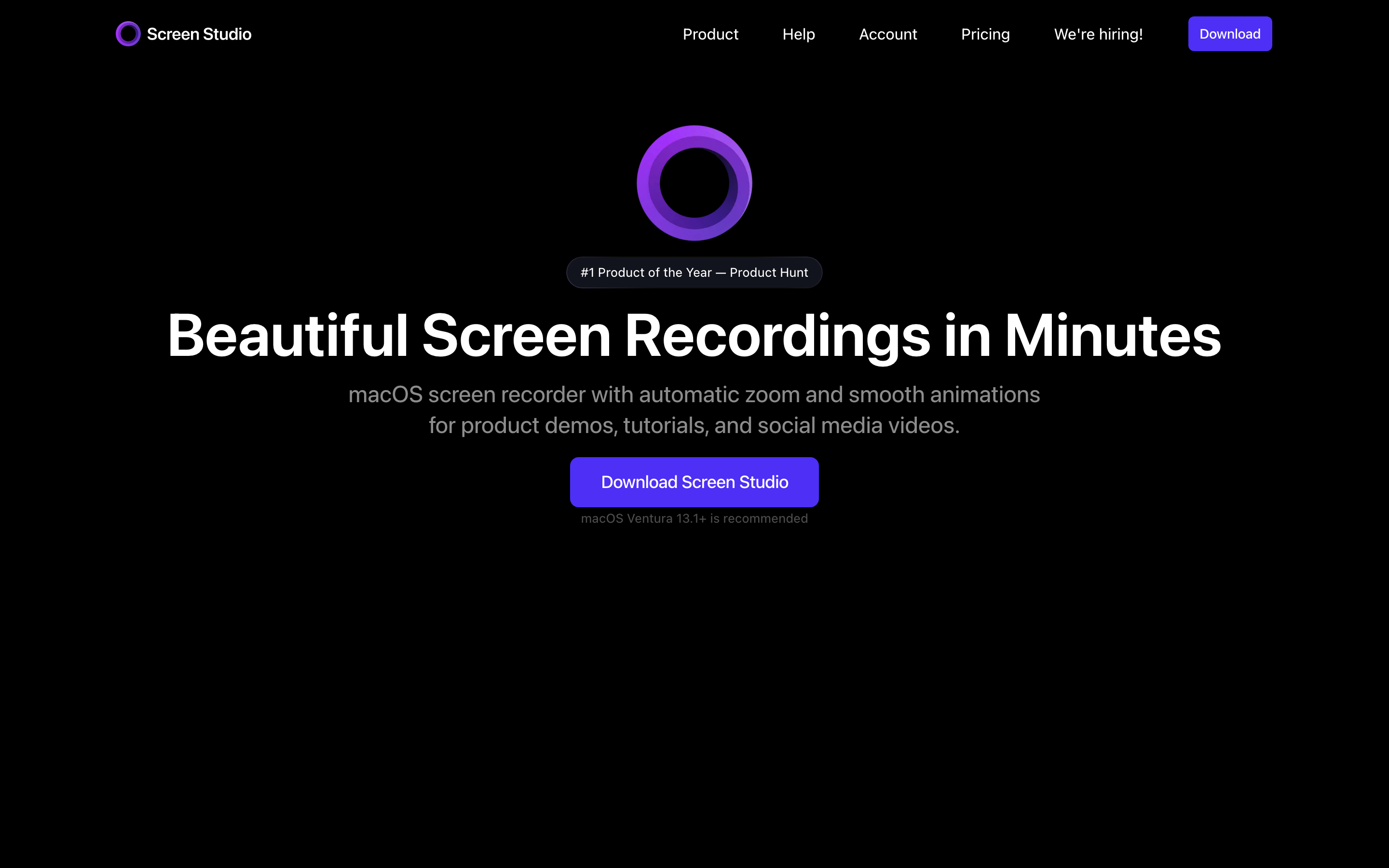
Screen Studio is a production tool first. You record on macOS, then Screen Studio applies the style layer that would otherwise take manual editing: smooth zooms that follow the action, cursor smoothing, background styling, speed changes, audio cleanup, on-device transcript generation, and export up to 4K 60fps or GIF. It can also record webcam, microphone, system audio, and an iPhone or iPad screen connected to the Mac. The output is a polished standalone recording, and the appeal is that the first export already looks edited.
Tella is a hands-on recorder and editor. It captures screen, webcam, or both in the browser or desktop app, then drops you into a transcript-based editor where you cut by deleting text instead of dragging clips on a timeline. One-click audio enhancement, filler-word removal, and automatic zoom effects do the tidying, and you can add backgrounds, layouts, and a personal-camera bubble before sharing the result as a link or embed. The output is a finished, edited recording that keeps your own voice and on-camera delivery.
Winner: Screen Studio for hands-off Mac polish, Tella for hands-on text-based editing and the personal-camera feel. Pick based on whether you want the recording edited for you or want to shape it yourself.
ngram fits a different but adjacent job. If your recording needs a script, storyboard, voiceover, captions, callouts, brand kit, intro, outro, and channel-specific cuts prepared separately, ngram starts earlier in the production chain. It treats the recording as source material for a finished video rather than as the final asset, and it can plan the whole thing from a prompt or doc when no clean recording exists yet.
Editing depth and control
Screen Studio is opinionated in a useful way. The automatic zooms track where the action happens, cursor effects make each interaction easier to follow, and the timeline gives you control over cuts, speed, background, layout, shadows, and export format. Most users pick it because the default treatment is already good, so the editing they do is refinement rather than assembly. The tradeoff is that the polish is a fixed house style: clean and consistent, but less about your own narration.
Tella keeps editing approachable but hands-on. Cutting by transcript is forgiving for non-video-people, and the one-click cleanup tools, the layout and background options, and the camera bubble let you shape a personal, talking-to-you video. It is enhancement in service of your own delivery rather than an automatic narrator-style makeover. The tradeoff is that you are doing the editing decisions, so a polished result still depends on your choices.
Winner: Screen Studio for automatic visual polish with minimal effort, Tella for hands-on control over a personal recording.
ngram sits above both when the goal is a finished business video. The live product supports screen-recording ingest, transcription, smart zooms, click emphasis, dead-air trimming, step labels, product callouts, captions, AI voiceover, branded intros and outros, brand kits, script editing, visual chat, scene regeneration, and timeline editing. A product marketer can turn a raw walkthrough into a launch video, while a support team can turn the same source into a customer-education clip, all on brand.
Pricing and value
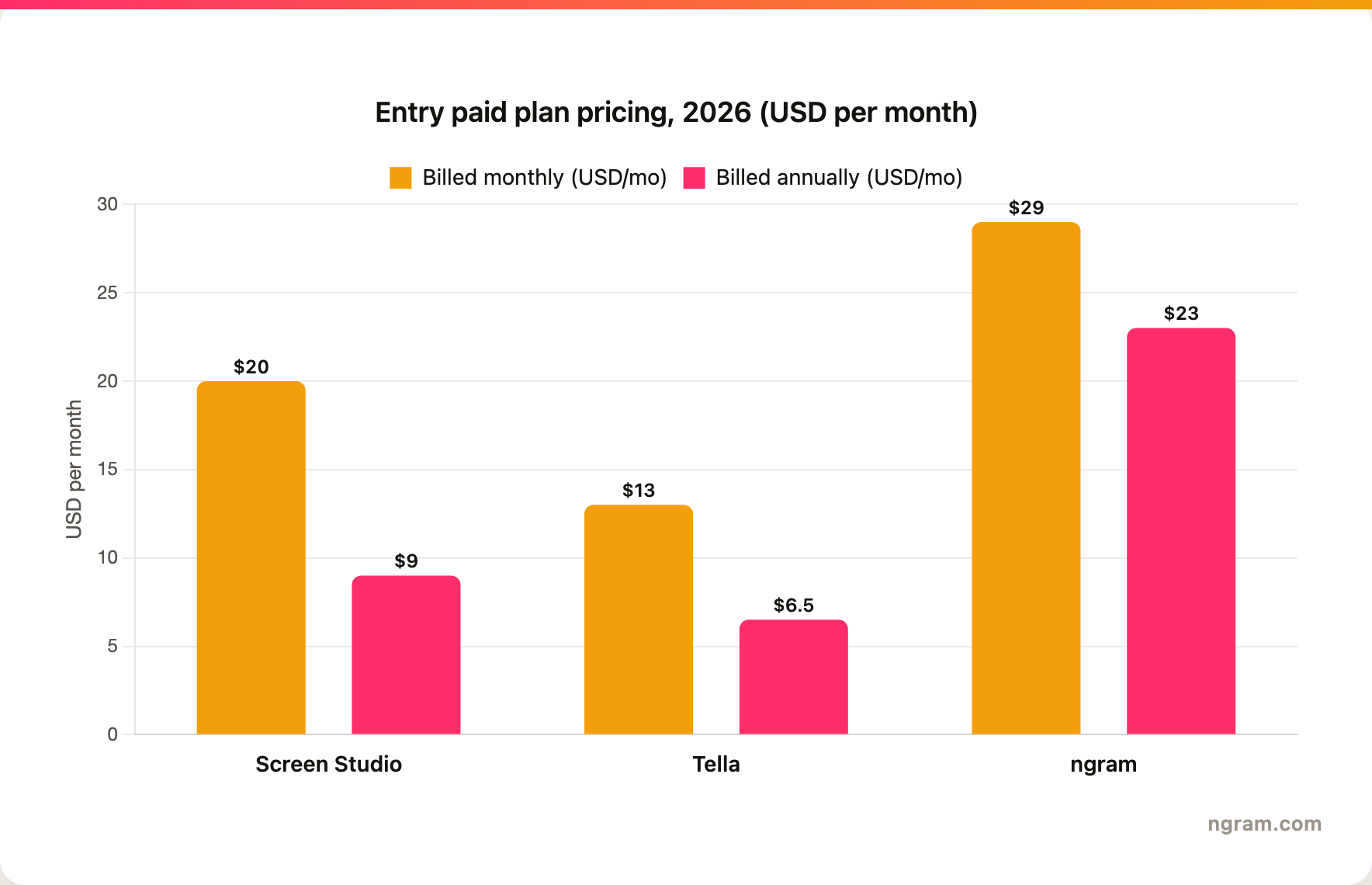
Screen Studio uses a single-plan model: $20 per month on monthly billing, or $9 per month when billed yearly. That makes it inexpensive for one Mac creator who needs polished output, but it is priced as a single-creator recorder, not a team workspace, and it has no free tier.
Tella is the affordable, individual-friendly pick with a free plan to start. Paid plans begin at $13 a month for Pro, dropping to $6.50 a month with Tella's 50% annual discount, and $19 a month for Premium. That keeps it within reach for a solo creator, founder, or small team making demos and async videos. Billed annually, Tella Pro at $6.50 a month is the cheapest paid option in this comparison.
ngram is credit-based. The self-serve paid tiers start at $29 per month, with annual pricing from $23.20 per month, and the entry Basic plan includes 3,000 credits a month spread across video generation and editing rather than a per-seat recorder, with unlimited exports. There is also a free plan that exports at 720p with a watermark. For screen-recording buyers the value question is straightforward: use Screen Studio when one Mac creator needs cheap polished capture, use Tella when you want the lowest entry price with hands-on editing, and use ngram when the asset needs full video production from mixed sources.
Here is how entry paid plans compare, billed monthly versus billed annually:
Sharing, distribution, and analytics
Screen Studio is strongest when distribution happens after the recording, outside the tool. A creator records and edits locally on the Mac, then exports an MP4 or GIF or shares through a generated link. That is ideal for a founder making a product demo or a course creator publishing tutorials, and the export quality is the headline. It is weaker if you want viewers commenting, reacting, or being tracked inside the tool.
Tella treats sharing as part of the product. It shares finished recordings as links or embeds and gives you viewer engagement analytics on who watched and how far, which is genuinely useful for async messages, demos, and help-center content. If you care about who is actually watching your videos and how much of them, Tella's tracking is more detailed than what a pure recorder offers.
Winner: Tella for built-in sharing and viewer analytics, Screen Studio for high-quality creator-led exports.
ngram's distribution angle is honest about its limits. Every rendered video gets a hosted, shareable page and an embed code, and the workspace provides hosted pages and embeds; a generally available owner analytics surface is not live. ngram does not yet offer scene-level watch-time or drop-off analytics, so if detailed engagement tracking is core to your job, Tella's viewer analytics are more granular today. Where ngram pulls ahead is MP4 export and brand-consistent output built for multiple distribution surfaces.
Platform fit and learning curve
Screen Studio is macOS-native. That is a constraint, but it is also why the app feels fast and the polish looks consistent for its target buyer. If your creators are already on Mac and care about visual quality, the platform limit may not matter. If your team needs Windows or a browser-first workflow, Screen Studio is not the fit.
Tella is cross-platform and browser-friendly, with a desktop app as well. That matters for mixed-device teams and non-technical users who record ad hoc. The learning curve is low by design: record, trim by editing the transcript, enhance the audio, share a link, and read the analytics. It is fast and forgiving, which is exactly why it markets to non-video-people.
Winner: Tella for cross-platform and browser access, Screen Studio for Mac-native speed and consistent polish.
ngram works when the platform question is less about the recorder and more about the production workflow. The current product accepts text prompts, PDFs, URLs, screenshots, screen recordings, raw video, decks, and Shopify product URLs through an agentic chat interface. That range matters when a product video starts with a launch doc, a recording, three screenshots, and a brand kit rather than one clean screen capture.
Where ngram fits if you are comparing Screen Studio and Tella
Watch how ngram turns an idea into a finished video:
ngram does the same core job as Screen Studio and Tella, turning a screen recording into a polished, share-ready video, and then keeps going where they stop. Instead of starting from a recording you already shaped in your head, you give ngram a prompt, a PDF, a URL, a deck, screenshots, a recording, or raw footage, and its agentic chat plans the script, storyboard, scenes, captions, and call to action for you to review before it renders.
That plan-first workflow is the difference. For the product marketing, sales, customer success, support, and training teams who make up most "Screen Studio vs Tella" searches, the real job is rarely "a clean recording." It is a product demo, an onboarding walkthrough, a feature launch, or a localized training clip that needs screen-recording polish, callouts, B-roll, branded intros, voiceover, captions, and MP4 export, all on brand. If your job is a fast Mac capture, use Screen Studio. If it is hands-on editing of your own recording with viewer tracking, use Tella. If it is a finished branded video built from mixed source material, use ngram.
To be fair about the limits: ngram provides hosted video pages and embeds but has no generally available owner analytics surface or scene-level watch time, so Tella's viewer analytics are more detailed today, and ngram's public security certifications are not published yet, so a compliance-bound enterprise should confirm requirements directly.
Helpful internal reads:
- Compare ngram against Screen Studio directly on the ngram vs Screen Studio page.
- Compare ngram against Tella directly on the ngram vs Tella page.
- See the AI screen recorder and screencast understanding and editing pages for the product workflow behind screen-recording videos.
Methodology
We compared Screen Studio and Tella across five buying dimensions: core output, editing depth, pricing, sharing and analytics, and platform fit. Competitor claims came from the official Screen Studio and Tella public pages available on June 18, 2026. ngram claims reflect ngram's current shipped product and published plans.
Official sources checked: Screen Studio and Tella.
We did not use numerical review ratings. Star scores hide the workflow question that matters here: whether you want automatic Mac polish, hands-on cross-platform editing, or a complete video production workflow.
FAQ
Is Screen Studio better than Tella?
Screen Studio is better when you are on a Mac and want a recording to look automatically polished with smooth zooms, cursor smoothing, and 4K export and almost no editing. Tella is better when you want hands-on, transcript-based editing, a personal-camera feel, cross-platform browser access, and viewer engagement analytics. Neither is better outright, so match the tool to the job.
Is Tella cheaper than Screen Studio?
Yes. Tella has a free plan and a Pro plan at $13 a month, dropping to $6.50 a month with the 50% annual discount. Screen Studio is $20 a month on monthly billing or $9 a month billed yearly. Tella Pro is cheaper in both billing modes, so it is the budget pick whether you pay monthly or commit to a year. Screen Studio earns its price on automatic Mac polish rather than on being the lower number.
Can ngram replace Screen Studio?
ngram is a strong Screen Studio alternative when the finished video needs script planning, storyboard control, AI voiceover, captions, brand-kit styling, callouts, and multiple export formats. Screen Studio remains the better pick for Mac users who want a native recorder and fast automatic visual polish without a broader production workflow.
Can ngram replace Tella?
ngram can replace Tella for teams that use recordings as source material for polished explainers, demos, training videos, and customer-education clips. Tella stays the better fit when the defining need is hands-on transcript editing of your own on-camera recording plus detailed viewer engagement analytics, which ngram does not match today.
Which tool should product marketing teams pick?
Product marketing teams should pick Screen Studio for quick polished Mac demos, Tella for hands-on async videos with viewer tracking, and ngram for launch videos, product stories, sales-enablement clips, and customer-facing explainers built from mixed source material on brand.
Which one should you pick?
The Screen Studio vs Tella decision is clear once you know the job. Pick Screen Studio when you are on a Mac and want a recording that looks automatically edited with minimal effort. Pick Tella when you want hands-on transcript editing, a personal-camera feel, cross-platform access, and viewer analytics at the lowest entry price. Use ngram when the recording is only one source in a larger business video workflow, especially when the final asset needs story, brand, voiceover, captions, callouts, localization, and an MP4 export.
Try ngram for your next product video. Bring a prompt, doc, URL, deck, screenshot, or recording, then turn it into a polished business video with script, storyboard, brand, voiceover, captions, and export formats. Start with ngram








