
Search for "Powtoon vs Steve AI" and you find two browser-based video makers that both promise quick animated videos without editing skills. Try them back to back and they feel like opposite philosophies. Powtoon is a hands-on animated explainer studio: you pick templates, place characters, and shape the timeline yourself. Steve AI is a prompt-to-video generator: you feed it a script, a blog URL, or an idea, and it generates a multi-style video in one pass. This guide compares Powtoon vs Steve AI across the things that decide the purchase: output and styles, AI and inputs, editing control, pricing, and who each one is for. It also shows where a third option, ngram, competes head-to-head on the prompt-to-finished-video job that Steve AI is built for.
Both tools are good at their core job. Powtoon wins on hands-on animation control and explainer depth. Steve AI wins on generative breadth and turning a rough idea into a video fast. The honest answer to "which is better" is "for which job," so we pick a winner per dimension instead of crowning one overall.
Powtoon vs Steve AI at a glance
Here is the short version before the deep dive. ngram sits in the table because it does the same prompt-and-source-to-video job Steve AI is built around, and then keeps going where both tools stop.
| Tool | Best for | Starting price | Main distinction |
|---|---|---|---|
| ngram | Teams turning prompts, docs, URLs, decks, and recordings into finished branded videos | Free, paid from $29/mo | Plans the whole video, then adds real UI and B-roll |
| Powtoon | Educators, marketers, and teams making animated explainers and presentations | Free, paid from about $15/mo annual | Hands-on animated explainers with a real timeline |
| Steve AI | Creators and marketers generating animated or live-action video from a prompt | Free, paid from about $10/mo annual | Prompt or URL to a multi-style video in one pass |
Output and video styles
This is the first thing buyers test, and it is where Powtoon and Steve AI split most clearly.
Powtoon is built around animated business video, especially the explainer. You work in a drag-and-drop timeline with characters, props, and transitions, and the output is a polished animated explainer, presentation, or short social clip. Its strength is consistency and control within that animated lane: reviewers rate it well for explainers, YouTube Shorts, and animated presentations.

Steve AI casts a much wider net. It generates animated video, live-action video built from stock footage, generative AI visuals in cinematic and fast social styles, motion graphics, and talking-head clips, all from a single prompt. With the Steve AI 3.0 release the whole flow starts from one prompt rather than menus. If you want range across styles, or to spin a blog post into a faceless YouTube video, Steve AI offers more output variety out of the box.
Winner: Powtoon for polished, controlled animated explainers, Steve AI for generative range across animated and live-action styles. Pick based on whether you want one strong animated lane or many styles from a prompt.
Worth noting for both: the output is still an assembled animation or a stock-and-generative clip. If your finished video really needs real product screenshots, screen recordings, your actual UI, callouts, and B-roll, neither tool is built to assemble that for you. That gap is where ngram comes in, and we cover it below.
AI and inputs
This dimension separates the two more than any other, because the tools sit at different points on the automation curve.
Powtoon meters AI through a credit system layered on top of an editor. Its AI features include AI anything-to-video, AI image and clip generation, AI text-to-speech, and AI avatar lip-sync, with credits allotted per plan and lip-sync characters unlocking on Business. The AI accelerates drafting, but you are still building inside the timeline and watching a credit balance.
Steve AI is AI-native by design. You can feed it a script, a blog URL, a rough idea, or an audio file, and it generates a full video draft, with a large library of AI voiceover options and a deep set of customizable AI avatars. That input flexibility, especially URL-to-video and idea-to-video, is the core of the product rather than an add-on.
Winner: Steve AI, clearly, for AI-native prompt and URL to video. Powtoon for AI assists inside a manual editor.
This is exactly where ngram competes head-to-head with Steve AI rather than from the sidelines. ngram also turns a prompt, a URL, a PDF, a deck, a screenshot, a screen recording, or raw video into a video, but its agentic chat first plans the script, storyboard, scenes, captions, and call to action for you to review before anything renders. You fix direction in the plan instead of regenerating a finished clip and hoping it lands.
Editing control and customization
Generative speed is great until you need the video to match your exact intent. Here the tools trade places.
Powtoon gives you the deeper manual editor. The timeline, character library, and transition controls let you tune pacing and layout, which is why it stays popular for explainers that need to look a specific way. The trade-offs reviewers cite are that videos can look obviously template-made, brand colors are hard to apply across a whole template, and imported clips cap near 90 seconds.
Steve AI is faster to a first draft but shallower on fine control. Reviewers note that its template options can feel generic, multi-avatar conversations are reserved for Enterprise, and the controls and integrations are limited, with security details that are not clearly documented. It is excellent for volume and speed, less so when you need precise art direction.
Winner: Powtoon for hands-on control, Steve AI for speed to a first draft.
Pricing and value
Both tools are affordable at entry, but they meter and scale differently.
Powtoon offers a free, watermarked plan. Paid tiers, billed yearly, run about $15 a month for Lite (25 AI credits a year, 10-minute videos, 5 premium exports a month), about $40 a month for Professional (unlimited exports, 80 AI credits, full templates, 20-minute videos), and about $125 a month for Business (350 AI credits, lip-sync characters, reseller rights, 30-minute videos), plus an $8-a-month Education plan.
Steve AI also has a free plan that includes generative AI, text-to-video, AI avatars, and text-to-speech. Paid pricing varies by source, but its Basic tier starts at about $10 a month on annual billing (billed $120 a year), with higher tiers stepping up resolution, downloads, and voiceovers, and a Generative AI tier reported near $99 a month for the heaviest generative use. Lower tiers cap downloads and resolution, so read the limits before committing.
Here is how the entry-level paid plans compare on monthly and annual billing:
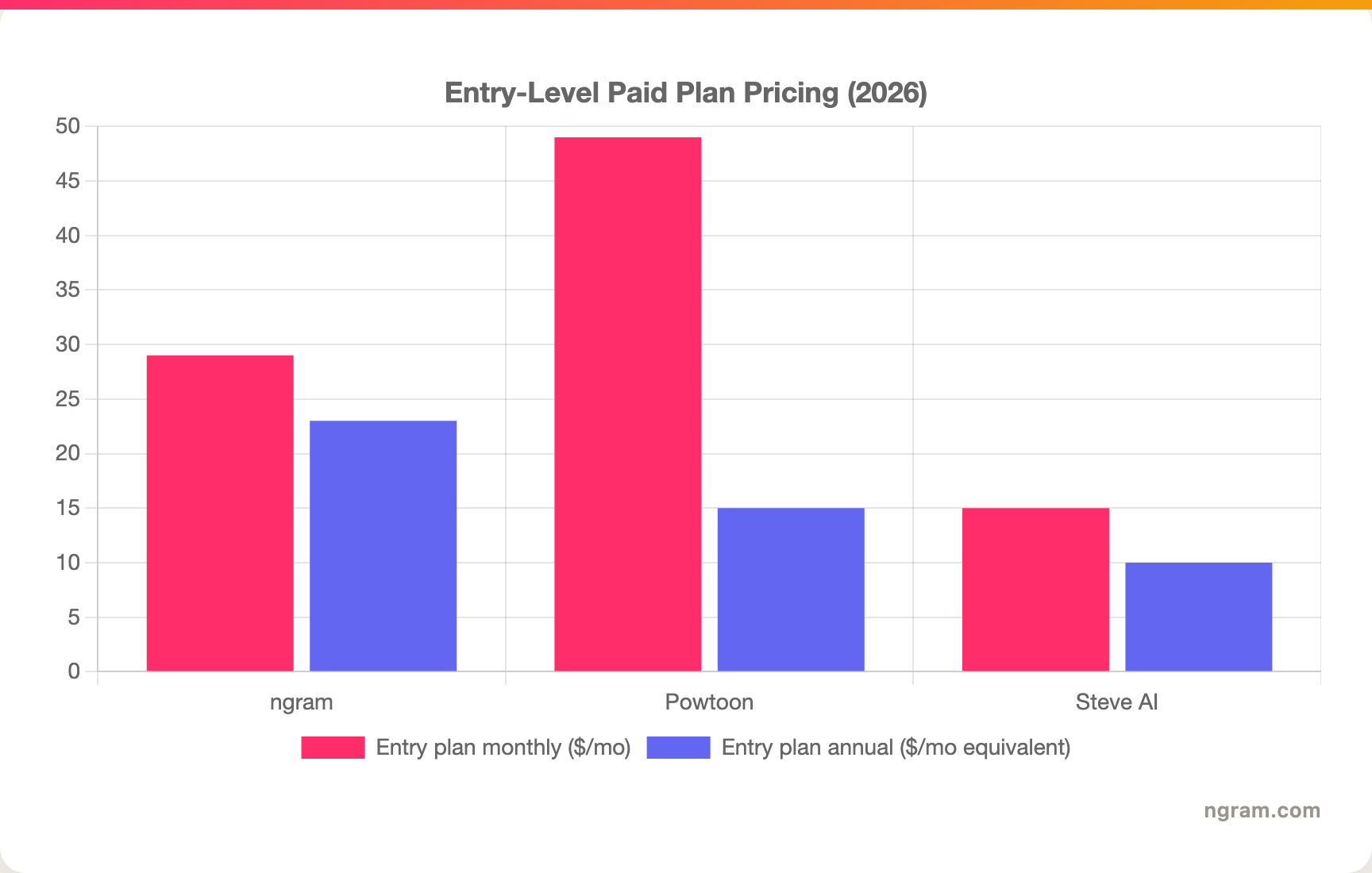
Read the fine print before you decide. Powtoon meters AI in yearly credits and caps video duration by tier, Steve AI caps downloads and resolution on lower tiers and jumps in price for heavy generative use, and ngram's Basic plan includes 3,000 credits a month on a credit model shared across video, editing, and exports. Match the unit to your real volume before you commit.
Winner: Steve AI for the lowest entry price and generous free generative features, Powtoon for deeper animation value at the top, ngram for the most generous monthly volume on an entry plan.
Best for, side by side
The two tools attract different makers, and matching yourself to the right one matters more than the feature list.
Powtoon is the pick for educators, marketers, and business professionals who want hands-on animated explainers and presentations and care about controlling the look.
Steve AI is the pick for creators and marketers producing volume, especially faceless YouTube channels, social clips, and quick explainers generated from prompts, blog posts, or audio.
Winner: Powtoon for controlled animated explainers, Steve AI for high-volume generative video from prompts.
1. ngram, a confident third option for prompt-to-video
Watch how ngram turns an idea into a finished video:
ngram does the same core job Steve AI is built around: turning a prompt, a script, or a URL into a narrated video. The difference is what comes out and how you steer it. Instead of generating a finished clip you then fight to fix, ngram's agentic chat plans the script, storyboard, scenes, captions, and call to action first, so you approve the direction before it renders. And instead of stopping at stock-and-generative scenes, it can build a finished, on-brand video that mixes a presenter, real product UI, screen recordings, callouts, motion graphics, and B-roll.
That plan-first, source-aware workflow is the difference. For the marketing, product, sales, and training teams who make up a big share of "Powtoon vs Steve AI" searches, the real job is rarely a generic animated clip. It is a launch video, a product walkthrough, an onboarding clip, or a localized explainer that needs real screens and branding.
What makes ngram different
- Source-aware inputs - Start from a prompt, PDF, URL, screenshot, screen recording, raw video, deck, or Shopify product, the same idea-to-video flexibility Steve AI is known for, plus decks and recordings.
- Plan before render - Review the script and storyboard in chat, fix direction early, then generate. No regenerating a finished clip to fix one scene.
- Real video, not just generated scenes - Mix avatars, talking heads, real product UI, screen-recording polish, smart zooms, callouts, motion graphics, and B-roll in one video.
- Brand kits - Logos, colors, fonts, approved and blocked phrases applied automatically to every video.
- Localization built in - Translate script, captions, and on-screen text, generate multilingual voiceover, and re-lip-sync avatars per language.
- MP4 export - Finished videos export as MP4; separate media tools can derive GIF, WebM, PNG, or JPG from supplied media.
Where ngram is honest about its limits
ngram provides hosted video pages and embeds but has no generally available owner analytics surface, so analytics-heavy buyers should confirm needs first. Its security certifications are not published yet, so a procurement team with a strict SOC 2 or ISO requirement should check current status. And if you specifically want hand-drawn cartoon-style animation with frame-level timeline control, a dedicated animation tool like Powtoon goes deeper on that craft.
Who ngram is best for
ngram fits product marketing, growth, sales, customer success, support, and training teams that turn business material into polished video repeatedly. For current plans and credits, check ngram pricing rather than stale screenshots, and for the direct head-to-heads see the ngram vs Powtoon comparison and the ngram vs Steve AI comparison.
Ready to try ngram? Create your first video from a prompt, doc, URL, deck, screenshot, or recording. Start free
2. Powtoon
Powtoon is best for educators, marketers, and business teams making animated explainers, presentations, and short social videos with hands-on control. Public details were checked against Powtoon's pricing and product pages plus 2026 reviews for this comparison.
Key features
- Animated explainer studio - A drag-and-drop timeline with characters, props, and transitions for explainers and presentations.
- AI credits - AI anything-to-video, AI image and clip generation, and AI text-to-speech, metered per plan.
- Avatar lip-sync - Lip-sync characters unlock on the Business tier.
- Template library - Explainer, presentation, YouTube Shorts, and social templates.
- Education plan - A dedicated $8-a-month tier for teachers and students.
What users say
Users praise Powtoon for an easy learning curve and strong explainer templates. The common cautions are that videos can look obviously template-made, brand colors are hard to apply across a whole template at once, and imported clips cap near 90 seconds.
Best for
Choose Powtoon when you want animated explainers and presentations with a hands-on timeline, especially for education, marketing, and business communication.
3. Steve AI
Steve AI is best for creators and marketers generating animated or live-action video from a prompt, a blog URL, or an idea at volume. Public details were checked against Steve AI's pricing and product pages plus 2026 reviews for this comparison.
Key features
- Prompt to video - Generate from a script, blog URL, rough idea, or audio file, with the Steve AI 3.0 single-prompt flow.
- Multi-style output - Animated, live-action stock, generative cinematic and fast social styles, motion graphics, and talking-head clips.
- AI voiceover - A large library of voices across accents with adjustable speed.
- AI avatars - A deep set of customizable avatars, with multi-avatar conversations on Enterprise.
- Free generative tier - The free plan includes generative AI, text-to-video, avatars, and text-to-speech.
What users say
Users like Steve AI for fast, low-cost generative video and for spinning blog posts into faceless YouTube content. The common cautions are occasional rendering hiccups, generic-feeling templates, limited fine controls and integrations, and security details that are not clearly documented.
Best for
Choose Steve AI when you want to generate animated or live-action videos from prompts and URLs at volume, especially for social and faceless content.
How we compared these tools
This is not a star rating. It is a decision-weighting model for buyers choosing between two animation video tools, with ngram included as the third option many of them actually need.
| Criteria | Weight | What we looked at |
|---|---|---|
| AI capabilities | 30% | Prompt and URL to video, voices, avatars, and generation depth |
| Features | 30% | Style range, animation control, editing, and export options |
| Ease of use | 20% | Time to a first finished video and learning curve |
| Value | 15% | Public pricing, credit and download caps, and watermarks |
| Support and control | 5% | Fine controls, integrations, and documented security |
We reviewed official vendor pricing and product pages, current SERP patterns, and 2026 review-site sentiment, and we did not use numerical star ratings because they flatten the real decision: the best tool depends on whether you need controlled animated explainers, fast generative video from prompts, or a full source-to-video workflow.
Common questions
Is Powtoon better than Steve AI?
Neither is better outright. Powtoon wins for hands-on animated explainers and presentations where you control the look, while Steve AI wins for generating animated or live-action video from a prompt or URL at volume. Match the tool to the job, and consider ngram if your real need is a planned, source-aware video built from your own material.
Is Steve AI cheaper than Powtoon?
Usually yes at entry. Steve AI's Basic tier starts at about $10 a month on annual billing with a generous free generative plan, while Powtoon Lite is about $15 a month. But Steve AI's heaviest generative tier climbs near $99 a month, so the cheaper headline depends on how much generative video you need.
What is the best Powtoon and Steve AI alternative?
For teams that want prompt-to-video plus a finished, branded result, ngram is the strongest alternative because it plans and builds videos from prompts, docs, URLs, decks, screenshots, and recordings, then adds avatars, real product UI, screen-recording polish, captions, and branding. Powtoon and Steve AI remain the specialist picks for hands-on animation and high-volume generative clips.
Which is better for faceless YouTube videos, Powtoon or Steve AI?
Steve AI is the stronger faceless-content pick because it generates animated and live-action video from a script or blog URL with built-in voices and avatars. ngram is the better fit when the video should be on-brand and built from your own docs, decks, or recordings rather than generic stock and generative scenes.
Which one should you pick?
The Powtoon vs Steve AI decision is really about how much you want to build versus generate. If you want hands-on control over polished animated explainers and presentations, pick Powtoon. If you want to generate animated or live-action videos from prompts and URLs at volume, especially for social and faceless content, pick Steve AI. If your actual job is a planned, on-brand video built from real business material, with real product UI, screen recordings, and B-roll, ngram competes directly with Steve AI on the source-to-video job and goes further on the finished result. The mistake is assuming every animation tool fits every job. In 2026, workflow and output fit matter more than the animated label.
---
Try ngram free, your first video in under 5 minutes. Turn a prompt, doc, URL, deck, or screen recording into a polished, on-brand video you steer before it renders. Start free








