

Pictory vs Wave.video looks like a simple AI video maker comparison until you test where the work starts. Pictory's current site shows Pictory positioning the product around turning text, blogs, scripts, ideas, PPTs, images, screen recordings, URLs, and existing videos into edited videos with captions, AI voices, AI avatars, templates, and stock visuals. Wave.video's current site shows Wave.video positioning the product as a bundle of live streaming studio, video editor, thumbnail maker, video hosting, video recording, and stock library tools.
That means the winner depends on the job. Pictory is the better pick when your source is a blog post, script, deck, or long recording that needs to become a narrated short video quickly. Wave.video is the better pick when your workflow includes live shows, multistreaming, video landing pages, hosted players, and manual template edits. ngram sits in the decision as the third option for teams that want source-to-finished-video production with storyboard review, brand kits, captions, voiceover, callouts, and MP4 exports.
Pictory vs Wave.video at a glance
| Tool | Best for | Relevant paid entry | Main distinction |
|---|---|---|---|
| ngram | Teams turning prompts, PDFs, URLs, screenshots, recordings, decks, and raw video into finished branded business videos | Basic $29/mo, or $23.20/mo billed annually | Plans the script and storyboard, then produces the video with brand, captions, voiceover, callouts, and export variants |
| Pictory | Creators, marketers, educators, and teams repurposing written or recorded material into narrated videos | Starter $25/mo billed annually | AI source-to-video from scripts, blogs, URLs, PPTs, images, recordings, and existing video |
| Wave.video | Marketers, creators, streamers, and small teams that need editing, recording, multistreaming, and hosted video pages | Streamer $16/mo, Creator $24/mo, both billed annually | All-in-one video editor, live studio, video player, hosting, templates, and stock library |
Core workflow and output
Pictory is built for automatic creation from source material. Its text-to-video page says users can paste a topic, script, prompt, URL, article, blog post, audio file, PowerPoint, or image prompt and get a video with visuals, captions, AI avatars, and realistic voices. Its practical strength is reducing the blank-page problem: it drafts a structure, matches or generates visual material, adds narration, and gives the user a first cut to edit.
Wave.video is broader and more manual. The homepage lists starting points like blank video, video recording, upload, text, templates, blog post, stock assets, YouTube, and Instagram imports, then routes users into an online editor, live studio, recorder, stock library, video player, and thumbnail maker. That makes Wave.video feel less like a pure AI generator and more like a browser-based video marketing workstation.
Winner: Pictory for automated source-to-video. Wave.video for all-in-one marketing video operations. ngram is stronger than both when the buyer needs the tool to plan a business story, keep the team's own assets in the cut, and generate a polished branded video rather than a stock-backed social clip or a manually edited live asset.
Editing, hosting, and live distribution
Pictory has real editing depth for its workflow: storyboards, layouts, captions, brand kits, stock media, voiceover, AI Studio assets, long-video summarization, and team workspaces on higher plans. That is enough for content repurposing, social clips, explainers, training snippets, and blog-to-video production. It is less convincing when the core job is running a live show, managing hosted landing pages, or replacing a lightweight streaming stack.
Wave.video wins the live and distribution layer. Its live streaming page describes a web-based studio for multistreaming, pre-recorded broadcasts, guest recording, scenes, screen shares, transitions, overlays, live chat, and branded broadcasts. Its video hosting page adds custom players, embeds, landing pages, password protection, thumbnails, and analytics for plays, watch time, and engagement graphs. Pictory has enterprise interactive hosting on its pricing page, but Wave.video is the clearer public fit for live and hosted marketing workflows.
Winner: Wave.video. Pick Wave.video if publishing, streaming, embedding, and hosting are part of the purchase. Pick Pictory if the job ends at a rendered video from a source document or recording. Pick ngram when the buyer needs a finished business video first, then export or hosted sharing after the production work is done.
Pricing and value
As of June 19, 2026, Pictory's official pricing page lists Starter at $25 per month billed annually for 200 video minutes, Professional at $35 per month billed annually for 600 video minutes, Team at $119 per month billed annually for 1,800 video minutes, and Enterprise as custom. The same page says unused video minutes do not roll over and projects are deleted after cancellation unless downloaded first. Pictory's value is strongest when you will use those video minutes to repurpose blogs, scripts, URLs, decks, recordings, or long videos often.
As of the same date, Wave.video's official pricing page lists annual pricing at $16 per month for Streamer, $24 per month for Creator, and $48 per month for Business. Wave.video also says any plan can create unlimited videos, paid plans can download MP4 files, Creator users can edit videos up to 30 minutes, and Business users can edit up to 2 hours at 60fps. Hosting has separate embed and bandwidth allowances, which matters if Wave.video becomes your hosted player.
ngram uses credits rather than video minutes or streaming tiers. Basic is $29 per month, or $23.20 per month billed annually, with 3,000 credits per month. Premium is $59 per month and Ultimate is $299 per month, with higher credit pools and higher export resolution. Credits cover usage-heavy actions such as AI video generation and AI editing, exports are unlimited on every plan, and Premium and Ultimate credits roll over for one billing cycle.
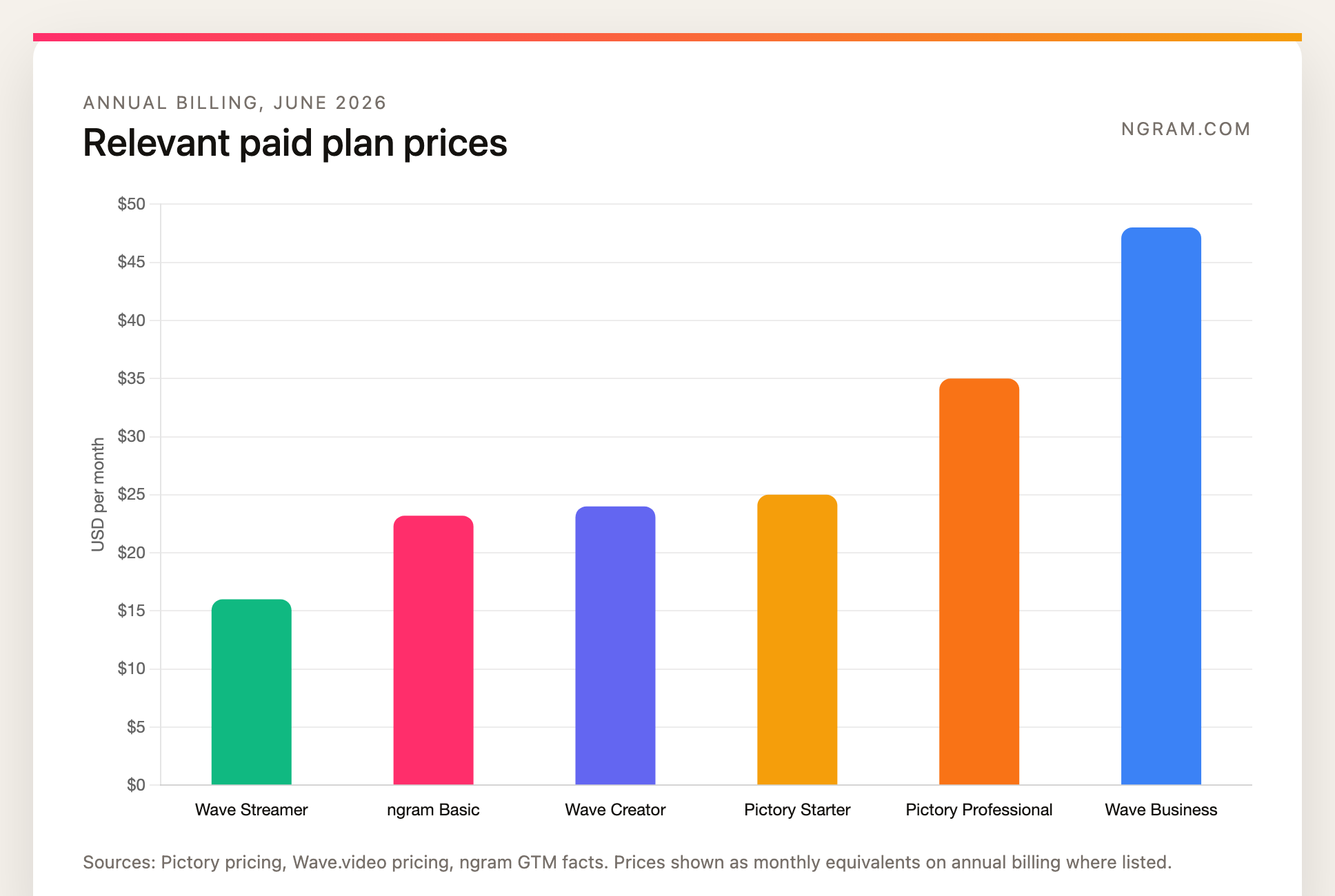
Winner: Wave.video on lowest entry price, Pictory on automated video minutes, ngram on finished-video production from mixed source material. If you mostly stream, Streamer is inexpensive. If you need the editor and hosting workflow, compare Wave.video Creator or Business against Pictory Starter or Professional. If you need the software to plan and produce the whole branded video, ngram's credit model is the more relevant comparison.
Best fit by team and use case
- Pick Pictory if the source is written or recorded content that needs fast repurposing: blog posts, scripts, URLs, PPTs, webinars, podcasts, lectures, training material, and social clips.
- Pick Wave.video if the workflow includes a live studio, multistreaming, branded broadcasts, templates, hosted players, video landing pages, thumbnails, embeds, and channel distribution.
- Use ngram if the business outcome is a finished branded explainer, product demo, launch video, training clip, customer education asset, or sales video built from real source material.
The cleanest test is where the video goes next. If the next step is YouTube, LinkedIn, a training clip, or a blog-to-video repurposing queue, Pictory probably gets you there faster. If the next step is a live event, embedded player, hosted landing page, or streaming channel, Wave.video is the safer buy. If the next step is customer-facing and the video needs product context, pacing, brand, voiceover, callouts, captions, and variants, use ngram.
1. ngram
Watch how ngram turns an idea into a finished video:
ngram is the best third option when a team is comparing Pictory and Wave.video but the real pain is production quality. It accepts text prompts, PDFs, URLs, screenshots, screen recordings, raw video, decks, and Shopify product URLs. The agent writes the script, builds the storyboard, plans scenes, applies brand direction, adds captions and voiceover, and lets the user revise through chat, visual chat, script editing, scene regeneration, canvas controls, or a timeline editor.
That makes ngram stronger than Pictory when the output cannot feel like a stock-footage summary, and stronger than Wave.video when the team does not want to manually assemble every scene. ngram also covers screen-recording polish, cursor smoothing, click emphasis, product callouts, smart zooms, motion graphics, branded intros and outros, background music, AI-generated visuals, multilingual voiceover, translated captions, on-screen text translation, and MP4 export.
ngram is not a live streaming studio and should not be sold as a replacement for Wave.video's multistreaming stack. It also does not publish a fixed language-count matrix, and its detailed analytics are not live today beyond a generally available owner analytics surface in the workspace. Public API v1 access uses self-service bearer API keys, and Zapier and n8n are available, while Make.com is Coming Soon.
For direct buyer comparisons, read ngram vs Pictory, ngram vs Wave.video, and the text-to-video workflow.
Try ngram when the brief is bigger than a stock clip or live stream: turn docs, URLs, decks, screenshots, recordings, and raw video into a planned, branded video with captions, voiceover, and export variants.
2. Pictory

Pictory is the stronger choice for automated video creation from existing content. The current product covers text-to-video, URL-to-video, audio-to-video, PPT-to-video, image-to-video, AI video editing, captions, realistic voices, AI Studio assets, stock media, brand kits, and long-video summarization. Its Starter and Professional plans are single-user tiers, while Team and Enterprise are the better fit when multiple users need shared assets and collaboration.
Review aggregators and current SERP comparisons tend to frame Pictory around script building, content generation, text editing, and fast conversion from written or long-form inputs. The recurring caution is control: buyers should expect to review the script, visuals, aspect ratio, and scene choices instead of assuming every automatically selected clip will match the brand or platform on the first pass.
Pictory is best for marketers, educators, creators, and internal teams that have a steady queue of blogs, scripts, webinars, lectures, podcasts, or training docs to repurpose. It is less ideal when the workflow depends on live production, embedded player controls, hosted landing pages, or recurring multistreaming.
3. Wave.video

Wave.video is the stronger choice when video creation is tied to distribution. It combines an online editor, templates, stock library, recorder, live studio, thumbnail maker, video player, video hosting, embeds, video landing pages, and social publishing. That breadth matters for teams that want one browser-based place to create, stream, host, and share campaign assets.
Current comparison pages and review summaries consistently give Wave.video credit for live streaming, template range, social formats, hosting, and editor breadth. The trade-off is that its AI generation is one piece of a larger toolkit, not the entire product. If the buyer mainly wants a tool to read a blog post and create a narrated video draft, Pictory is the more focused fit.
Wave.video is best for social teams, creators, agencies, educators, and small businesses that publish across channels, run live events, embed hosted videos, or maintain a video library. It is less ideal when the buyer wants source-aware business video planning with storyboard review and agentic revision.
Methodology
We compared Pictory, Wave.video, and ngram across source inputs, first-draft workflow, editing depth, live streaming, video hosting, brand controls, pricing, usage limits, and the type of output each tool is meant to produce. Official product and pricing pages were weighted above review aggregators and older comparison articles. Review pages from Software Advice, G2, Slashdot, Video Marketing Insider, and Stack Bounty were used only for qualitative market framing, never for numerical ratings.
Pricing is a point-in-time claim for June 19, 2026. Pictory and Wave.video claims come from their official pages unless explicitly framed as third-party sentiment. ngram claims come from the product-state and GTM truth files in this repository, so this page records self-service bearer API keys for Public API v1, Zapier and n8n availability, hosted pages and embeds, and no unsupported scene-level analytics or SOC 2 certification; Make.com is Coming Soon.
FAQ
Is Pictory better than Wave.video?
Pictory is better when you want AI to turn a script, blog post, URL, deck, image, recording, or long video into a narrated draft quickly. Wave.video is better when you need a broader video marketing stack with live streaming, video hosting, templates, recording, editing, embeds, and channel distribution.
Which is cheaper, Pictory or Wave.video?
Wave.video has the lower annual entry price at $16 per month for Streamer, while Pictory Starter is $25 per month billed annually. For video editing and hosting, Wave.video Creator at $24 per month is closer to Pictory Starter. Pictory meters video minutes, while Wave.video splits value across streaming, editing, hosting, and bandwidth limits.
Does Pictory do live streaming like Wave.video?
No. Pictory focuses on generated and edited videos from source material. Wave.video has the clearer live streaming workflow, including multistreaming, pre-recorded broadcasts, guest recording, scenes, overlays, live chat, and a web-based studio.
When should I use ngram instead of Pictory or Wave.video?
Use ngram when the output needs to be a polished branded business video rather than a quick content repurpose or a hosted live asset. ngram can start from docs, URLs, decks, screenshots, recordings, raw video, and prompts, then plan the script and storyboard, add captions, voiceover, product callouts, motion graphics, brand treatment, and export variants.
Can Pictory and Wave.video be used together?
Yes. A team can use Pictory to turn scripts, blogs, or long recordings into short videos, then use Wave.video for hosting, landing pages, live events, or distribution. That split can work, but it also means the team is maintaining two workflows. ngram is the better fit when the priority is one source-to-finished-video production flow.
Which one should you pick?
Pick Pictory if you want the fastest path from written or recorded source material to a narrated video. Pick Wave.video if your video workflow includes live streaming, hosting, embedded players, video landing pages, and hands-on editing. Use ngram if the end result needs to look like a finished business video from your own material: planned, branded, narrated, captioned, edited, and ready for an MP4 export.
Try ngram for the finished-video version of this decision: turn a prompt, doc, URL, deck, screen recording, or raw video into a polished, on-brand video with a reviewable storyboard and editable scenes.








