

Search for "InVideo vs Visla" and you find two AI video tools that promise the same outcome: type or paste what you have, and get a finished video back without a camera crew or an editor. Look closer and they are built for different people. InVideo has pivoted into an agentic generator.
Its Agent One system (the invideo v4 agent) turns a single prompt or idea into a finished video and orchestrates 200+ third-party models such as Sora 2, Veo 3.1, Kling, and ElevenLabs behind the scenes. Visla is an AI video workflow platform built for business teams, with recording, transcript-style editing, repurposing, collaboration, and SOC 2 backed governance.
This guide compares InVideo vs Visla across the dimensions that actually decide the purchase: what each one produces, inputs and workflow, feature depth, ease of use, pricing, and who each one wins. It also shows where a third option, ngram, beats both when your real job is a finished, on-brand video built from source material rather than just a prompt or a recording.
Both tools are genuinely good at what they target. InVideo leans into generation: describe a video and the agent assembles it from frontier models. Visla leans into the business workflow: bring a recording, a script, or source material and turn it into shareable, governed video. The honest answer to "which is better" is "for which job," so we pick a winner per dimension instead of crowning one overall.
InVideo vs Visla at a glance
Here is the short version before the deep dive. ngram sits in the table because for most teams comparing these two, the better question is whether you want a pure prompt-to-video generator, a business recording-and-editing workflow, or a system that plans the whole video from whatever source you already have.
| Tool | Best for | Starting price | Main distinction |
|---|---|---|---|
| ngram | Teams turning prompts, docs, URLs, decks, screenshots, and recordings into finished branded videos | Free, paid from $29/mo | Plans the whole video from any source, not just a prompt or a recording |
| InVideo | Creators and teams generating finished video from a prompt at scale | Free, paid from $25/mo ($20/mo annual) | Agent One generation across 200+ models, incl. Sora 2 and Veo 3.1 |
| Visla | Business teams recording, editing, and repurposing governed video | Free, paid from about $18/mo | Recording plus transcript-style editing with SOC 2 governance |
Core output and quality
This is the first thing buyers test, because InVideo and Visla aim their output at different audiences.
InVideo's output is generation-first. With Agent One you describe the video and the agent picks models, writes the script, and assembles scenes, B-roll, voiceover, and music into a finished cut, with Agent One able to generate up to roughly 30 minutes of video from a single prompt.
Frontier models such as Sora 2, Veo 3.1, and Kling sit across InVideo's paid plans and draw from a metered credit pool, with the top Generative tier bundling the largest model access and the most credits for cinematic AI footage rather than stock clips. Reviewers note the trade-off: results can vary run to run, and the heavy reliance on third-party models means quality and cost both depend on which models a given generation calls.
Visla's output is workflow-first. It is built to produce clear business videos: marketing clips, training, sales, support, and internal updates, often starting from a recording or source material rather than a blank prompt. The output is dependable and on-message rather than cinematic, and the transcript-style editor makes it easy to cut a long take into something tight. For a business team that needs a usable video fast, that predictability is the point.
Winner: InVideo for cinematic, generation-heavy output and frontier-model footage, Visla for dependable business video from recordings and source material. Pick based on whether you want eye-catching AI footage or a reliable business clip.
Worth noting for both: a polished generated clip is still only as good as the structure behind it, and neither tool is built to plan a full multi-source video, a launch piece that mixes a presenter, screen recordings, product callouts, B-roll, and branded intros, the way a production team would. That gap is where ngram comes in, and we cover it below.
Inputs and workflow
How you get from a starting point to a finished asset is where these two tools diverge most.
InVideo's primary input is a prompt or idea. You tell Agent One what you want and it generates from there, then you refine with follow-up instructions in the agent, batch edits, and a timeline. It also keeps long-term project memory and supports multiplayer real-time collaboration, which helps teams iterate on the same generation. The workflow is strongest when you are starting from an idea and want the machine to do the assembly.
Visla's workflow is built around real source material. You can record your screen or webcam in-browser, upload existing footage, paste a script, or generate from a topic, then edit by editing the transcript. That recording plus transcript-edit loop is a real advantage for teams whose raw material is a Zoom call, a webinar, or a talking-head take that needs trimming and captioning. Visla then helps repurpose one video into multiple shareable cuts.
Winner: InVideo for idea-to-video generation from a prompt, Visla for recording-driven and source-driven business workflows. If your starting point is a blank idea, InVideo fits, if it is a recording or existing footage, Visla fits.
Both share a limit. InVideo expects you to drive everything from prompts, and Visla expects you to bring a recording or script. Neither plans a full video for you across mixed inputs the way ngram does, where a prompt, a PDF, a URL, a deck, screenshots, and a screen recording can all feed one storyboard you approve before anything renders.
Feature depth
Both platforms are broad, but the depth sits in different places.
InVideo's depth is in model orchestration and scale. The 200+ model library, frontier models such as Sora 2, Veo 3.1, and Kling available across the paid plans through a metered credit pool, batch editing, custom agent creation, and 2 voice clones on Plus make it a power tool for creators and teams producing a high volume of generated video. The flip side is that the breadth lives behind a credit system that depends on which models run.
Visla's depth is in the business and governance layer. Custom avatars, custom voice cloning on higher plans, premium stock through Storyblocks and Getty on higher plans, analytics, branding controls, SOC 2 Type II, and two-factor authentication, with SSO and SCORM export reserved for the higher tiers (Business and Enterprise), make it a fit for teams that need security and consistency, not just generation.
Winner: InVideo for generation breadth and frontier-model access, Visla for governance, avatars, voice cloning, and business controls. This is the clearest split between the two.
Ease of use and learning curve
Both tools follow a similar loop: input in, video assembled, export out, but they feel different in practice.
InVideo is fast to a first result because you can start from a single prompt, and the agent does the heavy lifting. The learning curve appears later, when you want precise control, because steering a generative agent and managing the multi-pool credit system takes some practice. Reviewers describe the experience as quick to start and occasionally unpredictable to fine-tune.
Visla is approachable for business users because the transcript-style editor maps to how non-editors think: change the words, change the video. The recording-first flow is familiar to anyone who has used a screen recorder. The trade-off is that for pure generation from an idea, Visla feels less magical than InVideo's prompt-to-video path.
Winner: roughly even, with a tilt to InVideo for fastest first generation and Visla for the gentlest learning curve for non-editors.
Pricing and value
Pricing is where the two tools feel most different, because they meter usage differently. InVideo sells AI generation minutes across tiered plans with separate credit pools. Visla sells monthly credits that different tasks consume.
InVideo's free plan is watermarked and limited. Plus is about $25 a month, or about $20 a month billed annually, for AI generation minutes, 2 voice clones, and unlimited watermark-free exports with commercial rights. Max is about $60 a month, or about $48 annually, for more minutes and 4K output.
The 2026 Generative tier is about $120 a month, around $100 annually, and bundles the largest model access and the most credits for frontier video; Sora 2, Veo 3.1, and Kling are reachable across the paid plans through a shared, metered credit pool. Treat the live pricing page as the source of truth, since the v4 tiers have shifted.
The most common complaint in reviews is the multi-pool credit model, where AI minutes, stock downloads, and voice minutes are separate buckets that do not roll over.
Visla's free plan includes 2,000 credits a month and carries a Visla watermark. Pro starts around $18 a month, with a steep annual discount of roughly half, and removes the Visla watermark on export while adding roughly 10,000 monthly credits, custom avatars, and premium stock options. Only the free plan carries the watermark, so every paid plan starting at Pro exports watermark-free.
Business is about $59 a month, with a deep annual discount, and adds more credits, voice cloning, Storyblocks and Getty stock, analytics, SOC 2 Type II, and two-factor authentication; SSO and SCORM export sit on the higher tiers (Business and Enterprise). Because Visla is credit-metered, your real cost depends on how many videos, avatars, and voices you generate.
Here is how the entry-level paid plans compare on monthly and annual billing:
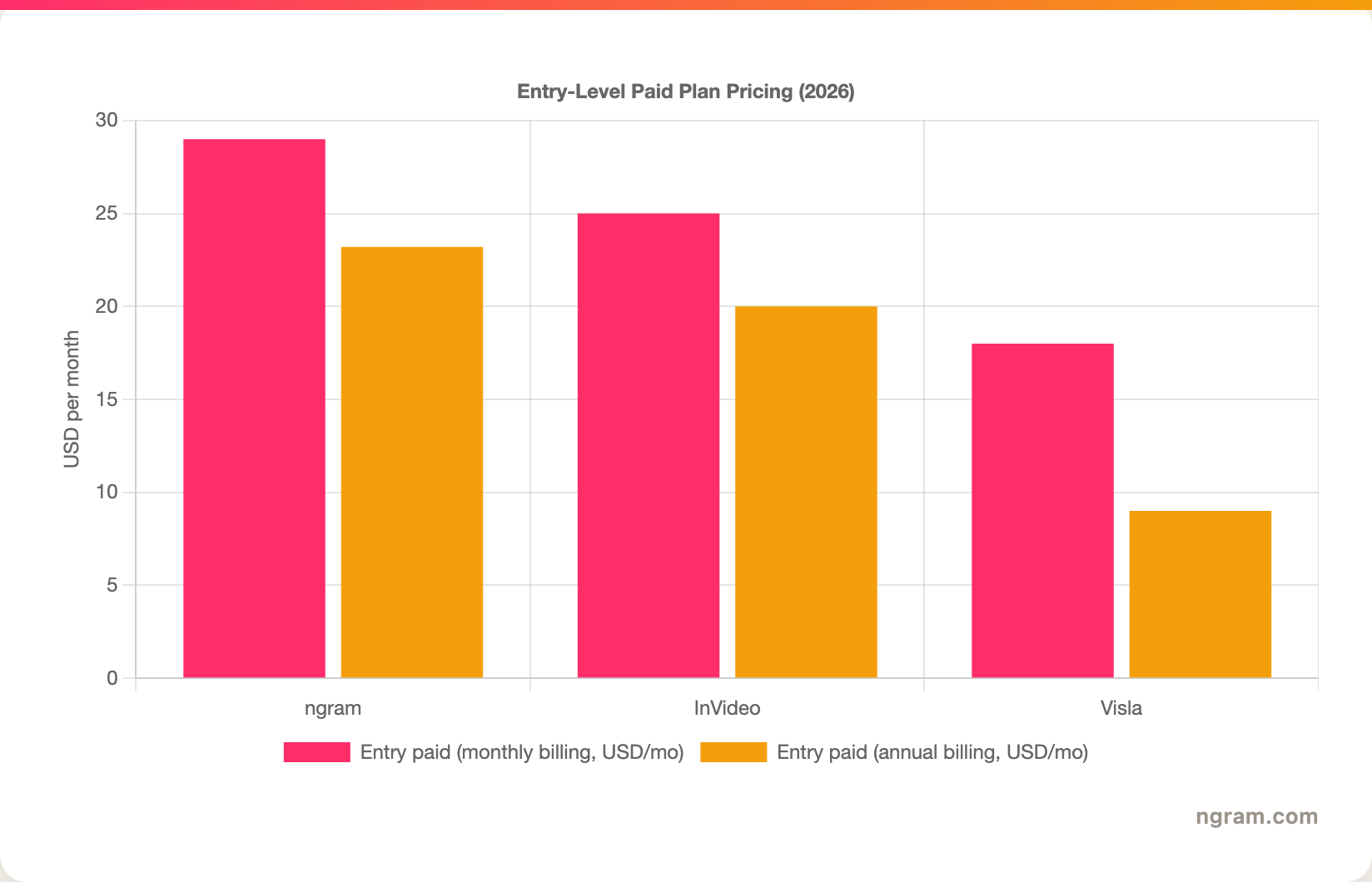
The headline numbers look close at the bottom, but read the unit. InVideo meters AI generation minutes, so a team producing lots of short clips can burn through 50 minutes fast, while Visla meters credits that stretch differently across recording-based editing versus generation. ngram's Basic plan includes 3,000 credits a month on a single pool shared across video generation, editing, and exports, which is simpler to reason about when your workflow mixes those actions. Match the unit to your actual volume before you decide.
Winner: Visla for the lowest paid entry point at around $18 a month, InVideo for unlimited watermark-free exports on its entry paid tier and frontier-model access higher up, ngram for the most flexible single credit pool across a full workflow.
Integrations and collaboration
Both tools support team work, with different emphases.
InVideo emphasizes real-time multiplayer collaboration on generations, long-term project memory, and batch editing for teams running many videos at once. Visla emphasizes business collaboration with shared workspaces, brand controls, SOC 2 Type II, and two-factor authentication on its paid tiers, with SSO on the higher tiers (Business and Enterprise), which matters for regulated or larger organizations.
Winner: InVideo for collaborative generation at volume, Visla for governed, security-conscious team workflows.
1. ngram, the better third option for most teams
Watch how ngram turns an idea into a finished video:
ngram does the same core job as InVideo and Visla, turning input into a finished video, and then keeps going where they stop. Instead of starting only from a prompt (InVideo) or mainly from a recording (Visla), you give ngram a prompt, a PDF, a URL, a deck, screenshots, a screen recording, or raw footage, and its agentic chat plans the script, storyboard, scenes, captions, and call to action for you to review before anything renders.
That plan-first workflow is the difference. For the marketing, sales, training, product, and support teams who make up most "InVideo vs Visla" searches, the real job is rarely "a clip from one prompt" or "a trimmed recording." It is a launch video, a product demo, an onboarding walkthrough, or a localized update that needs screen recordings, callouts, B-roll, branded intros, and MP4 export with separate channel-cut preparation, all on brand.
What makes ngram different
- Source-aware inputs : Start from a prompt, PDF, URL, screenshot, screen recording, raw video, deck, or Shopify product, not just a prompt or a recording.
- Plan before render : Review the script and storyboard in chat, fix direction early, then generate, so you do not re-run a whole generation to fix one scene.
- A presenter plus everything else : Use the avatar library, a custom face, a talking head with lip sync, or a generated on-brand presenter, then add screen-recording polish, smart zooms, product callouts, motion graphics, and B-roll in the same video.
- Brand kits : Logos, colors, fonts, approved and blocked phrases applied automatically to every video.
- Localization built in : Translate script, captions, and on-screen text, generate multilingual voiceover, and re-lip-sync avatars for each language.
- MP4 export : Finished videos export as MP4; separate media tools can derive GIF, WebM, PNG, or JPG from supplied media.
Where ngram is honest about its limits
ngram provides hosted video pages and embeds but has no generally available owner analytics surface, so analytics-heavy buyers should confirm needs first. Its public security certifications are not published yet, so a compliance-bound team with a strict SOC 2 requirement may still prefer Visla's Business tier today. Automation is available through Zapier and n8n; Make.com is Coming Soon. Public API v1 uses self-service bearer API keys.
And if you only ever need a single cinematic clip generated from a prompt, InVideo's Generative tier with Sora 2 and Veo 3.1 is a more direct fit.
Who ngram is best for
ngram fits product marketing, growth, sales, customer success, support, and training teams that turn business material into polished video repeatedly. For current plans and credits, check ngram pricing rather than stale screenshots, and for the direct head-to-heads see the ngram vs InVideo comparison and the ngram vs Visla comparison.
Ready to try ngram? Create your first video from a prompt, doc, URL, deck, screenshot, or recording. Start free
2. InVideo

InVideo is best for creators and teams that want to generate finished video from a prompt at scale, with access to frontier AI video models. Public details were checked against InVideo's pricing and product pages for this 2026 comparison.
Key features
- Agent One generation : The invideo v4 agent turns a single prompt or idea into a finished video, with the agent handling script, scenes, voiceover, and music, and can generate up to roughly 30 minutes of video from one prompt.
- 200+ model orchestration : Routes generations across third-party models including Sora 2, Veo 3.1, Kling, Seedance, and ElevenLabs.
- Generative tier : The top tier, about $120 a month, that bundles the largest model access and the most credits for cinematic AI footage; frontier models such as Sora 2, Veo 3.1, and Kling are reachable across the paid plans through a metered credit pool.
- Team and scale features : Long-term project memory, multiplayer real-time collaboration, batch editing, and custom agent creation.
- Watermark-free paid exports : Paid plans include unlimited exports without a watermark and commercial rights.
What users say
Users praise InVideo for how quickly a single prompt becomes a finished video and for the frontier-model access on the Generative tier. The common cautions are the multi-pool credit system where AI minutes, stock, and voice are separate non-rolling buckets, variability between generations, and costs that depend on which models a generation calls.
Best for
Choose InVideo for prompt-to-video generation at scale and for direct access to Sora 2 and Veo 3.1 inside one workflow.
3. Visla
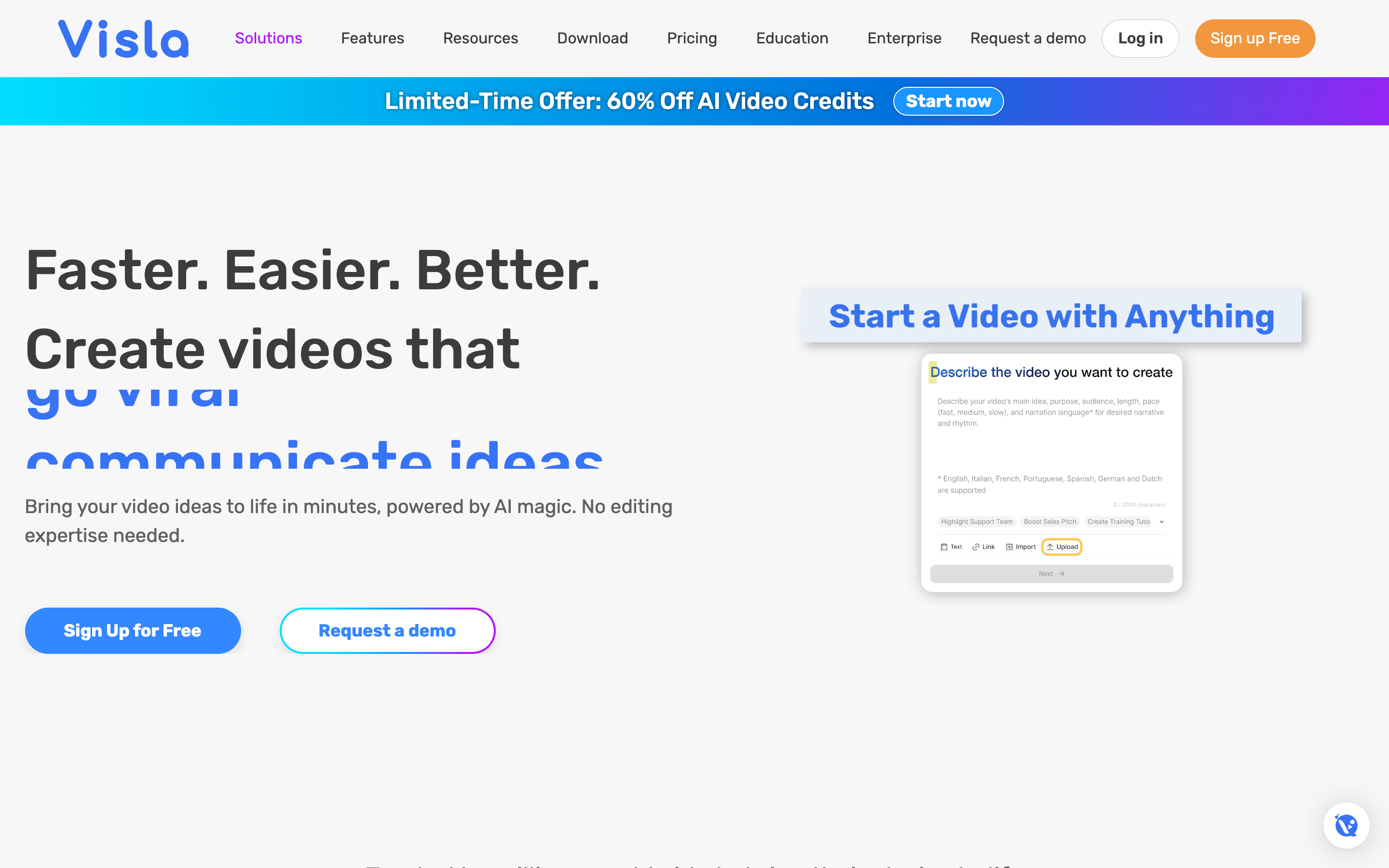
Visla is best for business teams that want to record, edit, generate, and repurpose video with governance and security built in. Public details were checked against Visla's pricing and product pages for this 2026 comparison.
Key features
- Business video workflow : Record screen or webcam in-browser, upload footage, paste a script, or generate from a topic, then edit by editing the transcript.
- Repurposing and sharing : Turn one video into multiple shareable cuts for different channels.
- Avatars and voice cloning : Custom avatars on the paid plans, with custom voice cloning on the higher plans.
- Premium stock : Storyblocks and Getty Images libraries on the higher plans.
- Enterprise governance : SOC 2 Type II, two-factor authentication, branding controls, and analytics on paid tiers, with SSO and SCORM export on the higher tiers (Business and Enterprise).
What users say
Users value Visla for the transcript-style editing, the recording-first workflow, and the business-ready security on Business and Enterprise. The common cautions are that the watermark only clears once you move off the free plan onto a paid tier, that voice cloning and premium stock sit behind higher plans, and that credit consumption can be hard to predict across different task types.
Best for
Choose Visla when your workflow starts from a recording or source material and you need governed, security-conscious business video.
How we compared these tools
This is not a star rating. It is a decision-weighting model for buyers choosing between two AI video tools, with ngram included as the third option many of them actually need.
| Criteria | Weight | What we looked at |
|---|---|---|
| AI capabilities | 30% | Generation quality, model access, voice, and scene depth |
| Features | 30% | Workflow breadth, source support, editing, and export options |
| Ease of use | 20% | Time to a first finished video and learning curve |
| Value | 15% | Public pricing, credit and minute rules, watermarks, and rollover |
| Governance and collaboration | 5% | Security, brand controls, and team review |
We reviewed official vendor pricing and product pages, current SERP patterns, and 2026 review-site sentiment, and we did not use numerical star ratings because they flatten the real decision: the best tool depends on whether you need prompt-to-video generation, a recording-driven business workflow, or a full source-to-video production system.
Common questions
Is InVideo better than Visla?
Neither is better outright. InVideo wins for generating finished video from a prompt and for direct access to Sora 2 and Veo 3.1, while Visla wins for recording-driven business workflows, transcript-style editing, and enterprise security like SOC 2. Match the tool to the job, and consider ngram if your real need is a finished video built from mixed source material rather than a single prompt or a trimmed recording.
Is Visla cheaper than InVideo?
On entry pricing, Visla's Pro plan starts lower, around $18 a month, while InVideo's Plus is about $25 a month or about $20 annually. But the units differ: InVideo meters AI generation minutes and gives watermark-free exports on its paid entry tier, while Visla meters credits but, like InVideo, removes the watermark on its paid entry tier (Pro). Compare against your actual volume, not just the headline price.
Which is better for business and training videos, InVideo or Visla?
Visla is the stronger pick for governed business and training video because of SOC 2 Type II and two-factor authentication (with SSO and SCORM export on the higher tiers), transcript-style editing, and a recording-first workflow. InVideo can produce business clips from prompts quickly, but it is built more for generation than for governed team workflows. ngram is the better fit when training or business content starts from SOPs, PDFs, decks, or screen recordings and needs storyboard planning plus branded export.
What is the best InVideo and Visla alternative?
For teams that need more than a single generation or a trimmed recording, ngram is the strongest alternative because it plans and builds full videos from prompts, docs, URLs, decks, screenshots, and recordings, then adds avatars, screen-recording polish, captions, and branding. InVideo and Visla remain the specialist picks for prompt-to-video generation and recording-driven business video respectively.
Which one should you pick?
The InVideo vs Visla decision is really a question about your starting point, not the logo. If your job is to turn an idea or prompt into a finished, eye-catching video and you want frontier models like Sora 2 and Veo 3.1 in one place, pick InVideo. If your raw material is a recording or source footage and you need governed, security-conscious business video with transcript-style editing, pick Visla.
If your actual job is turning real business material, docs, URLs, decks, screenshots, and recordings, into finished, branded videos where a presenter is one scene among screen recordings, callouts, and B-roll, ngram beats both. The mistake is treating every AI video tool as interchangeable. In 2026, workflow fit matters more than the category label.
Try ngram free, your first video in under 5 minutes. Turn a prompt, doc, URL, deck, or screen recording into a polished, on-brand video without rebuilding it from a blank prompt or a raw recording. Start free








