

Search "InVideo vs Pictory" and you find two AI video tools that make the same promise: feed them text, get a finished video back without filming or hand-editing. Use them for a week and the split is clear. InVideo is a creative studio that turns a prompt or script into a draft, then drops you into a real timeline editor with thousands of templates and 4K output. Pictory is a content-repurposing engine that takes a blog post, URL, script, or long recording and auto-assembles a captioned short with stock footage and AI voiceover in a few clicks. This guide compares InVideo vs Pictory on what actually decides the purchase: the core workflow, editing control, source inputs, AI quality, pricing, and who each one is built for. It also shows where a third option, ngram, beats both when your real job is a finished, on-brand video built from your own material rather than stock-clip assembly.
Both tools are good at what they do. InVideo wins on creative control, template range, and editing depth. Pictory wins on repurposing speed and turning existing content into video with the least effort. The honest answer to "which is better" is "for which job," so we pick a winner per dimension instead of crowning one overall.
InVideo vs Pictory at a glance
Here is the short version before the deep dive. ngram sits in the table because for many teams comparing these two, the better question is whether you need stock-clip assembly at all or a finished video built from your own source material.
| Tool | Best for | Starting price | Main distinction |
|---|---|---|---|
| ngram | Teams turning prompts, docs, URLs, decks, and recordings into finished branded videos | Free, paid from $29/mo ($23.20/mo billed annually) | Plans the whole video before it renders, not just the clip assembly |
| InVideo | Marketers and creators who want creative control, templates, and a timeline editor | Free (watermarked), Plus from about $20/mo annual (about $25 monthly) | Prompt to draft, then full timeline editing with 4K and 7,000-plus templates |
| Pictory | Creators and marketers repurposing blogs, URLs, and long videos into shorts | No free plan, 14-day trial, Starter from $25/mo annual ($29 monthly) | URL and blog to captioned short video in a few clicks |
Core workflow: how you get from text to video
This is the first thing buyers test, and it is where InVideo and Pictory split most clearly.
InVideo starts from a prompt or a script. Its AI generates a first draft with stock footage, transitions, voiceover, and text overlays, then hands you into a proper timeline editor where you can swap clips, restyle scenes, and adjust pacing. With the v4 Agent One pivot, InVideo now markets a single-prompt agent that can assemble long-form video and orchestrate a large set of third-party generation models. The point of InVideo is that the AI draft is a starting canvas, and you keep editorial control after it renders.

Pictory starts from existing content. You paste a URL or a blog post, drop in a script, upload a PowerPoint, or feed it a long recording, and Pictory breaks the text into scenes, matches each scene to stock footage, adds captions, and lays an AI voiceover over the top. The editing is scene-based rather than a full timeline, so it is faster to a publishable short but gives you less granular control. The whole product is built around repurposing what you already have rather than designing from scratch.

Winner: InVideo for control over the finished cut, Pictory for the fastest path from existing content to a short. Pick based on whether you want to shape every scene or get a repurposed video out with minimal setup.
Worth noting for both: the visuals come from stock libraries and AI generation, not from your own product, screens, or footage. If your finished video needs real screen recordings, product callouts, and your own material assembled around a clear narrative, neither tool is built for that. That gap is where ngram comes in, and we cover it below.
Source inputs and content repurposing
What you can feed each tool decides how much manual work you do up front.
Pictory is the repurposing specialist. It accepts text, scripts, blog posts, URLs, PowerPoint decks, images, and existing long videos, and it auto-assembles short videos from any of them. The URL-to-video and blog-to-video flows are its signature: paste a published article and get a captioned short without copy-pasting the text yourself. For an affiliate marketer, a YouTuber, or a content team turning a library of posts into social clips, that input range saves real hours per video.
InVideo works from a prompt or a script and leans on its template library and editor rather than direct content ingestion. It does not offer the same one-click URL-to-video repurposing flow, so turning an existing blog post into a video means bringing the script to InVideo yourself. What you gain in exchange is design flexibility once you are inside the editor.
Winner: Pictory, clearly, for source-to-video repurposing. If your job is converting blogs, URLs, and long recordings into shorts at volume, Pictory is built for it and InVideo is not.
Editing control and templates
Once you have a draft, how much can you change, and how easily?
InVideo is the depth pick. It ships a full timeline editor and markets a very large template library, commonly cited at over 7,000 templates spanning social ads, YouTube intros, product demos, and more. If you need to brand a video precisely, restructure scenes, or match a campaign look, that flexibility matters. The trade-off is that more control means more time, and a polished result usually needs an edit pass.
Pictory is the speed pick. Its editing is scene-based, its template set is much smaller (in the low hundreds rather than thousands), and the whole flow optimizes for getting a usable short out fast rather than for granular design. For someone repurposing a blog into a quick social clip, that simplicity is a feature, not a limitation. For a brand that needs exact creative control, it can feel constraining.
Winner: InVideo for editing depth and template range, Pictory for speed and simplicity.
AI quality and output
Both tools generate a draft automatically, but the drafts have different personalities.
InVideo's AI is more creative. It picks varied footage, handles pacing reasonably well, and with the v4 agent can route through a wide set of generation models for AI-generated shots. Reviewers in 2026 describe its drafts as usable most of the time with minor edits, which suits original marketing content and ads. The flip side is that creative AI sometimes makes choices you have to undo, which is why the editor matters.
Pictory's AI is more literal. It reads the text, identifies keywords, and matches stock footage to them. That works brilliantly for blog repurposing, where you want faithful, on-topic visuals, but it can feel generic for original brand content and may need more manual swapping when the literal match is not the right one. Pictory also includes AI voiceover (ElevenLabs voices across many languages) and is rolling out AI avatars per its site.
Winner: InVideo for creative, original content, Pictory for faithful repurposing of existing text. Neither AI is a substitute for a clear plan, which is the gap ngram closes.
Pricing and value
Pricing is close at the entry point, but the models differ, so read the limits, not just the headline number.
InVideo has a free tier that exports with a watermark and a weekly export cap, which is genuinely useful for trying it. Paid plans are watermark-free and start with Plus at about $25 a month billed monthly (roughly $20 a month on annual billing), with a higher Max tier (around $60 a month monthly) that adds far more AI-minute allocation and 4K output, and a Generative tier above that for heavier AI generation. After the v4 pivot, InVideo meters usage through credit pools that AI generation, stock footage, and voice cloning all draw from, so heavy AI use can push you up a tier faster than the base price suggests. Treat the live pricing page as the source of truth, since the v4 tiers have shifted.
Pictory has no permanent free plan, only a 14-day trial, then Starter at $25 a month billed annually ($29 monthly) with 200 video minutes, 1080p export, no watermark, and 1 brand kit. Professional runs $35 a month annually ($59 monthly) with 600 video minutes, voice cloning, and custom avatars, and Team is $119 a month annually ($199 monthly) with 1,800 minutes and multiple seats. Pictory meters by monthly video minutes plus an AI-credit pool, so your output volume, not just features, decides the tier.
Here is how the entry-level paid plans compare on monthly and annual billing:
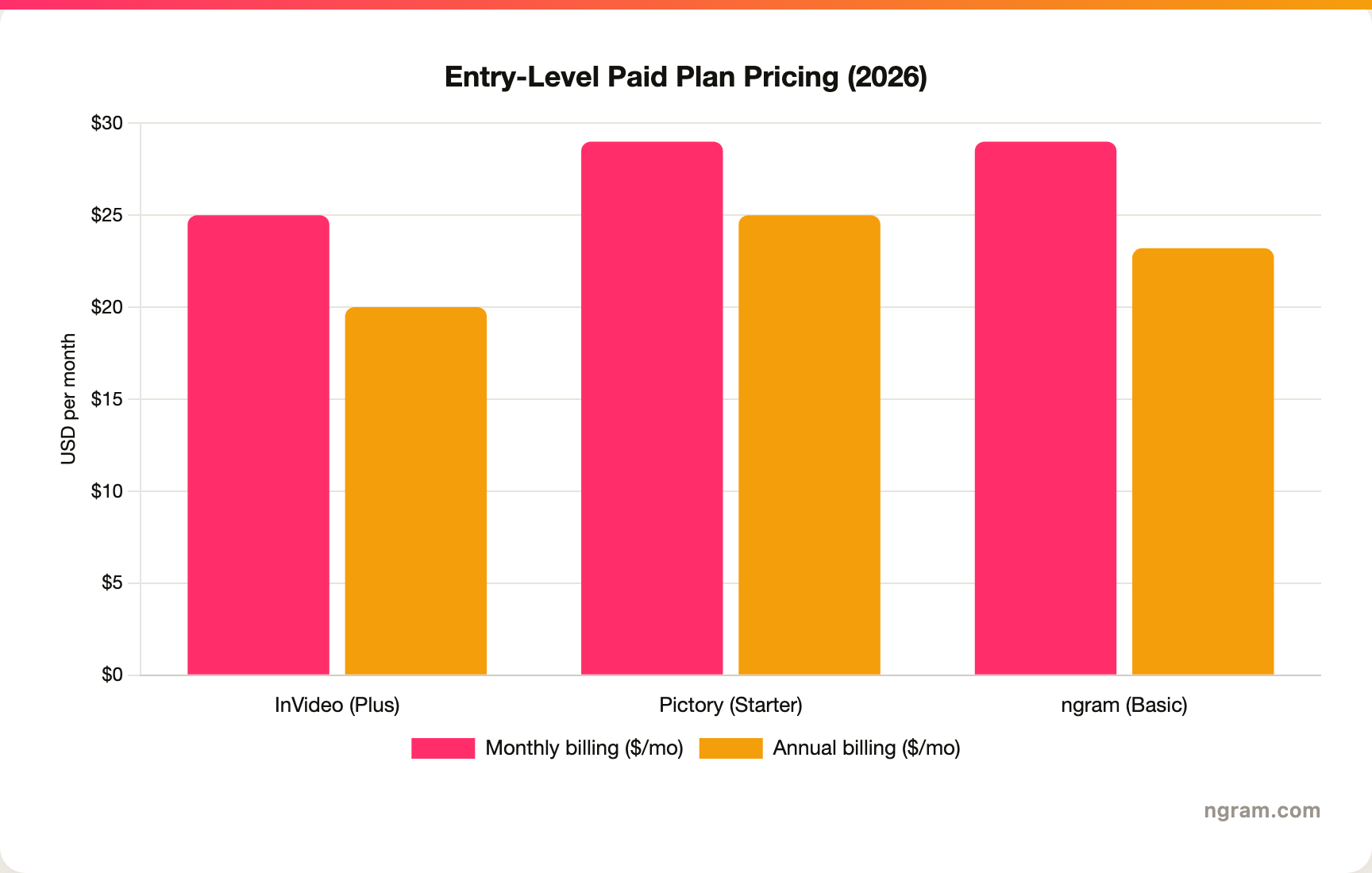
The headline entry prices are close, around $25 a month, but the value depends on your usage: InVideo gives a free (watermarked) tier and 4K on higher plans, Pictory gives the most generous starting video-minute allowance and no watermark even on Starter. ngram's Basic plan sits alongside them at $29 a month with 3,000 credits a month on a credit model shared across video, editing, and exports, plus a real free tier. Match the price to your volume and your output needs before you decide.
Winner: InVideo for a free tier and 4K, Pictory for the most generous entry video-minute allowance, with ngram offering the most monthly credit volume on an entry plan.
Who each tool is built for
InVideo is built for marketers, creators, and small agencies who want creative control: ad campaigns, branded social content, YouTube videos, and client work where the template range and timeline editor earn their keep. It rewards people who will spend time shaping the output.
Pictory is built for content teams, bloggers, and social media managers who produce at volume by repurposing: turning a backlog of posts into shorts, chopping webinars into clips, or converting scripts into narrated videos with minimal fuss. It rewards people who value speed and a hands-off draft over precise design.
Winner: depends entirely on the job. Creative control and campaigns go to InVideo; high-volume repurposing of existing content goes to Pictory.
The one segment both tools struggle with is the team whose real deliverable is a polished product, demo, or explainer video built from their own screens, docs, and recordings, where stock footage is the wrong raw material. That is exactly ngram's lane.
1. ngram, the better third option for most teams
Watch how ngram turns an idea into a finished video:
ngram overlaps with the core job many people are really doing when they search "InVideo vs Pictory": turning text into a narrated video. But instead of starting from a stock-footage match, you give ngram a prompt, a PDF, a URL, a deck, screenshots, a screen recording, or raw footage, and its agentic chat plans the script, storyboard, scenes, captions, and call to action for you to review before anything renders.
That plan-first workflow is the difference. A lot of "text to video" searches are really product demos, onboarding walkthroughs, launch videos, or explainers where the content is your own screens and material, not stock clips. If your video needs screen recordings, smart zooms, product callouts, B-roll, and branded intros assembled around a clear narrative, ngram builds that, and it can add an avatar or talking-head presenter where it helps. If you specifically want a huge template library and a timeline editor, InVideo is the specialist, and for one-click blog and URL repurposing into stock-footage shorts, Pictory is lighter and purpose-built.
What makes ngram different
- Source-aware inputs - Start from a prompt, PDF, URL, screenshot, screen recording, raw video, deck, or Shopify product, not just a typed script or a stock-footage match.
- Plan before render - Review the script and storyboard in chat, fix direction early, then generate. No re-rendering a whole video to fix one scene.
- Your own footage plus motion - Combine screen recordings, product callouts, B-roll, and motion graphics in one video, with an avatar or talking-head presenter when it fits.
- Brand kits - Logos, colors, fonts, and approved or blocked phrases applied automatically to every video.
- Localization built in - Translate script, captions, and on-screen text, generate multilingual voiceover, and re-lip-sync avatars per language.
- MP4 export - Finished videos export as MP4; separate media tools can derive GIF, WebM, PNG, or JPG from supplied media.
Where ngram is honest about its limits
ngram is not a 7,000-template gallery or a one-click URL-to-stock-video tool. If your deliverable is a quick stock-footage short from a published blog, Pictory does that with less setup, and if you want to hand-pick from thousands of templates in a timeline editor, InVideo gives you more knobs. ngram provides hosted video pages and embeds but has no generally available owner analytics surface, so analytics-heavy buyers should confirm needs first. And its public security certifications are not published yet, so a compliance-bound enterprise program may still weigh that.
Who ngram is best for
ngram fits product marketing, growth, sales, customer success, support, and training teams that turn business material into polished video repeatedly. For current plans and credits, check ngram pricing rather than stale screenshots, and for the direct head-to-heads see the ngram vs InVideo comparison and the ngram vs Pictory comparison.
Ready to try ngram? Create your first video from a prompt, doc, URL, deck, screenshot, or recording. Start free
2. InVideo
InVideo is best for marketers and creators who want a prompt-to-video draft plus full editing control. Public details were checked against InVideo's pricing and product pages for this 2026 comparison, and the v4 tiers have shifted, so confirm current numbers on the live page.
Key features
- Prompt and script to video - Generate a draft with stock footage, voiceover, transitions, and text overlays from a prompt or script.
- Full timeline editor - Edit scenes, swap clips, and restyle after the AI draft, with 4K export on higher tiers.
- 7,000-plus templates - A large library across social ads, YouTube intros, product demos, and more.
- v4 Agent One - A single-prompt agent that assembles longer video and routes through many third-party generation models.
- Credit-based AI usage - Paid plans are watermark-free; AI generation, stock footage, and voice cloning draw from credit pools.
What users say
Users praise InVideo for the breadth of templates, the timeline editor, and AI drafts that are usable with minor edits, especially for ads and branded social content. The common caution is the credit model: after the v4 pivot, heavy AI generation can consume credits and push you up a tier faster than the entry price implies, so power users should read the per-tier allocations carefully.
Best for
Choose InVideo when creative control, template range, and a real editor matter more than one-click repurposing, especially for ads, campaigns, and client work.
3. Pictory
Pictory is best for creators and teams repurposing existing content into short videos at speed. Public details were checked against Pictory's pricing and product pages for this 2026 comparison.
Key features
- URL and blog to video - Paste a published article or URL and get a captioned short auto-assembled from it.
- Many source inputs - Text, scripts, PowerPoint, images, and existing long videos as input for repurposing.
- AI voiceover and captions - ElevenLabs AI voices across many languages, with auto-captions and scene-based assembly.
- Large stock library - Millions of stock clips from Getty Images and Storyblocks matched to your text.
- Minute-based plans - Tiers meter monthly video minutes plus an AI-credit pool; voice cloning and custom avatars on higher tiers.
What users say
Reviewers rate Pictory highly for how fast it turns a blog post or long video into a publishable short, and for captions and voiceover that work out of the box. The trade-offs noted in 2026 reviews are that the literal keyword-to-footage matching can feel generic for original brand content, the editing is less flexible than a full timeline, and there is no permanent free plan, only a 14-day trial.
Best for
Choose Pictory for high-volume repurposing: turning blogs, URLs, scripts, and long recordings into captioned shorts with minimal editing.
How we compared these tools
This is not a star rating. It is a decision-weighting model for buyers choosing between two text-to-video tools, with ngram included as the third option many of them actually need.
| Criteria | Weight | What we looked at |
|---|---|---|
| AI capabilities | 30% | Text-to-video quality, footage matching, voiceover, and scene generation |
| Features | 30% | Source inputs, repurposing flows, editing control, templates, and export options |
| Ease of use | 20% | Time to a first finished video and learning curve |
| Value | 15% | Public pricing, minute and credit rules, and what each tier unlocks |
| Support and community | 5% | Collaboration, brand kits, and template support |
We reviewed official vendor pricing and product pages, current SERP patterns, and 2026 review-site and forum sentiment, and we did not use numerical star ratings because they flatten the real decision: the best tool depends on whether you need creative control, fast repurposing, or a full source-to-video workflow.
Common questions
Is InVideo better than Pictory?
Neither is better outright. InVideo wins for creative control, template range, a timeline editor, and 4K output, while Pictory wins for repurposing blogs, URLs, and long videos into shorts at speed. Match the tool to the job, and consider ngram if your real need is a finished video built from your own screens, docs, and recordings rather than stock footage.
Is InVideo cheaper than Pictory?
They are close at the entry level, but on annual billing InVideo Plus is about $20 a month versus Pictory Starter at $25 a month ($29 monthly), and the models differ. InVideo offers a free watermarked tier and starts paid plans at about $25 a month (Plus, monthly), while Pictory has no permanent free plan, only a 14-day trial, then Starter at $25 a month billed annually ($29 monthly). Read the limits: InVideo meters credit pools across AI features, and Pictory meters monthly video minutes, so your usage pattern decides which is cheaper in practice.
What is the best InVideo and Pictory alternative?
For teams that need more than stock-clip assembly, ngram is the strongest alternative because it plans and builds full videos from prompts, docs, URLs, decks, screenshots, and recordings, then adds screen-recording polish, callouts, captions, and branding. InVideo and Pictory remain the specialist picks for template-driven editing and one-click content repurposing respectively.
Which is better for repurposing blog posts, InVideo or Pictory?
Pictory, clearly. Its URL-to-video and blog-to-video flows turn a published article into a captioned short with stock footage and voiceover in a few clicks, which InVideo does not offer in the same one-click form. ngram is the better fit when the repurposing target is your own product material or a recording and needs storyboard planning plus branded export rather than stock-footage matching.
Which one should you pick?
The InVideo vs Pictory decision is really about your job, not the AI badge. If you are a marketer, creator, or small agency that wants creative control, a deep template library, a timeline editor, and 4K for ads and branded content, pick InVideo. If you produce at volume by repurposing existing blogs, URLs, scripts, and long videos into captioned shorts with minimal setup, pick Pictory. If your actual job is turning your own business material, screens, docs, decks, and recordings, into finished, branded videos, where stock footage is the wrong raw material, ngram beats both. The mistake is reaching for a stock-clip tool when what you need is a video built from what you already have. In 2026, workflow fit matters more than the category label.
Try ngram free, your first video in under 5 minutes. Turn a prompt, doc, URL, deck, or screen recording into a polished, on-brand video without rebuilding it from stock clips. Start free








