
n8n video generation is useful when the product story is already approved but the video draft still depends on manual copy-paste work. A product marketer has the positioning doc. RevOps has the CRM trigger. DevOps has the self-hosted n8n instance. The founder wants a short explainer that makes the product obvious to buyers who will not read a long page.
The hard part is not pressing a generate button. The hard part is deciding what the product explainer video is allowed to say. A good explainer reduces confusion because it narrows the story to one audience, one painful problem, one promise, proof the buyer can trust, and one CTA.
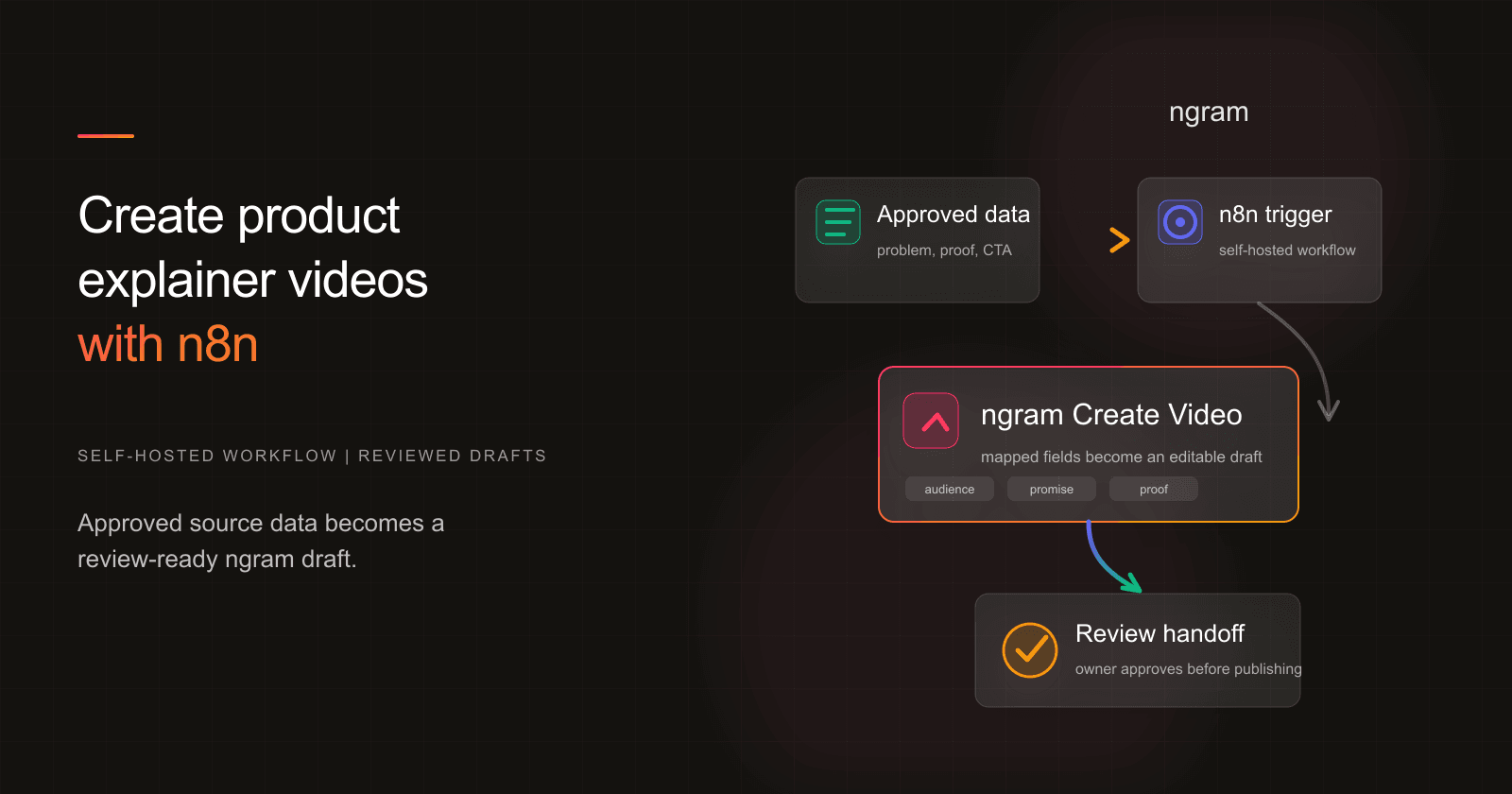
This n8n video generation guide shows a safe self-hosted pattern with the ngram n8n integration: trigger from approved source data, use a bearer API key created in Account & Settings → API Keys, map fields into Create Video, then hand the draft to review. It is automated video generation with a review gate, not unattended public publishing.
Why product explainer videos are worth automating
Explainers earn their keep because they remove friction from a buyer's first understanding. Wyzowl's 2026 video marketing survey says 96% of people have watched an explainer video to learn more about a product or service, 85% have been convinced to buy after watching a video, 89% say video quality affects brand trust, and 63% prefer a short video when learning about a product or service.
The marketer-side data points in the same report explain why the draft process needs structure. Wyzowl found that 91% of businesses use video as a marketing tool, 93% of video marketers see video as part of overall strategy, 68% have created explainer videos, 59% create video in house, 63% have used AI video tools, and 71% believe 30 seconds to 2 minutes is the most effective length.
Budget pressure makes the workflow case stronger. Wyzowl reports that 92% of marketers plan to spend the same or more on video marketing in 2026, while 38% say video costs are increasing. HubSpot's 2026 marketing statistics put short-form video, long-form video, and live-streaming video as the top three ROI-driving content formats, cited by 49%, 29%, and 25% of marketers.
B2B teams have the same production constraint. Content Marketing Institute's 2025 B2B benchmark report found that 76% of B2B marketers used videos in the previous 12 months, 58% rated video as the content type producing the best results, and 45% lacked a scalable content creation model. A repeatable intake-to-review workflow is how internal teams keep explainers moving without turning every request into a new production project.
What this n8n video generation workflow creates
This n8n video generation workflow creates a review-ready product explainer video draft from source data your team has already approved. It does not decide positioning. It does not invent customer proof. It does not publish the final asset to a public channel.
The input can be a product page URL, launch brief, approved positioning doc, customer-facing FAQ, feature spec summary, Airtable record, CMS item, or form response. The output is an editable ngram draft with the key explainer fields already mapped.
If the team needs a hands-on tool outside n8n, the same source structure works in the AI explainer video maker. The n8n version is for teams that already use workflow automation as their control plane and want the first draft created from approved records.
What we verified in the n8n setup
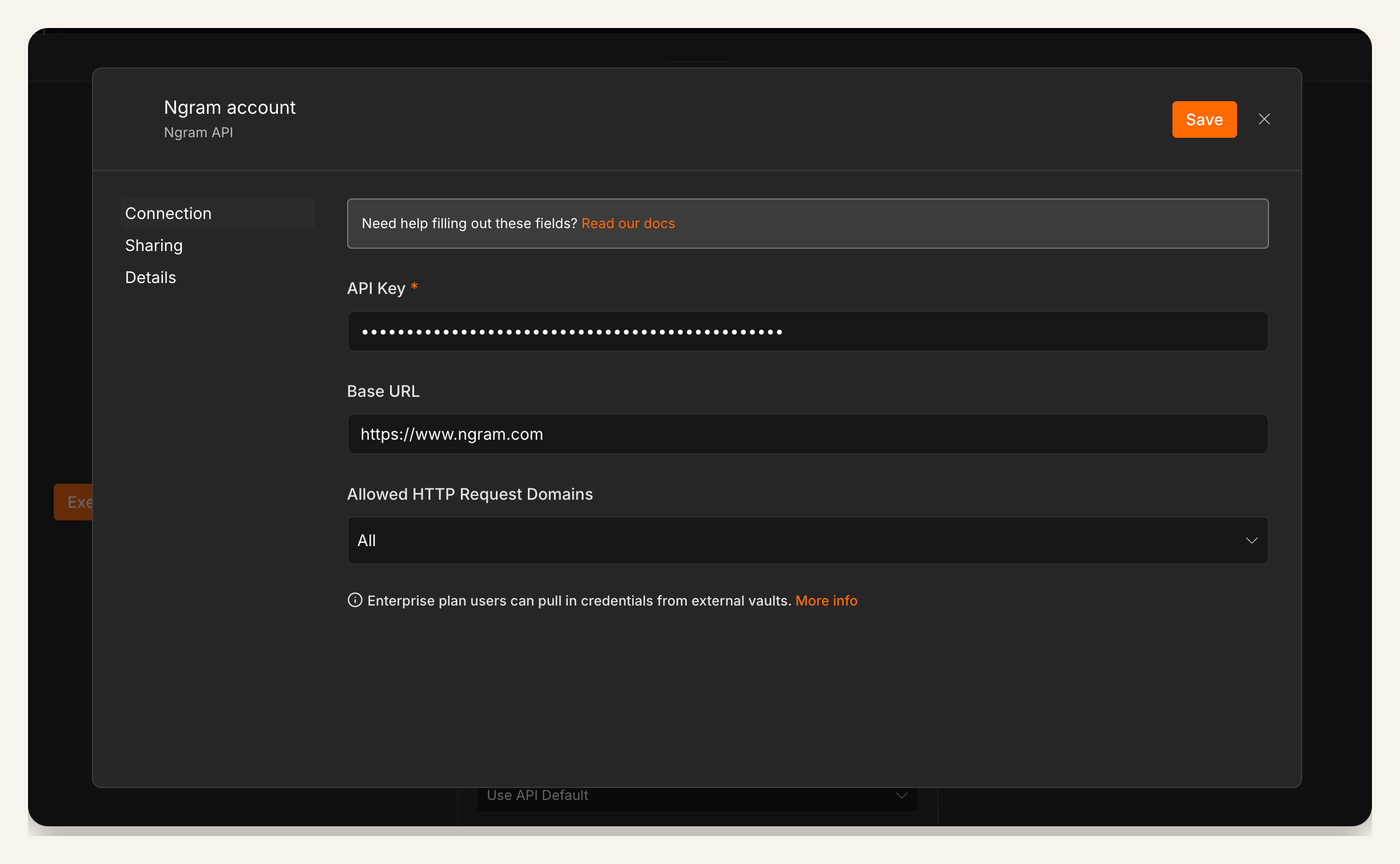
We reviewed reusable n8n proof captures for this integration: a workflow canvas showing a trigger connected to the ngram Create Video node, a credential/setup screen, and a Create Video node configuration screen. These captures prove the workflow surface and configuration path. They are not result screenshots, and the configuration capture should not be read as explainer-specific UI copy.
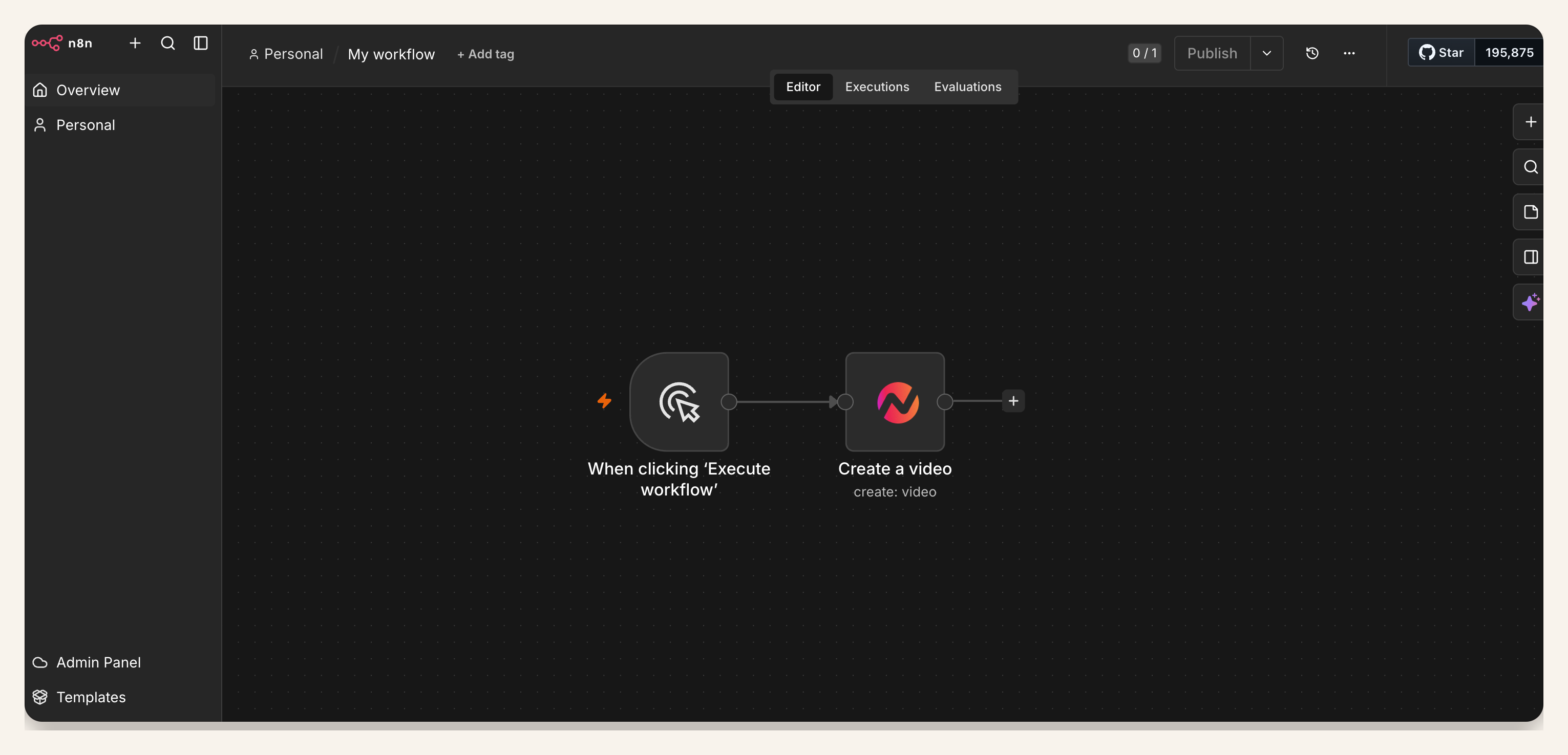
Methodology note: the proof review used three existing July 2026 n8n screenshots supplied for the Batch 2 integration workflow. We treated them as surface proof only and kept the article focused on reviewed draft creation rather than result/status claims.
Prerequisites for n8n video generation
- A self-hosted n8n instance where your owner or admin can install community nodes. n8n's community node docs describe community node installation and management.
- An ngram bearer API key created in Account & Settings → API Keys and stored in n8n Credentials.
- An approved product source record with audience, problem, promise, proof, CTA, tone, desired length, owner, and reviewer fields.
- A review destination, such as a Slack channel, project task, CMS draft, or internal ticket. This is a review handoff, not automatic public distribution.
- A publishing rule that blocks public use until the product owner or product marketing owner approves the draft.
For product marketing teams, the source record should map back to approved positioning. The workflow should make it easy to repeat a proven explainer structure, not easier to bypass message review.
How to create a product explainer video with n8n
1. Start with an approved explainer source
Create or identify the record that should trigger the workflow. Good trigger events include a CMS item marked ready for video, an Airtable row moved to approved, a product page URL submitted by product marketing, or a form response reviewed by the owner.
Do not trigger n8n video generation from raw notes. The source needs a single problem statement, one audience, one promise, proof, and a CTA before Create Video runs.
2. Install the ngram community node in self-hosted n8n
Install the verified ngram community node in the self-hosted n8n instance or n8n Cloud environment that owns your automation. For Cloud, confirm the node appears and is enabled in the Nodes panel before use.
3. Add the ngram API key
Create a bearer API key in Account & Settings → API Keys, then store it in n8n Credentials. Limit access to the workflow owners who already handle source data and publishing review. Treat the credential as production infrastructure, not a shared note in a launch doc.
4. Configure the Create Video node
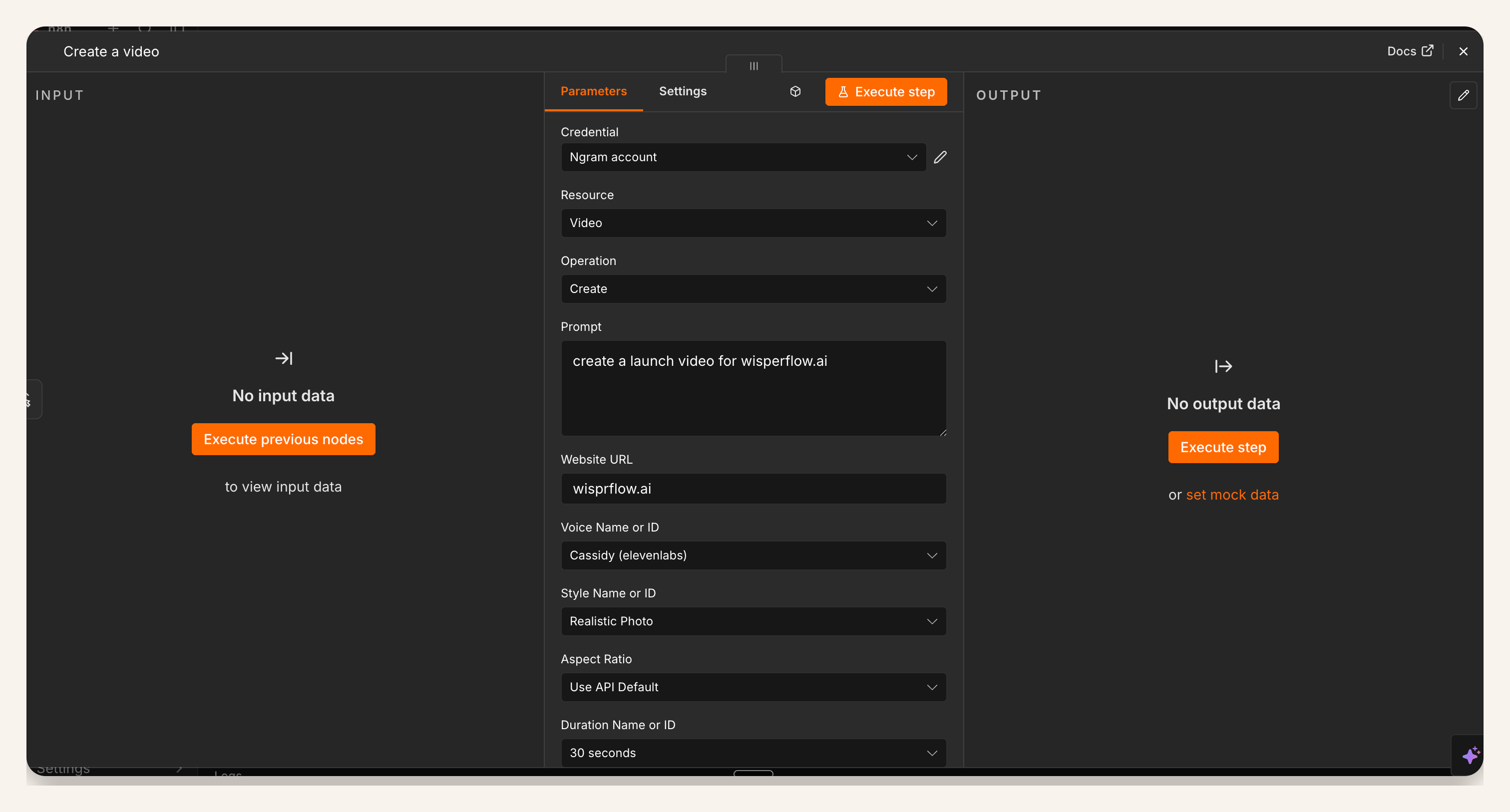
Add the ngram Create Video node after the approved trigger. Select the ngram credential, then configure the fields that should become the draft brief. The exact field labels can evolve, so keep the workflow mapped to your source record rather than hardcoding vague prompt text.
5. Map the explainer fields
Map the fields that make an explainer specific: source URL, product name, target audience, the buyer's current confusion, the promised outcome, the proof point, the CTA, desired length, tone, brand kit, owner, reviewer, and due date. If your workspace uses Brand Kit, map the approved brand direction instead of leaving every draft to pick its own visual treatment.
The minimum viable field set is problem, audience, promise, proof, and CTA. If one of those is missing, stop the workflow and route the record back to the owner.
6. Test with one known product story
Run the n8n video generation workflow against one known source where the team already agrees on the right message. This makes it easier to spot mapping mistakes: the wrong CTA, missing proof, an audience field pulled from the wrong column, or a target length that creates a bloated explainer.
7. Review the draft in ngram
Open the generated draft and review the script, storyboard, captions, product proof, tone, pacing, and CTA. For a product explainer video, the first 10 seconds should answer why the viewer should care. The final CTA should match the source record, not a generic signup line.
8. Route the reviewed link to the owner
After review, route the link to the owner in the system where the work is tracked. That might be Slack, Linear, Jira, a CMS task, or a launch checklist. Keep the publishing step separate so the owner can approve the final explainer before it reaches customers.
QA checklist for a product explainer video
- The source record names one audience and one product problem.
- The promise is specific enough to check against the product page or approved brief.
- Every claim has proof in the source data, screenshot, demo note, or approved doc.
- The script introduces the product only after it names the viewer's problem.
- The draft stays near the planned length, especially if the target is 30 seconds to 2 minutes.
- Captions, pronunciation, UI labels, and CTA copy match the approved source.
- The reviewer can reject, revise, or approve the draft before public publishing.
Common mistakes
Triggering from unapproved source data
A workflow that reacts to every edit in a CRM or CMS will create noisy drafts. Use an approved status field, owner approval, or release-ready event as the trigger.
Mapping features instead of the explanation
Explainers fail when they list capabilities without resolving confusion. Map the buyer's problem, the promised change, and the proof before you map secondary feature bullets.
Treating automation as approval
Automation can create a useful first cut, but it cannot replace product review. Keep the owner in the path for accuracy, brand fit, legal-sensitive wording, and final CTA approval.
Treating community-node availability as automatic
The verified ngram community node supports self-hosted n8n and n8n Cloud. Confirm it appears and is enabled in your instance before writing the workflow into production docs.
FAQ
Can n8n create a product explainer video automatically?
n8n can trigger an automated video generation workflow when approved source data is ready. The safer pattern is to create a reviewed draft, then keep human approval before publishing.
Does this n8n video generation workflow work on n8n Cloud?
Yes. The verified ngram community node supports self-hosted n8n and n8n Cloud. Confirm it appears and is enabled in your instance before using it in a live plan.
What fields should I map into Create Video?
Start with source URL, product name, audience, problem, promise, proof, CTA, length, tone, owner, and reviewer. Add brand direction and channel only if those fields are approved in the source record.
What makes a product explainer video different from a product demo?
A product explainer video clarifies the problem, audience, promise, proof, and next step. A product demo usually spends more time showing the product workflow and feature sequence.
How do I stop the workflow from inventing product claims?
Require proof fields in the source record and fail the workflow when they are empty. Review the draft against the approved product page, brief, or demo notes before publishing.
Can I use this for SaaS explainer video maker workflows?
Yes, if the SaaS team already has approved source data and a review owner. Keep the n8n workflow tied to approved product facts, then use the draft review to tune pacing, visuals, and CTA.
What is the first version I should build?
Build one n8n video generation trigger from an approved source record, one Create Video node, and one review handoff. Once the team trusts that path, add branches for different audiences or product lines.