
Search "Camtasia vs Loom" and you are comparing two tools that both start by recording your screen, then go in opposite directions. Camtasia is a desktop editing studio: record, then polish on a multi-track timeline until the video looks exactly right. Loom is a cloud-first async messenger: record a quick walkthrough and share a link in seconds instead of holding a meeting. This guide compares Camtasia vs Loom on what actually decides the purchase: recording, editing depth, sharing and async workflow, AI features, and pricing. It also shows where a third option, ngram, beats both when your real job is a finished, on-brand video built from that recording, not a raw clip or a hand-edited timeline.
Both tools are good at their job. Camtasia wins on editing power and polish. Loom wins on speed, sharing, and async communication. The honest answer to "which is better" is "for which job," so we pick a winner per dimension instead of crowning one overall. One note up front: Loom has been owned by Atlassian since 2024, and its product now leans heavily into Jira and Atlassian-flavored AI.
Camtasia vs Loom at a glance
Here is the short version before the deep dive. ngram sits in the table because for many teams comparing these two, the real goal is a finished video built from the recording, not a raw async clip or a manual edit.
| Tool | Best for | Starting price | Main distinction |
|---|---|---|---|
| ngram | Teams turning recordings, prompts, docs, and URLs into finished branded videos | Free, paid from $29/mo | Plans and builds a polished video from the recording |
| Camtasia | Trainers and marketers making polished how-to and demo videos | Free trial, paid from about $15/mo annual | Desktop multi-track editing studio |
| Loom | Distributed teams replacing meetings with quick recorded messages | Free, paid from $12.50/user/mo annual | Cloud async video messaging with instant links |
Recording and capture
Both tools capture screen and camera, but the experience reflects their philosophies.
Camtasia records your screen, camera, system audio, and microphone onto separate tracks, which is the foundation for serious editing later. You can reposition the camera, swap audio, and rework layouts after the fact because each element is independent. It is a desktop application, so capture happens locally and you own the file.
Loom records screen and webcam straight to the cloud, and the moment you stop, a shareable link is ready. There is no file to manage and no export step for the common case. That instant-link model is the whole point: capture a thought and send it, no meeting required. Recording length is unlimited on paid plans, while the free tier caps clips at five minutes.
Winner: Loom for frictionless capture-and-share, Camtasia for capture built for later editing.
Editing depth
This is the widest gap between the two.
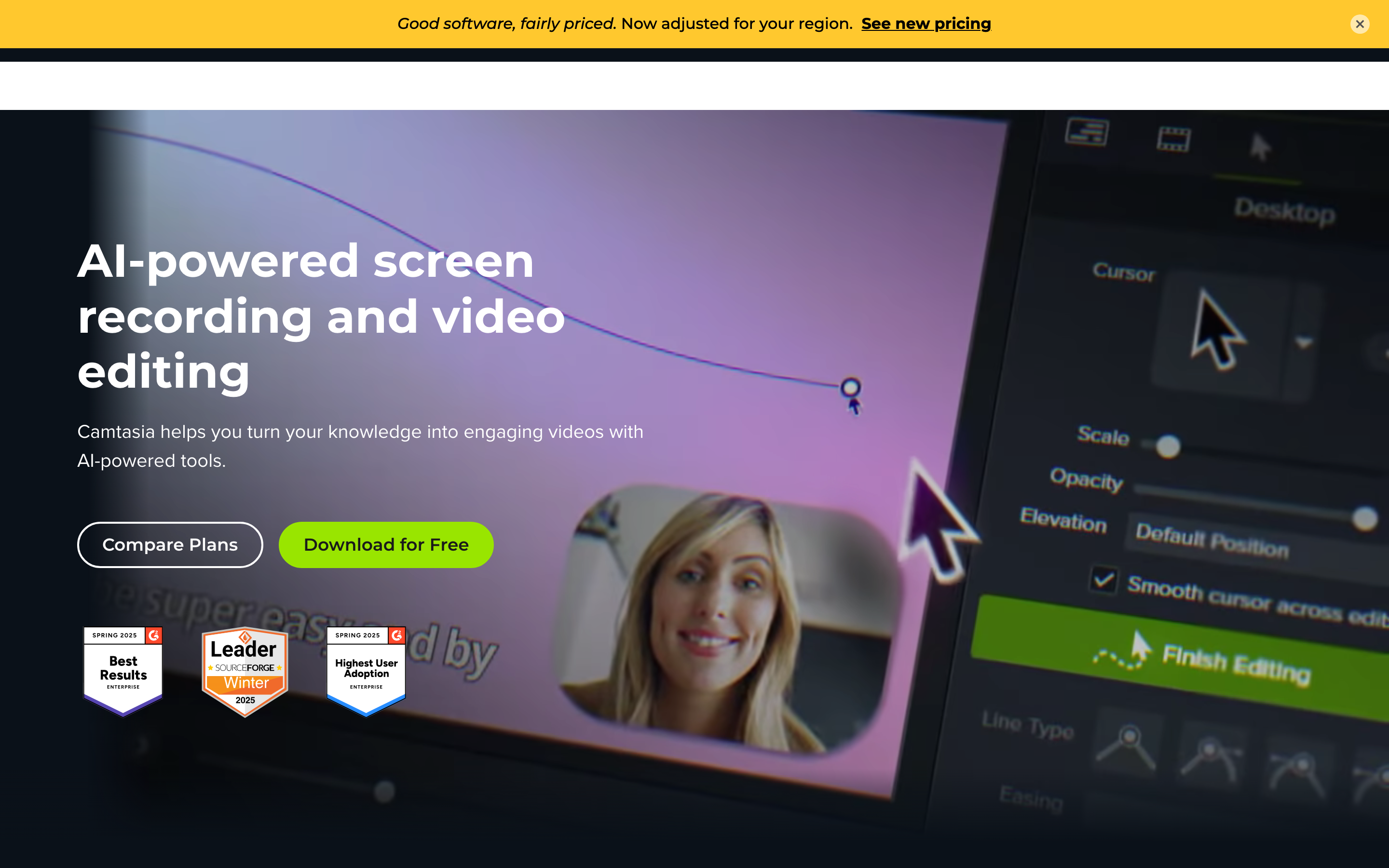
Camtasia is a full multi-track video editor. You get transitions, annotations, animations, callouts, cursor effects, quizzes, and a royalty-free asset library, all layered on a timeline you control second by second. For training videos, product walkthroughs, and detailed demos that need to feel intentional, that depth is exactly what you want.
Loom keeps editing deliberately light: trim, stitch, and basic cleanup. If you want zoom effects, callouts, or cursor polish, you have to take the recording elsewhere. That is by design, since Loom optimizes for sending fast, not for production. The trade-off is that a raw Loom rarely looks like a finished, polished video.
Winner: Camtasia, clearly, for any video that needs real editing and polish. If you only need a quick clip, Loom's lightness is a feature, not a flaw.
This editing gap is exactly why teams comparing these two often end up at a third option, which we cover below.
Sharing, async, and AI features
This dimension flips the script back toward Loom.
Loom is built for sharing and async communication. Every recording becomes a link you can drop into Slack, email, or a doc, with auto-transcription, viewer reactions, and comments. Since the Atlassian acquisition, it adds AI titles, summaries, chapters, and action items, plus workflows that turn a recording into a written doc or a populated Jira work item. For distributed teams replacing status meetings with recorded messages, that is a genuinely strong workflow.
Camtasia is not built for async messaging. It produces a finished video file you then host or upload yourself, which is the right model for polished assets but slow for quick back-and-forth. Its AI assists lean toward production, including avatars, voice and script generation, noise removal, transcription, captions, and translation, rather than communication.
Winner: Loom for async sharing and communication AI, Camtasia for production-oriented AI assists.
ngram fits the slice in between: turning a recording into a polished, shareable video. It is not a record-and-send async messenger, so for quick walkthrough messages Loom remains the better tool, and we are clear about that.
Pricing and value
The two tools price for different buyers, though the entry numbers land surprisingly close.
Camtasia is sold as an annual license, with Essentials around $179.88 a year per user, roughly $15 a month, and Create and Pro tiers near $249 and $499 a year adding AI workflows and collaboration. A free trial exports with a watermark until you upgrade. You pay once a year for a tool you use heavily.
Loom has a free tier with a five-minute cap, and its Business plan runs about $12.50 a user per month billed annually, around $15 monthly, unlocking unlimited recording length. Business plus AI adds the generative features at roughly $20 to $24 a user per month. Loom is per-seat, so cost scales with team size.
Here is how the entry-level paid plans compare on monthly and annual billing:
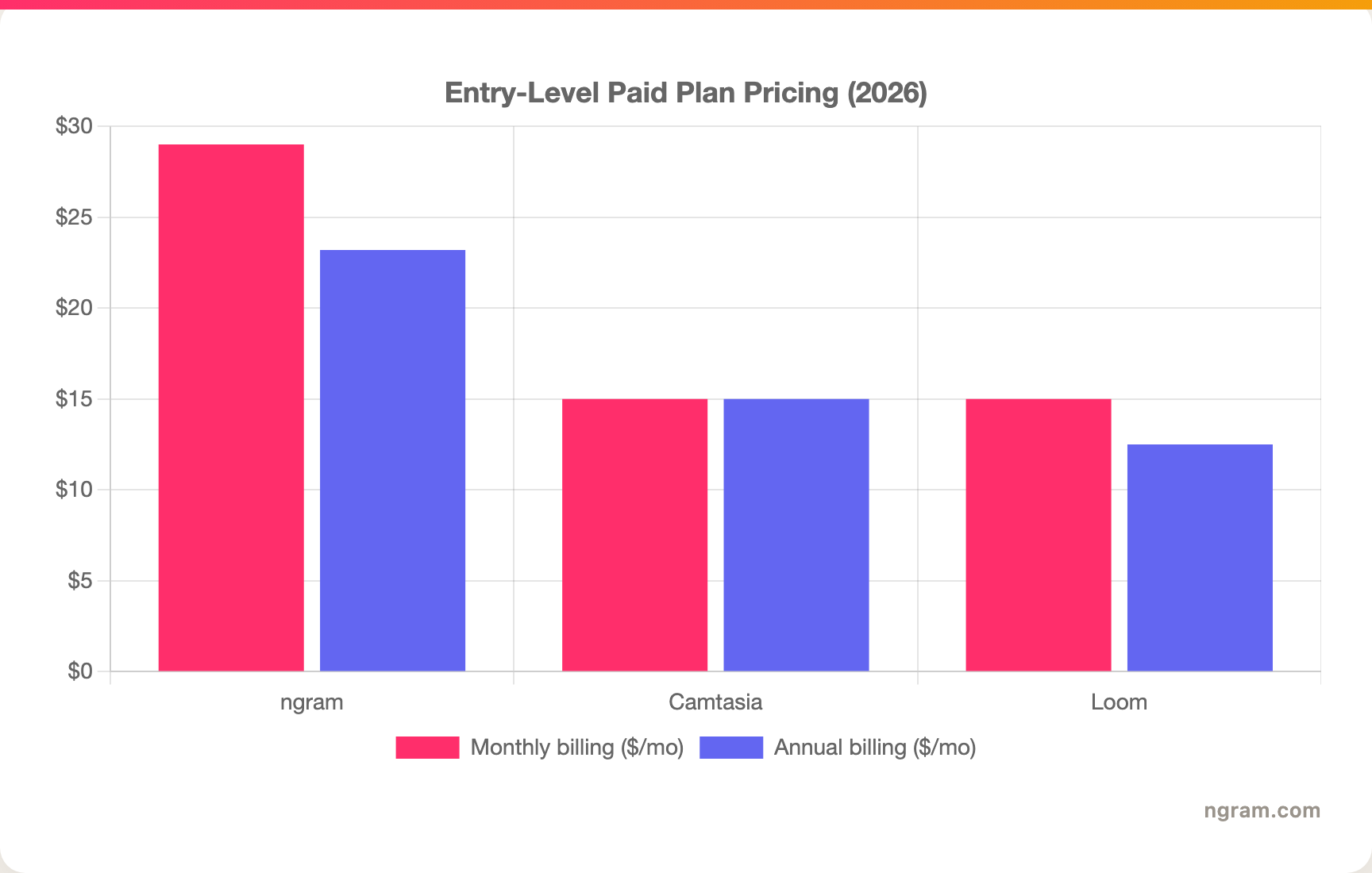
Read the units behind the bars: Camtasia is an annual license billed once a year, so its monthly figure is the yearly price divided by twelve, and Loom is per user per month, so a team multiplies that figure by seats. ngram's Basic plan is $29 a month, or $23.20 a month billed annually, with 3,000 credits a month shared across video, editing, and exports. Match the model to your team size and how much you actually produce.
Winner: Loom for the lowest per-seat entry price, Camtasia for a single heavy-use license, ngram for the most flexible monthly entry plan.
1. ngram, the better third option for most teams
Watch how ngram turns an idea into a finished video:
ngram is the strong third option for the slice both Camtasia and Loom only partly serve: turning a screen recording into a polished, on-brand video without hand-editing a timeline or settling for a raw clip. You give ngram a screen recording, a prompt, a PDF, a URL, a deck, or screenshots, and its agentic chat plans the script, storyboard, scenes, captions, and call to action for you to review before anything renders.
That plan-first workflow is the difference for the overlap slice. If your real job is a product demo, an onboarding walkthrough, a feature announcement, or a training clip built from a recording, ngram cleans up the capture with cursor smoothing, click emphasis, dead-air trimming, and smart zooms, then layers in product callouts, B-roll, captions, branded intros, and an optional presenter, all on brand. Where ngram does not compete: if you just want to record a thought and fire off a link in ten seconds, Loom owns that async-messaging job, and if you want to hand-edit every frame on a timeline, Camtasia is the deeper desktop editor.
What makes ngram different
- Source-aware inputs - Start from a screen recording, prompt, PDF, URL, screenshot, raw video, or deck, not just a raw capture.
- Plan before render - Review the script and storyboard in chat, fix direction early, then generate. No re-recording a long take.
- Screen-recording polish built in - Cursor smoothing, click emphasis, dead-air trim, smart zooms, and product callouts applied automatically.
- Brand kits - Logos, colors, fonts, and approved or blocked phrases applied automatically to every video.
- Localization built in - Translate script, captions, and on-screen text, generate multilingual voiceover, and re-lip-sync avatars per language.
- Hosted and embeddable - MP4, GIF, WebM, PNG, JPG, and PPTX export plus hosted watch pages and an embeddable player.
Where ngram is honest about its limits
ngram is not an async video messenger. If your core need is recording quick walkthroughs and sharing instant links across Slack and Jira, Loom's capture-and-send loop and Atlassian integration are the better fit, and we say so plainly. ngram also does not replace a full hand-editing timeline for frame-level control, which is Camtasia's strength. And ngram tracks view counts on hosted videos but does not yet offer scene-level watch-time or drop-off analytics, and its public security certifications are not published yet, so analytics-heavy or compliance-bound buyers should confirm needs first.
Who ngram is best for
ngram fits product marketing, growth, customer success, support, and training teams that turn recordings and business material into polished video repeatedly. For current plans and credits, check ngram pricing rather than stale screenshots, and for the direct head-to-heads see the ngram vs Camtasia comparison and the ngram vs Loom comparison.
Ready to try ngram? Create your first video from a recording, prompt, doc, URL, deck, or screenshot. Start free
2. Camtasia
Camtasia by TechSmith is best for trainers, educators, and software marketers making polished how-to and demo videos with full editing control. Public details were checked against TechSmith's Camtasia pricing and product pages for this 2026 comparison.
Key features
- Multi-track timeline - Layer video, audio, text, and effects with frame-level control.
- Separate-track capture - Record screen, camera, system audio, and microphone independently.
- Editing depth - Transitions, annotations, callouts, cursor effects, quizzes, and a royalty-free asset library.
- AI assists - Avatars, voice and script generation, noise removal, transcription, captions, and translation on higher tiers.
- Desktop ownership - A mature local app with annual licensing, not a cloud messenger.
What users say
Users praise Camtasia for editing power and the polish of its finished videos, and rely on it for training and tutorial content. The common cautions are the learning curve, the time to produce a video by hand, and the watermark on the free trial until you upgrade.
Best for
Choose Camtasia when you want a polished, intentional video and are willing to invest editing time to get it.
3. Loom
Loom, owned by Atlassian since 2024, is best for distributed teams that want to replace status meetings and walkthroughs with quick recorded video messages. Public details were checked against Loom's pricing and product pages for this 2026 comparison.
Key features
- Instant capture and share - Record screen and webcam to the cloud and share a link the moment you stop.
- Async communication - Viewer reactions, comments, and auto-transcription built for replacing meetings.
- AI features - Auto titles, summaries, chapters, and action items, plus workflows into written docs and Jira work items.
- Atlassian integration - Deep ties to Jira and the Atlassian ecosystem post-acquisition.
- Light editing - Basic trim and stitch, with unlimited recording length on paid plans.
What users say
Reviewers love Loom for speed and how little setup it takes to record and send a clear walkthrough, especially for remote and async teams. The trade-off is editing: it handles only basic trimming, so polished demos or training videos usually need another tool to add zooms, callouts, and effects.
Best for
Choose Loom when fast async communication and instant sharing matter more than production polish.
How we compared these tools
This is not a star rating. It is a decision-weighting model for buyers choosing between two screen-recording tools, with ngram included as the third option many of them actually need.
| Criteria | Weight | What we looked at |
|---|---|---|
| AI capabilities | 30% | Recording polish, transcription, summaries, and scene generation |
| Features | 30% | Editing depth, capture, sharing, and export options |
| Ease of use | 20% | Time to a first shareable or finished video and learning curve |
| Value | 15% | Public pricing, licensing model, watermarks, and seats |
| Support and community | 5% | Collaboration, sharing, and integrations |
We reviewed official vendor pricing and product pages, current SERP patterns, and 2026 review-site and forum sentiment, and we did not use numerical star ratings because they flatten the real decision: the best tool depends on whether you need polished editing, fast async sharing, or a full source-to-video workflow.
Common questions
Is Camtasia better than Loom?
Neither is better outright. Camtasia wins for polished editing, callouts, and production-quality training videos, while Loom wins for fast async recording and instant sharing across a distributed team. Match the tool to the job, and consider ngram if your real need is a finished, branded video planned and built from the recording rather than a raw clip or a hand-edited timeline.
Is Loom cheaper than Camtasia?
They are close at entry, but they bill differently. Loom's Business plan is about $12.50 a user per month billed annually, while Camtasia's Essentials runs around $179.88 a year per user, roughly $15 a month. Loom scales per seat, so a large team can cost more overall, while Camtasia is one license per heavy user, so the cheaper option depends on team size and how you work.
What is the best Camtasia and Loom alternative?
For teams that need a polished video rather than a raw async clip or a manual timeline, ngram is the strongest alternative because it plans and builds full videos from recordings, prompts, docs, and URLs, then adds screen-recording polish, callouts, captions, and branding. Camtasia and Loom remain the specialist picks for deep editing and fast async messaging respectively.
Which is better for async team messages, Camtasia or Loom?
Loom is the clear pick for async messaging because it records to the cloud and produces an instant shareable link with transcription and AI summaries, which Camtasia does not do. Camtasia is the better choice when the deliverable is a polished, edited video rather than a quick message, and ngram fits when that recording needs to become an on-brand finished video.
Which one should you pick?
The Camtasia vs Loom decision is really about your deliverable, not the recording. If you make polished training videos, walkthroughs, and demos and want full editing control, pick Camtasia and budget the editing time. If you are a distributed team that wants to replace meetings with quick recorded messages and instant links, pick Loom, especially inside the Atlassian ecosystem. If your actual job is turning a recording into a finished, on-brand video, where the capture is one input among callouts, B-roll, and a planned narrative, ngram beats both for that slice. The mistake is choosing by the category label instead of the deliverable you owe. In 2026, workflow fit matters more than the label.
---
Try ngram free, your first video in under 5 minutes. Turn a screen recording, doc, URL, or prompt into a polished, on-brand video without hand-editing a timeline. Start free








