

Animoto vs VEED is a common 2026 shortlist for teams that need polished video without hiring an editor, but the two tools solve different problems. Animoto is a template-first slideshow maker: drop in photos and clips, pick a marketing or social template, swap the text and licensed music, and export. VEED is a full browser-based editing suite built for short-form social, where auto-subtitles, AI avatars, dubbing, noise removal, and an eye-contact tool live in one tab. So the real question is not which is better overall, but whether you mostly assemble existing media (Animoto) or actively edit and clean up footage for the feed (VEED).
Both tools start once you already know roughly what you want on screen: Animoto wants your media and a template, VEED wants your footage and a timeline. Neither does the upstream thinking of turning a raw document, URL, or recording into a structured video for you. That gap is where ngram fits this matchup. It is the third option for teams whose real job starts earlier, with messy source material that still needs a script, a storyboard, and a finished branded edit, not just an assembly surface or an editing toolbox.
Animoto vs VEED at a glance
| Tool | Best for | Starting price | Main distinction |
|---|---|---|---|
| ngram | Teams turning prompts, PDFs, URLs, screenshots, recordings, decks, and product URLs into finished branded videos | Free, paid from $29/mo | Agentic planning, storyboard review, captions, voiceover, brand kits, localization, and timeline editing |
| Animoto | small businesses and marketers assembling social, promo, and training videos from existing photos, clips, screen recordings, templates, music, and simple AI helpers | Basic plan $30/mo billed monthly, $15/mo billed annually | template-first video assembly with licensed music, stock media, and a low learning curve |
| VEED | creators and social teams that want a broad browser editor for captions, cleanup, avatars, dubbing, and short-form social video | Free plan, Creator from $20/mo billed monthly, $10/mo billed annually | wide online editing suite with generative AI, subtitles, avatars, dubbing, and utility tools |
Core output and video quality
Animoto produces clean, template-driven marketing and social videos built mostly from your own photos and clips, dressed up with Getty stock, licensed music, and motion text. For a small team with assets and a message already in hand, the output looks far more finished than a slide deck and takes minutes. The ceiling is style: Animoto videos tend to read as well-produced slideshows, which is exactly right for event recaps, listings, and promos, but limiting if you want footage-level polish or generated talking-head segments.
VEED produces feed-ready social videos by actually editing the footage in the browser. Because it works at the clip and caption level, it can clean up real recordings: burn in auto-subtitles, remove background noise, apply the eye-contact correction, add a generated avatar, or dub a clip into another language. The output is less a slideshow and more a finished short-form edit, which is why creators and social teams reach for it when the raw material is camera or screen footage rather than a folder of stock photos.
Winner: VEED. VEED has the stronger fit when the buyer expects the software to shape the story, not just decorate existing assets. Animoto still wins for fast template assembly with a lower learning curve.
ngram aims at the step before either tool starts. Instead of handing you a template (Animoto) or a timeline of clips (VEED), an agent reads your source material, writes the script, and proposes a storyboard you approve before anything renders. It will not out-template Animoto for a quick photo montage or out-edit VEED on frame-level cleanup, but when the deliverable is a planned, branded explainer or product video from a document or recording, ngram does the upstream work the other two leave to you.
Inputs and workflow
The practical question is what you start with. Animoto assumes you arrive with visual material ready to drop in: photos, short clips, product shots, a webcam or screen recording, and a short message. From there the template does the layout and pacing for you. That keeps things fast, but it also means Animoto cannot read a blog post or a transcript and decide what the video should say. The thinking still happens in your head before you open the editor.
VEED is broader on the input side because it is a real editor. You can bring raw recordings, existing clips, audio, or a text prompt, then trim, resize, caption, and clean them up for any publishing format. It also offers text-to-video and image-to-video generation, so a rough idea can become footage inside the tool. What VEED does not do is plan the narrative for you: you still decide the structure, then VEED gives you the editing surface to build it.
Winner: VEED. VEED handles more source-to-video situations and gives teams a stronger path from rough input to publishable output.
This is where ngram diverges from both. It accepts the inputs neither Animoto nor VEED can reason over: text prompts, PDFs, live URLs, screenshots, screen recordings, raw video, PPTX or PDF decks, and Shopify product URLs. The agent reads that source, then plans the script, storyboard, scenes, captions, and CTA in chat, so you approve the structure before a single credit is spent on rendering. The work of deciding what the video says moves from your head into a reviewable plan.
Editing depth, brand control, and collaboration
Animoto is deliberately simple. The upside is that a marketer or founder can make something without training. The downside is that deeper edits can feel constrained by the chosen format. You can change visuals, text, music, and styling, but the workflow is still built around fast assembly.
VEED gives teams far more room to build a repeatable workflow. It pairs text-to-video and image-to-video generation with auto-subtitles, AI avatars, dubbing, noise removal, and eye-contact correction, and it layers brand kits and team collaboration on top. That combination makes it easier to standardize a caption style across campaigns, repurpose one long recording into several short clips, or bring more teammates into a shared project, all of which Animoto's lighter editor cannot match.
Winner: VEED. VEED is the better choice for teams that need a system, while Animoto is better for solo or lightweight template work.
ngram's advantage is editability after the first draft. You can use agentic chat edits, visual chat, a script editor, scene regeneration, and a full timeline editor. Brand kits cover logo, colors, fonts, approved phrases, blocked phrases, tone controls, and style generation, which helps the output feel like a company asset rather than a generic template.
Pricing and value
Animoto's value is strongest when the team wants quick template output and does not need heavy source interpretation. Its entry Basic plan runs $30/mo billed monthly, dropping to $15/mo when billed annually, which is genuinely cheap for unlimited template-led marketing video. The budget risk is not the sticker price. It is whether the team spends hours forcing a slideshow editor to do work, like writing and structuring the video, that a tool should have planned in the first place.
VEED's value depends on how often the team will use the deeper editing workflow. Its entry Creator plan is $20/mo billed monthly, or $10/mo billed annually, with Pro at $44 monthly ($21 annually) and Studio at $70 monthly ($35 annually). A higher entry price than Animoto's annual rate can still pay off if it replaces manual captioning, noise cleanup, dubbing, and repurposing across many clips each month.
Here is how the entry paid plans compare, shown at both monthly and annual billing. Plan limits differ, so confirm credit and export caps for your usage before you buy.
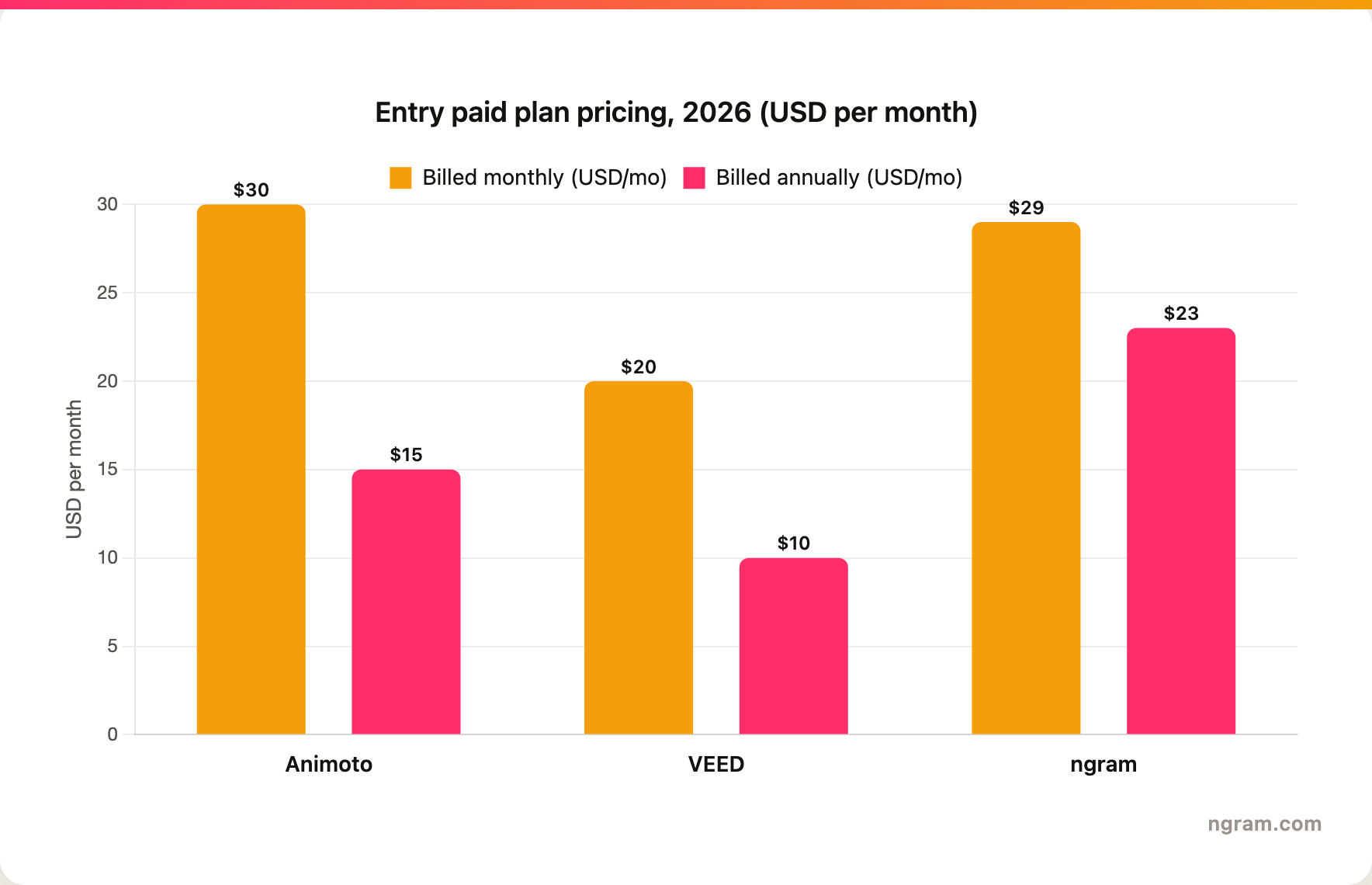
Winner: VEED. On the entry paid tier, VEED's Creator plan is the cheapest either way: $20/mo billed monthly and $10/mo annually, undercutting Animoto's $30 monthly and $15 annual Basic. ngram's $29/mo Basic ($23/mo annually) costs more than both, but it bundles the upstream planning and source-to-finished-video work the other two leave to you, so the right comparison is total time saved, not just the entry sticker.
ngram uses credits. Free includes 600 one-time credits with 720p export and a watermark. Basic is $29/mo, or $23/mo billed annually, with 3,000 credits per month and 720p export. Premium is $59/mo and Ultimate is $299/mo, which is where 1080p and 4K export unlock, and Enterprise is custom. Basic credits refresh monthly and do not roll over, while Premium and Ultimate credits roll over for one billing cycle, so heavy regeneration should still be budgeted intentionally.
Best fit by team and use case
Pick Animoto if your team mostly needs quick template-led videos from existing assets. It is a better fit for lightweight campaigns, event promos, social posts, and simple internal videos where speed matters more than a deeply planned narrative.
Pick VEED if your team needs a broad browser editor for captions, cleanup, avatars, dubbing, and short-form social video. It gives you a stronger path when the source material is real camera or screen footage that needs editing, not just photos waiting to be slotted into a template.
Winner: split decision. Animoto wins for simple template assembly. VEED wins for the broader or more automated video workflow.
Use ngram if the real job is turning messy source material into a finished branded business video. That includes product explainers, sales videos, training clips, launch videos, screen-recording polish, multilingual versions, and social variants that need captions, voiceover, callouts, motion graphics, and brand rules.
1. ngram
Watch how ngram turns an idea into a finished video:
ngram is the best fit when you do not want to begin from either an Animoto template or a VEED timeline. You can start with a prompt, PDF, URL, screenshot, recording, raw video, deck, or product URL, then let the agent plan a script, storyboard, scenes, captions, and CTA before rendering. The decisions Animoto and VEED expect you to bring are made in a reviewable chat instead.
It also covers the production layer in one place: auto captions, AI voiceover, multilingual voiceover, screen-recording polish, product callouts, motion graphics, branded intros and outros, background music, scene transitions, AI image generation, and short AI video b-roll. VEED offers many of these as separate manual tools and Animoto offers a lighter subset, but ngram applies them as part of a single planned build.
What makes ngram different
- Agentic planning before rendering, so the storyboard is reviewed before credits are spent.
- Source-aware inputs across prompts, documents, URLs, screenshots, recordings, raw video, decks, and product URLs.
- Brand kits for logos, colors, fonts, approved and blocked phrases, tone, and visual style.
- Editing through chat, visual chat, script editor, scene regeneration, and a full timeline.
- Exports to Finished videos export as MP4; separate media tools can derive GIF, WebM, PNG, or JPG from supplied media.
Where ngram is honest about its limits
- ngram provides hosted video pages and embeds; a generally available owner analytics surface is not live.
- Public security certifications are not published, so do not treat it as SOC 2 or ISO certified.
- Public API v1 uses self-service bearer API keys.
- Zapier and n8n are available; Make.com is Coming Soon.
Who ngram is best for
ngram is best for marketing, sales, training, product, and founder-led teams that need finished business video from real source material. If your need is genuinely Animoto's quick photo-and-template montage, or VEED's hands-on footage editing for short-form social, keep that tool. If you want an agent to plan, produce, revise, localize, and brand the video from a document or recording, ngram is the stronger path.
Try ngram free, your first video in under 5 minutes. Turn a prompt, doc, URL, deck, or screen recording into a polished, on-brand video without rebuilding it from a blank template. Start free
For a direct ngram comparison, see ngram vs Animoto and ngram vs VEED.
2. Animoto
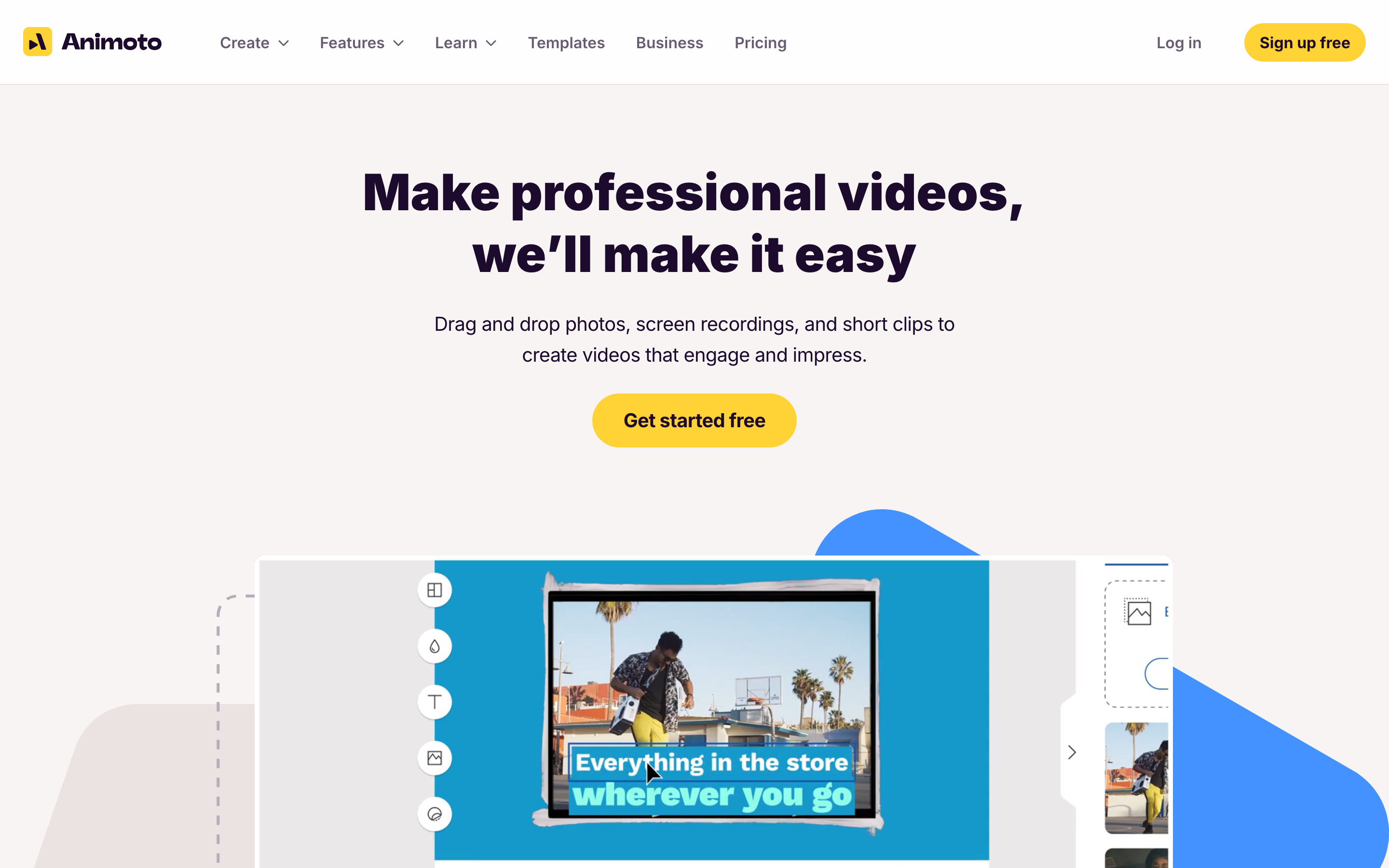
Animoto is the simpler side of this comparison. It is for teams that want a finished-looking video quickly, without learning a professional editor.
Key features
- Drag-and-drop templates for promos, ads, tutorials, and internal videos
- Getty Images stock media, licensed music, text, graphics, and simple animation controls
- Screen and webcam recording inputs for quick explainers or demos
- AI script and video helpers layered onto a template-first editor
- Team plans for brand control, collaboration, and reusable styles
What users say
Users tend to like Animoto because it is approachable. The common praise is speed: non-editors can assemble a decent social or business video without learning a timeline. The tradeoff is ceiling. The moment a team wants frame-level cleanup like VEED's, or wants the tool to interpret a longer source and storyboard it, Animoto's template workflow starts to feel narrow.
Best for
Animoto is best for teams that already know the message and have visual material ready. It is less ideal when the job starts with a long document, a messy recording, or a need for the tool to plan the full video.
3. VEED
VEED is the deeper or more specialized option in this comparison. It fits teams that need more than a quick template and want the tool to support repeatable video production.
Key features
- Browser-based editor for trimming, resizing, captions, cleanup, and publishing formats
- Text-to-video and image-to-video generation alongside third-party AI model access
- Auto-subtitles, AI avatars, dubbing, noise removal, and eye-contact tools
- Brand kits and team features for repeatable short-form production
- Large utility surface for creators who need many small editing jobs in one place
What users say
Users tend to like VEED because it puts a lot of editing jobs in one browser tab. It is useful when captions, resizing, cleanup, and social delivery matter as much as generation. The tradeoff is focus. A team that wants an agent to plan a business video from source material may find VEED broader than necessary.
Best for
VEED is best for teams whose video process includes planning, repurposing, collaboration, or specialist capabilities beyond simple template assembly. It is less ideal when the fastest possible template video is enough.
How we compared these tools
| Criteria | Weight | What we looked at |
|---|---|---|
| AI capabilities | 30 | Source inputs, automatic planning, voiceover, captions, generation, and regeneration |
| Features | 30 | Editing depth, templates, brand controls, collaboration, localization, and export paths |
| Ease of use | 20 | How quickly a non-video user can make a useful first video |
| Value | 15 | Entry price, plan limits, credit or usage constraints, and time saved |
| Support | 5 | Team readiness, enterprise fit, and purchase clarity |
We weighted this around how each tool gets from raw material to a finished video, not around any single editing trick. Animoto scores on accessibility and template speed, VEED on editing depth and its short-form cleanup toolkit, and ngram on planning a branded video from source material before rendering. Prices were checked against each vendor's live pricing page at publish time.
Common questions
Is Animoto better than VEED?
It depends on your raw material. Animoto is better if you have photos and clips and want a polished template video in minutes. VEED is better if you have real camera or screen footage that needs captioning, noise cleanup, dubbing, or an avatar before it is feed-ready. Pick by the kind of editing your content actually requires, not by feature count.
Is VEED cheaper than Animoto?
On the entry paid tier, yes. VEED's Creator plan is $20/mo billed monthly and $10/mo billed annually, below Animoto's Basic at $30/mo monthly and $15/mo annually. The picture can flip on higher tiers, since VEED Pro and Studio climb to $44 and $70 monthly, so confirm the exact plan limits your team needs before purchase.
What is the best Animoto and VEED alternative?
ngram is the strongest alternative when your bottleneck is the planning, not the editing. Where Animoto needs ready assets and VEED needs footage to edit, ngram starts from prompts, URLs, documents, decks, screenshots, or recordings, plans the storyboard for your review, then produces a branded video with captions, voiceover, motion graphics, and editable scenes.
Which tool is best for marketing videos in 2026?
For quick social promos and event recaps from photos and clips, Animoto is the easiest pick. For short-form social where footage needs captions, dubbing, or cleanup before it ships, VEED is stronger. For branded marketing videos written and storyboarded from a document, page, or recording, ngram is the better third option.
Which one should you pick?
The Animoto vs VEED decision comes down to what you start with. Pick Animoto if you have photos and clips and want quick template assembly. Pick VEED if you have real footage that needs a broad browser editor for captions, cleanup, avatars, dubbing, and short-form social video. Use ngram if your real job is turning prompts, docs, URLs, decks, screenshots, recordings, and product pages into finished, branded videos with storyboard review and editable scenes. In 2026, the best tool is the one that matches the starting material, not the one with the longest feature list.
---
Try ngram free, your first video in under 5 minutes. Turn a prompt, doc, URL, deck, or screen recording into a polished, on-brand video without rebuilding it from a blank template. Start free








