
Every product launch lives or dies in the first 48 hours. And the single most effective way to build pre-launch anticipation? A product launch teaser video.
According to Wyzowl's 2026 State of Video Marketing report, 91% of businesses now use video as a marketing tool, and 85% of consumers say they've been convinced to buy a product after watching a video. Yet most product teams still rely on blog posts, email blasts, and static social images to announce their launches.
The gap between what works and what most teams do is massive. And it's a gap you can close with a well-crafted product launch teaser video.
This guide walks you through exactly how to create one, from scripting to distribution, backed by real data and a modern AI-powered workflow that takes minutes instead of weeks.
What Makes a Product Launch Teaser Video Work
A great teaser video isn't a product demo crammed into 30 seconds. It's a deliberate piece of storytelling designed to create curiosity and drive a specific action.
Here's what separates teaser videos that convert from ones that get skipped:
Hook in the first 3 seconds. Research shows that 71% of viewers decide within the first few seconds whether a video is worth watching. Your opening frame needs to stop the scroll, whether that's a bold question, a surprising visual, or a pain point your audience feels deeply.
Keep it short. The ideal teaser length is 15-60 seconds. Videos under one minute see a 66% completion rate, compared to just 22% for videos over 20 minutes. For teasers specifically, 15-30 seconds hits the sweet spot on social platforms like TikTok, Instagram Reels, and LinkedIn.
Focus on one message. The temptation to showcase every feature is strong. Resist it. The best teasers zero in on a single pain point or a single "wow" moment. One clear takeaway beats five diluted ones.
End with a clear CTA. Every teaser should direct viewers somewhere specific, whether that's a waitlist signup, a landing page, or a pre-order link.
Here's how video completion rates drop as length increases:
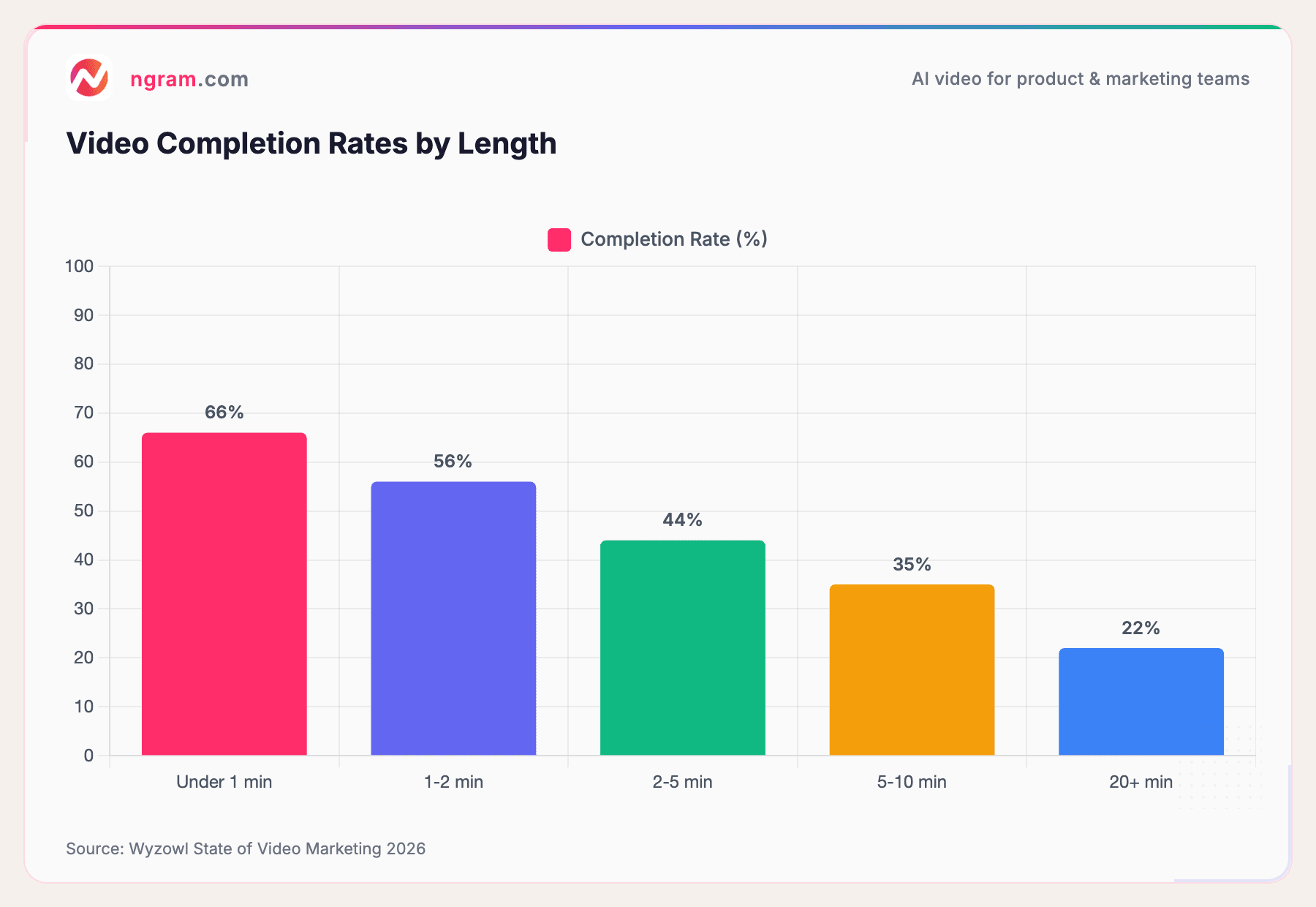
Source: Wyzowl State of Video Marketing 2026
The takeaway is clear: if your teaser runs past 60 seconds, you're losing a third of your audience before they ever see your CTA.
6 Steps to Create Your Product Launch Teaser Video
Whether you're launching a SaaS product, a physical product, or a major feature update, here's the step-by-step process for creating a teaser video that drives real results.
Step 1: Define Your Audience and Goal
Before you open any editing tool, answer two questions:
- Who is this for? A teaser targeting developers looks completely different from one targeting marketing managers. Define your persona, their pain point, and the emotional trigger that will grab their attention.
- What action do you want them to take? Join a waitlist? Visit a landing page? Share the video? Every creative decision flows from this single goal.
According to TechnoTrenz's product launch data, only 20% of products remain active after two years. The ones that survive tend to nail their launch positioning from day one, and a teaser video is where that positioning gets tested first.
Step 2: Write a Script That Builds Anticipation
The script is the backbone of your teaser. For a 30-second video, you're working with roughly 60-75 words. Every word has to earn its place.
A proven teaser structure:
- Hook (3-5 seconds): Open with the pain point or a bold claim
- Tease (15-20 seconds): Show just enough of the solution to create curiosity. Use visuals, motion, and sound to hint at what's coming without revealing everything.
- CTA (5 seconds): Tell viewers exactly what to do next
Tools like ngram's AI script generation can help you go from a rough idea to a polished script in minutes. You feed in your product context, audience, and goal, and get back a structured script ready for storyboarding.
Step 3: Gather Your Visual Assets
You don't need a film crew. Most effective teaser videos are built from materials you already have:
- Screen recordings of your product in action
- Product screenshots or UI mockups
- Logo and brand assets (fonts, colors, intro/outro)
- Existing marketing copy (landing page text, feature descriptions)
- Customer quotes or beta tester feedback
The key insight: you don't need to create assets from scratch. The best product launch teaser video creators let you start from what you already have and build around it.
Step 4: Choose the Right Teaser Format
Not all teasers look the same. Pick the format that matches your product and audience:
- Screen recording teasers: Perfect for SaaS products. Show the product in action with smart zoom, cursor emphasis, and callouts.
- Motion graphics teasers: Ideal for abstract concepts, platform launches, or when you want a polished, branded look. ngram's motion graphics engine handles this natively.
- AI-generated visual teasers: Use AI video models to create product shots, abstract backgrounds, or stylized footage that matches your brand.
- Live-action teasers: Best for physical products or when human presence adds authenticity.
For most SaaS and tech product launches, a combination of screen recording and motion graphics delivers the best results. You get the credibility of real product footage with the polish of professional animation.
Step 5: Edit for Pacing, Music, and Polish
Pacing makes or breaks a teaser. Here's what to get right:
- Cut aggressively. Every second of dead air or slow transition weakens the impact. If a scene doesn't advance the story, cut it.
- Add music that matches your tone. Upbeat and energetic for consumer launches, more measured and confident for B2B. The right track sets the emotional context before a single word is spoken.
- Use captions. 69% of people watch video on smartphones (Wyzowl), often without sound. Captions aren't optional, they're essential.
- Apply brand consistency. Colors, fonts, logo placement, and transition style should match your brand guidelines. This is where a brand kit pays for itself across every video you create.
Step 6: Export for Multiple Formats
Your teaser needs to live on multiple platforms, and each platform has different requirements:
- 16:9 for YouTube, website embeds, and email
- 9:16 for TikTok, Instagram Reels, and YouTube Shorts
- 1:1 for LinkedIn and Facebook feeds
Exporting three versions of the same video used to mean three editing sessions. With tools that support multi-format export, you render once and get all three.
Here's how the traditional video production process compares to an AI-powered workflow:
| Traditional Production | AI-Powered (ngram) | |
|---|---|---|
| Timeline | 3-8 weeks | Under 30 minutes |
| Cost | $1,000-$6,000 per video | Included in subscription |
| Revisions | Days per round | Minutes per round |
| Brand consistency | Depends on editor | Automatic via brand kit |
| Multi-format export | Manual re-editing | One-click |
Traditional production data from Advids
How ngram Makes Product Launch Teasers Easy
We built ngram specifically for teams that need professional video without the production overhead. Here's how the workflow looks for a product launch teaser:
Start from what you have. Drop in your product URL, screenshots, screen recordings, a PDF or deck, a rough script, or even just a landing page. ngram extracts what it needs and builds a coherent story from your existing materials.
Review before rendering. ngram generates a script and scene-by-scene storyboard before building the video. You review the plan, tweak the messaging, and approve the direction, all before a single frame is rendered. This is the fastest point to iterate.
Stay on brand automatically. Define your brand kit once (logo, colors, fonts, intro/outro) and every teaser you create is consistent. No more guessing whether the designer used the right hex code.
Refine in plain language. Don't like the pacing of scene 3? Just say "make scene 3 faster and add more emphasis on the pricing." ngram understands natural language edits, no timeline scrubbing required.
Export everywhere. Render your teaser in 16:9, 9:16, and 1:1 with captions included. One video, every platform.
The result: a polished, on-brand product launch teaser video in minutes, not weeks.
Ready to create your first teaser? ngram turns your raw content into polished, on-brand launch videos in minutes. Try it free
Where to Distribute Your Product Launch Teaser
Creating the video is half the battle. Distribution determines whether your teaser actually reaches the right people.
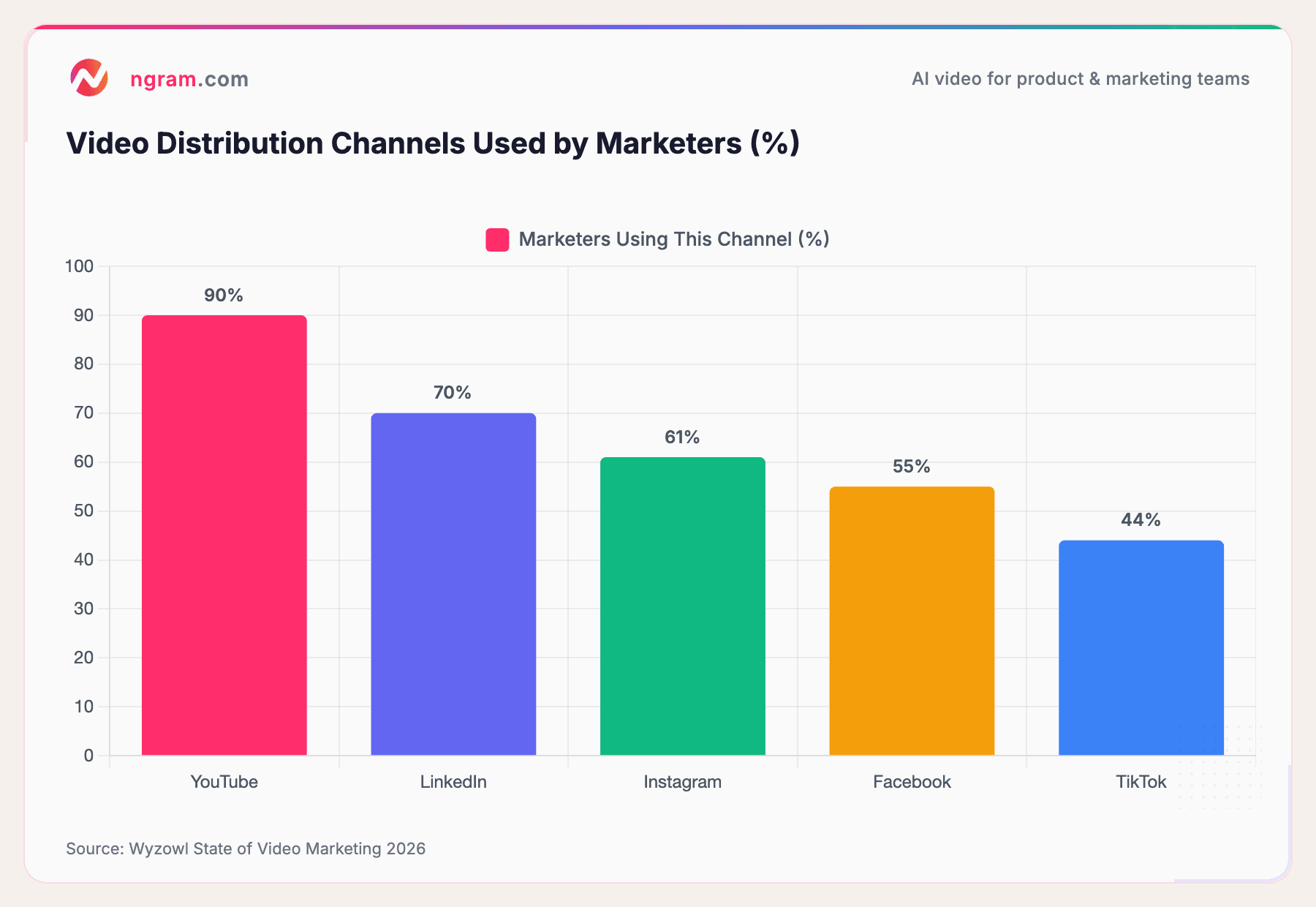
Here's where marketers are distributing video content in 2026:
Source: Wyzowl State of Video Marketing 2026
YouTube dominates at 90%, but for B2B product launches, LinkedIn is where your decision-makers live.
Distribution timing matters. The most effective pre-launch campaigns begin 3-6 months before launch day, with engagement peaking 2-3 weeks before the actual launch. Plan your teaser to drop in that peak window.
A smart distribution playbook for product launch teasers:
- LinkedIn (B2B): Native upload, not just a YouTube link. Native videos get significantly more reach on LinkedIn.
- YouTube: Upload as a Short (vertical) and a standard video (horizontal). Cover both formats.
- Twitter/X: Teasers under 30 seconds perform best here. Lead with the hook.
- Email: Embed the teaser in your announcement email. Early access campaigns see a 42.1% open rate when paired with video.
- Website/Landing page: Embed above the fold. Adding video to a landing page can boost conversions by up to 86%.
The Data: Does Video Actually Drive Launch Success?
Let's look at what the numbers say about video's impact on product launches.
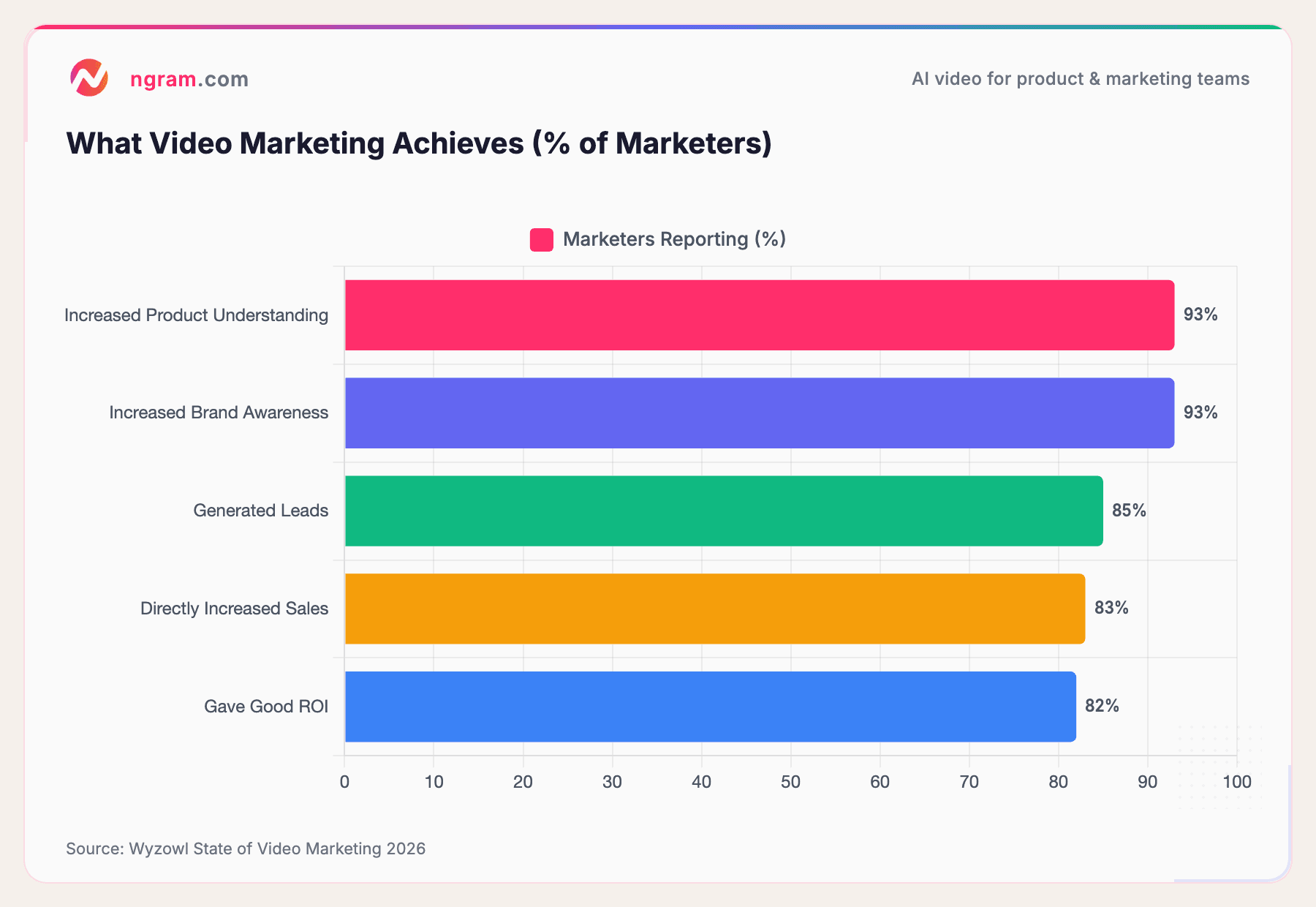
Video doesn't just make launches look better, it measurably improves every metric that matters:
Source: Wyzowl State of Video Marketing 2026
93% of marketers say video increased their audience's understanding of their product, and 83% report that video directly increased sales.
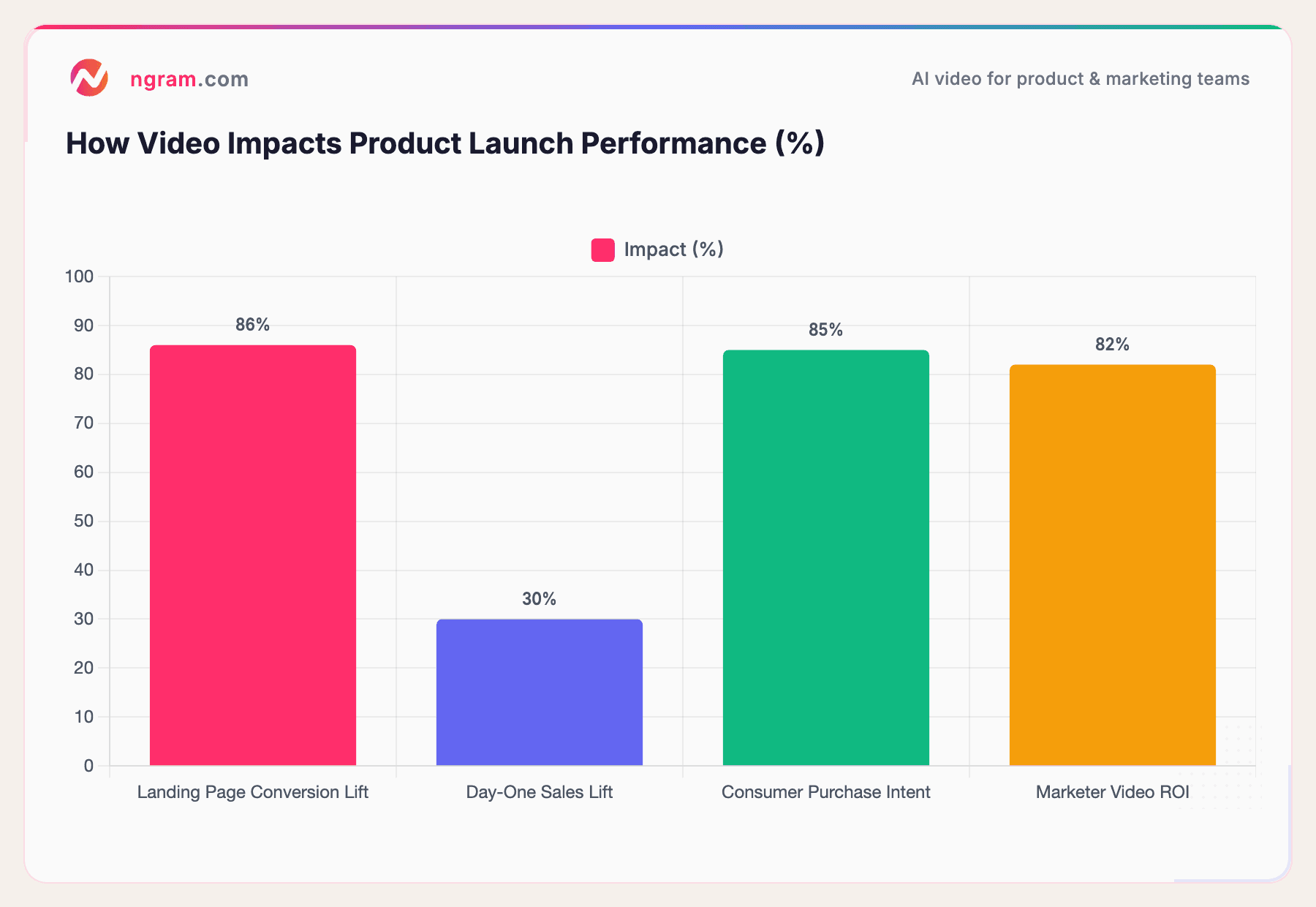
The launch-specific data is even more compelling:
- Landing page conversions: Adding video to a landing page can boost conversion rates by up to 86%
- Day-one sales: Companies that invest in pre-launch marketing (including video) see up to 30% higher day-one sales compared to those that don't
- Real-world proof: Dropbox's explainer video famously helped them gain 70,000 new subscribers in 24 hours. Tesla's Model 3 teaser campaign generated over 325,000 pre-orders worth $14 billion before the car was available.
Sources: industry research, CB Insights / Medium, Wyzowl
The data is unambiguous: video is the highest-ROI asset you can create for a product launch. And with AI-powered tools bringing production costs close to zero, there's no reason to launch without one.
Frequently Asked Questions
How long should a product launch teaser video be?
15-60 seconds is the optimal range. Videos under one minute have a 66% completion rate, while anything over 2 minutes drops to 44%. For social platforms like TikTok and Instagram Reels, aim for 15-30 seconds. For YouTube or website embeds, you can stretch to 45-60 seconds.
How much does it cost to create a product launch teaser video?
Traditional production runs $1,000-$6,000 for a 60-second teaser, with timelines of 3-8 weeks. AI-powered tools like ngram bring this down to the cost of a monthly subscription, with production time measured in minutes. The quality gap between AI-generated and traditionally produced videos has narrowed dramatically in 2025-2026.
What should a product teaser video include?
Every effective teaser has three elements: a hook that grabs attention in the first 3 seconds, a tease that reveals just enough to create curiosity (typically a key pain point being solved or a standout feature), and a clear CTA directing viewers to take a specific action.
When should you release a teaser video before launch?
Start your pre-launch campaign 3-6 months before launch day. Release your teaser during the engagement peak, which is typically 2-3 weeks before launch. This gives your audience enough time to build anticipation and share the teaser organically.
Can you create a product launch video with AI?
Yes, and the results have improved dramatically. AI video tools can now generate scripts from product context, create motion graphics and visual effects, add professional voiceovers, and handle multi-format export, all in minutes. The AI video generation market is projected to reach $946 million in 2026, growing at over 34% CAGR, reflecting rapid adoption across product and marketing teams.
What's the difference between a teaser video and a product demo?
A teaser is designed to create curiosity and anticipation, it hints at what's coming without revealing everything. A product demo is designed to educate and convert, showing the product in full detail. Teasers come before launch (or at the moment of announcement) to build buzz. Demos come after, when prospects want to understand the product deeply. Many successful launches use both: a teaser to generate initial interest, followed by a demo to close the deal.
Start Creating Your Product Launch Teaser
The teams that win their product launches in 2026 aren't the ones with the biggest video budgets. They're the ones that move fast, stay on brand, and put video at the center of their launch strategy.
92% of marketers plan to maintain or increase their video spending this year. The question isn't whether to create a launch teaser video, it's how quickly you can ship one.
With AI-powered video tools, the answer is: today. Create your first product launch teaser with ngram and see how fast you can go from idea to published video.