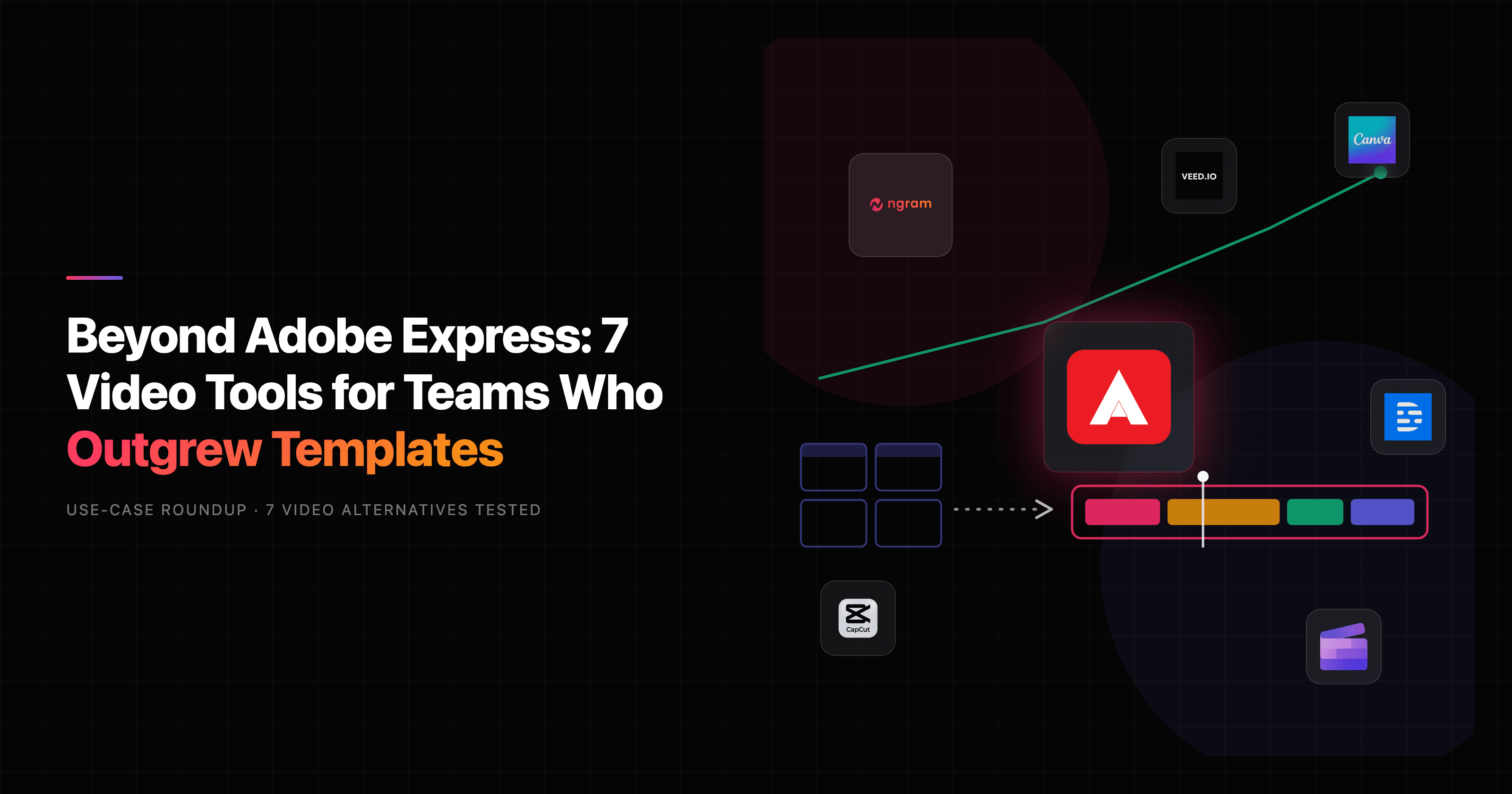

If you run video for a marketing, product, or social team and you have been treating Adobe Express as your video tool, you have probably hit the same wall everyone hits: it is a fantastic quick-design app that happens to do light video, not a video app that happens to do design. That distinction matters once your videos need a script, a voiceover, on-brand pacing, and a version for three different channels. This guide looks at Adobe Express alternatives through one lens only: which tool actually gets a finished video out the door.
Adobe Express earns its reputation. It is genuinely good at what Adobe built it for: social posts, flyers, thumbnails, quick image edits, and short clip trims, all from a browser with a huge template library and one-click generative AI. For a solo marketer who needs a Reel cropped and captioned before lunch, it is hard to beat.
But "create-anything" has an edge. The moment the job stops being a designed asset and becomes a real video, a narrated product walkthrough, a launch explainer, a localized demo, Adobe Express starts asking for skills and time it was never meant to need. So below, we line up the strongest Adobe Express alternatives for video work, lead with the one we think wins the finished-video job (ngram), and stay honest about where Adobe Express and the rest still pull ahead.
Where Adobe Express falls short for video teams
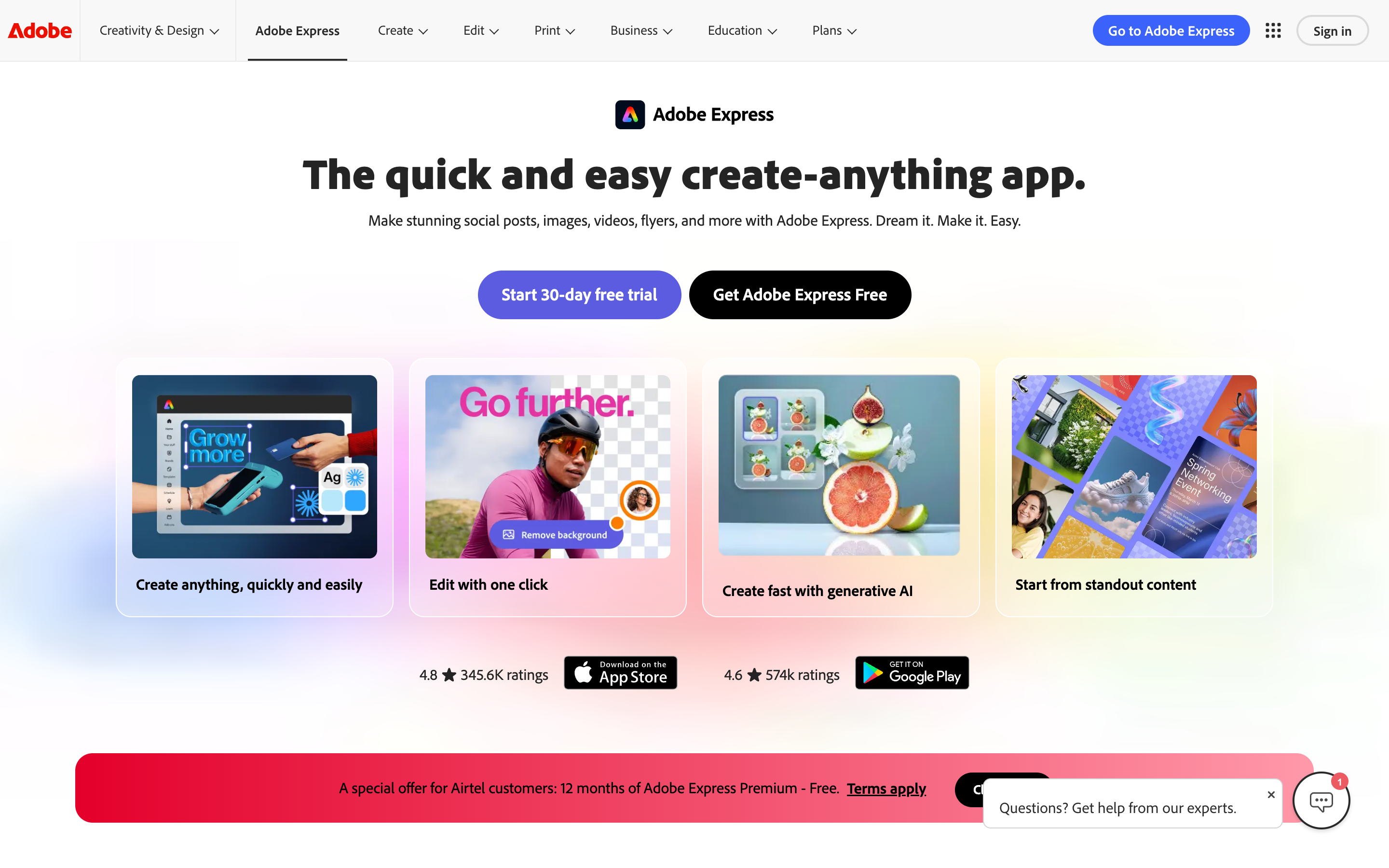
Adobe Express is a design-first product, and that shapes every limitation people run into when they push it toward serious video.
The video editor is deliberately basic. Reviewers are blunt about it: Adobe Express video editing is fine for light trims and text overlays but "nowhere near Premiere Pro," with weak audio control and no real mixing. There is no scripting, no AI voiceover from a script, and no storyboard step. You are assembling clips by hand, which is exactly the work busy teams want to skip.
Useful pieces sit behind Premium. Background removal, the larger asset library, brand kits, and most generative AI credits require the $9.99/month Premium plan. Several Reddit and G2 reviewers describe signing up expecting a cheap tool and finding the genuinely useful features gated, with Creative Cloud upsells layered on top.
Reliability complaints cluster around video. Adobe's own community forums carry recurring threads about uploads that fail to process, previously edited videos that will not reload, blurry frames when splitting clips, and slow 4K uploads on mobile. None of that is fatal for a quick social post, but it is painful when a launch video is due.
It does not adapt the message. Adobe Express does not know that a LinkedIn launch is not a sales demo. It hands you a canvas and templates; deciding what to say, writing the script, and reformatting for each channel is all on you. That is the most time-consuming part of video, and it is the part Adobe Express leaves untouched.
For a quick social graphic, none of this matters. For a team that needs the right video every time the message changes, it adds up fast.
Quick comparison
| Tool | Best For | Starting Price | Key Differentiator |
|---|---|---|---|
| ngram | Finished business video from a doc, URL, or recording | Free / $29/mo | Plans script and storyboard, then generates and edits |
| Canva | The closest all-round Adobe Express swap | Free / $15/mo | Huge template library plus design and video in one place |
| CapCut | Short-form social clips and trending effects | Free / $9.99/mo | Best-in-class mobile and TikTok-style editing |
| Clipchamp | Quick exports inside the Microsoft ecosystem | Free / $11.99/mo | Free AI editing with no watermark on export |
| VEED | Browser editing with auto subtitles | Free / $12/mo | Transcript-based editing and team collaboration |
| Descript | Editing video by editing the transcript | Free / $24/mo | Word-processor-style editing and overdub voice |
| InVideo AI | Prompt-to-video for social and ads | Free / $20/mo | Type a prompt, get a rough cut with stock and voiceover |
1. ngram
Watch how ngram turns an idea into a finished video:
Here is the honest framing first, because it is the whole point of this list. ngram is the strongest Adobe Express alternative when your job is a finished, narrated business video built from source material you already have. It is not a design app, and it is not where you would crop a single Instagram thumbnail. If that finished-video job is what keeps eating your week, ngram is built for exactly it.
What makes ngram stand out
Adobe Express starts with a blank canvas and templates. ngram starts with your message. You give it a prompt, a doc, a product URL, a deck, or a screen recording, and it writes a script, maps a storyboard, and generates the video, with captions, voiceover, motion graphics, and brand treatment applied automatically. You review the plan before anything renders, so direction stays in your hands.
That "plan first, generate second" flow is the part Adobe Express has no answer for. Instead of dragging clips on a timeline, you tell ngram your audience, goal, and channel, and it adapts the script's tone, length, and call to action. Need the same message as a LinkedIn cut, a website cut, and an ad cut? It supports separate channel-cut preparation. Need a German version? It translates the script, captions, and voiceover, and re-syncs lip movement for avatar videos.
Editing happens in plain language. You type "make this shorter," "create a training version," or "swap the intro," and ngram applies the change across script, visuals, and audio. There is also a full timeline editor when you want frame-level control after the first cut. For screen recordings, it adds cursor smoothing, click emphasis, dead-air trimming, and smart zooms on its own, which is the work Adobe Express expects you to do by hand.
Brand kits keep every output on-brand: logo, colors, fonts, intros, and outros applied to every video automatically. For a deeper feature-by-feature look, see our ngram vs Adobe Express comparison, and you can read more about ngram's AI video editing.
Key features:
- Plan first, generate second - Review the script and storyboard before ngram renders anything.
- Start from what you have - Text, docs, URLs, decks, screenshots, or screen recordings become the source.
- Context-aware output - Tell ngram the audience, goal, and channel, and it adapts the whole video.
- AI editing in plain language - Cut, restructure, translate, and reformat by describing the change.
- MP4 export - finished MP4 with captions; prepare channel-specific cuts separately.
- Brand kits - Logo, colors, fonts, intros, and outros applied to every video automatically.
Pros
- ✅ Turns a rough doc or recording into a scripted, narrated video without timeline skills
- ✅ Reformats one video for LinkedIn, web, and ads in a few clicks
- ✅ Localizes script, captions, and voiceover into other languages
- ✅ Generous free plan to test the full workflow before paying
Cons
- ❌ Web-based only, with no offline desktop app
- ❌ Overkill if you only need a quick designed graphic or a single thumbnail
- ❌ Not a static-design tool, so flyers and print layouts are not its job
Who is ngram best for?
Marketing, product marketing, growth, sales, and customer success teams that need polished videos out the door without a freelancer budget or an editor on staff. If your week is full of product updates, launches, demos, and explainers that each need their own structure, ngram is the fit. ngram has a generous free plan, with paid plans starting at $29 per month.
Ready to try ngram? Create your first video in under 5 minutes. Start free
2. Canva
Canva is the alternative most Adobe Express refugees land on first, and for good reason: it does almost everything Adobe Express does, usually with a deeper bench. It pairs a graphic-design suite with a built-in video editor, so social posts, presentations, and short videos all live in one workspace.
Canva reports more than 230 million monthly active users and a template library north of a million, which dwarfs Adobe Express's selection. Reviewers consistently call it the most complete Adobe Express replacement for teams that want design and light video in the same tool, with stronger collaboration and a more generous free tier.
Key features
- Massive template library - Over a million templates across social, video, and print formats.
- Magic Studio AI - Text-to-image, magic edit, and background removal built in.
- Brand Kit - Logos, colors, and fonts shared across a team workspace.
- Built-in video editor - Timeline trims, transitions, and stock footage.
- Team collaboration - Real-time editing, comments, and shared folders.
What users say
Users love that Canva is easy enough for a non-designer to look professional in minutes, and that the free tier is genuinely usable. The praise sounds a lot like Adobe Express praise, which is the point: for static design and quick clips, people find Canva broader and friendlier. The common gripe is the same one Adobe Express gets, though. Once a video needs real scripting, precise audio, or fine timeline control, Canva's editor feels like a design tool stretched into video, and the best assets push you toward the paid plan.
Pros
- ✅ The closest like-for-like Adobe Express replacement for design plus light video
- ✅ Larger template library and a stronger free tier than Adobe Express
- ✅ Excellent for team collaboration and shared brand assets
Cons
- ❌ Video editing is still template-and-timeline, with no scripting or AI voiceover from a script
- ❌ Best AI features and premium assets sit behind Canva Pro
Best for
Teams that want one tool for social graphics, decks, and the occasional short video, and who valued Adobe Express's breadth but wanted more templates and better collaboration. Canva Pro starts at about $15 per month. If your real bottleneck is finished video rather than design, see how the two stack up in our ngram vs Canva Video comparison.
3. CapCut

CapCut is the tool to beat for short-form social video. Owned by ByteDance, it grew up alongside TikTok and is purpose-built for fast, trend-driven clips on mobile and desktop.
CapCut is one of the most downloaded video editors in the world, with a free tier that covers far more than Adobe Express's clip trims: auto-captions, trending effects, transitions, and a deep library of sounds and templates. For creators and social teams who live in vertical video, it is faster and more capable than Adobe Express at the specific job of cutting a punchy clip.
Key features
- Auto-captions and subtitles - Accurate, styleable captions generated automatically.
- Trending effects and templates - Built around what is working on TikTok and Reels right now.
- Mobile-first editing - A genuinely strong phone editor, not a cut-down version.
- AI tools - Background removal, auto-cut, and text-to-speech.
- Huge audio library - Trending sounds and royalty-free music.
What users say
Creators rave about how quickly CapCut gets a clip from raw footage to publish-ready, especially on a phone. The effects and template ecosystem keep content on-trend with little effort. The flip side: CapCut is built for consumer and creator short-form, not corporate video. Reviewers note watermarks and feature gates on the free plan, occasional export friction, and that it is not the place for a structured, narrated business explainer. There have also been ownership and data-privacy questions some enterprise teams weigh.
Best for
Creators and social teams making TikToks, Reels, and Shorts who want trending effects and the best mobile editor available. CapCut has a free tier, with CapCut Pro around $9.99 per month.
4. Clipchamp
Clipchamp is Microsoft's answer to browser-based video editing, and it is the strongest pick if your team lives in the Microsoft 365 world. It bundles a straightforward timeline editor with stock assets, templates, and AI features.
The standout, and the thing Adobe Express cannot match, is that Clipchamp lets you use its AI editing features for free and export with no watermark, which is rare. It is included with many Microsoft 365 subscriptions, so for a lot of teams it is effectively already paid for.
Key features
- Watermark-free free tier - Export at 1080p without paying or branding the video.
- AI voiceover and auto-compose - Generate narration and rough cuts from text.
- Microsoft 365 integration - Saves to OneDrive and fits the Office workflow.
- Templates and stock - A solid library for quick marketing clips.
- Screen and webcam recording - Built in for simple explainers.
What users say
Users appreciate that Clipchamp is approachable, free of watermarks, and already in their Microsoft stack, which removes a budgeting conversation entirely. For simple marketing videos and quick exports, it gets the job done. The criticisms: it is Windows and web only with no Mac app, the editor is basic next to dedicated tools, and the AI features, while free, are simpler than what AI-first video tools offer. It is a better Adobe Express alternative for plain video editing than for generating a video from scratch.
Best for
Teams already on Microsoft 365 who want a free, watermark-free editor for simple marketing and internal videos. Clipchamp is free, with a premium tier around $11.99 per month.
5. VEED
VEED is a browser-based video editor that leans into AI subtitles, transcript editing, and team collaboration. It targets the same "no desktop software" crowd as Adobe Express but with a sharper focus on video.
VEED is used by teams at a long list of recognizable brands and is known for fast, accurate auto-subtitles in dozens of languages. Where Adobe Express treats video as a side feature, VEED treats it as the main event, with subtitle tools, screen recording, and brand collaboration that marketing and content teams actually use.
Key features
- Auto-subtitles - Accurate captions in many languages, fully styleable.
- Transcript-based editing - Edit the video by editing its text.
- Screen and webcam recorder - Capture and edit in one place.
- AI tools - Background removal, eye contact correction, and a clip maker.
- Brand and collaboration - Shared workspaces and brand kits.
What users say
Reviewers like that VEED is fast to learn, runs entirely in the browser, and nails subtitles, which is often the whole reason people pick it. Compared to Adobe Express, it is a more serious video tool for marketers. The common complaints are around pricing creeping up as you add seats and features, occasional render slowness on longer projects, and an editor that is capable but not as deep as desktop NLEs. VEED has a free tier, with paid plans starting around $12 per month.
Best for
Content and marketing teams that need clean subtitles, browser-based editing, and collaboration without installing software. For a closer look, see our ngram vs VEED comparison.
---
Looking for the fastest way to create professional videos? ngram turns your screen recordings, docs, and images into polished videos in minutes. Try ngram free
---
6. Descript

Descript took a genuinely different approach to editing: you edit video and audio by editing a transcript, like a text document. Delete a sentence in the transcript, and the matching footage disappears. For talking-head, podcast, and tutorial content, it is a revelation.
Descript is widely used by podcasters, YouTubers, and content teams, and its Overdub voice cloning and "Studio Sound" cleanup are standout features. Adobe Express has nothing like transcript-based editing, so for anyone whose videos are mostly people talking, Descript removes the most tedious part of the job.
Key features
- Transcript-based editing - Edit footage by editing text.
- Overdub - Clone a voice to fix or add narration without re-recording.
- Studio Sound - One-click cleanup of muddy audio.
- Screen and audio recording - Built in for explainers and podcasts.
- Filler-word removal - Strip "um" and "uh" automatically.
What users say
Users describe Descript as the tool that finally made editing feel approachable, especially for fixing spoken mistakes without re-recording. The transcript workflow gets near-universal praise for talking-head and podcast content. The limitations: it is built around spoken-word footage, so it is less suited to heavily designed, motion-graphics-driven marketing videos, and the AI features have a learning curve. Descript has a free tier, with paid plans starting around $24 per month. See how it compares in our ngram vs Descript comparison.
Best for
Podcasters, YouTubers, and teams whose videos are mostly people talking, who want to edit by editing words.
7. InVideo AI
InVideo AI is the prompt-to-video option on this list. You type a prompt describing the video you want, and it assembles a rough cut with stock footage, AI voiceover, captions, and music, which you then refine through follow-up prompts.
InVideo has millions of users and positions itself squarely at marketers and social creators who want speed over fine control. Unlike Adobe Express, it actually generates a structured video from an idea rather than handing you a canvas, which is why it shows up on so many AI-video shortlists.
Key features
- Prompt-to-video - Describe the video and get a full rough cut.
- Text-based refinement - Iterate by giving instructions in plain language.
- Large stock library - Millions of clips, images, and music tracks.
- AI voiceover - Multiple voices and languages.
- Templates - For ads, social, and explainers.
What users say
Marketers like how fast InVideo AI gets from a blank prompt to a watchable draft, which is great for volume and quick social content. It is a real step up from Adobe Express for generating video rather than editing it. The honest caveats from reviewers: output can feel generic and stock-heavy, the AI voiceover is improving but not always natural, and getting exactly the result you want sometimes takes many prompt iterations. InVideo has a free tier, with paid plans starting around $20 per month.
Best for
Marketers and creators who want to generate high volumes of social and ad video quickly from text prompts, and who are comfortable trading some control for speed.
How the AI video market is reshaping this decision
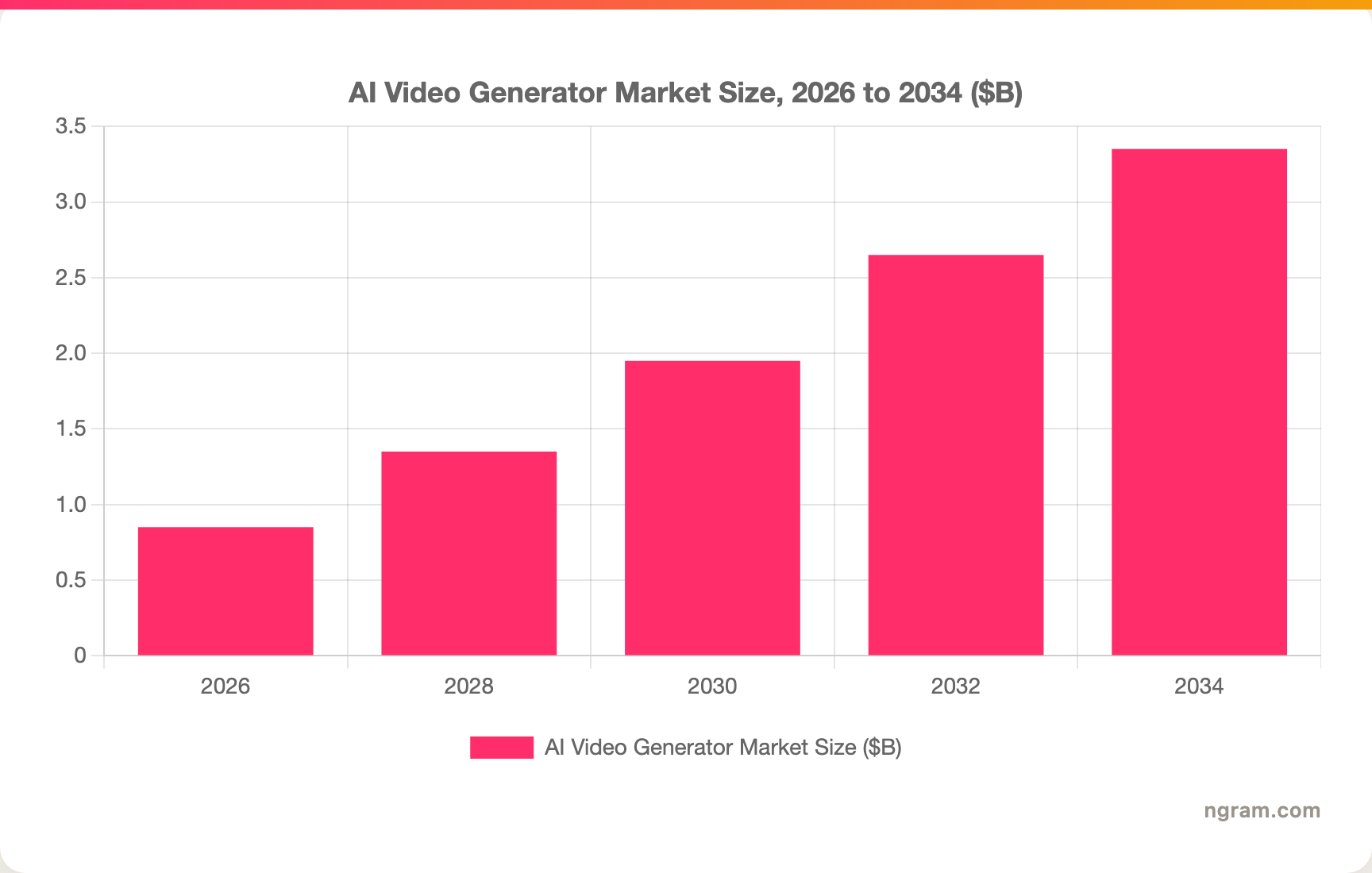
A quick aside on why this question even matters now. The AI video generation market is on a steep climb, projected to grow from about $847 million in 2026 to $3.35 billion by 2034, a compound annual growth rate near 18.8%, according to Fortune Business Insights. That growth is pulling capability that used to require a tool like Premiere Pro into browser-based products.
Here is the broader market trajectory:
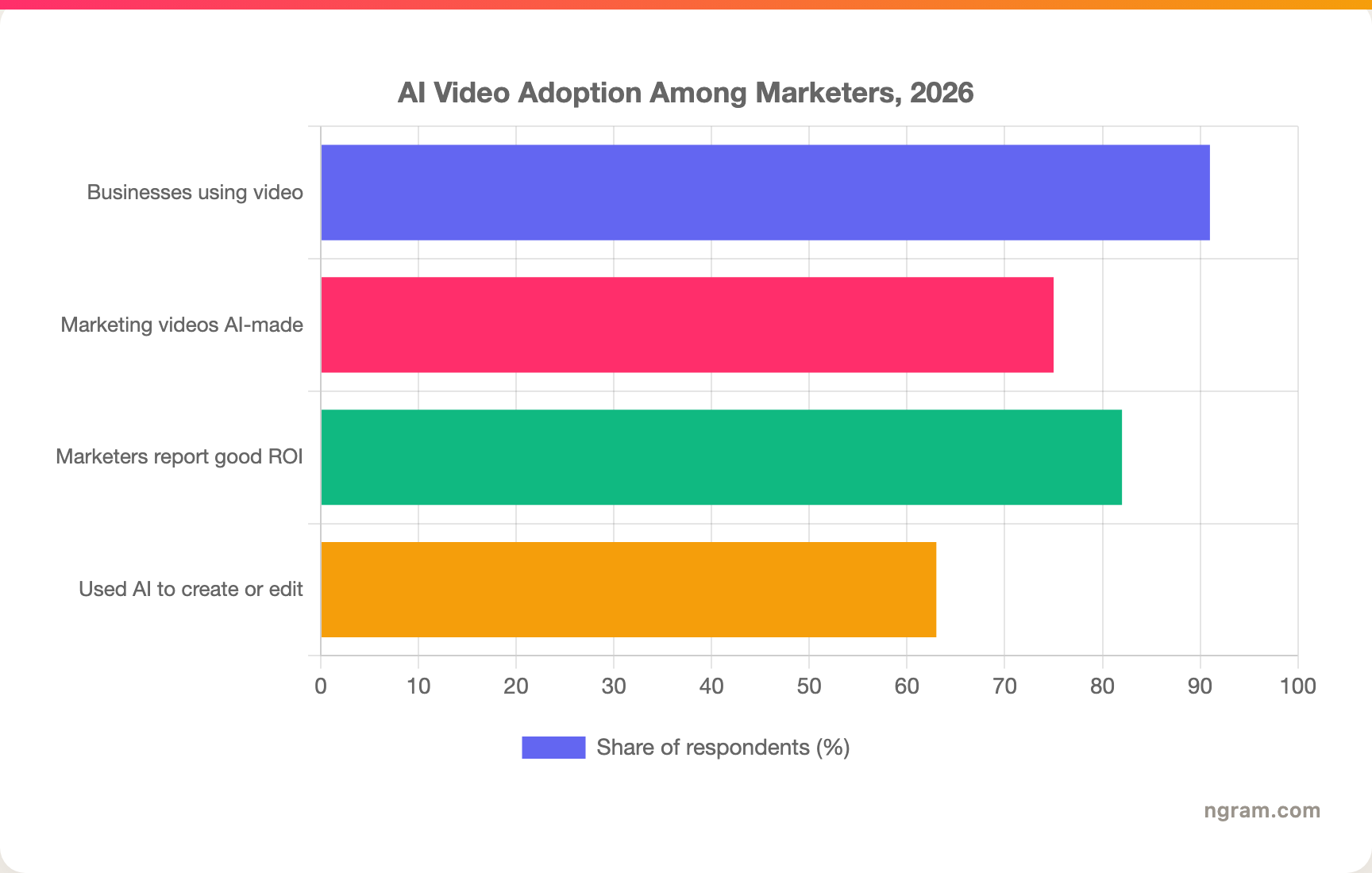
The demand side explains the rush. Wyzowl's 2026 State of Video report found 91% of businesses now use video as a marketing tool, up from 86% in 2024, and 82% of marketers say video delivers good ROI. Crucially, 75% of marketing videos are now AI-generated or AI-assisted, and 63% of video marketers have used AI tools to create or edit, which has helped drop the median production cost from $4,200 to $2,500 per finished minute.
That is the context for choosing an Adobe Express alternative. The teams winning here are not the ones with the biggest template library; they are the ones whose tool removes the script-and-edit grind. Here is how often marketers now reach for AI in the workflow:
How we compared these tools
We did not just list tools. We tested them, read hundreds of user reviews across G2, Capterra, Reddit, and Product Hunt, and compared them across five weighted criteria tuned for design-and-video apps like Adobe Express:
| Criteria | Weight | What we looked at |
|---|---|---|
| Features | 25% | Scripting, editing depth, AI generation, voiceover, and export options |
| Ease of Use | 25% | How fast a non-editor gets a watchable result |
| AI Capabilities | 20% | Generation, auto-editing, captions, and language support |
| Value | 20% | What the free tier covers and where paid gates land |
| Template Library | 10% | Breadth and quality of starting points (replaces Support for this category) |
We also factored in:
- Real user reviews from G2, Capterra, TrustRadius, Reddit, and Product Hunt, weighing qualitative sentiment rather than star scores
- Market presence and company stability, including user base and years in market
- Integration ecosystem with common business tools
- Industry trends and where AI video is heading
Adobe Express sits in a crowded "design plus light video" category, so we weighted the criteria that separate a quick-clip tool from one that can carry a real video project.
Frequently Asked Questions
What is the best Adobe Express alternative?
It depends on the job. For design plus light video, Canva is the closest like-for-like swap with a bigger template library. For finished, narrated business videos built from a doc, URL, or recording, ngram is the strongest pick because it scripts, storyboards, and edits for you. For short-form social clips, CapCut is hard to beat.
Is there a free alternative to Adobe Express?
Yes. Canva, CapCut, Clipchamp, VEED, Descript, and InVideo all offer free tiers, and ngram has a generous free plan. Clipchamp stands out because it lets you export 1080p video with no watermark for free, which Adobe Express does not.
How does ngram compare to Adobe Express?
Adobe Express is a design-first app that does light video editing; ngram is a video engine that turns source material into a finished, narrated video. Adobe Express is better for social graphics, flyers, and quick clip trims. ngram is better when you need a scripted explainer, demo, or launch video, plus MP4 and multilingual versions. See the full ngram vs Adobe Express comparison.
Why do video teams look beyond Adobe Express?
Adobe Express has no scripting or storyboard step, basic audio control, and gates background removal and brand kits behind its Premium plan. Its community forums also carry recurring video-upload and reload bugs. For teams producing real video on a schedule, those gaps push them toward dedicated video tools.
Can Adobe Express do AI video generation?
Adobe Express offers generative AI for images and some assist features, but it does not generate a full scripted video from a prompt or document the way ngram or InVideo AI do. Its video side is editing-focused, not generation-focused.
Which Adobe Express alternative is best for social media?
CapCut for short-form trend-driven clips, Canva for mixed social graphics and video, and InVideo AI for generating social video from prompts. ngram fits when social content is part of a larger workflow and you want a finished video with separately prepared channel cuts.
Which one should you pick?
The Adobe Express alternatives market splits cleanly by what you are actually making. If you want design plus the occasional short clip, Canva is the natural step up with more templates and better collaboration. If your week is real video, scripted explainers, product demos, launches, and localized versions, ngram is the strongest fit because it handles the script-and-edit grind that Adobe Express leaves to you. CapCut owns short-form social, and Clipchamp wins if you are already inside Microsoft 365 and want a free, watermark-free editor. The one reader who should stick with Adobe Express is the solo marketer whose output is mostly designed graphics with light video on the side, that is the job Adobe Express was built for. For everyone whose bottleneck is finished video, a five-minute test is the fastest way to see the difference.
---
Try ngram free, your first video in under 5 minutes. Turn docs, URLs, and screen recordings into polished, on-brand videos without touching a timeline. Start free