
Quick comparison
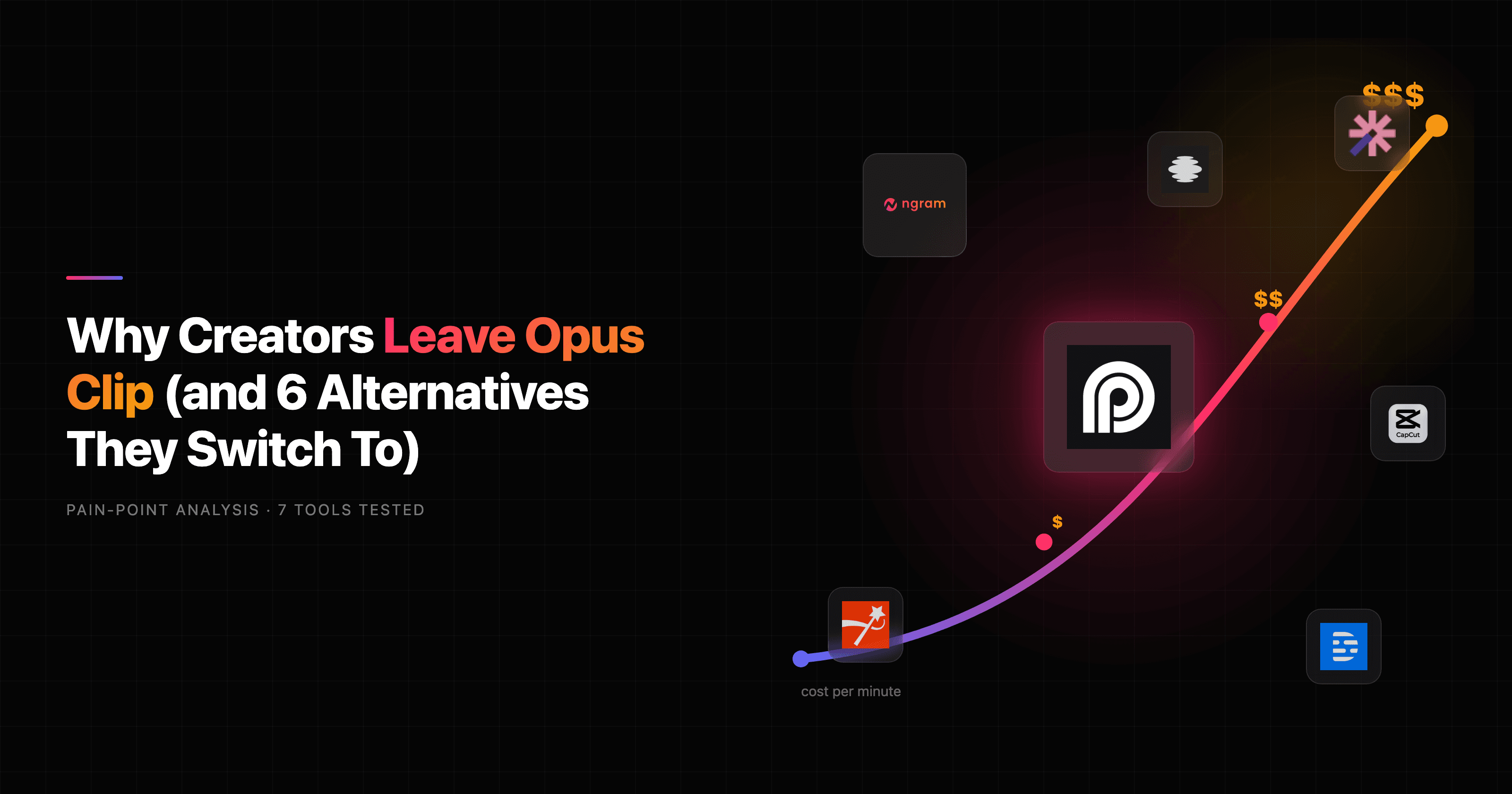
The fastest way to read this: if your job is turning one long recording into a stack of short clips, stay close to a dedicated clipper. If your real job is shipping a finished, on-brand video, the right pick changes. OpusClip's pricing checked August 5, 2026 lists 60 monthly credits on its limited three-day Free workspace, Starter at $15 a month with 150 credits, and Pro at $29 monthly or $174 annually; editing, broader export controls, and scheduling depend on plan.
| Tool | Best for | Starting price | Key differentiator |
|---|---|---|---|
| ngram | Finished, on-brand video from any source | View pricing | Plans script and storyboard, then renders the whole video |
| Vizard | Solo creators who want cleaner clip output | Free / about $20 per month | Clean transcript-led clip editor |
| Submagic | Caption-heavy short-form social clips | Free / about $20 per month | Deep animated caption control |
| Klap | Fast YouTube-to-Shorts repurposing | Free / about $29 per month | One-click long-to-shorts |
| Descript | Editing podcasts and long-form by transcript | Free / $24 per month | Edit video like a doc |
| Captions | Mobile-first talking-head creators | Free / about $25 per month | AI eye contact and reframing on phone |
| CapCut | Manual short-form editing on a budget | Free | Free template-rich editor |
Why creators leave Opus Clip
Opus Clip earned its place. It made AI clipping mainstream, and for turning a one-hour podcast into ten captioned shorts with virality scores, it still does the job fast. Credit where it is due: the auto-reframing, the hook detection, and the speed are genuinely good. The Starter plan runs $15 per month and Pro runs $29 per month, with a free tier that stores clips for three days and stamps a watermark on caption templates.
The cracks show as volume grows. Here is what surfaced across Trustpilot, G2, and creator threads:
The credit math gets expensive. The per-minute processing model is fine at low volume, but high-output creators run through their allowance fast and watch the cost climb. Across roughly 300 Trustpilot reviews, the most common complaint theme is billing: hidden refund buttons, projects that expire when a subscription lapses, and no warning before renewal.
The AI misses nuance. Reviewers repeatedly say the model does not get comedic timing or sarcasm, the exact things that make a clip worth sharing. It will cut a joke before the punchline or drop the one sentence that made the segment land, so people spend more time fixing clips than the manual edit would have taken.
Processing hangs and the scheduler flakes. Some videos sit for hours and never finish, and the built-in scheduler draws steady complaints: posts that do not go through, accounts that disconnect, creators downloading clips to post by hand.
It only does one job. Opus Clip clips footage you already recorded. It cannot generate a video when you have a doc, a URL, or a deck but no footage. That is the gap that sends a different kind of buyer looking, the one who does not want more clips, they want a finished video.
That last group is who this guide is really for. The seven tools below split into two camps: dedicated clippers that do Opus Clip's job with a different trade-off, and ngram, which does a different job, turning source material into a finished video.
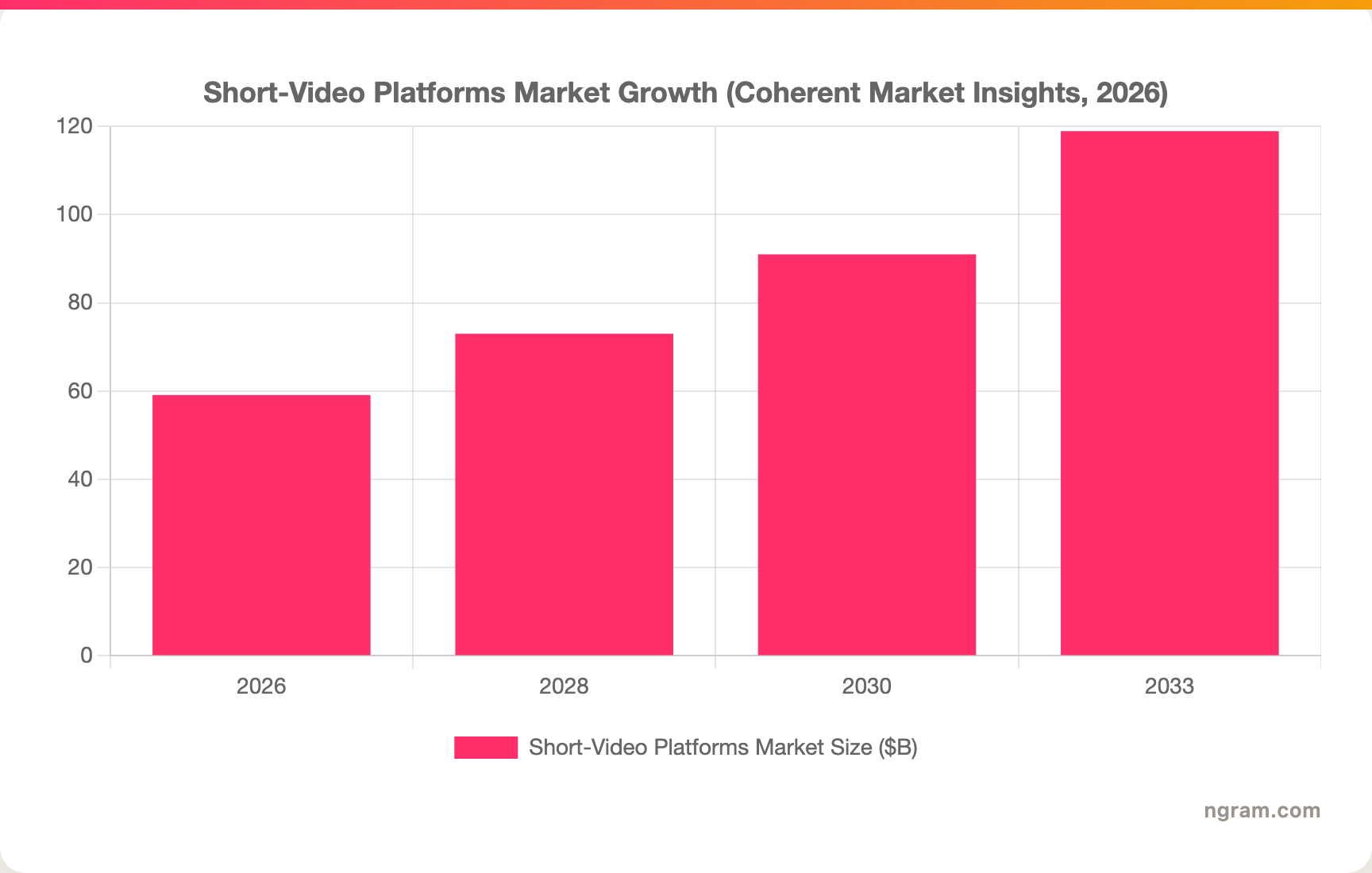
The demand behind all of this keeps climbing. The global short-video platforms market is valued at roughly $59.1 billion in 2026 and is projected to grow steadily through the decade, which is why so many clipping tools are fighting for the same creators.
1. ngram
Watch how ngram turns an idea into a finished video:
ngram is the pick when the deliverable is a finished video, not a pile of clips. Where Opus Clip starts from footage you already have, ngram starts from whatever you have lying around: a prompt, a PDF, a URL, a deck, a screen recording, or raw video. It writes the script, maps a storyboard, then generates voiceover, captions, visuals, and export variants. You approve the plan before anything renders, so the direction stays yours.
That difference matters most for teams, not just solo creators. A product marketer turning release notes into a launch video, a sales team that needs a persona-specific clip, a support lead explaining what changed: none of them have raw footage to clip. They have a doc and a deadline. ngram is built for that path.
What makes ngram stand out
- Plan first, generate second. ngram drafts the script and storyboard up front. You fix direction early, in plain language, instead of correcting an AI's cut after the fact, which is the exact frustration Opus Clip users describe.
- Start from what you already have. Text, PDFs, URLs, decks, screenshots, screen recordings, and raw video all work as input. You do not need a camera or existing footage.
- On-brand by default. Brand kits apply your logo, colors, fonts, and tone to every video automatically, so output looks intentional rather than like a generic template.
- MP4 export. Finished videos export as MP4 with captions; prepare channel-specific cuts separately.
- Edit in chat. Ask for a shorter cut, a translated version, or a different presenter, and ngram applies the change across script, visuals, and audio.
Pros
- Generates a complete video from a doc or URL, not just clips from existing footage.
- Keeps a human in control with a reviewable script and storyboard before render.
- Applies brand kit, captions, and MP4 export with separate channel-cut preparation in one pass.
Cons
- Not a dedicated long-to-many clipper. If your only job is slicing one recording into twenty shorts, a specialist clipper is faster.
- Web-based agentic workflow, so it is a different way of working than a timeline editor.
Who is ngram best for?
Marketing, product marketing, sales, and customer success teams who need a polished video without hiring an editor for every asset. Check ngram's live pricing for the current plan that fits your workflow. For a direct head-to-head, see the ngram vs Opus Clip comparison.
Ready to try ngram? Create your first video in under 5 minutes. Start with ngram
2. Vizard

Vizard is the clipper most Opus Clip switchers land on first, and for good reason. It does the same long-to-many job, turning podcasts, webinars, and talking-head videos into captioned shorts, but reviewers consistently call out a cleaner interface than Opus. It scores well across review sites, and solo creators repeatedly praise how little fighting the editor takes.
Key features
- Transcript-led clip selection so you pick moments by reading, not scrubbing.
- Auto-reframing to 9:16, 1:1, and 16:9 with face tracking.
- Animated captions with template styles.
- Multi-language support for repurposing across regions.
- One-click sharing to social platforms.
What users say
Solo creators and small marketing teams say Vizard feels like Opus Clip with the rough edges sanded off. The interface gets the most praise, and the clip quality holds up for straightforward talking-head and podcast content. The honest limit shows up on complex multi-speaker footage and on heavy customization, where people still drop into a separate editor to finish. Compared to Opus Clip, Vizard's draw is UI polish more than a fundamentally different feature set.
Pros
- Cleaner, calmer editor than Opus Clip.
- Reliable clip quality on podcast and talking-head footage.
- Generous enough free tier to test on real videos.
Cons
- Still a clipper, so it needs footage you already recorded.
- Customization tops out below what dedicated caption tools offer.
Best for
Solo creators and SMB marketers who want Opus-level clip output with a friendlier interface. Pricing starts free, with paid plans around $20 per month.
3. Submagic
Submagic is the caption specialist of the group. It started as a captioning tool and grew into a fuller short-form editor, and captions are still where it wins. If your clips live or die on attention-grabbing animated text, Submagic gives you more control than Vizard or Opus Clip without hiring a motion designer.
Key features
- Deep animated caption styling with trend-driven templates.
- AI B-roll and zoom effects to add motion to talking-head clips.
- Auto-clipping from long-form video.
- Emoji and keyword highlighting synced to the audio.
- Multi-platform export presets.
What users say
Creators making educational, motivational, and promo content like that Submagic's captions look designed rather than auto-generated. The caption engine is the recurring highlight in reviews. The trade-off people note is that the broader clipping and workflow features feel newer than the captioning, so some treat it as a caption layer on top of another tool rather than a full Opus Clip replacement.
Best for
Short-form creators and agencies whose clips depend on polished, branded captions. Pricing starts free, with paid plans around $20 per month. For a side-by-side, see the ngram vs Submagic comparison.
4. Klap
Klap is the no-fuss option for one specific job: paste a YouTube link, get back a set of vertical shorts. It strips the workflow down to the long-to-shorts core, which is exactly what some Opus Clip users want when the scheduler, analytics, and extra panels feel like clutter.
Key features
- YouTube-to-Shorts in a single step.
- Auto-captions and reframing for vertical formats.
- Hook and moment detection to pick clip-worthy segments.
- Brand presets for caption styling.
What users say
People who want speed over control like Klap. It does the one thing quickly, and for repurposing a back catalog of long videos into shorts, it gets out of the way. The flip side is that the same simplicity means fewer levers when the AI picks a weak moment, so it suits high-volume, lower-touch repurposing more than careful clip-by-clip work.
Best for
Creators repurposing a large YouTube library into Shorts who value speed over fine control. Pricing starts free, with paid plans around $29 per month.
5. Descript

Descript is the odd one out, and that is the point. It is not primarily a clipper, it is a transcript-based editor for podcasts and long-form video. You edit the video by editing the text, delete a word from the transcript and it disappears from the recording. For Opus Clip users whose real bottleneck is producing the long-form piece in the first place, Descript solves a different part of the chain.
Key features
- Edit video by editing the transcript.
- Filler-word removal and studio-sound cleanup.
- Overdub and AI voice for fixing mistakes without re-recording.
- Multi-track recording for remote interviews.
- Short clip export for social.
What users say
Podcasters and long-form creators love editing by transcript, especially for cutting filler and tightening pacing without a timeline. It is the most-cited reason people stick with it. The clip-generation side is lighter than a dedicated tool like Opus Clip, so plenty of creators pair Descript for the main edit with a clipper for the shorts. Compared to Opus Clip, Descript is better at producing the long-form video, not at slicing it into many.
Best for
Podcasters and content teams who want to edit long-form audio and video by transcript. Pricing starts free, with paid plans from $24 per month. See the ngram vs Descript comparison for how the two differ.
---
Looking for the fastest way to ship a finished video? ngram turns your docs, URLs, screen recordings, and decks into polished, on-brand videos in minutes, no footage required. Try ngram
---
6. Captions
Captions is the mobile-first pick. It started on the phone and is built for talking-head creators who record, edit, and post from one device. Its standout is AI eye contact, redirecting your gaze toward the lens when you were reading off-screen, plus auto-reframing and captions tuned for vertical video.
Key features
- AI eye contact for talking-head footage.
- Auto-captions and reframing built for mobile.
- AI editing presets for fast social clips.
- On-device recording with teleprompter.
Best for
Creators who shoot and edit talking-head content on their phone and want AI polish without a desktop. Pricing starts free, with paid plans around $25 per month.
7. CapCut

CapCut is the budget default. It is a free, template-rich editor that creators reach for when they want hands-on control and zero spend. It is not an AI clipper in the Opus Clip sense, there is no auto-detection of viral moments, but for manually cutting and captioning shorts it is hard to beat on price.
Key features
- Free core editor with a deep template library.
- Auto-captions and a large effects catalog.
- Background removal and basic AI tools.
- Direct export to TikTok and other platforms.
Best for
Creators and small teams who want to edit short-form video by hand at no cost, and do not need AI moment detection. CapCut's core editor is free.
What these tools cost to start
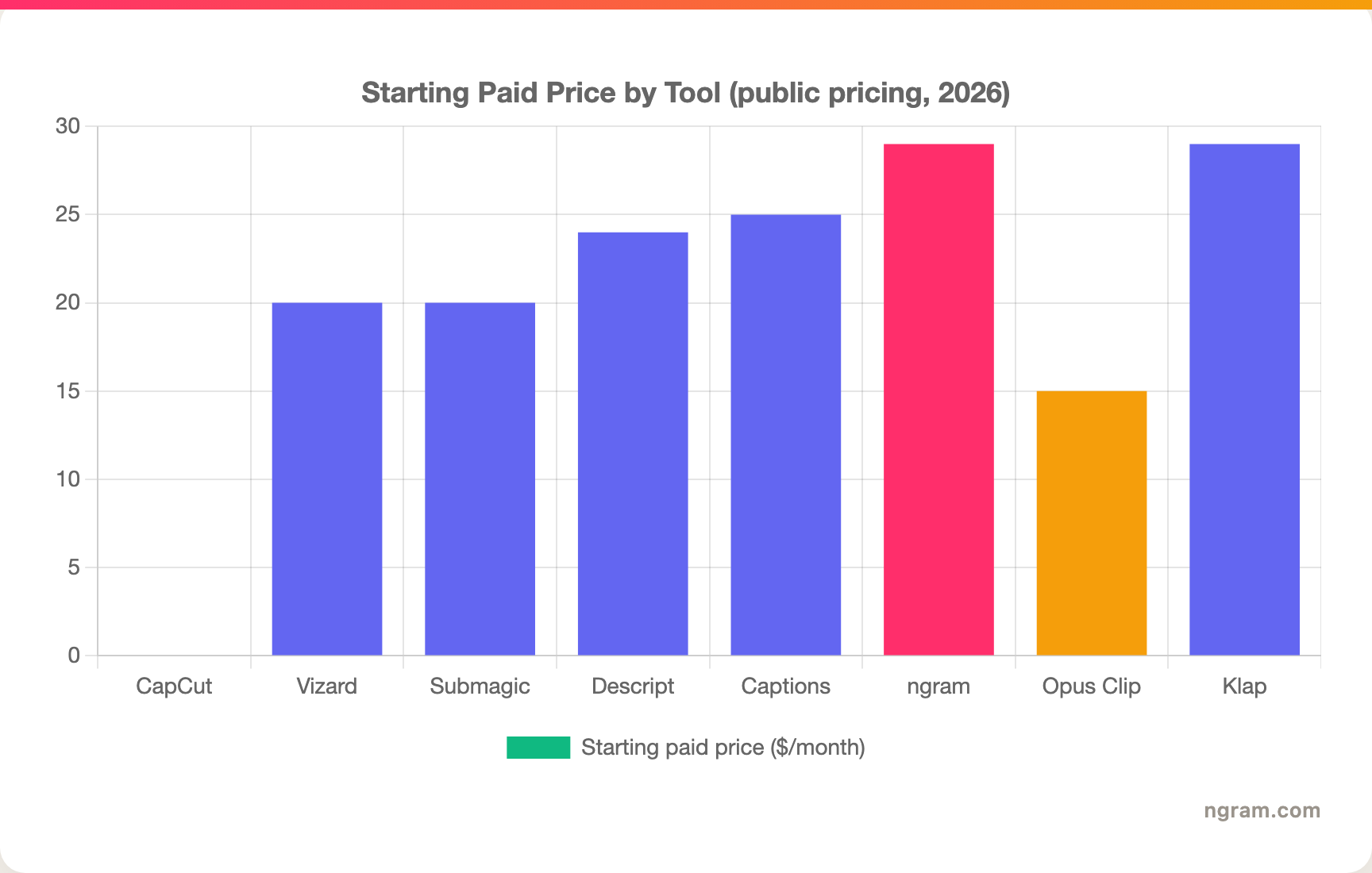
Since per-minute billing is the loudest complaint about Opus Clip, here is where each tool's first paid plan begins. Entry price is not the whole story, credit mechanics and volume matter, but it shows how the lineup stacks up before usage scales.
How we evaluated these Opus Clip alternatives
We did not just list tools, we read hundreds of user reviews across Trustpilot, G2, Capterra, and Reddit, checked current public pricing, and weighed each tool against five criteria:
| Criteria | Weight | What we looked at |
|---|---|---|
| Clip and output quality | 30% | How good the finished clip or video looks without manual rescue |
| AI capabilities | 25% | Moment detection, captioning, reframing, and script or storyboard generation |
| Ease of use | 20% | How much fighting the editor takes for a typical job |
| Value | 15% | Cost at real volume, including credit and per-minute mechanics |
| Workflow fit | 10% | Whether the tool matches the user's actual deliverable |
We also factored in real user sentiment from public forums, market presence and stability, and where each tool's primary output sits, clips versus finished video. The weighting leans toward output quality and AI because that is where Opus Clip users feel the most pain.
Frequently asked questions
What is the best Opus Clip alternative in 2026?
It depends on the job. For finished, on-brand video from a doc, URL, or deck, ngram is the strongest pick because it generates the whole video, not just clips. For pure long-to-many clipping, Vizard is the most common switch thanks to a cleaner interface, and Submagic wins on caption control.
Is there a free Opus Clip alternative?
Several competitors publish limited free tiers or trials, including Vizard, Submagic, Klap, Captions, Descript, and OpusClip itself. Check current watermarks, storage, edit, credit, and export limits before using one for production.
Why is Opus Clip so expensive for high-volume creators?
Opus Clip charges by processing minutes, so cost climbs with volume. Reviewers also flag billing friction: hidden refund buttons, projects that expire when a subscription lapses, and no renewal warning. High-output creators usually move to a flat-rate plan or a tool whose pricing does not scale per minute.
How is ngram different from Opus Clip?
Opus Clip slices footage you already recorded into short clips. ngram generates a finished video from source material you have, like a doc, URL, deck, or screen recording, with a script and storyboard you approve before render. Opus Clip is the better pick for pure viral clipping at scale, ngram for a reusable branded video.
Can ngram replace Opus Clip for making social clips?
For repurposing one long recording into many viral shorts, a dedicated clipper like Opus Clip or Vizard is still faster. ngram fits when you want a branded social video built from source material rather than clipped from existing footage, and it exports as MP4; prepare channel-specific cuts separately.
Which Opus Clip alternative is best for teams?
ngram suits marketing, sales, and customer success teams because most of their work starts from a doc or deck, not raw footage, and brand kits keep output consistent across people. Vizard works well for small teams doing high-volume clipping from recorded content.
Which one should you pick?
The clipping space in 2026 is crowded, and most of these tools solve one slice of it well. If you are a creator turning a back catalog of long videos into viral shorts, stay with a dedicated clipper, Vizard for a cleaner interface, Submagic for captions, Klap for speed. If you are a marketing, sales, or product team that needs a finished, on-brand video from a doc, URL, or deck, ngram is the strongest fit because it generates the whole video instead of clipping footage you may not even have. And if your only job is hand-editing shorts for free, CapCut is hard to beat. The fastest way to know which camp you are in is a five-minute test.
---
Start a video with ngram and review the plan before rendering. Turn docs, URLs, decks, or screen recordings into polished, on-brand videos without a single piece of footage. Start with ngram