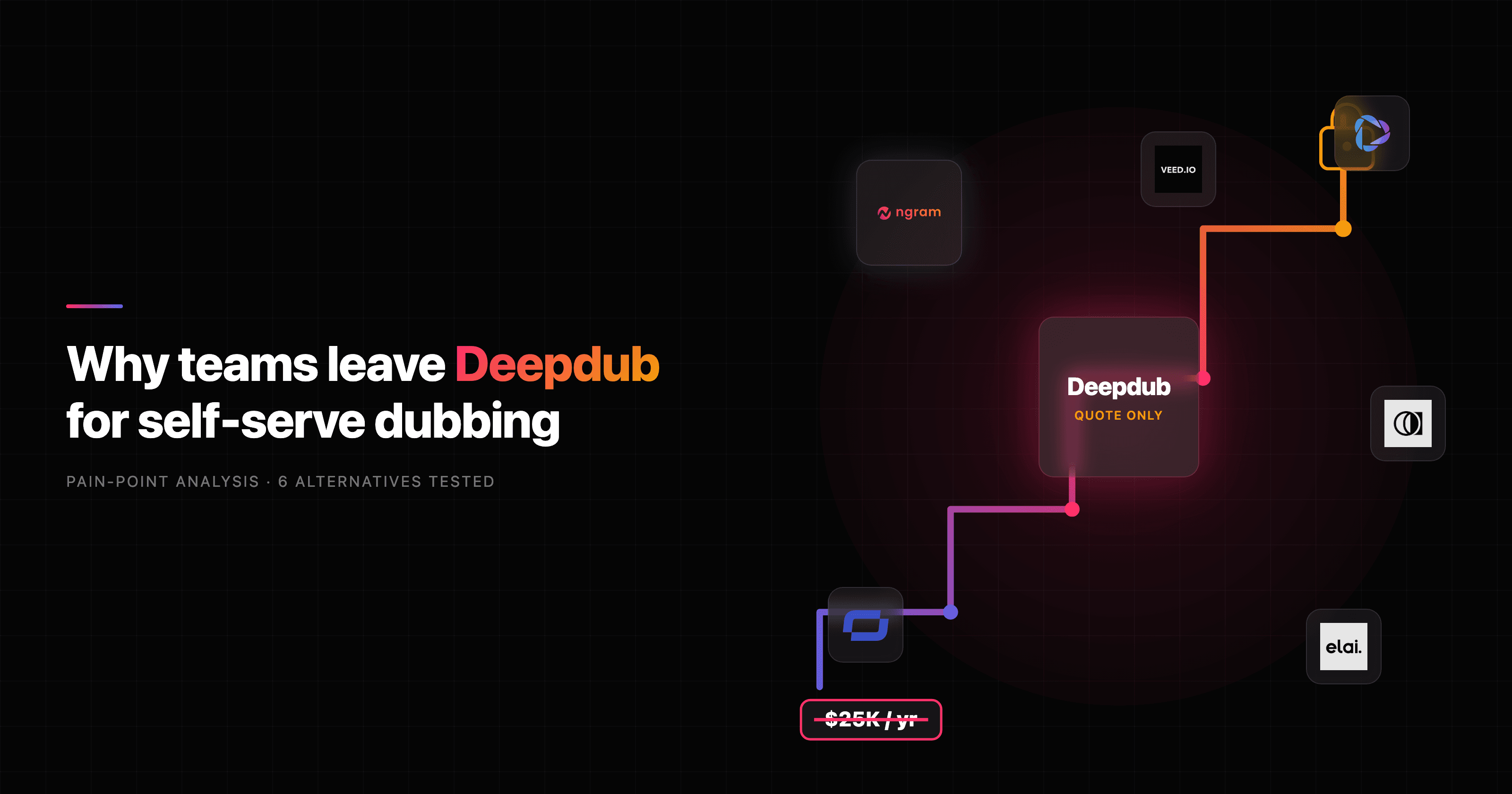

If you are searching for Deepdub alternatives, the first question is not which tool, it is which job. Deepdub is the AI dubbing layer trusted by major Hollywood studios, built to localize films, series, and broadcast catalogs at emotional, frame-accurate fidelity. That depth is real, and so is the catch: Deepdub is enterprise-only, with no public pricing, a sales-gated quote, and project minimums that put it out of reach for most teams localizing ordinary business video.
We tested the self-serve options that actually fit the common case, localizing demos, onboarding, training, and launch videos, and ranked them by access, language coverage, voice quality, and how much of the finished video each one builds for you. ngram leads for one specific slice: when the goal is a finished, on-brand business video in another language rather than a broadcast dub. Here is the quick read.
| Tool | Best for | Starting price | Key differentiator |
|---|---|---|---|
| ngram | Finished business video, localized | Free / $29 mo | Builds the video and translates it in one workflow |
| HeyGen | Self-serve avatar dubbing | Free / $29 mo | 175+ languages with avatar lip sync |
| Rask AI | Localizing large video libraries | $50 mo | 135+ languages, multi-speaker detection |
| Murf AI | Voiceover-led localization | Free / paid | Tunable, natural voiceover and dubbing |
| Synthesia | Avatar training video localization | Free trial / paid | 140+ languages for talking-head training |
| Kapwing | Fast creator localization | Free / paid | In-browser editing, subtitling, and dubbing |
| ElevenLabs | Most natural voice on a budget | $5 mo | Best-in-class voice realism for dubbing |
1. ngram
Watch how ngram turns an idea into a finished video:
Here is the honest framing first, because it decides whether ngram is even on your list. Deepdub is built to dub finished entertainment content, full episodes, films, and broadcast catalogs, with the emotional fidelity a studio signs off on. ngram is not that. ngram is the alternative when the thing you are localizing is a business video, a product demo, an onboarding walkthrough, a training module, or a launch clip, and the real goal is a finished, branded video in another language rather than a frame-perfect dub of a film.
For that slice, ngram does something Deepdub never tries to: it builds the whole video from your source material. Start from a prompt, a PDF, a URL, a deck, a screen recording, or raw footage, and ngram writes the script, plans the storyboard, generates voiceover, burns in captions, and exports the finished cut. Localization is then one step inside that workflow, not a separate vendor engagement.
What makes ngram stand out
ngram treats translation as part of producing the video, not a post-production handoff. Once you have a video, you can ask in plain language for a German version or a Spanish cut, and ngram translates the script, the on-screen text, the captions, and regenerates the voiceover in the target language. For avatar and talking-head videos, lip movements are regenerated to match the translated audio. That is the difference between localizing a video and re-shooting one.
Because the script and storyboard are review points before anything renders, you fix direction early instead of paying for a redo. You approve the plan, then ngram generates. Multilingual voiceover runs on ElevenLabs and MiniMax voices, and a brand kit keeps logo, colors, fonts, and tone consistent across every language variant so the Portuguese cut looks like the English one.
ngram also covers the parts of the job a pure dubbing tool leaves on your desk: the actual production. Screen recordings get cursor smoothing, click emphasis, zooms, and dead-air trimming. Decks become narrated scenes. The finished video can then be localized and used to prepare a social cut separately, with a reviewer checking each output.
Key features:
- Source to finished video - Prompts, PDFs, URLs, decks, screen recordings, and raw video all become a planned, narrated video.
- Localization inside the workflow - Translate script, captions, on-screen text, and voiceover, with lip sync regenerated for avatar and talking-head cuts.
- Plan before render - Review the script and storyboard, then generate, so direction is fixed before the spend.
- Brand kit across languages - Logo, colors, fonts, and tone applied automatically to every variant.
- MP4 export - Download the reviewed edit as MP4; prepare each aspect-ratio version separately.
- Self-serve and transparent - Public plans starting free, no sales call required to begin.
Pros
- ✅ One workflow covers script, voiceover, captions, translation, and export, not just the dub.
- ✅ Self-serve with a free plan and public pricing, no enterprise quote to start.
- ✅ Strong for business video: demos, onboarding, training, launches, and social cuts.
Cons
- ❌ Not built for broadcast-grade dubbing of full films or entertainment catalogs.
- ❌ No TPN-certified, studio-pipeline managed dubbing service.
Who is ngram best for?
Marketing, product marketing, sales enablement, customer success, and L and D teams who need the same explainer, demo, or training video in several languages, fast, and on brand. If your localization queue is business content rather than season two of a drama, ngram is the alternative to test first. For a head-to-head on the production side, see our ngram vs HeyGen comparison.
ngram has a generous free plan, and paid plans start at $29 per month.
Ready to try ngram? Create your first localized video in under 5 minutes. Start free
2. HeyGen
HeyGen is the most common name people land on when they want dubbing without an enterprise contract. It pairs AI avatars with multilingual video translation, so you can upload a clip and get a lip-synced version in another language, or generate a talking-head video that speaks the script natively.
HeyGen delivers lip-synced dubbing across 175+ languages and dialects, which is one of the widest ranges in the category, and its voice preservation keeps the original speaker's character recognizable. The free plan covers 3 videos per month at up to 3 minutes each, with paid plans starting around $29 per month and a Pro tier near $99.
Key features
- Avatar dubbing - Lip-synced translation with the speaker's likeness preserved.
- 175+ languages and dialects - One of the broadest language menus available self-serve.
- Voice cloning - Reuse a presenter's voice across localized cuts.
- Talking-head generation - Create a presenter video from a script, then localize it.
- Templates and brand controls - Reusable looks for repeated localized content.
What users say
Across G2 and Reddit, marketers consistently praise HeyGen for how fast a usable dub comes out and how natural the lip sync looks on talking-head footage. The common gripe is that complex source video, multiple speakers, heavy background audio, or rapid cuts, can confuse the pipeline and need cleanup. Several reviewers note that credit-based limits add up quickly once you localize at volume, and that the avatar look is not right for every brand. Compared to Deepdub, users frame HeyGen as the self-serve option you actually reach for when you do not have a studio budget.
Pros
- ✅ Self-serve, fast, and genuinely broad on languages (175+).
- ✅ Avatar plus dubbing in one tool, useful for talking-head heavy content.
- ✅ Free tier to test before paying.
Cons
- ❌ Credit limits get expensive at high localization volume.
- ❌ Multi-speaker and noisy source video can need manual cleanup.
Best for
Creators and marketing teams that want self-serve avatar video and dubbing across a very wide language set. For ngram's take on the same job, see our ngram vs HeyGen comparison.
3. Rask AI
Rask AI is built for scaling video translation across large libraries, which makes it the closer pick when the job is volume rather than a single hero asset. Upload many videos and Rask handles translation, voice cloning, and dubbing without a per-project vendor engagement.
Rask supports 135+ languages with voice cloning in roughly 32, and its multi-speaker detection handles interviews, panels, and videos with several presenters, a real gap in many cheaper tools. Pricing starts around $50 per month for a capped number of minutes, then scales with usage.
Key features
- 135+ languages - Wide coverage with voice cloning in a large subset.
- Multi-speaker detection - Separates and dubs multiple voices in one video.
- Batch-friendly - Designed for translating libraries, not one-offs.
- Subtitle and transcript export - Captions alongside the dub.
- Voice cloning - Keep speaker identity across languages.
What users say
On Reddit and review sites, Rask earns praise for handling interview and podcast-style footage that trips up single-speaker tools, and for getting a watchable dub out quickly. Users flag that minute-based limits run out faster than expected and that fine emotional nuance still lags a human dub. For teams localizing a back catalog of webinars or courses, the consensus is that Rask is a practical workhorse rather than a broadcast-grade studio.
Best for
Teams localizing large libraries of multi-speaker video, like webinars, interviews, and course content, who need breadth and batch throughput over studio polish.
4. Murf AI
Murf AI started as a text-to-speech and voiceover studio and now offers dubbing and translation on top, so it fits when the core need is high-quality narration in multiple languages rather than full video production.
Murf's library spans a large set of voices and 20+ languages, with controls for pace, pitch, and emphasis that voiceover-focused users like. It is priced for individuals and small teams, well below enterprise dubbing minimums, with a free tier to try.
Key features
- Large voice library - Many voices with style and emphasis controls.
- Dubbing and translation - Localize existing audio and video tracks.
- Voice editing controls - Tune pace, pitch, and pronunciation.
- Collaboration - Shared projects for small teams.
- API access - Pipe voiceover into other tools.
What users say
Reviewers like Murf for clean, controllable voiceover and for how much they can fine-tune a read without a recording booth. The honest limitation is that Murf is voice-first: it localizes the audio well but does not build or edit the video around it, so you still assemble the finished cut elsewhere. For business voiceover and lightweight dubbing, users find it dependable and affordable.
Best for
Voiceover-led localization where the priority is natural, tunable narration in multiple languages and the video itself is handled in another tool.
5. Synthesia
Synthesia is an AI avatar video platform widely used for training and corporate communication, and it includes translation so a course or policy video can be reissued in many languages from one script.
Synthesia offers 140+ languages and a large avatar library, and it is popular with L and D and enterprise communications teams for turning a script into a polished talking-head video without a camera. Plans are self-serve with a free trial, scaling into team and enterprise tiers.
Key features
- 140+ languages - Localize avatar-led videos at scale.
- Avatar library - Stock and custom avatars for presenters.
- Template-driven - Reusable formats for repeated training content.
- Brand controls - Keep corporate look consistent.
- SCORM-friendly outputs - Fits learning-management workflows.
What users say
Training teams praise Synthesia for making multilingual course updates fast: change the script, regenerate, reissue in every language. The recurring critique is that avatar-only video can feel impersonal and that complex screen or product footage is not its strength. For talking-head training localized across a workforce, reviewers rate it highly. See our ngram vs Synthesia comparison for where each fits.
Best for
Enterprise L and D and internal comms teams localizing avatar-led training and policy videos across many languages.
6. Kapwing
Kapwing is a browser-based editor with AI translation and subtitling baked in, which makes it a friendly pick for creators who want to localize a clip without learning a heavy tool or signing an enterprise deal.
Kapwing handles subtitle translation, AI voiceover, and dubbing across 70+ languages inside the same editor you use to trim and caption, and it runs entirely in the browser with a free tier. It is built for speed and accessibility rather than broadcast fidelity.
Key features
- In-editor translation - Subtitle and dub without leaving the timeline.
- 70+ languages - Broad coverage for social and creator content.
- Auto-subtitles - Caption and translate in one pass.
- Browser-based - No install, collaborative by default.
- Templates - Quick social formats.
What users say
Creators like that Kapwing keeps editing, subtitling, and translation in one place, so a localized social cut is a few clicks rather than a pipeline. Reviewers note that dubbing quality is good enough for social and rough drafts but not for high-stakes brand or broadcast work, and that exports on the free tier carry limits. For fast, casual localization, it is a favorite.
Best for
Creators and social teams localizing short-form video quickly inside one browser-based editor.
7. ElevenLabs Dubbing
ElevenLabs is best known for the most natural AI voices in the category, and its Dubbing product applies that to video and audio: upload a file and get a translated, voice-matched version with the original delivery preserved.
ElevenLabs Dubbing covers around 29 languages, fewer than the breadth leaders, but its voice realism and emotional retention are frequently called the best available. Pricing is among the most accessible in this list, with tiers from about $5 to $330 per month and a free allowance to test.
Key features
- Best-in-class voice realism - Natural delivery and emotional nuance.
- Speech-to-speech dubbing - Preserve the original speaker's character.
- Developer API - Pipe dubbing into custom pipelines.
- Affordable entry tier - Low starting price for individuals.
- Voice cloning - Reuse a known voice across languages.
What users say
Reviewers single out ElevenLabs for how human the output sounds, often the deciding factor when a dub has to feel real. The trade-off they name is narrower language coverage than HeyGen or Rask, and that it is audio-first, so video assembly and timing still happen elsewhere. For voice quality on a budget, it is the repeat recommendation.
Best for
Individuals and developers who prioritize the most natural voice over the widest language list, and who handle video assembly separately.
Why teams look for Deepdub alternatives
Deepdub is genuinely impressive at what it is built for. It is the dubbing layer trusted by major studios, with emotional text-to-speech, frame-accurate timing, TPN-certified and GDPR-compliant infrastructure, and a voice library of 1000+ licensed voices across 100+ languages. For localizing a film, a series, or a FAST channel catalog at broadcast quality, that depth is the point. The reasons people go looking for an alternative are almost always about access and fit, not capability.
No self-serve pricing. Deepdub does not publish plans. The pricing page returns a not-found error, and you reach pricing through a sales consultation and a custom quote. An enterprise subscription has been listed around $25,000 per year on the AWS Marketplace, with project minimums commonly estimated in the $10,000 to $50,000 range. For a team that needs to localize a few business videos, that is a non-starter.
Built for entertainment catalogs, not business video. Deepdub's whole design target is produced media at broadcast fidelity. If your localization queue is product demos, onboarding videos, and training modules, you are buying studio-grade dubbing for a job that needs a fast, on-brand finished video.
Managed-service timelines. Studio-quality dubbing involves human review cycles and a managed workflow. That is the right call for a film, but it adds time and cost that a marketing or enablement team localizing a launch video cannot absorb.
Overkill for the common case. The market reflects this split: 67% of marketing teams plan to localize video in the next 12 months, but only 22% have a dedicated localization workflow, per industry surveys. Most of those teams need a self-serve tool, not a studio engagement.
Industry data backs the shift toward accessible tools. AI dubbing already cuts localization costs by roughly 70 to 90% and compresses the process from weeks to days. Here is how the AI dubbing tools market is scaling:
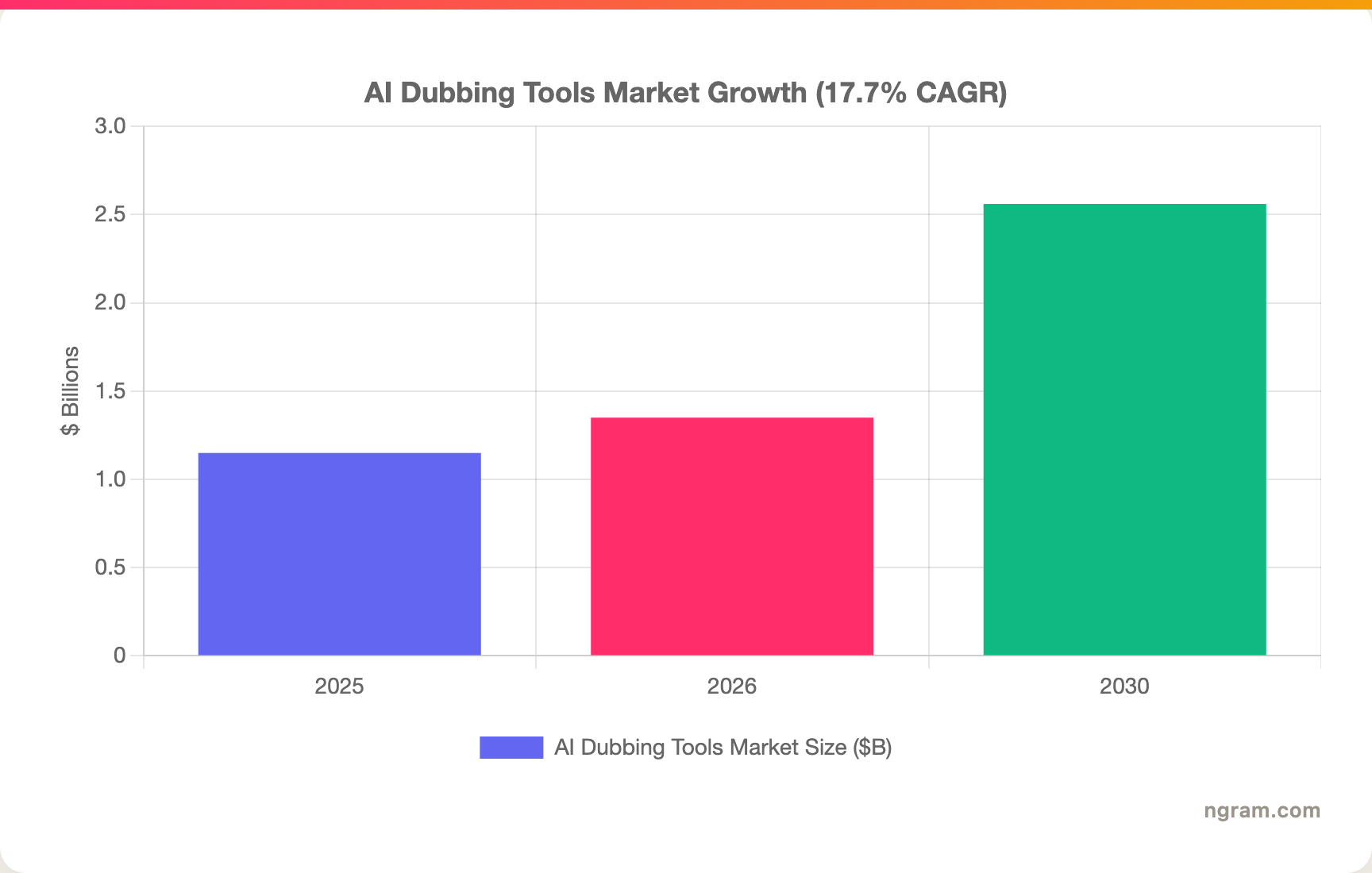
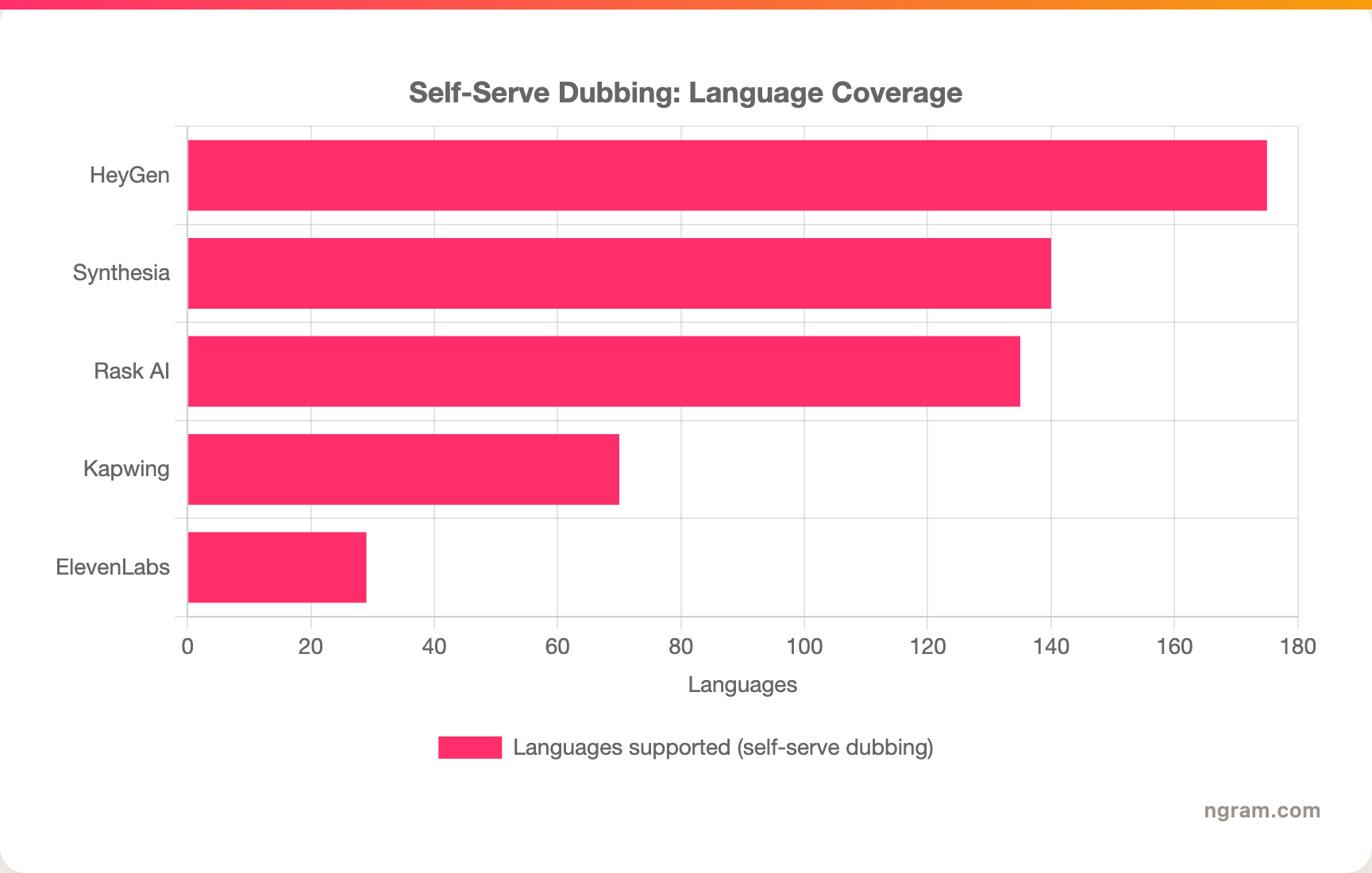
The takeaway is not that Deepdub is overpriced. It is that most teams comparing alternatives do not need a studio dubbing house at all, and language coverage and access vary widely across the self-serve options:
---
Localizing business video, not films? ngram turns docs, decks, and recordings into finished videos and translates the script, captions, and voiceover in one workflow. Try ngram free
---
How we compared these tools
We did not just list dubbing tools, we mapped each one to the job it actually serves, then weighted what matters for localizing video that real teams ship:
| Criteria | Weight | What we looked at |
|---|---|---|
| AI Capabilities | 30% | Translation, voice cloning, lip sync, and multi-speaker handling quality |
| Voice and language support | 30% | Number of languages, naturalness of voices, and emotional retention |
| Ease of Use | 20% | Self-serve access, onboarding, and how fast a usable dub comes out |
| Value | 15% | Pricing transparency and cost relative to localization volume |
| Support and Community | 5% | Docs, responsiveness, and real-user sentiment |
We also factored in:
- Real user reviews from G2, Capterra, Gartner Peer Insights, and Reddit (qualitative sentiment, not numerical scores)
- Public pricing and access model (self-serve versus sales-gated)
- Language coverage and voice quality as reported by each vendor and verified against reviews
- Where the market is heading, including the shift from studio dubbing to self-serve localization
Because Deepdub and ngram are built for different ends of the same need, the comparison is less about which is better and more about which job you actually have.
Frequently Asked Questions
What is the best Deepdub alternative?
It depends on the job. For localizing business video like demos, onboarding, and training, ngram is the strongest pick because it builds the finished video and translates script, captions, and voiceover in one workflow. For pure self-serve dubbing across the widest language set, HeyGen leads with 175+ languages. For the most natural voice on a budget, ElevenLabs wins.
Is there a cheaper alternative to Deepdub?
Yes. Deepdub is enterprise and quote-based, with subscriptions listed around $25,000 per year and project minimums commonly estimated at $10,000 to $50,000. Self-serve options are far cheaper: ngram and HeyGen start near $29 per month, ElevenLabs from about $5, and several offer free tiers.
When should I still choose Deepdub?
Choose Deepdub when the job is broadcast-grade dubbing of films, series, or FAST channel catalogs where emotional fidelity and studio sign-off are non-negotiable, and when you need a TPN-certified managed service. ngram and the other tools here are built for business video, not entertainment localization.
Can ngram replace Deepdub for full video localization?
For business video, yes: ngram translates the script, on-screen text, captions, and voiceover, and regenerates lip sync for avatar and talking-head cuts. For broadcast dubbing of produced entertainment, no, that is Deepdub's specialty and ngram does not target it.
How does HeyGen compare to Deepdub?
HeyGen is the self-serve counterpart to Deepdub's enterprise service. HeyGen covers 175+ languages with avatar-based lip-synced dubbing starting around $29 per month, while Deepdub delivers studio-grade emotional dubbing through a managed workflow at enterprise pricing. HeyGen fits creators and marketers, Deepdub fits studios.
Which one should you pick?
Most teams comparing Deepdub alternatives are not localizing films, they are localizing the videos their business already ships. If that is you, and the content is demos, onboarding, training, or launches, ngram is the strongest fit because it produces the finished video and handles translation in the same workflow rather than treating the dub as a separate vendor step. If you specifically need broadcast-grade dubbing of an entertainment catalog with studio sign-off, stay with Deepdub, that is exactly what it is built for, and nothing on this list replaces it for that. The fastest way to know which side of that line you are on is a 5-minute test.
---
Localize your next video in minutes, not weeks. Turn a doc, deck, or recording into a finished video, then ship it in every language you need, all self-serve. Start free