
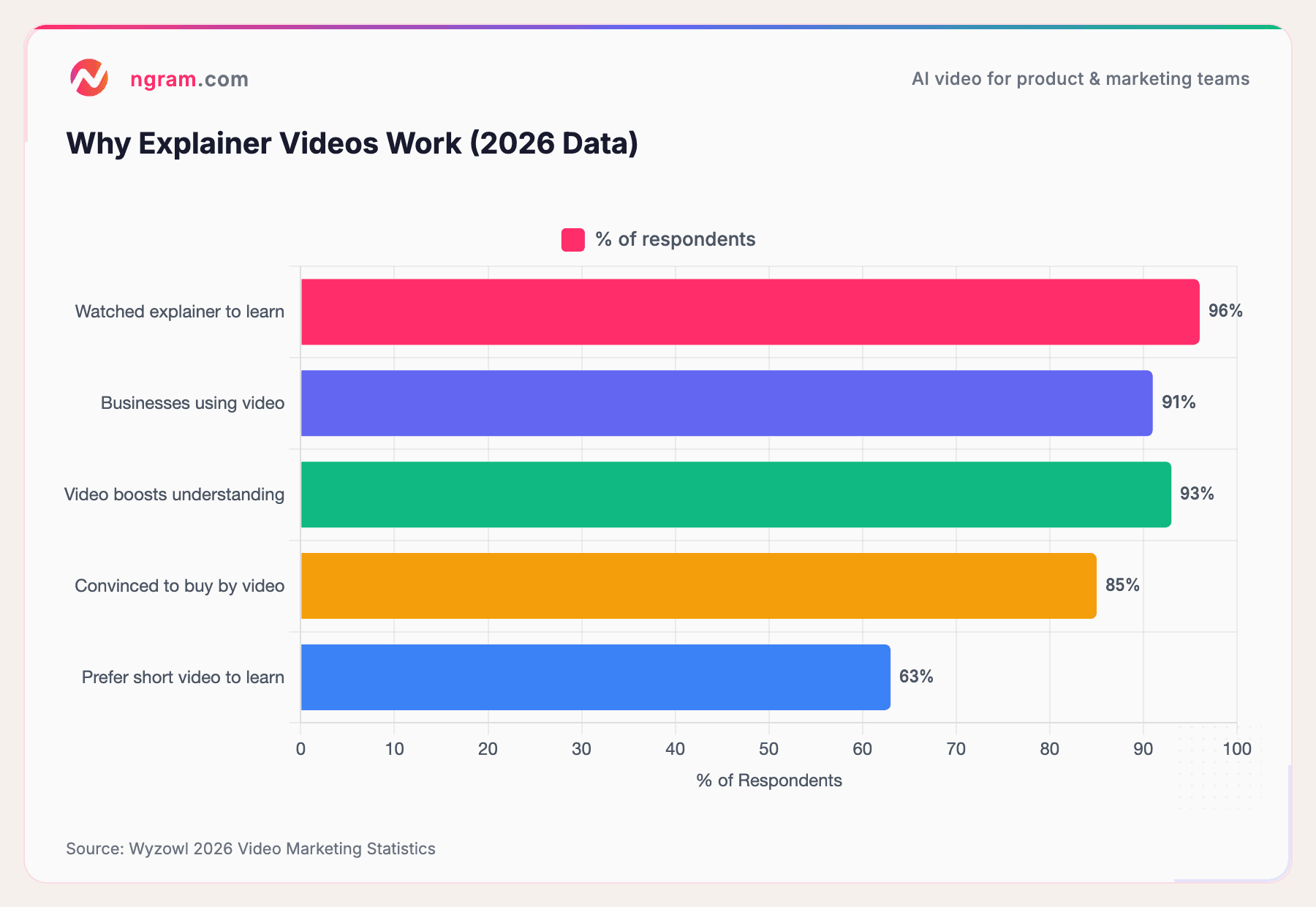
If your product is hard to explain in a paragraph, you're not alone. That's exactly why explainer videos exist, and according to Wyzowl's 2026 Video Marketing Survey, 96% of people have watched an explainer video to learn about a product or service.
The problem used to be making one. Hiring a freelancer meant $1,500-$7,000 per video and weeks of back-and-forth. Agencies charged $15,000+ per finished minute. Even template-based tools still required you to figure out the story, pacing, and visuals yourself.
That's where AI explainer video makers come in. These tools turn your existing content, whether it's a document, a URL, screenshots, or a rough screen recording, into a polished explainer video in minutes instead of weeks. And the quality gap between AI-generated and traditionally produced videos is shrinking fast.
This guide covers how AI explainer video makers work, what to look for when choosing one, and how to create explainer videos that actually convert.
Why Explainer Videos Still Dominate in 2026
Explainer videos aren't a trend. They're one of the most effective content formats for driving understanding and conversions, and the data backs it up.
According to Wyzowl, 91% of businesses now use video as a marketing tool, and 93% of video marketers say video has increased user understanding of their product or service. Explainer videos specifically are the second most popular video type created by marketers, with 73% producing them regularly.
On the consumer side, 85% of people say they've been convinced to buy a product or service after watching a brand's video. And when asked how they'd prefer to learn about a product, 63% choose watching a short video over reading text, attending a webinar, or viewing an infographic.
Here's a snapshot of the key numbers:
Source: Wyzowl 2026 Video Marketing Statistics
Landing pages with explainer videos convert up to 86% higher than those without. That's not a marginal improvement. It's the kind of lift that turns a mediocre landing page into a high-performing one.
What Is an AI Explainer Video Maker?
An AI explainer video maker is a tool that uses artificial intelligence to automate the heavy lifting of video production. Instead of hiring an editor or wrestling with a timeline, you provide your content (text, docs, URLs, images, or recordings) and let the AI handle scripting, visual generation, voiceover, pacing, and editing.
The category has matured quickly. Today's AI explainer video generators fall into a few buckets:
- All-in-one platforms like ngram that handle the full workflow: script generation, storyboarding, visual creation, voiceover, editing, and multi-format export
- Avatar-based tools that generate talking-head videos with AI presenters, best for training and corporate communications
- Animation tools that create 2D or whiteboard-style animated explainers from templates
- Text-to-video tools that match stock footage to a script or text prompt
The biggest shift in 2026 is that the best AI explainer video creators don't just automate production. They understand narrative structure. They know that a strong explainer follows a problem-solution-proof-CTA flow, and they build the video around that structure rather than just slapping text onto slides.
The AI Video Market Is Growing Fast
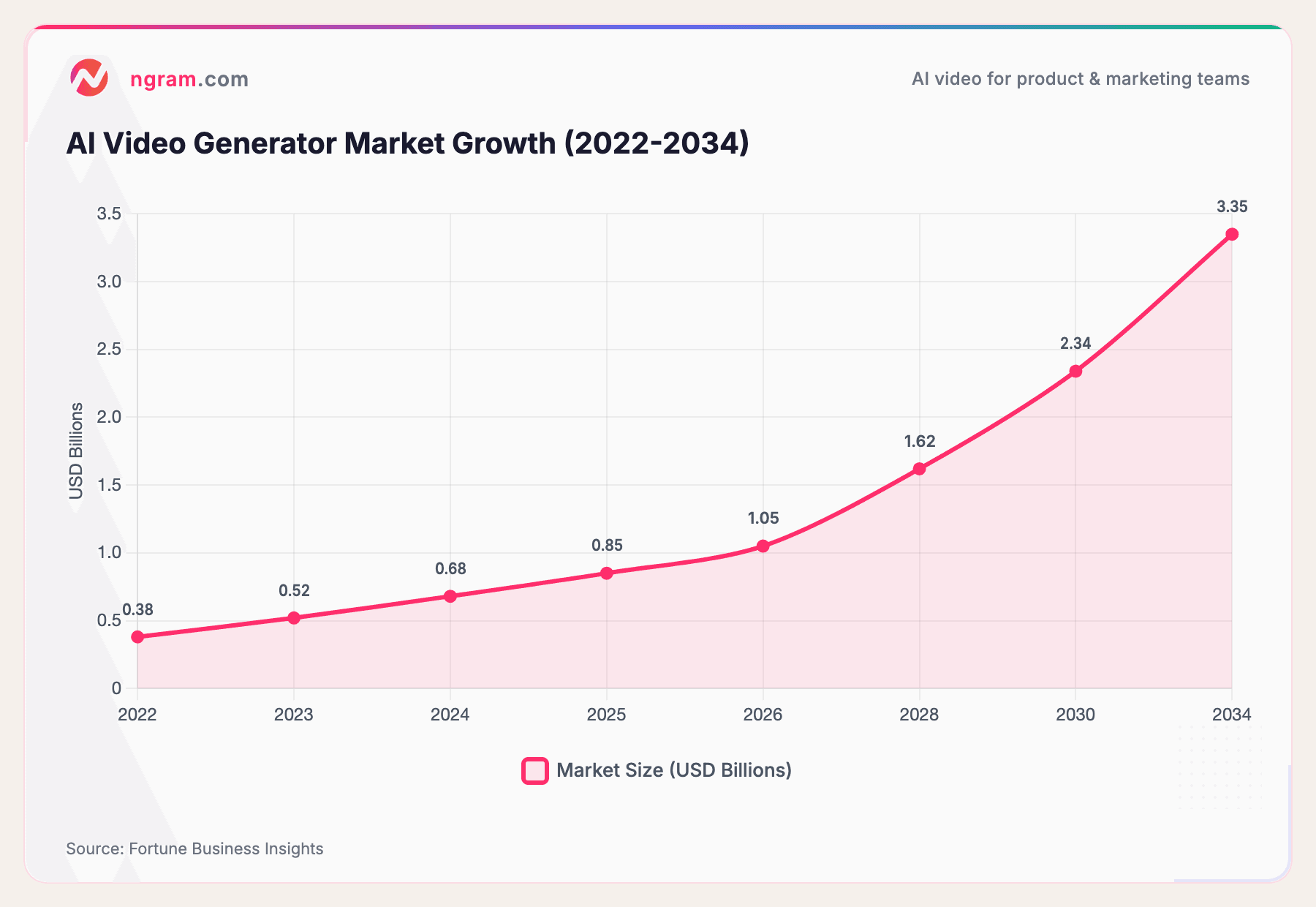
AI video creation isn't a niche anymore. The global AI video generator market is projected to grow from $847 million in 2026 to $3.35 billion by 2034, a compound annual growth rate of 18.8%, according to Fortune Business Insights. Some estimates are even more aggressive, with Grand View Research pegging the broader AI video market at $42.29 billion by 2030.
Adoption numbers tell the same story. According to recent industry data, 78% of marketing teams now use AI-generated video at least quarterly, 73% of Fortune 500 companies have integrated AI video tools, and the total number of monthly active users across AI video platforms reached 124 million in January 2026.
Here's the market trajectory:
Source: Fortune Business Insights
The generation volume tells an even more dramatic story: an 840% increase in AI video generation between January 2024 and January 2026, according to recent industry research. The trajectory is clear. AI video creation is moving from "nice to have" to standard operating procedure.
How ngram Works as Your AI Explainer Video Maker
ngram takes a different approach from most AI explainer video tools. Instead of starting with a template or an avatar, you start with what you already have.
Here's the workflow:
1. Bring your content. Drop in whatever you've got: a product doc, a URL, screenshots, a rough screen recording, or even just a text description. ngram extracts what it needs and organizes the raw material into a coherent narrative.
2. Tell ngram who it's for. Specify the audience, the goal, and the channel. An explainer video for LinkedIn looks different from one for your website, and ngram adapts structure, length, pacing, and tone accordingly.
3. Review the script and storyboard. This is where ngram differs from most AI video generators. Before rendering anything, you see the full script and storyboard. You can edit the narrative, swap scenes, adjust messaging, and approve the direction before a single frame is generated. Script-first means you catch problems early, when they're cheap to fix.
4. Generate and refine. ngram builds the video using your assets, then fills gaps with AI-generated visuals and AI voiceover where needed. Motion graphics, captions, transitions, and pacing are all handled automatically. Need changes? Describe them in plain language or use the timeline editor for precise control.
5. Export on-brand. Your brand kit (fonts, colors, logos, intro/outro) is applied automatically. Export in 16:9, 9:16, or 1:1 with captions included. One explainer, ready for every channel.
The result: you go from raw content to a polished, on-brand explainer video in minutes, not weeks. And because the script comes first, the output actually makes sense. It follows a clear narrative structure instead of just reading your document out loud.
Want to see it in action? ngram turns your raw content into polished, on-brand explainer videos in minutes. Try it free
How to Create an AI Explainer Video (Step by Step)
Regardless of which AI explainer video maker you choose, the best explainer videos follow a consistent process. Here's how to get it right.
Step 1: Define your audience, goal, and channel
Before opening any tool, answer three questions:
- Who is watching this? A product manager evaluating your tool needs different information than an end user seeing your brand for the first time.
- What should they understand (or do) when it's done? Every explainer video needs a clear outcome.
- Where will it be published? A LinkedIn explainer needs different pacing and format than a website hero video or an email embed.
Skipping this step is the most common mistake. The tool can't compensate for unclear thinking about who the video is for.
Step 2: Write or generate the script
The script is the most important part of any explainer video. A polished video with a weak script is still a weak video.
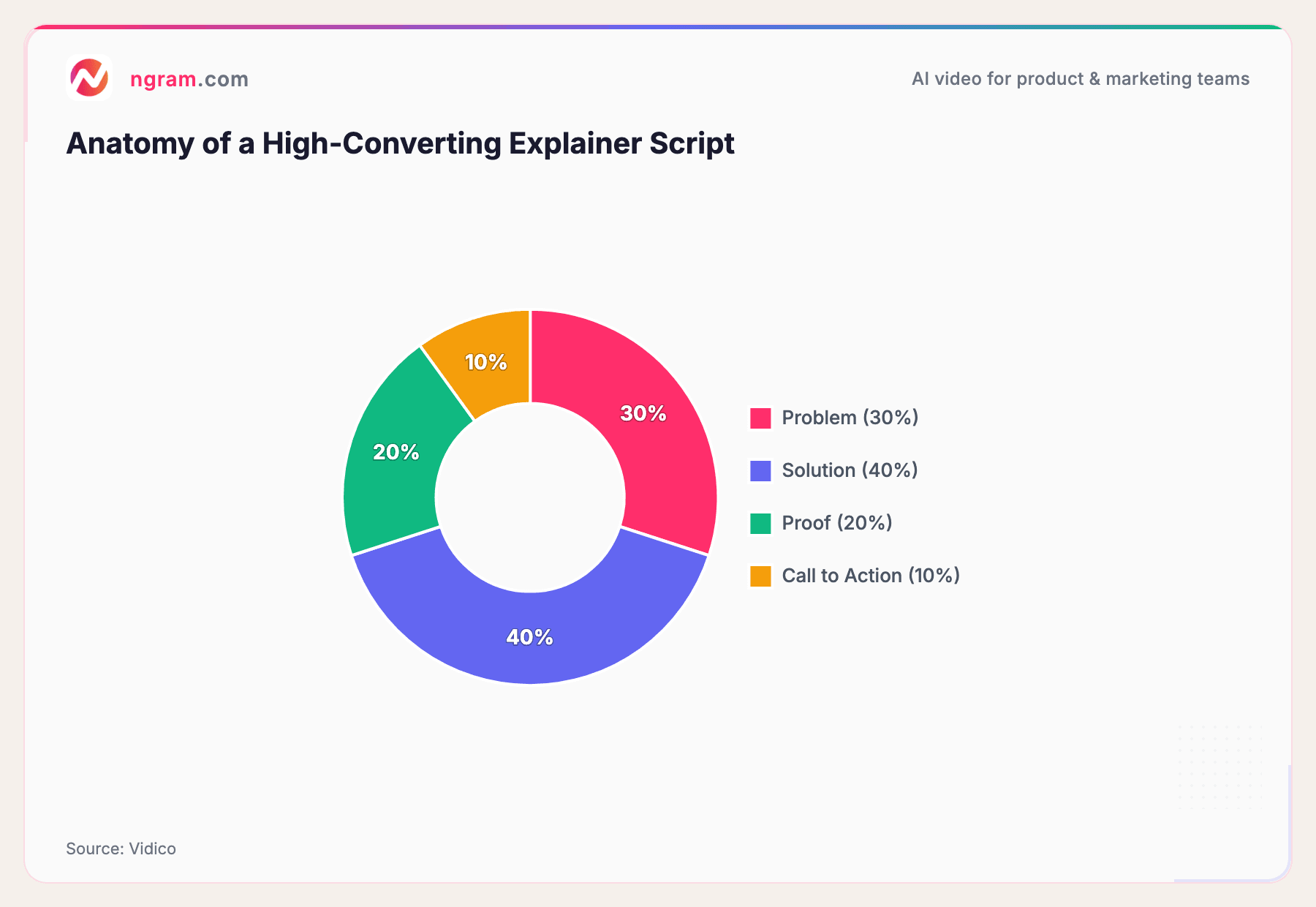
The most effective explainer video scripts follow a proven structure:
Source: Vidico
Spend roughly 30% on the problem (make the viewer nod along), 40% on the solution (show how it works), 20% on proof (social proof, results, testimonials), and 10% on a clear call to action.
Aim for 150 words per minute of final video. A 60-second explainer needs about 140-160 words. A 90-second video needs 210-230 words. The sweet spot for explainer video length is 60-90 seconds, as viewer retention drops significantly after that.
Step 3: Add your assets
Feed the AI tool whatever you have: product screenshots, documentation, a URL, or a screen recording. The better the input, the better the output. AI explainer video generators like ngram will fill visual gaps automatically with motion graphics and AI-generated visuals, but your real assets make the video feel authentic.
Step 4: Review, refine, and iterate
Never publish the first draft. Watch the video through your audience's eyes:
- Does the hook land in the first 5-10 seconds?
- Is the pacing right, or does it feel rushed (or draggy)?
- Does every scene advance the story?
- Is the voiceover tone appropriate for the audience?
With AI tools, iteration is fast. Swap a scene, regenerate a section, adjust the timing. The whole point of using an AI explainer video maker is that revision cycles take minutes, not days.
Step 5: Export for the right channel
Different platforms need different formats:
- LinkedIn and YouTube: 16:9 horizontal
- Instagram Reels and TikTok: 9:16 vertical
- Email embeds and social feeds: 1:1 square
Always export with captions on. According to multiple studies, the majority of social video is watched without sound, and captions boost engagement across every platform.
How Much Does an AI Explainer Video Cost?
One of the biggest reasons teams switch to AI explainer video creation is cost. The difference between traditional production and AI is dramatic.
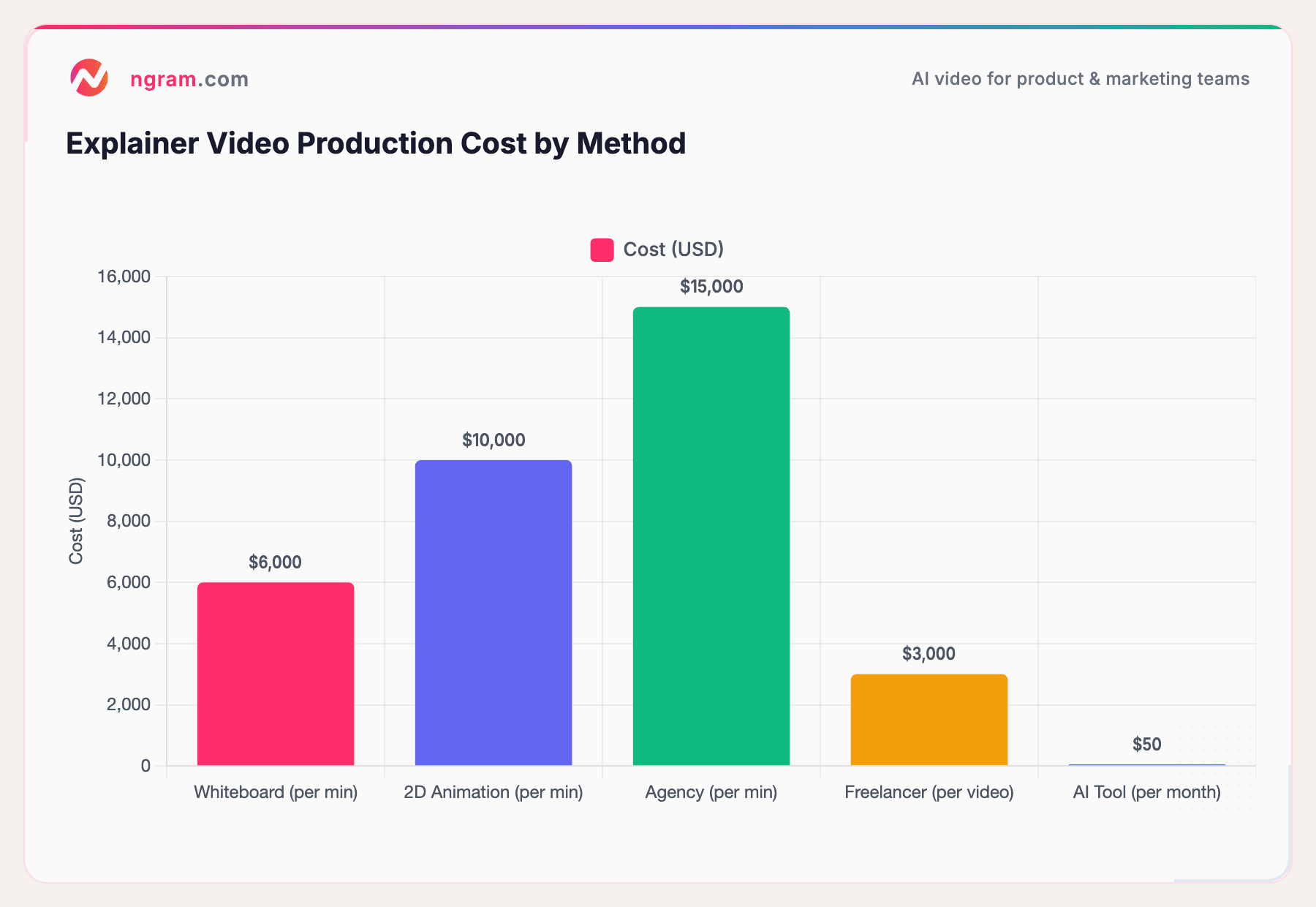
Here's what explainer video production typically costs by method:
Sources: Advids, Clutch, industry research
The numbers are stark. A whiteboard explainer runs $2,000-$10,000 per minute. 2D animation costs $5,000-$15,000 per minute. Agencies charge $15,000+ per finished minute. Freelancers are cheaper at $1,050-$2,450 per video, but you're still looking at days of turnaround and revision cycles.
AI explainer video makers? Most charge $15-$90 per month, and many have free tiers. According to industry benchmarks, AI tools have driven a 91% cost reduction in video production, from an average of $4,500 per minute to $400 per minute. Production time has dropped from 13 days to 27 minutes for a 60-second video.
If your team produces even two explainer videos a month, AI tools pay for themselves on day one.
Types of Explainer Videos You Can Create with AI
Not all explainer videos are the same. The best AI explainer video makers support multiple formats, each suited to different goals:
Product Explainers - The classic. Show what your product does, who it's for, and why it matters. Best for landing pages, product pages, and email campaigns.
Feature Announcements - Turn release notes into clear, visual narratives. Instead of a changelog that nobody reads, ship a 60-second video that shows the new feature in action.
Onboarding and How-To Videos - Walk new users through your product step by step. AI tools with screen recording editing capabilities can turn raw captures into polished walkthroughs with smart zoom, callouts, and step labels.
Customer Stories - Combine quotes, proof points, and visuals into case study-style narratives. These work well for mid-funnel content where prospects need social proof.
Social Clips - Cut longer content into short, high-signal clips optimized for platform pacing. A 90-second explainer can become three or four 15-second clips for different channels.
Sales Enablement Videos - Create persona-specific demo clips that sales teams can drop into outreach. Instead of a generic demo, tailor the explainer to each prospect's industry and pain points.
The common thread: AI explainer video generators let you produce all of these without a production team. One tool, multiple formats, minutes per video.
Frequently Asked Questions
How long should an AI explainer video be?
The sweet spot is 60-90 seconds. Research consistently shows viewer retention drops after 90 seconds. Plan for about 150 words per minute of script. If your message needs more time, consider breaking it into a series of shorter videos.
Can AI explainer video makers replace professional video production?
For most business use cases, yes. AI tools excel at product demos, feature announcements, onboarding walkthroughs, and social media explainers at a fraction of the cost. Where traditional production still wins is in high-end brand campaigns and emotional storytelling that requires live-action footage.
What is the best free AI explainer video maker?
Most leading AI explainer video tools offer free tiers. ngram offers free access to get started with a full AI-powered workflow including script generation. Other tools like Canva provide template-based options for basic explainers.
Do explainer videos actually increase conversions?
Yes, and the data is consistent. Landing pages with explainer videos convert up to 86% higher, according to Loopex Digital. And Wyzowl reports that 85% of consumers have been convinced to buy after watching a brand's video.
How much does it cost to make an explainer video with AI?
AI explainer video tools range from free to about $90/month for premium plans. Compare that to $1,500-$7,000 for a single freelance explainer or $15,000+ per minute from an agency. For teams producing multiple videos per month, AI tools offer 90%+ cost savings.
What types of explainer videos can AI tools create?
Most AI explainer video makers support animated explainers, screencast tutorials, text-to-video conversions, and some offer avatar-based presenter videos. All-in-one platforms like ngram handle multiple formats from a single workspace, including motion graphics, voiceover, and brand kit integration.
How to make AI explainer videos that convert?
Start with the script. Follow a problem-solution-proof-CTA structure, keep it under 90 seconds, and make sure the first 5-10 seconds hook the viewer. Use your real product assets when possible, and always tailor the message to your specific audience and channel.
Wrapping Up
The math on AI explainer video creation is simple. Traditional methods cost thousands and take weeks. AI tools cost a fraction of that and deliver in minutes. And the quality is good enough that 78% of marketing teams now use AI-generated video regularly.
If you're looking for an AI explainer video maker that starts with narrative, not templates, give ngram a try. Bring whatever you have, tell it who the video is for, and get a polished, on-brand explainer video in minutes. Your first video is free.