
SaaS buyers have changed. They're skeptical, savvy, and unwilling to sit through feature lists or lengthy sales pitches. What they want is evidence - quick, visual proof that your product solves their specific problem faster and easier than anything else.
That's where demo videos come in. According to Wyzowl's 2026 Video Marketing Report, 91% of businesses now use video as a marketing tool. For SaaS specifically, the impact is even stronger: B2B video content achieves 1200% more shares than text and images combined. But not all demo videos are created equal.
In this guide, we'll walk you through everything you need to know about SaaS demo videos - from the types that work best to the tools that make creating them faster, and how to actually distribute them to reach your audience.
Why SaaS Demo Videos Matter More Than Ever
Let's start with the basics. A SaaS demo video is a focused, visual walkthrough of your product that shows how it works in real-world scenarios. It's designed to answer the question every prospect has: "Does this actually solve my problem?"
The numbers tell the story. According to DemandSage's analysis, the average conversion rate for websites using video marketing sits at 4.8%, compared to just 2.9% for those without video. That's a 65% lift from adding video to your funnel.
But here's the catch: most SaaS teams are getting demo videos wrong. Many SaaS companies still gate their product behind sales calls, not showing any part of their product without requiring a conversation first. Meanwhile, their competitors are using short, focused video demos to let prospects self-serve at the top of the funnel.
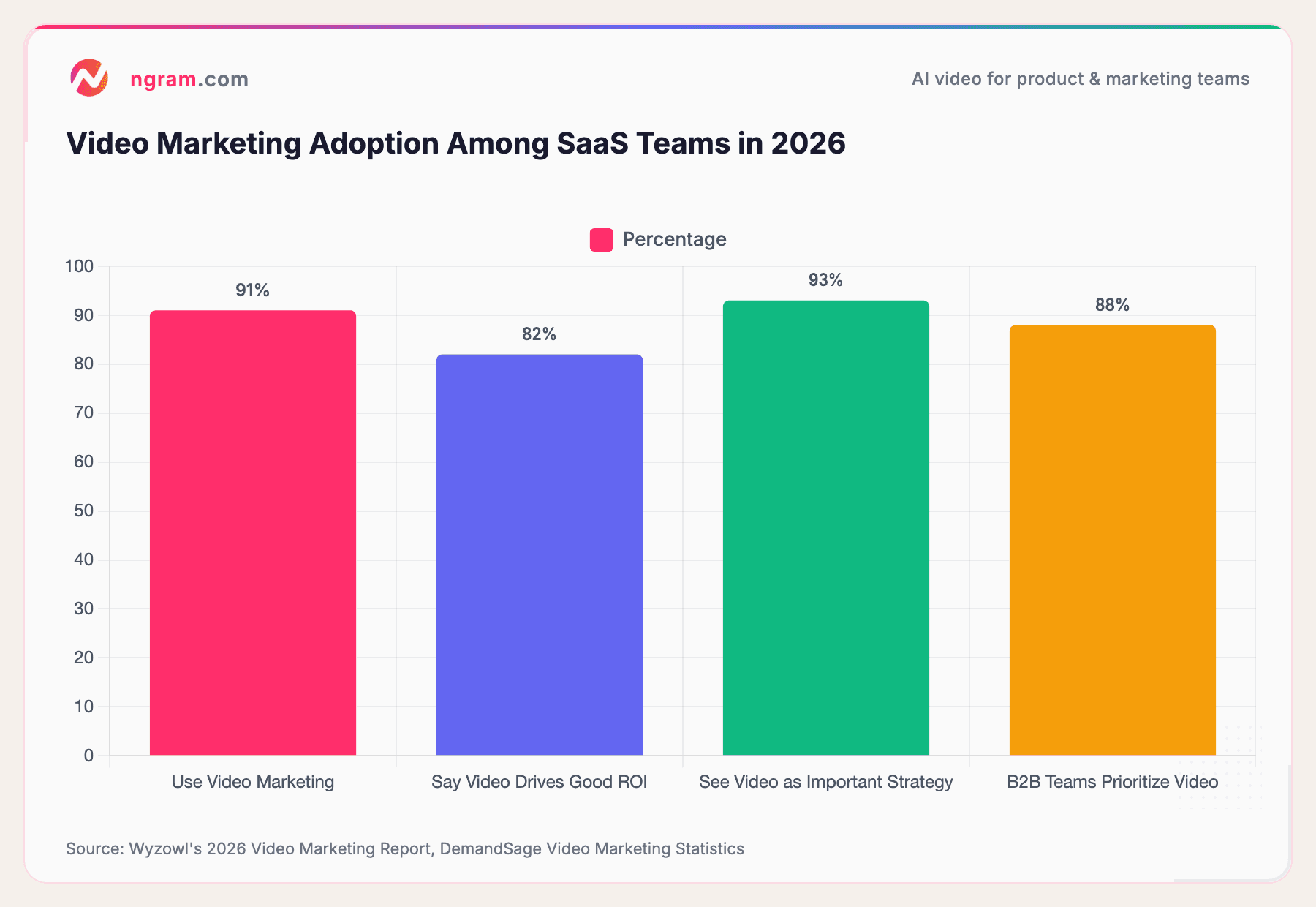
Source: Wyzowl's 2026 Video Marketing Report, DemandSage Video Marketing Statistics
The data is clear: video is no longer optional. It's the most effective way to communicate product value at scale.
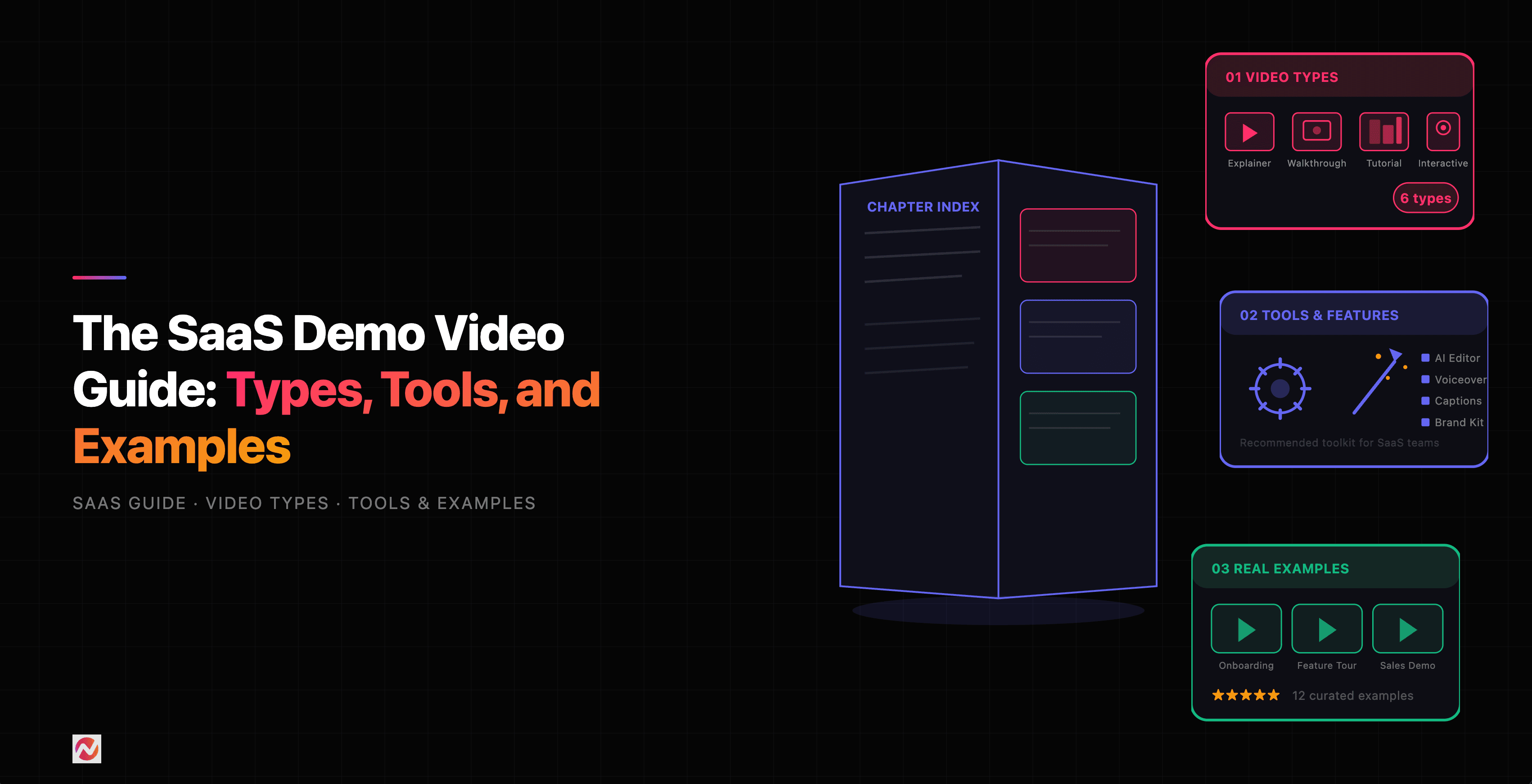
Types of SaaS Demo Videos
Not every demo video serves the same purpose. Different stages of the sales funnel require different formats. Here's what actually works:
1. Product Overview Videos
These are your top-of-funnel heroes. A product overview video is typically 1-2 minutes long and answers the basic question: "What is this product and why should I care?"
The best product overview videos focus on the problem first, then show how your product solves it. They're usually animated or use motion graphics to make complex ideas visual and easy to follow. Think of it as a hook - your goal is to make prospects curious enough to explore further.
Slack's "So Yeah, We Tried Slack" video is a textbook example - it opens with relatable communication chaos and then shows Slack as the fix, all in under two minutes. Dropbox's original MVP demo took an even simpler approach: a 3-minute screencast showing one file syncing across devices that drove 75,000 signups overnight.
Example structure:
- Problem statement (15 seconds)
- Your solution in action (45 seconds)
- Key benefit (20 seconds)
- Call to action (5 seconds)
2. Feature Deep-Dive Videos
Once a prospect is engaged, they want details. A feature deep-dive video zooms in on a specific capability and shows exactly how it works and why it matters.
These are typically 3-5 minutes and work best as content on your product page or sent to prospects who ask "Can you show me how you handle X?" They're usually screencast-based (showing your actual product UI) with voiceover narration explaining each step.
The key difference from a product overview: deep-dive videos assume your audience already knows what you do. They're for people ready to evaluate. Figma's Config conference demos are a strong example of this format - they skip the "what is Figma" intro and jump straight into showing new features in action. Grammarly's screencast demos also excel here, showing the product catching errors in real time with no setup needed.
3. Onboarding Videos
Your product is amazing, but if new users get stuck on day one, you've lost them. Onboarding videos are short, tactical walkthroughs of your first-time user experience.
These typically live inside your product or in your knowledge base. They answer questions like "How do I set up my account?" or "Where do I find this feature?" They're usually 1-3 minutes, screencast-based, and highly specific to individual workflows.
4. Sales Follow-Up Videos
After a demo call, prospects are making a decision. A sales follow-up video is a personalized walkthrough that addresses specific objections or shows how your product handles their unique use case.
These work best when personalized (even just saying the prospect's name) and sent within 24 hours of a demo call. According to research from Vidyard, personalized video in follow-up emails significantly increases click-through rates.
5. Customer Testimonial Videos
Nothing beats social proof. Testimonial videos feature actual customers describing their problems, how they use your product, and the results they achieved.
These are pure trust-builders. According to Wyzowl, 57% of video marketers created testimonial videos in 2026, making it one of the top three video formats alongside social media videos and explainers.
Real SaaS Demo Video Examples Worth Studying
Theory is useful, but seeing what actually works is better. Here are seven real SaaS demo videos from companies that got it right - and what specifically makes each one effective.
1. Slack - "So Yeah, We Tried Slack" (Customer Story as Demo)
Slack's breakout demo video is a masterclass in showing, not telling. Instead of walking through features, Slack hired Sandwich Video (a production company) to document their own experience adopting Slack. The result is a mockumentary where real team members describe their chaotic communication before Slack - email threads, missed messages, lost files - and then show how Slack's channels, search, and integrations fixed it.
What makes it work: The video never feels like an ad. It uses humor, relatable frustration, and real people to make the product feel inevitable rather than aspirational. The video racked up over 5 million views on YouTube and became one of the most referenced B2B SaaS videos in marketing. Slack later produced a sequel filmed entirely during remote work in 2020, showing the team collaborating through Slack from seven different home offices.
Takeaway: Let your customers (or a relatable team) tell the story. Problem-first storytelling beats feature-first every time.
2. Dropbox - Drew Houston's Original MVP Demo (Screencast)
This is the SaaS demo video that launched a company. In 2007, Dropbox founder Drew Houston recorded a simple screencast showing how Dropbox synced files across devices. He dragged a file into a folder on one computer, switched to another, and the file appeared instantly. That was the whole demo.
What makes it work: Radical simplicity. Houston didn't explain cloud architecture or file syncing protocols. He showed one thing happening in real time, and it felt like magic. The video went to #1 on Hacker News, and Dropbox's beta waitlist jumped from 5,000 to 75,000 signups overnight. Houston also embedded Easter eggs targeted at the Hacker News audience (references to Digg and specific tech culture jokes), which drove sharing.
Takeaway: You don't need animation or production value. A clear screencast of your product doing something genuinely useful can be more powerful than a $50,000 explainer video.
3. Grammarly - Real-Time Error Correction Demo (Screencast)
Grammarly's demo videos are short, focused product screencasts that show the tool catching errors in real time. A user types a sentence with grammatical issues, and Grammarly highlights the problems and suggests fixes - right there on screen. No narrator talking about features. Just the product working.
What makes it work: Grammarly shows relatable writing scenarios that everyone has experienced - typos in emails, unclear phrasing in documents, tone issues in professional messages. The product is the star, and there's zero gap between the problem and the solution. This approach has been so effective that Grammarly spent over $200 million on video advertising (primarily YouTube), making it one of the highest-spending SaaS video advertisers.
Takeaway: If your product has an immediately visible before-and-after, lean into it. Show the transformation happening in real time with no narration needed.
4. Airtable - Multi-Use Case Overview (Animated + Screencast)
Airtable's product demo video solves a hard problem: explaining a flexible tool that can be used for hundreds of different workflows. The video starts broad ("organize anything") and then gets increasingly specific, showing Airtable being used for content calendars, product launches, event planning, and inventory tracking. Each example is a quick 10-15 second screencast of the actual product.
What makes it work: The video uses a smart funnel structure. It opens with a universal pain point (spreadsheets are limiting), shows Airtable's core concept (a database that looks like a spreadsheet), and then rapidly cycles through specific use cases. This lets different audience segments see themselves in the product. Viewers who stick through the first 30 seconds are essentially self-qualifying as interested leads.
Takeaway: For horizontal products that serve many use cases, rapid-fire examples work better than picking one scenario. Let viewers find their own use case in your demo.
5. Figma - Config Product Launch Demos (Live Product Demo)
Video: Watch at figma.com/demo Type: Feature deep-dive / product launch Length: Varies (individual demos 3-10 minutes)
Figma's Config conference demos are some of the best feature deep-dives in SaaS. Rather than using voiceover narration or animation, Figma lets the product speak for itself with clear, in-action screen recordings of new features. The demos move briskly through engaging visuals that make complex design functionality look effortless. Their Config 2024 keynote featured CEO Dylan Field walking through the UI redesign, Dev Mode improvements, and new AI features with live product usage.
What makes it work: Figma skips the marketing fluff entirely. There's no "imagine a world where..." setup. The demos jump straight into the product, show a real design workflow, and demonstrate how new features change that workflow. The pacing is fast enough to hold attention but slow enough to follow. Figma also makes all conference demos available on-demand, turning a one-time event into an evergreen content library.
Takeaway: For technical or creative products, confidence in the product is your best marketing. Skip the setup and show the product doing impressive things.
6. Monday.com - Animated Explainer (Animation + Live Action + UI)
Video: Watch at monday.com/blog/project-management/monday-demo Type: Product overview / animated explainer Length: ~2 minutes
Monday.com's product demo video is a high-energy blend of stop-motion animation, live-action footage, and product UI screenshots. The video tackles the core pain point (juggling too many tools for project management) with humor and visual energy, then shows how Monday.com consolidates everything into one platform. It covers generating reports, using AI for repetitive work, setting up workflows, and rolling out automations - all in under two minutes.
What makes it work: The mixed-media approach keeps attention high. Instead of a flat screencast, Monday.com alternates between animated sequences (showing the chaos of disorganized teams) and clean product UI shots (showing the organized alternative). The humor is specific to workplace frustrations rather than generic, which makes it relatable. The pacing matches the energy of a team that actually needs this tool - fast, no wasted time.
Takeaway: For project management or workflow tools, showing the before (chaos) and after (order) with visual energy is more persuasive than a calm walkthrough.
7. Canva - Real-Time Creation Session (Screencast)
Video: Watch at canva.com/enterprise/product-demo Type: Product overview / live demo Length: ~90 seconds
Canva's demo video takes the simplest possible approach: it shows someone building a social media post from scratch. The viewer watches a real-time creation session - selecting a template, adjusting colors, swapping images, adding text, and downloading the final asset. No narrator explains what's happening because the product is intuitive enough that the actions speak for themselves.
What makes it work: Canva's demo succeeds because it mirrors exactly what a new user would do in their first session. There's no gap between watching the demo and using the product. The video also shows real people and outcomes - small business owners, restaurant teams, and sports players wearing custom-designed merch created in Canva - which grounds the product in tangible results rather than abstract features.
Takeaway: If your product is visual and intuitive, a real-time creation session is the most honest demo you can make. Show the whole workflow from blank canvas to finished output.
What These Examples Have in Common
Look across all seven examples and you'll notice patterns:
- Problem first, product second. Every effective demo starts with a pain point the viewer recognizes.
- Short and focused. None of these videos try to show every feature. They pick one angle and commit to it.
- The product is visible. Whether through screencast, animation, or live demo, you see the actual product working. No vague promises.
- Clear audience. Each video knows exactly who it's for and doesn't try to speak to everyone.
- No jargon. These companies avoid technical language and instead show outcomes that anyone can understand.
You don't need a massive production budget to apply these principles. A focused 90-second screencast with good audio, clear narration, and a compelling use case will outperform a $100,000 video that tries to say everything.
How Long Should Your Demo Video Be?
This is where many teams get it wrong. The internet is full of 10-minute product demos that nobody watches.
Here's the data:
- 71% of professionals believe videos between 30 seconds and 2 minutes are most effective
- For a self-serve video demo on your site or social media, keep it under 2 minutes
- For an interactive demo or in-product tutorial, limit it to about 10 steps (roughly 3-5 minutes)
- For a sales follow-up or detailed feature walkthrough, 3-5 minutes is appropriate
The rule: If your prospect is watching on their own time (not on a call with you), respect their attention span. Short always wins over long.
Video Demo Tools Worth Your Time
You have options. The question isn't really whether you should use a tool - it's which tool makes sense for your workflow and team size.
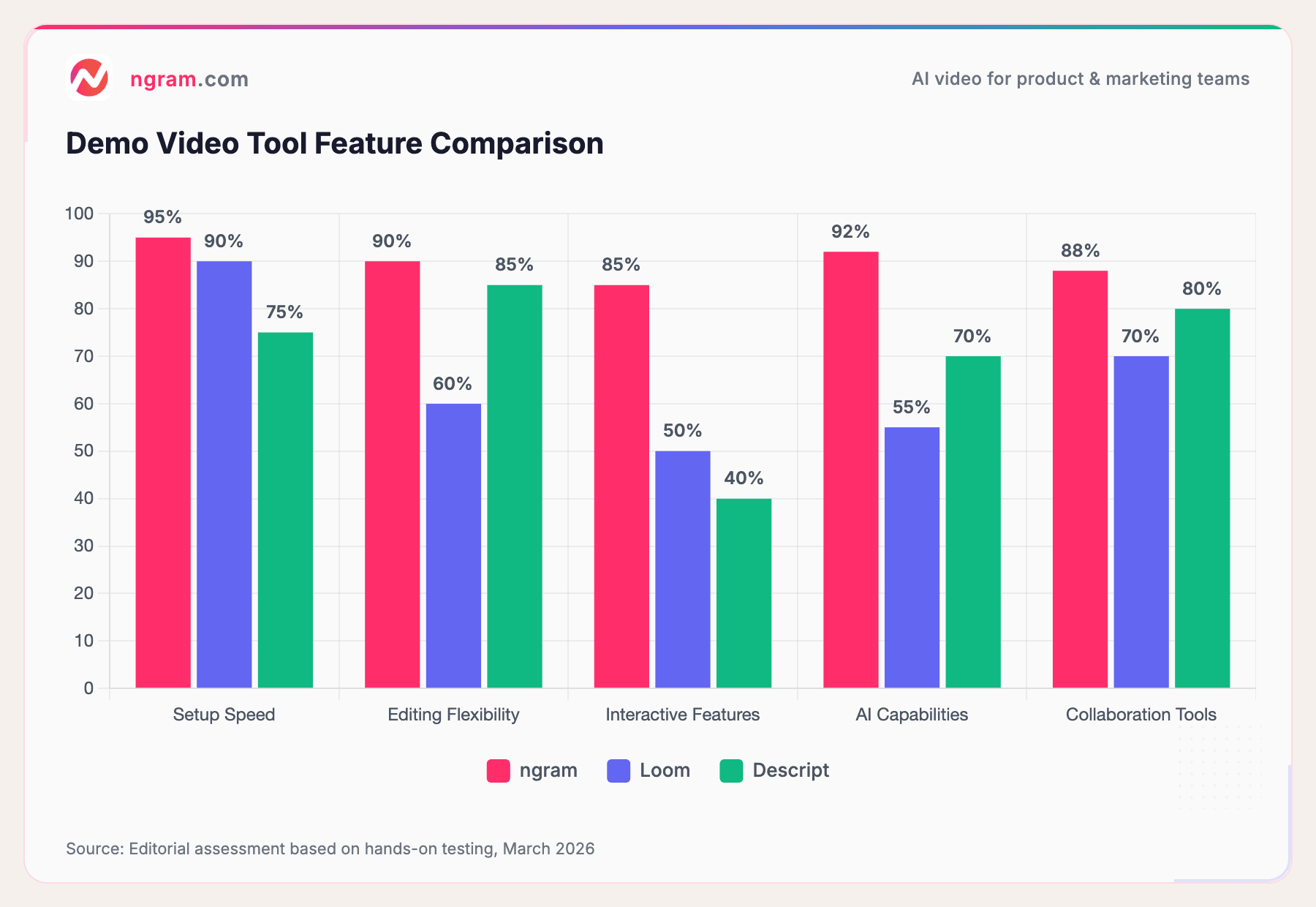
Source: Editorial assessment based on hands-on testing, March 2026
Here's what each category of tool does best:
Simple Screen Recording (Loom, Camtasia): If you just need to hit record, talk through your screen, and share a link, these work. They're lightweight and get the job done for basic tutorials and quick follow-ups.
Full-Featured Editors (Descript, CapCut): If you want to record, edit, add captions, music, and create a polished final product, these give you more control. They take longer to use but the output is more professional.
AI-Powered Platforms (ngram, HeyGen): If you want to create demo videos fast - turning a rough recording into a polished video in minutes - these are worth exploring. They handle editing, captions, motion graphics, and formatting automatically.
For most SaaS teams, the sweet spot is a tool that lets you record quickly, edit with minimal friction, and share easily. You want to be creating five demos, not spending two weeks perfecting one.
Creating Your First SaaS Demo Video
Here's the honest truth: you can spend weeks planning your first demo video and still get it wrong. Instead, we recommend working backward from your audience.
Step 1: Pick Your Scenario
Don't try to show your whole product. Pick one specific use case. For example: "A product manager setting up a changelog notification" or "A sales rep recording a personalized follow-up video."
Specific is better. When you try to be comprehensive, you become boring.
Step 2: Write a Script (Loosely)
You don't need a word-for-word script, but you need a roadmap. Write down:
- The problem your prospect has (1 sentence)
- The exact steps they'd take in your product (3-5 steps)
- The outcome they'll achieve (1 sentence)
- The call to action (1 sentence)
That's it. Now you know what to demo.
Step 3: Record Your Screen + Your Voice
Hit record. Walk through those steps. Speak naturally - don't try to sound like an infomercial. People connect with authenticity, not polish.
If you mess up, just pause and re-record that section. You're capturing the raw material. Editing comes next.
Step 4: Edit Ruthlessly
Remove the boring parts. Long pauses, clicking around looking for features, typing slowly - cut it out. Your job is to keep the viewer's attention.
Add captions so your video works with sound off. Most video consumption happens on mute. If someone can't follow your demo without audio, you've lost them.
Step 5: Add a Call to Action
Don't just end the video. Tell viewers what to do next. "Click the link in the description," "Book a demo," "Start your free trial" - be clear.
Distribution Strategy: Where Your Demo Videos Actually Get Watched
Creating a demo video is 40% of the work. Getting it in front of people is the other 60%.
On Your Product Site: Hero videos on your homepage, feature pages, and pricing page build credibility and reduce bounce rates. Make sure your video loads fast and plays automatically.
In Sales Emails: A personalized demo video in a follow-up email increases reply rates. Services like ngram make it easy to add video directly to email without huge file sizes.
On Your Blog: A product demo video embedded in a how-to guide or comparison blog post keeps readers on your site longer. See our guide on creating product demo videos for more detail.
On Social Media: Short demo clips (30-60 seconds) perform well on LinkedIn and Twitter. LinkedIn video content continues to grow in reach.
In Your Demo Product Page: Link to your demo video maker tools so prospects can self-serve. Interactive demos with embedded video tend to create significantly higher engagement than static video alone.
On Help Content: Onboarding videos inside your product reduce support tickets. A new user who watches a 2-minute walkthrough is more likely to succeed than one who contacts support.
One more distribution tip: Not all platforms treat video equally. YouTube, LinkedIn, and TikTok all reward video content algorithmically. If you're serious about demo videos, you need to show up where your audience already spends time.
Measuring What Actually Works
You need to know if your demo videos are working. Here's what to track:
View Duration: Are people watching the whole thing or dropping off halfway? If you're losing 30% of viewers at the 30-second mark, your opening isn't compelling.
Click-Through Rate: If your video has a call to action, how many people are taking it? A 10% CTR from your video is solid. Below 3% means your CTA isn't clear or compelling.
Demo-to-SQL Conversion: This is the metric that matters. If you send a personalized demo video and track responses, how many recipients book a call or request more info? Even a 5% conversion rate is strong and worth repeating.
Content Lift: Compare conversion rates on pages with video to pages without. A video on your pricing page that lifts conversion rate by 30% is an ROI winner.
Don't get distracted by vanity metrics. Video views matter less than video impact. A 100-view video that converts 5 viewers matters more than a 10,000-view video that converts nobody.
Moving From Ideas to Action
You probably have a good sense of what a SaaS demo video should do by now. The next question is: what should you demo first?
Start with your biggest problem. Is it that prospects don't understand what your product does? Create a 2-minute product overview. Are new users struggling to get started? Build an onboarding video. Are your sales reps spending 30 minutes on similar demo calls? Record one strong demo and use it as a template.
If you're looking for a tool to turn your raw recordings into polished, on-brand videos fast, try ngram for free - your first video takes under 5 minutes to create.
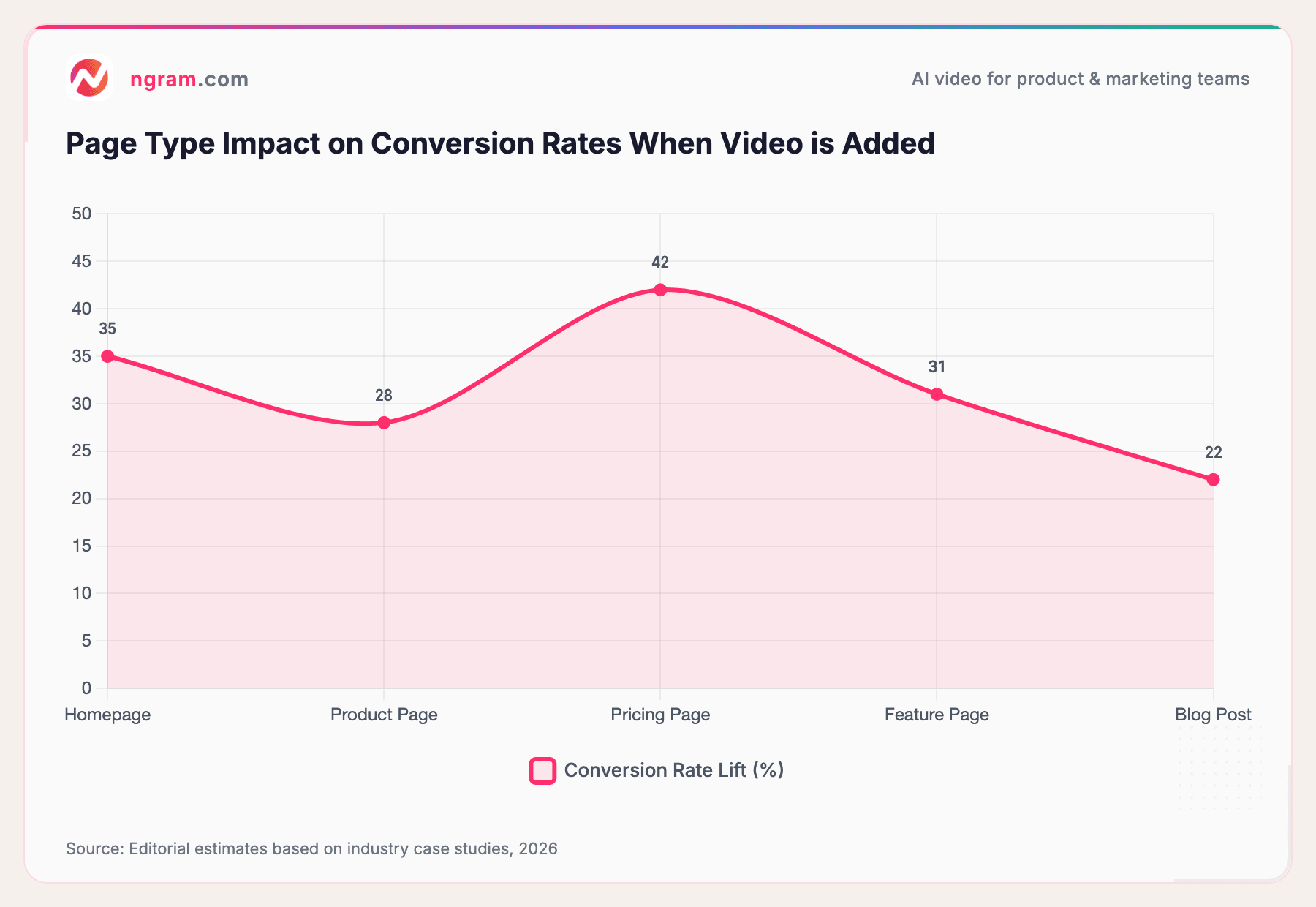
Source: Editorial estimates based on industry case studies, 2026
Pricing pages see the biggest lift - a 42% conversion increase on average when video is added. This suggests that demo videos help prospects move from evaluation to decision.
Frequently Asked Questions
How much time should I spend scripting a demo video?
About 30 minutes. Write down the problem, the steps, and the outcome. Don't try to memorize a script word-for-word - that's when you sound robotic. Instead, know the flow and talk naturally. The best demo scripts are outlines, not speeches.
Can I use stock footage in my demo videos?
Yes, but sparingly. Your actual product UI is always more credible than animated representations or stock footage. If you need to show something you can't capture on screen, stock footage can help. But lead with reality.
How often should I update my demo videos?
If your product hasn't changed, your demo is still valid. But if you ship a major new feature or redesign your UI, record a new demo. Outdated demos lose trust - "Why is the interface different from what they showed me?"
What's the difference between a demo video and an explainer video?
A demo video shows your actual product in action. An explainer video uses animation or motion graphics to explain a concept or process. Demos are literal - here's our product. Explainers are conceptual - here's how to think about this problem. Most SaaS companies need both.
Should I use my create product demo video tool or just record my screen?
A dedicated tool adds value: automatic captions, editing without multiple software, AI-powered optimization, and one-click sharing. If you value your time, a tool is worth it. If you're just doing this once, screen recording works.
Can I use testimonial videos on my homepage?
Absolutely. In fact, you should. Video testimonials build trust faster than written reviews. A 60-second video of a real customer talking about results is more powerful than 500 words of marketing copy.
What length video performs best on LinkedIn?
LinkedIn favors videos 30 seconds to 5 minutes. But according to research, the sweet spot is 30-120 seconds. Short enough to finish in a feed scroll, long enough to demonstrate real value. Video continues to grow as a share of LinkedIn impressions.
The Bottom Line
SaaS demo videos aren't a nice-to-have anymore. They're the most effective way to show product value at scale. You can't put your whole product in a 2-minute video, but you can show enough to answer the core question: "Does this actually solve my problem?"
Start small. Pick one use case, record it, edit it, and ship it. Then measure what happens to your conversion rates. The data will tell you if it's working. If it is, make more. If it's not, adjust and try again.
The teams winning in 2026 aren't waiting for perfect. They're shipping good demo videos consistently and iterating based on what they learn. You can do the same.