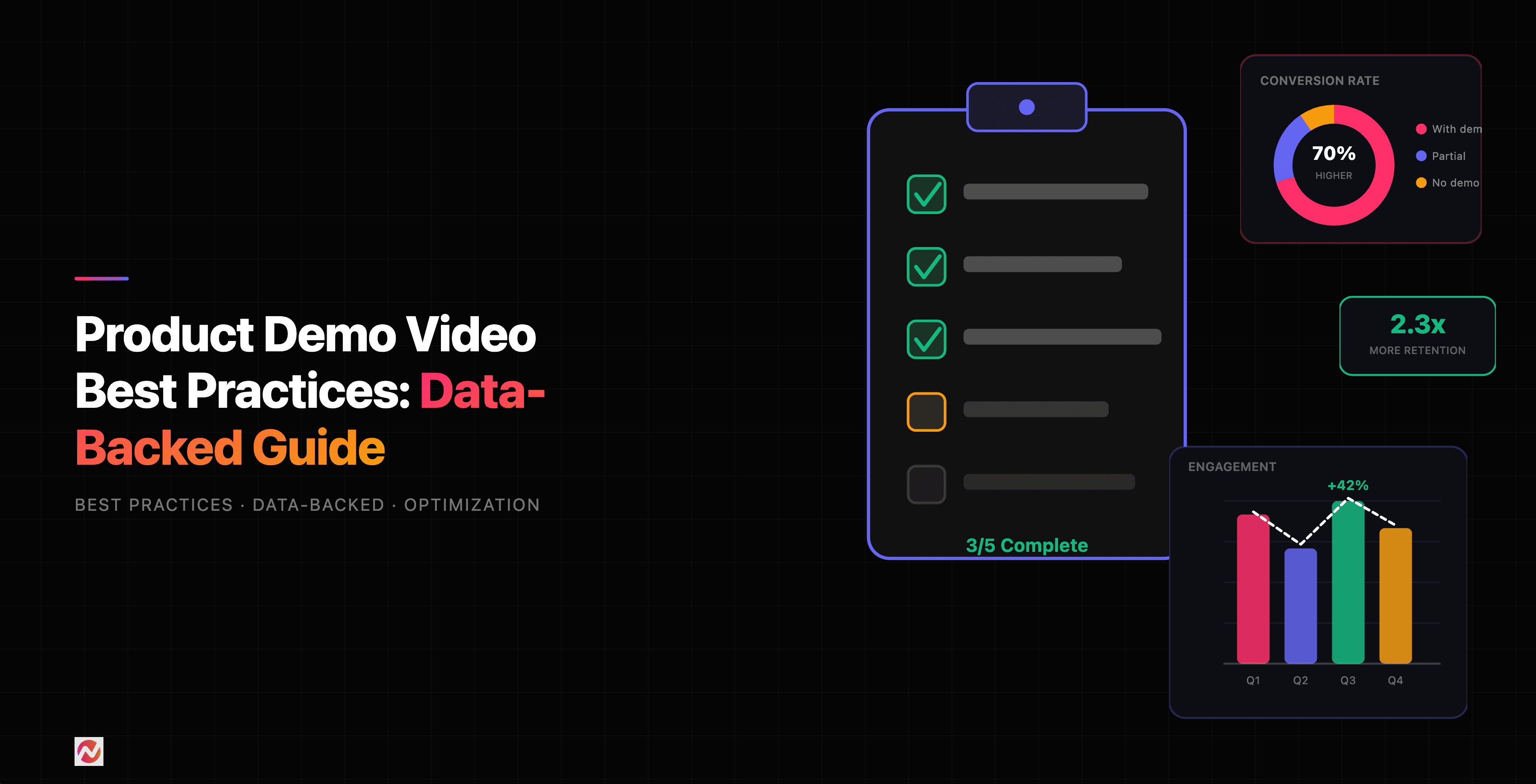

Product Demo Video Best Practices: Data-Backed Guide
Product demos are where prospects decide whether your software is worth their time. Yet most companies miss the mark. They focus on listing features instead of solving problems. They ramble for 10 minutes when people expect 2. If you're looking for a structured approach to creating product demo videos, start here. They bury the call-to-action in confusing jargon.
We've analyzed hundreds of high-converting product demos and tested countless variations. Here's what actually works.
Why Product Demos Matter More Than Ever
Video has become the primary way prospects evaluate SaaS products. According to Aberdeen Group research, companies that use video in their marketing grow revenue 49% faster than those that don't. More striking: shoppers who view demo videos are 1.81x more likely to purchase.
The challenge isn't whether to create demos. It's whether you're creating them right.
The Science of Demo Length
One of the most common mistakes is making demos too long. Your audience doesn't have unlimited attention.
Here's what the data shows:
For top-of-funnel engagement, videos between 30 seconds and 2 minutes are considered most effective by 73% of marketers. For deeper product exploration, the sweet spot is 2-3 minutes maximum. Anything longer loses viewers.
Why Shorter Wins
The reason is simple: people scan before they commit. A prospect landing on your site has competing demands. They'll give you 60 seconds to prove relevance. Only then will they invest more time.
This doesn't mean you need just one demo. In fact, the best practice is to create multiple short demos aligned to specific stages in the user journey.
If you're targeting product managers, create a 90-second demo showing how your tool speeds up feature tracking. If you're targeting sales teams, show how your product shortens demo cycles. Each audience gets a tailored experience.
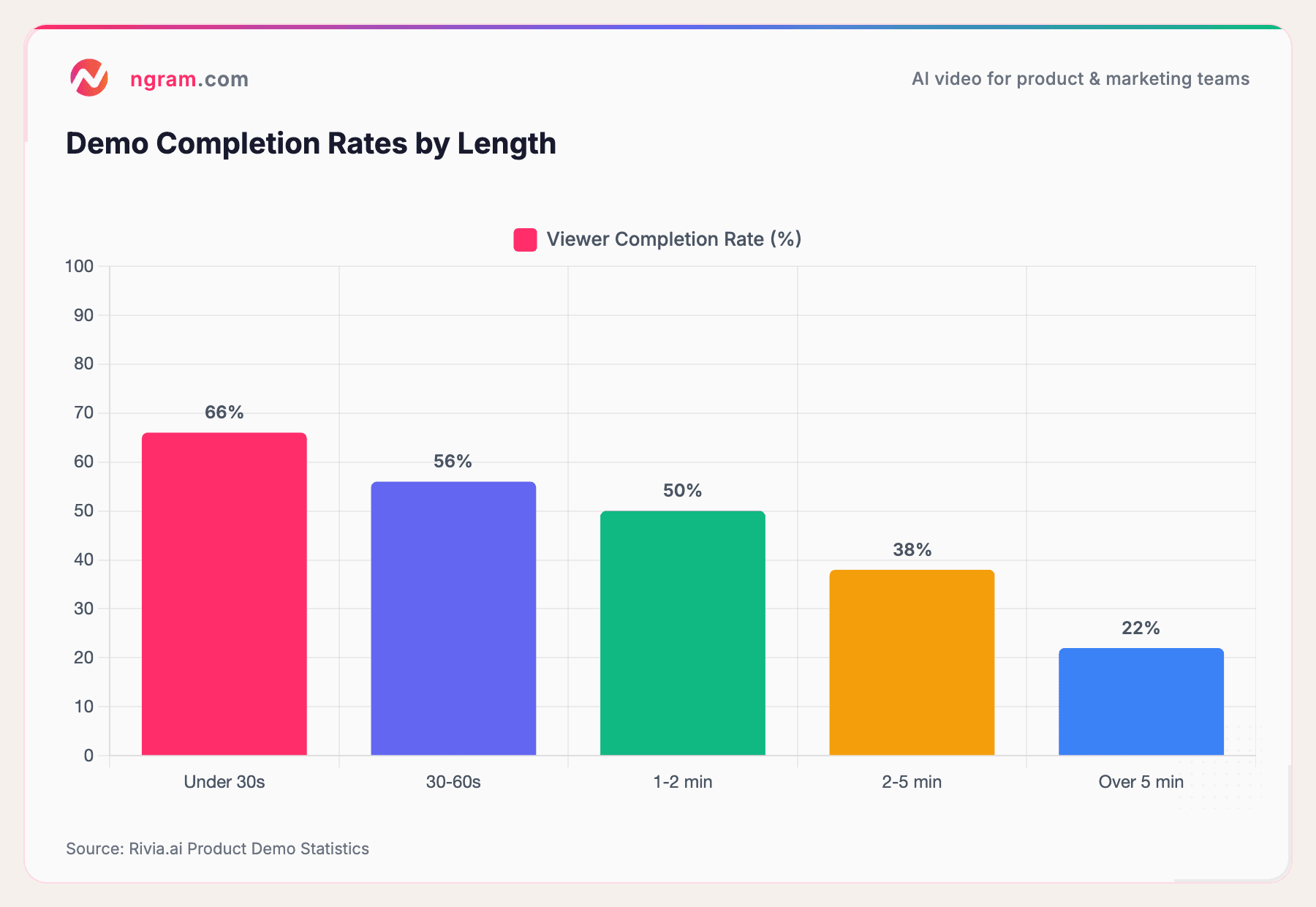
Source: Rivia.ai Product Demo Statistics
This chart shows a brutal truth: every minute after 60 seconds, your completion rate drops. Viewers aren't being impatient. They're being selective. Honor that.
Script Structure That Converts
The best demos follow a predictable narrative arc. Not because it's formulaic, but because it mirrors how people actually make decisions.
The Four-Part Demo Script
1. Start with the problem (20 seconds)
Don't introduce your product. Introduce your prospect's problem. Say something like: "Onboarding users is messy. Documentation gets out of date. Support teams answer the same questions every day."
This does three things. First, it establishes credibility through recognition. Second, it frames your product as a solution, not a tool. Third, it keeps focus on the viewer, not the product.
2. Show the before state (15 seconds)
Visualize the problem. If your product automates reporting, show the spreadsheet madness. If it centralizes customer feedback, show emails scattered across inboxes. Make the pain tangible.
3. Demonstrate the transformation (60-90 seconds)
This is your demo's core. Show the key workflow that solves the stated problem. Use ui overlays or callouts to guide attention. Minimize narration and let the visuals do the work. Only explain what's non-obvious.
4. End with results and next steps (15 seconds)
Close with a concrete outcome: "Teams now onboard 3x faster. Support tickets drop by 40%." Then add a clear next step: "Try it free," "See a live demo," or "Schedule a call."
This structure isn't rigid. Adjust it for your audience and product. But these four elements should anchor every demo you create.
Visual Hierarchy: What Gets Attention
Production quality matters. In fact, research shows that 82% of businesses believe video gives them a good return on investment. Part of that ROI comes from looking professional.
But "professional" doesn't mean expensive. It means intentional.
The Three Visual Principles
Use motion to guide attention. When the screen changes, people notice. When nothing moves, their eyes wander. Use cursor emphasis, callouts, or subtle animations to guide viewers through your interface.
Contrast makes clarity. Highlight the action zone. Fade or desaturate the surrounding interface. If you're showing a button click, make that button stand out. Make everything else recede.
Data visualization sells results. Don't just say "faster." Show it. Display before-and-after metrics. Use charts and graphs to make impact visible.
ngram's approach to visual hierarchy uses these principles automatically. When you record your screen, our platform identifies the key interactions and enhances them with smart zooms, cursor smoothing, click emphasis, and product callouts that arrow, highlight, and label the right part of the UI. You get polished results without needing motion graphics expertise.
Call-to-Action Placement and Testing
A demo without a CTA is a missed opportunity. Yet placement matters more than most realize.
Where CTAs Perform Best
CTAs work best at three moments: at the end of the demo (obvious), mid-demo after showing a key benefit (when interest is highest), and in a follow-up email (when they're reconsidering).
The mistake most teams make is being too subtle. Your CTA should be clear and easy. "Try free," "Watch more," or "Chat with us" work. Vague language like "Learn more" underperforms because it doesn't signal what happens next.
For asynchronous demos (recorded videos), add CTAs in the video player itself. Don't rely solely on page elements. Interactive elements like clickable buttons in videos increase engagement by up to 20%.
A/B Testing Your CTAs
You should test:
- Timing: Does the CTA perform better at 30 seconds or 90 seconds?
- Copy: "Try for free" vs. "Start free trial" vs. "See for yourself"
- Format: Text link vs. button vs. video overlay
- Frequency: Single CTA vs. two CTAs in the demo
Most teams skip this testing. That's leaving 15-30% conversion lift on the table.
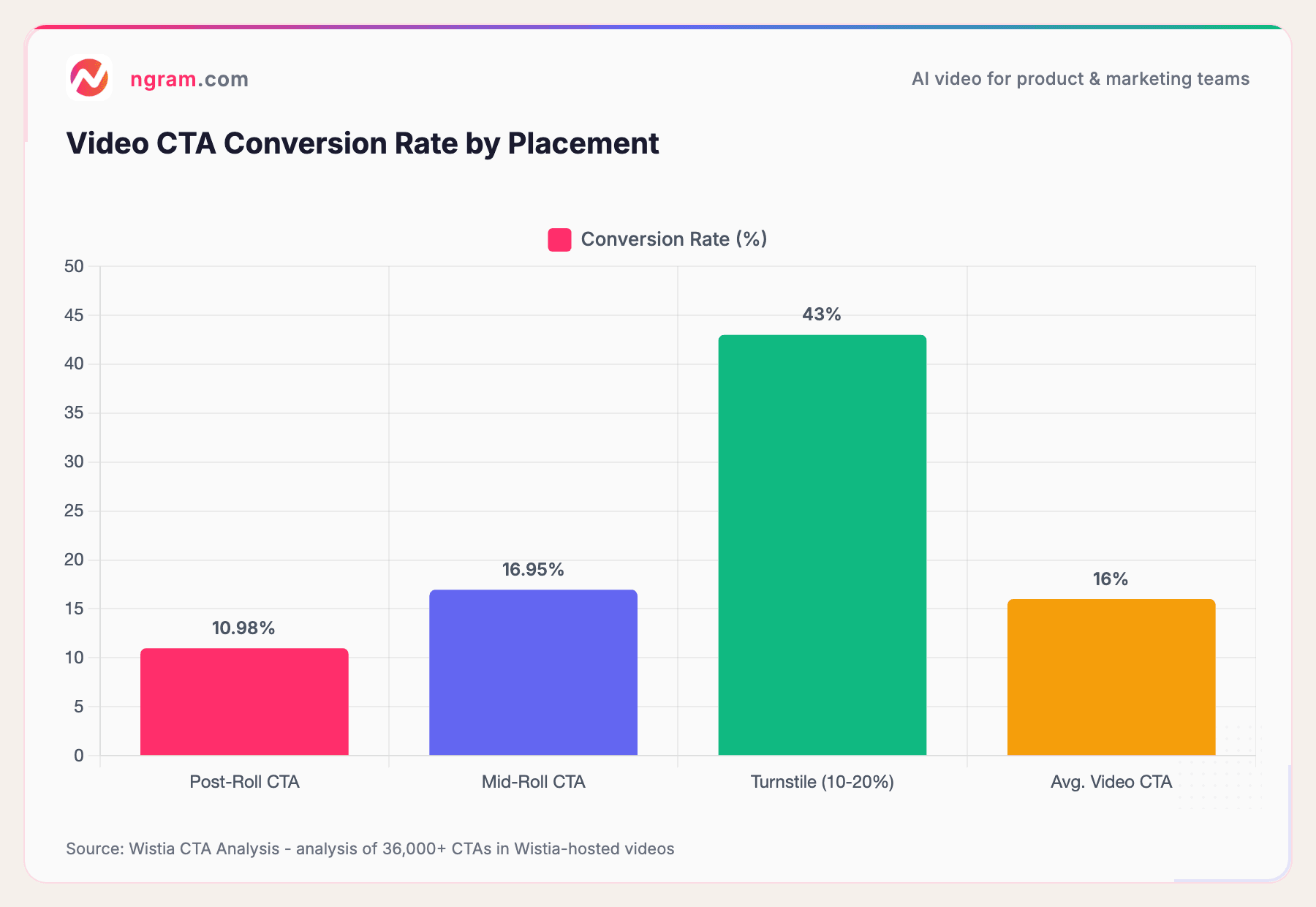
Source: Wistia CTA Analysis - analysis of 36,000+ CTAs in Wistia-hosted videos
Mid-roll CTAs convert at 16.95%, outperforming post-roll CTAs (10.98%) by nearly 6 percentage points. Turnstile forms placed in the first 10-20% of a video achieve a 43% conversion rate. The takeaway: don't wait until the end to ask viewers to act.
Distribution Strategy and Timing
Demos live everywhere: landing pages, sales emails, comparison pages, and support docs. Placement affects performance.
Where to Place Demos
Landing pages: Put demos above the fold if you're targeting people who've already searched for your product. Below the fold works fine for cold traffic where you need copy to establish credibility first.
Email campaigns: Demos perform best 2-3 days into a nurture sequence, after you've established the problem but before people lose interest.
Sales emails: Personalized demo videos outperform generic ones by 3x. If you're doing outreach, record a 45-second demo specific to their use case.
Comparison pages: Demo your strongest differentiator. Don't try to show everything. Show the one thing you do better.
Support docs: Video walkthroughs of complex features reduce support tickets by 30%.
Timing for Distribution
There's no single "best time" to send demo videos. But we've observed patterns:
- B2B SaaS: Tuesday-Thursday, 10am-2pm works best (when people are checking email, not in meetings)
- Bottom-of-funnel demos: Evening/weekend can work (when prospects review options on their own time)
- New feature releases: The day after announcement, when curiosity peaks
The key is consistency. Create a schedule, measure what works for your audience, then double down on winners.
Measuring Demo Performance
You can't optimize what you don't measure. Most teams track views. Smart teams track engagement.
The Metrics That Matter
View completion rate: What percentage of viewers watch to the end? For a 2-minute demo, aim for 60%+. If it's lower, your demo is too long or loses interest too quickly.
CTA click rate: What percentage click your call-to-action? Aim for 8%+. Below 5% suggests your CTA is unclear or poorly timed.
Conversion rate: What percentage of demo viewers become leads or customers? This is the north star. Track it by demo version, landing page, and traffic source.
Time to conversion: Do people who watch demos convert faster than those who don't? They should. If a demo viewer takes 2x longer to convert, your demo isn't building conviction.
Engagement heatmaps: Some platforms show exactly where viewers rewatch, pause, or drop off. These heatmaps reveal what's working and what's confusing.
For detailed performance measurement, create a dashboard that tracks these metrics over time. Then experiment: test different demos on the same landing page and measure which drives more conversions. Iterate monthly.
A/B Testing Demos for Continuous Improvement
Like all marketing, demos improve through testing. Here's how to structure A/B tests for demos.
Test One Variable at a Time
If you change the script, the visuals, and the CTA simultaneously, you won't know what moved the needle. Change one thing:
- Script variations: Problem-first vs. feature-first. Short narrative vs. minimal narration.
- Length variations: 60 seconds vs. 90 seconds vs. 2 minutes
- Visual style: Animated UI walkthrough vs. realistic footage vs. hybrid
- CTA variations: Different copy, placement, or format
Sample Size Matters
You need sufficient traffic to reach statistical significance. For most landing pages, this means 500+ views per variation before drawing conclusions. Avoid the trap of declaring a winner too early.
Track These Metrics During Tests
- Completion rate
- CTA clicks
- Lead generation (or signup rate)
- Cost per acquisition (if running paid traffic)
Run each test for at least 1-2 weeks to account for traffic pattern variations.
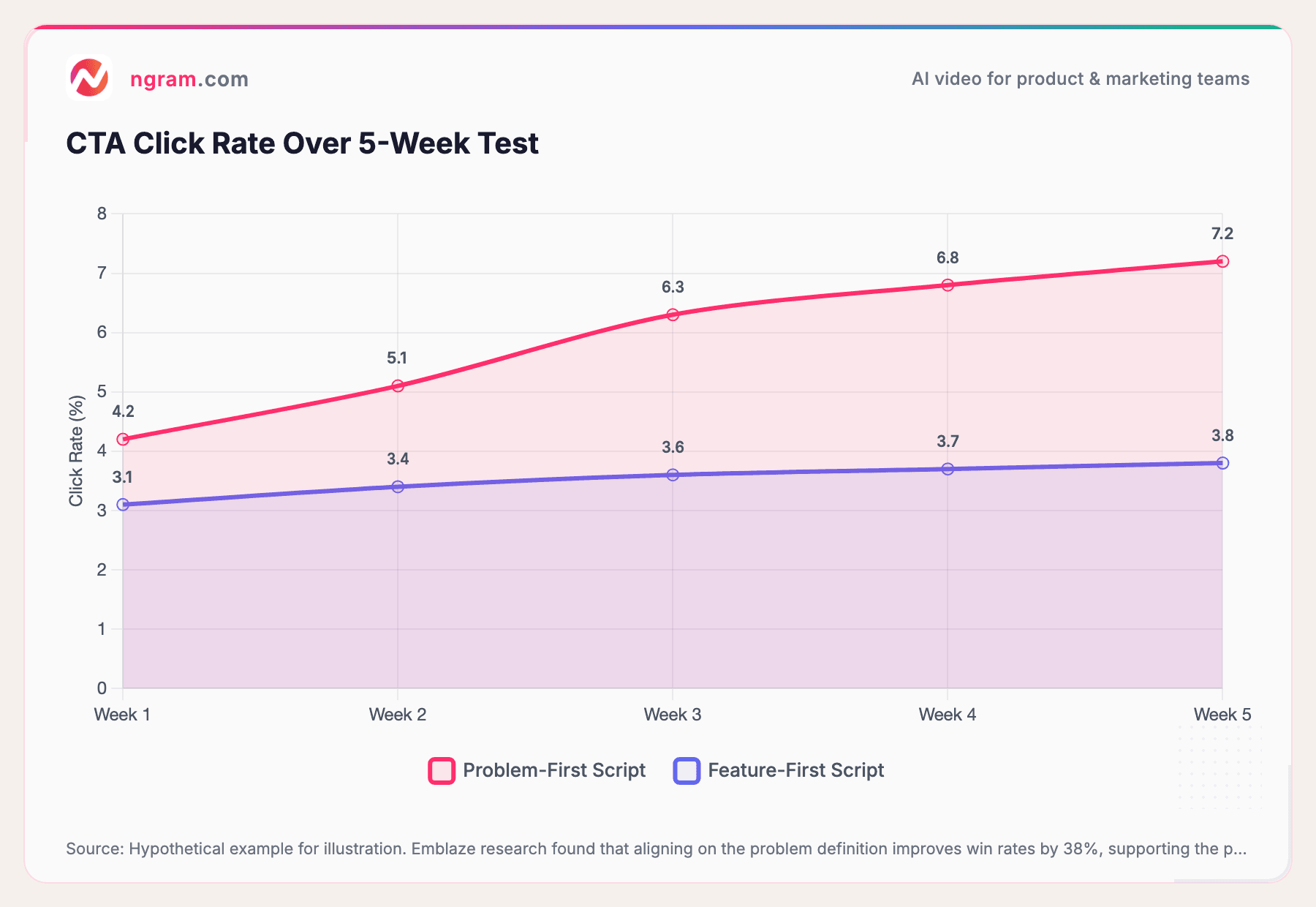
Source: Hypothetical example for illustration. Emblaze research found that aligning on the problem definition improves win rates by 38%, supporting the problem-first approach.
This example shows what we typically see: problem-first scripts outperform feature-first across the board. Emblaze's research confirms that demos which align on problem definition see significantly higher win rates. But your audience might be different. Test and learn.
Creating Demos at Scale
If you need dozens of product demos, manual creation doesn't scale. You need a repeatable process and the right tools.
The Scalable Demo Workflow
- Create a template. Establish your script structure, visual style, and branding. Every demo should feel consistent.
- Record your screen. Keep recordings clean and focused. Get B-roll of key workflows.
- Add polish. Insert callouts, highlight important elements, add background music. Keep it subtle.
- Optimize for distribution. Create multiple versions: a 60-second cut, a 2-minute cut, and a web version. Vertical video for social.
- Test and measure. Deploy and track performance. Iterate based on data.
If you're doing this manually in editing software, expect 2-4 hours per demo. That's not scalable.
Tools like ngram automate much of this. Record your screen. We handle the editing, branding, and formatting - including auto-cut that removes dead air automatically. That cuts production time to 15-30 minutes per demo.
Try ngram free and see how much faster you can ship demos. Your first video takes under 5 minutes to create.
Demo Performance by Audience and Use Case
Not all demos are created equal. Performance varies by audience and purpose.
Sales Demos
Sales demos are often live, but asynchronous recorded demos are growing in popularity. Why? Sales teams can send a personalized demo to warm prospects, speeding up evaluation cycles.
For sales demos, focus on measurable outcomes: "Close deals 40% faster," "Reduce onboarding time to 1 week," etc. Prospects need to see ROI.
Optimal length: 2-3 minutes. Sales prospects will invest this time if the demo feels tailored to them.
Marketing Awareness Demos
These reach cold audiences who haven't yet recognized they have a problem. Your job is to introduce the problem and intrigue them.
Focus on storytelling and emotion. Show transformation. Make them curious.
Optimal length: 30-60 seconds. Awareness-stage people have low attention.
Customer Onboarding Demos
These help new customers get up to speed. Higher engagement is expected because they've already bought.
Focus on clarity and completeness. Help them succeed quickly. Break complex workflows into bite-sized demos.
Optimal length: 1-3 minutes per workflow. Longer is okay here because engagement is high.
Product Comparison Demos
Here, prospects are comparing you to competitors. Show your unique strength. Don't try to show everything.
Focus on the one or two things you do differently. Be specific and data-backed.
Optimal length: 1-2 minutes. Be crisp and confident.
Common Demo Mistakes to Avoid
We've reviewed hundreds of product demos. Here are the patterns that tank performance.
Mistake 1: Starting with the Product
Wrong: "Here's ngram. We're a platform that automates video creation."
Right: "Creating product videos is painful. Recording takes 30 minutes. Editing takes hours. Most tools are buggy and confusing."
Start with the problem your prospect recognizes. Then show how your product solves it.
Mistake 2: Showing Too Many Features
Wrong: "We have 47 features including AI editing, captions, music library, brand kit, and custom branding."
Right: "Most teams waste days on editing. We cut that to minutes with AI-powered automatic editing."
Show the one thing you do best. Everything else is distraction.
Mistake 3: Weak Call-to-Action
Wrong: "Learn more" or "Check it out"
Right: "Try free for 7 days" or "Watch a 2-minute walkthrough"
Be specific. Signal what happens next.
Mistake 4: Poor Audio Quality
Video can be low-fi. Audio cannot. Bad audio = low professionalism. Invest in a decent USB microphone if recording voiceover.
Mistake 5: Ignoring Mobile
Most viewers watch demos on mobile. Ensure your demo is readable on small screens. Avoid tiny text and small UI elements.
Best Tools and Approaches for 2026
The market for demo creation has exploded. Here's how to choose.
Recorded vs. Interactive vs. Live
Recorded: Pre-recorded video. Pros: scalable, consistent, can polish heavily. Cons: can't adapt to viewer questions.
Interactive: Web-based clickable demo. Pros: high engagement, personizable. Cons: takes longer to build, browser-dependent.
Live: Real-time webinar or video call. Pros: personal, can answer questions. Cons: doesn't scale, scheduling required.
For most teams, a mix works best: use recorded demos for awareness and comparison, interactive demos for bottom-of-funnel, and live demos for enterprise deals.
Demo Creation Platforms
Look for these features:
- Easy screen recording: Minimal setup and editing required
- Branding: Watermarks, colors, fonts that match your brand
- Editing speed: Turn raw recording into polished output in minutes, not hours
- Customization: Callouts, captions, zooms to guide attention
- Distribution: Built-in player that tracks engagement
Try a few. Most offer free trials. The right tool will feel intuitive and save you significant time.
Frequently Asked Questions
How long should a product demo video be?
It depends on your audience and stage. For awareness, 30-60 seconds is ideal. For consideration, 2-3 minutes works best. For detailed product exploration, up to 5 minutes is acceptable. The key rule: if your completion rate drops below 50%, your demo is too long. Test different lengths and measure completion rate to find your optimal length.
What should I include in a product demo script?
Start with the problem (20 seconds), visualize the before state (15 seconds), demonstrate the key workflow (60-90 seconds), and end with measurable results plus a clear next step (15 seconds). Keep narration minimal and let the visuals do the heavy lifting. Use first person and focus on benefits, not features.
How do I know if my demo is working?
Track completion rate, CTA click rate, and conversion rate. Aim for 60%+ completion, 8%+ CTA clicks, and measure how many demo viewers become leads. Use tools that provide heatmaps showing where viewers pause or drop off. Run A/B tests to continuously improve. Monthly iteration will reveal what resonates with your audience.
Should I use narration or on-screen text?
A mix works best. Use narration for high-level narrative and emotional hooks. Use on-screen callouts and text for specific interactions. Keep voiceover professional and clear. Avoid background music that's too loud. Many viewers watch without sound, so never rely solely on audio to convey critical information.
How often should I update my product demos?
Update demos whenever you release major features or change your product interface. For messaging and positioning, test new approaches quarterly. Small updates (fixing typos, refreshing branding) can happen anytime. More important than frequency is consistency. A 6-month-old demo that's polished beats a brand-new one that's rough.
Can I use the same demo for all audiences?
Not effectively. Different audiences have different problems and priorities. Create multiple demos: one focused on sales efficiency for sales teams, one focused on onboarding speed for customer success, one focused on analytics for executives. Tailored demos convert 3x better than generic ones.
What's the best way to distribute demo videos?
Use multiple channels: embedded on relevant landing pages (above or below the fold depending on traffic source), sent in nurture emails 2-3 days after initial contact, embedded in sales outreach emails for personalized demos, linked in comparison pages next to your strongest differentiator, and embedded in help documentation for feature walkthroughs. Measure completion rate and CTA clicks by channel to understand which distribution methods work best.
The Path Forward
Product demos are now table stakes in SaaS sales and marketing. But doing them well requires more than just hitting record.
Start with these immediate actions:
- Audit your current demos. Are they solving a problem or listing features? What's your completion rate? If you don't know, measure it.
- Create a demo template. Establish your script structure, visual style, and branding. Make creation repeatable.
- Test demo length. Try 60 seconds vs. 2 minutes on your key landing page. Measure completion rate and track which drives more leads.
- A/B test your script. Problem-first vs. feature-first. See what resonates with your audience.
- Measure everything. Set up dashboards. Track completion, CTAs, and conversions. Optimize monthly.
Demos that start with a clear problem, show a focused solution, and end with an obvious next step will outperform generic feature lists every time.
If you're ready to create better demos faster, try ngram free. Turn raw screen recordings into polished, branded videos in minutes. See how much you can accelerate your sales and marketing process. Learn more about creating product demo videos with ngram.