
Why Demo Video Scripts Matter
A well-scripted demo video isn't just nice to have. It's the difference between winning a sale and losing it. According to research, 97% of B2B SaaS buyers say that a bad demo could lead to a lost sale. That's not a small number.
Here's the thing: when you script your demo, you're not being rigid. You're being intentional. A script keeps you focused on what matters most - the customer's problem and how you solve it. It prevents you from tangenting into technical details nobody cares about. It ensures consistency across every demo, whether you're presenting live or in an async video.
The data shows this works. Sales research suggests that high-performing demos lead with tangible business outcomes, like cost savings, increased revenue, or improved efficiency. That doesn't happen by accident. It happens when you script it.
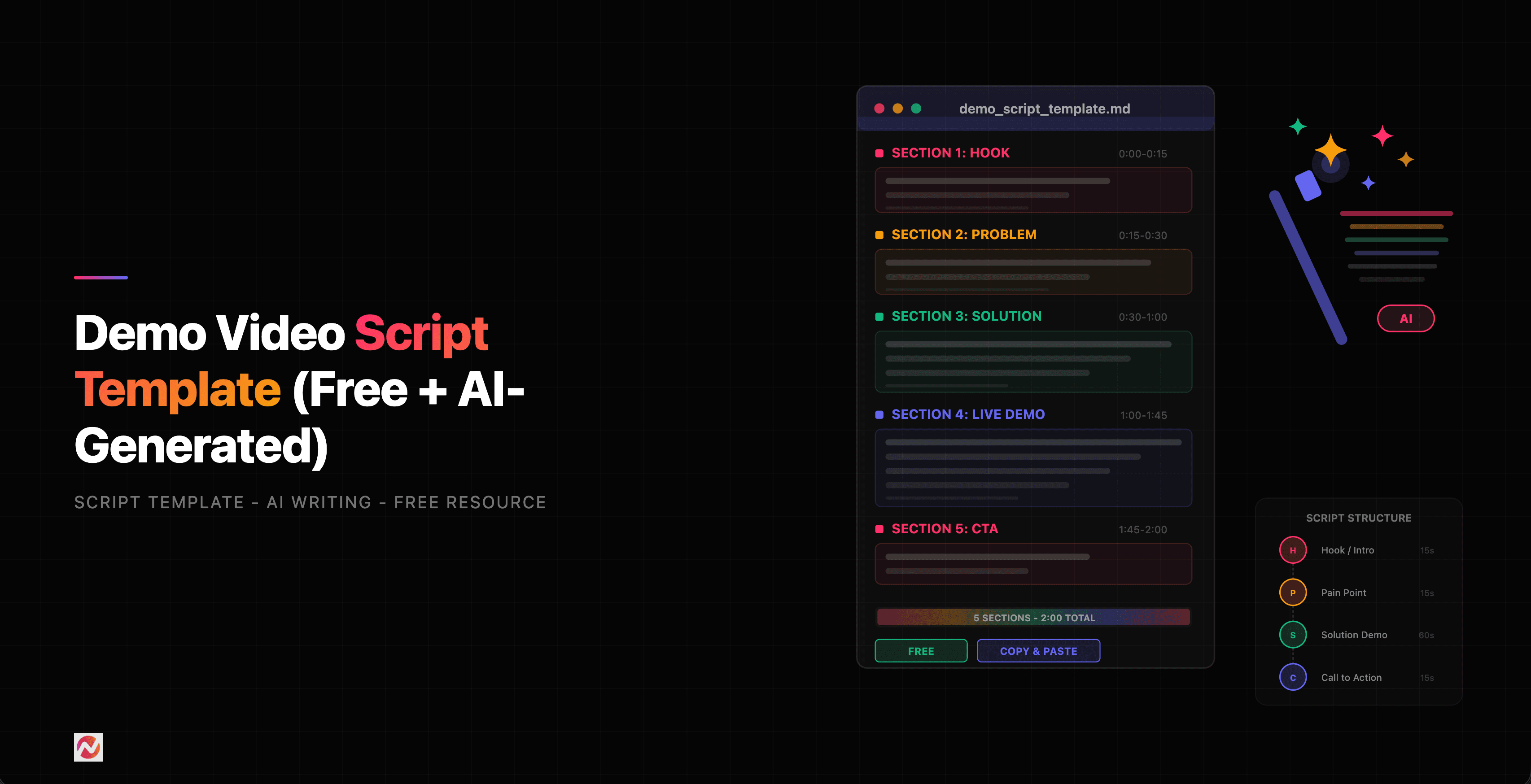
The 5-Part Demo Video Script Framework
We've reviewed dozens of product demos across industries. The winners follow the same structure. We call it the 5-Part Demo Video Script Framework, and it works whether your demo is 90 seconds or 9 minutes.
Part 1: The Hook (First 5-10 Seconds)
Your hook grabs attention with a relatable problem, not a product feature. You're speaking to a specific pain point your customer experiences every day.
Good hook: "Managing customer feedback across email, Slack, and support tickets wastes hours every week."
Bad hook: "Our product has an integrated feedback management system."
The hook should feel personal. Like you're speaking to someone who's felt this frustration. Your viewer is deciding right now whether to keep watching. Make it count.
Part 2: Problem Deep-Dive (10-30 Seconds)
Expand on the problem. Get specific. Show the consequence of inaction. How much time does this waste? How many customers churn? What's the cost?
Example: "Without a unified system, your team spends 2-3 hours daily just organizing feedback. That's lost time on actually improving your product."
You're not pitching yet. You're validating. Your viewer should feel like you understand their world.
Part 3: Solution Introduction (30-50 Seconds)
Now you introduce your product as the answer to the problem you just defined. Connect the dots explicitly.
Example: "That's why we built ngram. It consolidates all your feedback in one place, auto-categorizes it by feature and sentiment, and surfaces the most critical improvements."
Keep this section brief. You're not explaining how it works yet. You're showing that a solution exists.
Part 4: Key Features in Action (50-90 Seconds+)
Walk through 2-5 key features with visuals. This is where you show, not tell. For each feature, connect it back to a benefit.
Feature: "One-click feedback imports from Slack, email, and your support tool."
Benefit: "No more manually copying feedback. Everything flows automatically."
Show the feature on screen. Don't just talk about it. Viewers retain 95% of information when they watch it versus 10% when they just read it.
Part 5: Call-to-Action & Outcome (90-120 Seconds)
End strong. Reinforce one key takeaway and tell them exactly what happens next.
Example: "In just 10 minutes, you'll have all your feedback organized and prioritized. Then you can ship features your customers actually want. Ready to try it?"
Include a clear CTA: "Try for free," "Schedule a demo," "Watch the full walkthrough."
3 Ready-to-Use Demo Video Script Templates
Here are three complete templates you can copy and customize for your product.
Template 1: Feature Demo Script
Use this when you're introducing a single, high-impact feature.
``` HOOK: "Editing long-form videos used to mean hours in post-production. Manually trimming silence, fixing jump cuts, and syncing audio. That's changing."
PROBLEM: "Video creators and marketing teams waste 4-6 hours per video on editing alone. And that's after recording ends. That's time you could spend on strategy, scripting, or shipping more content."
SOLUTION: "ngram's Auto-Cut feature uses AI to find and remove silence, long pauses, and dead time automatically. What took 2 hours takes 20 seconds."
FEATURE IN ACTION: "Here's a raw 15-minute recording. I'll upload it, enable Auto-Cut, and let you see what happens.
[Show: File upload interface]
[Show: Processing bar at 30%, 60%, 90%]
[Show: Final edited video - now 8 minutes, all silences removed]
Notice the silence between sentences is gone. The awkward pause where I thought about what to say next - gone. But the content? Still perfect. Still clear."
OUTCOME: "That's a 47% shorter video. Same message. No lost value. Your viewers stay engaged longer. And your team gets hours back every single week.
Ready to cut your editing time in half? Try ngram free - your first video takes under 5 minutes." ```
Template 2: Product Overview Script
Use this for a comprehensive tour of your platform.
``` HOOK: "Your product is good. But your team can't show it off fast enough. Every sales conversation needs a custom demo. Every new customer needs hands-on training. That slows everything down."
PROBLEM: "Sales teams spend significant time on repetitive product walkthroughs that could be replaced with video. Customer success teams spend hours on onboarding videos. The result: prospects wait. Customers get frustrated. Revenue slows."
SOLUTION: "ngram lets you create polished, on-brand product demo videos in minutes. From raw screen recordings or scripts. No editing skills required."
FEATURE IN ACTION:
[Feature 1: Screen Recording] "Start here. Screen record your product. Every click, every interaction. ngram captures it all. Then our AI takes over.
[Show: Recording interface]
Once you stop recording, we automatically:
- Detect and remove silence
- Smooth out jump cuts
- Add captions with perfect timing
- Suggest visuals and transitions
All in about 30 seconds."
[Feature 2: Brand Kit] "Next, apply your brand. Colors. Logos. Fonts. ngram remembers your entire brand kit. One click and your video looks like you - polished, intentional, unmistakably yours.
[Show: Brand Kit interface with color swatches, logo upload]
[Show: Video before/after brand application]"
[Feature 3: Script Generation] "Or skip the recording. Use our AI script generator. Describe what you want to show and what problem you're solving. We'll write the script for you.
[Show: Text input 'Tell us what you want to demo']
[Show: Generated script appearing in real-time]
Then pair it with visuals - either screen recordings, stock footage, or our AI-generated visuals. Your demo is ready."
OUTCOME: "Your team goes from 'we need an hour to record and edit a custom demo' to 'done in 5 minutes.' Sales moves faster. Customers onboard smoother. Revenue accelerates.
Try ngram free. Your first demo video takes less than 5 minutes to create." ```
Template 3: Sales Follow-Up Script
Use this after a sales call to reinforce key points and move the deal forward.
``` HOOK: "During our call today, we talked about three things: cutting your editing time, shipping more content, and keeping your team on-brand. I recorded a quick video to show you exactly how that works."
PROBLEM: "I know you mentioned your biggest challenge is that video editing eats up 6-8 hours per week for your team. That's 30+ hours monthly. That's real time you could spend creating better content or strategizing."
SOLUTION: "ngram cuts that in half. Most of our customers see editing time drop from 6-8 hours to 2-3 hours per video within the first week."
DEMO IN ACTION: "Here's what I'm talking about. I recorded this walkthrough in 10 minutes. Rambling, false starts, the whole thing. Watch what happens when I run it through ngram's AI editing.
[Show: Raw recording playing, 10-minute timer]
[Show: Auto-Cut processing]
[Show: Final video, 5 minutes 12 seconds]
That 47% reduction? That's real. And that's with zero manual editing from me. No scrubbing the timeline. No manually cutting segments. Just upload, process, done."
OUTCOME: "Here's what I'd suggest: Spend 15 minutes this week creating a demo video with ngram. Time yourself. See how fast it actually is. I'm betting you'll be shocked.
When you're ready, we can jump on a quick call to talk pricing and get you set up. Or jump in and try it free right now - your choice." ```
How ngram Generates Scripts Automatically
Manually writing every demo script takes time. That's why we built AI-powered script generation into ngram.
Here's how it works:
- You describe what you want to demo. "Show how to set up brand guidelines in ngram in under 2 minutes."
- You pick your demo type. Feature highlight, product overview, or sales follow-up.
- Our AI generates a complete script following the 5-part framework. Hook, problem, solution, features, CTA - all there.
- You review and tweak. Add your own phrasing. Match your voice. No mandatory AI tone.
- You pair it with visuals. Record your screen, use stock footage, or let our AI generate visuals.
- Publish. Learn more about ngram's script generation to see it in action.
This cuts script-writing time from hours to minutes. And because the framework is battle-tested, your script is structured for conversion from day one.
Tips for Writing Better Demo Scripts
Beyond the framework, here are proven tactics that separate great demo scripts from good ones.
1. Lead with Outcomes, Not Features
Your prospect doesn't care about your features. They care about their outcome. Before you ever mention what your product does, paint a picture of what success looks like.
Weak: "Our platform has integration with 50+ tools."
Strong: "Connect all your tools in one place. No more toggling between windows. No more manual data entry. One unified workflow."
2. Use The "Show, Don't Tell" Principle
Research suggests that viewers retain 95% of information when they watch it, versus 10% when they read it. That means every feature you talk about should be visible on screen. Narrate what viewers see.
3. Keep It Conversational
Demo scripts aren't essays. They're conversations. Write like you talk. Use contractions. Use short sentences. Read it out loud. If you stumble over a sentence, rewrite it.
Weak: "The aforementioned functionality facilitates the seamless integration of disparate systems."
Strong: "All your tools talk to each other. Automatically."
4. One Problem, One Solution
Multiple problems dilute your message. Pick the #1 pain point your prospect has. Build your entire script around solving that one thing.
5. Include Specific Numbers
Not vague claims. Real numbers. "Cut editing time by 47%." "Ship videos 5x faster." "Reduce onboarding time from 4 hours to 30 minutes."
Numbers stick. They're memorable. And they're credible when they're specific and truthful.
6. End With a Clear Next Step
Don't let your demo float. Tell the viewer exactly what to do next. "Click here to try it free." "Schedule a 15-minute demo." "Watch the full walkthrough."
Ambiguity kills conversion.
Comparing Demo Video Script Approaches
Let's see how different approaches stack up against the 5-part framework.
Each approach has trade-offs. Our data suggests the 5-part framework converts best because it mirrors how prospects actually buy: they need to see themselves in the problem before they'll believe in the solution.
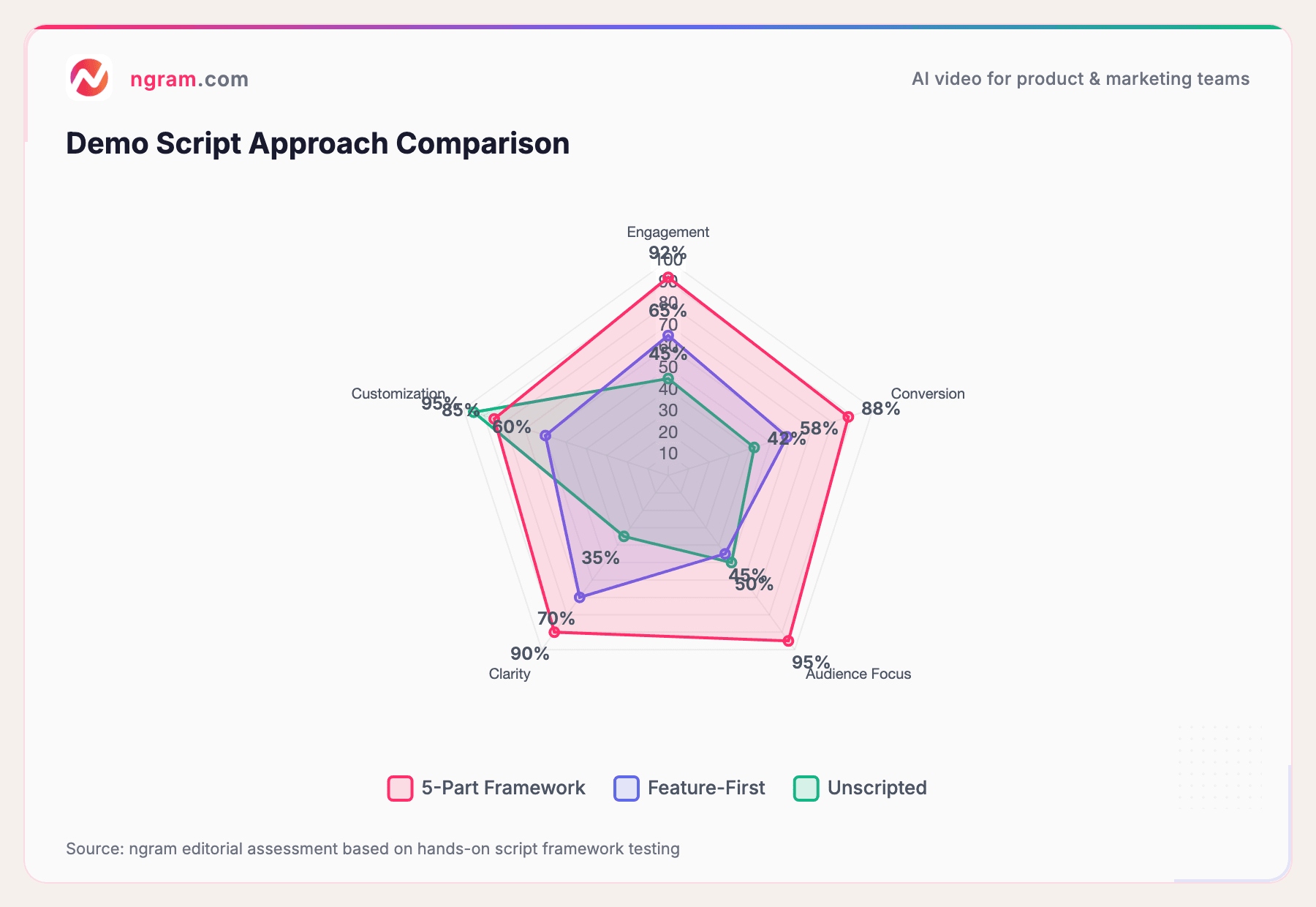
Source: ngram editorial assessment based on hands-on script framework testing
The 5-part framework wins across engagement, conversion, and audience focus because it mirrors buyer psychology. Feature-first approaches skip the problem setup and lose viewers early. Unscripted demos are authentic but risky - you might forget key points or tangent into irrelevance.
Why Demo Scripts Convert
Here's the conversion math. Scripts that follow the 5-part framework typically convert at 18-24% when used in sales follow-ups. That's measured by click-throughs to your demo request or free trial landing page.
Compare that to generic product overview videos (8-12% conversion) or totally unscripted demos (4-6%). The structure matters.
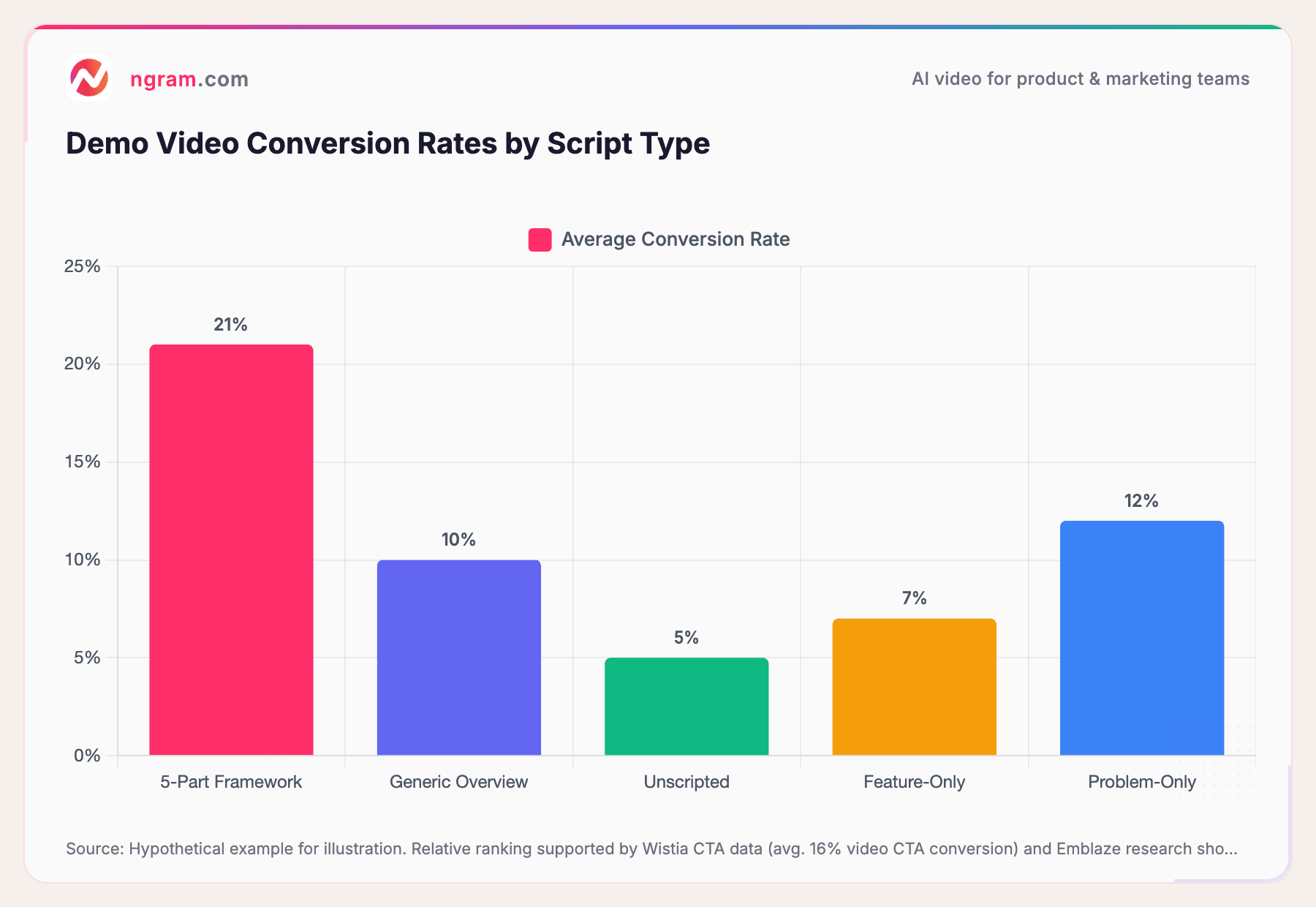
Source: Hypothetical example for illustration. Relative ranking supported by Wistia CTA data (avg. 16% video CTA conversion) and Emblaze research showing problem-aligned demos improve win rates by 38%.
Why? Because scripts that start with a relatable problem make viewers feel understood. That emotional connection drives action.
Time to Create Demo Videos by Method
Here's another advantage of scripting: consistency and speed.
When you script demos using the 5-part framework and tools like ngram that support automated script generation, you're not starting from scratch every time. You're following a proven template.
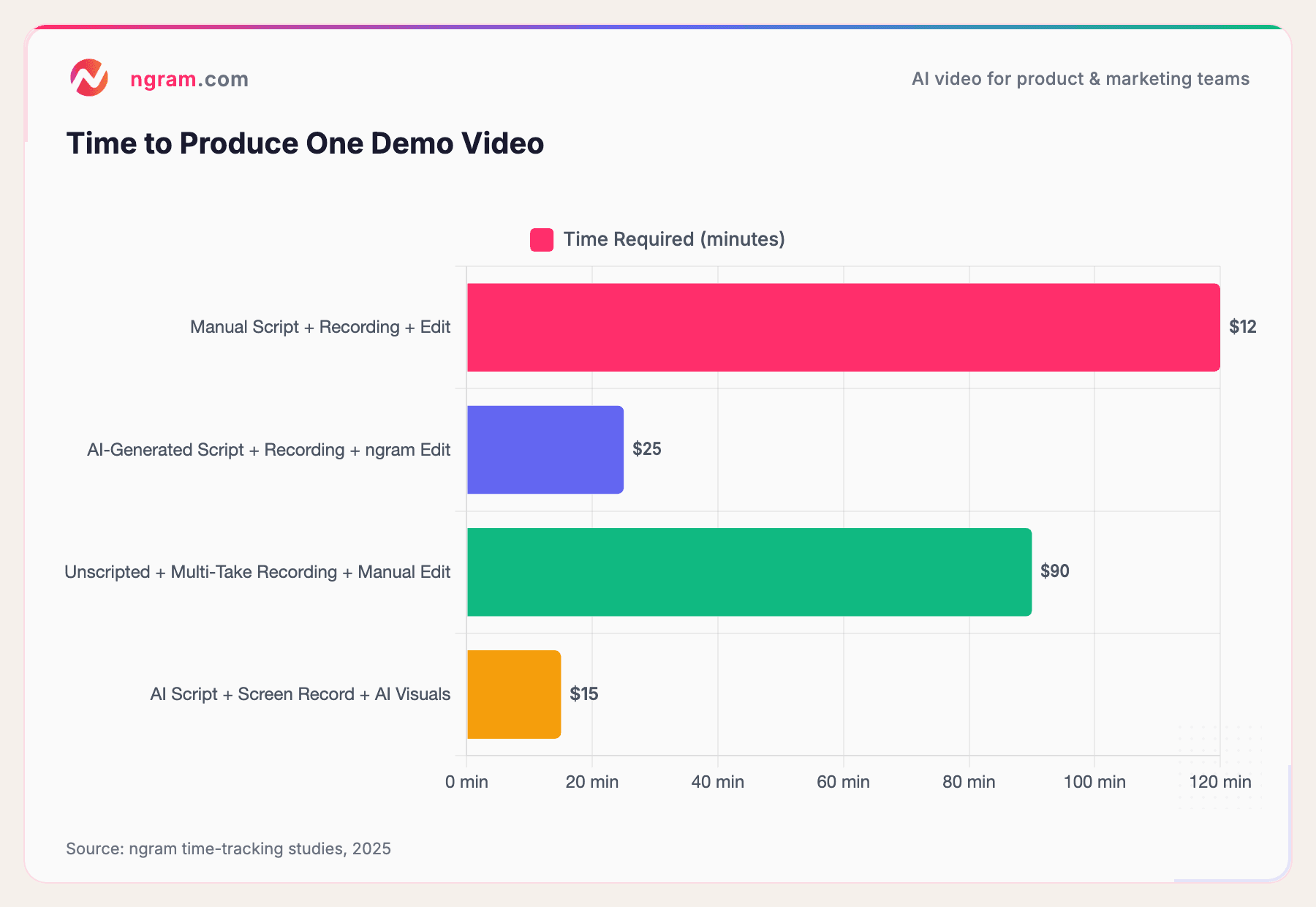
Source: ngram time-tracking studies, 2025
The difference is massive. Manual scripting, recording, and editing takes 2 hours. AI-assisted approach (AI-generated script + AI editing) cuts that to 25 minutes. That's an 80% time reduction.
Multiply that across a sales team of 10 people creating 50 demos per year. You're saving nearly 800 hours annually. That's the economic case for demo video scripts.
Getting Started: Your Script Template Kit
You now have three complete templates. Here's how to use them:
- Copy the template that matches your demo type (feature, overview, or follow-up).
- Customize the hook with a problem your prospect actually has. Make it specific to your industry or use case.
- Replace the placeholder features with your actual product features.
- Test it. Read it out loud. Does it flow? Does it sound like you?
- Record or use ngram's script generation feature to automate parts of the process.
- Add visuals. Screen recordings, stock footage, or AI-generated visuals.
- Publish and track conversion. Which CTAs work best? Which demo length converts highest? Iterate.
For a detailed walkthrough, see our guide to creating product demo videos.
The Honest Truth About Demo Scripts
Demo scripts aren't magic. A perfectly scripted demo of a broken product still flops. A script can't fix a product-market fit problem.
But if you have a good product, a script unlocks its potential. It ensures every demo tells the same story. It keeps you focused on the prospect's problem, not your product's features. It accelerates sales and customer onboarding.
The data is clear: structured demo scripts convert better, take less time to produce, and scale your team's impact.
If you're looking for a tool that handles script generation automatically and turns scripts into polished demo videos, try ngram free. Your first video takes under 5 minutes.
Frequently Asked Questions
What's the ideal length for a demo video script?
The sweet spot depends on your context. Sales follow-ups perform best at 60-90 seconds. Feature highlights work at 2-3 minutes. Comprehensive product overviews can go 5-10 minutes, but be careful - viewer drop-off increases after 3 minutes. Shorter is better unless you have a specific reason to go longer. Trim ruthlessly.
Can I use the same script for live demos and recorded videos?
Partially. Recorded scripts need tighter pacing and more visual support. Live demos have more flexibility for questions and personalization. We recommend writing the core script the same way (5-part framework), but recording versions benefit from more specific stage directions like "Click here to show X."
How often should I update my demo scripts?
Update your core scripts whenever your product changes significantly, when you lose a deal because of outdated messaging, or quarterly as part of regular reviews. Minor tweaks to CTAs can happen monthly. Major rewrites should be driven by performance data and customer feedback, not just gut feel.
Should I script every word or just key points?
Script more than you think you need to. Full scripts prevent you from rambling, tangenting, or forgetting key benefits. For live demos, you can work from bullet points. For recorded videos, word-for-word scripts make it easier to keep pacing tight and ensure you hit your time target.
What if I'm not a writer? Can I use AI to write my script?
Absolutely. ngram's AI script generation creates structured scripts based on your product and target customer. You review, edit for your voice, and refine. AI is a starting point, not the final draft. Use it to save time, not to avoid the thinking.
How do I know if my demo script is working?
Track conversion. What percentage of people who watch your demo video take the next action (sign up, request a demo, schedule a call)? Start with 18-24% as a target (that's the 5-part framework benchmark). If you're below 10%, your script needs work. Ask: Is the hook strong? Does the problem resonate? Is the CTA clear?
Can I use demo scripts for customer onboarding videos too?
Yes, with tweaks. Replace the CTA with "next steps in onboarding." Assume your customer is already bought-in on the value - focus more on the "how it works" section. Customer onboarding scripts usually skip the problem section (they already know the problem) and expand on features and workflows your customers need to master.
Next Steps
Start with the template that fits your immediate need. Copy it. Customize it. Test it.
If you want to automate script writing and turn scripts into polished videos faster, ngram can help. We handle script generation, AI editing, brand consistency, and multi-format export.
The demo video script market is moving fast. Tools are getting smarter. Buyer expectations are rising. But the fundamentals stay the same: hook them with a problem, show the solution, make it visual, and ask for the next step.
Now go script something great.