
Quick comparison
| Tool | Best For | Starting Price | Key Differentiator |
|---|---|---|---|
| ngram | Professional video from any asset | Free / $29/mo | Context-aware AI generation |
| CapCut | Free mobile-first editing | Free / $7.99/mo | 1B+ downloads, full free toolkit |
| DaVinci Resolve | Professional color grading | Free / $295 one-time | Hollywood-grade color + 8K export |
| VEED | Browser-based editing with AI | Free / $12/mo | 10M+ monthly users, auto subtitles |
| Descript | Transcript-based editing | Free / $16/mo | Edit video by editing text |
| Filmora | Beginner-friendly desktop editor | $69.99/yr | 90% user satisfaction, 10K+ effects |
| Canva Video | Template-based team videos | Free / $13/mo | Drag-and-drop with brand kits |
| InVideo | AI text-to-video generation | Free / $28/mo | Sora 2 + VEO 3.1 built in |
Microsoft acquired Clipchamp in 2021 and built it into Windows 11 as the default video editor. For basic trims and cuts, it works. But in early 2026, a forced OneDrive migration left users scrambling - some lost over 100 video projects overnight, with Microsoft support calling it a "known issue" with no resolution timeline.
That incident crystallized what many Clipchamp users already suspected: a browser-dependent editor tied to Microsoft's cloud ecosystem has real risks. Add in the 1080p export cap on the free tier (4K requires a Microsoft 365 subscription), limited transitions, no keyframe support, and compatibility restricted to Edge and Chrome, and the search volume for "Clipchamp alternatives" tells the story - up 50% from January to April 2026.
We tested 8 Clipchamp alternatives across features, ease of use, AI capabilities, pricing, and real user sentiment from G2, Capterra, Reddit, and Product Hunt. Here's what held up.
1. ngram
If Clipchamp's limitations pushed you to search for alternatives, ngram solves a fundamentally different problem. Instead of giving you a timeline and asking you to edit, ngram builds professional videos from whatever you already have - screen recordings, docs, images, URLs, or plain text.
What makes ngram stand out
Context-aware generation is the core difference. Tell ngram your audience (developers vs. executives), your goal (educate vs. convert), and your channel (LinkedIn vs. website). The output adapts structure, pacing, tone, and visuals automatically. Clipchamp treats every project the same way - ngram treats every project as a unique communication problem.
Plan first, generate second. Before anything renders, ngram shows you the script and storyboard. You fix direction issues before the AI spends compute generating the wrong video. With Clipchamp, you start from a blank timeline and figure it out as you go.
AI-powered editing for screen recordings. Upload a rough screen recording, and ngram auto-cuts dead air, adds smart zoom on interactions, emphasizes cursor movements, and inserts callouts driven by your prompts. No timeline editing required - the exact opposite of Clipchamp's manual approach.
Brand kits keep everything consistent. Define your logo, colors, fonts, and intro/outro once. Every video stays on-brand across the team. Clipchamp's brand kit is limited to the Premium tier and doesn't offer the same depth.
Key features
- Context-aware generation - Adapts structure, pacing, and tone to your audience and channel
- Plan first, generate second - Script and storyboard review before rendering
- Any asset in - Text, images, docs, URLs, screen recordings as input
- AI editing - Auto-cut, filler removal, smart zoom, cursor emphasis
- Multi-format export - 16:9, 9:16, 1:1 with captions included
- Brand kits - Logo, colors, fonts applied to every video automatically
Pros
- ✅ Builds videos from existing content - no blank timeline to stare at
- ✅ Works entirely in-browser, no Microsoft ecosystem dependency
- ✅ AI handles editing automatically - no timeline skills needed
Cons
- ❌ Web-based only - no native desktop app yet
- ❌ Newer platform with a smaller template library than established editors
Who is ngram best for?
Product Marketing, Growth, Sales Enablement, Customer Success, and Agencies who need professional videos without production timelines. If your videos go to customers, prospects, or public audiences, ngram is the pick.
ngram has a generous free plan with paid plans starting at $29 per month.
Ready to try ngram? Create your first video in under 5 minutes. Start free
See ngram in action:
2. CapCut
CapCut is the most direct Clipchamp competitor and the reason "clipchamp vs capcut" gets 170 monthly searches. Owned by ByteDance (TikTok's parent), it's been downloaded over 1 billion times and offers a remarkably complete free editing toolkit that makes Clipchamp's free tier look thin.
Where Clipchamp caps free exports at 1080p with limited effects, CapCut's free plan includes multi-track timeline editing, keyframe animation, chroma key, AI voiceover, and 1080p export without watermarks. The Pro tier at $7.99-$9.99/month adds 4K export and the full AI toolkit.
Key features
- Free full editing toolkit - Timeline editing, keyframes, chroma key included free
- AI auto-captions - Accurate subtitles with style templates
- Cross-platform - Desktop, mobile, and browser versions
- 12M+ royalty-free assets - Music, effects, and templates (Pro)
- Motion tracking - AI-powered camera tracking (Pro)
What users say
Users love the generous free plan. The Pro subscription unlocks 4K export and advanced AI features. The main criticisms center on ByteDance's data practices and the limited AI generation compared to purpose-built tools. For a detailed comparison, see our ngram vs CapCut comparison.
Pros
- ✅ Most complete free editing toolkit available in 2026
- ✅ Cross-platform (desktop, mobile, browser) - not locked to Windows
- ✅ 1B+ downloads means active community and frequent updates
Cons
- ❌ ByteDance ownership raises data privacy concerns for enterprise teams
- ❌ AI generation features are limited compared to dedicated AI video tools
Best for
Individual creators and small teams who want a powerful free editor with no Microsoft dependency. Free plan available, Pro at $7.99/month.
3. DaVinci Resolve
DaVinci Resolve is the professional-grade wildcard. While Clipchamp targets beginners, DaVinci Resolve is used by Hollywood colorists and indie filmmakers - and its free version is more capable than most paid editors. The free tier includes professional editing, color correction, visual effects (Fusion), and audio post-production (Fairlight).
The Studio upgrade is a one-time $295 payment (no subscription), which unlocks 8K editing, HDR color grading, AI-based tools, and multi-user collaboration. That's less than three years of Clipchamp Premium.
Key features
- Professional color grading - Industry-standard node-based color correction
- Fusion VFX - Built-in visual effects and motion graphics
- Fairlight audio - Complete audio post-production suite
- 8K support - In Studio version ($295 one-time)
- DaVinci Neural Engine - AI tools for face recognition, speed warp, and scene detection
What users say
G2 reviews are overwhelmingly positive - 90% of reviewers praise the value. The learning curve is the main barrier. Reddit users consistently recommend it as "the best free editor, period" but note it's overkill for quick social clips. The free version has no watermarks, no time limits, and no feature gating tricks.
Pros
- ✅ Most powerful free video editor on the market
- ✅ One-time $295 Studio purchase - no recurring subscription
- ✅ Professional-grade tools used in actual film production
Cons
- ❌ Steep learning curve - not for beginners or quick edits
- ❌ Resource-intensive - needs a capable machine to run smoothly
Best for
Creators and editors who want professional-grade tools without a subscription. Works on Windows, Mac, and Linux - no platform lock-in. Free version available, Studio at $295 one-time.
4. VEED
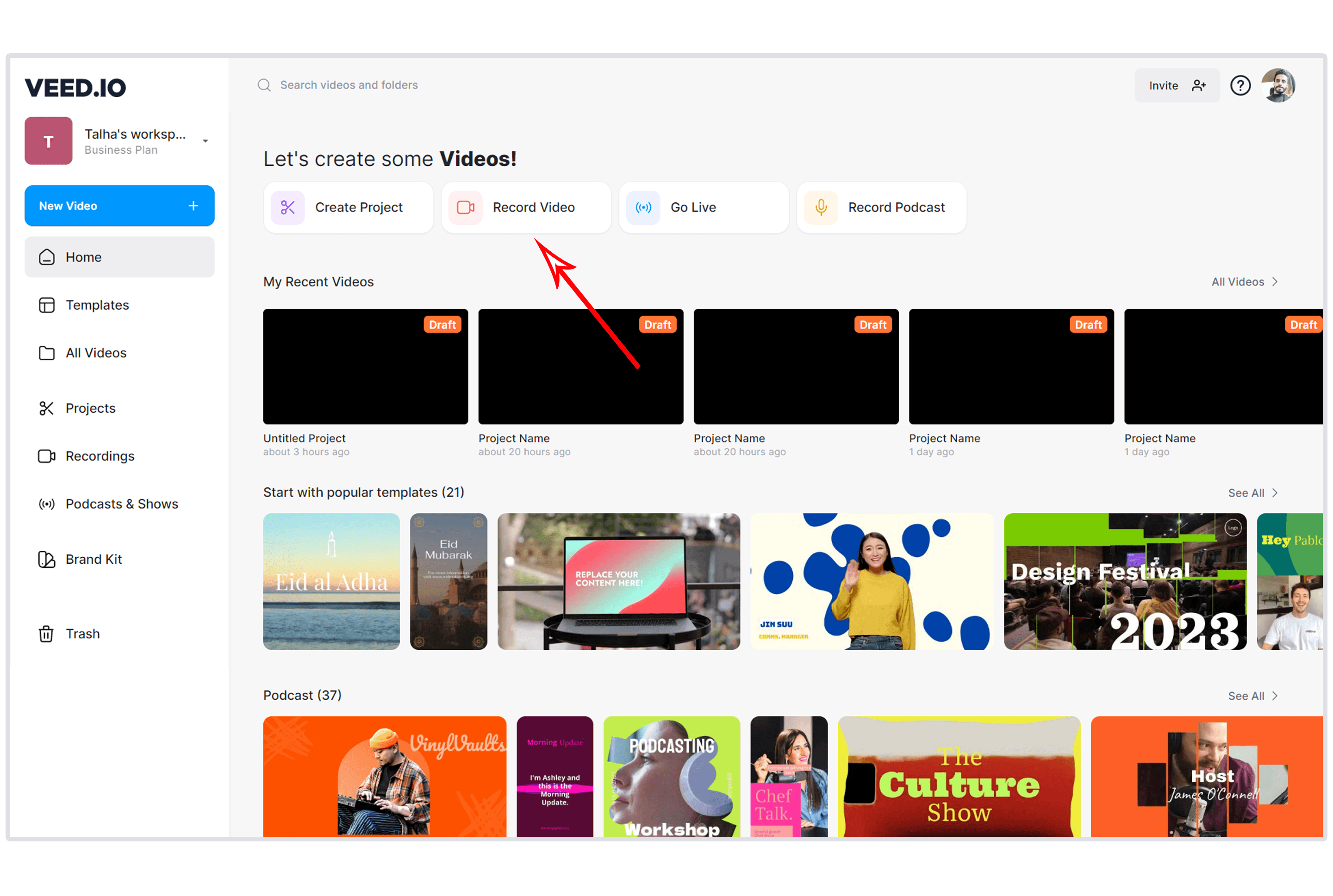
VEED is the browser-based editor that does what Clipchamp promises but with more AI muscle. With over 10 million monthly active users and $35 million in Sequoia Capital backing, VEED offers a full timeline editor alongside AI features like auto-subtitles in 50+ languages, background noise removal, and one-click resizing for multiple platforms.
Unlike Clipchamp, VEED isn't tied to any platform ecosystem. It works in any browser, on any OS. For teams switching from Clipchamp's browser-based editing but wanting more capability, VEED is the closest workflow match. See our ngram vs VEED comparison for a deeper look.
Key features
- Browser-based editor - Full timeline editing, no downloads
- Auto subtitles - AI-generated captions in 50+ languages
- Screen recording - Record screen and webcam in-browser
- AI background removal - Remove or replace backgrounds
- Multi-platform export - Auto-resize for YouTube, Instagram, TikTok
What users say
Capterra and G2 reviews praise VEED's simplicity and subtitle accuracy. The Pro plan at $24/month is seen as the best value. Criticism focuses on transcription accuracy with accents and the free tier's watermark.
Best for
Marketing teams who want browser-based editing without the Microsoft ecosystem lock-in. Free plan available, Lite at $12/month, Pro at $24/month.
Looking for the fastest way to create professional videos? ngram turns your screen recordings, docs, and images into polished videos in minutes. Try ngram free
5. Descript
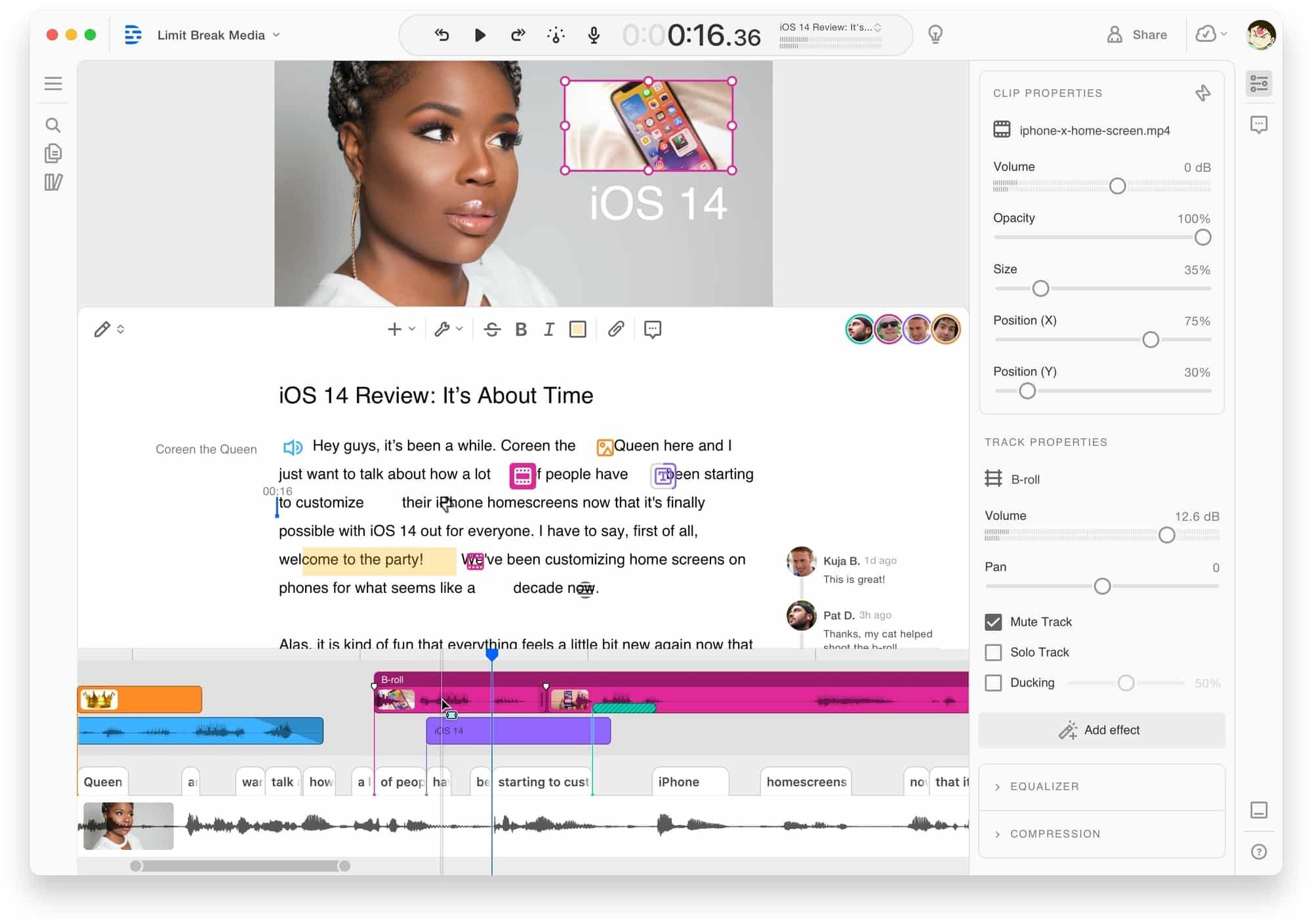
Descript flips the editing model: edit video by editing text. Import a video, Descript transcribes it, and you edit the transcript like a document. Delete a word, and the video cuts accordingly. Users report 60-70% time savings compared to traditional timeline editing.
For Clipchamp users frustrated with manual trimming and cutting, Descript's approach is revelatory. The tradeoff: Descript's 2026 shift to credit-based AI features means costs can escalate fast. See our ngram vs Descript comparison.
Key features
- Text-based editing - Edit video by editing the transcript
- AI voices - Clone your voice for corrections or voiceover
- Filler word removal - One-click elimination of ums and ahs
- Screen recording - Built-in recorder with webcam overlay
- Collaboration - Real-time team editing and commenting
What users say
Reddit users call transcript-based editing "mind-blowing for long-form content." The biggest complaints: the new credit system, rendering speed on complex projects, and customer support that relies heavily on AI chatbots.
Best for
Podcast producers and long-form content creators who want transcript-level control. Hobbyist at $16/month (annual), Creator at $24/month, Business at $65/month.
6. Filmora
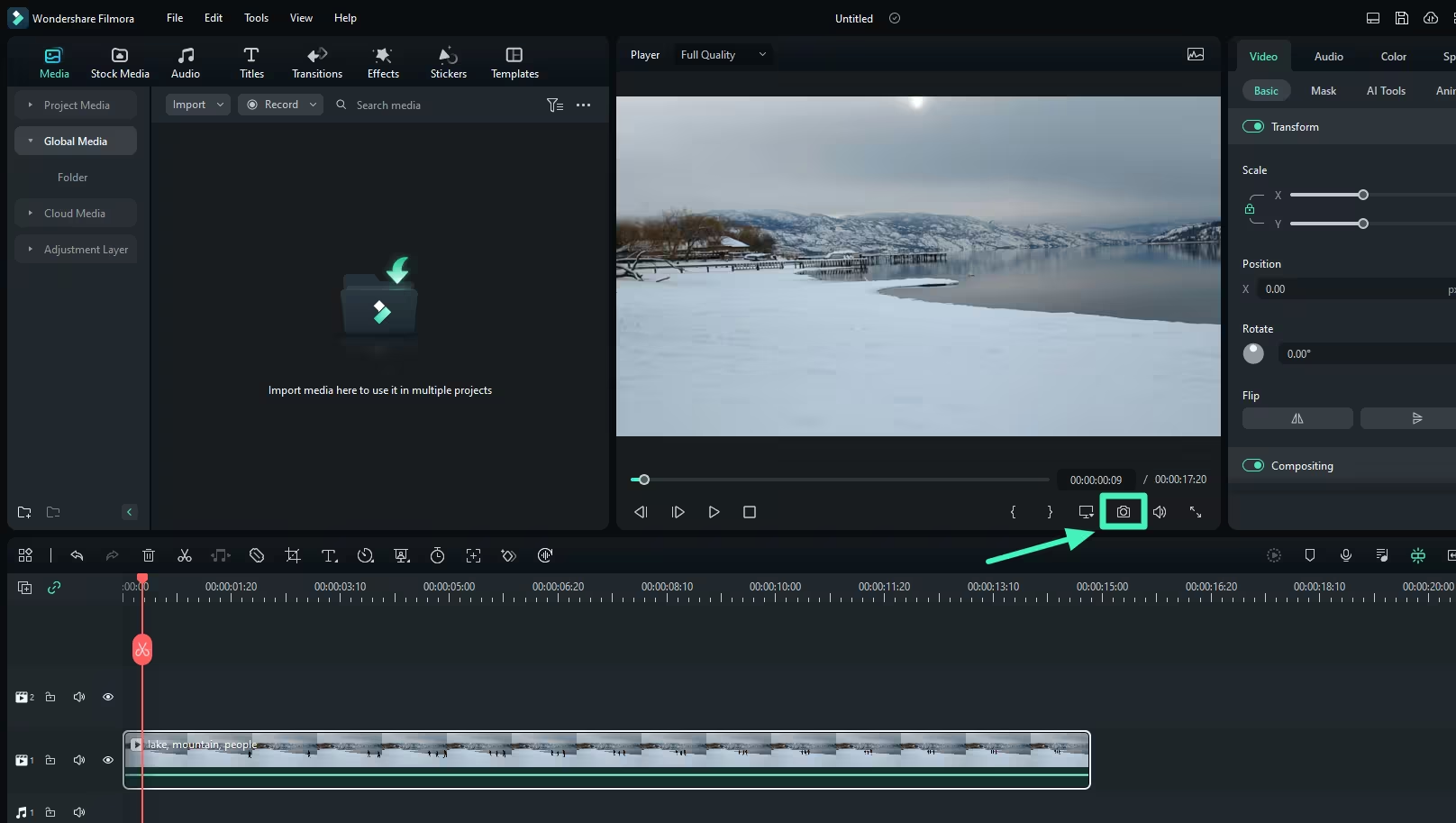
Filmora is the desktop editor that most closely matches Clipchamp's beginner-friendly philosophy but with significantly more depth. It earns 90% user satisfaction from 1,420+ reviews on Capterra and G2, with reviewers praising the balance between simplicity and capability.
Where Clipchamp's effects library feels sparse, Filmora offers 10,000+ effects, transitions, overlays, and templates. It includes keyframing, motion tracking, and color grading - features Clipchamp lacks entirely. The annual plan at $69.99 or perpetual license at $99.99 is straightforward pricing without Microsoft 365 bundling.
Key features
- Drag-and-drop editing - Intuitive timeline with beginner-friendly controls
- 10,000+ effects - Transitions, overlays, motion graphics, and templates
- AI tools - Speech-to-text, text-to-speech, AI copywriting
- Keyframing - Full animation control (missing in Clipchamp)
- Motion tracking - Attach elements to moving objects
What users say
Capterra reviewers praise Filmora's pricing relative to features. The main complaints: performance lag with high-resolution video, occasional crashes during long edits, and a watermark on trial exports. Cross-platform support (Windows + Mac) is a plus over Clipchamp's Windows-first approach.
Best for
Beginners and content creators who want more editing power than Clipchamp without the learning curve of DaVinci Resolve. Annual plan at $69.99, perpetual license at $99.99.
7. Canva Video
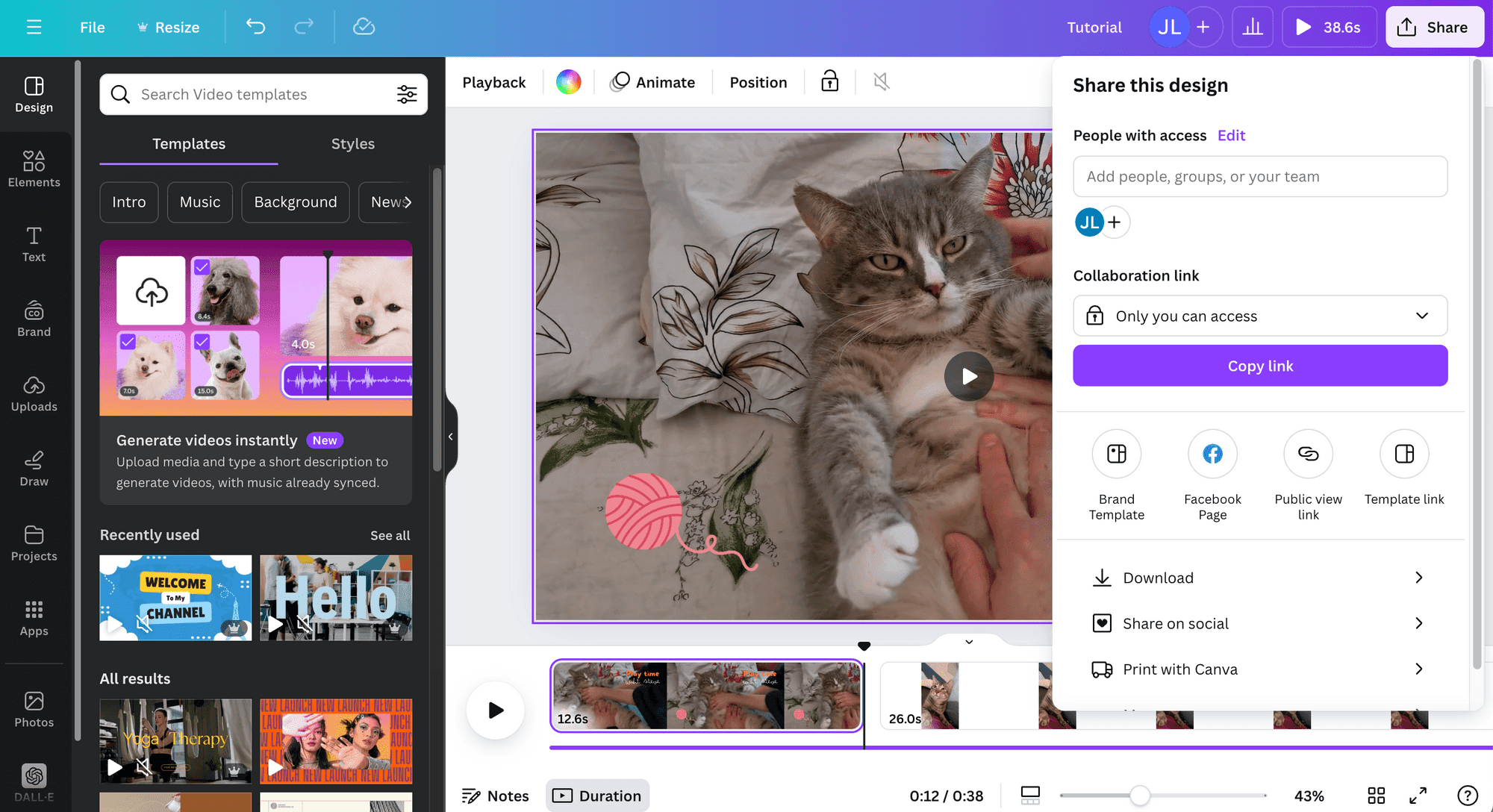
Canva Video brings Canva's template-first approach to video editing. For teams that already use Canva for graphics, the video editor is a natural extension - same brand kits, same asset library, same collaboration tools. Over 200 million monthly active users already know the interface.
Where Clipchamp requires you to build from a blank timeline, Canva starts with templates optimized for specific platforms and use cases. The tradeoff: limited timeline control and no advanced editing features. See our ngram vs Canva Video comparison for details.
Key features
- Template library - Thousands of video templates by platform and use case
- Brand kits - Colors, fonts, logos applied across all designs and videos
- Team collaboration - Real-time editing with commenting and approval workflows
- Stock library - Access to millions of images, videos, and audio tracks
- Multi-platform resize - One-click resize for YouTube, Instagram, TikTok
What users say
G2 reviews praise Canva's ease of use and template quality. Criticism centers on the limited timeline editor - you can't do frame-by-frame edits or complex audio mixing. For simple branded content, it's fast. For anything requiring precision, it falls short.
Best for
Marketing teams already in the Canva ecosystem who need quick, branded video content from templates. Free plan available, Pro at $13/month.
8. InVideo
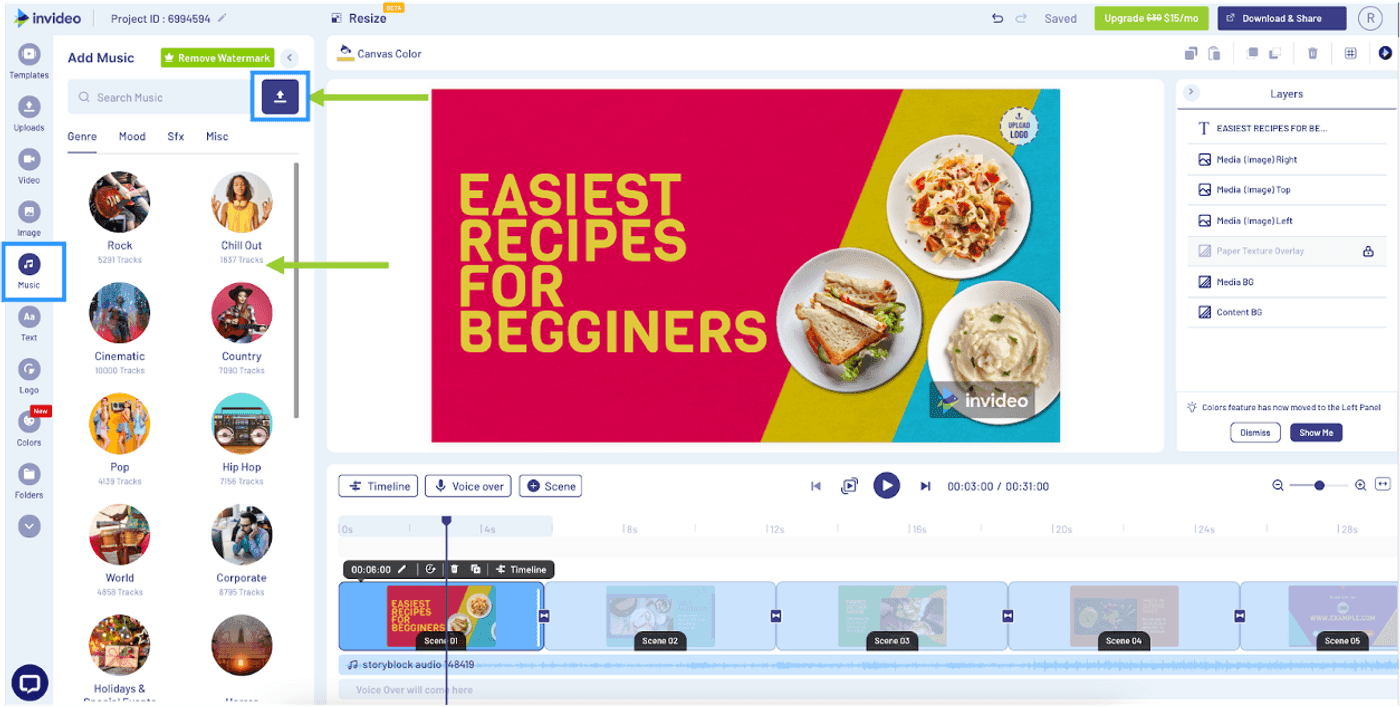
InVideo is the AI-powered alternative for teams that want to skip editing entirely. With over 50 million users across 190+ countries, it generates complete videos from text prompts - script, footage, voiceover, subtitles, and transitions - without you touching a timeline.
In 2026, InVideo is the only platform bundling access to both OpenAI's Sora 2 and Google's VEO 3.1 within a single subscription, giving you generative AI footage instead of stock libraries. For Clipchamp users who edit because they have to (not because they want to), InVideo removes the editing step. See our ngram vs InVideo comparison.
Key features
- Full-stack AI generation - Complete videos from text prompts
- Sora 2 + VEO 3.1 access - Generative AI models for original footage
- 10,000+ templates - Social, product promos, explainers, and more
- Voice cloning - Upload a 30-second sample to create your own AI voice
- VFX House - Relight scenes, swap props, AI color grading
What users say
Reddit and G2 users praise InVideo's ease of use for non-editors. The credit system is the main complaint - generative features burn through credits fast, and pricing tiers feel confusing.
Best for
Content creators and marketing teams who want AI-generated video without manual editing. Plus at $28/month, Max at $50/month.
The case for switching off Clipchamp
Clipchamp works for what it is: a basic video editor bundled into Windows 11. For quick trims, simple cuts, and casual social clips, it's adequate. But teams and creators hit walls fast.
Microsoft ecosystem lock-in. Clipchamp stores projects in OneDrive, requires a Microsoft account, and works only in Edge and Chrome. In early 2026, a forced OneDrive migration caused widespread project loss - one Medium post titled "Microsoft Killed My Clipchamp Projects" detailed how entire video libraries became unreadable overnight.
The 1080p ceiling. Free-tier exports max out at 1080p. For 4K, you need Microsoft 365 Personal ($9.99/month) or Family ($12.99/month). That's $120/year for an export resolution that CapCut and DaVinci Resolve offer free.
Limited editing features. No keyframe support, sparse transitions, basic audio controls. The feature set hasn't kept pace with competitors who offer motion tracking, AI-powered editing, and professional color grading.
Performance under load. Longer videos and larger files cause slowdowns, export failures, and inflated file sizes. Browser-based processing has inherent limits that desktop applications avoid.
For a detailed head-to-head, see our ngram vs Clipchamp comparison.
Here's how the starting prices compare across all 8 alternatives:
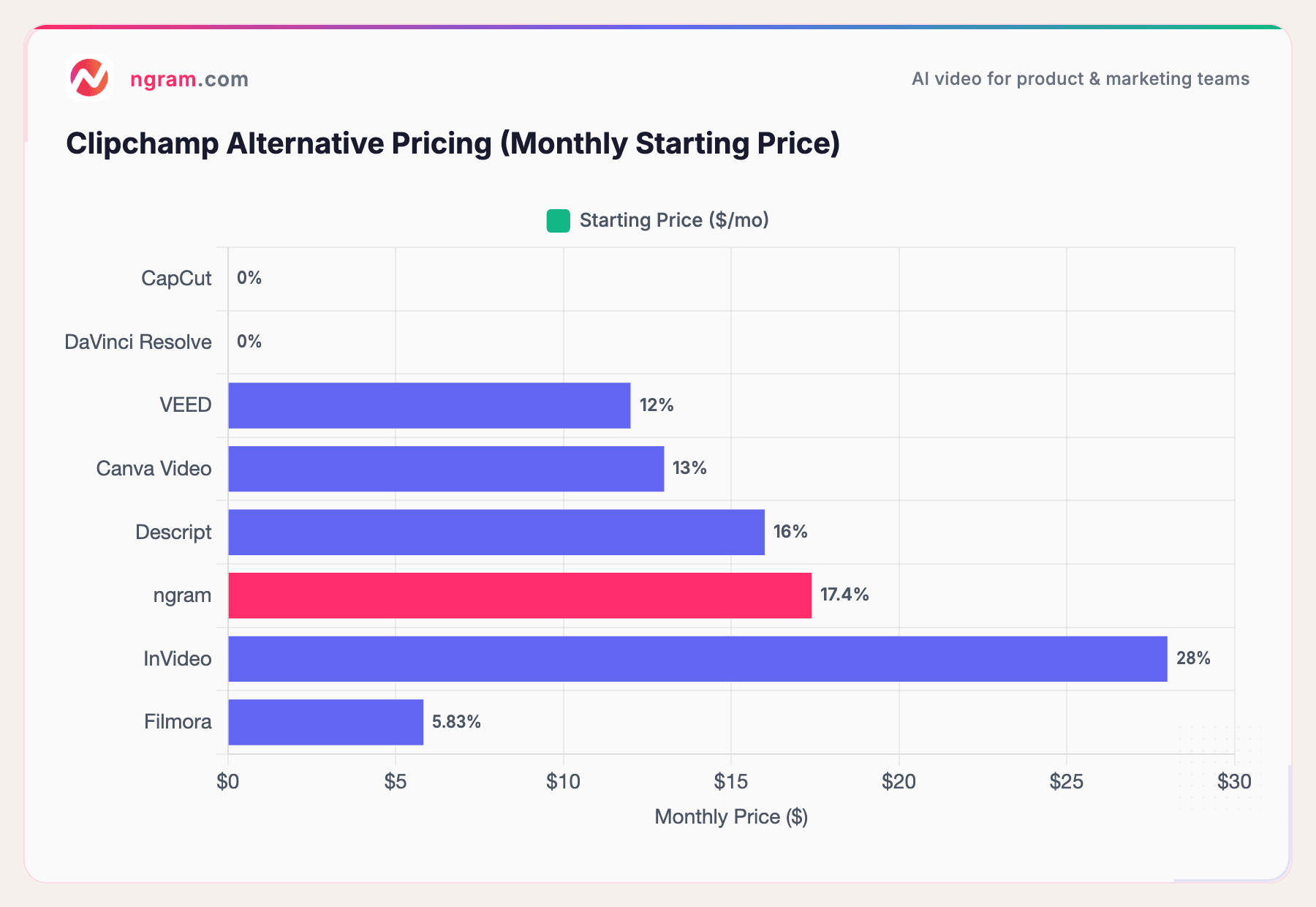
CapCut and DaVinci Resolve are both free with no feature-gating on core editing. Filmora's $69.99/year works out to $5.83/month. Clipchamp's free tier is $0 but the feature constraints push most serious users to Microsoft 365 at $9.99/month for 4K alone.
How we compared these tools
We didn't just list tools. We tested each one, read hundreds of user reviews across G2, Capterra, Trustpilot, Reddit, and Product Hunt, and compared them across five weighted criteria:
| Criteria | Weight | What we looked at |
|---|---|---|
| Features | 25% | Timeline editing, effects library, export options, collaboration tools |
| Ease of Use | 25% | Onboarding speed, learning curve, UI/UX quality, accessibility for non-editors |
| AI Capabilities | 20% | AI editing, generation, auto-captions, voice features, smart tools |
| Value | 20% | Pricing relative to features, free tier generosity, subscription transparency |
| Support & Community | 10% | Documentation quality, response times, community size, update frequency |
We also factored in:
- Real user reviews from G2, Capterra, Trustpilot, Reddit, and Product Hunt (qualitative sentiment, not numerical scores)
- Platform independence - whether the tool locks you into a specific ecosystem
- Export quality - resolution caps, watermarks, and format support
Features and Ease of Use carry equal weight because Clipchamp alternatives span two categories: manual editors (CapCut, DaVinci Resolve, Filmora) and AI-powered generators (ngram, InVideo). Both dimensions matter depending on your workflow.
Quick answers
What's the best free Clipchamp alternative?
CapCut offers the most complete free editing toolkit with timeline editing, keyframes, chroma key, and 1080p export at no cost. DaVinci Resolve's free version is even more powerful but has a steeper learning curve. ngram also offers a free tier for AI-powered video generation.
Is Clipchamp better than CapCut?
For most creators, CapCut offers more features in its free tier than Clipchamp. CapCut includes keyframe animation, advanced effects, and cross-platform support (desktop, mobile, browser) while Clipchamp is limited to Edge/Chrome on Windows. The "clipchamp vs capcut" comparison is one of the most searched in this category.
Can I create professional videos without editing skills?
ngram is designed for exactly this. Upload your existing assets (docs, screenshots, recordings, URLs), tell ngram who the video is for, and it handles script, storyboard, visuals, and editing. InVideo also generates complete videos from text prompts without manual editing.
Does Clipchamp work on Mac?
Clipchamp is available as a web app accessible on Mac through Chrome or Edge, but it's optimized for Windows. For Mac users, CapCut, DaVinci Resolve, Filmora, VEED, and Descript all offer full native Mac support or browser-based access.
Is there a Clipchamp alternative that works offline?
DaVinci Resolve and Filmora are fully offline desktop applications. CapCut also has a desktop version that works offline. Clipchamp, VEED, and Canva Video all require an internet connection.
Which Clipchamp alternative is best for teams?
For marketing teams, ngram's context-aware generation and brand kits make collaboration consistent. Canva Video offers real-time team editing with approval workflows. VEED and Descript support real-time collaboration on editing projects.
Our verdict
Clipchamp is a capable basic editor for personal Windows users who need quick trims. But the Microsoft ecosystem lock-in, 1080p free-tier cap, and limited feature set mean most teams outgrow it fast.
If you want the best free editor available, CapCut's free tier is more complete than anything else on the market. If you need professional-grade tools without a subscription, DaVinci Resolve delivers Hollywood-quality editing for free. If you need professional videos from existing content without touching a timeline, ngram handles the editing for you. And if you want AI-generated video from a text prompt, InVideo gives you Sora 2 and VEO 3.1 in one subscription.
The common thread: none of these tools require a Microsoft account, and none will delete your projects during a cloud migration.
Try ngram free - your first video in under 5 minutes. Turn raw screen recordings, docs, or images into polished, on-brand videos without touching a timeline. Start free