

Canva Video's Editor 2.0 update broke workflows. These 7 alternatives picked up the slack.
Canva Video earned its place as the go-to template-based video editor for marketing teams. With 4,497 G2 reviews and a 4.7/5 rating, thousands of templates, real-time collaboration, and a free tier that doesn't watermark standard content, it's genuinely good for quick social videos and presentations.
Then Canva rolled out Video Editor 2.0 in October 2025, and the complaints started flooding Reddit, Trustpilot, and every creator forum. Adjusting one clip's length causes audio tracks to unsync. Ghost footage appears in exports - you trim out a bad take, the timeline shows it's gone, but the bad take plays in the final video. Page duplication is gone, forcing teams to rebuild every slide from scratch. The mobile interface became what users describe as "laggy, choppy, and distorted."
With "canva alternatives" pulling 1,900 searches a month and "canva pricing" at 6,600/month, creators are re-evaluating whether a design tool with video features attached can keep up with dedicated video platforms. We tested 7 Canva Video alternatives for teams that need more than templates.
Where Canva Video falls short in 2026
Canva is a design platform first. Video was added later, and it shows.
Single-scene timeline limits precision. Canva's video editor operates on a scene-by-scene model, not a multi-track timeline. You can't layer multiple video tracks, sync audio precisely across scenes, or do the kind of detailed cutting that dedicated editors offer. For anything beyond simple template fills, the editing feels constrained.
Editor 2.0 introduced new bugs. The October 2025 update broke core workflows. Audio unsyncing when clips are resized, ghost footage in exports, and elements refusing to stay aligned are widely reported. One creator wrote that "what took minutes in the old editor now takes hours in the new one."
AI features are surface-level. Magic Media generates clips and images, and Magic Write assists with scripts, but the AI doesn't understand your audience, goal, or channel. It generates generic content that needs manual customization to fit specific use cases.
Output format limitations. Video export options are restricted compared to dedicated editors. No 4K on most plans, limited format choices, and no way to back up projects natively.
Quick comparison
| Tool | Best For | Starting Price | Key Differentiator |
|---|---|---|---|
| ngram | Professional video from any asset | Free / $29/mo | Context-aware AI generation |
| VEED | Browser-based AI editing | Free / $12/mo | Transcript editing, AI Copilot |
| CapCut | Mobile + desktop editing | Free / $9.99/mo | Cross-platform, powerful free tier |
| Clipchamp | Free editing on Windows | Free | Microsoft-backed, multi-track timeline |
| InVideo AI | Text-to-video generation | Free / $28/mo | Sora 2 + VEO 3.1 built in |
| Animoto | Template-based marketing video | Free / $16/mo | Video-first templates (not design-first) |
| Descript | Transcript-based editing | Free / $24/mo | Edit video by editing text |
1. ngram
If your team uses Canva Video because it's the fastest way to turn assets into content, ngram is built for exactly that workflow - but without the template constraints. Drop in screen recordings, documents, images, or URLs, and ngram generates a professional, on-brand video with script, storyboard, pacing, and visuals matched to your audience.
What makes ngram stand out
Context-aware generation is what separates ngram from Canva's template approach. Tell ngram who the video is for (developers vs. executives), what it needs to do (educate vs. convert), and where it's going (LinkedIn vs. website). The output adapts structure, tone, and visuals automatically. Canva gives you a template to fill; ngram gives you a finished first draft built from intent.
Plan first, generate second means you review the script and storyboard before rendering. No filling in template placeholders and hoping the result looks professional.
AI-powered editing automates the tasks that eat time in Canva: trimming recordings, removing filler words, adding smart zoom, applying cursor emphasis, and generating callouts. These features don't exist in Canva Video.
Key features
- Context-aware generation - Adapts to audience, goal, and channel
- Plan first, generate second - Script and storyboard review before rendering
- Any asset in - Text, images, docs, URLs, screen recordings
- AI editing - Auto-cut, filler removal, smart zoom, cursor emphasis
- Multi-format export - 16:9, 9:16, 1:1 with captions
- Brand kits - Logo, colors, fonts applied automatically
Pros
- ✅ Generates complete videos from assets, not just template fills
- ✅ Context-aware output adapts to audience and channel
- ✅ AI editing features (auto-cut, smart zoom) that Canva doesn't have
Cons
- ❌ Not a template library (different paradigm from Canva)
- ❌ Web-based only - no native mobile app
Who is ngram best for?
Marketing teams, product managers, and agencies who've outgrown templates and need professional video from existing content. If you're spending more time fighting Canva's template constraints than actually creating, ngram is the upgrade.
ngram has a generous free plan with paid plans starting at $29 per month.
Ready to try ngram? Create your first video in under 5 minutes. Start free
See ngram in action:
2. VEED
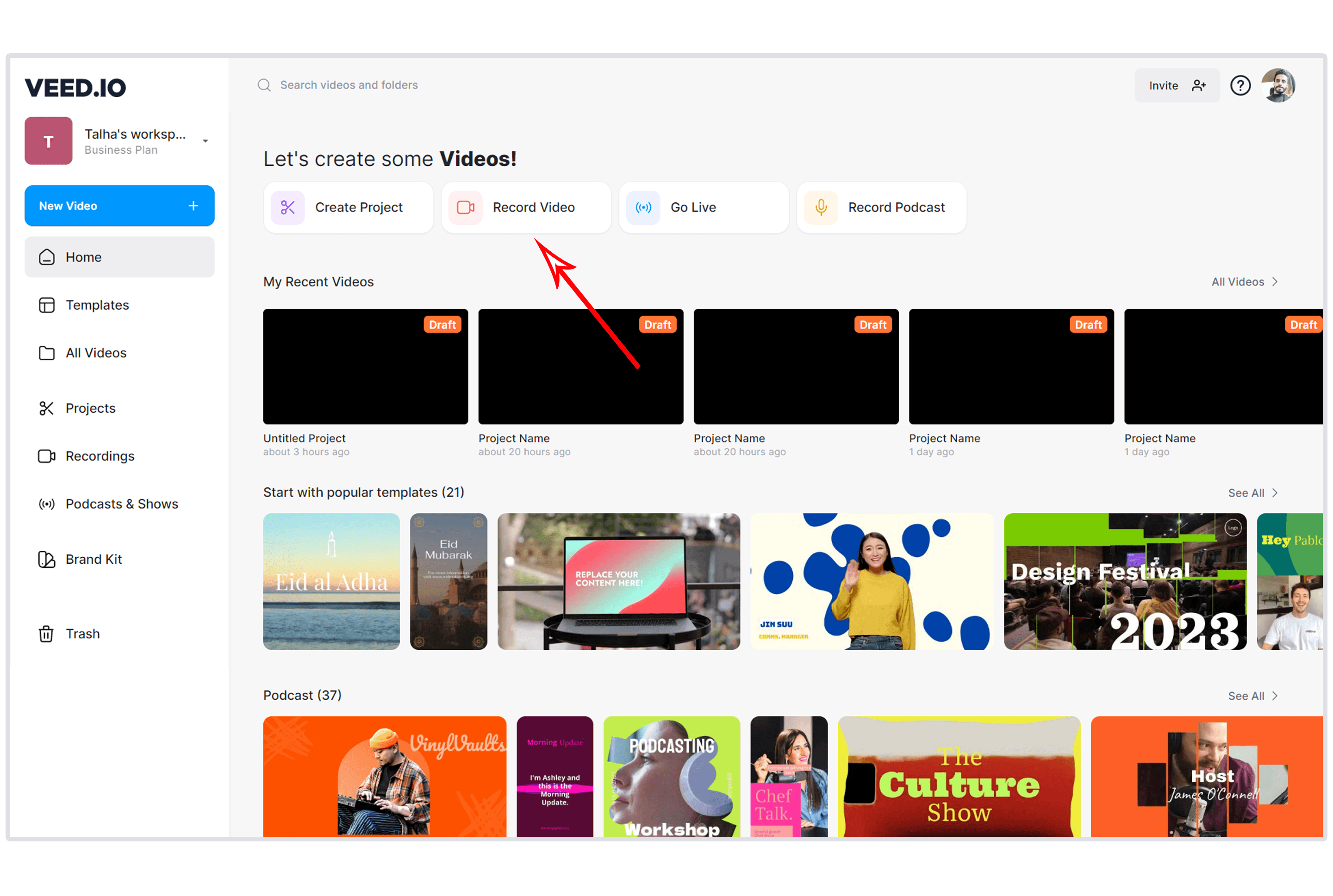
VEED is the browser-based editor that most closely matches Canva's ease-of-use while adding video-specific AI features Canva lacks. Auto-subtitles in 125+ languages, Magic Cut for filler word removal, transcript-based editing, and an AI Copilot that executes multi-step edits from natural language commands. For teams moving from Canva who want to stay browser-based but need real editing power, VEED is the closest match.
Key features
- AI Copilot - Natural language editing commands
- Transcript-based editing - Edit video by editing text
- Auto-subtitles - 125+ languages with translation
- Magic Cut - Filler word and pause removal
- Eye contact correction - AI gaze adjustment
What users say
Reddit users call VEED "the easiest browser editor" and praise subtitle accuracy. The free plan exports at 720p with a watermark, and Pro costs $29/month. For teams that liked Canva's browser simplicity but need deeper video editing, VEED fills the gap.
Pros
- ✅ Browser-based simplicity matching Canva's UX philosophy
- ✅ Video-specific AI features (subtitles, Copilot) that Canva doesn't match
- ✅ Transcript-based editing for talk-heavy content
Cons
- ❌ Free plan limited to 720p with watermark
- ❌ $29/month Pro is more expensive than Canva Pro ($13/month)
Best for
Creators who want Canva's browser simplicity with real video editing AI. Free; Lite at $12/month.
See our ngram vs VEED comparison.
3. CapCut
CapCut offers what Canva Video doesn't: a full multi-track timeline with desktop-grade editing power. Effects, transitions, speed ramping, green screen, and keyframing are all available on the free plan. For teams that hit Canva's single-scene ceiling, CapCut's timeline gives you the precision to build exactly what you want.
CapCut is available on mobile, desktop, and web, giving it cross-platform coverage Canva matches only in the browser.
Key features
- Multi-track timeline - Layer video, audio, text, and effects
- Cross-platform - Mobile, desktop, and web apps
- Effects library - Transitions, filters, text animations
- Speed ramping - Smooth speed adjustments
- Green screen - Chroma key removal
What users say
Reddit users praise CapCut's editing power and free feature set. The Pro price hike to $19.99/month in the US and ByteDance's data privacy concerns are the main drawbacks. For teams leaving Canva because the editing is too basic, CapCut is the most powerful free upgrade.
Best for
Creators who need a full timeline editor with powerful free features. Free; Pro at $9.99-$19.99/month.
Looking for the fastest way to create professional videos? ngram turns your screen recordings, docs, and images into polished videos in minutes. Try ngram free
4. Clipchamp
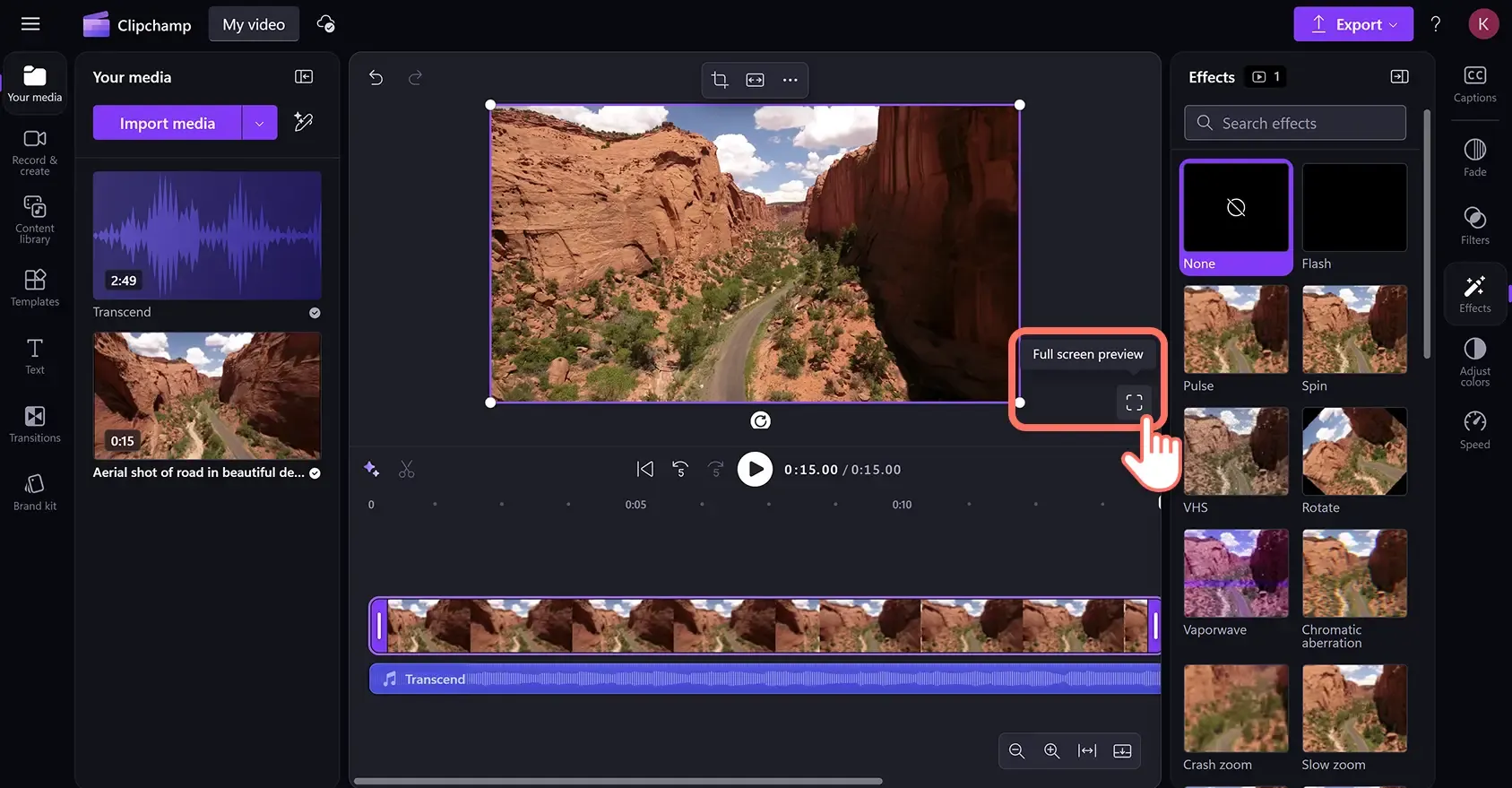
Clipchamp is Microsoft's free video editor with a proper multi-track timeline - the specific feature Canva Video lacks. Built into Windows 11, Clipchamp offers watermark-free 1080p exports for free, text-to-speech, auto-captions, and a stock media library. For Canva users who want a real timeline without paying anything, Clipchamp is the most direct upgrade.
Key features
- Multi-track timeline - Precise layering and sync
- Free with no watermark - 1080p export included
- Built into Windows 11 - No download needed
- Text-to-speech - AI narration in multiple languages
- Stock library - Free video, images, and audio
What users say
Reddit users appreciate Clipchamp's zero cost and timeline editing. The main limitation: no 4K export and fewer templates than Canva. For Windows users who need what Canva's video editor can't deliver (multi-track precision), Clipchamp is the obvious free switch.
Best for
Windows users who want free, multi-track video editing. Completely free.
See our ngram vs Clipchamp comparison.
5. InVideo AI
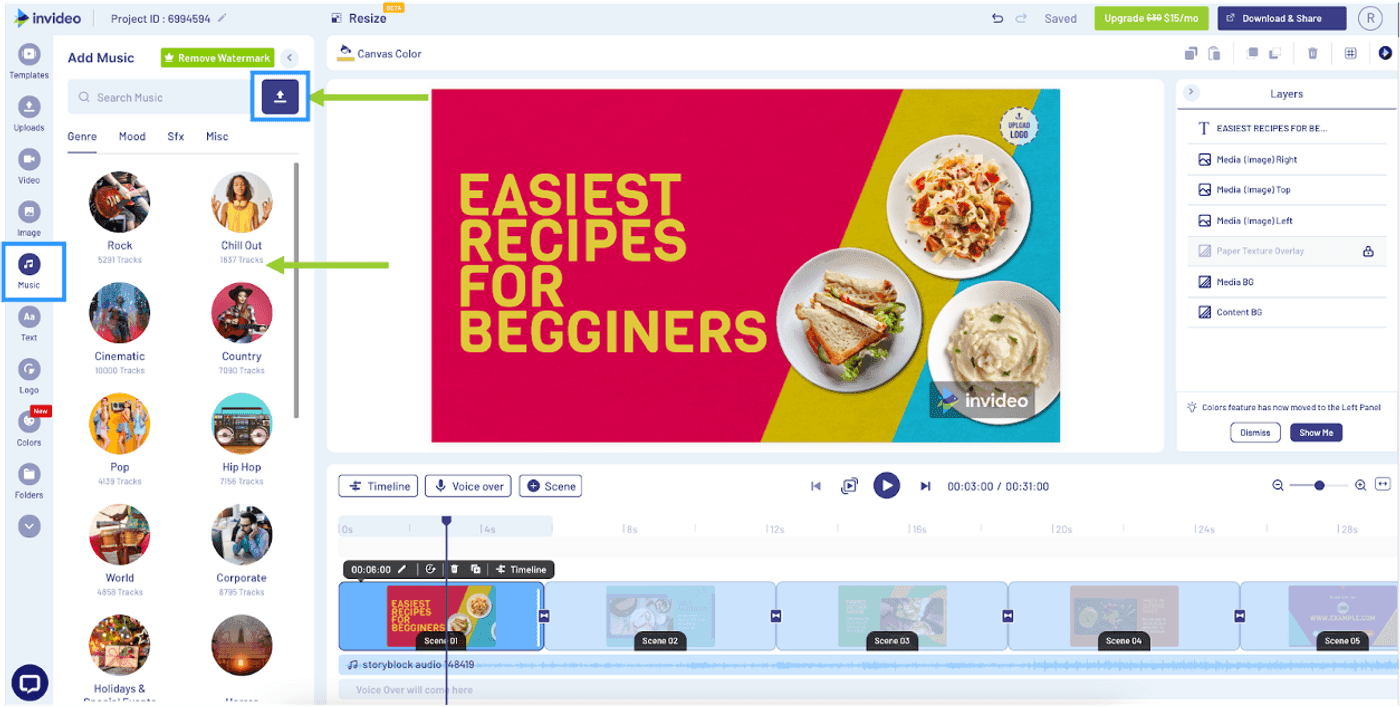
InVideo AI is for teams that want to skip editing entirely and generate videos from text prompts. With Sora 2 and VEO 3.1 built into the pipeline, InVideo generates cinematic clips alongside stock footage. For marketing teams producing high volumes of social content, InVideo's prompt-based generation is faster than filling Canva templates.
Key features
- Sora 2 + VEO 3.1 - Generative AI models
- Voice cloning - Reusable synthetic voice
- Text-to-video - Complete videos from prompts
- Multi-format export - Simultaneous format output
- Brand kit - Agency-level brand management
What users say
Reddit users praise InVideo's speed for social content creation. The credit system burns AI minutes on failed generations, and output quality is inconsistent for niche topics. For teams producing volume social clips, InVideo's AI generation is faster than Canva's template-first approach.
Best for
Marketing teams producing volume social videos from text prompts. Free; Plus at $28/month.
See our ngram vs InVideo comparison.
6. Animoto
Animoto is the template-based alternative that's actually built for video (unlike Canva, which is a design tool with video features). The templates are video-first, optimized for marketing use cases like product promos, social ads, and customer testimonials. For teams that love Canva's template approach but need templates designed for video, not retrofitted from image templates, Animoto fits.
Key features
- Video-first templates - Built for marketing video, not adapted from design
- Drag-and-drop builder - Canva-level simplicity
- Music library - Licensed tracks included
- Auto-resize - One video, multiple social formats
- Brand kit - Logo, colors, fonts across all videos
What users say
G2 reviewers praise Animoto for speed in producing marketing videos. The template variety is smaller than Canva's, but the templates are purpose-built for video. The main limitation: less powerful editing than CapCut or VEED. For teams whose primary need is template-based marketing video (not design), Animoto is more focused than Canva.
Best for
Marketing teams producing template-based video content (promos, ads, testimonials). Free; Professional at $16/month.
7. Descript
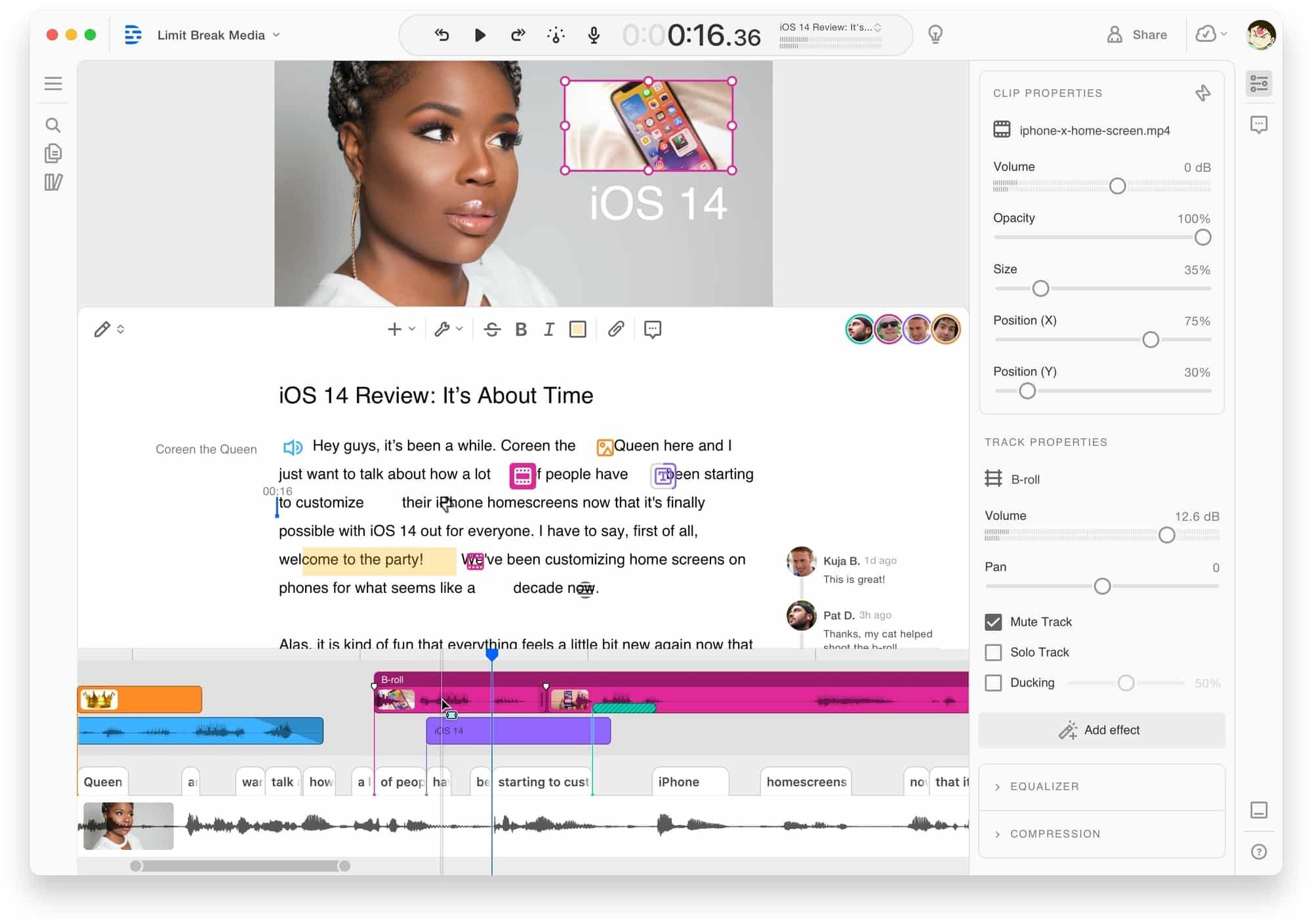
Descript is the transcript-first editor for teams producing talk-heavy content. Where Canva Video has no transcript editing capability, Descript lets you edit video by editing text - delete a word from the transcript, and the video cuts accordingly. For teams creating tutorials, webinars, or presentation videos, Descript's approach is fundamentally faster than any template editor.
Key features
- Transcript-based editing - Edit video by editing text
- AI filler word removal - Automatic cleanup
- Studio Sound - AI audio enhancement
- Eye contact correction - AI gaze adjustment
- Screen recording - Built-in recorder
What users say
Reddit users call transcript editing "mind-blowing for long-form content." The learning curve is steeper than Canva, and rendering can be slow. For talk-heavy content, Descript is faster. For template-based social content, Canva is simpler.
Best for
Creators producing talk-heavy content (tutorials, presentations, podcasts). Free tier; Hobbyist at $24/month.
See our ngram vs Descript comparison.
Here's how these tools compare on pricing:
Canva Pro at $13/month is competitive on price, but that price buys you a design tool with video features - not a dedicated video editor. Clipchamp at $0 and VEED Lite at $12/month offer dedicated video editing at similar or lower prices.
How we compared these tools
We tested each tool, read hundreds of user reviews across G2 (4,497 Canva reviews), Capterra, Reddit, and Product Hunt, and compared them across five weighted criteria:
| Criteria | Weight | What we looked at |
|---|---|---|
| Features | 25% | Timeline editing, effects, export options, template variety |
| Ease of Use | 25% | Browser/app UX, learning curve, onboarding |
| AI Capabilities | 20% | Auto-subtitles, AI editing, generation features |
| Value | 20% | Free tier quality, pricing, watermark policy |
| Support & Community | 10% | Documentation, community, response time |
We also factored in:
- Real user reviews from G2, Capterra, Reddit, and Product Hunt (qualitative, not scores)
- Template quality since Canva users expect template-based workflows
- Team collaboration because many Canva teams depend on shared editing
- Editor 2.0 stability since the recent update broke workflows for many users
Quick answers
Is there a free Canva Video alternative?
Yes. Clipchamp offers free multi-track editing with watermark-free 1080p exports. CapCut's free tier includes effects and transitions that Canva's free plan doesn't. ngram's free plan includes watermark-free exports. DaVinci Resolve offers professional-grade desktop editing at no cost.
What's the best Canva alternative for marketing teams?
For template-based marketing video, Animoto's video-first templates are more focused than Canva's design-adapted ones. For AI-generated marketing content, ngram adapts output to your audience and channel. For high-volume social clips, InVideo AI generates from text prompts faster than template editing.
Is Canva Video good enough for professional use?
For quick social posts and presentations, yes. For anything requiring precise editing, multi-track audio, or professional output formats, Canva Video's single-scene editor and limited export options fall short. The Video Editor 2.0 bugs in 2025-2026 have further eroded confidence in professional reliability.
How does Canva Video compare to VEED?
Canva is a design tool with video features. VEED is a dedicated video editor in the browser. VEED offers transcript editing, AI Copilot, and filler word removal that Canva doesn't. Canva offers a larger template library and real-time collaboration. VEED Lite ($12/month) costs less than Canva Pro ($13/month) for video-focused work.
Can I replace Canva Video with Clipchamp?
For video editing specifically, yes. Clipchamp offers a multi-track timeline, watermark-free 1080p exports, and Microsoft integration - all free. What you lose: Canva's template library, real-time collaboration, and the broader design toolkit. If video is your primary use case, Clipchamp is a direct upgrade for editing.
What is the best Canva Video alternative for business?
For business teams producing professional video from existing assets, ngram generates context-aware output matched to your audience and channel. For teams that need collaborative template editing, Animoto is a video-focused alternative. For teams that need a real timeline editor at no cost, Clipchamp is the pick.
Which one should you pick?
Canva Video is still the right tool for teams that primarily need quick social posts from templates and value Canva's broader design ecosystem. But if the Video Editor 2.0 bugs are disrupting your workflow, or you've outgrown the single-scene editor, the alternatives on this list fill specific gaps.
If you're a marketing or product team that needs professional video from existing content without template constraints, ngram is the strongest fit. If you want Canva's browser simplicity with better video AI, VEED delivers. If you want a free multi-track timeline, Clipchamp is the obvious choice.
The one team that should stay on Canva Video: if you use Canva for design AND video, and the real-time collaboration is essential to your workflow, the switching cost of leaving Canva's ecosystem is real.
Try ngram free - your first video in under 5 minutes. Outgrow the template. Turn raw recordings, docs, or images into polished, on-brand videos. Start free