

Every product team has the same fear: you ship something great and nobody notices. A changelog entry goes unread. A press release gets buried. An email blast lands in spam.
But a product launch video? That stops the scroll.
According to Wyzowl's State of Video Marketing report, 82% of people have been convinced to buy a product or service by watching a video. And eMarketer research shows that shoppers who view product demo videos are 1.81x more likely to purchase than those who don't.
The problem has never been whether product launch videos work. The data is overwhelming. The problem has always been making them - the cost, the time, the specialized skills. But that equation has changed dramatically in 2026, thanks to AI-powered video tools that let any team create polished launch videos in hours instead of weeks.
This guide covers everything you need to create product launch videos that actually drive results: the types that work, how to make them step by step, what the best teams do differently, the tools worth using, and where to distribute them for maximum impact.
Why Your Product Launch Needs Video (The Data Makes It Obvious)
Before diving into the how, let's look at why video has become non-negotiable for product launches.
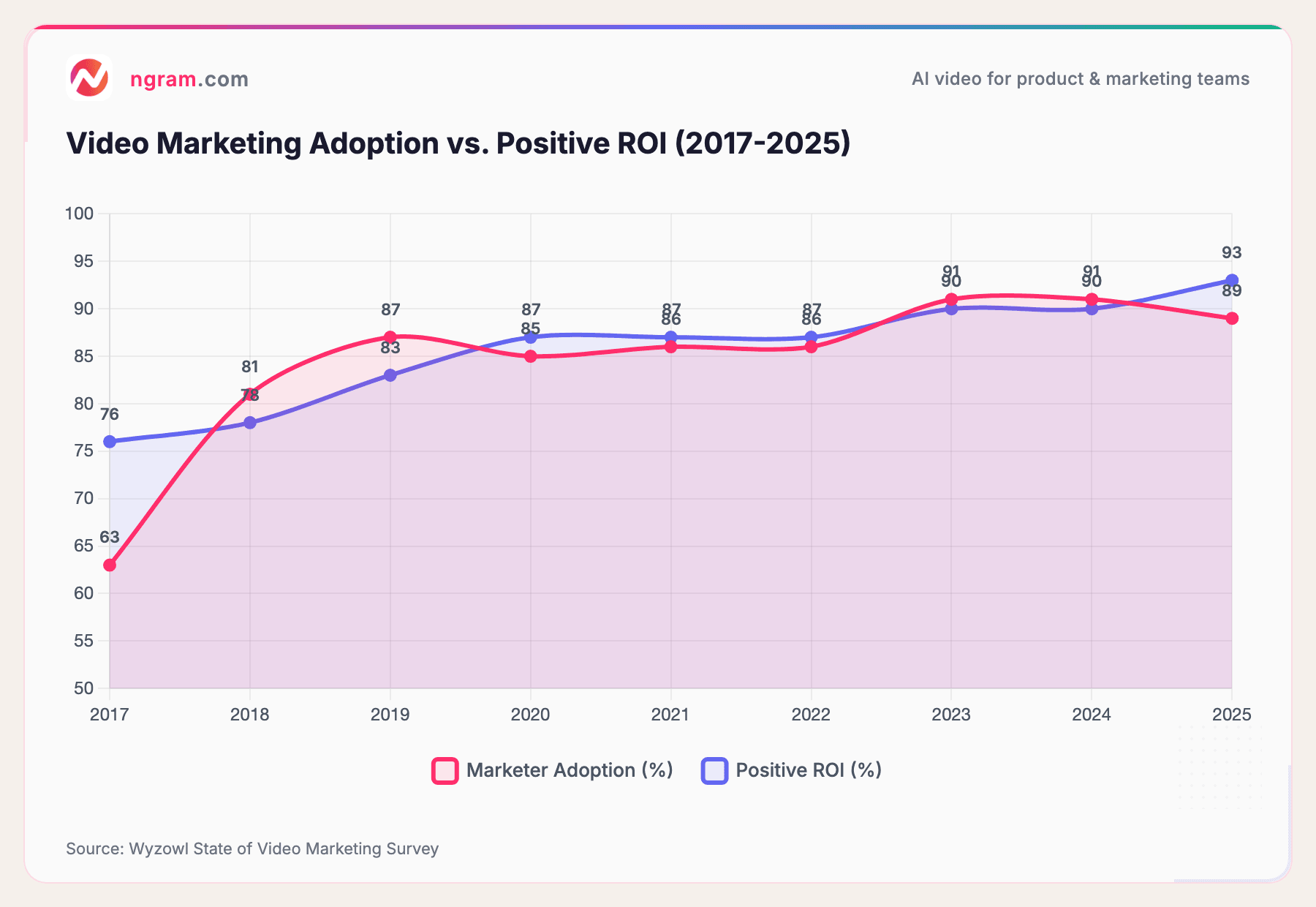
The numbers are hard to argue with. According to DemandSage's video marketing analysis, companies using video grow revenue 49% faster year-over-year than those that don't. Wyzowl reports that 93% of marketers say video gave them a positive ROI in 2025 - up from just 76% in 2016.
Adoption tells the same story. 89% of marketers now integrate video into their strategies, and 85% plan to maintain or increase their video budgets going forward.
The chart below shows how this trend has accelerated over the past decade:
Source: Wyzowl State of Video Marketing Survey
Adoption has plateaued around 89-91%, which means video is no longer a competitive advantage - it's table stakes. The gap between positive ROI and adoption keeps widening, meaning video is working better than ever for those who invest in it.
For product launches specifically, the impact is even sharper:
- Landing pages with video convert up to 86% better than text-only pages (Saleslion)
- Users spend 88% more time on websites that feature video (DemandSage)
- SaaS companies using demo videos see sales cycles reduced by 18%, from 33 days to 27 days on average (Advids)
- 50% of internet users look for product videos before visiting a store (Think with Google)
The takeaway: if you're launching a product without video, you're leaving conversions on the table.
6 Types of Product Launch Videos (and When to Use Each)
Not every product launch video serves the same purpose. The format you choose depends on your audience, your channel, and where buyers are in their journey. Here are the six types that consistently drive results.
1. Teaser / Countdown Videos
Best for: Building anticipation before launch day.
A product launch teaser video is short (15-30 seconds), curiosity-driven, and designed to spark interest without revealing everything. It highlights a problem or hints at a solution. Apple does this masterfully with their "Coming soon" teasers that show just enough to generate conversation.
When to use: 1-2 weeks before launch. Share on social media, embed in email teasers, post to communities where your audience lives.
2. Product Reveal / Announcement Videos
Best for: Launch day - the main event.
This is the hero video - a product reveal video that announces what you've built, shows what it does, and explains why it matters. Think of it as a visual press release, but one people actually want to watch. Typically 60-90 seconds.
When to use: Launch day across all channels. This is your tentpole content that everything else supports.
3. Feature Demo / Walkthrough Videos
Best for: Prospects evaluating the product post-launch.
Demos show the product in action. Screen recordings with smart zoom and callouts work well for software products. Physical products benefit from close-up shots of key features with voiceover. 2-5 minutes is the sweet spot.
When to use: On your product page, in sales follow-ups, and in your help center. These have the longest shelf life of any launch video.
4. Explainer / Problem-Solution Videos
Best for: Audiences who don't know they need your product yet.
Explainers follow a clear structure: problem, agitation, solution, proof. They frame the problem your product solves before showing the solution. Motion graphics and animation work particularly well here because they can visualize abstract problems.
When to use: Top of funnel - LinkedIn ads, YouTube pre-roll, website homepage. Great for product marketing teams running awareness campaigns.
5. Founder-Led Updates
Best for: Early-stage products and community-driven launches.
Nothing builds trust like a real person talking about what they built and why. Founder-led videos work especially well on Reddit, Product Hunt, Indie Hackers, and LinkedIn. They don't need high production value - authenticity is the point.
When to use: Product Hunt launches, community announcements, investor updates, changelog videos.
6. Social Clips (Short-Form)
Best for: Platform-native distribution.
Short, punchy clips (15-60 seconds) optimized for Instagram Reels, TikTok, LinkedIn, and X. These are often cut from longer launch videos or created specifically for each platform's format. According to DemandSage, 66% of consumers report short-form videos as the most engaging content type.
When to use: Across all social platforms, both organic and paid. Create multiple variants for different audiences.
The strongest product launches combine 3-4 of these types. Need product launch video ideas? Start with a teaser before launch, a reveal on launch day, a demo for the product page, and social clips for distribution. Check out our product launch video use case page for examples of how teams combine these formats.
How to Make a Product Launch Video: Step by Step
Here's the process that works whether you're using professional editors, AI tools, or doing it yourself. The principles are the same.
Step 1: Define Your Audience, Goal, and Channel
Before you touch any tool, answer three questions:
- Who is this for? A technical buyer evaluating features needs a different video than a CEO scanning LinkedIn. Be specific: "Product managers at B2B SaaS companies with 50-200 employees" beats "business professionals."
- What should they do after watching? Sign up for a free trial? Book a demo? Share with their team? One video, one CTA.
- Where will this live? LinkedIn (square or vertical, subtitled), your landing page (16:9, longer form), Instagram (9:16, under 60 seconds), or email (short, auto-playing).
These three answers determine everything that follows - script, length, style, and format.
Step 2: Write the Script
A great product launch video starts with a great script. Three proven frameworks:
AIDA (Attention, Interest, Desire, Action): "Tired of launches that nobody notices? [Attention] Your competitors are shipping product videos that convert 86% better than text. [Interest] With AI video tools, you can create the same quality in minutes, not weeks. [Desire] Start your free trial today. [Action]"
PAS (Problem, Agitation, Solution): "Creating a product launch video used to take weeks and thousands of dollars. [Problem] Meanwhile, your competitors are shipping polished video content daily. [Agitation] ngram turns your existing assets into on-brand launch videos in minutes. [Solution]"
BAB (Before, After, Bridge): "Before: your launch is a changelog entry nobody reads. After: a polished video that gets shared across every channel. Bridge: here's exactly how to get there."
A strong product launch video script should stay under 150 words for a 60-second video (roughly 2.5 words per second). Tools like ngram's AI script generation can draft scripts based on your product docs, blog posts, or release notes - giving you a starting point to refine.
Step 3: Gather Your Assets
You don't need a studio. Most product launch videos are built from what you already have:
- Screen recordings of the product in action
- Screenshots of key features or UI
- Product images or photos
- Existing docs - blog posts, release notes, pitch decks
- Brand assets - logo, fonts, color palette
- Customer quotes or testimonials (text is fine)
The more raw material you bring, the better the output. Modern AI video tools can extract stories from URLs, PDFs, and docs - you don't need to start from scratch.
Step 4: Storyboard and Plan Scenes
Map out scene by scene what the viewer will see. A simple format works:
| Scene | Duration | Visual | Audio/Text |
|---|---|---|---|
| 1 | 5s | Problem statement text on brand background | "Every team ships great products..." |
| 2 | 10s | Screen recording of frustrating workflow | "...but launches still feel like shouting into the void" |
| 3 | 15s | Product demo - key feature in action | "[Product] changes that" |
| 4 | 20s | 3 feature highlights with motion graphics | Feature callouts with supporting visuals |
| 5 | 10s | Social proof + CTA | "Join 1,000+ teams. Try it free." |
This step catches structural problems before you invest time in production. It's the fastest place to iterate.
Step 5: Produce the Video
This is where the approach forks based on your resources:
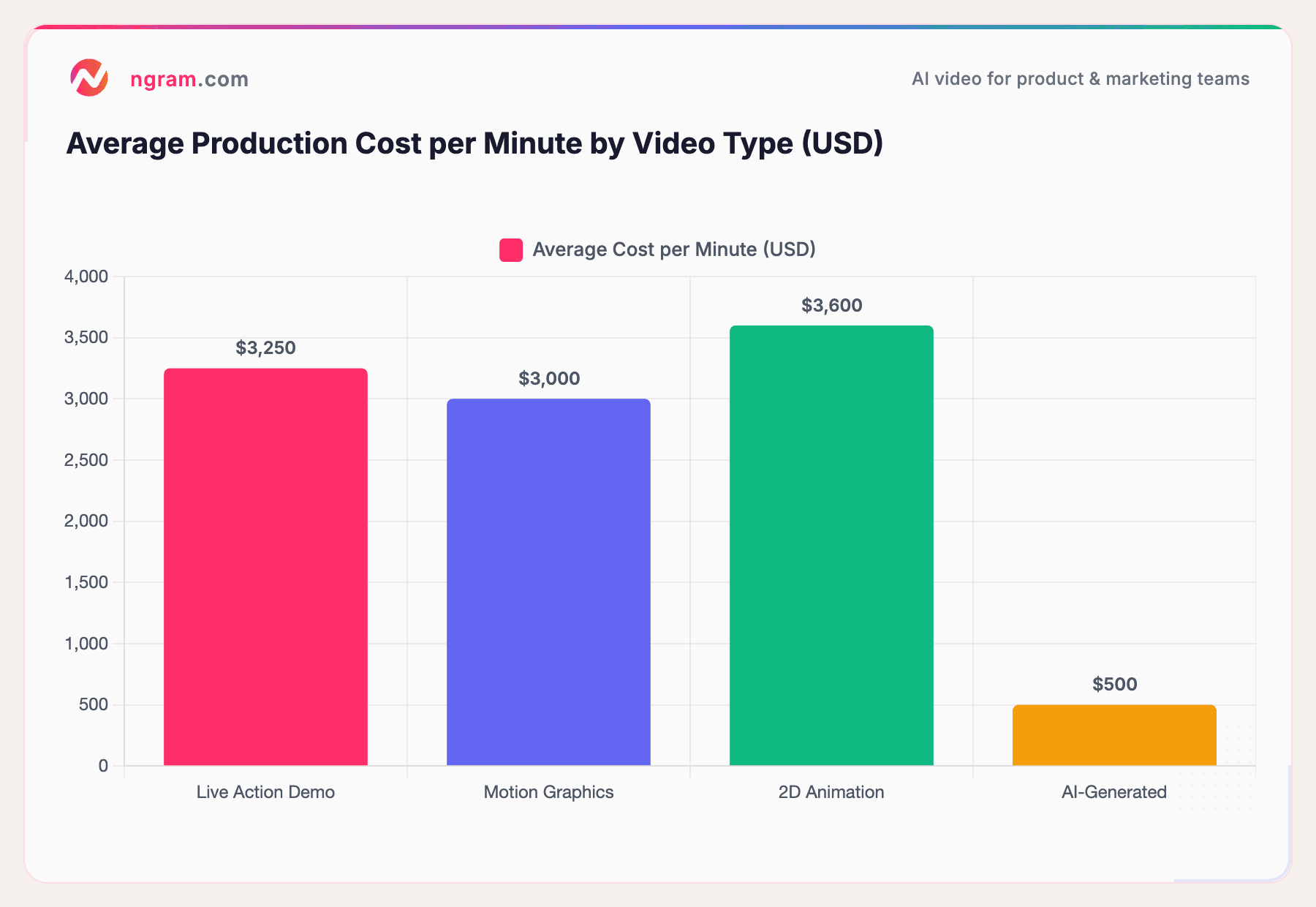
Traditional route: Record footage, edit in Premiere/Final Cut, add motion graphics in After Effects, hire a voiceover artist, mix audio. Timeline: 2-4 weeks. Cost: $1,500-$8,000 per minute.
AI-powered route: Feed your assets and script into an AI video tool. Get a first cut in minutes. Refine with plain-language edits. Timeline: hours. Cost: $0-50.
Here's how production costs compare across video types:
Sources: Advids, QuickFrame, Vidico
AI-generated video costs roughly 85% less per minute than traditional production. That's not cutting corners - it's a fundamentally different workflow that removes the coordination overhead of freelancers, agencies, and revision cycles.
Step 6: Add Polish
The finishing touches that separate amateur from professional:
- Captions: 80% of social video is watched with sound off. Always add captions.
- Music: Subtle background music sets the pace. Match the energy to your message.
- Brand elements: Consistent fonts, colors, logo placement. Use a brand kit to keep everything on-brand without manual effort.
- Transitions: Smooth, intentional transitions between scenes. Avoid flashy effects.
Step 7: Export for Multiple Formats
One video, multiple formats:
- 16:9 for website, YouTube, email embeds
- 1:1 for LinkedIn feed, Twitter/X
- 9:16 for Instagram Reels, TikTok, YouTube Shorts
Don't just crop - re-frame key elements for each aspect ratio. This is where MP4 export with separate channel-cut preparation tools save hours of manual work.
Building your first launch video? ngram lets you bring your existing assets - docs, screenshots, recordings - and turns them into polished, on-brand videos in minutes. No editing skills required.
Product Launch Video Best Practices
After analyzing the top-performing launch videos and the data behind them, here's what separates the videos that drive results from those that get ignored.
Hook Viewers in the First 5 Seconds
According to industry data, 33% of viewers stop watching a video after 30 seconds. Your opening needs to communicate the value immediately - either by stating the problem, showing a surprising result, or asking a question the viewer needs answered.
What doesn't work: logo animations, "Hi, I'm [name] from [company]," or slow-building context. Get to the point.
Shorter Is Better (Usually)
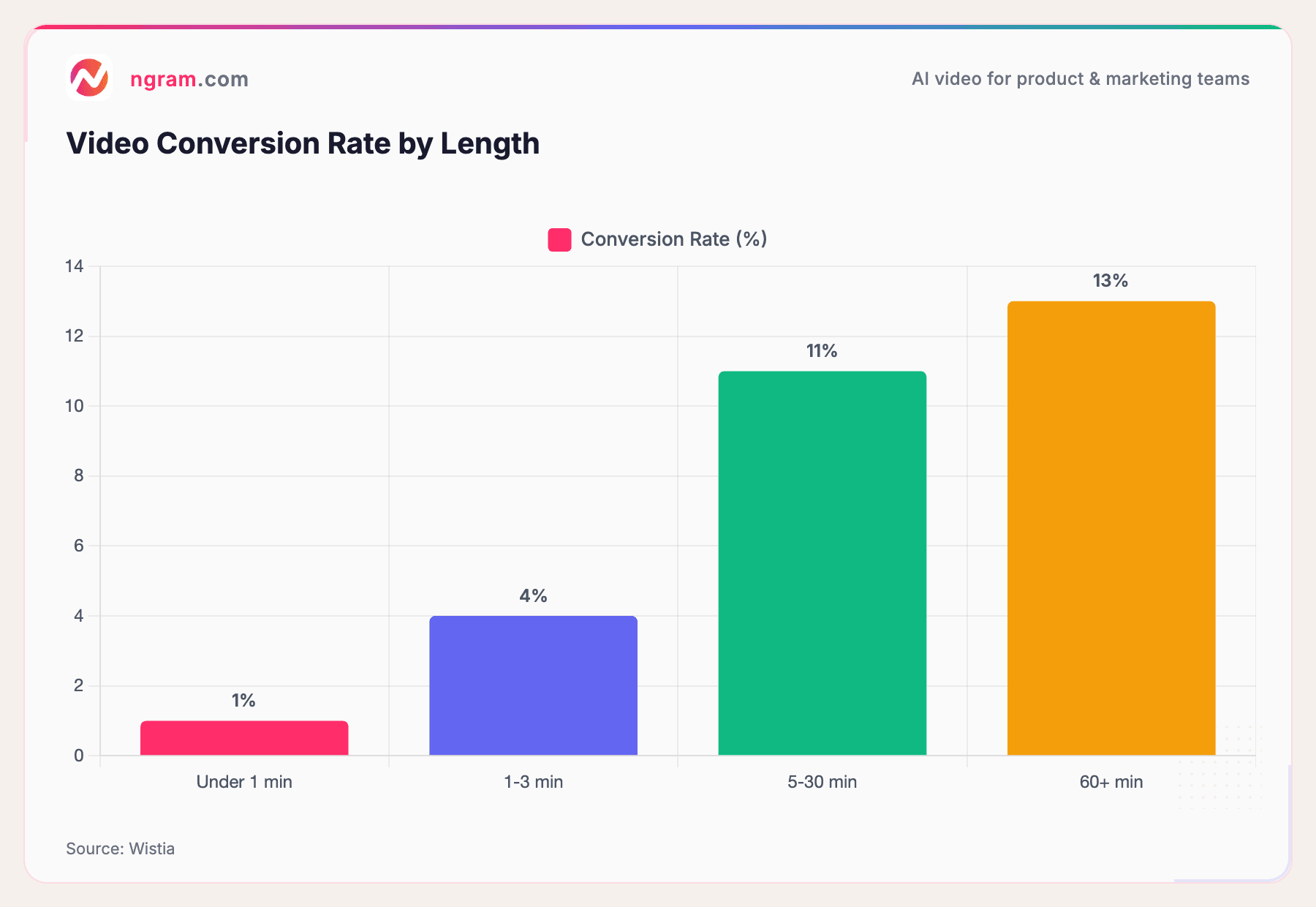
73% of marketers prefer 30-60 second demos for top-of-funnel engagement. But the data on conversions tells a more nuanced story:
Source: Wistia
Longer videos convert better, according to Wistia's data. But there's a catch: conversion rate measures people who complete a CTA, and longer videos self-select for more engaged viewers. For product launches, the play is a short teaser (30-60s) to capture attention and a longer demo (2-5 min) for people who want to dig deeper.
Show, Don't Tell
The best product launch videos demonstrate value rather than describe it. Instead of saying "our product is faster," show a side-by-side of the old vs. new workflow. Instead of "easy to use," show someone using it in real time.
Four times as many consumers would rather watch a video about a product than read a description, according to Forbes.
One CTA Per Video
Every product launch video should have exactly one clear call to action. Asking viewers to "sign up, follow us on social media, subscribe to our newsletter, and share with friends" dilutes everything. Pick the one action that matters most for this video's goal.
Stay On Brand
Consistency builds trust. Every video from your team should use the same fonts, colors, logo treatment, and tone. This is especially important when you're creating multiple videos for a single launch across different platforms. Set up a Brand Kit, then select it during creation to reuse that identity.
Best AI Tools to Create Product Launch Videos in 2026
The AI video landscape has matured significantly. If you're looking for a product launch video maker, here are the tools worth considering, each with a different strength.
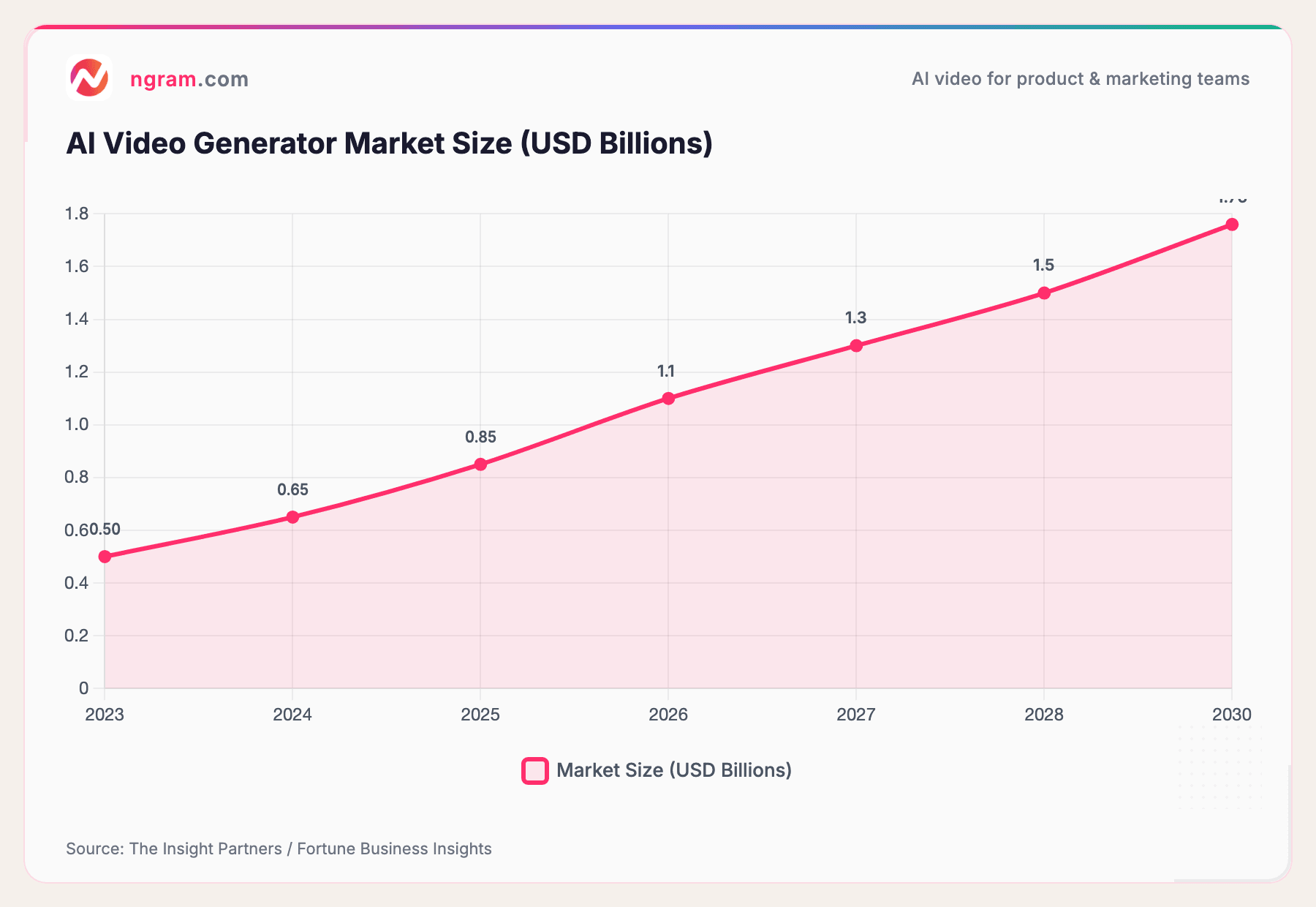
The AI video generator market is growing rapidly - projected to reach $1.76 billion by 2030, according to The Insight Partners. This growth reflects how quickly teams are shifting from traditional production to AI-assisted workflows.
Source: The Insight Partners / Fortune Business Insights
The market is projected to more than triple by 2030, driven by enterprise adoption and the shift toward self-serve video creation.
ngram
Best for: Teams that want context-aware video creation from existing assets.
ngram takes a different approach than most AI video tools. Instead of starting with templates, you start with intent - who the video is for, what it needs to do, and where it's going. Then you add whatever assets you already have: docs, screenshots, URLs, screen recordings.
ngram generates a script and storyboard first (so you can course-correct before rendering), then builds the video with motion graphics, AI visuals, captions, and music. Select your saved Brand Kit during creation and turn on captions when needed. The editing experience lets you refine in plain language or with direct UI controls, and you can export the same video in channel-specific cuts prepared separately - or ask for a launch kit that bundles teaser, reveal, demo, and social-clip variants in one pass.
Key strength: You don't start from a blank page. Your existing content becomes the foundation for a polished video. Ideal for product marketing teams shipping launches, announcements, and demos regularly.
Explore ngram's full AI video platform at ngram.com to see all the capabilities.
Descript
Best for: Teams that already record a lot of raw footage.
Descript's text-based editing approach lets you edit video by editing a transcript. Record a screen capture, remove filler words automatically, and clean up the pacing. It's strong for polishing raw recordings into something presentable.
Key strength: Text-based editing makes it approachable for non-editors. Good for founder-led update videos and rough demo polishing.
FlexClip
Best for: Quick template-based videos when speed matters more than uniqueness.
FlexClip offers a large template library with drag-and-drop editing. Their URL-to-video and PPT-to-video features are genuinely useful for repurposing existing content. The output is clean but tends to look template-driven.
Key strength: Speed. You can go from zero to a finished video in under 15 minutes. Good for social clips and quick announcements.
Canva Video
Best for: Teams already in the Canva ecosystem.
Canva's video editor integrates with their design tools, making it easy to maintain brand consistency if you already use Canva for other design work. The template library is extensive, and the learning curve is minimal.
Key strength: Familiarity. If your team knows Canva, the video editor feels natural. Good for social content and simple announcements.
PlayPlay
Best for: Enterprise teams needing brand-controlled video at scale.
PlayPlay focuses on enterprise video creation with strict brand governance. Templates are locked down to approved brand elements, which makes it a good fit for large organizations where consistency across distributed teams matters.
Key strength: Brand control at scale. Good for enterprise communications and multi-team video programs.
Real Product Launch Video Examples That Drove Results
Let's look at what actually works in practice - and more importantly, why it works.
Dropbox: The $48M Explainer
Dropbox's famous explainer video is perhaps the most cited product launch video success story. By adding a simple animated explainer to their landing page, conversions jumped by over 10%, contributing to millions of additional sign-ups. The video wasn't flashy - it was clear. It showed what Dropbox does in 2 minutes, solving the "I don't get it" problem that text alone couldn't fix.
Why it worked: Simplicity. One concept, one visual metaphor, one CTA. The video explained a new category (cloud storage) in terms anyone could understand.
Apple: The Aspirational Reveal
Apple product reveals set the gold standard for production quality, but the underlying structure is what matters: they show the product in beautiful detail, focus on how it changes the user's experience (not just specs), and build emotional resonance through music and pacing.
Why it works: Apple videos answer "why should I care?" before "what does it do?" That order matters. Most launch videos make the mistake of leading with features instead of impact.
Founder-Led SaaS Launches
Some of the most effective product launch videos on Reddit and Product Hunt are founders talking to camera about what they built. Robleh Jama (ex-Shopify, Boom Vision CEO) told Descript that founder-led videos outperform polished content for early-stage launches because they carry authenticity that viewers trust.
Why it works: People buy from people. A genuine 90-second video from a founder who clearly cares about the problem lands harder than a $10,000 produced piece that feels corporate.
Where to Distribute Your Product Launch Video
Creating the video is half the battle. Where you put it determines how many people see it.
Sources: DemandSage, industry research
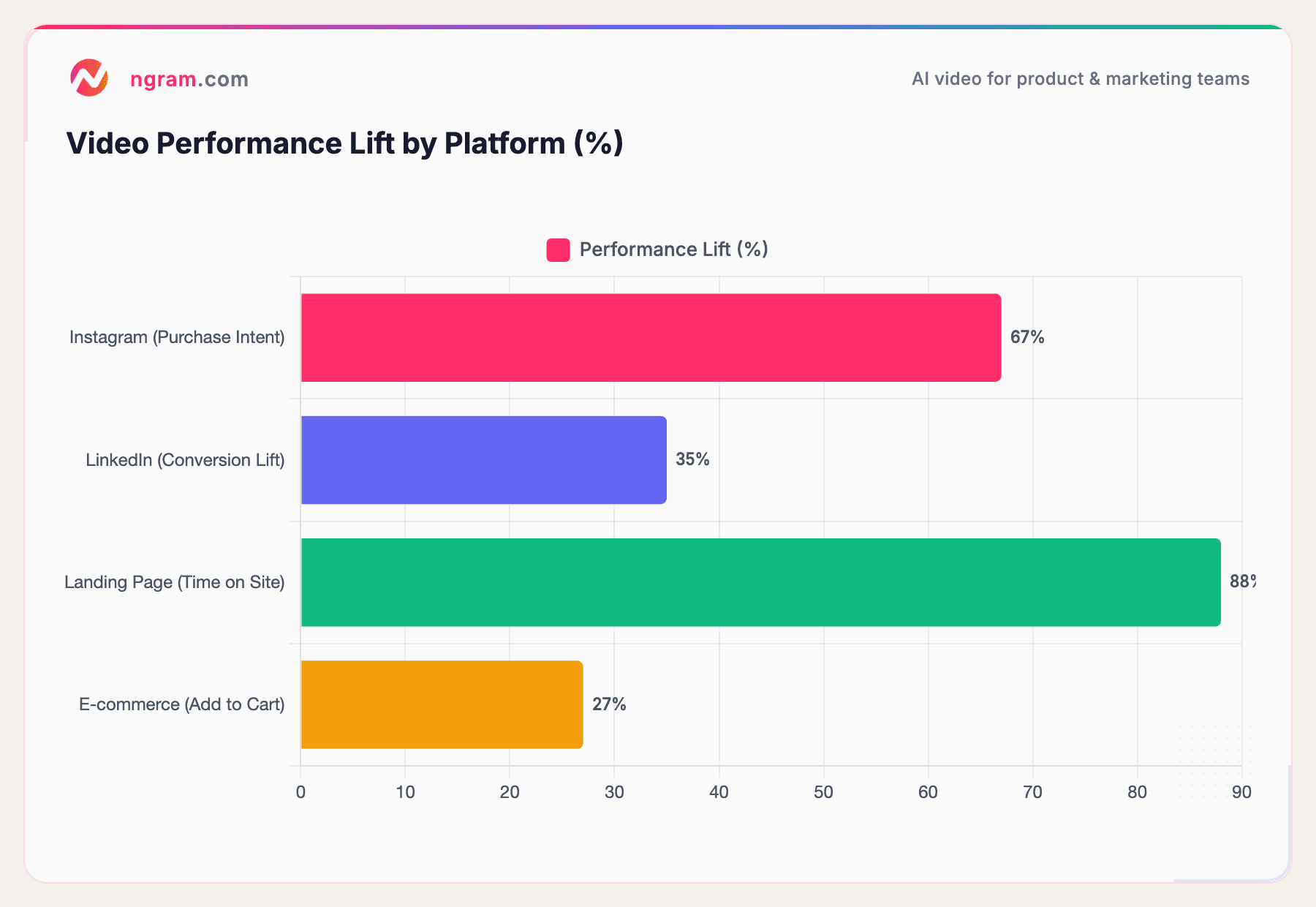
Here's where each format works best and what lift you can expect.
Your Landing Page (Non-Negotiable)
This is the most important placement. Users spend 88% more time on pages with video, according to DemandSage. Your product launch page should have the hero video front and center, above the fold. Keep it auto-playing (muted) or with a prominent play button.
For B2B launches, LinkedIn is the highest-converting social channel. Product demo videos on LinkedIn increase conversion rates by over 35%, particularly in software and technology sectors. Upload natively (don't share YouTube links) and keep videos under 90 seconds for feed content.
Instagram Reels & TikTok
Product demonstration videos on Instagram have been shown to increase purchase intent by 67%. Go vertical (9:16), keep it under 30 seconds, and lead with the most visually compelling moment. These platforms reward quick, visual-first content.
Email Campaigns
Including video in launch emails consistently increases click-through rates. According to Forbes, videos boost email CTR by up to 96%. Use an animated thumbnail that links to the full video - most email clients don't support inline video playback.
Product Hunt & Reddit
For SaaS and tech product launches, these communities drive high-quality early adopter traffic. Product Hunt practically requires a video for a successful launch. Reddit's r/SaaS, r/startups, and industry-specific subreddits respond well to authentic, founder-led video content.
Frequently Asked Questions
How do I make a product launch video?
Start by defining your audience, goal, and distribution channel. Write a script using a framework like AIDA or PAS. Gather your existing assets (screenshots, recordings, docs). Storyboard the scenes, produce the video using an editing tool or AI platform, add captions and music, then export in the right formats for each channel.
How long should a product launch video be?
For social distribution, 30-60 seconds works best - 73% of marketers prefer this length for top-of-funnel content. For your website or product page, 2-5 minutes gives you room to demonstrate value. Teaser videos should be 15-30 seconds. The key is matching length to the platform and viewer intent.
How much does a product launch video cost?
Traditional production ranges from $1,500 to $8,000 per minute, with a 60-second video averaging about $3,185. AI-powered tools bring this down to under $500 per minute - and many offer free tiers. The right choice depends on your budget, timeline, and quality requirements.
What makes a good product launch video?
The best product launch videos hook viewers in the first 5 seconds, focus on one clear message, show the product in action rather than just describing it, include captions for silent viewing, stay on-brand with consistent visuals, and end with a single clear CTA.
Can I create a product launch video with AI?
Yes. AI video tools like ngram, Descript, and FlexClip can generate product launch videos from text prompts, existing assets, or screen recordings. AI handles the heavy lifting - scripting, visual generation, motion graphics, voiceover - while you maintain creative control over the final output.
What types of product launch videos should I create?
A strong launch combines multiple formats: a teaser video 1-2 weeks before launch, a hero reveal video on launch day, a detailed feature demo for your product page, and short-form social clips for distribution. Explainer videos and founder-led updates add additional reach depending on your audience and channels.
The Bottom Line
Product launch videos aren't optional anymore. The data shows they convert better, engage longer, and reach further than any other format. And with AI tools bringing production costs down by 85%, the old excuses - too expensive, too slow, too hard - don't hold up.
The teams shipping the best product launches in 2026 aren't the ones with the biggest video budgets. They're the ones who figured out how to create the right video for every message, quickly and consistently.
Whether you're a solo founder recording your first Product Hunt video or a product marketing team launching across six channels simultaneously, the playbook is the same: start with a clear audience and goal, build from what you already have, and ship something real.
Try ngram free and create your first product launch video in minutes - no editing skills required.