
Is InVideo AI still worth it in 2026? We tested 7 alternatives to find out.
InVideo AI built its reputation on a compelling promise: type a prompt, get a complete video. With Sora 2 and VEO 3.1 now built into the pipeline, the generative quality has genuinely improved. But the gap between the demo and daily reality is widening.
Across Reddit, G2, and Trustpilot, the pattern is consistent: users burn through AI minutes on failed generations with no path to a refund. One user on the Max plan ($60/month) reported getting only 2 minutes of usable video from their entire allocation. Others describe needing 5-10 prompt attempts to get acceptable results, with each attempt consuming minutes. The scripts need rewriting for anything beyond basic social content, AI voices include clicking sounds and pronunciation errors, and the output looks generic - "like everyone else's," as one Reddit user put it.
With "invideo pricing" pulling 480 searches a month and declining (down from 720 in mid-2025), more creators are evaluating alternatives before renewing. We tested 7 InVideo alternatives across AI generation quality, editing flexibility, pricing transparency, and real user reviews. Here's what held up.
The case for switching off InVideo
InVideo AI is a capable text-to-video tool, but these pain points keep surfacing in reviews.
Credits burn on failed generations. Each prompt attempt consumes AI minutes, even when the result is unusable. There are no partial refunds for short or failed generations. Users on the Plus plan ($28/month) get 50 AI minutes, which translates to roughly 10-15 usable videos if every generation lands, fewer if you need iterations.
Output quality is inconsistent. For niche topics, expect to manually replace 30-50% of B-roll clips. The AI picks stock footage that's often tangential to the topic, and the scripts default to a generic marketing tone that needs rewriting for specialized audiences.
AI voices need work. Subtle clicking sounds, pronunciation errors with industry terms, and unnatural pacing require manual correction. Professional voiceover quality is not there yet.
The free plan is highly restricted. 10 AI minutes per week, watermarked exports, no commercial usage rights. It's a trial, not a working free tier.
Quick comparison
| Tool | Best For | Starting Price | Key Differentiator |
|---|---|---|---|
| ngram | Professional video from any asset | Free / $17.40/mo | Context-aware AI generation |
| Pictory | Blog and text to video | Free trial / $19/mo | URL-to-video conversion |
| VEED | Browser-based AI editing | Free / $12/mo | Transcript editing, AI Copilot |
| Synthesia | Enterprise AI avatar video | Free / $18/mo | 240+ avatars, 140+ languages |
| Canva Video | Collaborative video creation | Free / $13/mo | Template library, team workflows |
| Kapwing | Browser-based team editing | Free / $16/mo | Real-time collaboration, brand kits |
| Descript | Transcript-based editing | Free / $24/mo | Edit video by editing text |
1. ngram
If InVideo's AI generates videos that need extensive reworking, ngram solves the problem differently. Instead of generating video from a text prompt and hoping the AI picks the right footage, ngram starts from your existing assets - screen recordings, documents, images, URLs - and builds a professional, on-brand video with structure, pacing, and visuals that match your audience.
What makes ngram stand out
Context-aware generation is the core difference from InVideo. Tell ngram your audience (developers vs. executives), your goal (educate vs. convert), and your channel (LinkedIn vs. website). The output adapts automatically. InVideo generates from a prompt; ngram generates from intent.
Plan first, generate second means you review the script and storyboard before rendering. With InVideo, you burn minutes on each attempt. With ngram, you fix direction before any generation happens.
Start from what you have. Drop in a doc, screenshots, a rough recording, or a URL. ngram extracts what it needs and builds a coherent video. No stock footage roulette.
Key features
- Context-aware generation - Adapts to audience, goal, and channel
- Plan first, generate second - Script and storyboard review before rendering
- Any asset in - Text, images, docs, URLs, screen recordings
- AI editing - Auto-cut, filler removal, smart zoom, cursor emphasis
- Multi-format export - 16:9, 9:16, 1:1 with captions
- Brand kits - Logo, colors, fonts applied automatically
Pros
- ✅ No credit system that charges per failed generation
- ✅ Uses your actual assets instead of generic stock footage
- ✅ Context-aware output adapts to audience and channel
Cons
- ❌ Web-based only - no native mobile app
- ❌ Not a text-to-video prompt tool (different workflow)
Who is ngram best for?
Marketing teams, product managers, and agencies who have content (docs, recordings, screenshots) and need professional videos without stock footage lottery. If your videos go to customers or public audiences, ngram fits.
ngram has a generous free plan with paid plans starting at $17.40 per month.
Ready to try ngram? Create your first video in under 5 minutes. Start free
See ngram in action:
2. Pictory
Pictory is the closest alternative for InVideo's core use case: turning text into video. Paste in a blog post URL, a script, or long-form content, and Pictory matches it with relevant visuals, transitions, and AI voiceover. The difference from InVideo: Pictory focuses on content repurposing (existing text to video) rather than AI generation from scratch.
Pictory also extracts highlight clips from long videos and webinars, a feature InVideo doesn't match.
Key features
- URL-to-video - Turn blog posts into videos automatically
- Script-to-video - Paste text, get a complete video
- Highlight extraction - Pull clips from webinars and podcasts
- AI voiceover - Text-to-speech narration
- Brand kit - Consistent branding across videos
What users say
G2 reviewers praise Pictory's content repurposing speed. Reddit users note the stock footage matching can be hit-or-miss (similar to InVideo) and the AI voiceover quality varies. For teams that produce lots of written content and want video versions, Pictory is more reliable than InVideo because you control the source material.
Pros
- ✅ Strong at repurposing existing written content into video
- ✅ Highlight extraction from long-form video is a unique feature
- ✅ More predictable output because you control the source text
Cons
- ❌ Stock footage matching can be inconsistent, similar to InVideo
- ❌ Not designed for original creative video production
Best for
Content marketing teams turning blogs, articles, and scripts into video. Free trial available; Standard at $19/month.
See our ngram vs Pictory comparison.
3. VEED
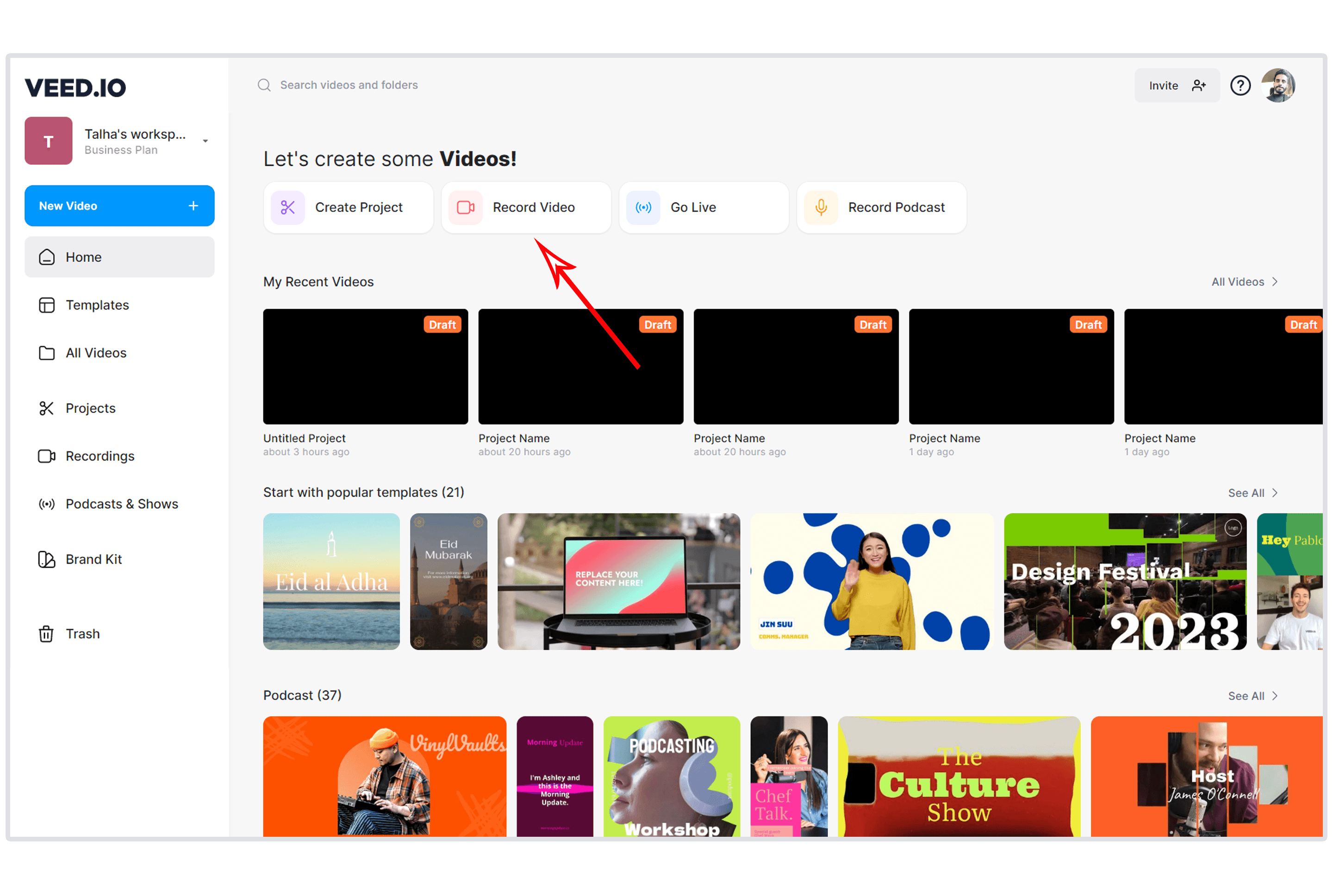
VEED takes the opposite approach from InVideo: instead of AI-generating entire videos, VEED gives you a browser-based editor to work with existing footage. Auto-subtitles in 125+ languages, Magic Cut for filler word removal, and a new AI Copilot that executes multi-step edits from natural language commands. For creators frustrated with InVideo's AI inconsistency, VEED puts you in control.
Key features
- AI Copilot - Natural language editing commands
- Transcript-based editing - Edit video by editing text
- Auto-subtitles - 125+ languages with translation
- Magic Cut - Filler word and pause removal
- Eye contact correction - AI gaze adjustment
What users say
Reddit users call VEED "the easiest browser editor" and praise subtitle accuracy. The free plan exports at 720p with a watermark. For creators who have footage and want to edit it with AI assistance rather than generate new footage from prompts, VEED is a stronger fit than InVideo.
Best for
Creators with existing footage who want browser-based AI-assisted editing. Free; Lite at $12/month.
See our ngram vs VEED comparison.
Looking for the fastest way to create professional videos? ngram turns your screen recordings, docs, and images into polished videos in minutes. Try ngram free
4. Synthesia
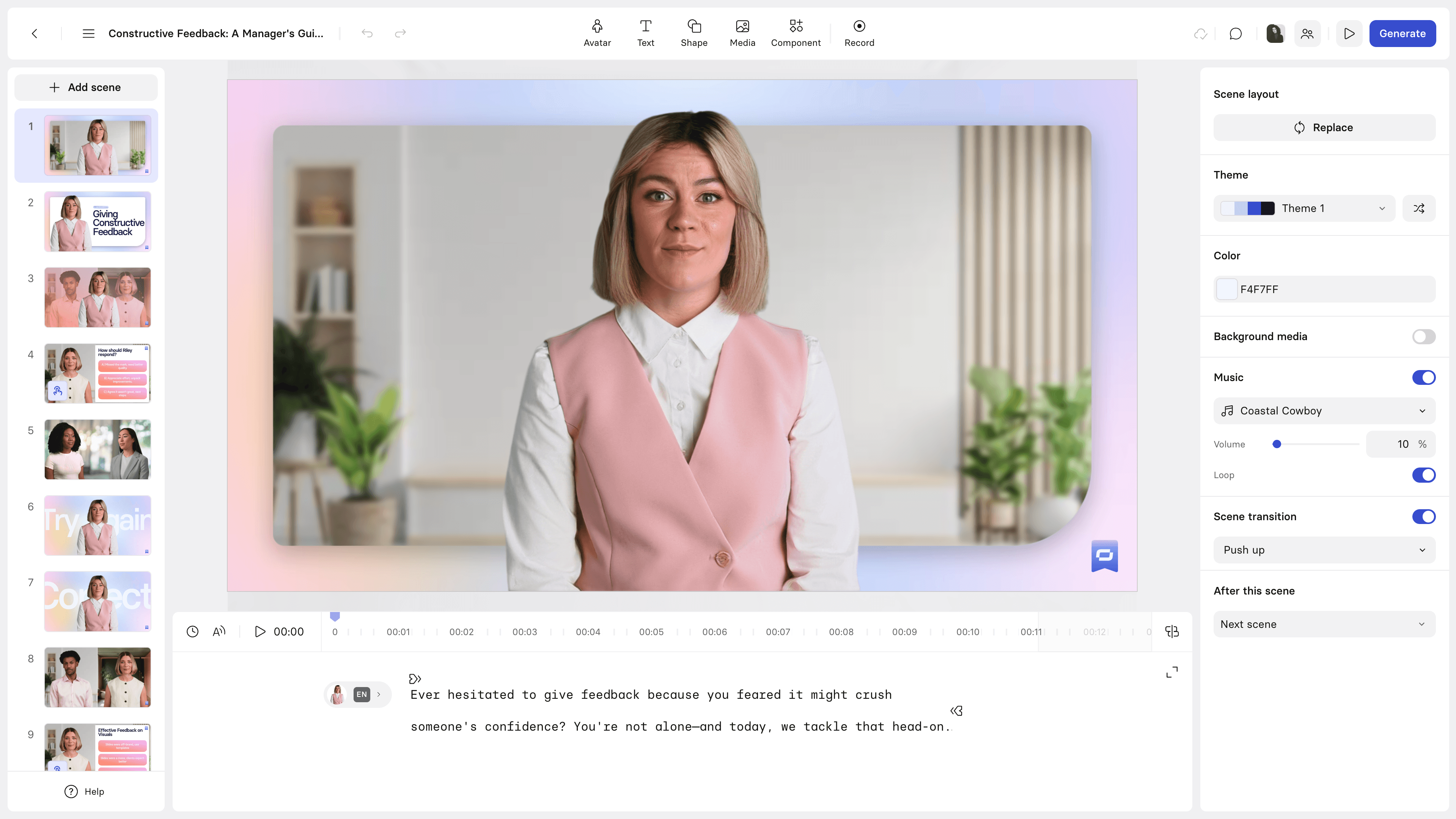
Synthesia is the InVideo alternative for teams that need AI-generated video with a human presenter but without filming one. With 240+ AI avatars and 140+ language support, Synthesia is built for enterprise L&D, training, and multilingual content at scale. Where InVideo generates video from text prompts with stock footage, Synthesia generates avatar-presented videos from scripts.
Synthesia recently dropped prices by 38% and added AI Playground with Veo 3.1 and Sora 2 access.
Key features
- 240+ AI avatars - More expressive than most competitors
- 140+ languages - Industry-leading multilingual support
- AI Playground - Veo 3.1 and Sora 2 for asset generation
- SCORM export - LMS integration for training
- Custom avatars - Create avatars from your own video
What users say
G2 reviewers praise Synthesia for enterprise features and avatar quality. Reddit users note it's best for structured content (training, onboarding) rather than creative social media. The Studio Express avatar add-on costs $1,000/year. For teams producing volume training content, Synthesia's avatar-first approach avoids the stock footage quality issues that plague InVideo.
Best for
Enterprise L&D and marketing teams producing multilingual avatar-presented videos. Free Basic plan; Starter at $18/month.
See our ngram vs Synthesia comparison.
5. Canva Video
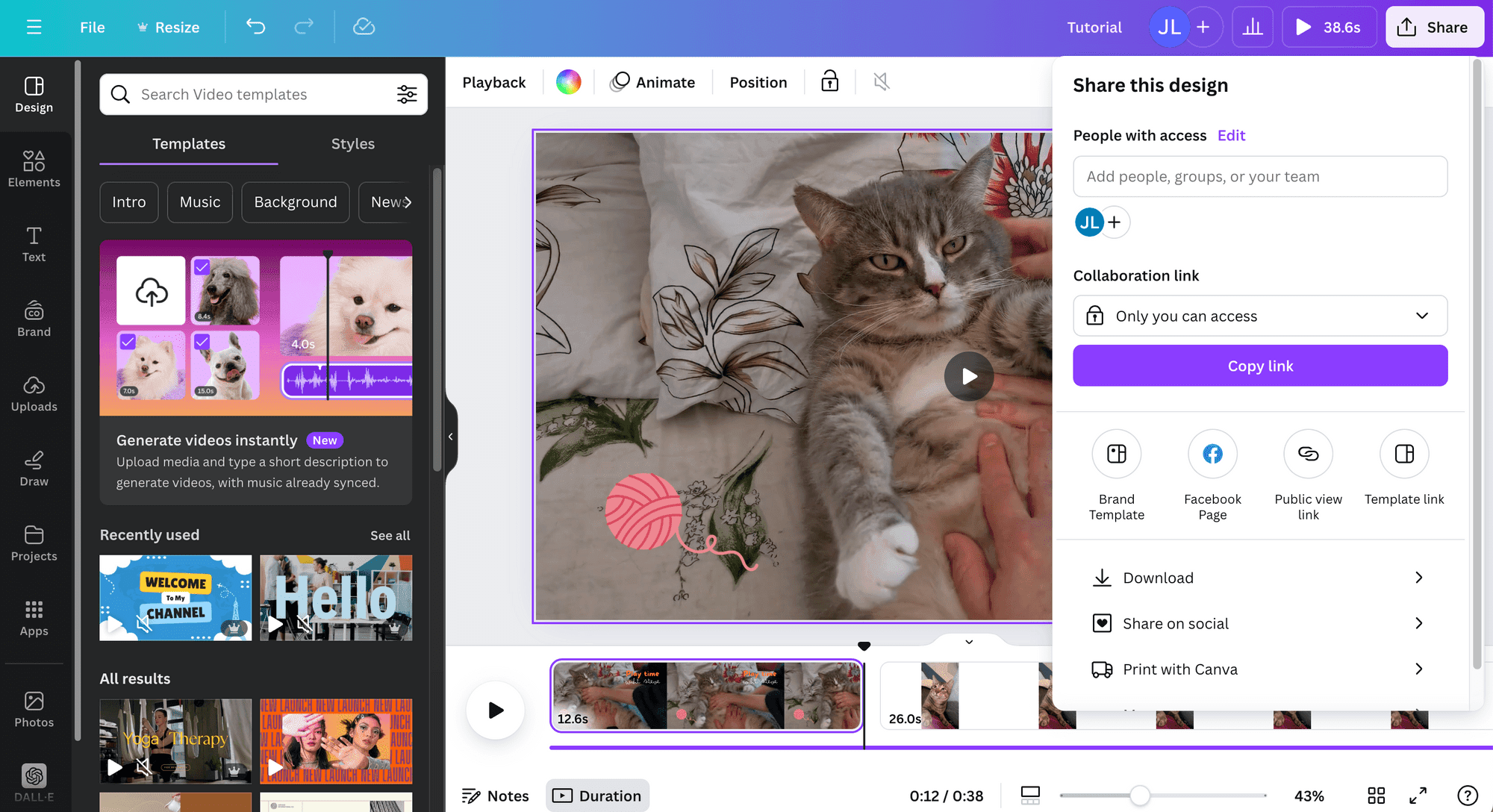
Canva's video editor is the template-first alternative to InVideo. While InVideo generates video from AI prompts, Canva gives you thousands of pre-designed templates, drag-and-drop editing, and real-time team collaboration. Canva recently added Magic Media (AI-generated clips) and Magic Write (script assistance), closing the AI gap.
With 5GB of free cloud storage and no watermarks on the free plan for standard content, Canva Video offers better free-tier value than InVideo.
Key features
- Thousands of templates - Pre-designed video templates for every use case
- Real-time collaboration - Teams edit together
- Magic Media - AI-generated clips and images
- Brand kits - Shared branding across the team
- Free with no watermark - Core features available free
What users say
G2 reviewers praise Canva for team workflows and template variety. Reddit users note it's not a replacement for AI-generated video but perfect for social media, presentations, and marketing content. The timeline editing is basic compared to InVideo's AI approach, but the template quality and consistency are higher.
Best for
Teams creating template-based social media and marketing videos. Free; Pro at $13/month.
See our ngram vs Canva Video comparison.
6. Kapwing
Kapwing is the browser-based editor built for teams. Like VEED, it focuses on editing existing content rather than AI generation. Kapwing's standout features are real-time collaboration (multiple editors on the same project), smart background removal, and auto-resize for social platforms. The brand kit feature keeps output consistent across team members.
Kapwing recently added AI-powered features including smart cut, auto-subtitles, and text-to-video.
Key features
- Real-time collaboration - Multiple editors simultaneously
- Smart background removal - AI-powered green screen alternative
- Auto-resize - One video, all social formats
- Brand kits - Team-wide consistency
- Auto-subtitles - AI transcription and captions
What users say
Reddit users praise Kapwing's collaboration features and export quality. The free plan is limited to 720p with a watermark, and the Pro plan at $16/month is competitive. For teams that edit together and need consistent branding, Kapwing offers something InVideo doesn't: real multi-user editing.
Best for
Teams that need collaborative browser-based editing with consistent branding. Free; Pro at $16/month.
7. Descript
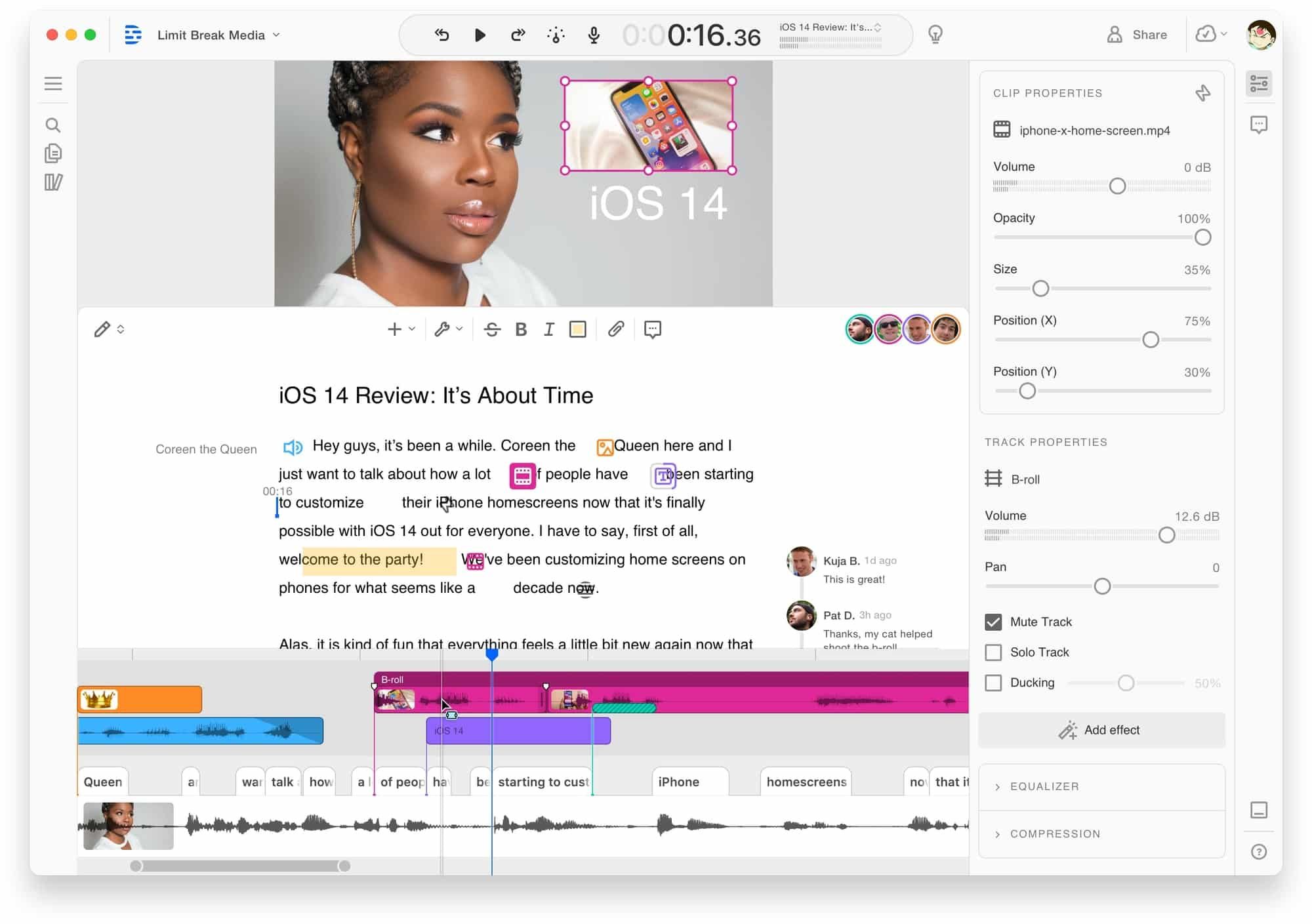
Descript is the transcript-first editor: edit the text, and the video follows. Delete a word from the transcript, and the video cuts accordingly. For InVideo users frustrated by AI-generated scripts that need constant rewriting, Descript flips the model - you write or edit the script directly, and the video adjusts.
Descript includes AI filler word removal, studio sound enhancement, eye contact correction, and voice cloning.
Key features
- Transcript-based editing - Edit video by editing text
- AI filler word removal - Automatic cleanup
- Studio Sound - AI audio enhancement
- Eye contact correction - AI gaze adjustment
- Voice cloning - Create a synthetic version of your voice
What users say
Reddit users call transcript editing "mind-blowing for long-form content." Rendering speed can be slow, and the approach works best for talk-heavy content rather than visual storytelling. For creators producing tutorials, presentations, or podcasts, Descript's text-first approach is more reliable than InVideo's prompt-based generation.
Best for
Creators producing talk-heavy content (tutorials, podcasts, presentations). Free tier; Hobbyist at $24/month.
See our ngram vs Descript comparison.
Here's how the AI text-to-video market is growing:
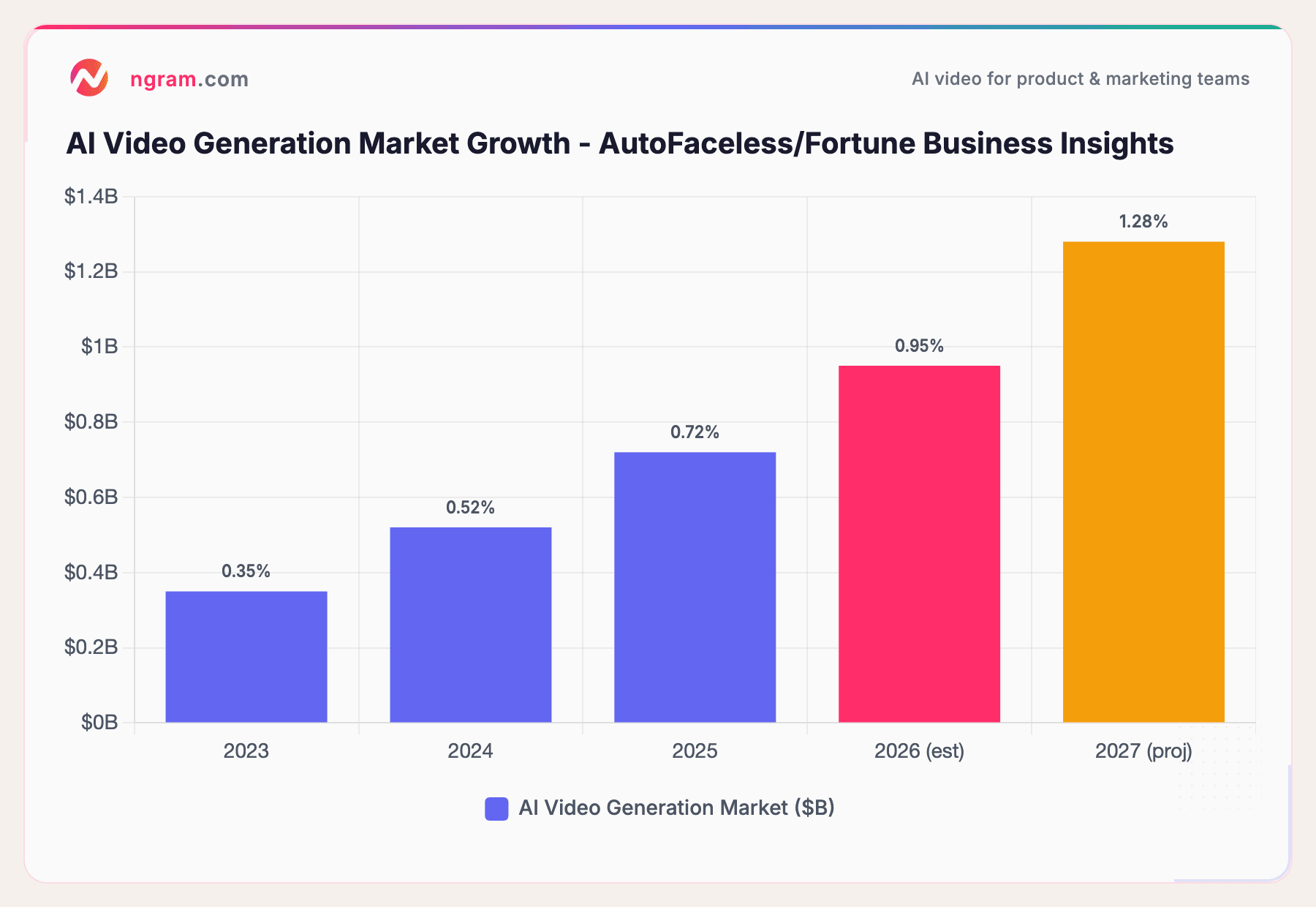
The AI video generation market grew from $350M in 2023 to an estimated $950M in 2026, per AutoFaceless and Fortune Business Insights. That growth is accelerating competition, which means better alternatives for teams evaluating InVideo today.
Our testing approach
We tested each tool, read hundreds of user reviews across G2 (700+ InVideo reviews), Capterra, Reddit, and Product Hunt, and compared them across five weighted criteria:
| Criteria | Weight | What we looked at |
|---|---|---|
| AI Capabilities | 30% | Generation quality, prompt consistency, voice synthesis, creative control |
| Features | 30% | Editing tools, export options, templates, integrations |
| Ease of Use | 20% | Learning curve, onboarding, prompt-to-output workflow |
| Value | 15% | Credit transparency, free tier quality, watermark policy, cost per video |
| Support & Community | 5% | Documentation, community, response time |
We also factored in:
- Real user reviews from G2, Capterra, Reddit, and Product Hunt (qualitative, not numerical scores)
- AI output consistency since InVideo users frequently cite generation variance as the #1 frustration
- Credit/minute transparency because hidden costs are a major switching trigger
Quick answers
Is there a free InVideo alternative without watermarks?
Yes. ngram's free plan includes watermark-free exports. Canva Video's free tier exports without watermarks for standard content. Clipchamp (Microsoft) offers watermark-free 1080p exports for free. VEED's free plan does include a watermark at 720p.
What's the best InVideo alternative for YouTube?
For YouTube tutorials and presentations, Descript's transcript-based editing is faster than InVideo. For YouTube Shorts and social clips, VEED and Canva Video offer quick workflows. For professional product videos and demos, ngram generates from your actual content rather than stock footage.
Is InVideo AI worth the price in 2026?
At $28/month (Plus) for 50 AI minutes with inconsistent output, InVideo's cost-per-usable-video is higher than it appears. If you need 5-10 attempts per video, your effective cost is $5-10 per video. Pictory and ngram offer more predictable output per dollar because you control the input material.
How does InVideo compare to Pictory?
InVideo generates video from AI prompts with stock footage. Pictory converts existing written content (blogs, scripts, URLs) into video. Pictory gives more predictable results because the source material is yours. InVideo offers more creative freedom but with less consistent output quality.
Can I replace InVideo with Canva Video?
For template-based social media content, yes. Canva Video's template library is larger than InVideo's, collaboration is built-in, and the free tier is more generous. For AI-generated video from text prompts, Canva is not a direct replacement, though Magic Media adds some AI generation capability.
What is the best InVideo alternative for business?
For business teams producing professional video from existing assets, ngram is the strongest fit - it adapts output to your audience, goal, and channel. For enterprise training, Synthesia's avatar approach avoids the stock footage issues. For collaborative marketing teams, Canva Video and Kapwing offer team editing InVideo lacks.
The honest answer
InVideo AI is a genuine innovator - it brought Sora 2 and VEO 3.1 to everyday creators before most competitors. But innovation in the AI engine doesn't fix the credit system that charges for failed generations, the inconsistent output that requires multiple attempts, or the free plan that's more trial than tool.
If you're a marketing or product team that needs reliable, professional video from your own content, ngram removes the stock footage lottery entirely. If you specifically need text-to-video and want better content repurposing, Pictory delivers more predictable results. And if you just need to edit existing footage with AI assistance, VEED does it for $12/month.
The one creator who should stay on InVideo: if you produce high volumes of social media clips, the Sora 2 integration genuinely impresses, and you've learned to prompt effectively, the generative output has improved enough to justify the subscription.
Try ngram free - your first video in under 5 minutes. Skip the stock footage lottery. Turn docs, recordings, or images into polished, on-brand videos. Start free