

Quick comparison
| Tool | Best For | Starting Price | Key Differentiator |
|---|---|---|---|
| ngram | Professional video from screen recordings | Free / $17.40/mo | AI-powered editing and video generation |
| Loom | Quick async video messages | Free / $15/mo | Instant share links with viewer analytics |
| ShareX | Power users who want full control | Free (open source) | 80+ capture modes and automation workflows |
| Greenshot | Lightweight screenshot capture | Free (open source) | Fast, simple, no bloat |
| ScreenPal | Budget screen recording and editing | Free / $3/mo | Lowest paid price point with solid editing |
| Zight | Team screenshot sharing | Free / $9.95/mo | AI summaries and instant cloud links |
| CleanShot X | Mac power users | $29 one-time | Scrolling capture, OCR, and annotation |
| OBS Studio | Live streaming and recording | Free (open source) | Unlimited recording with zero watermarks |
What's pushing users off Snagit
Snagit built its reputation over two decades as the gold standard for screen capture. TechSmith has sold over 65 million licenses, and for years it was the default recommendation for anyone who needed more than a basic screenshot tool.
But in February 2025, TechSmith made a move that changed the calculus: Snagit went subscription-only at $39 per year. No more one-time purchases. No more perpetual licenses. The announcement sparked significant pushback from longtime users who felt they were paying indefinitely for software they had already bought.
That pricing shift is the biggest reason people search for Snagit alternatives today. But it is not the only one.
Subscription fatigue. At $39/year, Snagit costs $195 over five years. Meanwhile, tools like CleanShot X charge $29 once, and ShareX is entirely free. For a screen capture tool, the recurring cost feels steep.
Limited video editing. Snagit captures video, but the editing tools are basic. You can trim clips and add callouts, but merging clips, adding transitions, or producing polished output requires a separate tool.
No cloud storage. Snagit does not include cloud hosting. To share screenshots via link, you need Screencast.com (another TechSmith product) or a third-party service like Dropbox.
Performance on older machines. Multiple G2 and Reddit users report that Snagit has become heavier over recent versions. Startup time and memory usage have increased, especially on Windows.
Missing AI features. While competitors have added AI-powered transcription, OCR, and smart editing, Snagit's AI capabilities remain limited compared to newer entrants.
We tested 7 Snagit alternatives across capture quality, video editing, pricing, and AI capabilities. Here is what held up.
1. ngram
If you have been using Snagit to capture screen recordings and then struggling to turn those recordings into something you would actually send to a customer or post on LinkedIn, ngram is built for exactly that gap.
Where Snagit stops at capture and basic trimming, ngram takes your raw recording and transforms it into a polished, professional video. Upload a screen recording, add context about who the video is for and what it needs to accomplish, and ngram handles the script, storyboard, visuals, pacing, captions, and brand styling automatically.
What makes ngram stand out
Context-aware generation adapts every video to its audience and channel. A product demo for enterprise buyers gets a different structure than a quick internal walkthrough. You set the audience, goal, and destination. ngram adapts automatically.
Plan first, generate second. You review the script and storyboard before anything renders. Most tools force you to commit to a final product before confirming direction. With ngram, you catch problems at the cheapest possible moment.
AI-powered editing turns rough screen recordings into polished walkthroughs. Automatic filler word removal, smart zoom on mouse interactions, cursor emphasis, and callouts driven by your prompts. No timeline editing required.
Key features
- Context-aware generation - Adapts structure, pacing, and tone to audience and channel
- Plan first, generate second - Script and storyboard review before rendering
- Any asset in - Screen recordings, docs, images, URLs as input
- AI editing - Auto-cut, filler removal, smart zoom, cursor emphasis
- Multi-format export - 16:9, 9:16, 1:1 with captions included
- Brand kits - Logo, colors, fonts applied to every video automatically
Pros
- ✅ Turns raw screen recordings into polished, share-ready videos in minutes
- ✅ No video editing skills needed, AI handles the production
- ✅ Works with any input: recordings, docs, screenshots, URLs
Cons
- ❌ Focused on video output, not static screenshot capture
- ❌ Web-based only, no native desktop capture tool
Who is ngram best for?
Product Marketing, Growth, Sales, and Customer Success teams who capture screen recordings with Snagit but need the final output to look professional. If your recordings go beyond your team to customers and prospects, ngram turns those raw captures into videos that look intentional.
ngram has a generous free plan with paid plans starting at $17.40 per month.
Ready to try ngram? Create your first polished video from a screen recording in under 5 minutes. Start free
See ngram in action:
2. Loom
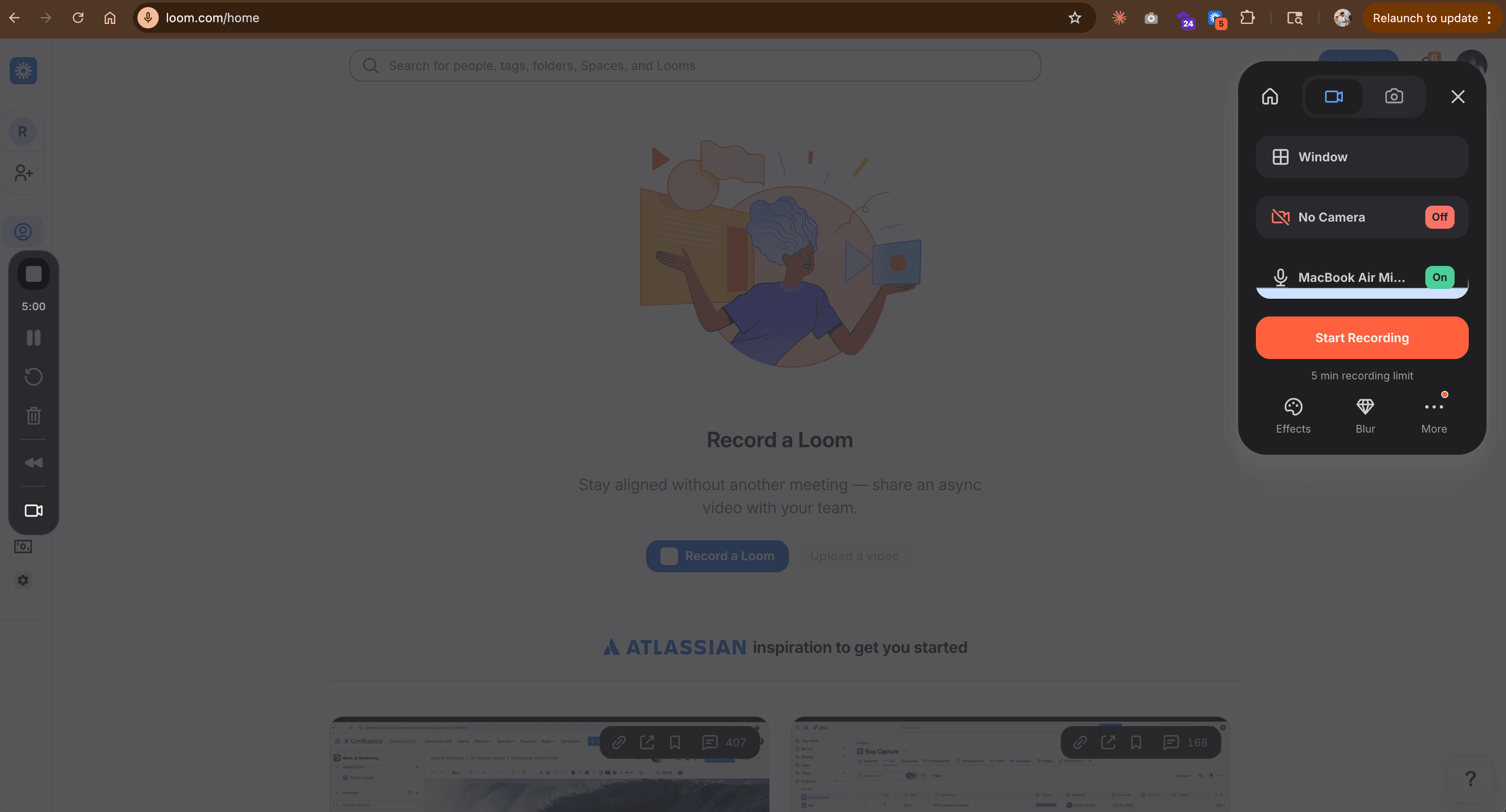
Loom is the async video communication tool that over 25 million users rely on for quick screen recordings with instant sharing. Where Snagit is rooted in screenshot capture with video as an afterthought, Loom was built video-first from day one.
After Atlassian acquired Loom in 2023, the platform has expanded with AI-powered features including auto-generated titles, summaries, chapters, and transcription. Loom's strength is the workflow: record, get an instant shareable link, and see who watched.
Key features
- Instant sharing - Every recording gets a shareable link automatically
- AI-powered summaries - Auto-generated titles, chapters, and transcriptions
- Viewer analytics - See who watched, how long, and where they dropped off
- Webcam overlay - Record screen with picture-in-picture webcam bubble
- Drawing tools - Annotate your screen while recording
Pros
- ✅ Fastest path from recording to shared link in the market
- ✅ Free plan includes 25 videos up to 5 minutes each
- ✅ AI transcription and summary features save post-production time
Cons
- ❌ Limited screenshot capabilities compared to Snagit
- ❌ Video editing is basic: trim only, no advanced cuts or transitions
What users say
Reddit users consistently praise Loom for replacing quick meetings. The most common complaint is that editing is limited to trimming. G2 reviewers note that the free tier's 5-minute video limit pushes teams to paid plans fast. Multiple users on r/SaaS describe Loom as "the tool that made async video normal."
Best for
Teams that need quick async video messages with instant sharing. If your primary Snagit use case was recording quick walkthroughs and sending them to teammates, Loom does that job faster. Pricing starts at $15/month with a generous free tier.
3. ShareX
ShareX is the power user's screen capture tool. It is completely free, open source, and packed with more capture modes than any other tool on this list: window capture, region capture, scrolling capture, webpage capture, text capture via OCR, and even screen recording with GIF output.
The project has over 30,000 GitHub stars and an active community. ShareX supports 80+ upload destinations, automated workflows, and custom hotkeys for every action.
Key features
- 80+ capture modes - Region, window, scrolling, OCR, screen color picker
- Automated workflows - Capture, annotate, upload, and copy link in one hotkey
- GIF recording - Record screen regions as GIF files
- Built-in editor - Annotate, blur, highlight, and add text
- 80+ upload destinations - Imgur, Google Drive, Dropbox, FTP, and more
What users say
ShareX users on Reddit describe it as "the Swiss Army knife of screen capture." The learning curve is steep, with many users admitting they only use 20% of the features. G2 reviewers note the interface looks dated compared to modern tools but praise the functionality depth. The biggest limitation is Windows-only support.
Best for
Developers and power users on Windows who want maximum control over their capture workflow. If you outgrew Snagit's capabilities (not its simplicity), ShareX gives you more features at zero cost.
Want to turn those screen captures into professional videos? ngram transforms raw recordings into polished, on-brand videos without touching a timeline. Try ngram free
4. Greenshot
Greenshot is the lightweight antidote to Snagit's growing complexity. This free, open-source screenshot tool does one thing well: capture your screen quickly and let you annotate it without overhead.
With minimal memory footprint and near-instant startup, Greenshot appeals to users who found Snagit increasingly sluggish on their machines. The tool captures regions, windows, and full screens, then opens an inline editor for arrows, text, highlights, and redaction.
Key features
- Fast capture - Region, window, or full screen with customizable hotkeys
- Built-in editor - Arrows, text, highlights, blur, and crop
- Export flexibility - Save to file, clipboard, printer, or email directly
- Minimal footprint - Under 20MB installed, negligible memory usage
- Plugin system - Extend with Jira, Confluence, and Imgur integrations
What users say
Users who switch from Snagit to Greenshot consistently cite speed and simplicity. Reddit threads in r/software praise the "zero bloat" approach. The main criticism is that Greenshot lacks video recording entirely and the macOS version lags behind the Windows release. One r/sysadmin user noted: "Greenshot does 90% of what Snagit does at 0% of the cost."
Best for
Users who only need screenshot capture with basic annotation. If you never used Snagit's video features and just want a fast, free screenshot tool, Greenshot is the cleanest option.
5. ScreenPal
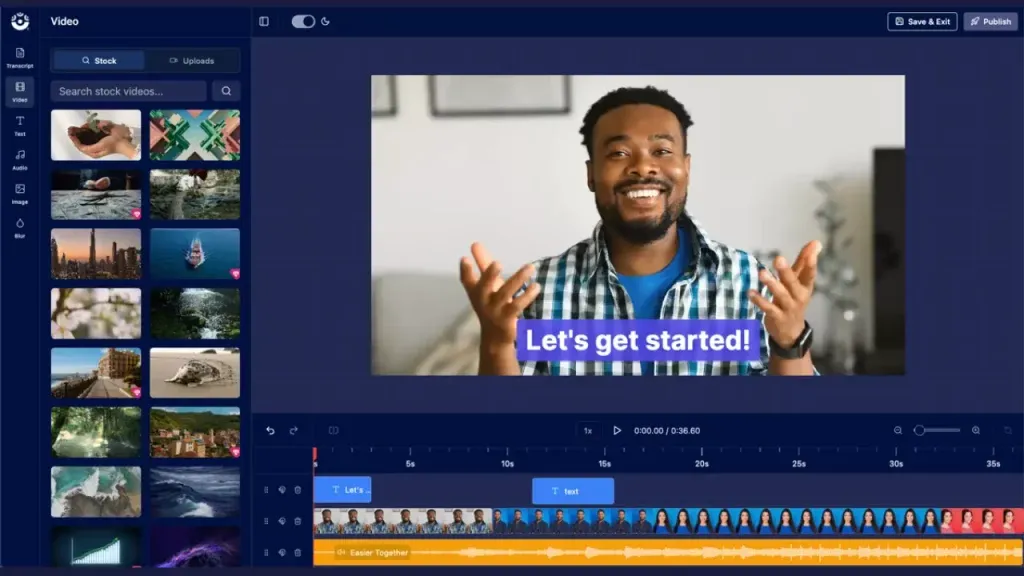
ScreenPal (formerly Screencast-O-Matic) offers screen recording and video editing at the lowest paid price point on this list: $3 per month. For teams that need more than Snagit's basic video trimming but do not want to pay $39/year for capture alone, ScreenPal fills the gap.
The platform serves over 18 million users worldwide and is particularly popular in education and training environments. ScreenPal includes a built-in video editor with transitions, overlays, and captions.
Key features
- Screen and webcam recording - Simultaneous capture with picture-in-picture
- Built-in video editor - Trim, cut, transitions, overlays, captions, and music
- Screenshot capture - Region and full-screen with annotation tools
- Cloud hosting - Share recordings via link with viewer tracking
- Team management - Shared content libraries and brand controls
What users say
Educators praise ScreenPal for its simplicity and price point. G2 reviewers highlight the video editor as surprisingly capable for the price. The main complaints are the watermark on free recordings and occasional performance issues during long captures. Reddit users in r/Teachers frequently recommend ScreenPal as "the Snagit alternative that actually edits video."
Best for
Individuals and small teams who need screen recording with real video editing capabilities at the lowest possible cost. If Snagit's $39/year felt too much for basic capture, ScreenPal's $3/month gives you more features for less.
6. Zight
Zight (formerly CloudApp) combines screenshot capture, screen recording, and GIF creation with instant cloud sharing. For teams that need to capture and share quickly without managing local files, Zight provides the fastest path from capture to shareable link.
The platform added AI-powered features in 2025, including automatic summaries of recordings and smart titles. Zight integrates with Slack, Jira, Zendesk, and 50+ other tools.
Key features
- Instant cloud sharing - Every capture gets a shareable link automatically
- GIF recording - Capture screen regions as animated GIFs
- AI summaries - Auto-generated descriptions and titles for recordings
- Annotation tools - Arrows, text, blur, and shapes on screenshots
- 50+ integrations - Slack, Jira, Zendesk, GitHub, and more
What users say
Teams that switched from Snagit to Zight cite the cloud-first workflow as the biggest improvement. G2 reviewers praise the instant sharing but note that the free plan limits captures to 5 per day. Reddit users appreciate the GIF creation feature for bug reports and quick demos. The main criticism is that the annotation editor is less powerful than Snagit's.
Best for
Teams that share screenshots and recordings frequently via Slack or project management tools. If your Snagit workflow was capture, save, attach to ticket/message, Zight removes the save and attach steps.
7. CleanShot X
CleanShot X is the premium Mac screenshot tool that many former Snagit users consider the best macOS alternative. A one-time purchase of $29 gets you scrolling capture, OCR, annotation, screen recording, and cloud storage with 1GB free.
The tool earned an Apple Design Award nomination and is used by developers, designers, and content creators who work primarily on macOS. CleanShot X captures what is on your screen and gives you tools to annotate, redact, and share without leaving the capture flow.
Key features
- Scrolling capture - Capture entire web pages and long documents
- OCR text recognition - Extract text from any screenshot
- Screen recording - Record screen with audio and webcam overlay
- Annotation tools - Arrows, text, shapes, blur, numbering, and highlighting
- Cloud storage - 1GB free cloud hosting for instant share links
What users say
Mac users on Reddit frequently describe CleanShot X as "Snagit done right for Mac." The one-time pricing is a major selling point against Snagit's subscription. G2 reviewers praise the design and workflow speed. The main limitation is macOS-only availability. Users note the scrolling capture works more reliably than Snagit's implementation on Mac.
Best for
Mac users who want a premium screenshot and recording tool without a subscription. If you used Snagit on Mac and were frustrated by the Windows-first design, CleanShot X is built natively for macOS.
8. OBS Studio
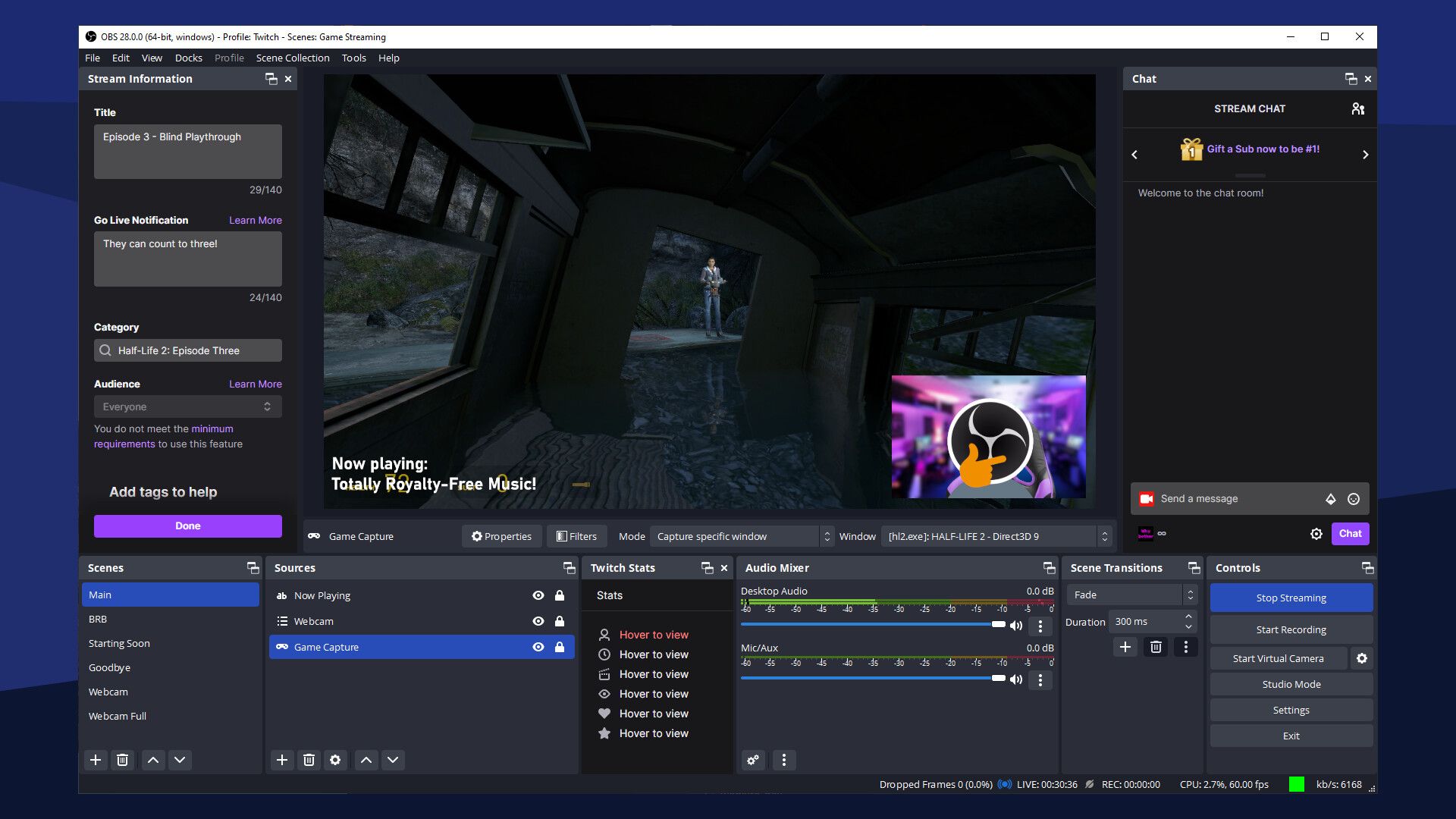
OBS Studio is the free, open-source screen recording and live streaming powerhouse used by over 5 million active users monthly. While Snagit caps recording quality and format options, OBS records in any resolution with zero watermarks and zero time limits.
OBS is maintained by a community of contributors and funded by sponsors including Logitech and Twitch. The tool supports scenes, sources, audio mixing, and real-time video composition.
Key features
- Unlimited recording - No time limits, no watermarks, no quality caps
- Scene composition - Multiple sources, overlays, and layouts
- Audio mixing - Per-source volume, filters, and noise suppression
- Cross-platform - Windows, macOS, and Linux
- Plugin ecosystem - Hundreds of community plugins for extended functionality
What users say
OBS has a dedicated following on Reddit, with r/obs having over 150,000 members. Users praise the zero-cost, unlimited recording but acknowledge the learning curve is steeper than any other tool on this list. G2 reviewers note that OBS is overkill for quick screen captures but unbeatable for extended recording sessions and live streaming.
Best for
Users who need unlimited, high-quality screen recording without paying anything. If your Snagit use case was long recording sessions for training or documentation, OBS removes every limitation Snagit imposed. Not ideal for quick screenshots.
Here is how the cost of Snagit compares to its alternatives over five years:
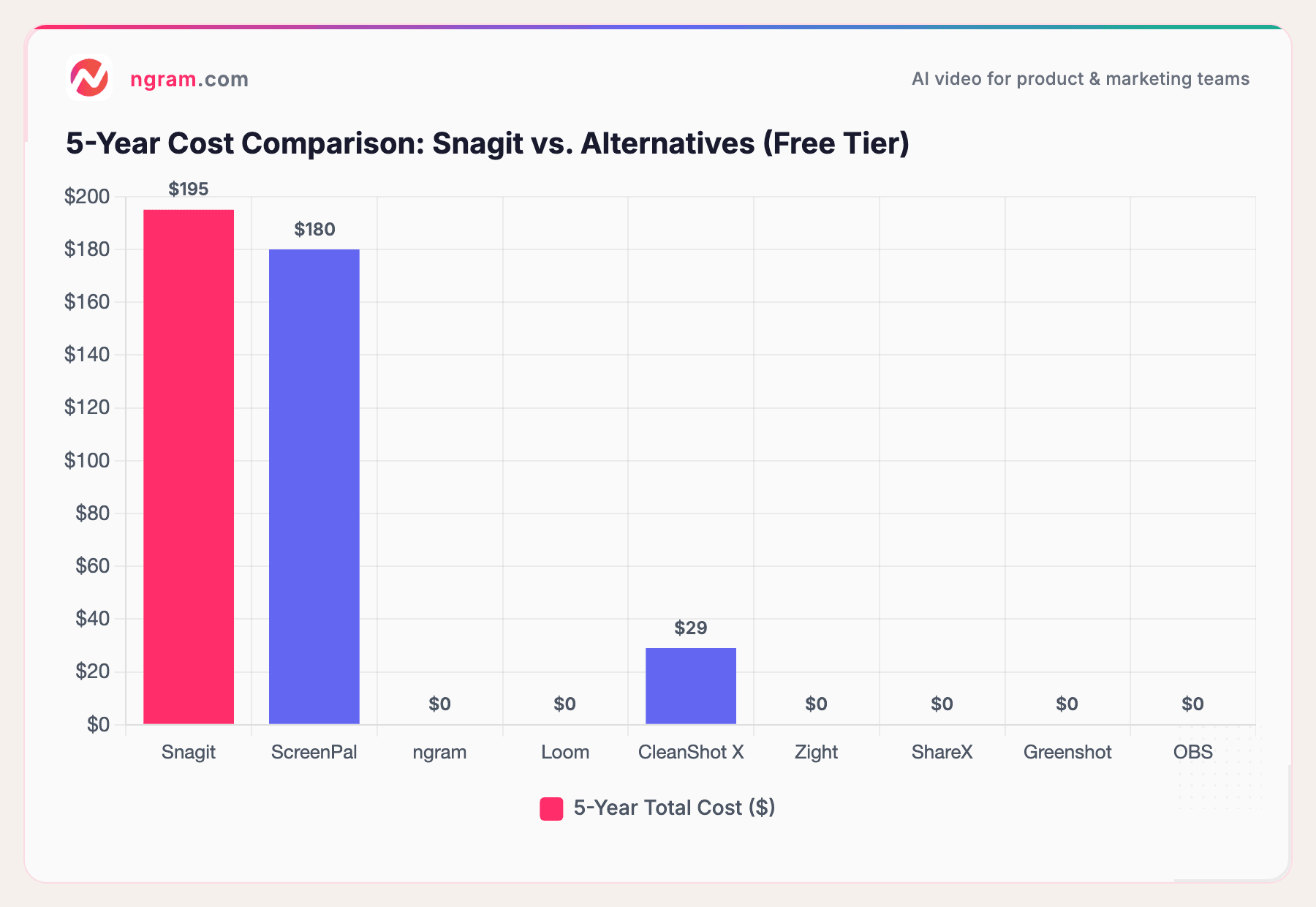
At $39/year, Snagit costs $195 over five years. ScreenPal's paid plan costs $180 over the same period (at $3/month). CleanShot X is a one-time $29. ngram, Loom, ShareX, Greenshot, Zight, and OBS all offer functional free tiers. The subscription model that worked when Snagit was the only serious option now faces competition from tools that charge nothing for the same core capabilities.
How we compared these tools
We tested each tool, read hundreds of user reviews, and compared them across five weighted criteria:
| Criteria | Weight | What we looked at |
|---|---|---|
| Ease of Use | 30% | Learning curve, onboarding speed, UI quality |
| Features | 25% | Capture modes, annotation tools, export options |
| AI Capabilities | 15% | AI editing, transcription, smart features |
| Value | 20% | Pricing relative to features, free tier generosity |
| Recording Quality | 10% | Video resolution, frame rate, audio quality |
We also factored in:
- Real user reviews from G2, Capterra, Reddit, and Product Hunt (qualitative sentiment, not numerical scores)
- Market presence and longevity (TechSmith has 30+ years; ShareX has 30K+ GitHub stars)
- Platform support (Windows, macOS, Linux, web)
- Integration ecosystem with team tools (Slack, Jira, Notion)
The "Recording Quality" criterion matters more for Snagit alternatives than for most categories. Snagit built its reputation on reliable, high-fidelity capture, so any replacement needs to match that baseline.
Common questions
Is there a free version of Snagit?
No. Snagit offers a 15-day free trial, but there is no permanent free tier. After the trial, you pay $39/year. ShareX, Greenshot, and OBS Studio are completely free alternatives. ngram and Loom offer generous free tiers.
What is the best free Snagit alternative?
For screenshots, ShareX (Windows) or Greenshot give you the most functionality at zero cost. For Mac users, CleanShot X at $29 one-time is the closest match. For screen recording, OBS Studio is unmatched. For turning recordings into polished videos, ngram's free tier handles the job.
Can I still buy Snagit with a one-time license?
No. As of February 2025, TechSmith discontinued perpetual licenses for Snagit. The only option is the $39/year subscription. Users who purchased perpetual licenses before the change can continue using their version but will not receive updates.
Is Snagit worth $39 per year?
It depends on your workflow. If you use Snagit's full feature set daily, including scrolling capture, video recording, annotation, and the image editor, the subscription may justify itself. But if you primarily use Snagit for basic screenshots and occasional recordings, free alternatives like ShareX and Greenshot cover those needs without recurring costs.
How does Snagit compare to Loom?
Snagit is primarily a screenshot tool with video recording added. Loom is a video-first tool with instant sharing built in. Snagit gives you better screenshot annotation and a local image editor. Loom gives you viewer analytics, AI summaries, and instant shareable links. For async video communication, Loom wins. For detailed screenshot documentation, Snagit wins.
Can I use a screen recording tool to create professional product videos?
Yes. ngram takes raw screen recordings and transforms them into polished, on-brand product videos with AI-powered editing. Upload a Snagit recording, and ngram adds professional pacing, captions, zoom effects, and brand styling automatically. Learn more about ngram's screen recording editor.
Which one should you pick?
The screen capture market in 2026 offers more capable free tools than ever, and Snagit's subscription switch has made the decision easier for most teams. If you need raw screen recordings turned into professional videos, ngram fills that gap better than any other tool on this list. If you want a direct Snagit replacement for screenshots on Windows, ShareX gives you more features for free. And if your honest assessment is that you use Snagit for everything it offers and $39/year is reasonable for your workflow, it remains a solid tool.
The difference now is that you have real choices.
Try ngram free - turn screen recordings into polished videos. No editing skills needed. No subscription required for the free tier. Start free


