

Kapwing built its reputation as the browser-based video editor that "just works." Over 60,500 people search for it every month, and for quick social media edits, it earned that trust.
But the gap between Kapwing's marketing and its daily reality has grown. Across Trustpilot, G2, and Reddit, the complaints follow a pattern: exports that crash on complex projects, a free tier that locks down after you've started working, per-user pricing that makes team plans expensive fast, and billing disputes where users report unauthorized charges with a rigid no-refund policy.
The online video editing market reached $4.2 billion in 2025, and tools built for speed, collaboration, and AI-powered workflows have multiplied. We tested 7 Kapwing alternatives across features, ease of use, AI capabilities, and pricing. Here's what held up.
What's pushing users off Kapwing
Kapwing still works for simple one-off edits. But the friction shows up once you need it for serious production.
Per-user pricing scales badly. Kapwing's Business plan costs $50 per user per month. A five-person marketing team pays $250/month for a browser-based editor. That's more than Adobe Creative Cloud for the entire team. The Pro plan at $24/month is per-seat too, making it expensive for any team beyond one person.
Exports break on complex projects. Users on G2 and Trustpilot report that as projects get more complex, exports fail or videos need to be broken into chunks. One reviewer described "some sort of glitch occurring every time" they used the platform for anything beyond basic trimming.
The free tier is misleadingly limited. Kapwing advertises a free subtitle generator but caps it at 1 minute. Watermarks appear on free exports. Storage is limited. Users discover the real limitations only after investing time building a project.
Billing practices frustrate users. Multiple Trustpilot reviewers report unauthorized charges across accounts and describe a support process that takes weeks and produces copy-paste responses. One user reported being charged $191 across two accounts that stayed on the free plan.
No built-in scheduling or publishing. Teams creating social content need to export from Kapwing, then upload to a separate scheduling tool. Competitors like VEED and Canva bundle publishing workflows directly.
Quick comparison
| Tool | Best For | Starting Price | Key Differentiator |
|---|---|---|---|
| ngram | Professional video from any asset | Free / $17.40/mo | AI-powered context-aware generation |
| CapCut | Free video editing | Free | Full editing suite with zero cost |
| VEED | Team collaboration | Free / $12/mo | Cloud-based team editing and sharing |
| Canva Video | Design-first video creation | Free / $13/mo | Integrated design + video in one tool |
| InVideo AI | AI-powered video creation | Free / $25/mo | Text-to-video with 16M+ stock assets |
| Clipchamp | Windows-native editing | Free / $13.99/mo | Microsoft 365 integration |
| Descript | Transcript-based editing | Free / $24/mo | Edit video by editing text |
1. ngram
If you're using Kapwing because you need quick, professional-looking videos from your existing content, ngram takes that concept and pushes it significantly further. Where Kapwing gives you a timeline editor in a browser, ngram gives you a complete video production system powered by AI.
The difference becomes clear when you look at the starting point. With Kapwing, you upload a video and manually edit it. With ngram, you bring whatever you have, a screen recording, a document, some screenshots, a URL, and tell it who the video is for and what it should accomplish. ngram handles the script, storyboard, visuals, pacing, captions, and brand styling.
What makes ngram stand out
Context-aware generation adapts the output to your audience, goal, and channel automatically. A LinkedIn announcement gets different pacing and structure than an internal team update. Kapwing treats every project the same way because it's fundamentally a manual editor.
Plan first, generate second shows you the script and storyboard before anything renders. You fix direction early instead of re-editing a finished video. This is the cheapest place to iterate, and it's a workflow Kapwing doesn't offer.
Brand kits keep every video consistent. Logo, colors, fonts, intro/outro are applied automatically. Kapwing has basic brand features, but ngram's are baked into the generation process rather than bolted on.
Key features
- Context-aware generation - Adapts structure, pacing, and tone to your audience and channel
- Script and storyboard first - Review the plan before rendering
- Any asset in - Text, images, docs, URLs, screen recordings as input
- AI-powered editing - Auto-cut, filler removal, smart zoom, cursor emphasis
- Multi-format export - 16:9, 9:16, 1:1 with captions included
- Brand kits - Logo, colors, fonts applied to every video automatically
Pros
- ✅ Turns raw content into finished videos without manual editing
- ✅ Flat pricing, not per-user like Kapwing's team plans
- ✅ Brand consistency across every video without setup per project
Cons
- ❌ Web-based only, no native desktop app
- ❌ Not designed as a general-purpose timeline editor
Who is ngram best for?
Product Marketing, Growth, Sales, Customer Success, and Agency teams who need professional videos without becoming video editors. If you're using Kapwing to make customer-facing content from screen recordings and docs, ngram does that job with less manual work.
ngram offers a generous free plan with paid plans starting at $17.40 per month, with no per-user pricing.
Ready to try ngram? Create your first video in under 5 minutes. Start free
See ngram in action:
For a detailed head-to-head, see our ngram vs Kapwing comparison.
2. CapCut
CapCut is the answer to "what if a professional video editor was completely free?" ByteDance's editing suite offers desktop, web, and mobile apps with no watermarks, no export limits, and no paid tier requirement for core features.
With over 490 million users globally, CapCut has the largest user base of any tool on this list. For social media creators who found Kapwing's free tier too restrictive, CapCut removes those barriers entirely. For a detailed comparison, see our ngram vs CapCut comparison.
Key features
- Completely free desktop app - Full editing suite, no watermarks, no export limits
- AI auto-captions - Fast, accurate transcription (Kapwing's biggest draw, but free and unrestricted here)
- Text-to-video - Generate short clips from text prompts
- Background removal - One-click green screen alternative
- Template library - Thousands of templates for TikTok, Reels, Shorts
What users say
Reddit communities consistently call CapCut the best free video editor available. The auto-caption feature works as well as Kapwing's but without the 1-minute cap. Critics note ByteDance's data practices raise privacy concerns, and the tool is heavily optimized for short-form social content rather than business or enterprise workflows.
Pros
- ✅ Completely free with no watermarks (Kapwing's free tier adds watermarks)
- ✅ Auto-captions with no time limit (vs Kapwing's 1-minute free cap)
- ✅ Available on desktop, web, and mobile
Cons
- ❌ ByteDance ownership raises data privacy concerns for enterprise teams
- ❌ Heavily optimized for social media, less suited for business video
Best for
Social media creators and content teams who need free, full-featured editing without Kapwing's restrictions. Not ideal for enterprise teams with compliance requirements.
3. VEED
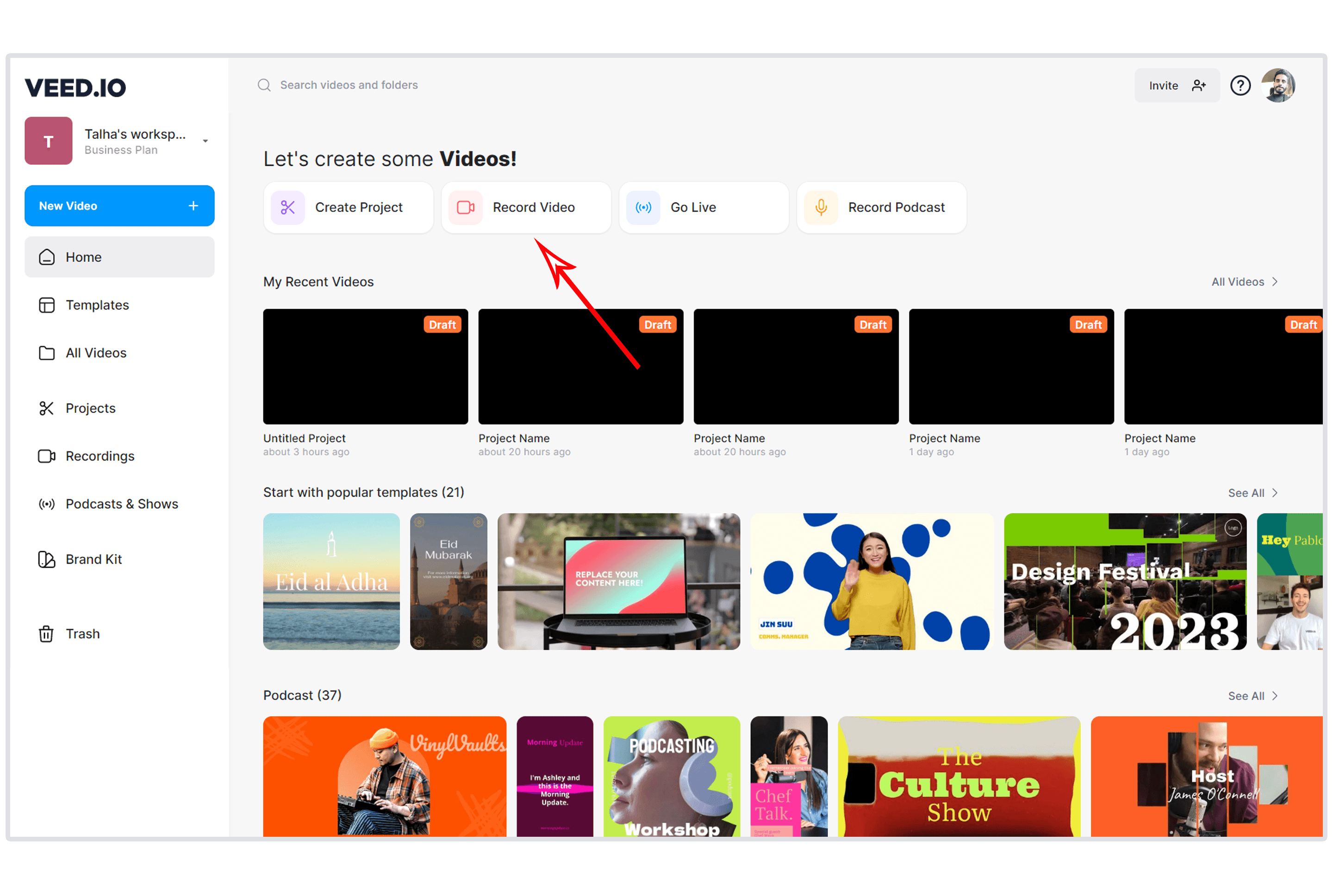
VEED is the closest direct competitor to Kapwing. Both are browser-based video editors with similar feature sets. But VEED's team collaboration and sharing features are noticeably stronger, and the pricing structure is more predictable.
VEED lets multiple editors work on the same project and share videos via URL with timestamped feedback comments. This workflow is what Kapwing's team plan promises but doesn't deliver as smoothly. For a detailed comparison, see our ngram vs VEED comparison.
Key features
- Cloud-based team editing - Real-time collaboration on projects
- AI subtitles - Accurate auto-captioning with style customization
- Video hosting - Share via URL with analytics
- Brand kits - Consistent branding across team projects
- AI-powered tools - Background removal, eye contact correction, noise removal
What users say
G2 reviewers praise VEED's collaboration features and the ability to share videos with clients via link. The learning curve is similar to Kapwing but the team features work more reliably. Common complaints include occasional slow rendering and limited offline capabilities.
Pros
- ✅ Stronger team collaboration than Kapwing (real-time editing, URL sharing)
- ✅ Video hosting with analytics built in
- ✅ More reliable export process for complex projects
Cons
- ❌ Free tier limits exports to 10 minutes and adds a small watermark
- ❌ Some AI features only available on higher-tier plans
Best for
Small teams and agencies who need collaborative browser-based editing with reliable sharing and client feedback workflows. Pricing starts at $12/month.
Need professional videos from your existing content? ngram turns screen recordings, docs, and images into polished, on-brand videos in minutes. Try ngram free
4. Canva Video
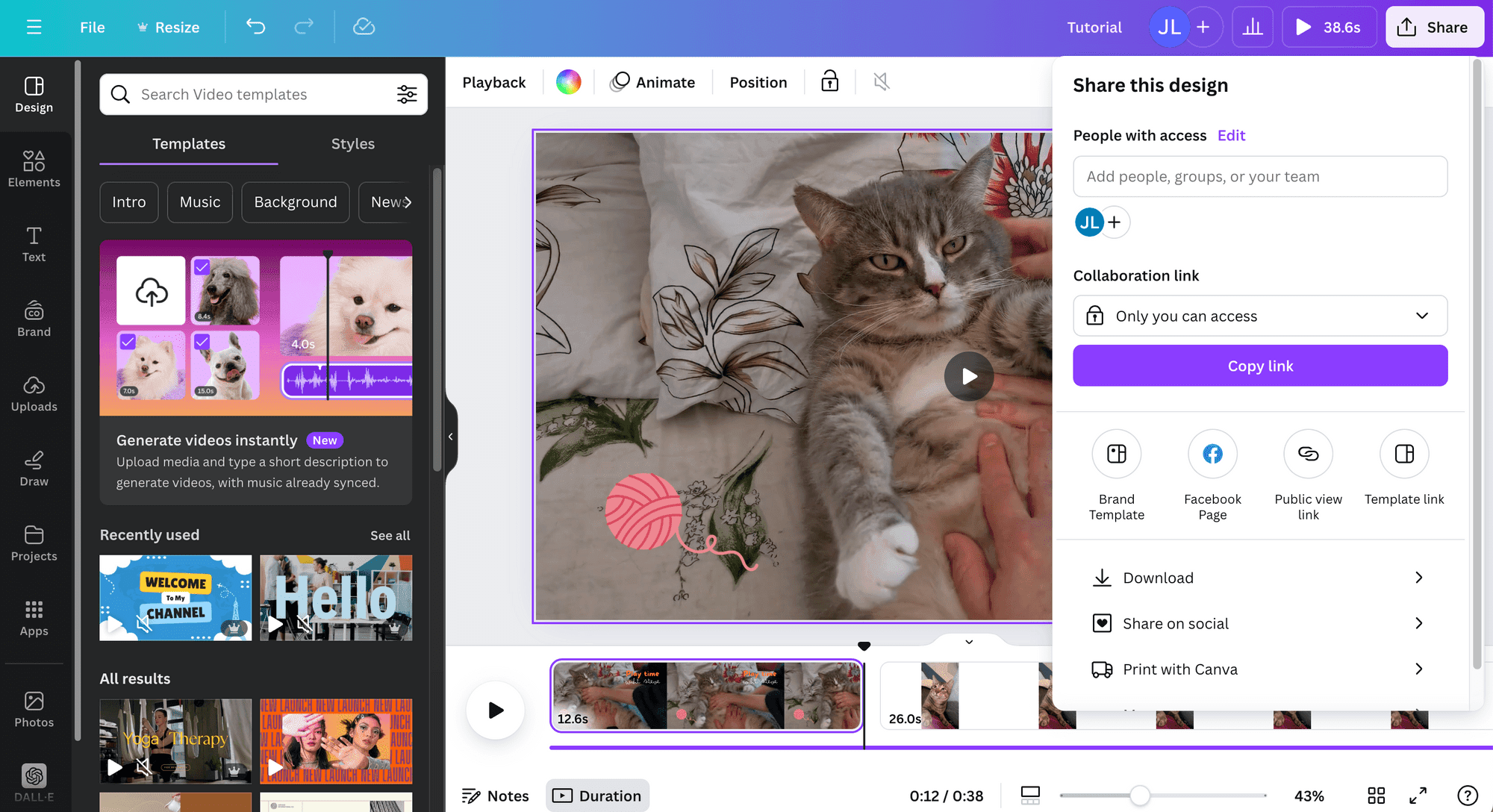
Canva's video editor lives inside the same platform 150+ million people already use for design. If your team creates graphics, presentations, and social posts in Canva, adding video to that workflow eliminates the need for a separate tool like Kapwing entirely.
Canva's advantage is ecosystem integration. You can pull from your existing design assets, brand kit, and templates without leaving the platform. The video editor isn't as deep as dedicated tools, but for marketing teams already in Canva, the convenience factor is significant.
Key features
- Integrated design + video - Access Canva's full asset library inside the video editor
- Templates - Thousands of video templates organized by platform and use case
- Brand Kit - Fonts, colors, logos shared across all Canva content types
- Collaboration - Real-time team editing with comments and sharing
- Social scheduling - Publish directly to social platforms from Canva
What users say
Users praise the seamless integration between Canva's design tools and video editor. The biggest limitation cited is the timeline editor's simplicity compared to dedicated video tools. For basic social videos, it's more than enough. For complex multi-track editing, it falls short.
Canva Pro starts at $13/month for one user with team plans at $10/user/month (5-user minimum). The free tier includes basic video editing.
Best for
Marketing teams already using Canva who want to add video without adopting another tool. The social scheduling feature eliminates a workflow step Kapwing can't match.
5. InVideo AI
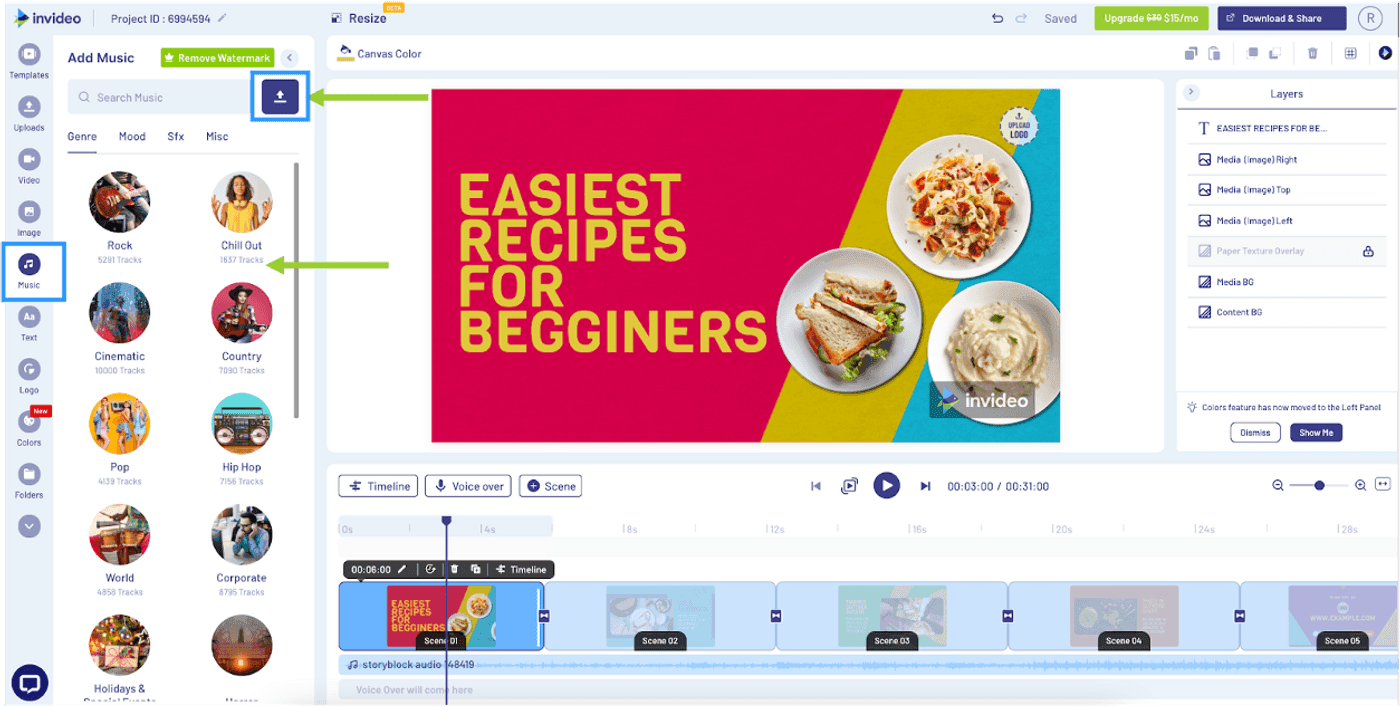
InVideo AI takes the simplest approach to video creation: describe what you want in plain language, and it generates a complete video with stock footage, voiceover, captions, and music. No timeline editing required.
InVideo has been in the video space since 2019, with access to 16 million+ stock assets from iStock and Storyblocks. For teams using Kapwing primarily to assemble quick videos from stock footage and text, InVideo AI automates that entire workflow. For a detailed comparison, see our ngram vs InVideo comparison.
Key features
- Prompt-to-video - Describe your video, get a finished product in minutes
- 16M+ stock library - iStock and Storyblocks assets included in paid plans
- AI voiceover - Automatic narration in multiple voices and 50+ languages
- Post-generation editing - Swap clips, change text, adjust pacing after AI creates the first cut
- Multi-language support - Generate videos in 50+ languages
What users say
Users praise the speed of going from idea to finished video. The quality ceiling is lower than manual editing in Kapwing, but for teams that value speed over precise control, InVideo AI is faster. The free tier includes watermarks, and the $25/month plan unlocks the full stock library.
Best for
Marketers and content teams who need quick explainers, social videos, and promotional content without touching a timeline editor.
6. Clipchamp
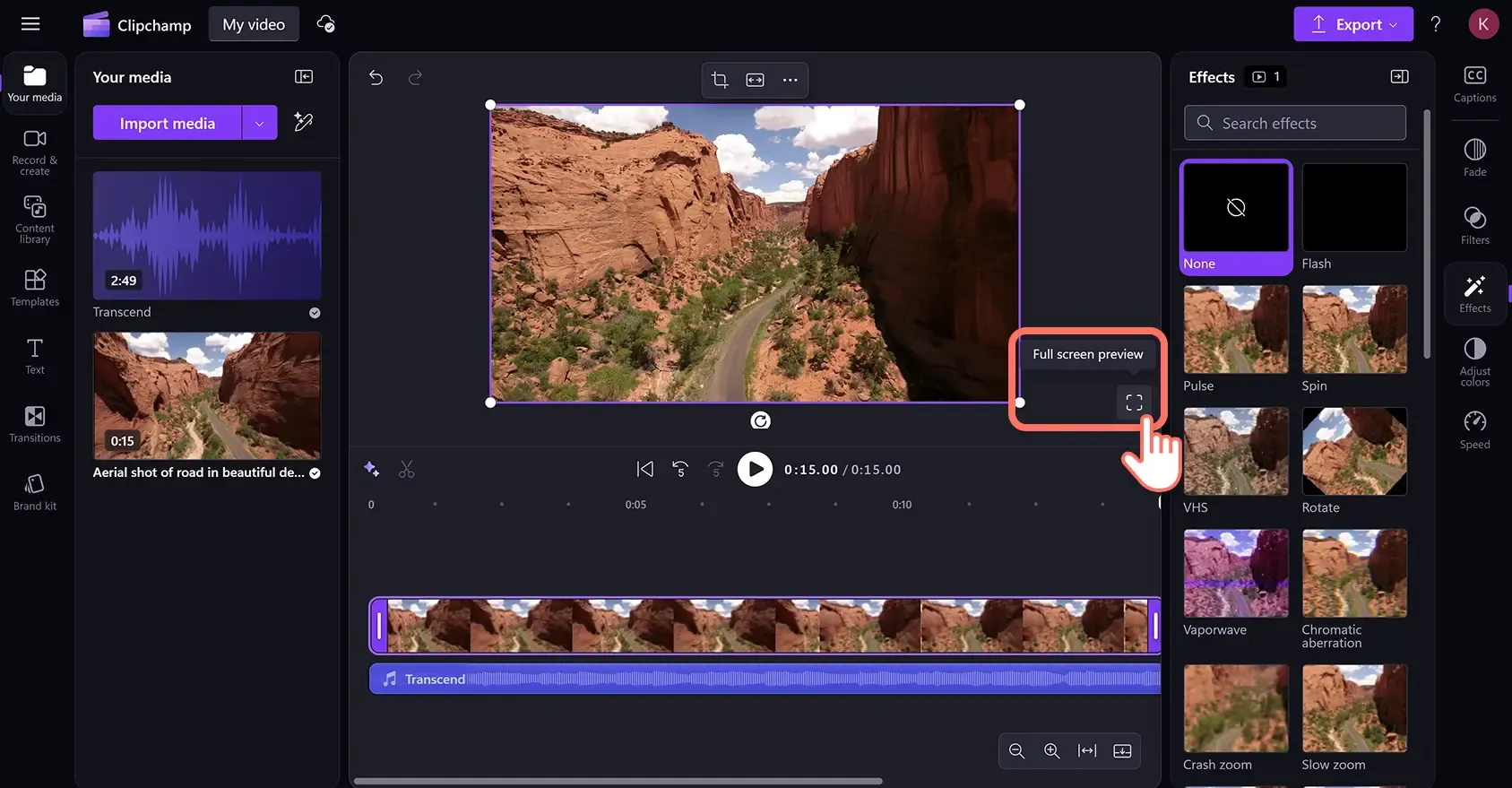
Clipchamp is Microsoft's answer to browser-based video editing, and it ships free with Windows 11 and Microsoft 365. For teams already in the Microsoft ecosystem, Clipchamp integrates directly with OneDrive, Teams, and SharePoint.
The editor itself is clean and beginner-friendly, with a similar learning curve to Kapwing. The key advantage: if your organization pays for Microsoft 365, Clipchamp is already included at no additional cost.
Key features
- Included with Microsoft 365 - No additional subscription needed for existing Microsoft customers
- OneDrive integration - Direct access to cloud-stored assets
- Auto-captions - Built-in subtitle generation
- Stock library - Microsoft's content library included
- Teams integration - Share and collaborate within Microsoft Teams
What users say
Windows users appreciate the convenience of having Clipchamp pre-installed. The editing capabilities are adequate for basic to intermediate projects. Power users note it lacks the advanced features of Kapwing or VEED, particularly around AI-powered editing and effects. The Essentials plan at $13.99/month unlocks premium features.
Best for
Teams already using Microsoft 365 who want a video editor without an additional subscription. Particularly strong for internal communications and training videos distributed via Teams.
7. Descript
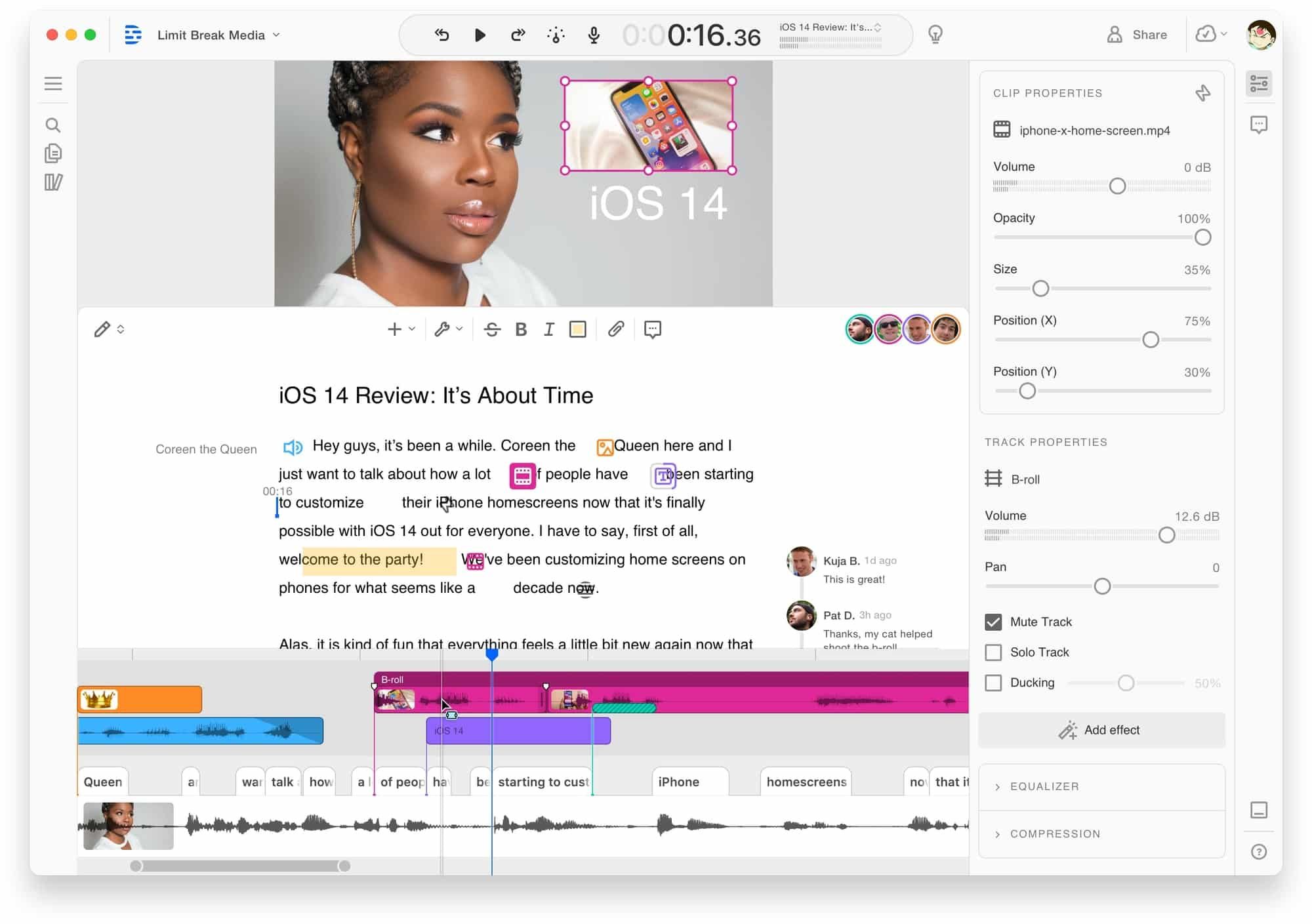
Descript approaches video editing from a fundamentally different angle: edit video by editing its transcript. Delete a word from the text, and the corresponding video segment disappears. It's a paradigm shift that makes editing accessible to people who find timeline editors intimidating.
Descript has raised over $100 million in funding and was acquired by Spotify in 2023, giving it strong backing and integration potential. For a detailed comparison, see our ngram vs Descript comparison.
Key features
- Text-based editing - Edit video by editing its transcript
- AI voice cloning - Clone your voice for corrections or overdubs
- Filler word removal - Automatically remove ums, uhs, and pauses
- Screen recording - Built-in recorder with webcam overlay
- Podcast editing - Full audio editing suite for podcast production
What users say
Reddit users consistently praise the transcript-based editing as transformative for long-form content. The biggest complaints are rendering speed and occasional sync issues between audio and video on complex projects. The free tier is limited, and the Hobbyist plan starts at $24/month.
Best for
Podcasters, content creators, and teams working with long-form video who want transcript-level control. Less suited for teams creating graphics-heavy social content (Kapwing and Canva are better there).
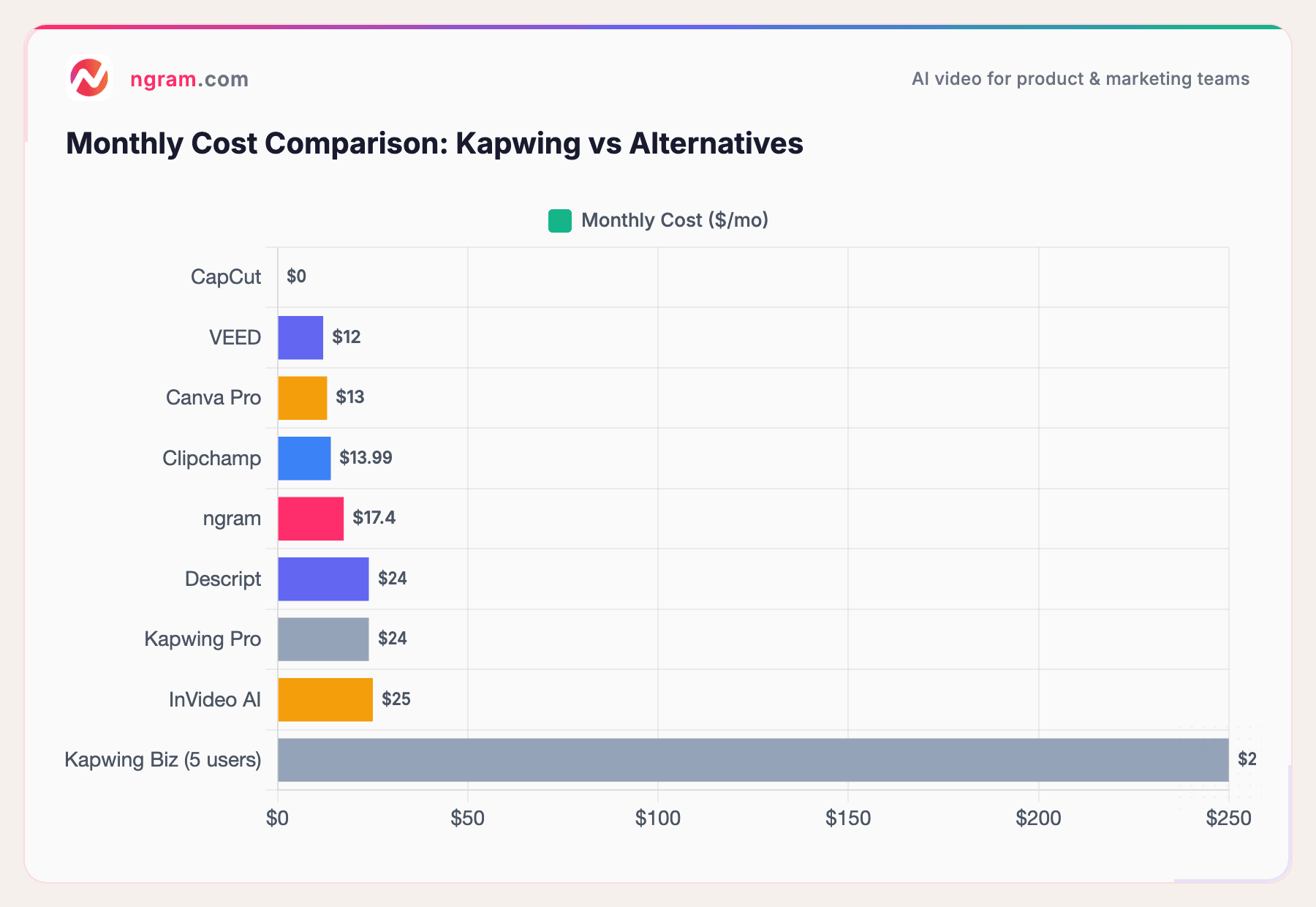
The pricing difference is stark. Kapwing's per-user Business plan ($50/user/month) means a 5-person team pays $250/month. Every alternative on this list offers team access for a fraction of that.
How we compared these tools
We tested each tool hands-on, analyzed hundreds of user reviews across G2, Capterra, Trustpilot, Reddit, and Product Hunt, and compared them across five weighted criteria:
| Criteria | Weight | What we looked at |
|---|---|---|
| Features | 25% | Editing tools, effects, templates, export options, integrations |
| Ease of Use | 25% | Onboarding speed, learning curve, UI quality |
| AI Capabilities | 20% | Auto-captions, AI generation, smart editing, automation |
| Value | 20% | Pricing relative to features, free tier generosity, team pricing |
| Support & Community | 10% | Documentation, community forums, customer support responsiveness |
We also factored in:
- Real user reviews from G2, Capterra, Trustpilot, Reddit, and Product Hunt (qualitative sentiment, not numerical scores)
- Market presence and company stability (funding, user base, ecosystem)
- Integration ecosystem with common team tools
For adjacent video tools, features and ease of use carry equal weight. A powerful tool that takes weeks to learn isn't practical for marketing teams shipping content weekly.
Common questions
Is there a free Kapwing alternative without watermarks?
Yes. CapCut's desktop app is completely free with no watermarks and no export limits. Clipchamp is also free for Windows 11 users and Microsoft 365 subscribers. Both offer more generous free tiers than Kapwing.
How does Kapwing compare to VEED?
VEED and Kapwing are the closest competitors on this list. VEED's team collaboration (real-time editing, URL sharing with comments) is stronger, and its export reliability on complex projects is better reviewed. Kapwing's per-user pricing makes it more expensive for teams of 3+. For teams needing video beyond editing, ngram creates finished video from existing content without manual editing.
Can I use Kapwing alternatives for team video production?
Yes. VEED, Canva, and ngram all offer team features. ngram's flat pricing (not per-user) makes it the most cost-effective for growing teams. Canva's team plan at $10/user/month includes video editing alongside design tools.
What's the best Kapwing alternative for auto-captions?
CapCut offers free, unlimited auto-captions with no watermark. Kapwing caps its free subtitle generator at 1 minute. VEED and Descript also offer strong captioning, but on paid plans.
Is Kapwing still worth paying for in 2026?
For solo creators doing simple edits, Kapwing's Pro plan at $24/month is functional. But the per-user Business pricing, export reliability issues, and limited free tier make it hard to recommend for teams. CapCut (free), VEED ($12/month), and Canva ($13/month) all offer better value for most use cases.
What Kapwing alternative works best with Microsoft 365?
Clipchamp integrates directly with OneDrive, Teams, and SharePoint, and it's included free with Microsoft 365 subscriptions. For Microsoft-heavy organizations, it eliminates the need for a separate video tool subscription.
Our verdict
Kapwing built a solid browser-based editor, but its pricing model and reliability issues have opened the door for alternatives that do specific things better.
If you need professional videos from existing content (recordings, docs, images) without manual editing, ngram automates the entire production workflow at a flat price. If you want the best free editor with zero restrictions, CapCut wins. If your team needs collaborative browser-based editing, VEED delivers what Kapwing's team plan promises but more reliably.
Kapwing still works for solo creators doing quick one-off edits. But for teams, the per-user pricing alone makes switching worth the evaluation.
Stop paying per seat for basic video editing. ngram turns your docs, recordings, and images into professional video at a flat price. Start free


