

Quick comparison
| Tool | Best For | Starting Price | Key Differentiator |
|---|---|---|---|
| ngram | Professional video from any asset | Free / $17.40/mo | AI-powered, context-aware video generation |
| CapCut | Free editing without limits | Free | Full editing suite, no watermarks, no cost |
| DaVinci Resolve | Professional-grade free editing | Free | Hollywood-grade color correction and effects |
| VEED | Browser-based team editing | Free / $12/mo | No downloads, cloud collaboration |
| Canva Video | Non-editors who need video | Free / $13/mo | Design-first, drag-and-drop simplicity |
| Descript | Transcript-based video editing | Free / $24/mo | Edit video by editing text |
| iMovie | Mac users who want simplicity | Free (Mac only) | Apple ecosystem integration |
Wondershare's Filmora built a 100-million-user base by promising "easy video editing for everyone." And for years, that promise held. The timeline editor was genuinely beginner-friendly, the effects library was solid, and the pricing was reasonable.
Then Filmora 15 landed. Reddit's r/VideoEditing lit up with a thread titled "You have GOT to be kidding with Filmora 15," calling out text animations that now require a separate paid Creative Assets subscription. Features that were free in Filmora 14 moved behind a paywall overnight. Users who'd paid for a "perpetual license" discovered it locked them to the current major version, not future updates.
Across Trustpilot, G2, and Reddit, the pattern is clear: watermarks on every free export, aggressive subscription prompts during editing, crashes on larger projects, and billing practices that include unexpected charges and difficult cancellations.
We tested 7 Filmora alternatives across features, ease of use, AI capabilities, and pricing transparency. Here's what we found.
1. ngram
If you're leaving Filmora because the editing workflow got complicated by paywalls and upsells, ngram takes a fundamentally different approach: you don't edit at all. You bring your raw materials, and AI builds the video.
Where Filmora gives you a timeline and expects you to arrange clips, transitions, and effects manually, ngram starts from whatever you have (a screen recording, a document, screenshots, a URL) and produces a complete video with script, storyboard, visuals, pacing, captions, and brand styling. No timeline. No effects library that disappears behind a paywall.
What makes ngram stand out
Context-aware generation adapts every video to its audience, goal, and channel. A LinkedIn announcement gets different pacing than an internal update. Filmora treats every project identically because it's a manual editor.
Plan first, generate second shows you the script and storyboard before rendering. You review and adjust the direction before committing. With Filmora, you discover problems after you've already spent an hour on the timeline.
No hidden feature gates. ngram's pricing is flat and transparent. Features don't migrate behind new subscription tiers between versions. What you see on the pricing page is what you get.
Key features
- Context-aware generation - Adapts structure, pacing, and tone to your audience and channel
- Script and storyboard first - Review the plan before rendering
- Any asset in - Text, images, docs, URLs, screen recordings as input
- AI-powered editing - Auto-cut, filler removal, smart zoom, cursor emphasis
- Multi-format export - 16:9, 9:16, 1:1 with captions included
- Brand kits - Logo, colors, fonts applied to every video automatically
Pros
- ✅ No timeline editing required - AI handles the production
- ✅ Transparent pricing with no feature gates between tiers
- ✅ Brand consistency across every video without manual setup
Cons
- ❌ Web-based only, no desktop app
- ❌ Not a traditional timeline editor (if you want manual frame-by-frame control, look elsewhere)
Who is ngram best for?
Product Marketing, Growth, Sales, Customer Success, and Agency teams who need professional videos from existing content. If you used Filmora to turn recordings and clips into polished output, ngram automates that entire workflow.
ngram offers a generous free plan with paid plans starting at $17.40 per month.
Ready to try ngram? Create your first video in under 5 minutes. Start free
See ngram in action:
For a detailed head-to-head, see our ngram vs Filmora comparison.
2. CapCut
CapCut is the most direct Filmora replacement on this list. It's a full timeline editor with effects, transitions, AI features, and templates. The difference: CapCut's desktop app is completely free with no watermarks and no export restrictions.
ByTeDance (TikTok's parent company) built CapCut to feed the short-form content machine, and over 490 million people use it globally. For Filmora users frustrated by the watermark on free exports, CapCut removes that barrier entirely. For a detailed comparison, see our ngram vs CapCut comparison.
Key features
- Free desktop editor - Full timeline, effects, transitions, no watermarks
- AI auto-captions - Accurate transcription with customizable styles
- AI text-to-video - Generate clips from text prompts
- Keyframe animation - Advanced motion control (matches Filmora's capability)
- Template library - Thousands of templates for social content
What users say
Reddit users who switched from Filmora consistently praise CapCut's value proposition: "Everything Filmora charges for, CapCut gives away." The editing interface is similar enough that the transition is smooth. Critics note ByteDance's data practices and the heavy TikTok-optimization bias. Users working on longer-form or business content find the template library less relevant.
Pros
- ✅ Free with no watermarks (Filmora's free tier watermarks every export)
- ✅ Similar timeline editor with comparable effects and transitions
- ✅ Auto-captions and AI features included at zero cost
Cons
- ❌ ByteDance ownership raises privacy concerns for business teams
- ❌ Optimized for short-form social content, less suited for long-form
Best for
Filmora users who want the same type of timeline editing without the watermarks or subscription pressure. The transition from Filmora to CapCut is the smoothest on this list.
3. DaVinci Resolve
DaVinci Resolve is what professionals use when they outgrow consumer editors like Filmora. Blackmagic Design's editor is used in Hollywood post-production, and the free version includes nearly every feature the paid Studio version offers.
The catch: DaVinci Resolve requires a dedicated GPU with at least 4GB of VRAM. If your computer can run it, you get color correction tools that Filmora can't match at any price point, plus Fairlight audio, Fusion visual effects, and a full editing suite.
Key features
- Hollywood-grade color correction - Industry-standard color grading tools
- Fairlight audio - Professional audio post-production suite
- Fusion VFX - Node-based visual effects and compositing
- Multi-user collaboration - Multiple editors on the same timeline
- Free version - Nearly all features available without payment
What users say
Reddit's video editing communities consider DaVinci Resolve the gold standard for free editors. Users praise the color grading as "years ahead of Filmora" and the depth of features as "overwhelming but worth learning." The main complaints are the steep learning curve, hardware requirements, and occasional instability on systems that don't meet the GPU specifications.
DaVinci Resolve is completely free. The Studio version ($295 one-time) adds GPU acceleration for some effects, AI tools, and collaboration features.
Best for
Serious editors who've outgrown Filmora's capabilities and want professional-grade tools without a subscription. Expect a steeper learning curve in exchange for significantly more power.
Need professional videos without learning a new editor? ngram turns your screen recordings, docs, and images into polished, on-brand videos in minutes. Try ngram free
4. VEED
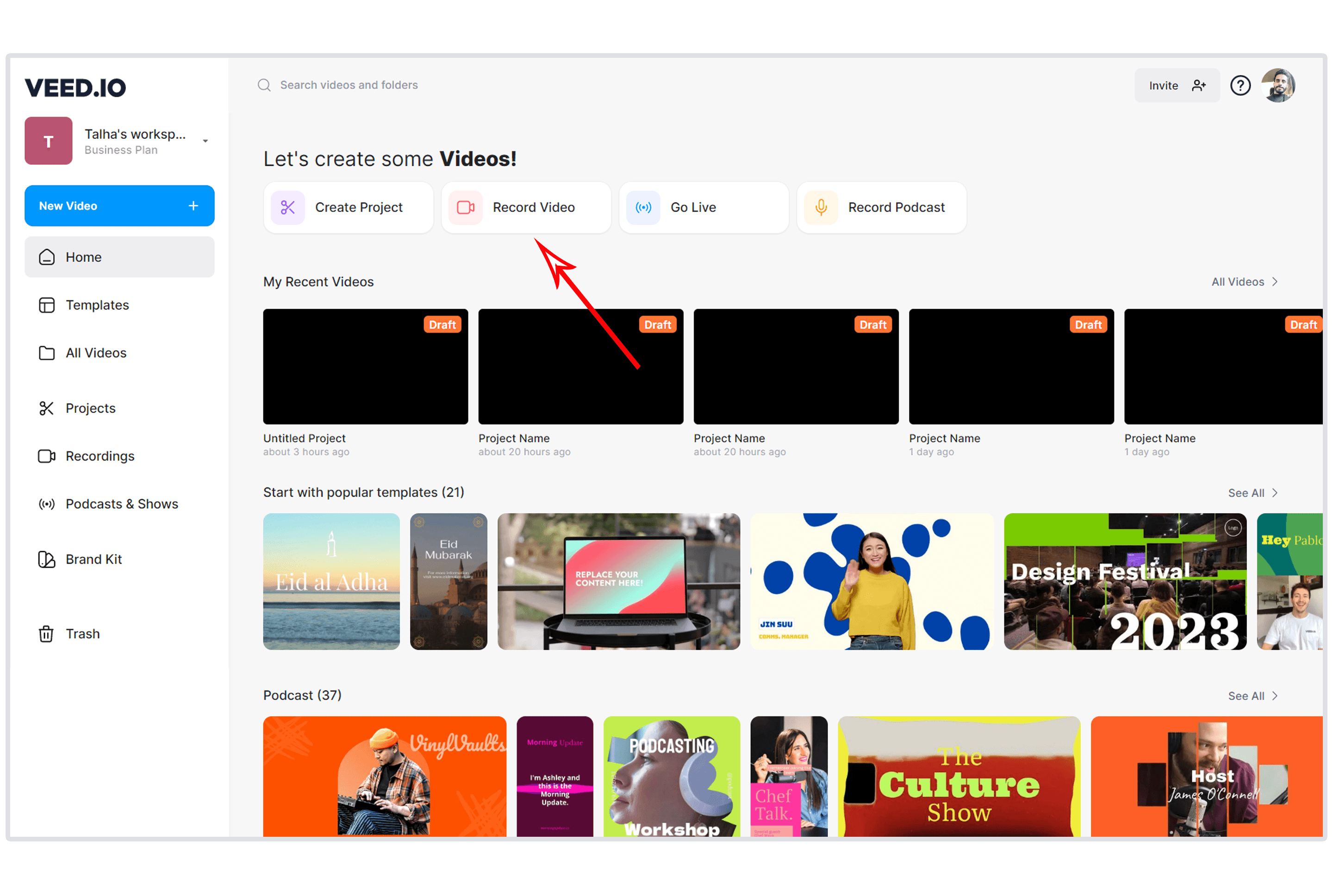
VEED is the browser-based answer to Filmora. No downloads, no installation, no version updates that break your workflow. You open a browser tab and start editing. For teams tired of Filmora's desktop-only workflow and version management headaches, VEED removes that friction.
VEED's strength over Filmora is collaboration. Multiple team members can work on the same project, share via URL, and leave timestamped feedback. Filmora has no real team workflow. For a detailed comparison, see our ngram vs VEED comparison.
Key features
- Browser-based - No downloads, works on any device
- AI subtitles - Accurate auto-captioning with style customization
- Team collaboration - Real-time editing, URL sharing, feedback comments
- AI-powered tools - Background removal, noise reduction, eye contact correction
- Video hosting - Share videos with built-in analytics
What users say
G2 and Capterra reviewers praise VEED's accessibility. Users describe the editing experience as "Filmora but in a browser, minus the bloat." Complaints focus on slower rendering for complex projects and the free tier's 10-minute export limit.
Pricing starts at $12/month (billed yearly).
Best for
Teams who need collaborative, browser-based editing without managing desktop software. Particularly strong for remote teams.
5. Canva Video
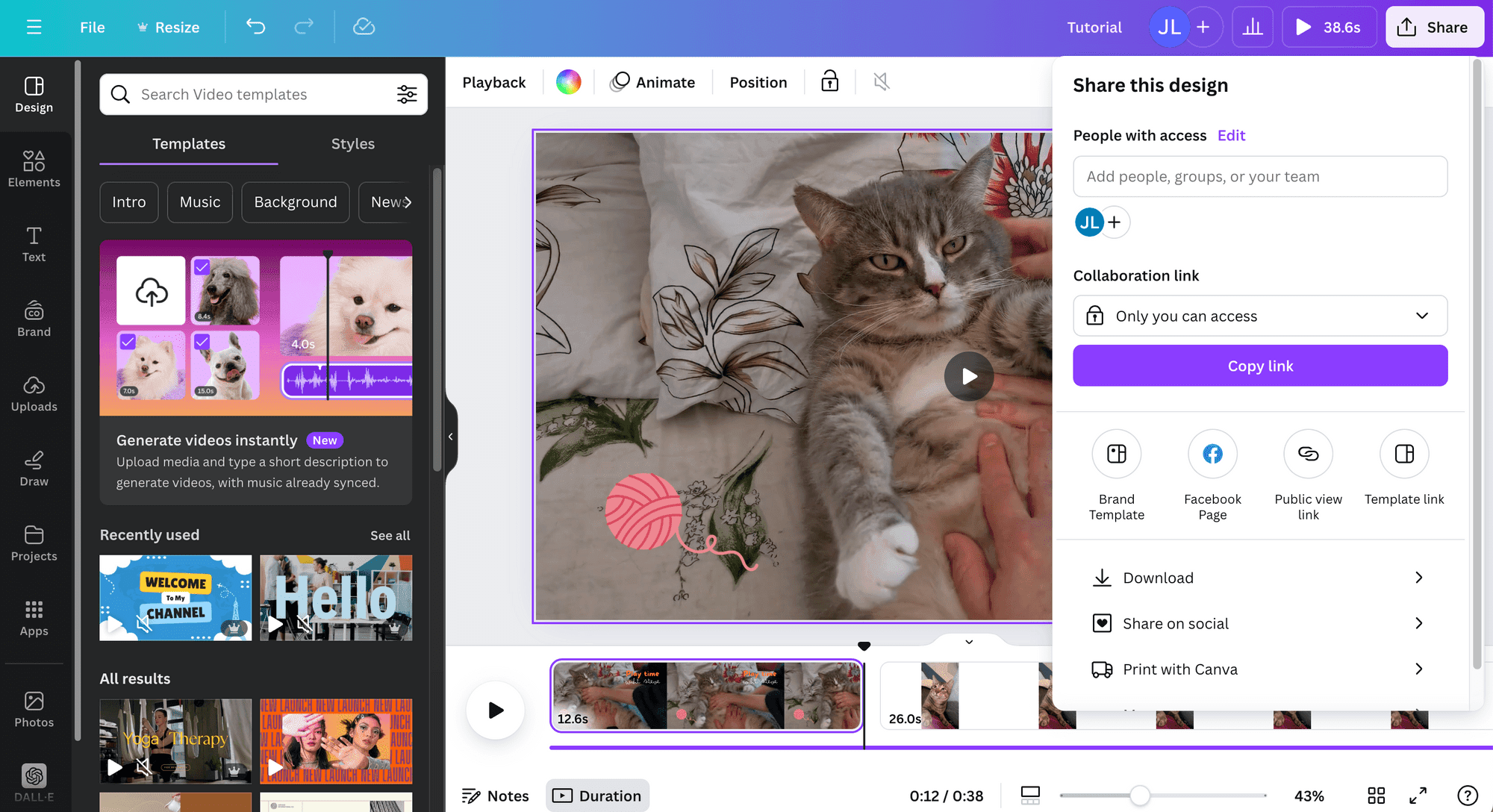
Canva Video isn't a Filmora replacement for editors. It's a Filmora replacement for people who never wanted to be editors in the first place. If you used Filmora because someone told you to "just make a quick video" and you spent three hours fighting the timeline, Canva is the tool you actually needed.
Over 150 million people use Canva, and the video editor lives inside the same ecosystem as their design tools. Pull from your brand kit, use existing templates, drag and drop elements, and export.
Key features
- Drag-and-drop video creation - No timeline expertise needed
- Integrated design ecosystem - Access Canva's full asset library
- Templates - Thousands organized by platform and use case
- Brand kit - Fonts, colors, logos shared across all content types
- Social scheduling - Publish directly from Canva
What users say
Users praise Canva Video for removing the learning curve entirely. The trade-off is clear: less control than Filmora but vastly faster for simple projects. The video editor can't handle multi-track complex edits, but for marketing and social content, it does the job.
Canva Pro costs $13/month for one user. The free tier includes basic video editing with some template restrictions.
Best for
Marketing teams and non-editors who need simple video creation without learning timeline editing.
6. Descript
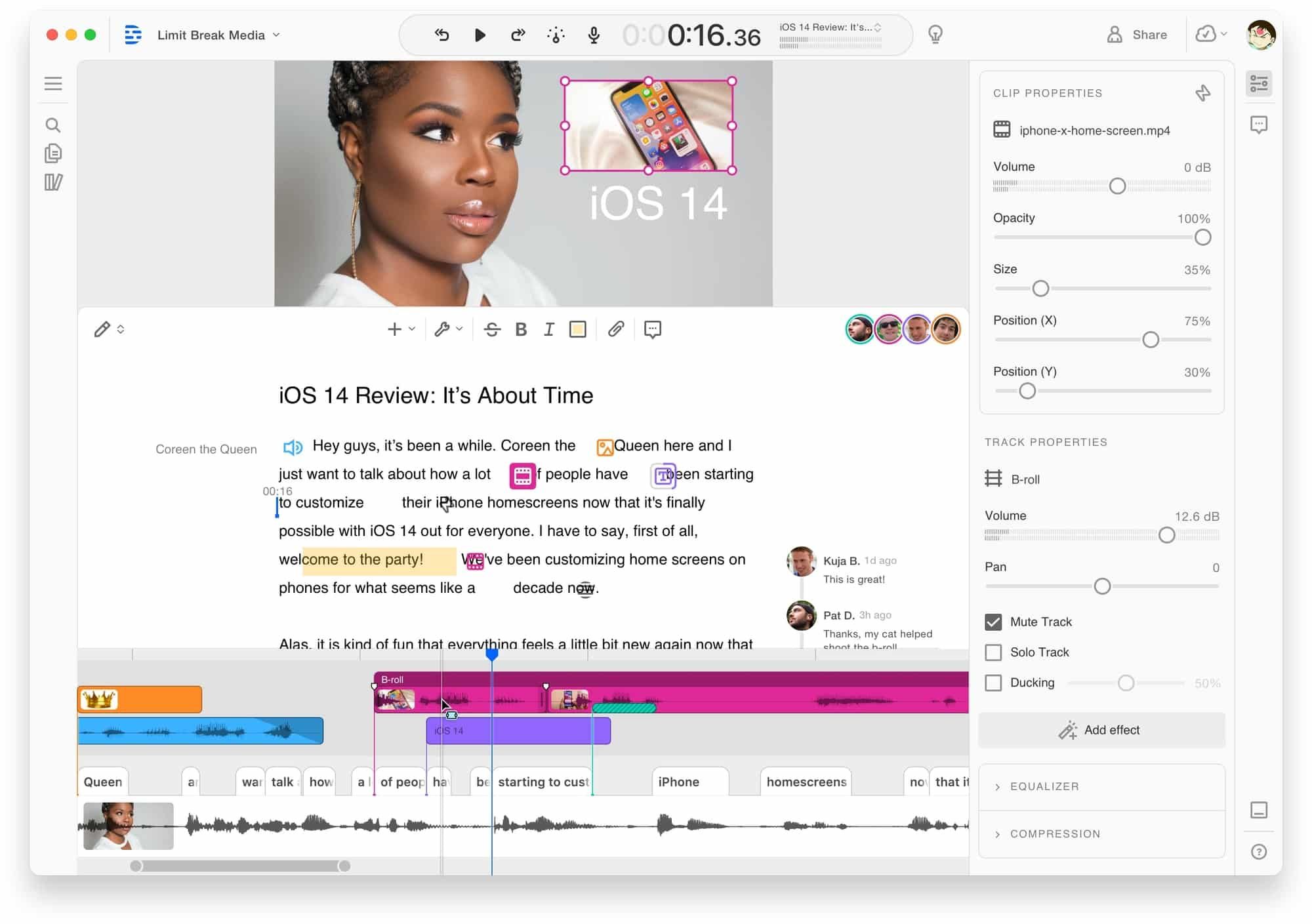
Descript takes a completely different approach: edit video by editing its transcript. Delete a word from the text, and the video cuts accordingly. For anyone who finds Filmora's timeline intimidating, Descript makes editing feel like editing a Google Doc.
Spotify acquired Descript in 2023, and the tool has raised over $100 million in funding. For a detailed comparison, see our ngram vs Descript comparison.
Key features
- Text-based editing - Edit video by editing its transcript
- AI voice cloning - Clone your voice for corrections
- Filler word removal - Automatically remove ums and pauses
- Screen recording - Built-in recorder with webcam overlay
- Podcast editing - Full audio editing capabilities
What users say
Reddit users describe Descript's transcript editing as "the moment I stopped missing Filmora." The approach is fundamentally easier for dialogue-heavy content. Limitations include rendering speed on complex projects, and the $24/month Hobbyist plan pricing.
Best for
Content creators working with dialogue-heavy video (tutorials, podcasts, interviews) who find timeline editing inefficient.
7. iMovie
iMovie comes pre-installed on every Mac and iPhone. It's Apple's free video editor, and for Mac users, it's the simplest possible replacement for Filmora. No downloads, no purchases, no subscriptions.
iMovie supports 4K editing, includes a solid library of transitions and effects, and integrates seamlessly with the Apple ecosystem (AirDrop, iCloud, Photos). The interface is deliberately simplified compared to Filmora, which means fewer options but a gentler learning curve.
Key features
- Free on all Apple devices - Mac, iPhone, iPad
- 4K editing - Full resolution support
- Cinematic mode - Background blur and depth effects
- iCloud integration - Start on iPhone, finish on Mac
- Templates and trailers - Pre-built project templates
What users say
Mac users consistently recommend iMovie as the first step after leaving Filmora. "It does 80% of what Filmora does and costs nothing." The limitations: no Windows version, limited multi-track capabilities, and fewer advanced effects.
Best for
Mac users who want a free, simple editor that handles standard projects without the complexity or cost of Filmora.
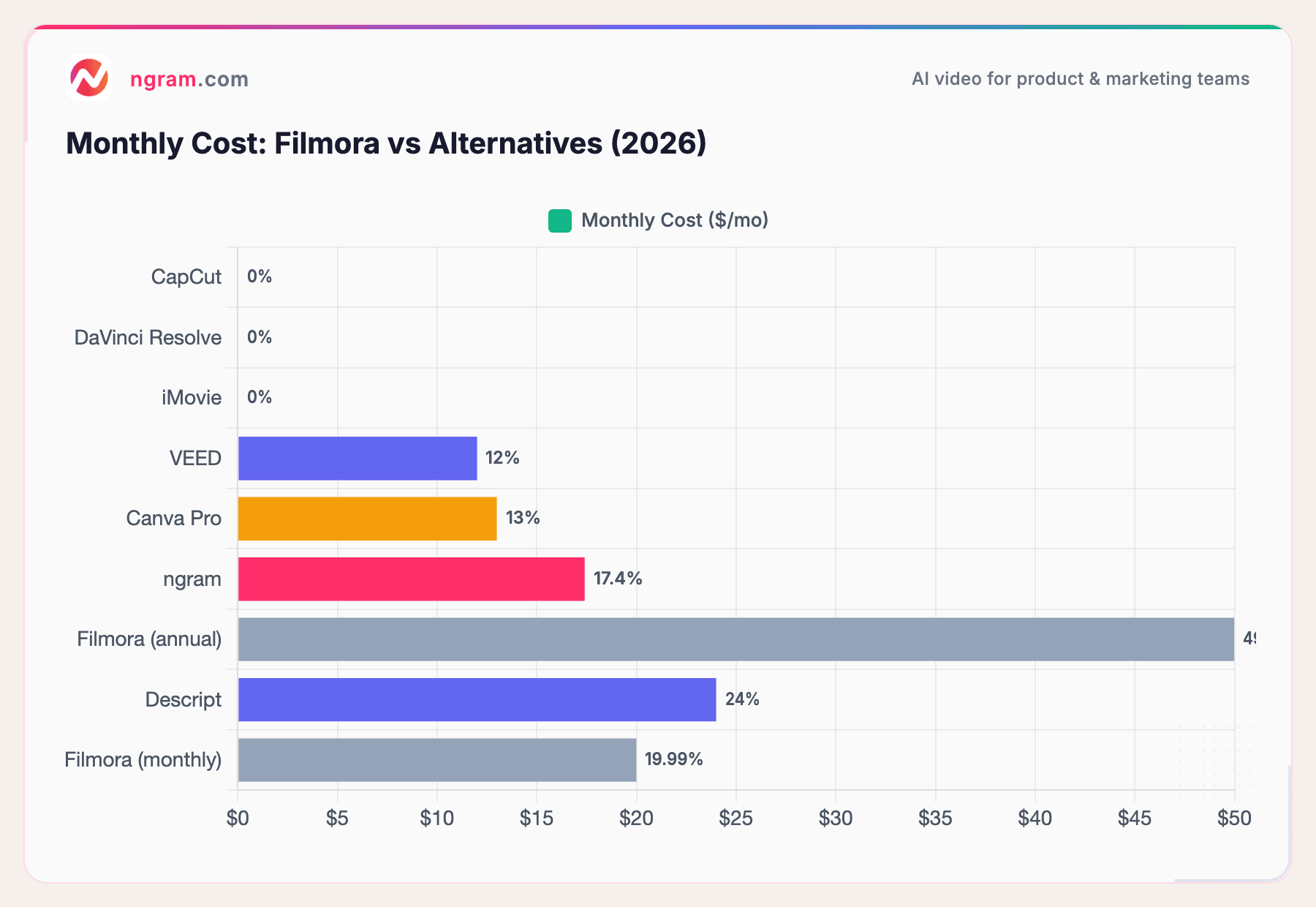
Three of the seven alternatives are completely free. The paid options start lower than Filmora's annual plan and don't gate features behind additional subscriptions.
The case for switching off Filmora
Filmora earned its user base with genuine ease of use. But the business model has shifted in ways that erode that value.
Features migrating behind paywalls. Filmora 15 moved text animations and creative assets from included to subscription-only. Reddit's reaction was immediate and negative. Users who'd relied on these features for years found their workflows broken overnight.
The watermark tax. Every free export carries a Filmora watermark. Three alternatives on this list (CapCut, DaVinci Resolve, iMovie) offer watermark-free exports at zero cost. The watermark exists solely to pressure upgrades, not because free users consume more resources.
Perpetual license confusion. Filmora's $79.99 "perpetual" license locks you to the version you purchased. Next year's major release requires a new purchase. This pricing model is technically accurate but practically misleading for users who expect lifetime access to the latest version.
Subscription creep. The monthly plan at $19.99/month and annual at $49.99/year are competitive in isolation. But add the Creative Assets subscription ($7.99/month) needed for features that used to be free, and the real cost climbs quietly.
Trustpilot patterns. Users report unexpected charges, difficult subscription cancellation processes, and customer support that responds slowly with generic answers.
Our testing approach
We tested each tool hands-on, read hundreds of user reviews across G2, Capterra, Trustpilot, Reddit, and Product Hunt, and compared them across five weighted criteria:
| Criteria | Weight | What we looked at |
|---|---|---|
| Features | 25% | Timeline tools, effects, transitions, export options, templates |
| Ease of Use | 25% | Learning curve, onboarding, UI intuitiveness, Filmora-to-X transition smoothness |
| AI Capabilities | 20% | Auto-captions, AI generation, smart editing, filler removal |
| Value | 20% | Pricing transparency, free tier generosity, no hidden upsells |
| Support & Community | 10% | Documentation, community size, customer support quality |
We weighted pricing transparency and hidden-cost avoidance higher than usual because that's the core reason people are leaving Filmora.
Quick answers
Is there a free Filmora alternative without watermarks?
Yes. CapCut, DaVinci Resolve, and iMovie all export without watermarks at zero cost. CapCut is the closest experience to Filmora's timeline editor. DaVinci Resolve is significantly more powerful but has a steeper learning curve.
What's the best Filmora alternative for beginners?
CapCut offers the smoothest transition from Filmora because the timeline interface is similar. Canva Video is best for people who find timeline editing intimidating. ngram removes editing entirely by generating video from your content with AI.
Can I use my Filmora projects in another editor?
Filmora project files (.wfp) are proprietary and can't be opened in other editors. You'll need to export your Filmora projects as video files first, then import those into your new tool. This is one of the hidden switching costs Wondershare doesn't advertise.
Is DaVinci Resolve really free?
Yes. Blackmagic Design's free version includes the editing page, color correction, Fairlight audio, and Fusion VFX. The paid Studio version ($295 one-time) adds GPU acceleration, AI tools, and multi-user collaboration. Most users never need the paid version.
Does Filmora 15's perpetual license include future versions?
No. The $79.99 perpetual license covers the version at time of purchase. Major version updates (like Filmora 14 to 15) require a new purchase. Minor updates within the same version are included.
What's the best Filmora alternative for business video?
ngram is designed specifically for business teams who need professional video from existing content. Unlike Filmora, ngram handles script, storyboard, visuals, and brand styling automatically. For a detailed comparison, see our ngram vs Filmora comparison.
The honest answer
Filmora still works for hobbyist editors who want a simple timeline with basic effects and don't mind the subscription model. The software itself isn't broken.
But the business model around it has changed. Features that were included are now upsells. The "free" tier exists primarily as a watermark-driven conversion tool. And the perpetual license that attracted many users doesn't work the way most people expected.
If you want the same type of editing without the paywalls, CapCut is the most direct replacement. If you want professional power and don't mind a learning curve, DaVinci Resolve is the best free editor available in 2026. And if you want to skip the editing entirely and let AI build professional videos from your existing content, ngram handles the production from start to finish.
Skip the timeline. Ship the video. ngram turns your docs, recordings, and images into polished, on-brand video without touching an editor. Start free


