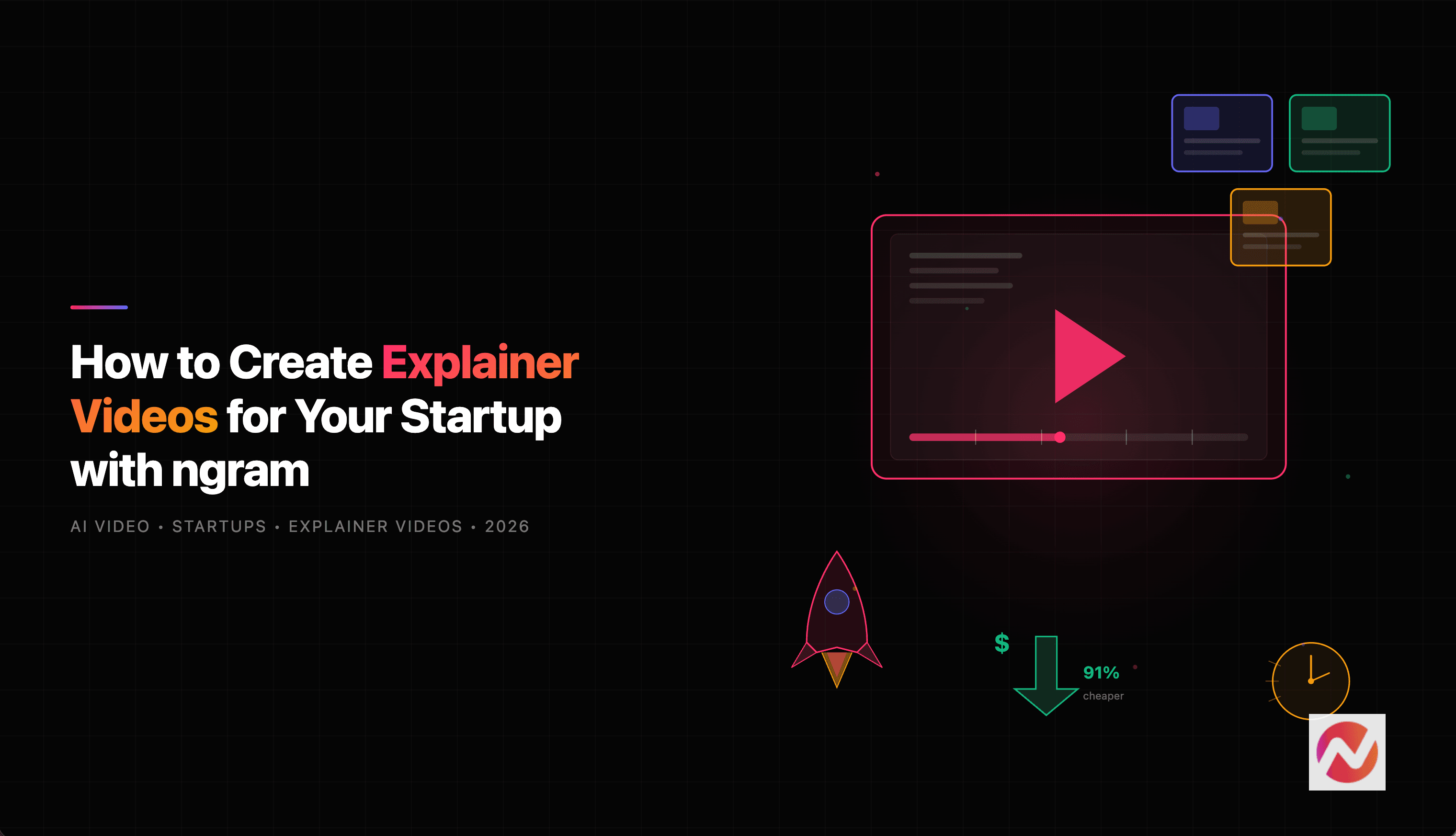

If you are running a startup, you already know how hard it is to explain what you do in a way that sticks. A pitch deck gets half-read. A landing page gets skimmed. A product walkthrough gets bookmarked and forgotten.
But an explainer video? That gets watched.
According to Wyzowl's 2026 Video Marketing Report, 98% of people have watched an explainer video to learn more about a product or service - an all-time high. And industry research shows that 85% of users are more likely to purchase after watching an explainer video.
For startups trying to earn attention, build trust, and convert visitors into users, explainer videos are not optional anymore. They are the fastest way to make your message land.
The problem? Creating one used to cost thousands of dollars and weeks of back-and-forth. That is where ngram changes the equation.
Why Startups Struggle with Traditional Explainer Video Production
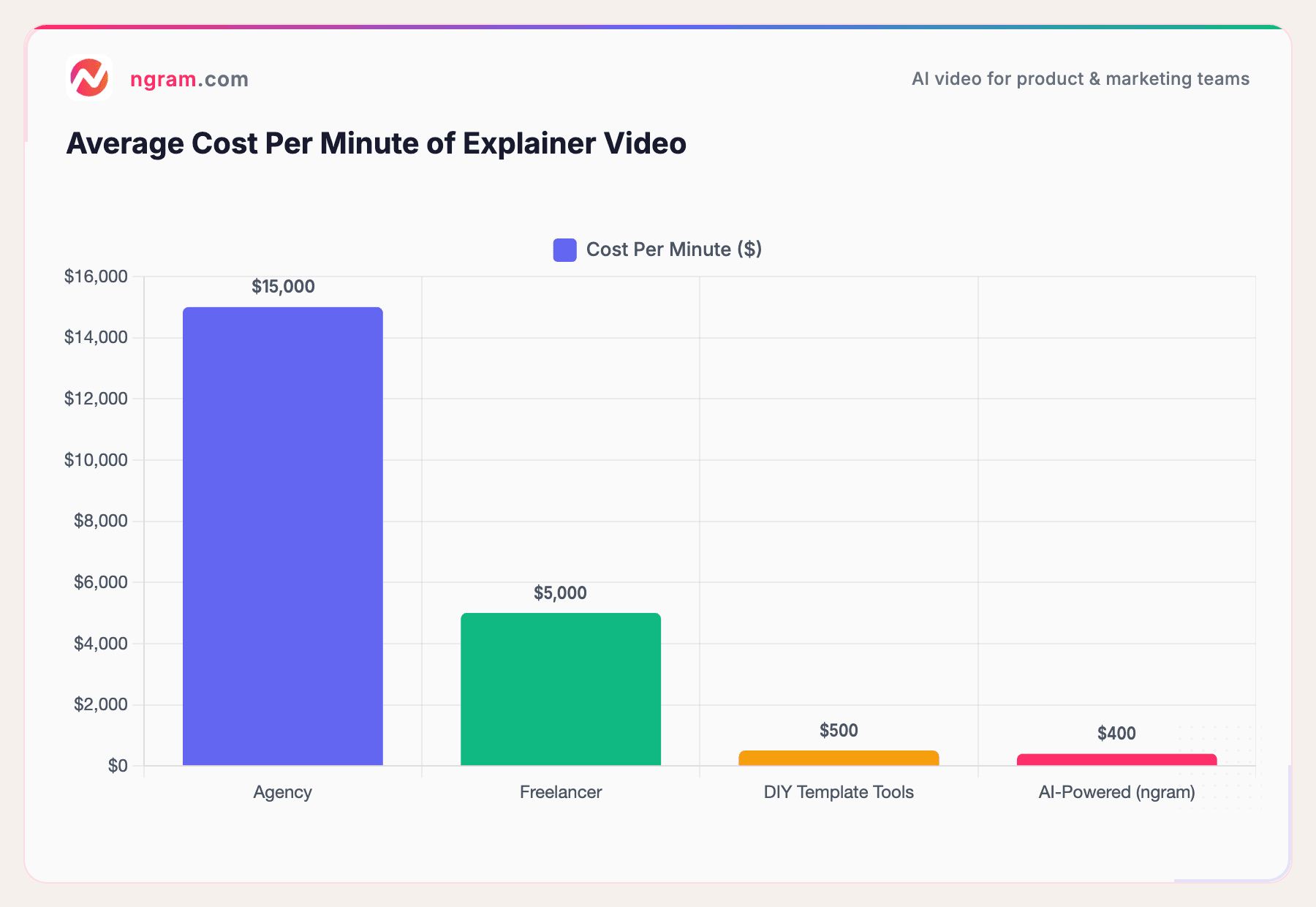
Let us be honest about the math. A two-minute animated explainer video from a traditional agency costs between $5,000 and $25,000 (Vidico). Even a freelancer will run you $3,000 to $5,000. And for that price, you get one revision cycle and a timeline measured in weeks, not days.
For a startup burning through runway, that equation does not work. You need to ship fast, iterate constantly, and communicate clearly across multiple channels - your landing page, investor decks, social posts, onboarding flows, and sales outreach. Each of those needs a different video, with different pacing, different messaging, and different formats.
Hiring an agency for every update? Not sustainable. Spending two weeks waiting for a single 90-second video? Not realistic.
Here is how the costs break down across different approaches.
Sources: Vidico, industry research
The gap is massive. AI-powered tools like ngram bring the per-minute cost down to roughly $400 - a 91% reduction compared to traditional production. For startups watching every dollar, that difference is the difference between making video a core part of your go-to-market strategy and treating it as a luxury you cannot afford.
But cost is only half the story. The other half is time. Building an explainer video for your startup should not take weeks when you could be shipping product.
How ngram Works as Your Startup's Explainer Video Maker
We built ngram to make video feel like writing. You bring what you already have - a product brief, screenshots, a rough screen recording, a landing page URL - and ngram turns it into a polished, on-brand explainer video.
Here is what makes ngram different from template-based tools or expensive agencies.
Context-Aware Video Generation
ngram does not just drop your content into a template. You tell it who the video is for, what it needs to accomplish, and where it is going. A LinkedIn explainer for potential investors looks completely different from an onboarding walkthrough for new users - and ngram adapts the structure, pacing, and tone accordingly.
Start from What You Already Have
Forget blank pages. Your startup already has the raw material for a great explainer video - product docs, pitch decks, screenshots, blog posts, URLs. ngram extracts what it needs, organizes the content, and builds a coherent story from it.
Script and Storyboard First
This is where most AI video tools get it wrong. They jump straight to rendering, leaving you with a polished-looking video that tells a weak story. ngram generates a script and storyboard first, so you can review and steer the direction before a single frame renders. That means faster iteration and fewer wasted renders.
AI-Generated Visuals That Match Your Brand
When your assets need support, ngram fills gaps with AI-generated visuals - motion graphics, styled footage, abstract backgrounds - all aligned with your brand kit colors and style.
Professional Editing Built In
Need precise control? ngram includes a full editing suite with timeline editing, keyframes, audio levels, transitions, and compositing. Go from AI-generated draft to polished final cut without leaving the platform.
Want to see this in action? ngram turns your startup's raw content into polished, on-brand explainer videos in minutes. Try it free
Step-by-Step: Creating Your Startup Explainer Video with ngram
Here is exactly how to go from idea to finished explainer video.
Step 1: Start a New Project
Open ngram and select "Explainer" as your video type. Define your audience (potential customers, investors, new users) and the goal of the video (convert landing page visitors, explain a feature, pitch to investors).
Step 2: Add Your Assets
Drop in whatever you have. This could be your product brief, a few screenshots, a rough screen recording, or even just a URL to your landing page. ngram pulls context from all of it.
For a startup explainer, the best combination is usually a brief product description plus 3 to 5 screenshots or screen captures showing the product in action.
Step 3: Review the Script and Storyboard
ngram generates a scene-by-scene plan. You will see the script (what the video will say) and the storyboard (what the viewer will see) laid out before any rendering happens.
This is the fastest place to iterate. Swap a scene, change the hook, reorder the story structure - all in plain language. No re-rendering needed.
Step 4: Generate the Video
Once you approve the plan, ngram builds the video. It combines your assets with motion graphics, transitions, captions, and AI-generated visuals where needed. The result is a polished explainer that looks intentionally produced.
Step 5: Refine and Polish
Swap scenes you do not like. Tweak text overlays. Adjust pacing. Regenerate specific sections. ngram keeps you in control without requiring you to learn video editing.
Step 6: Export in the Right Format
Export in 16:9 (website, YouTube), 9:16 (Instagram Reels, TikTok), or 1:1 (LinkedIn, social) - with captions included automatically.
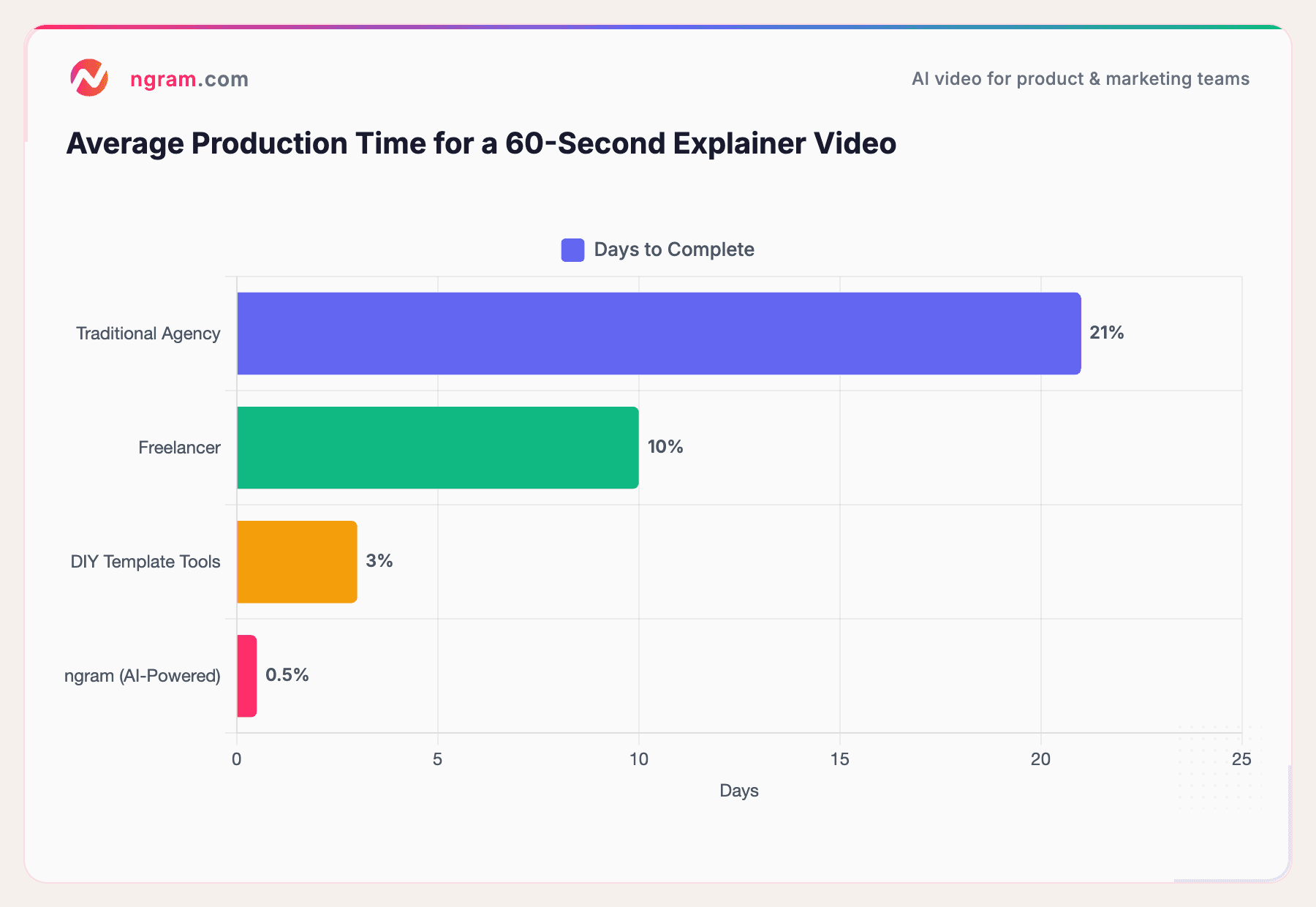
Here is how the timeline compares across different production methods.
Sources: Advids
With ngram, what used to take three weeks now takes under a day. That is the kind of speed startups need to stay in motion.
Start creating explainer videos with ngram
Types of Explainer Videos Startups Can Create with ngram
Startups do not just need one explainer video. They need different videos for different moments. Here is what you can create with ngram.
Product Explainers
The classic "here is what we do and why it matters" video. Structure it as problem, solution, proof, call-to-action. Perfect for your homepage or landing page.
Investor Pitch Videos
Turn your pitch deck into a compelling 2-minute video that investors can watch on their own time. Way more effective than sending a 40-page deck and hoping someone reads it.
Feature Announcement Videos
Shipping a new feature? Turn your release notes into a clear narrative with motion graphics and supporting visuals. Ready for social, email, or your changelog.
Onboarding Walkthroughs
Help new users get value faster. ngram turns your documentation into step-by-step walkthroughs with visual emphasis and clear sequencing.
Social Clips
Cut your longer content into short, high-signal clips optimized for LinkedIn, X, TikTok, and Instagram Reels.
For a deep dive into founder-specific explainer video use cases, check out our dedicated guide.
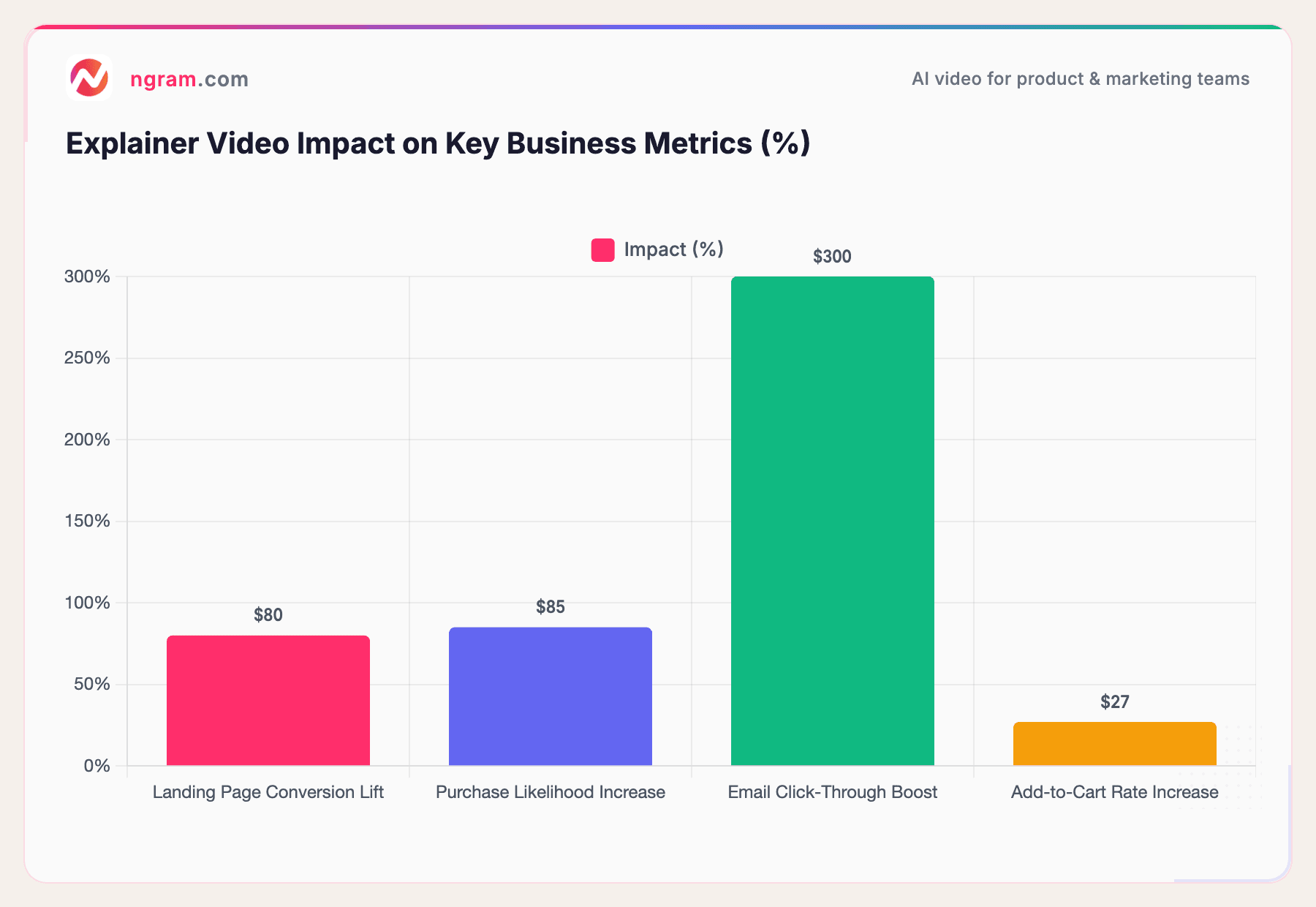
Here is how different video types perform in terms of their impact on business metrics.
Sources: involve.me, Wyzowl
The numbers speak for themselves. An explainer video on your landing page can increase conversions by up to 80%, and emails with embedded video see up to 300% higher click-through rates.
Best Practices for Startup Explainer Videos
A great explainer video is not just well-produced - it is well-structured. Here are the principles that separate videos that convert from videos that get ignored.
Keep It Under 90 Seconds
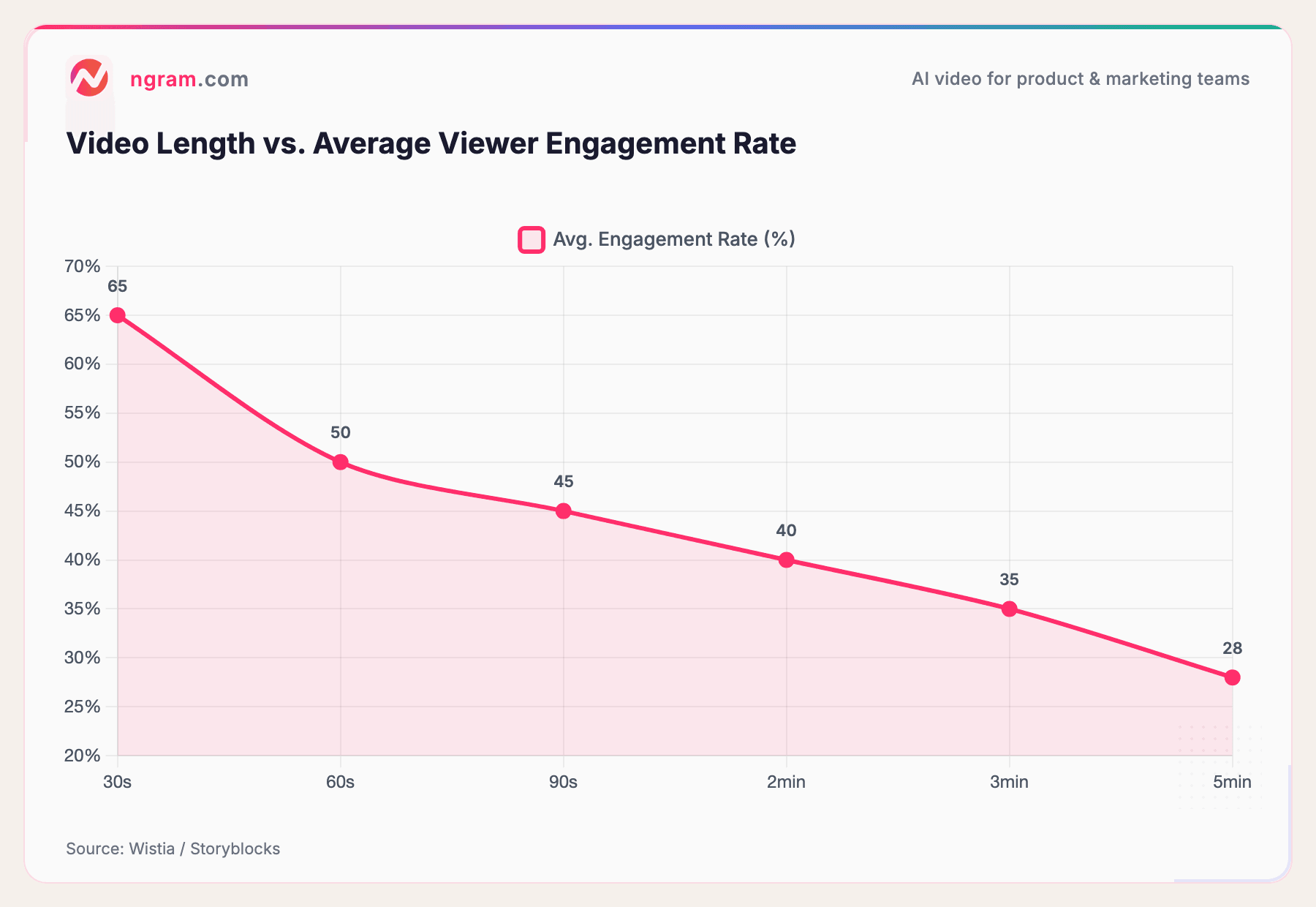
The sweet spot for startup explainer videos is 60 to 90 seconds. According to Wistia's engagement data, videos under one minute hold 50% engagement, while videos over five minutes drop to 38%. Say what matters and stop.
Source: Wistia / Storyblocks
Shorter videos consistently outperform longer ones for engagement. ngram helps you hit the ideal length by structuring your script to the right duration from the start.
Follow the Problem-Solution Framework
The most effective explainer video structure for startups follows a simple arc. Open with the problem your audience faces (10 to 15 seconds). Introduce your solution (10 to 15 seconds). Show how it works with 2 to 3 key benefits (30 to 40 seconds). Close with a clear call to action (10 seconds).
ngram's script generation builds this structure automatically based on your inputs.
One Video, One Message
Do not try to cram your entire product into a single explainer. Pick the one thing you want viewers to understand and build the entire video around it. You can always create additional videos for other features or use cases.
Stay On Brand
Consistency builds trust. Use your brand kit - logo, colors, fonts, intro and outro - so every video your startup produces feels cohesive. ngram's brand kit feature lets you define your identity once and apply it across every video automatically.
Prioritize Captions
Most social video is watched without sound. ngram adds captions to every export automatically, so your message lands whether or not the viewer has their volume on.
The Data Behind Explainer Videos for Startups
If you need to justify the investment in explainer videos to your co-founder, your board, or yourself, here is the data that matters.
The AI video generation market is projected to reach $18.6 billion by the end of 2026, up from $5.1 billion in 2023 - a 34.2% compound annual growth rate. This is not a niche trend. It is a fundamental shift in how businesses communicate.
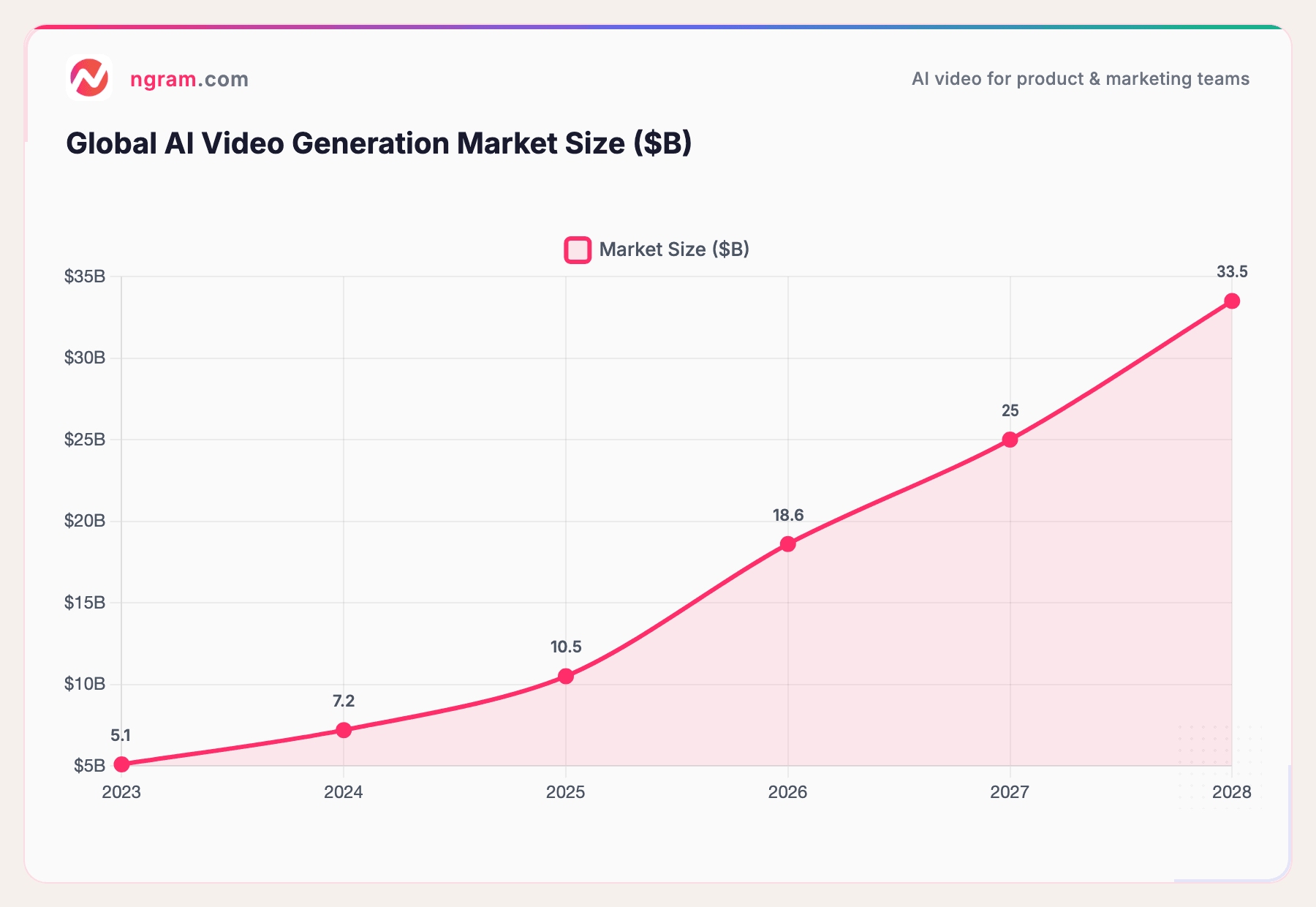
Sources: Fortune Business Insights
Here are the numbers that matter most for startups.
- 73% of video marketers say explainer videos are their most-used format in 2026 (Wyzowl)
- 78% of marketing teams now use AI-generated video in their campaigns
- 46% of new AI video tool signups are from small businesses with fewer than 50 employees
- Startups report that AI video reduced their go-to-market timeline by an average of 5.3 weeks
- Companies that adopted AI video saw a 4.2x ROI within their first six months
The early movers are already seeing results. Dropbox famously gained 75,000 additional users from a single explainer video. Crazy Egg saw a 64% revenue increase after adding an explainer to their homepage (MoonB).
You do not need a Dropbox-sized budget to get these results anymore. With ngram, you can create the same caliber of explainer video in an afternoon.
Frequently Asked Questions
How long should a startup explainer video be?
The ideal length is 60 to 90 seconds. Research shows that videos under one minute maintain around 50% viewer engagement, while longer videos see significant drop-off. For a startup, shorter is almost always better - focus on one clear message and a strong call to action.
How much does it cost to make an explainer video for a startup?
Traditional agency production runs $5,000 to $25,000 per minute. Freelancers charge $3,000 to $5,000. AI-powered platforms like ngram bring the cost down to roughly $400 per minute - a 91% reduction. For startups on a budget, AI video creation is the most practical path to professional-quality explainer videos.
Can I create an explainer video without video editing experience?
Yes. ngram handles the technical complexity for you. You provide the raw materials (text, images, screen recordings, URLs) and define the audience, goal, and channel. ngram generates the script, storyboard, and finished video. You refine it in plain language - no timeline editing required unless you want that level of control.
What should a startup explainer video include?
A strong startup explainer follows a four-part structure. Open with the problem (10 to 15 seconds). Introduce your solution (10 to 15 seconds). Show 2 to 3 key benefits with visuals (30 to 40 seconds). Close with a clear call to action (10 seconds). Keep it focused on one message and let the visuals do the heavy lifting.
How do I create an explainer video with AI?
With ngram, you start a project and select "Explainer" as the video type. Add your assets - product docs, screenshots, screen recordings, or URLs. ngram generates a script and storyboard for your review. Once you approve the plan, it builds the video with motion graphics, captions, and AI-generated visuals. You refine, export, and publish.
What format should startup explainer videos be in?
It depends on where the video is going. For your website and YouTube, use 16:9 (landscape). For Instagram Reels and TikTok, use 9:16 (vertical). For LinkedIn and social feeds, 1:1 (square) works well. ngram lets you export in all three formats from a single project, with captions included.
Start Making Explainer Videos That Actually Convert
As a startup, you do not have the luxury of long production cycles or five-figure video budgets. But you do have something better - a product worth explaining and the tools to do it fast.
ngram gives you the speed, the quality, and the flexibility to create explainer videos that match the pace of your startup. Whether you are pitching investors, converting landing page visitors, or onboarding new users, you can go from idea to finished video in minutes.
Ready to make your startup's explainer video? Try ngram for free