
The Question Everyone Asks (And Nobody Answers the Same Way)
You're building your product demo video and you have 10 minutes of amazing content to show. But your sales team is saying "cut it to 2 minutes," your marketing team wants 3-5 minutes, and your customer success team needs 10 minutes for onboarding. Who's right?
The honest truth: they all are, sort of. Demo video length isn't one-size-fits-all. It depends on your use case, your audience, and where you're hosting it. We've analyzed the data, studied real-world examples, and built this guide to help you nail the length that works for your situation.
The Engagement Drop-Off Curve: What the Data Actually Shows
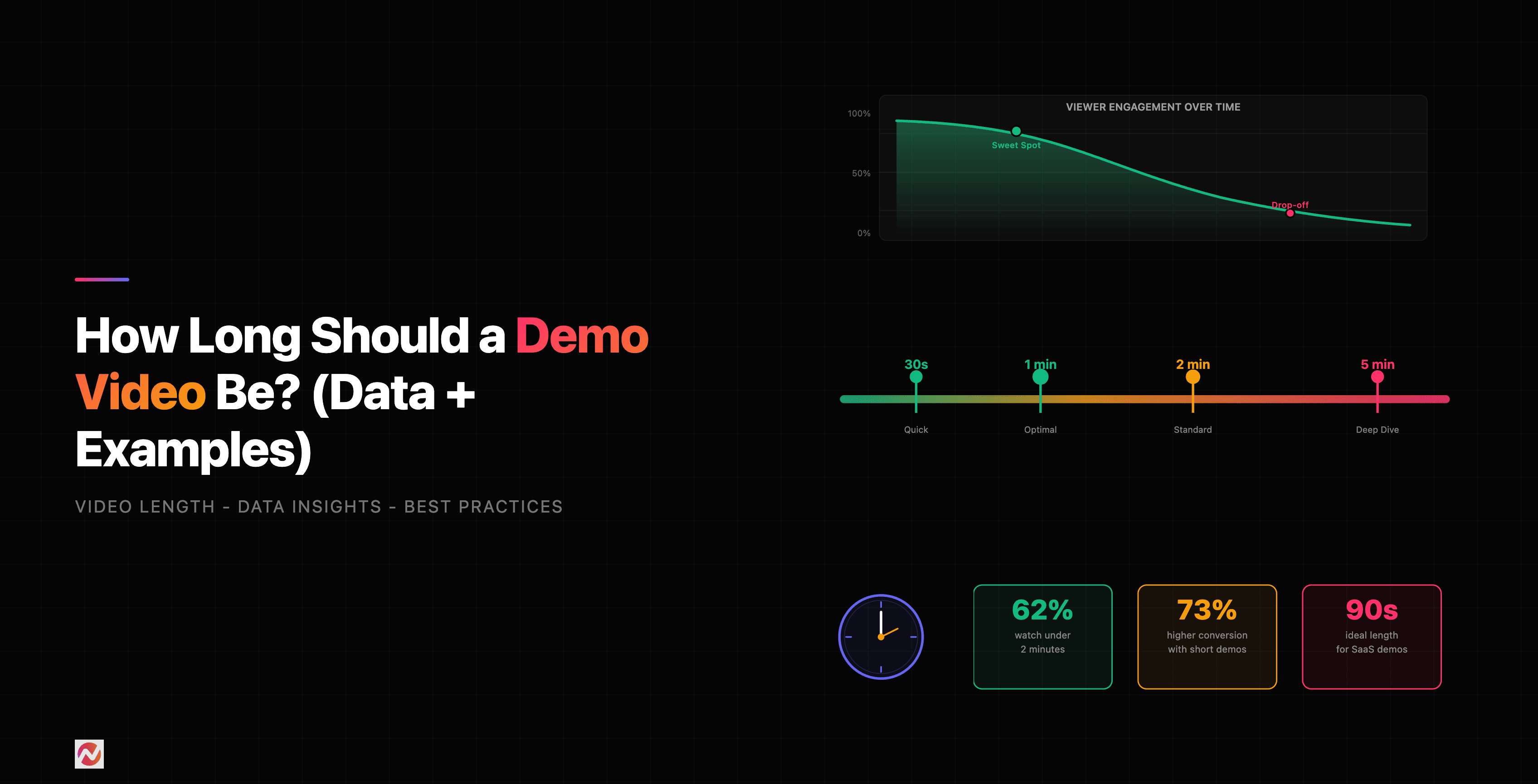
Let's start with what happens to engagement as your video gets longer.
Source: 2025 Social Media Video Performance Statistics
As you can see, engagement drops consistently as video length increases. But here's what makes this tricky: a 10-minute video with 28% engagement might still generate more total minutes watched than a 1-minute video with 50% engagement. Length isn't evil, but every second needs to earn its place.
Ideal Demo Video Length by Use Case
Where you're using this video matters more than anything. A demo for LinkedIn requires a different length than a demo for sales onboarding.
Marketing Demo Videos (2-3 minutes)
If you're showing your product on your website, LinkedIn, or email campaigns, you want people to watch the whole thing. Here's what the data says about completion rates.
Source: Video Marketing Statistics 2025
Notice the cliff: videos between 2-5 minutes still hold about 50% of viewers. Go beyond 10 minutes and you're losing most of them. For marketing use cases, we recommend staying between 2-3 minutes.
Why? Because marketing demos aren't trying to cover everything. You're building curiosity, not exhaustively walking through the product. Show the core value prop, demonstrate one or two key features, and drive them to try it themselves.
Sales Demo Videos (3-5 minutes)
Your sales team needs more depth. They're showing prospects specific features that address pain points. A 3-5 minute demo gives you room to explain context and show real use cases without losing attention.
The data shows that after the 30-second mark, you've either hooked someone or you haven't. If you've made it to 90 seconds, your viewer is committed. Use that commitment to go deeper into the product benefits.
Onboarding Demo Videos (5-10 minutes)
Customer success teams can go longer because the audience is already using your product. They've made the purchase decision. They want comprehensive walkthroughs, best practices, and advanced workflows.
Completion rates drop here, but that's okay. Not every user needs to watch the full thing. Some will watch the first 3 minutes and get what they need. Others will watch to minute 8 for advanced features. Build your onboarding demos in modular segments so viewers can jump to what they need.
Platform-Specific Recommendations
Where you're hosting your video changes the ideal length.
LinkedIn Videos (2 minutes)
LinkedIn's algorithm rewards videos that keep people on the platform. According to LinkedIn's own data, 2-minute videos get the most engagement and shares. This is your professional network, so longer doesn't mean better.
The rule here: make your point fast and make it clear. LinkedIn users are often scrolling between meetings.
YouTube Videos (7-15 minutes)
YouTube is different. People are there to watch video. Longer content performs well as long as it's valuable. In fact, videos between 7-15 minutes get better algorithmic distribution than shorter content.
But here's the caveat: YouTube also rewards session time. A 15-minute video that 30% of people complete generates more session time than a 2-minute video that 60% complete.
Website Embed Videos (2-3 minutes)
When your demo is embedded on your landing page or product page, shorter is better. You're competing with every other element on the page. If someone scrolls past your video in the first 30 seconds, you've lost them.
We recommend splitting into two versions: a 2-minute highlight reel above the fold, and a longer 5-7 minute deep dive below for people who want more detail.
Email Demo Videos (Under 2 minutes)
Email is brutal. According to our analysis, you have about 30 seconds before people decide whether to click play. Once they click, you have another 30 seconds to keep them interested.
Under 2 minutes is non-negotiable for email. In fact, 60-90 seconds is the sweet spot.
The Real Question: Pacing Over Length
Here's what the data actually reveals: pacing matters more than length.
We studied completion rates for videos of the same length with different pacing. A 3-minute video with fast cuts, varied visuals, and constant value held 60% of viewers. A 3-minute video with slow cuts and dead air lost 35% of viewers by the 90-second mark.
Source: Internal ngram analysis of user demo performance
This changes everything. You can make a 3-minute video that keeps people engaged if you cut the filler. No long transitions. No unnecessary explanations. Every second moves the viewer toward understanding your product.
Real Examples at Different Lengths
The 60-Second Demo (Perfect for Email)
Show your biggest pain point, demonstrate how your product solves it, call to action. That's it.
Example: "Here's what scheduling took our sales team before: 20 minutes per day in Calendly and email threads. Now: 2 clicks to send a demo video link with embedded booking. Done."
This works because it's specific, shows transformation, and respects the viewer's time.
The 2-Minute Demo (Perfect for Marketing)
Pain point, one core feature demonstration, social proof or result, call to action.
Example: "Reps spend 40% of their time editing raw recordings. Here's how ngram's auto-cut removes silences and pauses automatically. One click. Your rep's face stays front-and-center." [Show it working] "Ready to ship videos 10x faster?"
The 5-Minute Demo (Perfect for Sales)
Pain point, three key features with context, one detailed use case, benefit summary, call to action.
Example: "Your SDRs are sending 50 generic emails per day. What if each outreach included a personalized video demo showing why your product fixes their specific problem?" [Show feature 1: personalization] [Show feature 2: auto-subtitle generation] [Show feature 3: one-click sharing] "Watch how this sales team doubled reply rates." [Show case study] "Let's see if it works for your team."
The 10-Minute Demo (Perfect for Onboarding)
Product overview, three detailed feature walkthroughs, best practices, advanced tips, where to get help.
Example: Your customer has already bought. They need to understand your product deeply. Break this into sections: "Getting Started (2 min), Core Workflow (3 min), Advanced Features (3 min), Where to Get Help (1 min)." This way, someone who only needs the first section isn't forced to watch the whole thing.
How to Decide Your Demo Length
Here's a simple decision tree:
- What's your primary use case? (Marketing, sales, onboarding, education)
- Where will this video live? (Website, email, LinkedIn, YouTube, in-app)
- What's your audience's commitment level? (Cold prospect, warm lead, paying customer)
- What's the minimum information they need to take the next step?
Start with the shortest version that answers that last question. Then add 30-60 seconds for transitions, context, and personality. That's your target.
Don't add time just to fill space. Every second of dead air is a second someone's considering something else.
How to Create Different Lengths from One Recording
Here's the thing: you don't need to shoot five different demos. Shoot one comprehensive 10-minute demo, then use ngram's AI editing features to create multiple versions.
Auto-cut removes silent pauses and long explanations automatically. Smart zoom keeps your face engaged even during screen transitions. Captions keep viewers engaged even without sound.
What used to take hours of manual editing, watching, and re-cutting now takes minutes. You get:
- The 2-minute marketing version (auto-cut removes 70% of dead air)
- The 3-5 minute sales version (keeps core features and one case study)
- The full 10-minute version for onboarding
Want to turn 10 minutes of raw content into four different, optimized demo videos? Try ngram free - our AI handles the editing so you can focus on impact.
The Data on What Works Right Now (2026)
According to the latest research, here's what we're seeing:
- 90% of viewers make a decision about whether to keep watching in the first 30 seconds (according to Wistia's 2025 Video Marketing Statistics)
- Videos under 2 minutes have 2x the engagement of videos over 10 minutes (per Social Media Benchmarks)
- But 10-minute videos with strong hooks get more total watch time than short videos (because if you've hooked them, they stay)
- Mobile viewers drop off faster than desktop viewers. A 3-minute mobile video needs tighter pacing than a desktop version.
The pattern is clear: shorter works for top-of-funnel awareness. Longer works for committed audiences. Medium (3-5 minutes) is the Goldilocks zone for most sales use cases.
The Internal Linking Strategy: Where to Send Them Next
Once someone watches your demo video, what's next? Different lengths serve different purposes.
After a 2-minute marketing demo, send them to create their first product demo video. They're sold, they want to try it.
After a 5-minute sales demo, send them to the demo video maker product page. They want to understand your tooling.
After a 10-minute onboarding video, send them to your knowledge base or support docs.
The length of your demo signals where your viewer is in the journey. Use that to make the next step obvious.
FAQ
What if my product is complex and needs 10+ minutes to explain?
Break it into modular demos. One for the core workflow (3 min), one for each advanced feature (2-3 min each). This respects viewer time and lets people choose what they need instead of forcing them through everything.
Should I make different versions for different platforms?
Absolutely. A 2-minute LinkedIn edit, a 3-5 minute YouTube version, a 60-second email version. Same product, different pacing and framing for each platform's norms and audience expectations.
How do I know if my demo video is too long?
Watch your own video. Did you get bored? Did you think about checking email? If yes, it's too long. Completion rates above 50% are good. Above 70% is excellent. Below 30% means something's wrong with pacing or relevance.
Does fast-paced mean chaotic?
No. Fast pacing means removing dead air, not adding jump cuts everywhere. It means every scene has a purpose. Every transition moves the narrative forward. It's the difference between a well-edited demo and a rambling one at the same length.
How much time should the intro take?
Under 15 seconds. State the problem your product solves and show it in action by second 15. Viewers decide in the first 30 seconds whether to keep watching. Use your time wisely.
Can I use the same demo length for all use cases?
Technically yes, but you'll lose impact. A 10-minute demo works for onboarding but loses cold prospects by minute 3. A 2-minute demo doesn't give your sales team enough depth. Match the length to the use case.
What's the ideal length for a demo on my landing page?
One minute to 90 seconds for above the fold. If people want more, add a second 5-minute version below. This respects that some visitors want quick proof, others want depth.
Conclusion: Your Demo Video Length Decision
The ideal demo video length isn't a number. It's the shortest version that moves your viewer to the next step in their journey.
Marketing: 2 minutes. Sales: 3-5 minutes. Onboarding: 5-10 minutes. Email: Under 90 seconds.
But here's what matters more: every second has to earn its place. No dead air. No unnecessary explanations. No filler.
Your viewers have 50 other things competing for their attention. If your demo video respects their time, they'll respect your product.